dreamcontext
Health Uyari
- License — License: Apache-2.0
- Description — Repository has a description
- Active repo — Last push 0 days ago
- Low visibility — Only 9 GitHub stars
Code Gecti
- Code scan — Scanned 12 files during light audit, no dangerous patterns found
Permissions Gecti
- Permissions — No dangerous permissions requested
Bu listing icin henuz AI raporu yok.
dreamcontext is an open-source (Apache-2.0) CLI that turns Claude into an operating system for running a project — not just a memory for the agent. It's the layer where a founder or a team runs their whole process through Claude: structured project knowledge, product features and PRDs, a task and roadmap system, analytics insights...

dreamcontext
dreamcontext is the persistent brain for your AI agents — and for you.
It remembers every decision you made, knows how your project is structured,
and is learning to act on that knowledge so that every session starts ready instead of blind.
Built for founders and builders, technical or not, who are tired of watching their agent
re-discover context it already had.
Meet Sleepy — ask your project's brain in plain language, or search it instantly.
Ranked hits, grounded answers, jump-to-source. Local · instant · no tokens.
Why · How It Works · Quick Start · Skills · Updating · Sleepy · Dashboard · Desktop App · Council · Memory Recall · Lab · Federation · Brain Sync · Linked Repos · Commands · Deep Dive
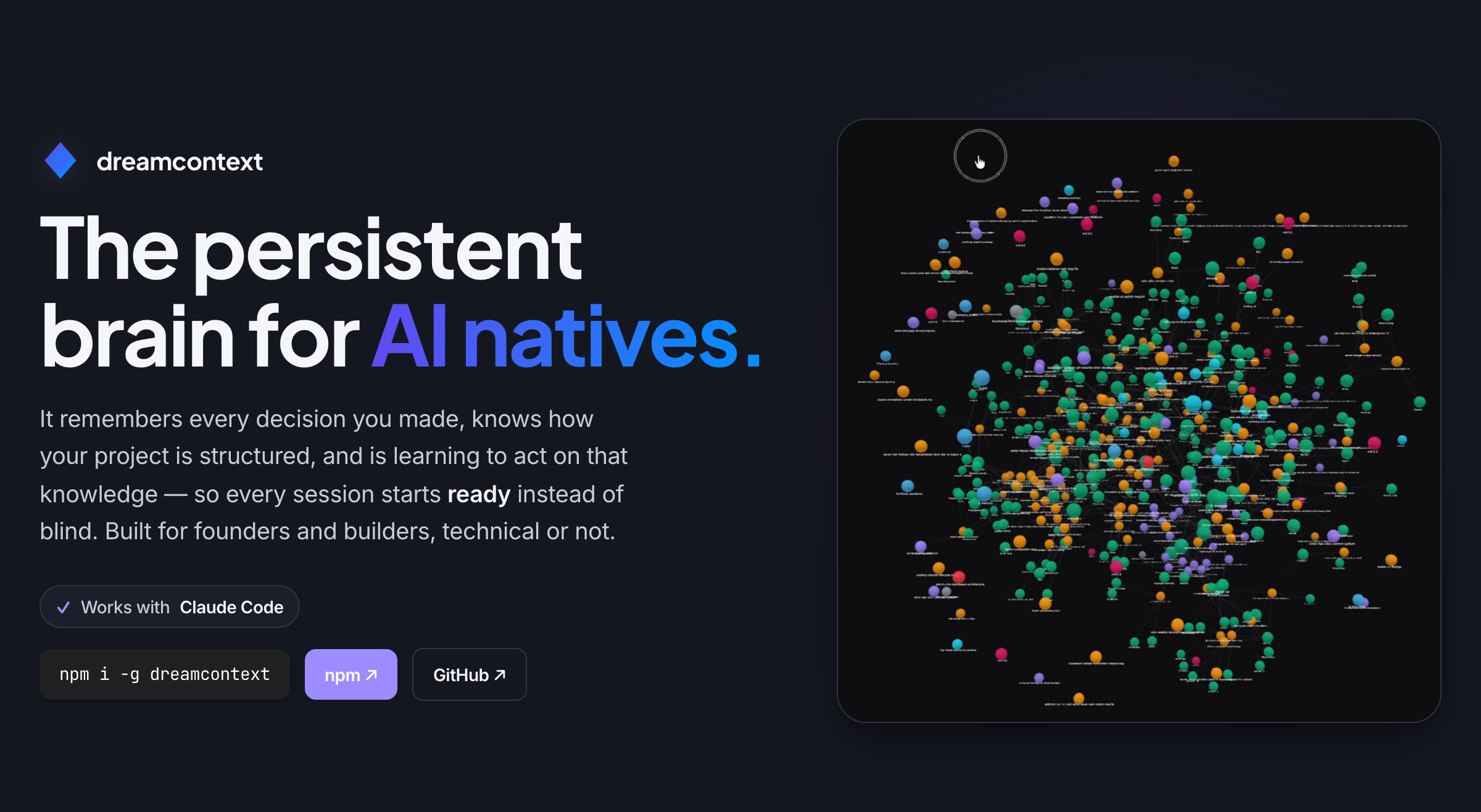
The built-in “What is this?” page, served live by dreamcontext dashboard.
Under active development. APIs and commands may change before v1.0.
Sleepy — search & ask your brain
Sleepy is the front door to your project's brain — the first thing you see in the dashboard. It turns the structured context dreamcontext maintains into something you can interrogate directly:
- Search — type a query and get instantly-ranked hits across your knowledge, features, tasks, core and memory. Each hit shows the most relevant chunk and jumps straight to the source.
- Ask — pose a question in plain language and Sleepy answers from your own brain, with the source documents cited inline.
- Chat — go deeper with a real, multi-turn conversation: Sleepy runs a Claude Code session inside your vault, streamed live, so it can read across the whole project to answer follow-ups. It's read-only by design — planning permission mode plus disallowed action tools and a guard prompt mean it can never write, edit, or run commands — and you pick the depth: normal for fast answers, intelligent for harder questions.
Search and the extractive Ask run on the same field-weighted BM25 recall engine as dreamcontext memory recall — entirely local, instant, and zero-token; nothing is sent to an external model and the answer is grounded in your own files. Chat is the one surface that calls a model, and even then it only ever reads your project. The idle view shows your context "in orbit" — knowledge, features, tasks, core and memory circling the dream gem — so you can focus a single type or just start typing.
Why
AI coding agents are powerful, but they make real mistakes. They fetch entire collections instead of filtering at the query level. They write serverless functions with infinite loop potential. They optimize for making the test pass, not making the system correct.
A human needs to be steering. But steering only works when both you and the agent are looking at the same context: what decisions were made, what is in progress, what rules to follow.
And every session starts from scratch. Your agent greps for a decision it already made yesterday. Reads a few files. Searches again. Pieces together context it already had. By the time it says "Ok, I understand the codebase," you haven't started working yet. This happens every session, and it gets worse as your project grows.
dreamcontext fixes both problems. It gives your agent structured, pre-loaded context before the first message, and gives you readable files you can open, audit, and correct. Context that both you and your agent can act on.
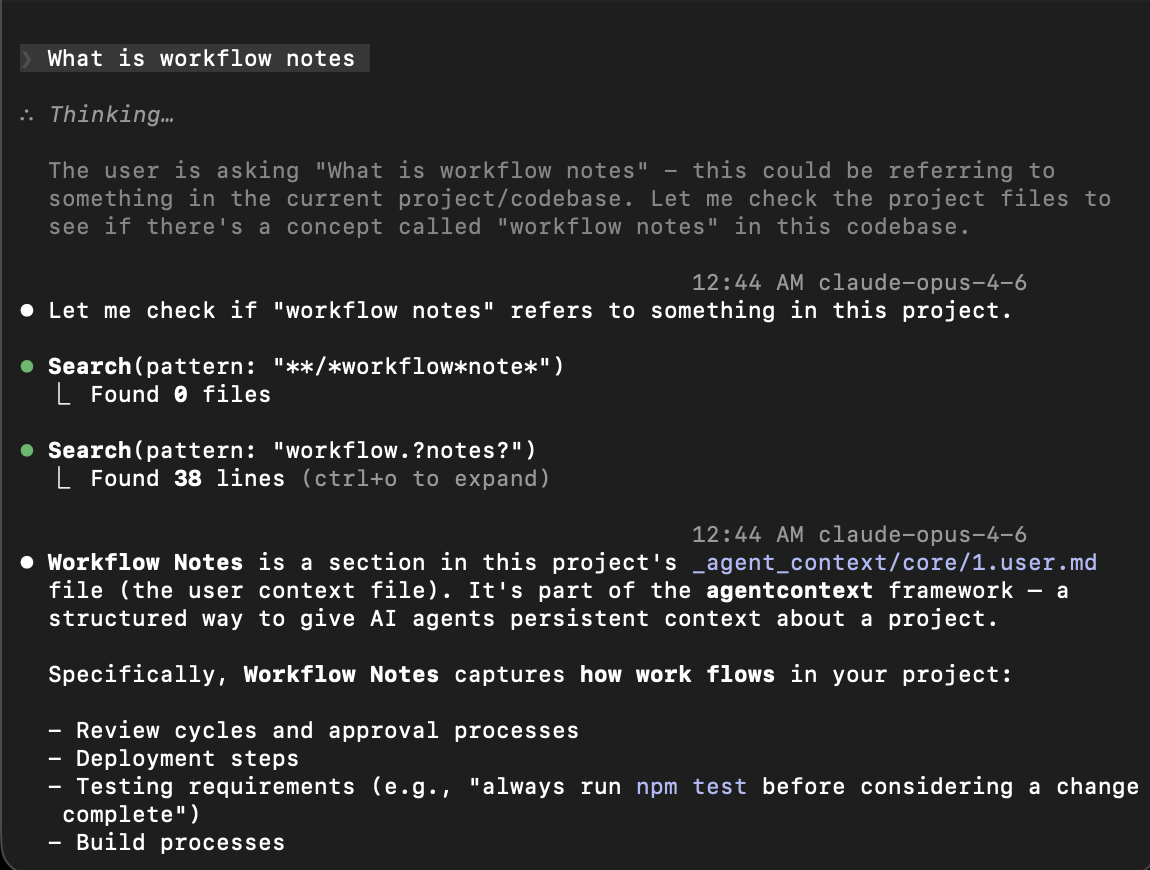 Without dreamcontext Search, read, search again. Tokens burned on re-discovery. |
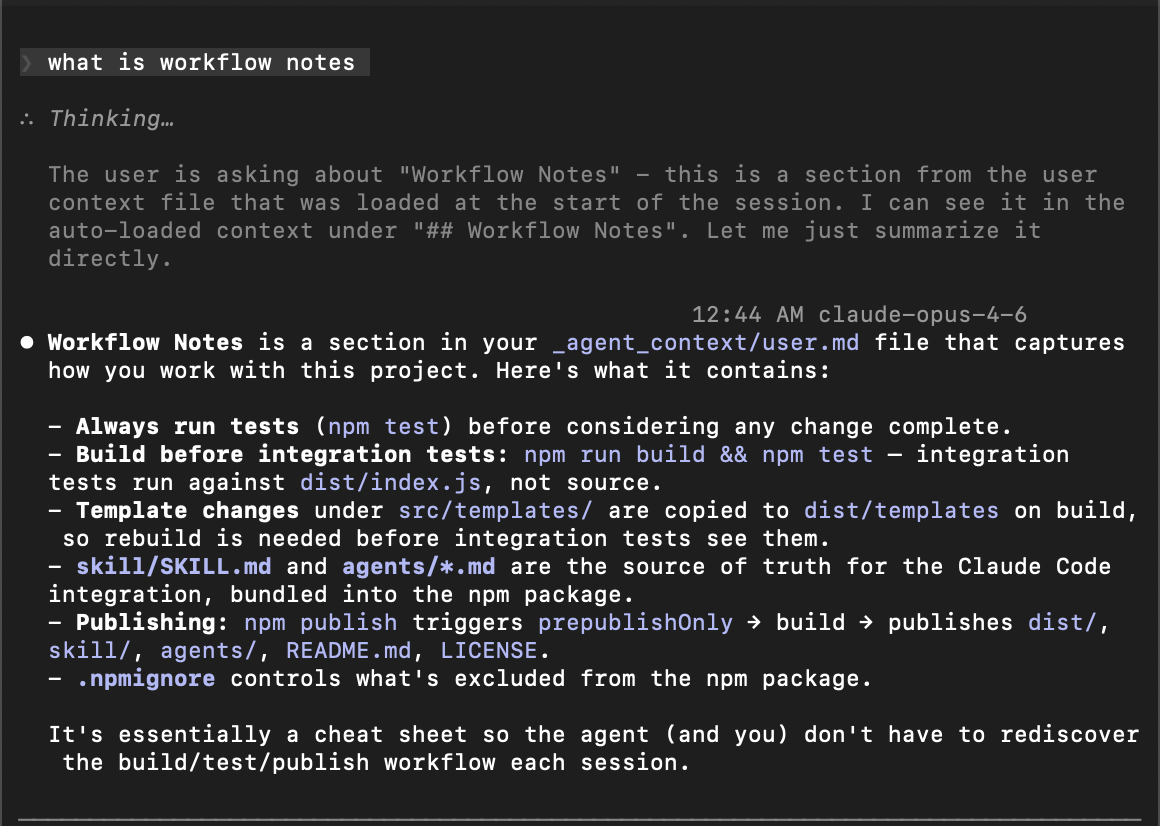 With dreamcontext Context pre-loaded via hook. Zero tool calls. Straight to work. |
Want the full story? Philosophy, architecture, and every design tradeoff explained. Read the deep dive →
How It Works
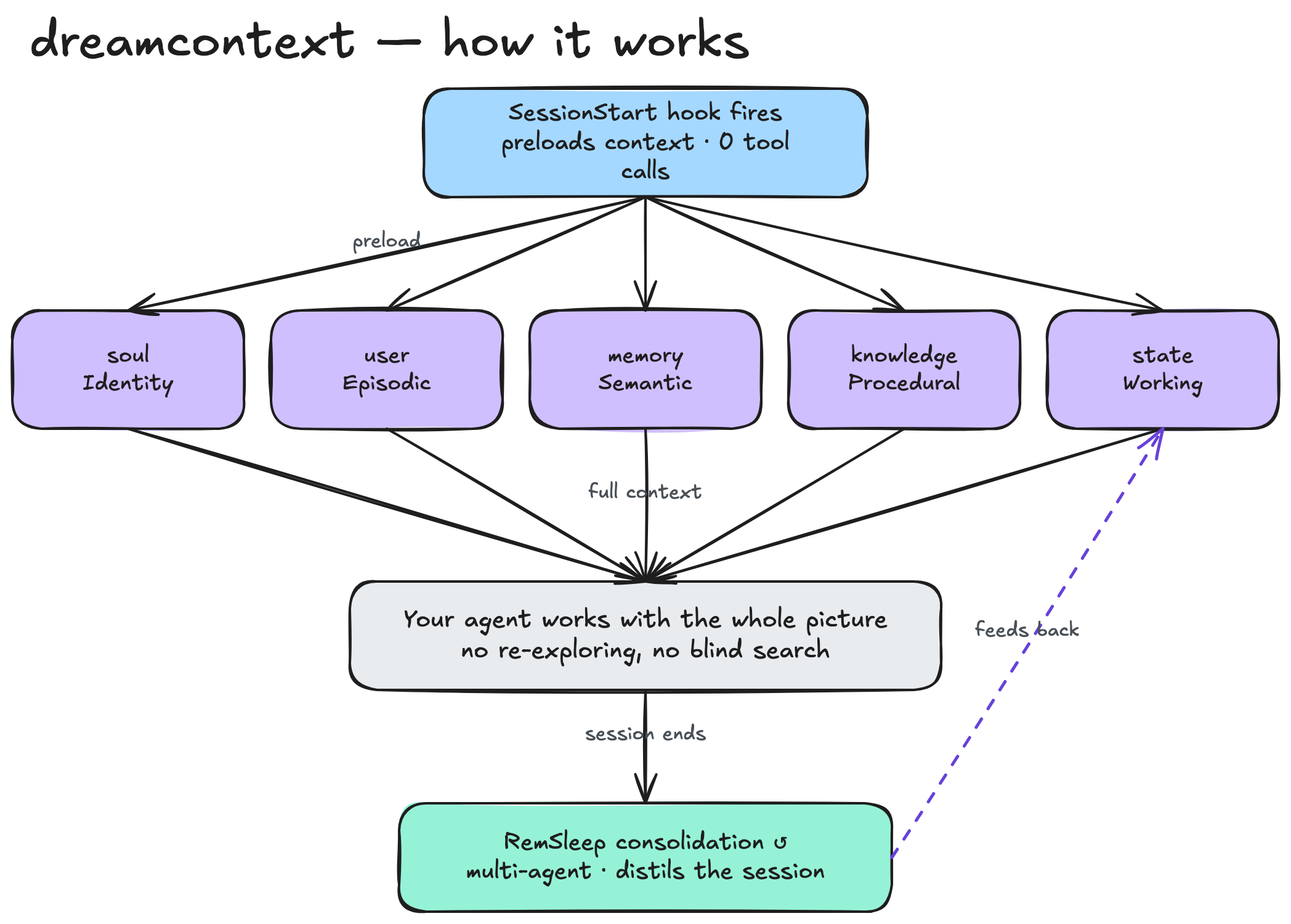
Every session, a hook pre-loads your project's whole brain — identity, decisions, active work, the knowledge index — into the agent with zero tool calls. It works with the full picture instead of re-discovering it; a multi-agent RemSleep cycle then consolidates what changed and feeds it back. (This is the same diagram the built-in “What is this?” page animates live.)
flowchart LR
    subgraph capture ["Capture"]
        STOP["Stop Hook\n(session ends)"]
        POSTTOOL["PostToolUse Hook\n(auto-format + tsc)"]
        BOOKMARK["Bookmarks\n(awake ripples)"]
        SLEEP["RemSleep cycle\n(3 specialists)"]
        HUMAN["You\n(edit files or dashboard)"]
    end

    subgraph store ["_dream_context/"]
        CORE["core/\nsoul · user · memory\nstyle · tech · features\nchangelog · releases\nsystem flow"]
        KNOWLEDGE["knowledge/\ntagged deep docs"]
        STATE["state/\ntasks · sleep debt\nbookmarks · triggers"]
    end

    subgraph inject ["Inject"]
        SESSION["SessionStart Hook"]
        PROMPT["UserPromptSubmit\n(persistent reminders)"]
        PRETOOL["PreToolUse Hook\n(context-first exploration)"]
        PRECOMPACT["PreCompact Hook\n(save state)"]
        SNAPSHOT["Compiled Snapshot\n+ warm knowledge\n+ contextual reminders"]
        AGENT["Agent starts with\nfull context loaded"]
    end

    BOOKMARK --> STATE
    STOP --> STATE
    POSTTOOL -.->|"feedback"| AGENT
    SLEEP --> CORE
    SLEEP --> KNOWLEDGE
    HUMAN --> CORE
    HUMAN --> KNOWLEDGE
    HUMAN --> STATE

    CORE --> SESSION
    KNOWLEDGE --> SESSION
    STATE --> SESSION
    STATE --> PROMPT
    SESSION --> SNAPSHOT
    PROMPT --> AGENT
    PRETOOL --> AGENT
    PRECOMPACT --> STATE
    SNAPSHOT --> AGENT
- Seven hooks capture context automatically. Stop hook records what happened. SessionStart injects everything before the first message. SubagentStart briefs sub-agents. PreToolUse blocks blind exploration when curated context exists. UserPromptSubmit reminds about sleep debt on every user message. PostToolUse auto-formats and type-checks edited files. PreCompact saves state before context compaction.
- Bookmarks tag important moments. During active work, the agent bookmarks decisions, constraints, and discoveries with salience levels. Critical bookmarks trigger immediate consolidation advisories.
- Files are structured by purpose. Identity, preferences, decisions, knowledge, and active work each live in their own file with their own format.
- Sleep cycles consolidate knowledge. A RemSleep cycle — the agent fanning out to three specialist sub-agents in parallel — reads bookmarks first, distills transcripts for high-signal content, extracts recurring patterns, promotes learnings, creates contextual triggers, cleans stale entries, and resets debt.
- Everything is local markdown and JSON. Readable, editable, git-tracked, owned by you.
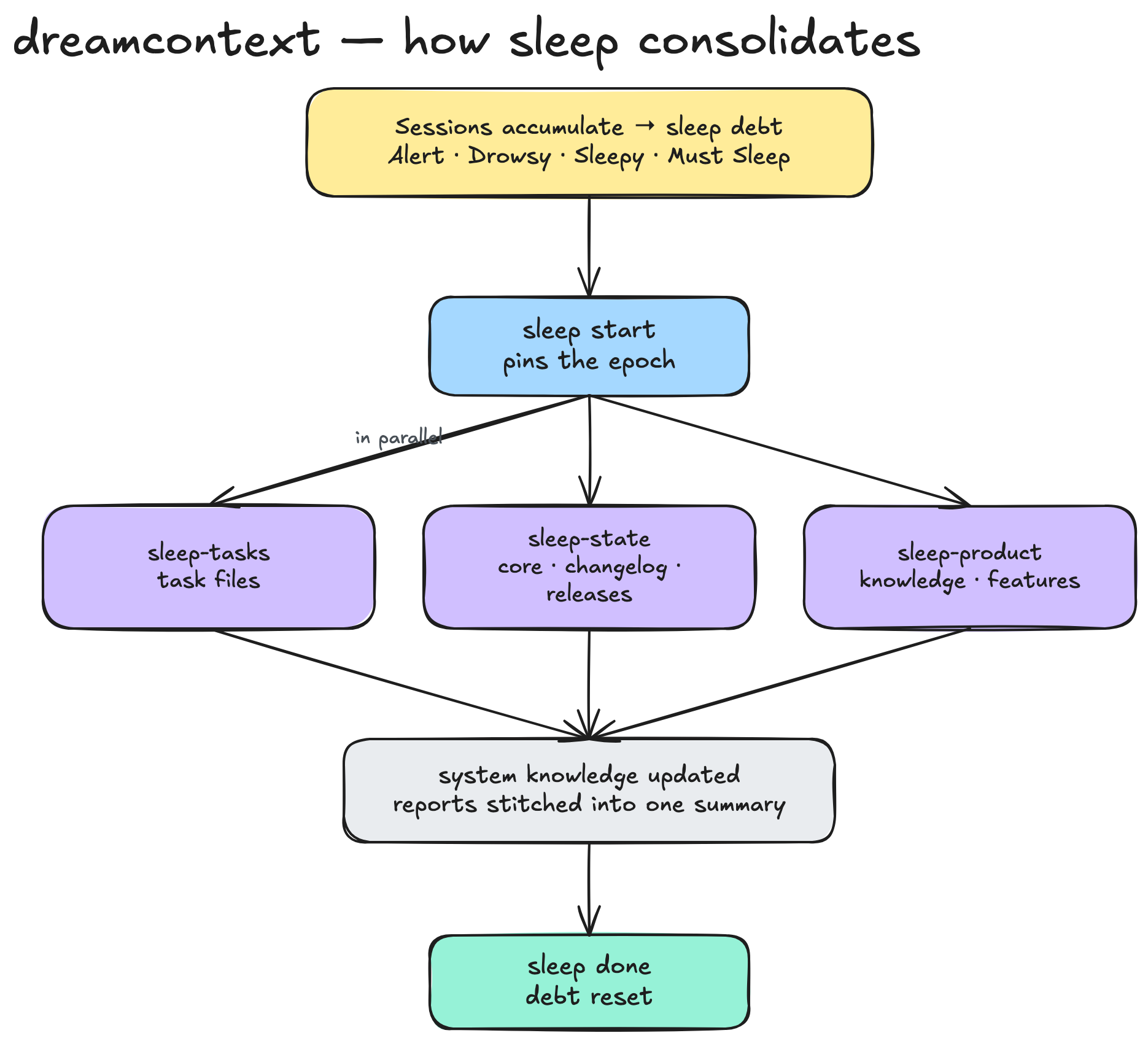
Sleep consolidation — when debt crosses a threshold, three specialists fold what changed back into the brain in parallel, then the meter resets.
Quick Start
curl -fsSL https://cdn.jsdelivr.net/npm/dreamcontext/install.sh | sh
Served from the published npm package via CDN — works with a private repo, no GitHub access needed. On macOS this also installs the optional desktop app into
~/Applications(skip withDREAMCONTEXT_INSTALL_NO_APP=1).
Manual install (npm):
npm install -g dreamcontext
Requires Node.js >= 18. Currently supports Claude Code.
# One-shot setup — scaffolds _dream_context/, installs the skill, agents,
# hooks, and root instructions, and prompts for optional skill packs.
dreamcontext setup

# Scriptable / non-interactive (explicit platforms, skip all prompts)
dreamcontext setup --platforms claude --defaults
One command. Next session, the hook fires, context loads, and the agent is ready.
Advanced: run the steps individually
setupis the front door — it runs init + install-skill + install-instructions in one step and tracks every file it writes in a manifest. The individual commands below still exist for advanced/scripted use, butsetupis what you want on a new project.
# Scaffold the context structure only (does NOT install the agent integration)
dreamcontext init

# Install platform integration (multi-select prompt; defaults to Claude)
dreamcontext install-skill
dreamcontext install-skill --platforms claude
dreamcontext init on its own leaves you without .claude/ skills, agents, and hooks — your agent won't load the context until you also run install-skill (or just use setup). When run interactively, init now offers to finish the install for you.
Interactive mode
Run dreamcontext with no arguments to enter interactive mode with a visual menu for all commands.
What gets created
your-project/
├── _dream_context/              # Structured context (git-tracked)
│   ├── core/
│   │   ├── 0.soul.md                    # Identity, principles, rules
│   │   ├── 1.user.md                    # Your preferences, project details
│   │   ├── 2.memory.md                  # Decisions & known issues
│   │   ├── 3.style_guide_and_branding.md
│   │   ├── 4.tech_stack.md              # Tech decisions
│   │   ├── 6.system_flow.md             # Session lifecycle, data flows
│   │   ├── CHANGELOG.json
│   │   ├── RELEASES.json
│   │   └── features/                    # Feature PRDs
│   ├── knowledge/                       # Tagged docs (index in snapshot)
│   │   ├── data-structures/             # Schema files (SQL-fenced, highlighted)
│   │   │   └── default.md              # single-product; one per product if monorepo
│   │   └── *.md                         # pinned: true → auto-loaded in full
│   └── state/                           # Active tasks + working state
│       ├── *.md                         # Active task files
│       ├── .sleep.json                  # Sleep debt, session history
│       └── .version-check.json          # Cached update check (24h)
│
├── .claude/
│   ├── skills/dreamcontext/
│   │   ├── SKILL.md            # Teaches the agent the system
│   │   └── references/         # Deep-dive refs loaded on demand (cli, tasks, sleep, recall, integrations)
│   ├── skills/initializer/
│   │   └── SKILL.md            # Interactive brain bootstrap (drives the initializer-* agents)
│   ├── skills/curator/
│   │   └── SKILL.md            # Interactive brain refactor (drives the curator-* agents)
│   ├── skills/dreamcontext-deep-research/
│   │   └── SKILL.md            # Iterative corpus synthesis (fans out dreamcontext-explore searchers)
│   ├── agents/
│   │   ├── initializer-scout.md     # bootstrap: intake → ingestion manifest
│   │   ├── initializer-ingestor.md  # bootstrap: fan-out write into the hierarchy
│   │   ├── initializer-verifier.md  # bootstrap: PASS/FAIL gate
│   │   ├── curator-auditor.md       # refactor: one-per-domain audit → reorg plan
│   │   ├── curator-worker.md        # refactor: applies a confirmed reorg batch
│   │   ├── curator-verifier.md      # refactor: PASS/FAIL gate
│   │   ├── dreamcontext-explore.md
│   │   ├── sleep-tasks.md       # RemSleep specialists —
│   │   ├── sleep-state.md       #   the agent fans out to
│   │   ├── sleep-product.md     #   these three in parallel
│   │   ├── sleep-federation.md  # disabled (read-only federation; copy-sync parked on roadmap)
│   │   └── sleep-migration.md   # conditional: when a migration is pending
│   └── settings.json           # 7 hooks (see Commands → System)
Opening the context directory in Obsidian
dreamcontext init scaffolds an _dream_context/.obsidian/ vault config with curated graph, appearance, and app settings so you can open the directory directly in Obsidian and navigate the context as a knowledge graph. Links between files (tasks → features → knowledge → memory) render natively, and the Obsidian graph view works out of the box.
Root instruction files without full skill install
For projects that want managed root instruction files without installing the full skill + agent bundle:
dreamcontext install-instructions --platforms claude
This writes managed fenced blocks into CLAUDE.md at the project root, preserving existing non-managed content.
Skills
The core dreamcontext skill (installed by install-skill) teaches your agent the context system itself. On top of that, dreamcontext ships curated skill packs and standalone skills that give your agent domain expertise — loaded on demand, only when the work calls for it, so they cost nothing the rest of the time.
Three more skills install with the core (no pack needed) and run only when the moment calls for them — each drives its own sub-agents:
initializer— interactive brain bootstrap. It recognizes a missing or sparse_dream_context/(or that you're migrating notes from another folder, or loading a large docs export into an existing brain) and ingests whatever you have — a docs folder, an Obsidian/Notion export, ADRs, an old wiki, or just the codebase — into the proper knowledge / feature / task hierarchy (scout → confirm → ingest → verify).curator— interactive brain refactor: the periodic re-organization the conservative sleep cycle won't do. It can MOVE, MERGE, SPLIT, RENAME, RE-TYPE, and RETIRE content to conform the whole brain to current conventions — deduping near-duplicate knowledge (dreamcontext knowledge merge), enforcing single-source-of-truth, and normalizing tags (audit → confirm plan → execute → verify).dreamcontext-deep-research— the heavy, iterative counterpart to the fastdreamcontext-exploresearcher, for large / multi-project / federated brains. When one explore pass comes back thin, the main agent fans out paralleldreamcontext-exploresearchers across the whole curated corpus and connected peer vaults, loops to close gaps, adversarially verifies the load-bearing claims, and synthesizes a cited report — not raw hits (/dreamcontext-deep-research). Read-only; it researches your brain the way the generic deep-research skill researches the open web.
# Browse and install interactively (terminal checkbox UI)
dreamcontext install-skill --packs

# Install specific packs directly
dreamcontext install-skill --packs engineering design

# Install one orchestration pack (council, multi-review, goal-skill)
dreamcontext install-skill --packs goal-skill

# Install a single sub-skill or standalone skill
dreamcontext install-skill --skill firebase-firestore
dreamcontext install-skill --skill system-prompts

# See everything available
dreamcontext install-skill --list
Skill packs (a base skill + on-demand sub-skills or sub-agents):
| Pack | What it covers | Inside |
|---|---|---|
| engineering (always-on) | Coding standards, security, testing, architecture | backend-principles, web-app-frontend, firebase-cloud-functions, firebase-firestore |
| design (always-on) | Design systems, typography, color, accessibility | frontend-principles, design-web, design-mobile, onboarding-design |
| growth | Retention, distribution, monetization, analytics | performance-marketing, lean-analytics-experiments, lean-analytics-metrics |
| brand-voice | Brand enforcement, discovery, guideline generation | discover-brand, guideline-generation |
| council | Multi-persona debate for hard decisions | council-persona, council-synthesizer agents |
| multi-review | Multi-agent code review (router + niche specialists) | review-router + security / cloud-functions / frontend / edge-cases agents |
| goal-skill | Sub-agent-orchestrated execution: plan → review → implement → validate | goal-planner, goal-plan-reviewer, goal-implementer, goal-validator agents |
Standalone skills (install individually with --skill <name>):
| Skill | What it covers |
|---|---|
| business-idea-discovery | Market selection, trend validation, competitor intel, pain-point mining, MVP scoping |
| business-idea-validation | Demand testing via landing page + waitlist, quick validation loops |
| meta-marketing | Meta / Facebook / Instagram ad campaigns end to end |
| system-prompts | Prompt engineering, cognitive architecture, agent design |
| excalidraw | Lay out images, labels, shapes, arrows, frames, and lanes on an Obsidian Excalidraw board from a small JSON spec — renders deterministically at near-zero token cost |
| video-watching | Turn a video into a time-mapped transcript with on-screen visuals described inline (whisper.cpp + ffmpeg), then reason about it |
Always-on packs apply their base principles to every relevant task; the rest load only when the work matches. Packs install to .claude/skills/{pack}/ (+ agents in .claude/agents/). Cross-pack dependencies are warned at install time.
Staying Up to Date
dreamcontext tells you when a new version ships, and updating is one command. There are two distinct things to update: the CLI (the dreamcontext binary) and your project's installed files (the skill, agents, and hooks copied into .claude/ or .agents/).
dreamcontext upgrade            # Upgrade the CLI to the latest published version
dreamcontext upgrade --check    # Just print "current: X  latest: Y" and exit
dreamcontext update             # Refresh this project's skill/agent/hook files to match the CLI
Or re-run the one-command installer — it detects an existing _dream_context/ and updates in place:
curl -fsSL https://cdn.jsdelivr.net/npm/dreamcontext/install.sh | sh
In-session update nudge. When a newer version is published, your agent sees a single-line nudge at the top of its loaded context — so you find out while you're working, not months later. The version check is deliberately unobtrusive: it runs at most once every 24 hours, never during the context-loading hot path (so session start is never slowed or blocked), and fails silent if npm is unreachable. Opt out entirely with DREAMCONTEXT_VERSION_CHECK=0.
Dashboard
dreamcontext dashboard                   # Open at localhost:4173
dreamcontext dashboard --port 8080       # Custom port
dreamcontext dashboard --no-open         # Start without opening browser
A local web UI for managing agent context visually. Built with React 19, served by a zero-dependency Node HTTP server. Ships in the npm package.
It also ships a built-in “What is this?” explainer page — a full landing experience with a spotlight that reveals each faculty's live diagram, and a layered map of how the brain is organized:
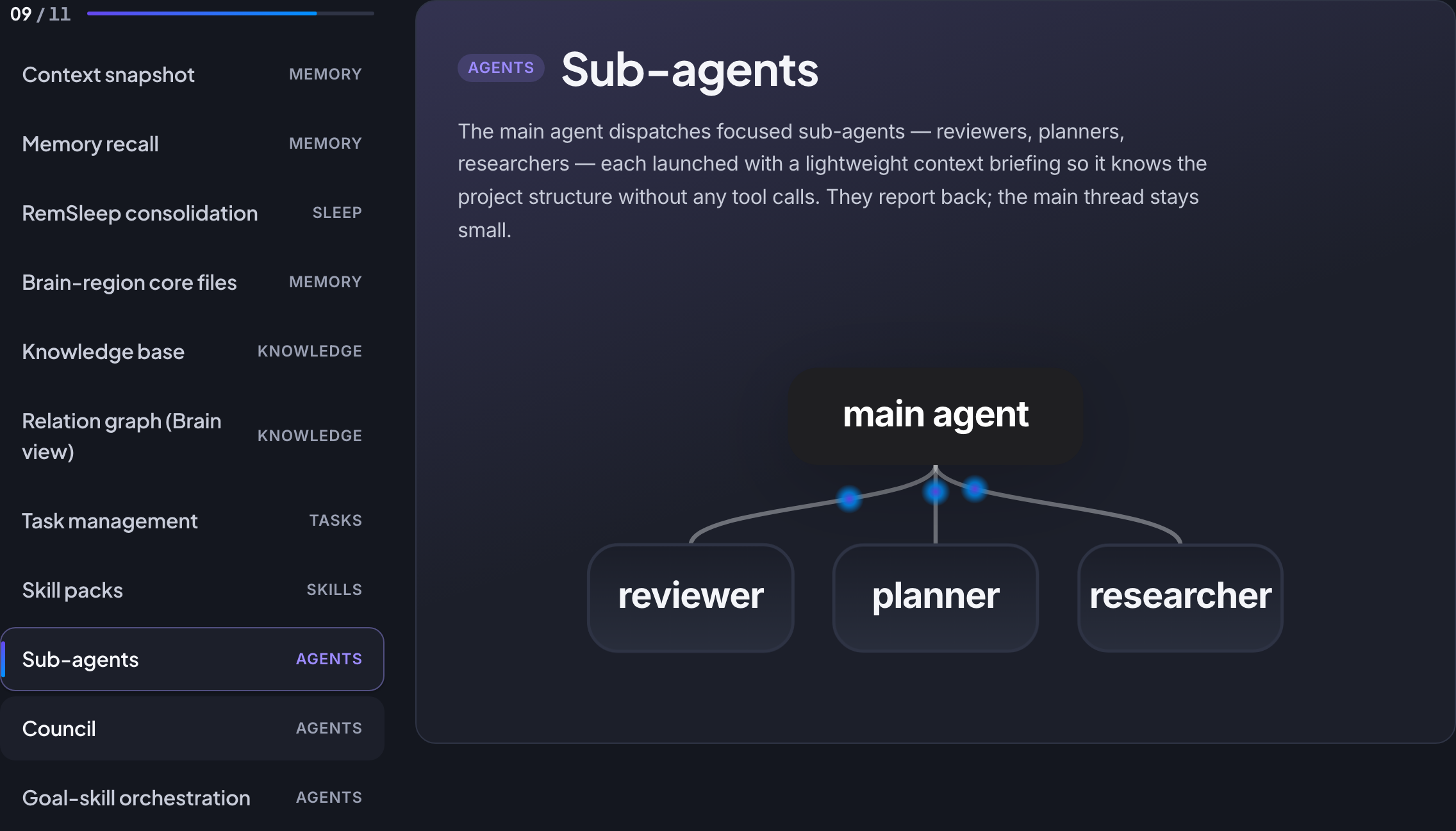
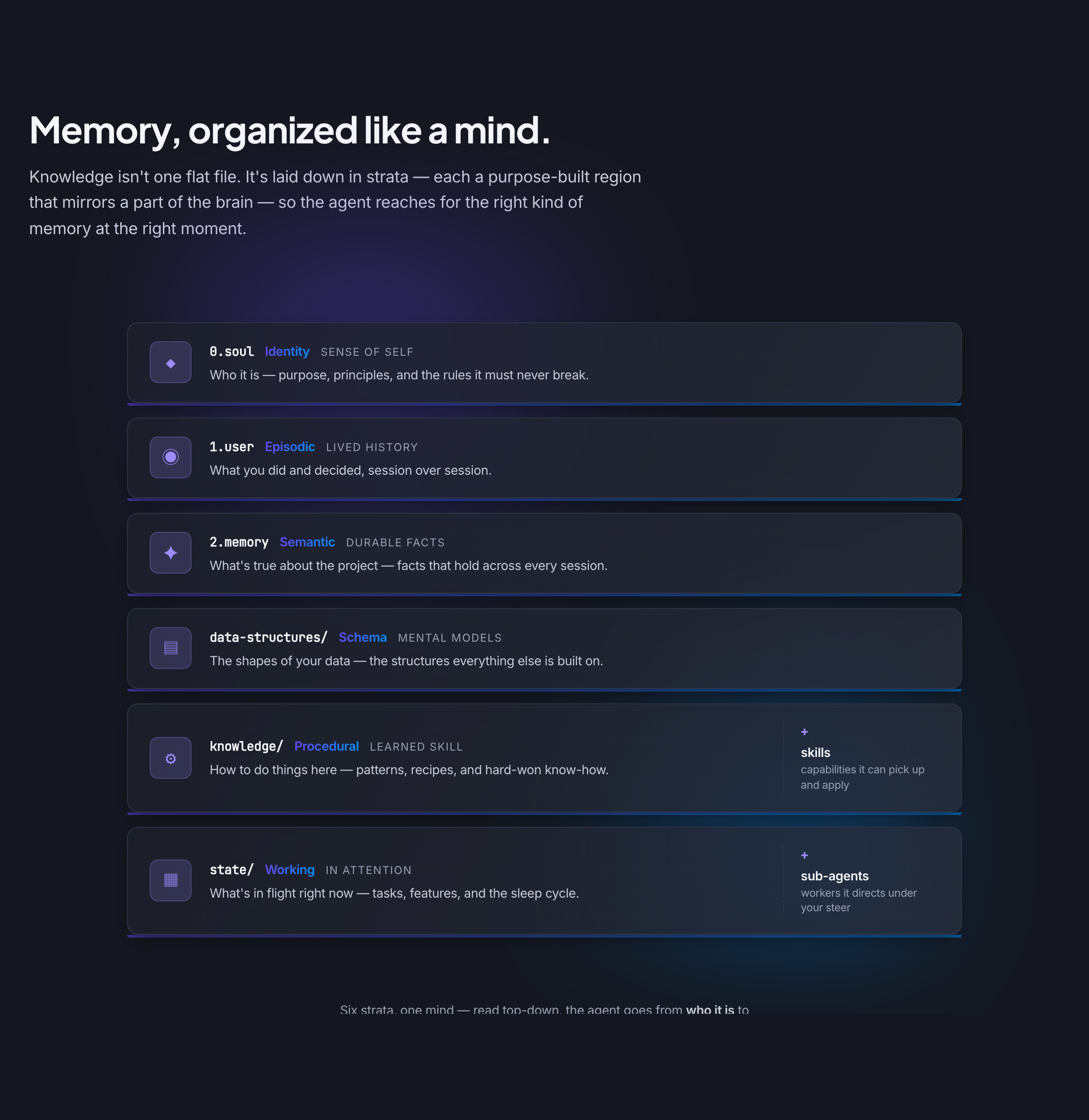
|
Tasks board — a drag-and-drop Kanban with saved views (each carrying its own persisted filter, sort, and grouping), a two-pane include/exclude filter menu (status, priority, tags, version, assignee) with type-ahead search, a Versions popover (with Current / Backlog / Completed smart buckets) to scope to one or more planning versions, toggleable card Properties badges (due date, RICE score, and a per-person-hued multi-assignee AvatarStack), and an At-Risk alert surfacing past-due or blocked tasks. View preferences persist two ways — shared and team-versioned in |
Core editor with split-pane markdown editing and live preview. Knowledge manager with search and pin/unpin. Feature PRD viewer. SQL ER diagram preview. Version manager for planning, releasing, renaming, and deleting versions — a rename re-points every task on that version and moves the active-sprint pointer; a delete warns and clears references first. Settings for cloud-task config — enter the ClickUp/GitHub token (stored gitignored, masked, never echoed), preview-then-provision custom fields, and edit the project's task-format override and custom-field schema. |
|
Sleep tracker showing debt gauge, session history timeline, and a list of every manual change made through the dashboard. |
Change tracking records every dashboard action to |
|
Brain graph visualizes your knowledge as an interactive network. Nodes are memory, knowledge, features, and decisions; edges are explicit and inferred links. Node drawer for full content, settings panel for layout and filters. |
Council Hall shows every multi-persona debate as a searchable card grid. Open a debate into a full-page detail view with three tabs: Overview (problem + synthesized final report + citation chips), Agents (per-persona transcripts with search), Matrix (persona × round grid with inline cell expansion). |
The sidebar groups every page into four job-based sections — Workspace, Memory, Brain, and Control Panel — under a single dream-gem brand lockup. Light and dark mode with system preference detection. Brand palette: violet, anchored by the folded-diamond dream-gem logo and a two-tone wordmark. Visby CF font with system font fallback.
Desktop App
macOS beta. A native Tauri 2 app that wraps the same dashboard server, so you manage every project from one window instead of a localhost tab per repo. Ships via the desktop release (and the macOS one-line installer), not the npm package.
dreamcontext app install      # Install to ~/Applications (no admin, no quarantine prompt)
dreamcontext app update       # Update the installed app to the latest release
dreamcontext app status       # Show installed app version and state
- Multi-vault launcher. The app lists every registered vault and opens each project in its own window — multi-vault is multi-window over one shared Node server, with each window pinned to its vault via a request header. A per-project status dot (green up-to-date / yellow needs-update / red folder-gone) lets you run
updatefrom the UI. - Federation network view. The launcher also renders your projects as an interactive board (Excalidraw-style cards) where you wire a reads relationship by clicking source → target: a violet wire means one project reads another's canonical memory live during recall (a reference, never a copy), gated by the target being Readable. A node panel and an always-on "Connections" list spell out in plain language who reads whom, each removable with one click. (Copy-based "sync" is parked on the roadmap — federation only reads, live.)
- In-app onboarding, no terminal. A quiz-style wizard creates a brand-new project (native folder picker), initializes an existing folder, or clones one from GitHub (sign in, search your repos, and clone into a local folder as a cancelable background job with live git progress) — then scaffolds
_dream_context/, runssetup, and best-effort installs the global CLI. It's deterministic and LLM-free; the success screen hands you a prompt to paste into Claude Code for the rich enrichment pass. - In-app Agent terminal & command palette (beta). Drive a real Claude Code session inside any vault from a split-pane, multi-session terminal surface — per-pane tab bars, ⌘D drag-to-split, ⌘T/⌘W, and a minimize-to-corner dock; sessions live in a detached DOM so the PTY never remounts. Drop an image to inject it straight into the vault, and jump anywhere with a ⌘K command palette (live BM25 recall + intelligent toggle). A first-run prerequisite installer reports and one-click-installs the Claude CLI / node-pty.
- Sleepy — notch quick-capture (beta). Off by default — enable it in dashboard Settings → Sleepy. A global-hotkey companion that drops a transparent notch panel over whatever you're doing, with an animated mascot whose mood follows your sleep debt. Pick a vault, type a thought, and choose a mode:
- Learn — saves the note to project memory, then enriches it.
- Ask — one-shot Q&A about the project; nothing is saved.
- Sleep — triggers a full consolidation cycle for that vault from the notch.
- Continuous updates without Apple notarization. The whole delivery path is CLI/curl-driven, so Gatekeeper's notarization check never fires (ad-hoc signing satisfies Apple Silicon). The app prefers your globally-installed, auto-upgrading CLI over its bundled copy, so ~95% of changes ride the normal CLI upgrade with no app rebuild. Downloaded artifacts require a matching
.sha256or the install refuses.
The desktop app is a working local beta — not yet Apple-signed/notarized, so first launch may need a right-click → Open. Windows/Linux are nice-to-have for later.
Council
Multi-persona debates for hard decisions. When a question is too load-bearing for a single model pass — architecture calls, hiring reviews, risk-heavy migrations, brand critiques — a council lets you convene N personas, run them through N rounds of structured deliberation, and synthesize a verdict that cites the contributing voices.
Each persona gets its own sub-agent with a scoped prompt, model choice, and aspects it advocates for. Between rounds, personas see a cross-context panel summarizing what everyone else said, so responses sharpen rather than repeat. A synthesizer produces the final report.
# Start a debate
dreamcontext council create "Should we migrate from Postgres to Firestore?" \
  --rounds 2

# Add personas (each gets a sub-agent and persona file)
dreamcontext council agent create migration-risk-auditor --model sonnet \
  --aspects operational-risk,rollback-readiness,team-readiness
dreamcontext council agent create dx-champion --model opus \
  --aspects developer-experience,feature-velocity
dreamcontext council agent create user-advocate --model haiku \
  --aspects end-user-impact,reliability-perception

# Drive rounds (the CLI orchestrates sub-agent dispatch; reports append as they return)
dreamcontext council round start 1
dreamcontext council round end 1              # Injects cross-context for R2+
dreamcontext council round start 2
dreamcontext council round end 2

# Synthesize the final report
dreamcontext council synthesize
dreamcontext council complete

# Optionally promote the verdict into knowledge
dreamcontext council promote --to knowledge/migration-decision
Each debate stores its state in _dream_context/council/<id>/ with debate.md, round-log.md, final-report.md, and per-persona folders containing context-and-persona.md, report.md, and researches/. The dashboard's Council Hall page renders this data as a searchable grid and full-page detail view.
Ships with two sub-agents (council-persona, council-synthesizer) and a dedicated skill pack at skill-packs/council/.
Memory Recall
Recall and remember across your project's curated context. BM25 ranking over knowledge files, feature PRDs, task files, 2.memory.md sections, and CHANGELOG.json entries — deterministic, instant, no setup.
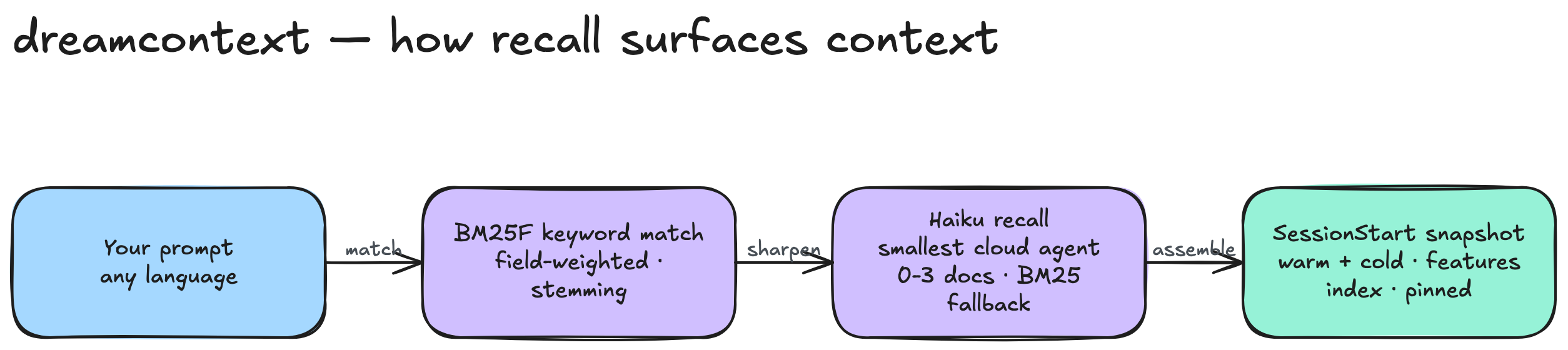
# Ask a question, get top-5 hits with snippets
dreamcontext memory recall "how did we decide on the sleep fan-out"

# Filter by corpus type (knowledge | feature | task | memory | changelog)
dreamcontext memory recall "auth flow" --types knowledge,feature
dreamcontext memory recall "deprecated" --types changelog

# Machine-readable output for scripts
dreamcontext memory recall "rice prioritization" --json --top 3

# Quick-capture a decision or note — writes a CHANGELOG entry (type=note, scope=quick)
dreamcontext memory remember "Chose BM25 over mem0 after 3-reviewer review"

# Inspect the corpus
dreamcontext memory status
Why not a vector DB or mem0. dreamcontext content is already curated atomic facts — knowledge docs, feature PRDs, closed tasks, memory entries, CHANGELOG entries. The LLM-extraction step a mem0-style stack provides solves a problem this system already solved. BM25 over the live corpus gives ~80% of the value at 1% of the complexity: no Python, no Ollama, no API keys, no daemon, version-controllable. Cold start is under 100ms on a 40-doc corpus; the index is rebuilt in memory on every call.
Hybrid recall (experimental, opt-in). For the remaining ~20% — paraphrased questions and cross-lingual queries (e.g. a Turkish question whose answer lives in an English doc) — an optional local embedding layer can be fused on top of BM25. Fully offline after a one-time model download (multilingual-e5-small, ~113 MB, no API keys, vectors never leave your machine), incremental content-hash cache under _dream_context/.embeddings/ (gitignored), and confidence-gated fusion so exact-term queries stay byte-identical to BM25. On the benchmark it lifted Turkish recall@1 2× and English paraphrase recall@1 by +17 pts with zero regressed categories. Off by default — BM25 behavior is unchanged unless you enable it:
dreamcontext recall hybrid       # switch recall mode to BM25 + dense fusion
dreamcontext embed refresh       # prewarm / refresh the embedding index (first run indexes the corpus)
dreamcontext embed status        # cache size, model, vector count
Freshness is automatic: recall refreshes changed chunks lazily per query, and sleep done runs an eager full re-check. If the model isn't installed, hybrid mode silently falls back to plain BM25.
Hook injection is ON by default: top hits are auto-surfaced to the agent on every non-trivial user prompt via the UserPromptSubmit hook. Opt out with DREAMCONTEXT_MEMORY_HOOK=0 if you want raw prompts without context augmentation.
Recent CHANGELOG in the snapshot is tiered: top 3 entries detailed (summary + ~300 char body), next 10 titles-only under an "Older" subheading. Everything older still lives in CHANGELOG.json and is reachable through memory recall --types changelog.
Lab (Insights)
The numbers that tell you whether the project is working — weekly active users, conversion, revenue, error rate — live in external systems: a product-analytics API, Stripe, a database, a Google Sheet. Getting them into your brain used to mean pasting a figure into a task note, where it went stale the moment you typed it. Lab closes that loop. You (or an agent) define a named insight — a curated metric, never a raw data dump — backed by any HTTP JSON API or a local script, and dreamcontext fetches it, rolls it up, caches the result in the brain, and surfaces it to every session.
An insight declares what to fetch (a generic HTTP adapter or a custom script), how to render it (number / line / pie / raw), a refresh TTL, and optional tweaks such as a time range. One command refreshes the cached snapshots:
dreamcontext lab create weekly-active-users --title "Weekly Active Users" \
  --render line --adapter http --group growth
dreamcontext lab credentials set analytics_token        # gitignored, 0600, never printed
dreamcontext lab sync --all                              # refresh every insight (skips fresh unless --force)
dreamcontext lab show weekly-active-users --json         # cached series only — never re-fetches
- Insights, not raw dumps. A hard cap of 62 points per series is structural — a year of daily data rolls up to monthly buckets, a month may stay daily. Lab delivers curated metrics to agents and dashboards; it is not a BI tool.
- Every session sees the latest value. Cached snapshots live in the brain, so an insight's latest value and staleness ride the SessionStart snapshot and are recallable by meaning —
dreamcontext memory recall "weekly active users" --types insight— without knowing the slug. - Measured roadmap progress. Bind an insight to a roadmap objective's Key Result —
dreamcontext lab bind <insight> <objective>, or search-and-connect it right in the dashboard's objective dialogs — andlab syncwritesmetric.currentfor you, so the forecast cascade reflects measured progress instead of PO-asserted numbers. Connecting seeds the current value from the cached snapshot immediately, and an objective has exactly one feeder: binding a new insight unbinds the previous one, loudly. - Credentials are gitignore-first. API keys and tokens are written only through
lab credentials set, stored gitignored at mode0600, and structurally redacted — never logged, never returned by a route, and never printed bycredentials list(names only). - Custom scripts run locally, with a tripwire. A
.mjsscript insight executes on your machine with your credentials — the same trust level as the repo itself — so if the script changes, Lab prints a loud change notice before it runs again. - No silent half-sync. When a fetch fails the prior cached series is kept intact, the error is surfaced loudly, and the sync exits non-zero. Sleep does not run lab sync (credential exposure, latency, non-determinism) — a bound insight feeds a Key Result through its own
lab syncinstead.
The dashboard turns this into a Lab page: insights grouped by category, a number / line / pie / raw render per insight (hand-rolled SVG, no chart library), per-insight and sync-all refresh with live success/error feedback, and inline tweak editing to change an insight's range and watch it re-fetch and coarsen granularity. An insight bound to an objective shows a "feeds <objective>" provenance chip.
Federation
Most people end up with more than one dreamcontext project. Federation lets those projects discover each other and recall across each other live — each vault stays the single source of truth for its own knowledge, and sees its peers' canonical knowledge by reference at query time. All opt-in, all local, no server in the middle, and nothing is ever copied between vaults.
It starts with a global vault registry — every project you register is a vault the CLI (and the desktop app) can address by name.
dreamcontext vaults add <name> <path>     # Register a project directory as a vault
dreamcontext vaults discover [root]        # Find every _dream_context/ project under a tree
dreamcontext vaults discover ~/projects --register  # …and register the new ones (idempotent)
dreamcontext vaults list                   # List all registered vaults
dreamcontext vaults remove <name>          # Unregister a vault
Cross-vault recall. Point a recall at other vaults and it spans them, returning hits tagged with their source vault. Only vaults you've marked shareable are reachable.
dreamcontext config shareable on                      # Allow this vault to be recalled by peers
dreamcontext memory recall "<query>" --vault other-project   # Also search a named vault (repeatable)
dreamcontext memory recall "<query>" --connected             # Span this vault + its out/both connections
dreamcontext memory recall "<query>" --all-vaults            # Span this vault + every shareable vault
Connections = a live read edge. Connect to a peer and your recall (and the per-prompt recall hook) surfaces that peer's canonical docs live — a reference, never a copy. A decision made in one repo shows up in a sibling repo's recall as it is in the source, always current, with no stale duplicate left behind.
dreamcontext connect <vault> --direction out --topics api,auth   # Connect to read a peer (out = read)
dreamcontext connections                  # Inspect this vault's federation connections
dreamcontext disconnect <vault>           # Remove a connection
dreamcontext federation peers             # Compact summary of readable peers (ambient awareness)
dreamcontext federation status            # Connections + any leftover federated copies
dreamcontext federation purge --all       # Remove leftover federated:true copies from the old sync path
A peer is readable when your connection to it is out/both, it isn't stale, and it has opted in with config shareable on. Reads happen live at recall time; the transitive-leak guard keeps a third vault from seeing what merely passed through this one.
Note — copy-based sync is parked on the roadmap. Earlier builds pushed a lossy, truncated digest into peers at sleep (
federation sync) and ingested it asfederated: truecopies (federation drain). That broke single-source-of-truth: copies went stale the moment the source changed and re-edits bred duplicates. Those verbs are now inert no-ops and thesleep-federationspecialist is no longer dispatched. If a vault still holds old copies, clear them withfederation purge. A redesigned opt-in offline-mirror mode may return later — its one genuine advantage is surviving a peer going offline, which live read can't.
Brain Cloud Sync
Federation lets separate projects read each other. Brain Cloud Sync is the other half of team collaboration: it lets a whole team work on the same brain. When you turn it on, dreamcontext syncs the whole project — your code, .claude/, and the brain nested under _dream_context/ — to the project's own GitHub repo, so tasks, knowledge, and features are pushed, pulled, merged, and reviewed the way you already collaborate on code. It stays local-first the entire time: the brain is still plain markdown and JSON on disk, and git is only the sync transport, not a new database.
dreamcontext brain enable    # Turn cloud sync on — whole project → its GitHub origin (needs an origin)
dreamcontext brain status    # Mode, remote, and current sync state
dreamcontext brain sync      # Manual fetch → merge → commit → push, outside a sleep cycle
dreamcontext brain disable   # Turn it off (the brain stays committed locally, never pushed)
- Sync rides sleep. Every
dreamcontext sleep doneautomatically runs fetch → merge → commit → push against the project'sorigin, so your teammates' consolidated context reaches you and yours reaches them with no extra step. A sync failure never fails the sleep. - Deterministic files merge themselves; prose defers to an agent; code goes to you. JSON (changelog, releases, config) and task status/changelog merge automatically (task changelogs union, the furthest status wins). When two people edit the same prose section of a knowledge or feature file, the conflict is handed to a semantic merge agent — the
/dream-syncskill — which reads base/ours/theirs and writes the real merge, then hands back to commit and push. A real code conflict is left for your editor with native git markers — never mangled by a merge agent. - Two modes.
full-repo(cloud sync on) syncs the whole project to its ownoriginon the current branch;in-tree(the safe default, cloud sync off) commits the brain inside the code repo but never auto-pushes. The scrub gate applies to both. Because.claude/and_dream_context/already live in the code repo, they travel together — no separate brain repo, no symlink layer. - Nothing secret or machine-local is ever pushed. A scrub gate runs before every commit and push and blocks secrets and absolute local paths, and the project-root
.gitignoreis force-written with the machine-local brain excludes before every whole-project stage. The auth token is never written into the remote URL — git network calls useGIT_ASKPASSwith a0600temp file, so the token never lands in.git/config, the environment, or a process argument. Per-machine indexes, caches, and embeddings are gitignored and rebuilt locally, so derived state never causes merge noise. - Personal attribution, no per-person forks. Attribution rides the existing multi-people awareness (
person:<slug>tags, changelog authors) rather than per-person file forks.
From the desktop Launcher the whole flow is terminal-free: GitHub device-flow login (with a personal-access-token fallback), a Settings "Cloud sync" toggle that turns whole-project sync on/off, a team-updates badge that tells you when teammates have pushed, and a one-click "Resolve with AI" for a deferred prose merge. If the project has no origin yet, the Cloud sync panel offers Create new (a fresh private-by-default GitHub repo wired as origin) or Connect existing (an existing repo URL), then enables sync and does the first push for you — no git remote add by hand.
Linked Repos
Federation reads across brains; Brain Cloud Sync shares one brain. Linked Repos is the third piece: it lets one brain govern the bare code repos it points at — the products or services that live in their own GitHub repos, with no _dream_context/ of their own, cloned to different local paths on each teammate's machine (or not cloned at all). The brain becomes a control tower over a family of repos, decoupled from where any of them physically lives.
Linking is a pointer, not a pipe — it never clones, pushes, pulls, or commits the target repo. It records two things: a shared {name, gitRemoteUrl} in .config.json that travels with the team so everyone knows the repo exists, and a machine-local url → path mapping in ~/.dreamcontext/linked-repos.json that says where it lives on this machine and never leaves it.
dreamcontext link add app-b ../app-b     # Govern a repo — URL derived from its git origin (no clone/push happens)
dreamcontext links                       # List them: ✓ present (local path) / ✗ missing here
dreamcontext link clone app-c            # Fetch a missing one to this machine — one-way, trust-gated clone
dreamcontext link rm app-b               # Stop governing it (the machine-local path mapping is kept)
Each session's context snapshot shows a Linked repos glance — present repos hand their resolved local path to the agent so it can read and edit the governed code directly; missing ones show a one-line link clone hint. It's fully manageable from the dashboard (Settings → Cloud sync → Linked repos), with a native folder picker to bind a checkout and a trust-gated Clone for missing repos. GitHub-only for now, and the clone path is hardened so a team-writable URL can never turn into code execution.
Commands
Core
dreamcontext core changelog add           # Add changelog entry
dreamcontext core releases add            # Create release with auto-discovery
dreamcontext core releases add --yes      # Non-interactive, include all unreleased items
dreamcontext core releases add --ver v0.2.0 --summary "..." --status planning  # Planning version
dreamcontext core releases list           # List recent releases
dreamcontext core releases show <version> # Show release details
Release creation auto-discovers unreleased tasks, features, and changelog entries. Back-populates released_version on included features. Use --status planning to create a version placeholder without auto-discovery. Tasks can be assigned to planning versions, and the version manager in the dashboard provides a "Release" action to transition from planning to released.
Tasks
dreamcontext tasks list                   # List active tasks (excludes completed)
dreamcontext tasks list --all             # List all tasks
dreamcontext tasks list --status in_progress  # Filter by status
dreamcontext tasks create <name>          # Create a task
dreamcontext tasks create <name> --priority high --status in_progress --tags "api,auth" --urgency high --version v0.2.0
dreamcontext tasks create <name> --start 2026-06-25 --due 2026-07-01      # planned date range
dreamcontext tasks start <name> 2026-06-25  # set/clear the planned start (range start)
dreamcontext tasks due <name> 2026-07-01    # set/clear the due/end (range end)
dreamcontext tasks field <name> team platform  # set/clear a user-declared custom field
dreamcontext tasks log <name> <content>   # Log progress (newest first)
dreamcontext tasks insert <name> <section> <content>  # Insert into a named section
dreamcontext tasks complete <name>        # Mark completed
All flags (--description, --priority, --status, --tags, --why, --urgency, --version, --start, --due, --field key=value) are optional. Defaults to medium priority/urgency and todo status, so the command works non-interactively for agent use.
- Roadmap objectives. Link tasks to PO-authored roadmap objectives with
--objectives a,bon create ortasks objectives <name> a,b|clear, and filter withtasks list --objective <slug>. The field is many-to-many and local-only (never synced to a remote backend). See the Roadmap section below. - Date ranges. A task has an optional planned
startand adue/end — set or clear either end independently (tasks start/tasks dueaccept aclearsentinel). Start must be on or before due; an inverted range is rejected. Setting any date removes thebacklogtag, and the first move toin_progressauto-stampsstart_datewith today if it is still unset (a planned start is never overwritten). Both dates render in the dashboard Timeline (Gantt) and Calendar views, and sync to ClickUp (native start/due fields) and GitHub (a<!-- dc:dates -->issue-body block). - User-declared custom fields. Drop an optional
_dream_context/overrides/task.mdto declare your own task fields (text/number/select/date) and override the scaffolded task template. Set values with--field key=valueon create ortasks field <name> <key> [value|clear]; values are validated against the schema and sync to both backends —selectas a ClickUp drop-down / GitHubkey:valuelabel, the rest as a ClickUp custom field / GitHub<!-- dc:fields -->body block.tasks provisioncreates any missing remote fields and reuses ones that already exist by name. Absent the override file, tasks behave exactly as the defaults (zero regression). Full schema → skill reference.
Roadmap (objectives — the OKR board)
A product-owner-authored board of objectives (outcomes like "increase retention 20%" or "ship v0.2.3") — not a derived shadow of tasks, not a list of releases. Objectives live one file each in core/objectives/<slug>.md; tasks link to them many-to-many via objectives: frontmatter; the computed assist layer does the math: progress rollups, a full-DAG dependency forecast cascade (a slip upstream moves every transitive dependent), and target vs forecast slip detection. Active objectives are injected into every session snapshot and are recallable (memory recall --types objective), so agents always know what the project is driving toward.
dreamcontext roadmap                                  # text board + regenerate knowledge/roadmap/board.md
dreamcontext roadmap --json                           # the typed RoadmapModel (queryable, no writes)
dreamcontext roadmap objective create increase-retention-20 --title "Increase retention by 20%" --target 2026-09-30
dreamcontext roadmap objective depend launch-mobile increase-retention-20   # write-time circular-dep guard
dreamcontext roadmap objective show increase-retention-20                   # members + "if this slips, so do: …"
dreamcontext tasks create "Retention email drip" --objectives increase-retention-20
- 🟢 done · 🔵 active · 🟡 review · ⚪ not started — rolled up from the real member-task statuses; a manual
--statusoverride (the PO's call) wins. - 🔴 SLIPPING = computed forecast lands after the PO's target date — surfaced on the board, in
objective show, and in the session snapshot before the deadline. - An objective with no dated member tasks is unforecastable (null) and never constrains its dependents; circular dependencies are rejected at write time.
- During sleep consolidation, agents propose
objectives:links for unlabeled tasks (never overwriting a non-empty list) and the board is regenerated automatically.
The dashboard turns this board into a live, editable Roadmap page. A forecast timeline lays objectives on a month-gridded axis — gradient status bars span each computed forecast window, dotted diamonds mark the PO's target, and red hatching flags a target overshoot; bezier connectors trace dependencies and redden when a slip cascades through them. Drag a bar to reschedule and every dependent's forecast bar slides and reddens live (only the dragged objective's dates persist); drag from a node to link a dependency, hover-✕ to unlink. A Board view groups objectives into status columns, and a slide-over detail panel edits everything inline — title, status (with clear-override), committed start/target via a date-range picker, Impact × Effort, and dependencies — persisting each change immediately. Backed by GET /api/roadmap, PATCH /api/objectives/:slug, and POST/DELETE /api/objectives/:slug/dependencies (cycle-guarded).
Remote Task Backends — ClickUp or GitHub Issues
Tasks default to local markdown files. Optionally they can live in a remote
backend instead — a ClickUp list or GitHub Issues — with the same CLI
verbs, the same dashboard, the same recall/snapshot behavior, backed by a
gitignored local mirror:
# ClickUp
dreamcontext config task-backend clickup            # switch backend (gitignores mirror/sync files, installs git triggers)
dreamcontext config clickup-list <teamId> <spaceId> <listId>
dreamcontext config clickup-token [--user <name>]   # stored in a gitignored secrets file (0600), never in .config.json

# GitHub Issues
dreamcontext config task-backend github             # switch backend (same gitignored mirror + git triggers)
dreamcontext config github-repo <owner> <repo>      # target repo (the switch flow also auto-discovers repos your token can see)
echo "$GITHUB_TOKEN" | dreamcontext config github-token   # stored in the gitignored secrets file (0600), never in .config.json

# Either backend — same verbs:
dreamcontext tasks sync [push|pull|both]            # manual two-way sync
dreamcontext tasks sync-hooks install               # best-effort post-commit/pre-push triggers (can never fail git)
- Both backends talk to the provider's REST API directly (no MCP) — so sync
works headless in git hooks, post-sleep consolidation, and cron. - GitHub maps each task to an issue: the issue body holds the task and
changelog entries become comments;todo/in_progress/in_reviewridedc:*labels and priority / urgency / tags / version ride reserved-prefix
labels. Onlycompletedcloses the issue, and a delete soft-closes it asnot_planned(the REST API can't hard-delete). It reuses the same pluggable
adapter and sync engine as ClickUp (issue #11). - Local task images render on GitHub: an image embedded by a local path
(e.g. an agent-drop screenshot) is uploaded to a dedicateddreamcontext-assetsbranch — content-sniffed by magic bytes (never a trusted
extension), size-gated, and content-addressed so re-pushes dedupe — then linked
by its hosted URL on the wire, while the local task keeps its canonical path so
the reference never churns on pull. - Sync is watermark-based on ClickUp server time: one field-level
PUT
per task under the ~100 req/min rate limit, changelog entries become
comments (union-merged), prose merges 3-way against the last synced base. - Conflicts are never silently lost: when ClickUp wins, the local copy is
preserved understate/.conflicts/and surfaced in the sync report and
dashboard. - Offline edits queue in
state/.tasks-queue.jsonand replay idempotently. - Tokens resolve env (
CLICKUP_TOKEN, or a per-persontokenEnv) → secrets
file;config showonly ever prints a masked token. - Assignees resolve to real members: each sync caches the list's members;
dreamcontext tasks membersshows them with their slugs. Tag a taskperson:<slug>(or pass--person <name>) and on a cloud backend the name is
resolved against the live roster — an exact or fuzzy match (display name /
first name, diacritic-folded) canonicalizes to the member's slug, an
ambiguous name aborts so you can be more specific, and an unmatched name is
recorded but warns it won't sync until that person is a member. Assignments
are never silently dropped or reassigned to the token owner. The fullassignees[]set round-trips bidirectionally;config clickup-memberstays
available as an explicit override. - Tags edit anywhere:
dreamcontext tasks tag <name> <tags…> [--remove]
edits tags on existing tasks; changed tags push through ClickUp's per-tag
endpoints (its PUT carries none), and assignee handovers/removals push as
add/rem deltas. - Date ranges:
tasks create --start … --due …/tasks start <name> <date|clear>
/tasks due <name> <date|clear>— planned start + due/end, validated start≤due,
synced natively to ClickUp's start/due fields and to a<!-- dc:dates -->block
in the GitHub issue body. - Custom-field bridge: the recommended RICE/meta fields (Urgency / Summary /
Reach / Impact / Confidence / Effort / Score / Feature / Version) plus any
fields you declare inoverrides/task.mdare provisioned and round-tripped
automatically —selectfields as a ClickUp drop-down / GitHub label, others as
a native ClickUp field / GitHub body block.tasks provisionreuses existing
remote fields by name instead of duplicating them. - Docs: illustrated user guide → docs/clickup.md;
technical reference → docs/remote-task-setup.md.
Lab (insights)
dreamcontext lab list [--json]                        # List insights with latest value + staleness
dreamcontext lab show <slug> [--json]                 # Show one insight's cached series (never re-fetches)
dreamcontext lab sync [slug] [--all] [--force]        # Refresh cached snapshots (skips fresh unless --force)
dreamcontext lab create <slug> --title "..." --render number|line|pie|raw --adapter http|script [--group <g>] [--ttl <min>]
dreamcontext lab tweak <slug> <key> <value>           # Adjust a declared tweak (e.g. a time range)
dreamcontext lab bind <slug> <objective> [--value latest|series:<n>] [--clear]  # Feed an objective's Key Result
dreamcontext lab credentials set <key>                # Store a source credential (hidden prompt or --value)
dreamcontext lab credentials list                     # List credential names only — values are never printed
- Insights are curated metrics, not raw data — a structural cap of 62 points per series rolls a year of daily data up to monthly buckets. Granularity derives from the resolved range: over 180 days is monthly, 45–180 days weekly, 45 or fewer daily.
- A source is either the generic HTTP adapter (any JSON API — endpoint, method, headers, and body may reference
{{tweak:…}}and{{cred:…}}placeholders, with a JSON-pathextract) or a custom.mjsscript underlab/scripts/. Ready-made PostHog / Sheets adapters are not shipped; the generic HTTP adapter and scripts cover the same ground. lab synccaches to the brain, writes a bound objective'smetric.currentwhen the insight declares a binding, keeps the prior series on failure, and exits non-zero if any insight failed. Sleep never runs lab sync.- Credentials live in a gitignored
lab/credentials.json(mode0600) written only throughlab credentials set;doctorwarns when a manifest names a credential you haven't set and fails if the file exists but isn't gitignored.
See the Lab (Insights) section above for the full workflow.
Features
dreamcontext features create <name>       # Create a feature PRD
dreamcontext features insert <name> <section> <content>
dreamcontext features doctor              # Audit PRD freshness (stale / orphaned / dangling refs)
Feature PRDs track freshness the same way knowledge does. features doctor reports which PRDs have gone stale, which have no linked task or release, and which reference things that no longer exist — so the sleep cycle (and you) can keep them in step with the code.
Knowledge
dreamcontext knowledge create <name>      # Create a knowledge doc
dreamcontext knowledge index              # List all with descriptions + tags
dreamcontext knowledge index --tag api    # Filter by tag
dreamcontext knowledge tags               # List standard tags
dreamcontext knowledge touch <slug>       # Record access (staleness tracking)

dreamcontext taxonomy vocab               # Canonical faceted tag vocabulary
dreamcontext taxonomy audit               # Surface non-canonical / orphan tags (read-only)
dreamcontext taxonomy audit --fix         # Bulk-normalize alias/normalizable tags → canonical (--dry-run to preview)
Set pinned: true in frontmatter to auto-load a knowledge file in every snapshot. Knowledge files not accessed in 30+ days are flagged as stale. Recently accessed files appear in a "warm knowledge" tier with first-paragraph previews.
Memory
dreamcontext memory recall <query...>                # BM25 search over knowledge + features + tasks + memory + changelog
dreamcontext memory recall <query...> --top 10       # Number of hits (1-50, default 5)
dreamcontext memory recall <query...> --types knowledge,task,changelog
dreamcontext memory recall <query...> --vault other    # Also search a named vault (repeatable)
dreamcontext memory recall <query...> --connected      # Span this vault + its connected peers
dreamcontext memory recall <query...> --all-vaults     # Span every shareable registered vault
dreamcontext memory recall <query...> --json         # Machine-readable
dreamcontext memory recall <query...> --plain        # No ANSI colors
dreamcontext memory remember "<text>"                # Writes a CHANGELOG entry (type=note, scope=quick by default)
dreamcontext memory remember "<text>" --type fix --scope api --summary "..." --references commit:abc,task:auth-refactor
dreamcontext memory update <slug> --description "..." --tags a,b --append "..."
dreamcontext memory update <slug> --pin              # or --unpin
dreamcontext memory delete <slug> --force
dreamcontext memory list                              # List indexed docs
dreamcontext memory list --types feature,task
dreamcontext memory status                           # Corpus stats by type
memory remember writes a CHANGELOG entry instead of appending to a LIFO section in 2.memory.md (the LIFO section was removed in 2026-05-23 — 2.memory.md now holds Decisions + Known Issues only). The new CHANGELOG schema supports optional summary (≤200 char soft cap), references[] (prefixed: commit:|file:|knowledge:|feature:|task:|url:), and supersedes (entry-id pointer).
Recall has no setup step — no init, no daemon, no API keys. The corpus is rebuilt in memory on every call (under 100ms on a 40-doc corpus). UserPromptSubmit hook injection of top hits is ON by default; set DREAMCONTEXT_MEMORY_HOOK=0 to opt out.
Bookmarks
Tag important moments during active work. Inspired by the brain's awake sharp-wave ripples that bookmark memories for consolidation during sleep.
dreamcontext bookmark add "<message>" -s 2    # Bookmark with salience (1-3)
dreamcontext bookmark list                     # Show all bookmarks
dreamcontext bookmark clear                    # Clear all bookmarks
Salience levels: 1 = notable, 2 = significant, 3 = critical. Critical bookmarks trigger immediate consolidation advisories regardless of debt level.
Triggers
Contextual reminders that fire when matching tasks are active. The brain's prospective memory: "remind me about X when working on Y."
dreamcontext trigger add "<when>" "<remind>"   # Create a trigger
dreamcontext trigger list                       # Show active triggers
dreamcontext trigger remove <id>                # Remove a trigger
Triggers match against active task names, tags, and bookmark text. Auto-expire after a configurable number of fires (default 3).
Sleep
Sleep debt is tracked automatically via hooks. The UserPromptSubmit hook reminds about debt on every user message, so the agent cannot dismiss the reminder. Consolidation rhythm advisory fires after 3+ sessions since last sleep, even at low debt.
dreamcontext sleep status                # Debt level, sessions, last sleep
dreamcontext sleep history               # Consolidation log
dreamcontext sleep add <score> <desc>    # Add debt manually
dreamcontext sleep start                 # Mark consolidation epoch
dreamcontext sleep done <summary>        # Complete consolidation, reset
dreamcontext sleep debt                  # Raw number (for scripts)
Transcript
dreamcontext transcript distill <session_id> # Structural filter of session transcript
Extracts high-signal content from raw JSONL transcripts: user messages, agent decisions, code changes, errors, bookmarks. Discards noise (Read results, Glob output, tool metadata). Pure Node.js, no AI. Used by the RemSleep specialists for selective deep analysis of important sessions.
Council
dreamcontext council create <topic> [--rounds N]     # Open a new debate
dreamcontext council list                             # List all debates
dreamcontext council show <id>                        # Show a debate's current state
dreamcontext council agent create <slug> --model <m> --aspects a,b,c
dreamcontext council round start <n>                  # Dispatch round n to all personas
dreamcontext council round end <n>                    # Close round n, inject cross-context for n+1
dreamcontext council round round-context <n>          # Preview what personas will see at round n
dreamcontext council report append <slug> <n> <path>  # Append a persona report from file
dreamcontext council report summaries <n>             # Summaries of all reports in round n
dreamcontext council research add <slug> <topic> <path>  # Persist a persona's research note
dreamcontext council research list <slug>
dreamcontext council synthesize                       # Produce the final synthesized report
dreamcontext council complete                         # Mark the debate complete
dreamcontext council promote --to <knowledge-slug>    # Promote verdict to knowledge
See the Council section above for the full workflow.
Vaults & Federation
dreamcontext vaults add <name> <path>    # Register a project as a vault
dreamcontext vaults discover [root]      # Find every _dream_context/ project under a tree
dreamcontext vaults discover [root] --register  # …and register the new ones
dreamcontext vaults list                 # List registered vaults
dreamcontext vaults remove <name>        # Unregister a vault
dreamcontext config shareable <on|off>   # Allow/deny this vault being recalled by peers
dreamcontext connect <vault> [--direction out|in|both] [--topics a,b]  # Connect to read a peer (out = read)
dreamcontext connections                 # Inspect federation connections
dreamcontext disconnect <vault>          # Remove a connection
dreamcontext federation peers            # Compact summary of readable peers
dreamcontext federation status           # Connections + any leftover federated copies
dreamcontext federation purge --all      # Remove leftover federated:true copies (old sync path)
# federation sync / drain are inert no-ops — copy-based sync is parked on the roadmap
See the Federation section above for the full workflow.
Brain (cloud sync)
dreamcontext brain enable                # Turn cloud sync on — whole project → its GitHub origin (full-repo)
dreamcontext brain status                # Show mode (full-repo | in-tree), remote, and sync state
dreamcontext brain sync                  # Manual fetch → merge → commit → push outside a sleep cycle
dreamcontext brain disable               # Turn cloud sync off (the brain stays committed locally)
full-repomode (cloud sync on) syncs the whole project to its ownoriginwith full post-sleep doneauto-sync;in-tree(the safe default, cloud sync off) commits the brain in the code repo on sleep and never auto-pushes.- Every
sleep doneruns fetch → merge → commit → push; a scrub gate blocks secrets and absolute paths before every push, and the token is supplied viaGIT_ASKPASS(never in the remote URL). Prose conflicts defer to the/dream-syncmerge agent; JSON and task status merge automatically; real code conflicts go to your editor. - Device-flow GitHub login and a Settings "Cloud sync" toggle are available from the desktop Launcher.
See the Brain Cloud Sync section above for the full workflow.
Linked Repos
dreamcontext link add <name> <path>      # Govern a bare code repo (URL from its origin, or --url); no clone/push happens
dreamcontext links                       # List governed repos: ✓ present / ✗ missing on this machine (--json)
dreamcontext link clone <name>           # Clone a missing repo here — one-way, trust-gated (--dir, --yes)
dreamcontext link rm <name>              # Drop it from the shared config (local path mapping kept; alias: unlink)
- A pointer, not a sync:
link addrecords only{name, url}(shared) + a machine-localurl → path(never synced). Only the explicitlink clonetouches the network. - The session-start snapshot surfaces present/missing and hands resolved paths to the agent; also manageable from Settings → Cloud sync → Linked repos.
See the Linked Repos section above.
Desktop App (macOS)
dreamcontext app install                 # Install the desktop app to ~/Applications
dreamcontext app update                  # Update the installed app
dreamcontext app status                  # Show installed app version and state
Dashboard
dreamcontext dashboard # Start the web dashboard
System
dreamcontext hook session-start          # SessionStart hook output
dreamcontext hook stop                   # Stop hook: capture + score
dreamcontext hook subagent-start         # SubagentStart hook output
dreamcontext hook pre-tool-use           # PreToolUse hook: block default Explorer
dreamcontext hook user-prompt-submit     # UserPromptSubmit hook: sleep debt reminder
dreamcontext hook post-tool-use          # PostToolUse hook: auto-format + tsc check
dreamcontext hook pre-compact            # PreCompact hook: save state before compaction
dreamcontext snapshot                    # Snapshot only (no hook processing)
dreamcontext snapshot --tokens           # Estimated token count
dreamcontext doctor                      # Validate structure
dreamcontext upgrade                     # Upgrade the CLI to the latest published version
dreamcontext upgrade --check             # Print current vs latest version, no install
dreamcontext update                      # Refresh installed skill/agent/hook files to match the CLI
dreamcontext install-skill               # Install core integration for selected platforms
dreamcontext install-skill --platforms claude  # Explicit platform selection
dreamcontext install-skill --packs       # Interactive skill pack browser
dreamcontext install-skill --packs engineering design  # Install specific packs
dreamcontext install-skill --skill <name>  # Install a single sub-skill
dreamcontext install-skill --list        # Show available skill packs
dreamcontext install-instructions --platforms claude  # Write managed root instruction blocks
dreamcontext install-claude-md           # Legacy alias: CLAUDE.md only
Design Principles
- Structure over volume -- organized context beats more context
- Pre-loaded, not searched -- memory injected before the first message
- Consolidation built in -- sleep cycles keep context sharp, not bloated
- Agent-native -- designed for how LLMs consume context
- Owned by you -- plain markdown and JSON in your repo
Works With
- Claude Code: full support via skill, core sub-agents (the initializer and curator skill families, explore, the iterative
dreamcontext-deep-researchsynthesis skill, the three primary RemSleep specialists — sleep-tasks, sleep-state, sleep-product — plus conditional sleep-federation and sleep-migration specialists), 7 hooks, plus optional pack sub-agents (council persona/synthesizer, multi-review specialists, goal-skill orchestrators) - Desktop app (macOS beta): native Tauri 2 multi-vault launcher with in-app onboarding and the Sleepy notch quick-capture companion — wraps the same dashboard server (
dreamcontext app install) - Web Dashboard: local UI with an in-app Agent surface (multi-session terminals + ⌘K command palette), a Tasks board with time-axis views (Timeline/Calendar/Activity heatmap), Core editor, Knowledge, Features, Brain graph, Sleep tracker, and Council Hall (ships in the package)
- Obsidian:
_dream_context/can be opened as an Obsidian vault; the directory is scaffolded with curated vault settings atdreamcontext inittime
More agents coming soon.
License
Apache License 2.0 — a permissive open-source license. You may use,
modify, distribute, and sell the code, and build commercial products on it.
Apache 2.0 also grants an explicit patent license and protects the project's
trademarks (the dreamcontext name and brand are not part of the code grant
— see TRADEMARK.md: fork freely, but ship it under your own
name). Contributions are accepted under Apache 2.0 with a DCO sign-off — see
CONTRIBUTING.md.
Acknowledgements
The memory system draws partial inspiration from OpenClaw's approach to agent memory. The neuroscience-inspired two-stage memory model (bookmarks during waking, selective consolidation during sleep) is based on findings from Joo & Frank 2025 (Science) on hippocampal awake sharp-wave ripples. The brain-region architecture, sleep consolidation cycle, and CLI-first design are my own, built from months of working with AI coding agents on real projects.
Yorumlar (0)
Yorum birakmak icin giris yap.
Yorum birakSonuc bulunamadi