remotex
Health Uyari
- No license — Repository has no license file
- Description — Repository has a description
- Active repo — Last push 0 days ago
- Low visibility — Only 5 GitHub stars
Code Uyari
- Code scan incomplete — No supported source files were scanned during light audit
Permissions Gecti
- Permissions — No dangerous permissions requested
Bu listing icin henuz AI raporu yok.
AI command center for the servers you already SSH into — diagnose, fix, and verify over SSH. macOS, iPhone, Android.
RemoteX
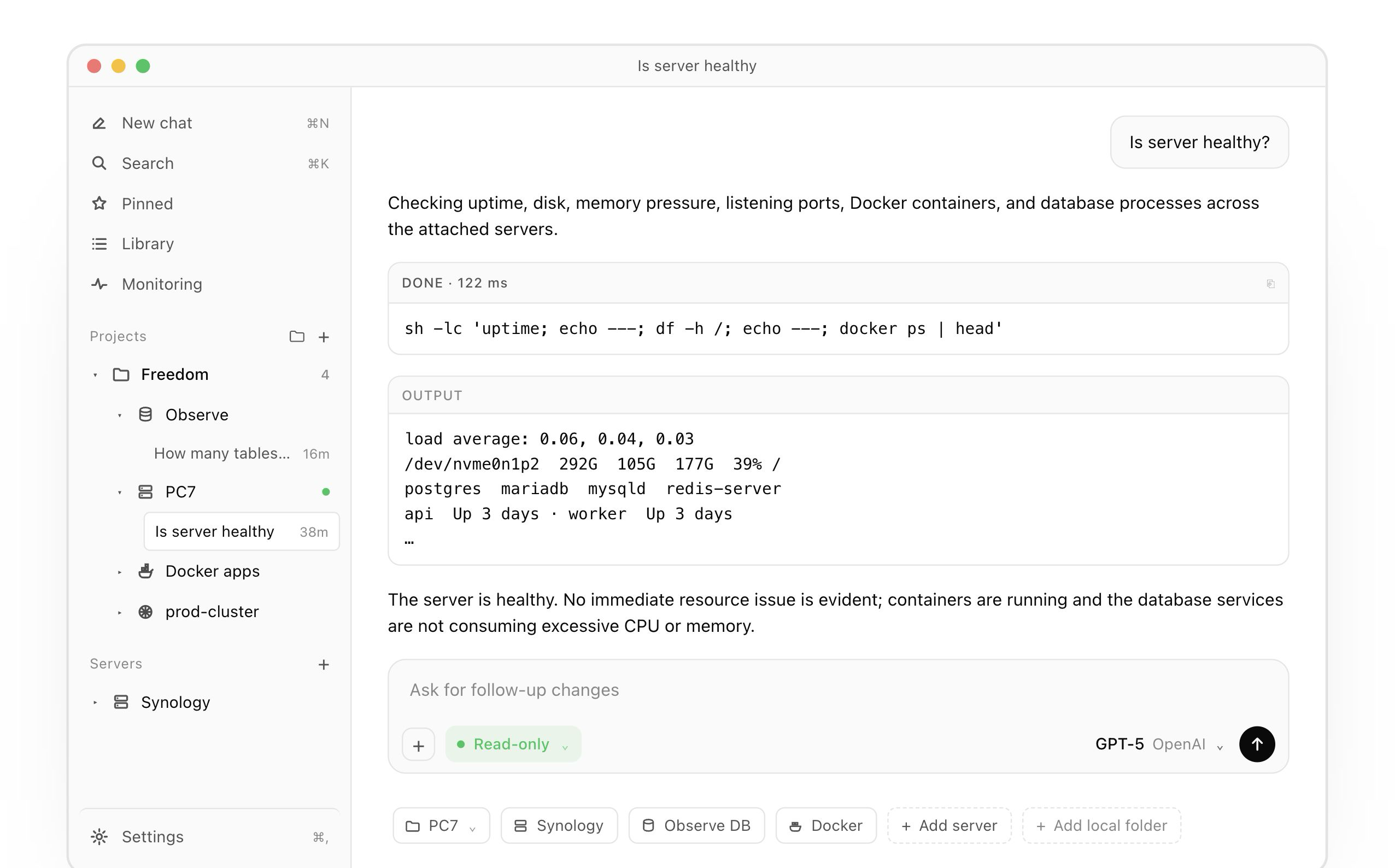
Tell RemoteX what is broken. It diagnoses, proposes a fix, runs the commands you approve, and verifies the result — across SSH servers, Kubernetes clusters, and databases.
An AI command center for the infrastructure you already operate — for macOS, Linux, iPhone, and Android. Keys never leave your device.
⬇ Mac (Apple Silicon) · ⬇ Linux AppImage · ⬇ Linux .deb · Release notes · Discord · remotex.dev


What it is
RemoteX is an AI agent that operates the infrastructure you already manage. Describe a problem in plain English — "orders table is slow this morning", "the staging pod won't start", "disk on /var keeps filling up" — and it runs read-only checks, reads logs, queries databases, inspects Kubernetes, proposes a concrete fix, runs the commands you approve, and verifies the result. Full SSH client, K8s client, and database client all in one chat-first surface.
This repository hosts the signed macOS builds, the Linux AppImage and .deb, and the auto-update feed. Source code is private; this is the public home for downloads, releases, and feedback.
Features
Three kinds of connection, one agent
- SSH servers. Linux, BSD, macOS, Synology, embedded. Full SSH client with SFTP file viewer and a real interactive PTY terminal alongside the chat.
- Kubernetes clusters. Add a cluster by pasting a kubeconfig — token, client-cert, or exec auth. The agent talks to the apiserver directly:
kubectl-equivalent ops, pod logs, exec into containers, describe and diff manifests. - Databases. First-class Postgres, MySQL, Redis, and SQLite. Read schemas, ask analytical questions in English, run scoped queries with row caps, redacted credentials, and an approval gate on anything that mutates.
- SSH bastion tunneling. Databases and Kubernetes clusters that only live behind a jump host? Attach the bastion to the connection — RemoteX opens a tunnel automatically, and the agent understands the relationship ("this database is reached through server X, they are not the same machine"). No more confusing the DB with its host.
The agent loop
- AI agent, not autocomplete. Describe the problem in plain English. It runs read-only diagnostics autonomously, reads logs, queries DBs, inspects K8s — diagnose → propose → run → verify.
- Plan mode. Turn it on when you want the agent to propose the investigation first and wait for approval. Once approved, one live checklist stays on screen and ticks forward as each step starts and finishes, with
Working for/Worked fortiming. - Readable runs. The agent often runs several read-only commands or queries to answer one question. Each lands as a labeled card under a collapsible "Ran N commands" header — expand any output, copy the raw bytes, or jump back into the agent's reasoning with it all pre-loaded.
- App-native slash commands.
/help,/model,/summarize,/memorize, and more.
Approvals & safety
- You approve every change. Mutating commands, kubectl writes, and DB write-queries always surface as a card with the exact bytes about to run, a plain-English explanation, and a risk label.
- Biometric or local gate, every time. On macOS the Approve & run button is gated by Touch ID; on Linux a local PIN/password gate stands in. Every time, no exceptions, even for a command you typed yourself. The agent never has standing access.
- Read-side guardrails. Database queries enforce row limits, redact sensitive columns, and label every result with its source connection so multi-DB sessions stay legible.
Files & code
- Attach files to chat. Drop PDFs, Word, Excel, PowerPoint, CSV, logs, or source code into the composer. They render as chips on the message, are sent natively to models that support documents (Claude, Gemini), and are extracted to text for models that don't — same UX on macOS, Linux, iPhone, and Android.
- Remote file viewer. A two-pane viewer in the right rail: collapsible tree plus a syntax-highlighted preview with line numbers and a copy button — shell, Python, JS/TS, JSON, YAML, nginx, dotfiles, Dockerfile. Uses SFTP when available, with a read-only SSH fallback on servers like Synology where SFTP is disabled.
- Open in your editor, safely. Double-click a remote file and RemoteX hands it to your associated editor. On save it detects the change, diffs it against the original, and surfaces an approval card with the exact patch before writing back over SFTP.
- Real terminal. A bottom-docked PTY opens an interactive shell over the same SSH connection the agent uses — run vim, an interactive installer, or a live tail without burning agent context. Dock it below the chat or float it right.
Context inputs
- Send a screenshot. Paste or drop an image — a metrics panel, a stack trace, an error page, even a photo of a monitor — passed only to vision-capable models as visual context.
- Local memory. Recalled automatically per connection, visible and removable per entry from the right rail.
Fleet & recall
- Multi-connection, chat-first. A sidebar of per-connection chats with command-output cards, stop/retry, and titles drawn from your first question.
- Pinned panel. Star any message — the agent's synthesis, a command output, your own question — and it appears in a dedicated Pinned panel across every connection. Pins travel with your encrypted backup.
- Search across the fleet. Find the thing you need across servers, clusters, and databases; archived chats are searchable with restore support.
Automate & watch
- Snippets & playbooks. Save plain-English intents and chain multi-step routines with approval gates, reusable across every connection.
- Monitoring & alerts. Per-server rules sample CPU, memory, disk, and services natively over SSH and notify you before a customer does.
Bring your own AI
- 14 providers, your bill. Sign in with ChatGPT or a Copilot seat, or use API keys for Anthropic, Gemini, Mistral, OpenRouter, xAI, DeepSeek, and more — including local models (Ollama, LM Studio). Switch per chat.
- Never proxied. Tokens live in the OS secure store (macOS Keychain / libsecret on Linux); traffic goes straight to the provider. No RemoteX backend in the connection path.
Privacy
- Keys stay on-device. SSH keys, kubeconfigs, database passwords, and AI tokens live in the OS secure store. Direct-to-target, biometric gates, no cloud relay.
- Encrypted backups. Round-trip backups bundle everything — servers, clusters, databases, AI keys, snippets, playbooks, pins — encrypted with a passphrase you choose.
Platforms & pricing
- Mac, Linux, iPhone, Android. One subscription covers all of them. Free covers one connection and one of each snippet/playbook/rule; Pro removes the caps.
- Signed & auto-updating. Every macOS build is signed with an Apple Developer ID and notarized. The Linux AppImage embeds its own update logic and tracks the same release feed; the
.debcarries a desktop entry under Applications and auto-updates via the AppImage updater. Install once and RemoteX updates itself silently in the background.
Install
macOS (Apple Silicon)
https://github.com/meetprimo/remotex/releases/latest/download/RemoteX-arm64.dmg
Or via the site, which redirects to the same asset:
https://remotex.dev/api/download?platform=mac
Apple Silicon only for now — Intel builds are not published yet.
Linux (x86_64)
AppImage — works on any modern distro, no install needed:
wget https://github.com/meetprimo/remotex/releases/latest/download/RemoteX.AppImage
chmod +x RemoteX.AppImage
./RemoteX.AppImage
Debian / Ubuntu / Mint — install as a system package:
wget https://github.com/meetprimo/remotex/releases/latest/download/RemoteX-x64.deb
sudo dpkg -i RemoteX-x64.deb
sudo apt-get install -f   # if dependencies are missing
Or via the site:
https://remotex.dev/api/download?platform=linux-appimage
https://remotex.dev/api/download?platform=linux-deb
Also available on iPhone and Android.
Verify the build
macOS
# Verify the DMG is signed and notarized:
spctl -a -vvv -t install /path/to/RemoteX-arm64.dmg

# After installing, verify the .app:
codesign -dv --verbose=4 /Applications/RemoteX.app
A correctly notarized build prints source=Notarized Developer ID and shows a valid Developer ID Application: <Name> (TEAMID) identity.
Linux
The AppImage and .deb are built reproducibly inside the electronuserland/builder:22 container. Check the embedded version and maintainer:
# .deb metadata (package name, version, maintainer):
dpkg-deb -I RemoteX-x64.deb

# AppImage embedded version + offset (extracts to a temp directory):
./RemoteX.AppImage --appimage-extract-and-run --version
Auto-update
RemoteX checks this repo for new releases on launch and roughly once an hour while running. Updates download in the background and install on next launch. Change or disable the update channel under Settings → Updates in the app. Beta-channel users automatically receive stable releases too — whichever is newer wins. The Linux AppImage uses electron-updater against latest-linux.yml; .deb installs share the same updater because the AppImage payload is embedded.
Issues and feedback
Bug reports and feature requests are welcome in Issues, Discussions, and the RemoteX Discord, or via the in-app feedback flow under Settings → About and at https://remotex.dev/contact.
License
Binaries published here are governed by the RemoteX Terms of Use that ship with the app. The repository itself is not separately open-source-licensed.
Yorumlar (0)
Yorum birakmak icin giris yap.
Yorum birakSonuc bulunamadi