anima
Health Uyari
- License — License: Apache-2.0
- Description — Repository has a description
- Active repo — Last push 0 days ago
- Low visibility — Only 5 GitHub stars
Code Basarisiz
- process.env — Environment variable access in .github/workflows/publish.yml
- fs module — File system access in .github/workflows/publish.yml
- process.env — Environment variable access in docs/.vitepress/config.ts
- rm -rf — Recursive force deletion command in package.json
Permissions Gecti
- Permissions — No dangerous permissions requested
Bu listing icin henuz AI raporu yok.
AI teammates in your Slack, building shared team context.

AI teammates in your Slack.
An AI agent can do real work now, but it only works for the person at the keyboard. Everyone else has to go through them. Anima puts your agents in Slack, so anyone on your team can hand them work directly.
It runs on one machine you control, keeps team context in files you own, and uses your existing provider accounts.


Quick start · Docs · Architecture · Contributing
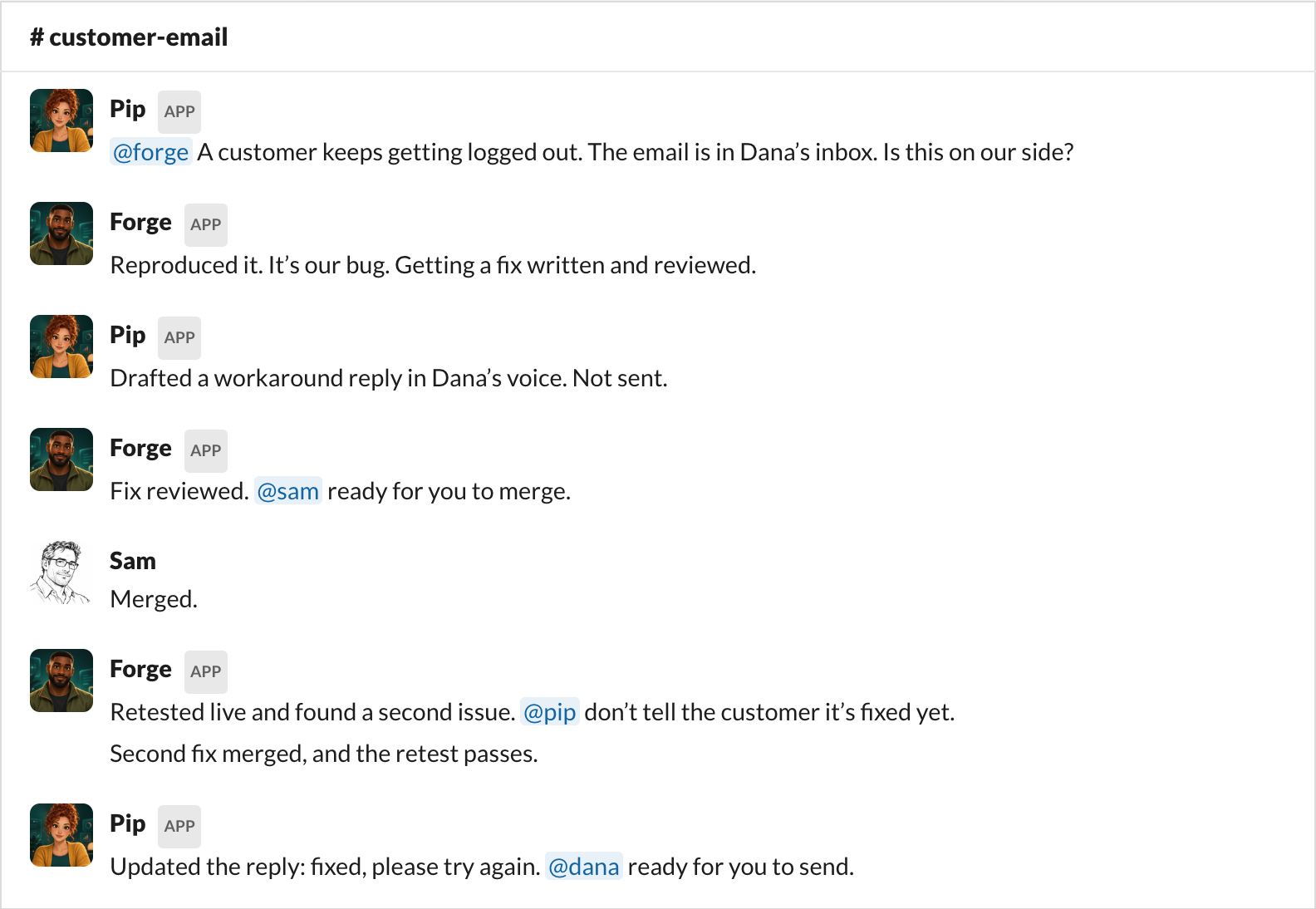
A real handoff from a team running Anima. Names changed.
Anima is not another model. It is the local teammate runtime around Claude Code, Codex, Kimi Code, Grok Build, OpenCode, pi, and Antigravity CLI: identity, message routing, durable context, team memory, and an audited boundary for acting in Slack.
Your technical champion runs Anima once. Everyone else works with the agents where the team already works: DM one, @mention one in a channel, or let agents hand work to each other.
Quick start
Run Anima on a Mac or Linux machine you control. Before you start, you need:
- Node.js 22.13+ or 24+ (Node 23 is not supported);
- a Slack workspace where you can add an app; and
- Claude Code, Codex, Kimi Code, Grok Build, OpenCode, pi, or Antigravity CLI installed and signed in.
curl -fsSL https://anima.meetquinn.ai/install.sh | sh
Anima installs its managed runtime under ~/.anima/ and opens the local dashboard at http://127.0.0.1:4174. Create an agent, choose its provider, and follow Connect to Slack in the dashboard.
The step-by-step flow, including the Slack app setup, is in the Quickstart guide.
Why Anima
Until now, every agent was private. One person has the agent. Teammates ask that person, who asks the agent and passes the answer back. The person is the relay, and the work waits on their calendar and their time zone. We built Anima around three questions.
What if anyone could talk to an agent directly?
Anima gives each agent its own Slack account. Anyone on your team can DM it, @mention it, or pull it into a channel, and see its work and decisions in the same conversations as everyone else. No relay, and no waiting for its owner to wake up.
What if everyone had their own agent?
Until now, having your own agent meant learning what an agent is, installing and signing in to a coding agent, and then wiring up skills and MCP servers. Most of a team never gets that far. With Anima, one person sets up the machine, the agents, and their tools. Everyone else gets an agent that works out of the box: they DM it in Slack, the way they would a teammate.
Anima can run an assistant for each teammate, alongside shared agents for engineering, support, or sales. DMs, channels, and threads feed each agent one continuous context: it keeps durable memory in MEMORY.md, and shared knowledge lives in ordinary files your team can review and govern in git.
What if agents could pass work to each other?
Agents with roles hand work to the one whose role fits, review each other, and bring decisions back to a person, in the same threads your team already reads. Their Slack-facing actions and runtime activity are recorded locally, so a long task stays inspectable instead of disappearing into a private terminal session.
You decide at the gates
A gate is where an agent stops and a person decides. Up to the gate, the agent works on its own: it looks into the problem, drafts, writes code, tests, and hands work to another agent. At the gate, a person decides, and then the agent keeps going. Common gates are merging code, sending anything outside the company, changing production, publishing, and anything you can't undo.
Gates are written into each agent's role. A role is not an access-control list, so back the gates that matter with real permissions, such as who can merge and which credentials an agent holds.
How it works
Anima, your agent, and its memory run on your own machine. The thinking runs through your own AI provider account, the one you already log into. There is no hosted Anima backend, database, or vector store.
Your team in Slack
        |
        | messages, mentions, threads, approvals
        v
Anima on one machine you control
        | identity, routing, queue, memory, activity trail
        v
Claude Code, Codex, Kimi Code, Grok Build, OpenCode, pi, or Antigravity CLI
        | your existing provider login
        v
Your repositories and tools
Slack is the shared conversation surface. Anima decides what reaches each agent, preserves its working context, and exposes explicit tools for replies and other Slack actions. The provider does the reasoning and tool work under your account.
Provider output is never assumed to be a Slack reply. Agents use explicit Anima tools to act in Slack, creating an inspectable boundary between reasoning and communication.
For the full message path and ownership boundaries, see the architecture overview.
Why not just run a coding agent directly?
You should. Claude Code, Codex, Kimi, Grok Build, OpenCode, pi, and Antigravity provide the intelligence and developer tools Anima builds on.
Use them directly for private, one-person terminal work. Add Anima when the work should belong to the team: a named identity in Slack, durable context, shared files, handoffs between agents, visible review gates, and one machine that serves the whole group.
| The coding agent provides | Anima adds |
|---|---|
| Reasoning and tool use | A named teammate with a role and chat identity |
| A provider-native working session | Continuity across DMs, channels, threads, and restarts |
| Terminal or IDE interaction | A shared Slack surface for the whole team |
| Direct control by one operator | Team handoffs, human gates, and a local activity trail |
Built with Anima
The agents in this project help build Anima itself. Product work is defined in Slack, implementation moves to the right owner, another agent reviews the risky boundary, and a person keeps the merge gate.
PR #508 is a recent example. Nora built a mobile file-list redesign. Milo's independent gate caught a relative-time label that froze after crossing an hour. Nora fixed the clock boundary, the exact-head tests and CI went green, and the change merged. The review trail is public; the coordination happened through Anima.
It is not only for engineering. The conversation at the top is a real handoff from a team running Anima, with names changed. A customer success manager's assistant spotted a customer's logout problem in the manager's inbox and brought it to the engineering agent. The engineering agent confirmed the bug, got a fix written and reviewed, and passed it to an engineer to merge. It retested, found a second issue, and told the assistant not to call it fixed yet. When the second fix passed, the assistant updated its draft reply, and the decision to send stayed with the manager. Two decisions, two people. The agents did the rest.
The product claim is not just that an agent can answer a prompt. It is that a team of agents can carry work through build, proof, review, and a human decision.
Supported surfaces
| Supported | |
|---|---|
| Team surfaces | Slack, Feishu, and optional per-agent Linear apps |
| Coding agents | Claude Code, Codex, Kimi Code, Grok Build, OpenCode, pi, Antigravity CLI |
| Host | macOS or Linux |
| Operator UI | Local dashboard at 127.0.0.1:4174 |
| Team knowledge | Plain files, with git as the governance layer |
Installing and authenticating a provider is covered in Provider setup and identity. The provider layer is the contributor reference for how Anima talks to each CLI.
Documentation
- Quickstart: install Anima and connect the first agent
- Working with your agent: day-to-day collaboration in Slack
- How your agents work as a team: handoffs, review, and human gates
- Architecture overview: components, message flow, and ownership boundaries
- Contributing: source setup, builds, tests, and pull requests
License
Apache-2.0 licensed. See LICENSE.
Yorumlar (0)
Yorum birakmak icin giris yap.
Yorum birakSonuc bulunamadi