genai-eshop-semantic-kernel
Health Pass
- License — License: MIT
- Description — Repository has a description
- Active repo — Last push 0 days ago
- Community trust — 15 GitHub stars
Code Fail
- rm -rf — Recursive force deletion command in .devcontainer/scripts/setup-fonts.sh
Permissions Pass
- Permissions — No dangerous permissions requested
No AI report is available for this listing yet.
Practical GenAI-Eshop application using Semantic Kernel, multi-agent orchestrations, Mcp tools, A2A Agents, Semantic Search, Aspire and more.
💡 Practical
GenAI-Eshopapplication using Semantic Kernel,multi-agent orchestrations,Mcp tools,A2A Agents,Semantic Searchand more.
[!NOTE]
We migrated theGenAI-Eshopapplication to use the microsoft/agent-framework instead of Semantic Kernel in the mehdihadeli/genai-eshop repository. You can check their differences in a practical application there.
[!NOTE]
🎥 See my talk at JetBrains .NET Day 2025, where I explain Generative AI and demonstrate this practical example.
Features
- ✅ Using microsoft/semantic-kernel for multi-agent orchestrations and AI related services
- ✅ Using
Qdrant Semantic Kernel Connectorfor storing vector data for doingSemantic Meaning SearchandHybrid Searchusing vector data and semantic kernel - ✅ Using Semantic Kernel
EmbeddingGeneratorbased on chosen providers likeOllama,AzureOpenAI, andOpenAIfor generating vector data for semantic search - ✅ Using Semantic Kernel
ChatCompletionbased on chosen providers likeOllama,AzureOpenAI, andOpenAIfor communicating with different models for generating responses - ✅ Using
Mcp toolsbased onhttpand json-rpc for calling endpoints in our Mcp server and calling third party tools by LLMs for Fine-grained functions - ✅ Using
Multi-Agent Orchestrationsforlocalandexternalagents communication using agentsparent child agent relationshipsand different Semantic Kernel’sAgent Orchestration PatternslikeParent-Child,GroupChatandSequentialorchestration - ✅ Using
Agent2Agent Protocol (A2A)protocol based on http and json-rpc for calling and using external agents - ✅ Using
Vertical Slice Architectureas a high-level architecture - ✅ Using
Minimal APIsfor handling requests - ✅ Using
OpenTelemetryfor collectingLogs,MetricsandDistributed Traces - ✅ Using
.NET Aspirefor cloud-native application orchestration and enhanced developer experience
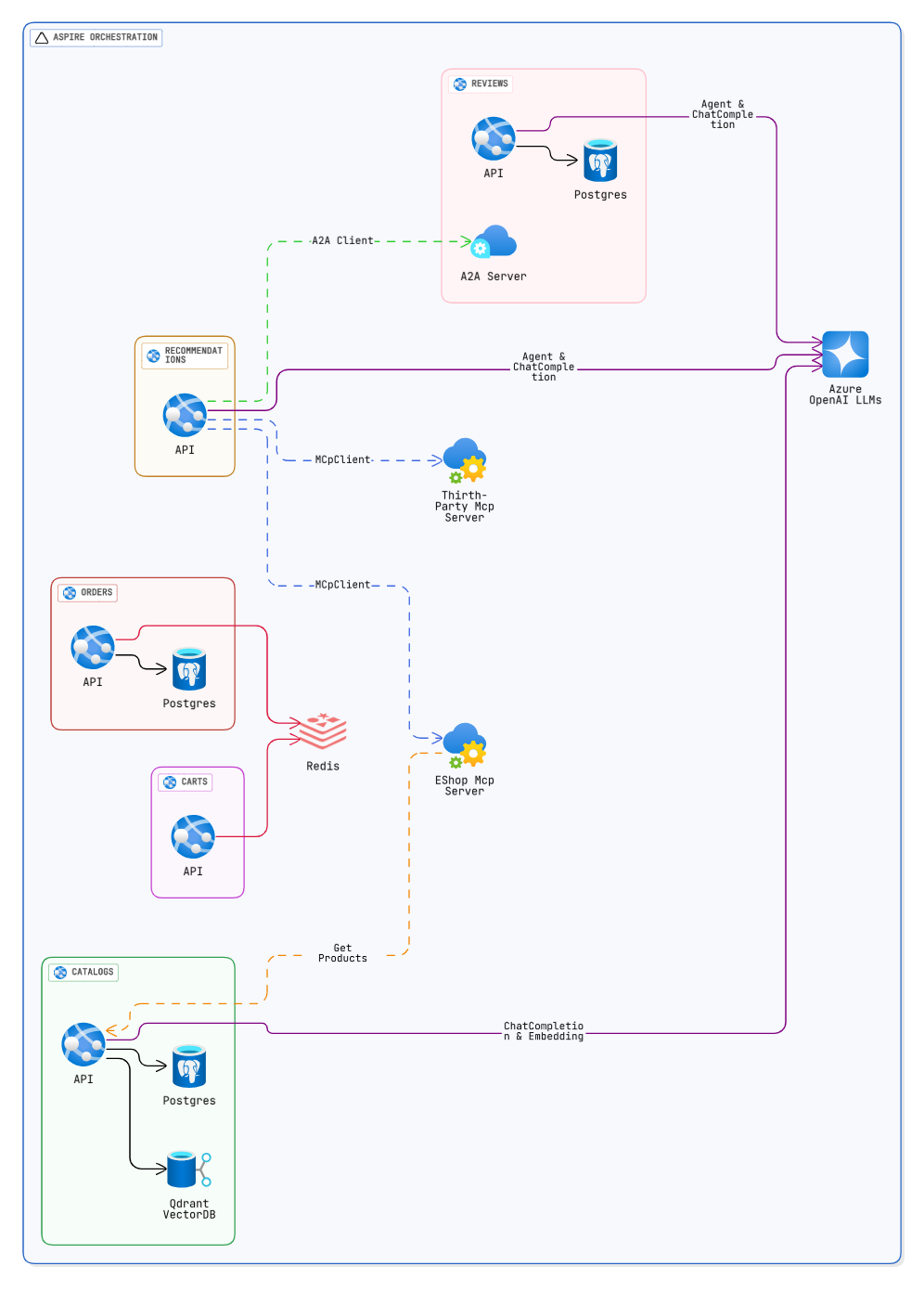
Architecture Diagram
Getting Started
OpenAI-compatible API
Copy .env.example to .env, then replace the placeholder endpoint, model names, and API keys. The application reads SemanticKernelOptions__... environment variables, so any provider exposing the OpenAI /v1 API shape can be used for local testing:
cp .env.example .env
Set SemanticKernelOptions__ChatEndpoint and SemanticKernelOptions__EmbeddingEndpoint to your provider's base URL, such as http://localhost:4000/v1. Keep .env local and never commit credentials.
Run the focused tests with:
dotnet test --project tests/BuildingBlocks/BuildingBlocks.Tests/BuildingBlocks.Tests.csproj
Prerequisites
Install an IDE
You can use any of the following IDEs for development:
- JetBrains Rider (Recommended)
- Visual Studio 2022
- Visual Studio Code
Ensure the IDE includes support for .NET Core and plugins for C#.
Run Application
Aspire
Install the Aspire CLI tool:
# Bash
dotnet tool install -g Aspire.Cli
To run the application using the Aspire App Host and using Aspire dashboard in the development mode run following command:
aspire run
Note:The
Aspire dashboardwill be available at:https://localhost:17056andhttp://localhost:15234
Using Docker-Compose
# Start docker-compose
docker-compose -f .\deployments\docker-compose\docker-compose.yaml up -d

# Stop docker-compose
docker-compose -f .\deployments\docker-compose\docker-compose.yaml down
This command will run the required infrastructure for the application
Open the solution file genai-eshop-semantic-kernel.sln in your preferred IDE (e.g., Rider or Visual Studio).
Now you can run each microservice using the IDE.
Run Integration and End-to-End Tests
Start Aspire before running tests so PostgreSQL, Redis, Qdrant, and the APIs are available:
export GENAI_RUN_EXTERNAL_TESTS=true
bash scripts/start-aspire-for-tests.sh
find tests -type f \( -name '*IntegrationTests.csproj' -o -name '*EndToEndTests.csproj' \) -print0 |
	while IFS= read -r -d '' project; do
		dotnet test --project "$project" --configuration Release --no-build
	done
bash scripts/stop-aspire-for-tests.sh
The integration test projects use xUnit v3's Microsoft.Testing.Platform runner, so CI invokes each *IntegrationTests.csproj and *EndToEndTests.csproj project explicitly.
The start script waits for every API health endpoint and disables vector seeding by default. Use GENAI_TEST_*_BASE_URL variables to override service URLs. CI runs the same lifecycle automatically and always stops Aspire after the test step.
License
The project is under MIT license.
Reviews (0)
Sign in to leave a review.
Leave a reviewNo results found