RepoSpend
Health Warn
- License — License: NOASSERTION
- Description — Repository has a description
- Active repo — Last push 0 days ago
- Low visibility — Only 9 GitHub stars
Code Fail
- rm -rf — Recursive force deletion command in apps/server/package.json
- process.env — Environment variable access in apps/server/src/cli.ts
- fs.rmSync — Destructive file system operation in apps/server/src/data.ts
- process.env — Environment variable access in apps/server/src/data.ts
- process.env — Environment variable access in apps/server/src/demo-data.ts
Permissions Pass
- Permissions — No dangerous permissions requested
No AI report is available for this listing yet.
Local-first dashboard for tracking Codex, Claude Code, and GitHub Copilot token usage/spend by repo, session, model, and tool.
RepoSpend
RepoSpend is a local-first dashboard for tracking AI coding token usage and API-equivalent spend by repository, session, model, and tool. It supports local Codex, Claude Code, and GitHub Copilot usage data, runs with npx repospend, and does not upload prompts, code, transcripts, or usage data.





RepoSpend turns local AI coding usage data into a repo-level cost dashboard, so
developers can see which projects, sessions, models, and tools are driving token
usage and estimated API-equivalent cost.
Project links:
- Website: https://repospend.com
- GitHub: https://github.com/mehmetdemircs/RepoSpend
- npm package:
repospend - AI-readable summary: docs/llms.txt
npx repospend
RepoSpend opens a local dashboard, usually at
http://localhost:2005.
Best for developers who want to:
- see which repositories are driving AI coding usage
- compare Codex, Claude Code, and GitHub Copilot usage locally
- inspect expensive sessions without uploading prompts or code
- understand token shape, cache reuse, model mix, and agent friction
Preview
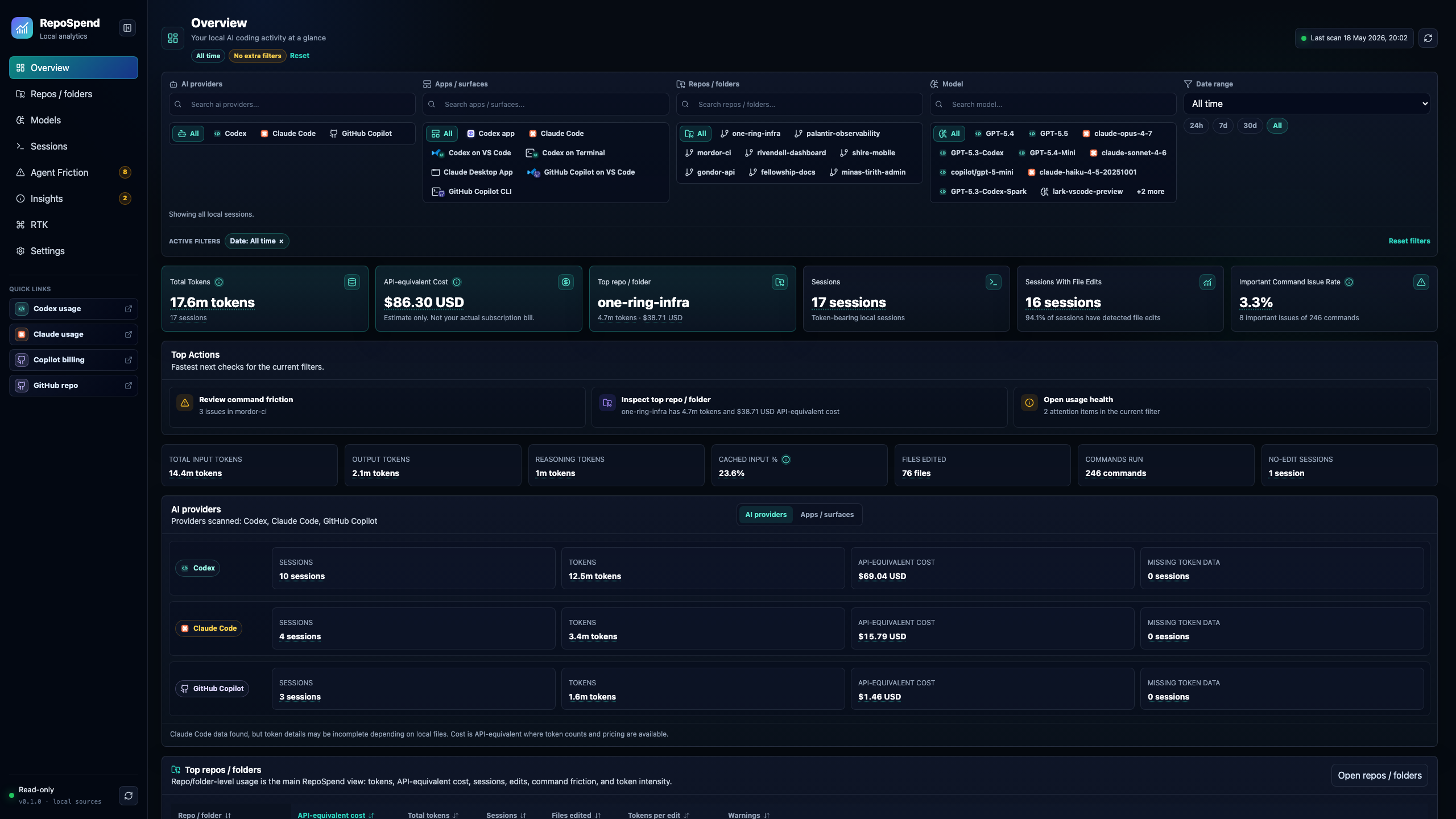
Screenshots use fictional Middle-earth demo data. The Lord of the Rings themed
repo names, sessions, prompts, token counts, and costs are intentional; no private
repository data is shown.
What is RepoSpend?
RepoSpend is a local-first AI coding spend dashboard for developers and teams
who want to understand usage by repository instead of only by account, day, or
tool. It reads supported local files in read-only mode, normalizes them into
sessions, and groups them by Git repository.
Use it to inspect Codex token usage, Claude Code token usage by repo, GitHub
Copilot local usage data, model mix, cache reuse, and the sessions behind high
estimated API-equivalent spend.
Why RepoSpend?
AI coding tools are powerful, but it is hard to see which repo, session, model,
or workflow is responsible for the usage.
RepoSpend helps answer practical questions:
- Which repo is using the most tokens?
- Which sessions were unusually expensive?
- Which model or tool generated the spend?
- What token shape drove the cost: input, cached input, output, or reasoning?
- Are cache reads reducing repeated input work?
- Is spend concentrated in one model, one repo, or one day?
- Where did the agent get stuck retrying commands?
- Which sessions should be exported or reviewed later?
- How much would this usage roughly cost at API-style rates?
Everything stays local.
Quick Start
Run without installing globally:
npx repospend
Or install it once:
npm install -g repospend
repospend
RepoSpend starts a local dashboard, binds to localhost, opens your browser, and
prints the dashboard URL. By default it runs at
http://localhost:2005.
Supported Tools
| Tool | Status | Notes |
|---|---|---|
| Codex | Most complete support | Tokens, models, sessions, repo grouping, command friction |
| Claude Code | Initial support | Sessions, projects, models, timestamps, tokens when available |
| GitHub Copilot | Initial support | Copilot CLI OTEL exports, Copilot CLI session state, and VS Code Copilot Chat transcripts; costs only when local data includes full token splits |
| Cursor | Experimental opt-in | Local JSONL and SQLite/vscdb discovery; tokens/cost only when local data includes them |
| RTK | Token reduction workflow | Not an AI model or coding assistant; shown by default as workflow context for reducing token waste |
RepoSpend started as a Codex-first release. Claude Code support is newer, and
GitHub Copilot support is newest. Cursor is off by default because accurate
Cursor token usage often requires account-backed usage data rather than local
files alone.
Requirements
- Node.js
20or newer - macOS, Linux, or Windows
- Local Codex, Claude Code, or GitHub Copilot data for usage analytics
- Optional RTK data if you want token-reduction workflow context
- Cursor data only if you enable experimental Cursor import
RepoSpend uses better-sqlite3, so npm may install a native SQLite package for
your platform.
What It Shows
RepoSpend helps you break down local AI coding usage by:
- repo, session, day, and hour
- model, source/tool, and app/surface where detectable
- input, cached input, output, and reasoning token shape
- estimated API-equivalent cost
Nested paths are grouped by Git root so usage rolls up to the repository.
Screenshots
Repositories
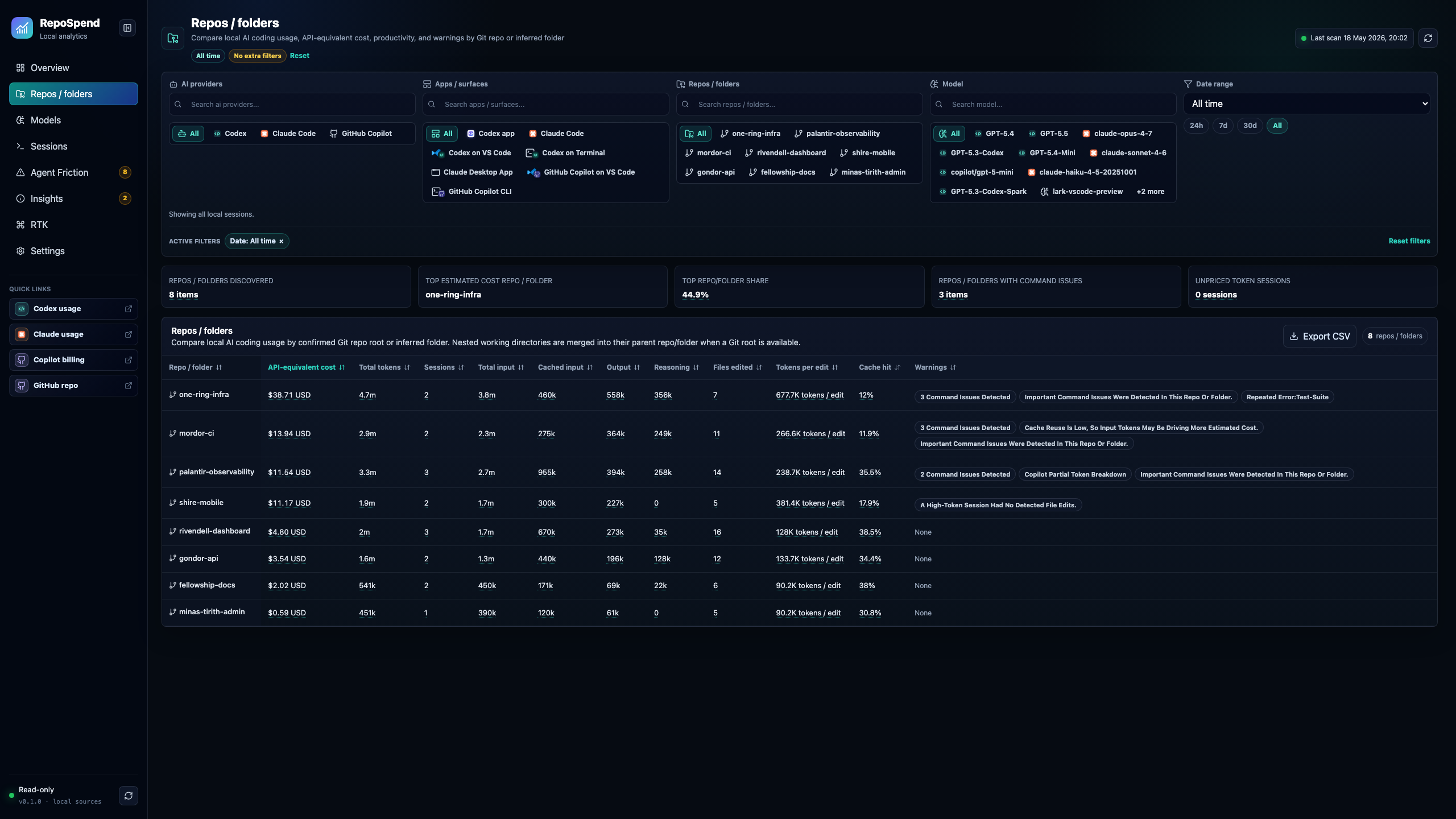
Compare spend, tokens, sessions, cache hit rate, file edits, and token intensity.
Repository Detail
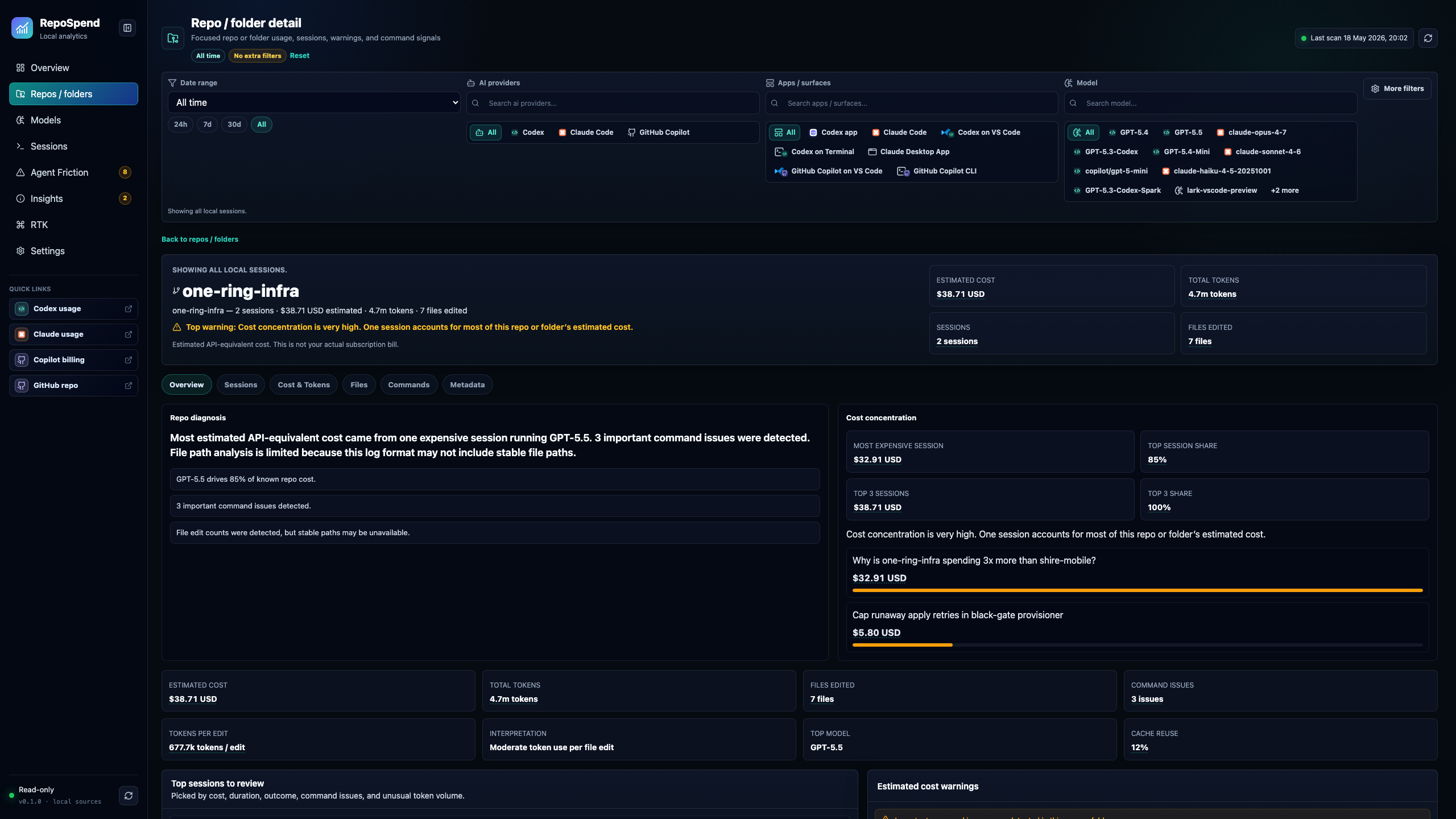
Inspect cost concentration, warnings, token shape, sessions, and command signals.
Models
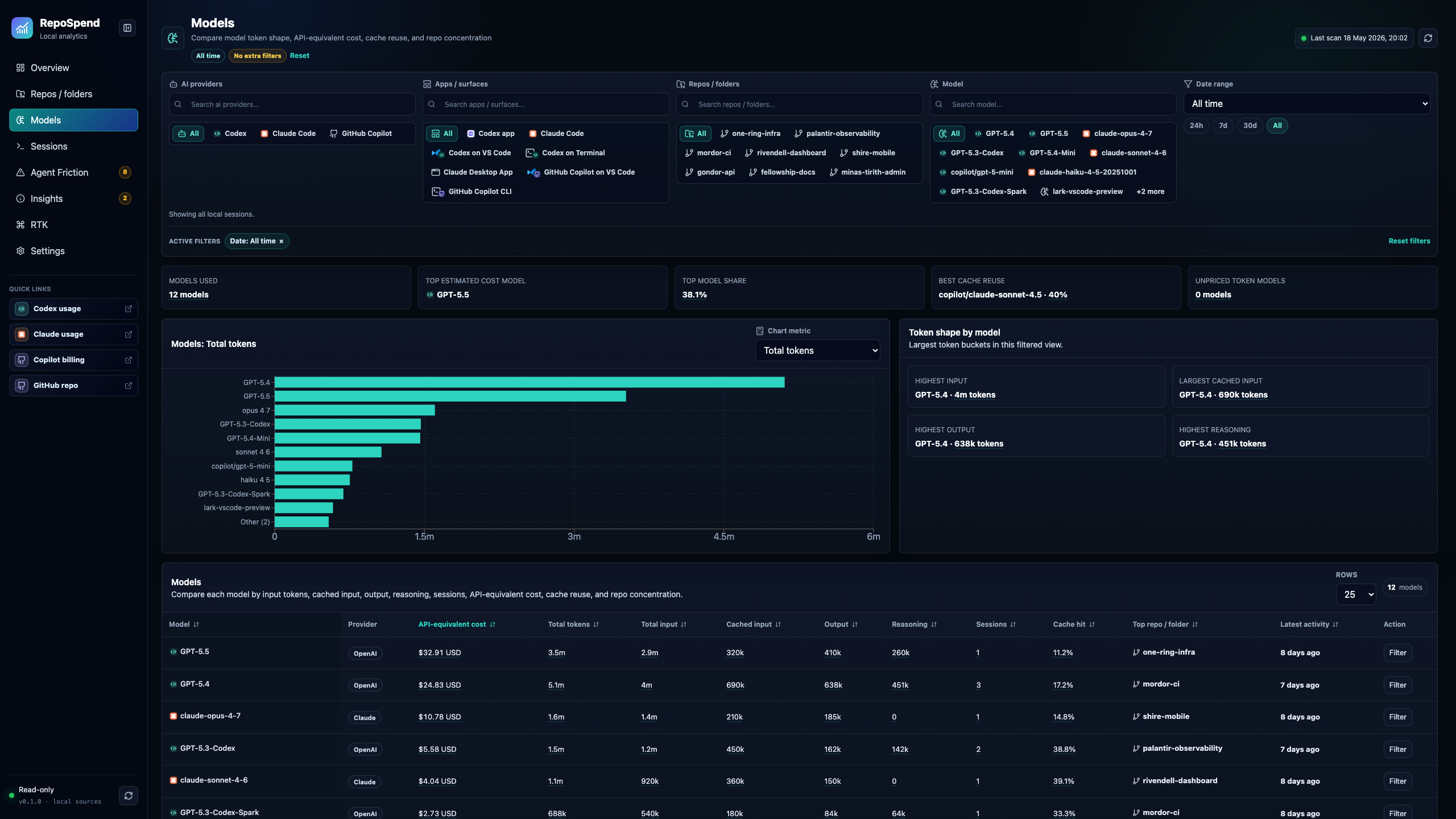
Compare token shape, API-equivalent cost, cache reuse, and repo concentration.
Sessions
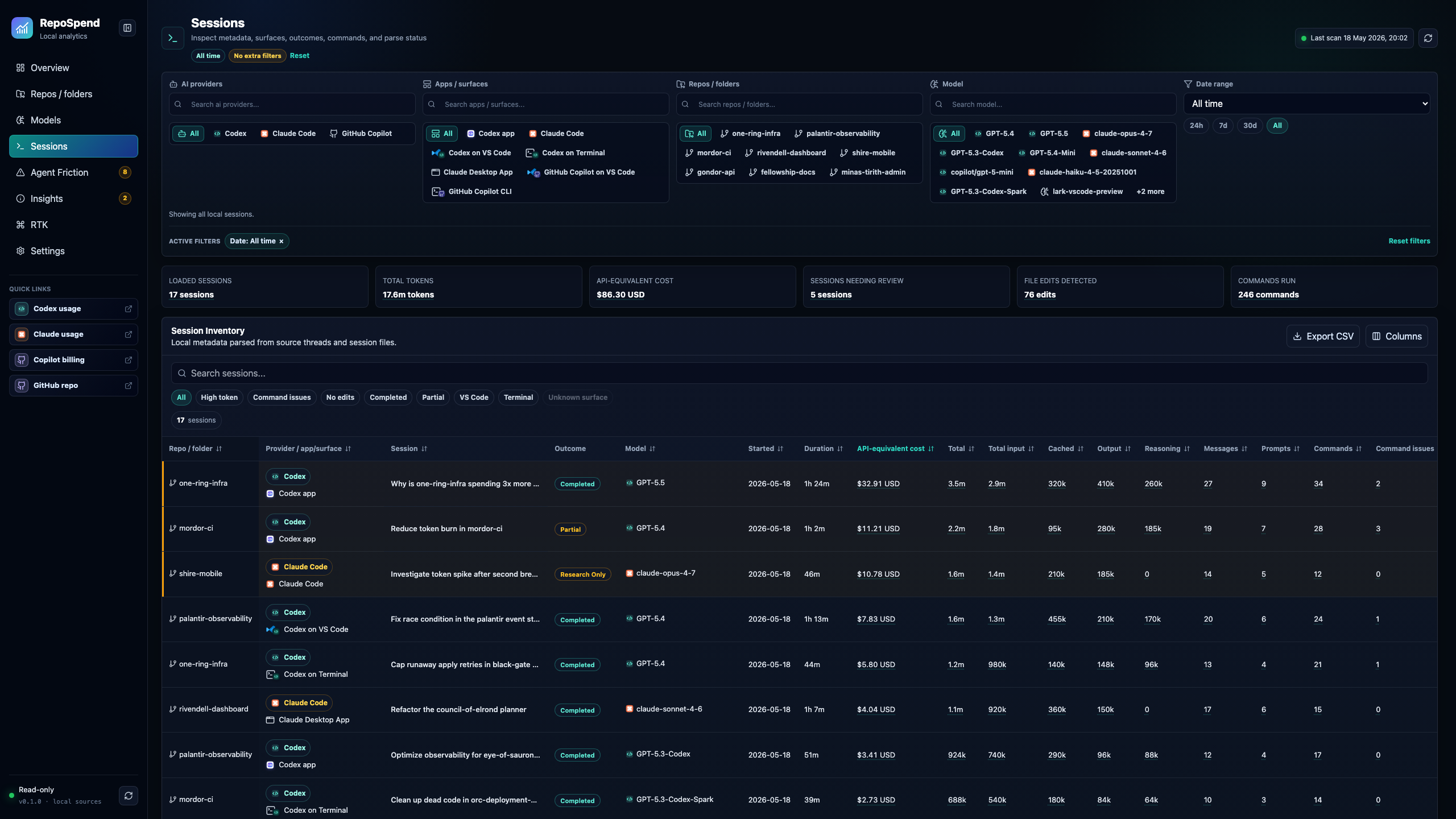
Search and sort individual AI coding runs by repo, tool, model, cost, and tokens.
Session Detail
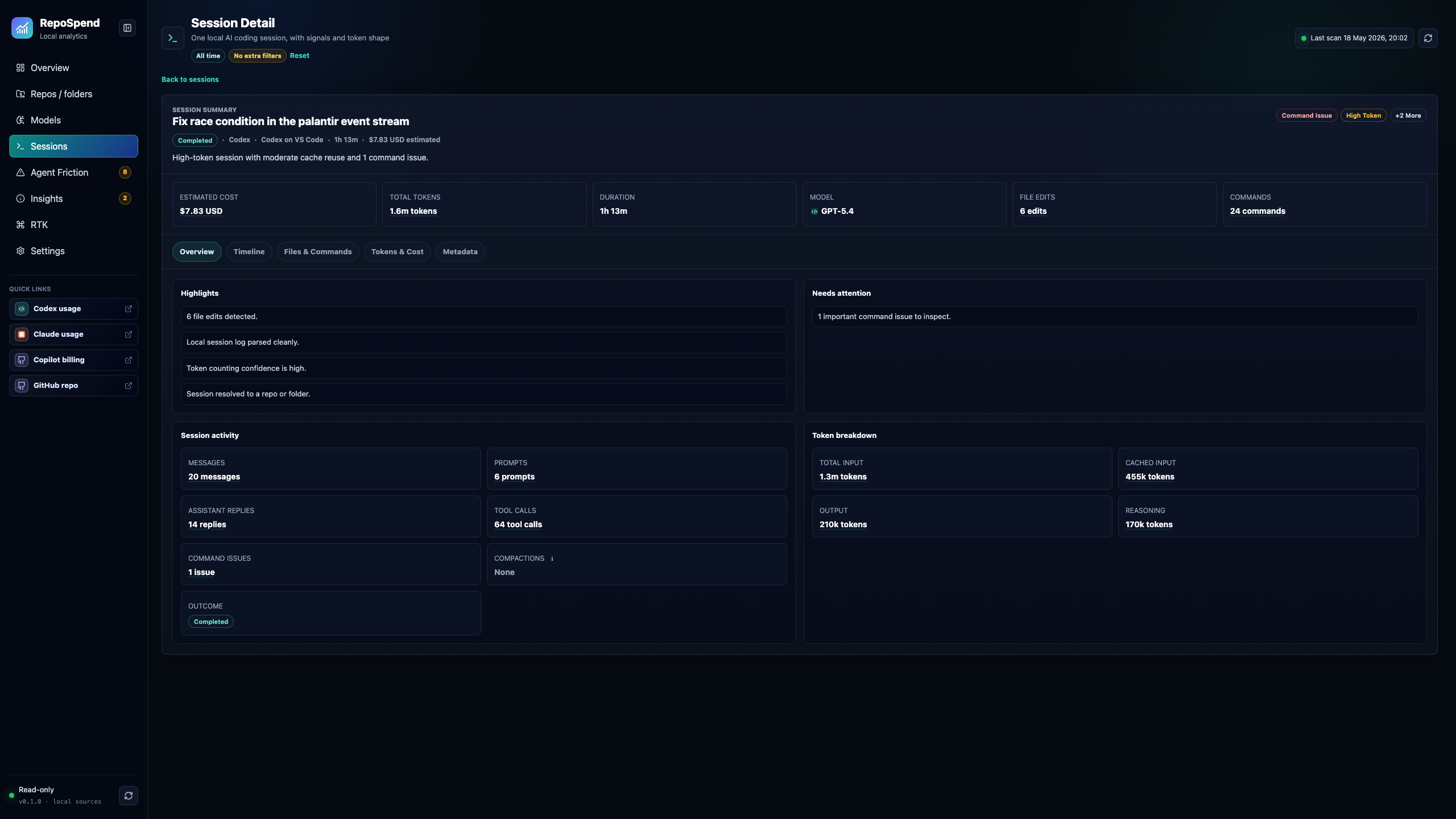
Review one run's cost, tokens, model, file edits, commands, and issues.
Agent Friction
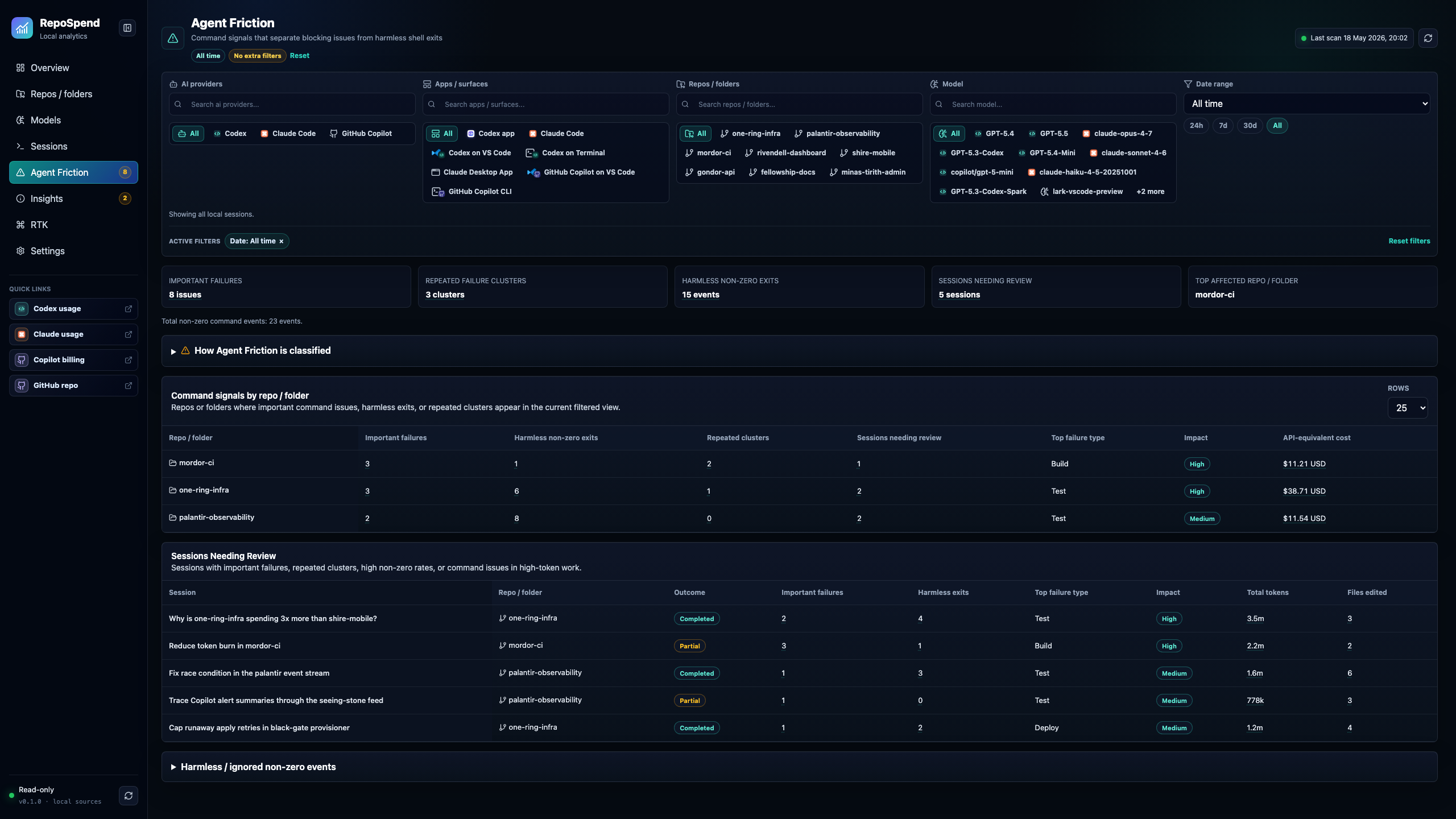
Separate blocking command failures from harmless shell exits.
Privacy
RepoSpend is local-first. Everything the dashboard shows comes from files already
on your machine.
- No login or account required.
- No telemetry.
- No prompt or transcript uploads.
- It does not modify Codex, Claude Code, GitHub Copilot, Cursor, or RTK files.
- It does not claim to match your subscription bill exactly.
- It does not read Codex Desktop server-side sessions that are not stored locally.
Cost Estimates, Not Invoices
RepoSpend shows API-equivalent cost.
RepoSpend estimates cost from local token counts and local pricing assumptions.
It is useful for comparing repos and sessions, but it is not an invoice. Actual
cost can differ because of subscriptions, credits, included usage, account terms,
provider changes, or missing local token data.
For pricing details, see docs/pricing.md.
Token Accounting
RepoSpend uses normalized model-work totals:
totalTokens = inputTokens + outputTokens + reasoningTokens
Cache reads and cache writes are kept as input sub-buckets and priced once. This
means RepoSpend token totals may look lower than tools that display cache
reads/writes as separate addable token columns.
For the detailed accounting model and comparison with ccusage and Tokscale,
see docs/token-accounting.md.
Data Sources
RepoSpend only reads local files. It does not edit Codex, Claude Code, GitHub
Copilot, Cursor, or RTK data.
| Source | What RepoSpend reads | Notes |
|---|---|---|
| Codex | Local CLI state and session files | Most complete token, model, repo, session, and command-friction support |
| Claude Code | Local project and session JSONL files | Tokens and models are shown when present in local transcripts |
| GitHub Copilot | Local OTEL exports, session-state, and VS Code Copilot Chat files | Full cost requires local input/cache/output token splits |
| Cursor | Experimental local transcript/database discovery | Off by default; local files vary and often omit exact token/cost data |
| RTK | Local workflow context | Not an AI token source; helps explain token-reduction practices |
Detailed paths, source-specific behavior, and Cursor troubleshooting live in
docs/data-sources.md.
RepoSpend-owned settings live under ~/.repospend/, including pricing overrides,
local app settings, and the parse cache.
FAQ
What is RepoSpend?
RepoSpend is a local-first dashboard for tracking AI coding token usage and
API-equivalent spend by repository, session, model, and tool.
Does RepoSpend upload prompts or code?
No. RepoSpend runs locally, reads supported client files in read-only mode, and
does not upload prompts, code, transcripts, or usage data.
Which tools does RepoSpend support?
RepoSpend tracks local usage from Codex, Claude Code, and GitHub Copilot. Cursor
import is experimental and opt-in. RTK can appear as workflow context for
token-reduction signals, but it is not an AI model or coding assistant. Support
depth depends on what each tool stores locally; Codex is currently the most
complete path.
How do I run RepoSpend?
Run it with:
npx repospend
RepoSpend starts a localhost dashboard, usually at
http://localhost:2005.
How is RepoSpend different from ccusage?
ccusage is excellent for Claude Code usage totals and terminal reporting.
RepoSpend is a visual, repo-first dashboard across multiple AI coding tools. It
focuses on repository grouping, session inspection, model mix, token shape,
cache reuse, exports, and command/agent friction signals.
Is RepoSpend open source?
Yes. RepoSpend is open source under the Apache-2.0 license. The GitHub repository
is mehmetdemircs/RepoSpend.
Compared With Other Usage Tools
RepoSpend is complementary to command-line usage tools such as ccusage and
generic Claude Code usage monitors.
Use ccusage when you want fast Claude Code totals, daily breakdowns, or a CLI
view that is close to Claude Code's local usage files. Use RepoSpend when you
want a local dashboard that compares AI coding usage across repos, sessions,
models, and tools.
Generic Claude Code monitors usually focus on one source. RepoSpend is designed
as a repo-level AI coding cost tracker: it brings together local Codex, Claude
Code, and GitHub Copilot data, includes experimental Cursor imports when enabled,
and can show optional RTK workflow context for token-reduction signals. The
dashboard then explains the token shape and sessions behind the estimated
API-equivalent spend.
Commands
Most users only need:
repospend
There are also a few terminal-friendly commands:
repospend scan
repospend by-repo
repospend by-day
repospend by-hour
repospend by-model
repospend by-app
repospend export --format json
repospend export --format csv
Most commands also accept a simple source filter:
repospend by-repo --source codex # codex, claude, copilot, cursor, all
Use REPOSPEND_NO_OPEN=1 repospend if you want the URL printed without opening a
browser.
Current Limits
- Codex support is still the most complete path for token and command-friction
analysis. - Claude Code support is initial: sessions, projects, timestamps, models, and
token usage are shown when present in local JSONL files. - Claude Code sessions without local token details are shown with unknown
tokens/cost. - Cursor support is experimental and off by default: local transcript/session
discovery is best-effort, and Cursor may omit token/cost details or change
local schemas. - Cost estimates do not represent subscription billing, credits, regional
pricing, or account-specific terms. - Budget alerts are not available yet.
- Some older sessions may not include full token, command, or prompt details.
- RTK is workflow context, not an AI token source; it helps explain token-reduction
practices alongside AI usage. - On Windows, RepoSpend captures Codex CLI usage from
~/.codex/. The Codex
Desktop app does not persist session transcripts or per-turn token usage to
disk; real session data lives server-side.
Develop
From source:
pnpm install
pnpm dev
Useful checks before publishing:
pnpm lint
pnpm typecheck
pnpm test
pnpm build
pnpm dev starts the API on
http://127.0.0.1:4318 and the dashboard on
http://127.0.0.1:2005, with /api proxied locally.
Maintainers
Publishing notes are in docs/PUBLISHING.md.
Security
Please see SECURITY.md for reporting security issues.
Changelog
Please see CHANGELOG.md for release notes.
License
Reviews (0)
Sign in to leave a review.
Leave a reviewNo results found