meraline
Health Uyari
- License — License: MIT
- Description — Repository has a description
- Active repo — Last push 0 days ago
- Low visibility — Only 7 GitHub stars
Code Gecti
- Code scan — Scanned 12 files during light audit, no dangerous patterns found
Permissions Gecti
- Permissions — No dangerous permissions requested
Bu listing icin henuz AI raporu yok.
Ask AI anything from ⌥ Space in any Mac app, then let it go. Apple Intelligence, API keys, Ollama, Claude Code, Codex. Chats stay in memory only.

Meraline
Ask AI anything, right where you are. Then let it go.

macOS 26 or later · What's new


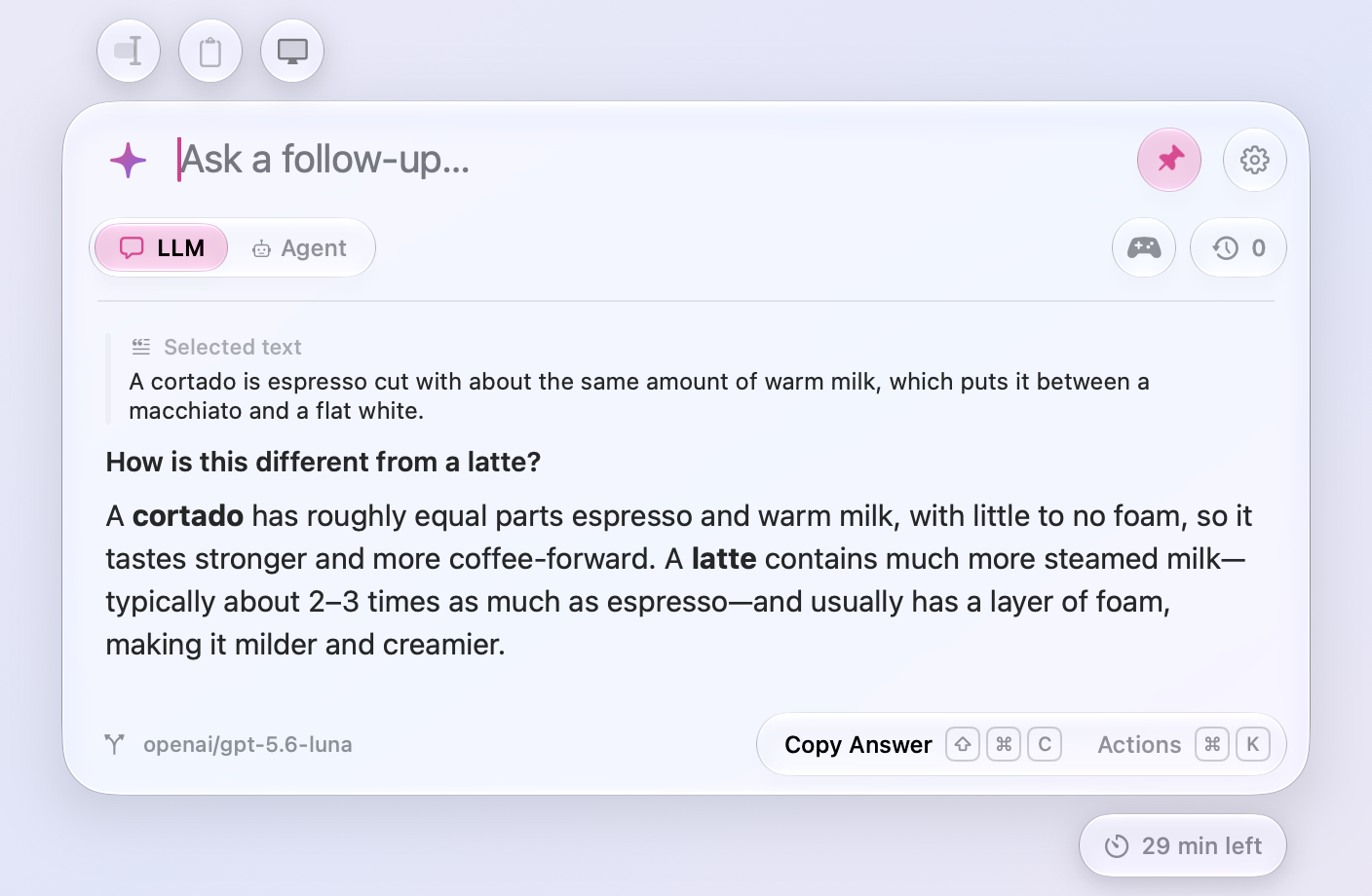
Meraline is a tiny Mac app for quick questions. Press ⌥ Space, type, and the answer streams in a small glass window. Ask a follow-up if you need one. Click away and it waits for you; press Esc to start fresh. Half an hour after the last message, the chat is gone and the next question starts fresh.
There are no chat lists to manage, no saved history, and no projects. Nothing is saved to disk. Pin the window (📌 or ⌘ P) to keep it open while you work in other apps.
What it does
✨ Opens anywhere. A global shortcut brings up the window over whatever you're doing, on any Space or full-screen app. It doesn't steal focus from the app you're in.
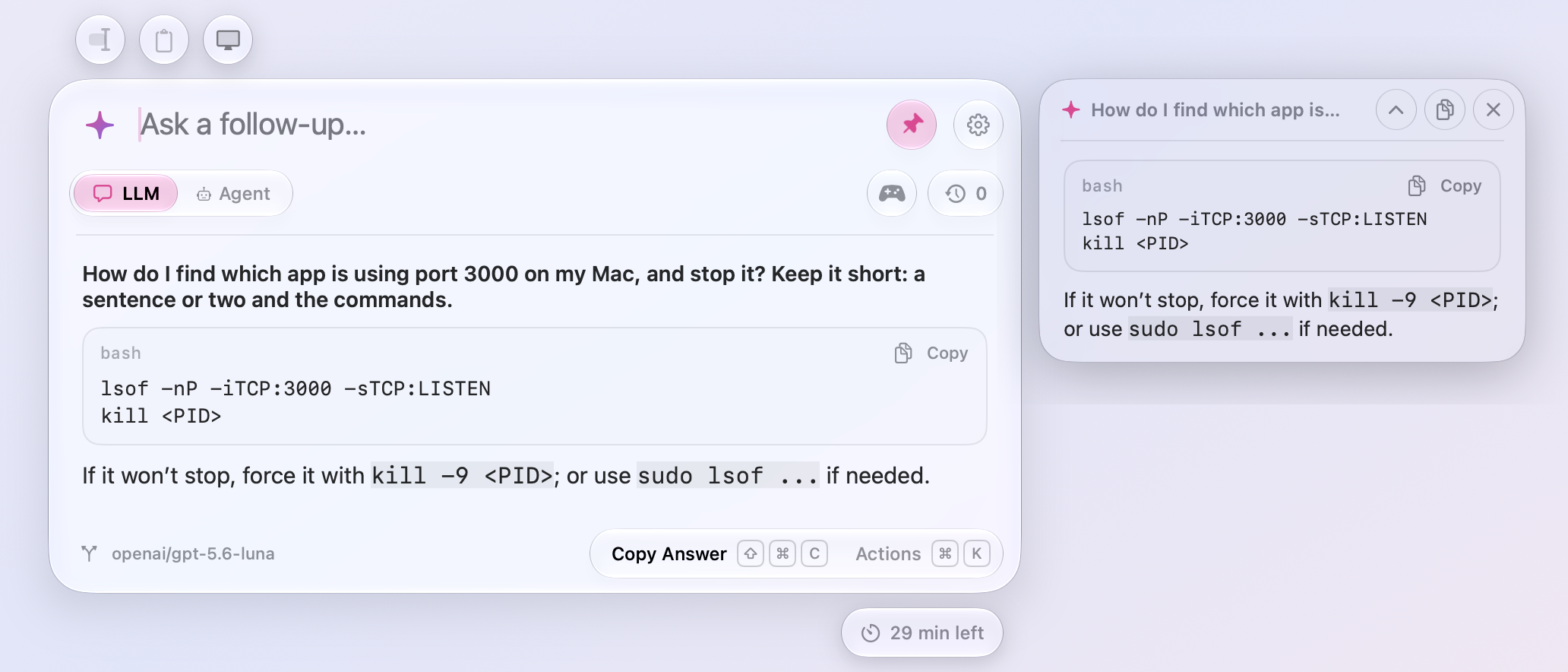
💬 Answers quickly. Replies stream in as they're written, with headings, lists, tables, and links rendered, and code in a box with a Copy button. While a model searches the web or runs a tool, you see what it's doing. While it thinks, Meraline murmurs ("sharpening pencils…", "asking the void…", "consulting the sparkle council…").
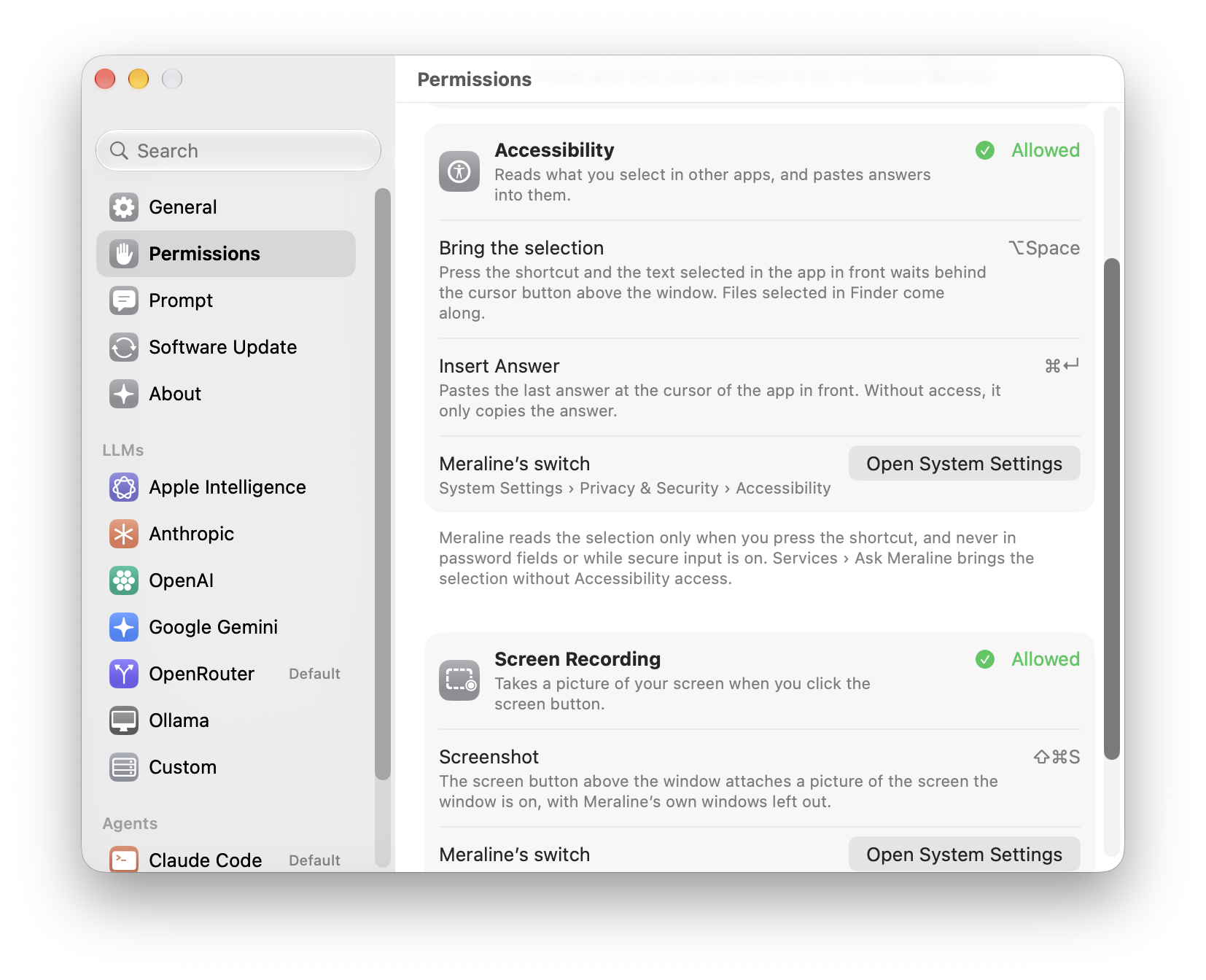
✂️ Knows what you selected. Select text in any app and press ⌥ Space, then click the text cursor above the window: the text comes along as context, so "summarize this" or "what does this mean?" is all you type. It never joins a question until you add it, and texts from several apps can go together. Select files or folders in Finder instead and they're attached: photos for any model, anything for an agent. It needs Accessibility access, which Meraline asks for. Services › Ask Meraline works without it.
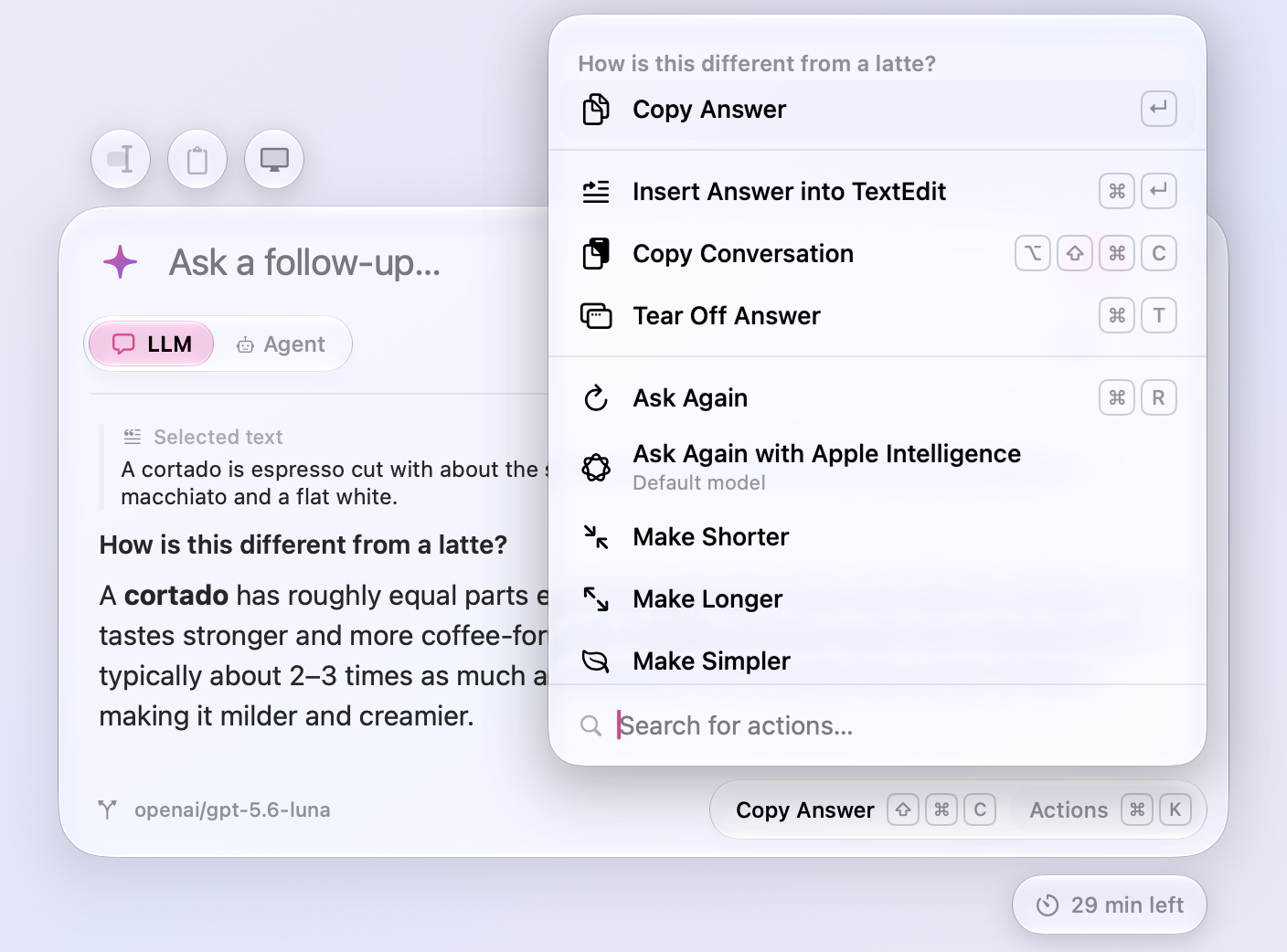
✍️ Puts the answer to work. Actions (⌘ K) under an answer make it shorter, longer, simpler, more concrete, or a bullet list, in place, so the next rewrite or follow-up builds on what you see. ⌘ ↩ closes the window and pastes the answer at the cursor of the app you were in: select a paragraph, ask for it friendlier, press ⌘ ↩, and the new text replaces the old. ⌘ T tears the answer off into a small floating note that stays on screen while you follow it in another app.
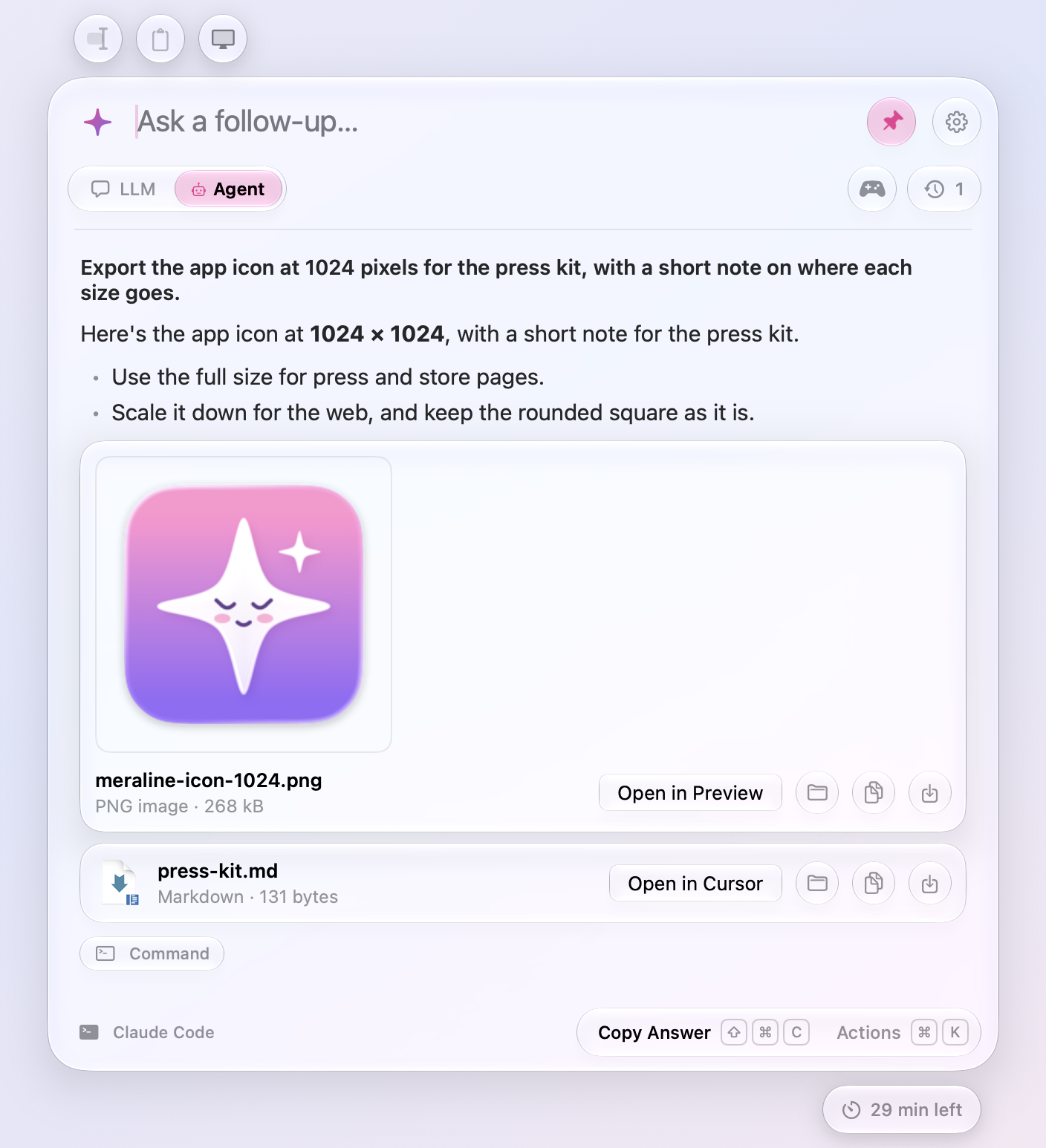
🖼️ Understands images and files. Paste a screenshot or drop an image into the window and ask about it, or use the two buttons above the window: one adds whatever you copied, the other a screenshot of your screen without Meraline in it. Agents take PDFs, spreadsheets, and any other file too, and whole folders: drop a project and ask about it, and the agent works on a copy of it, never on your own. When an agent makes a file for you, it hands it over: the file shows under the answer, ready to open in its app, show in Finder, copy, save to Downloads, or drag anywhere.
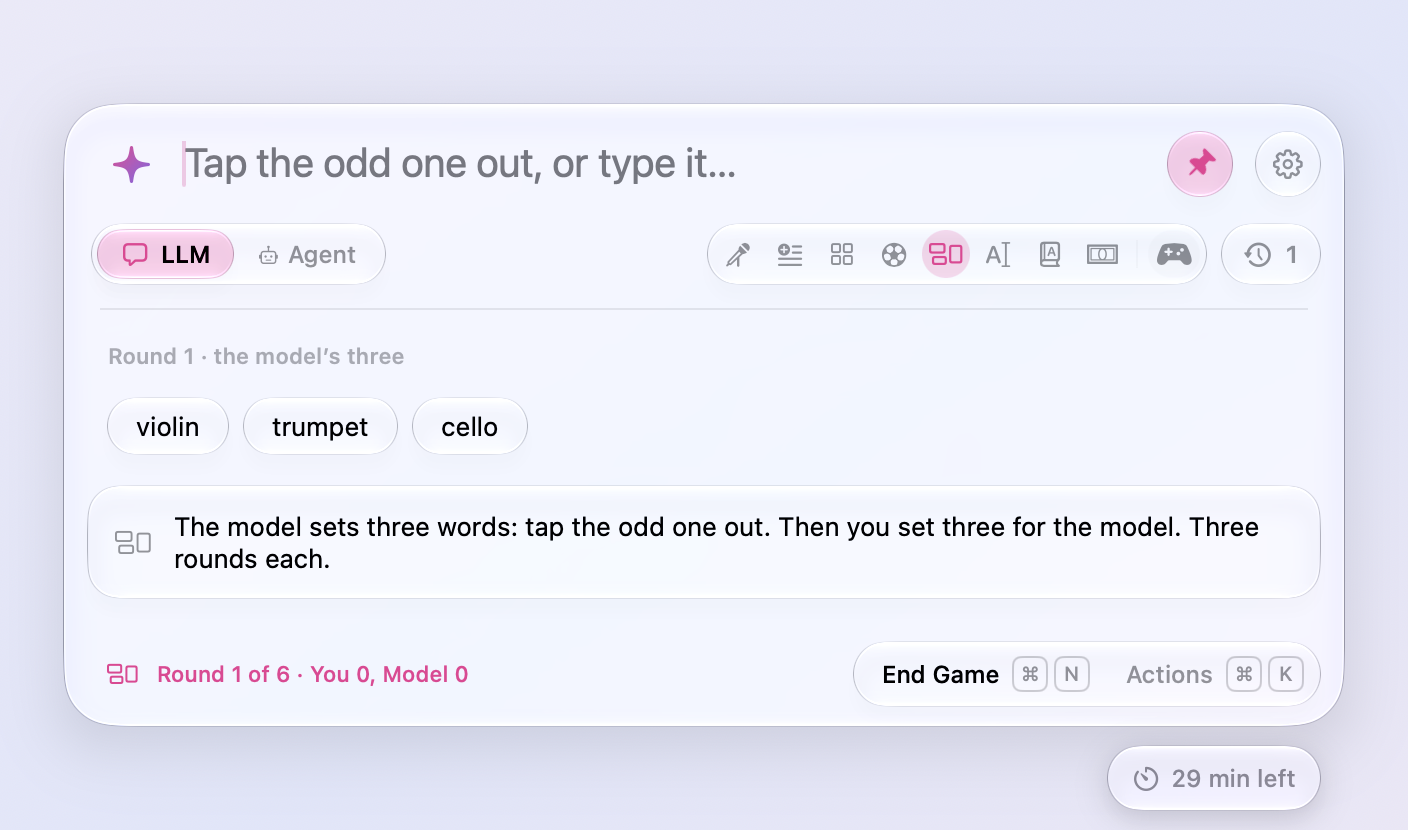
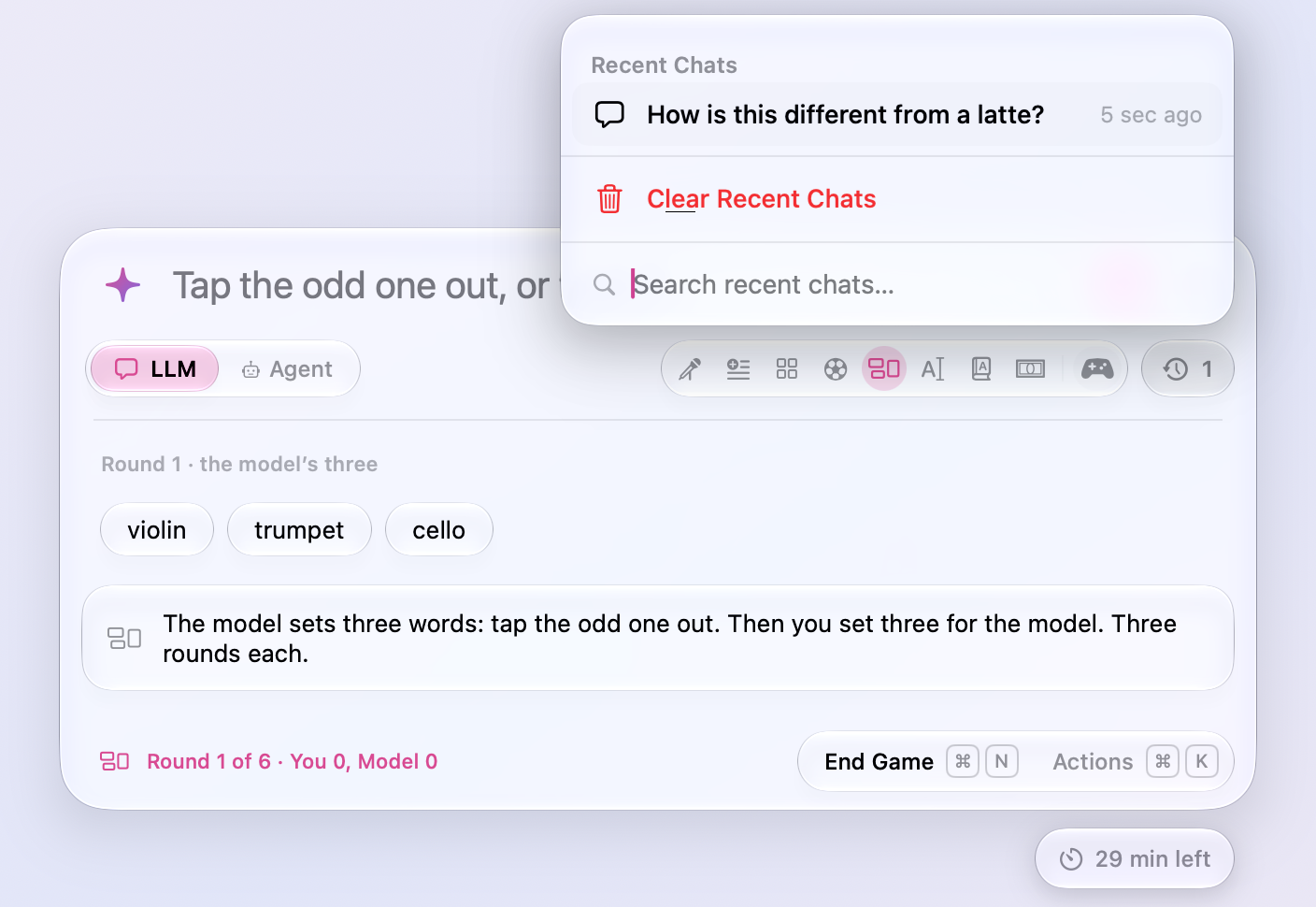
🎲 Plays word games. The controller under the input opens eight quick games against the model: Rhyme Duel, Add-a-Word, Categories, Word Football, Odd One Out, Fix the Typo, Speed Definitions, and Longest Word. Open a round yourself or leave it to the model or the dice, a move that breaks the rules comes back to you instead of costing a turn, and Esc forgets the game like any other chat. When a round ends, Play Again and your tally against the model stay close at hand until you quit.
🍎 Works out of the box. On a Mac with Apple Intelligence, the on-device model built into macOS answers the moment you install. No key, no account, and nothing leaves your Mac.
🔌 Uses the AI you already have. The toggle under the input switches between asking an LLM and asking an agent (⌘ 1 and ⌘ 2). Click the sparkle to pick among that mode's providers you've turned on. The clock under the input keeps the chats you close, with their count on it, until each one's 30 minutes run out. To forget them sooner, clear them from the clock, or shake the window while you drag it.
| Works with | |
|---|---|
| On this Mac | Apple Intelligence, the on-device model in macOS 26 |
| API keys | Anthropic, OpenAI, Google Gemini, OpenRouter |
| Local models | Ollama, LM Studio, or any OpenAI-compatible server |
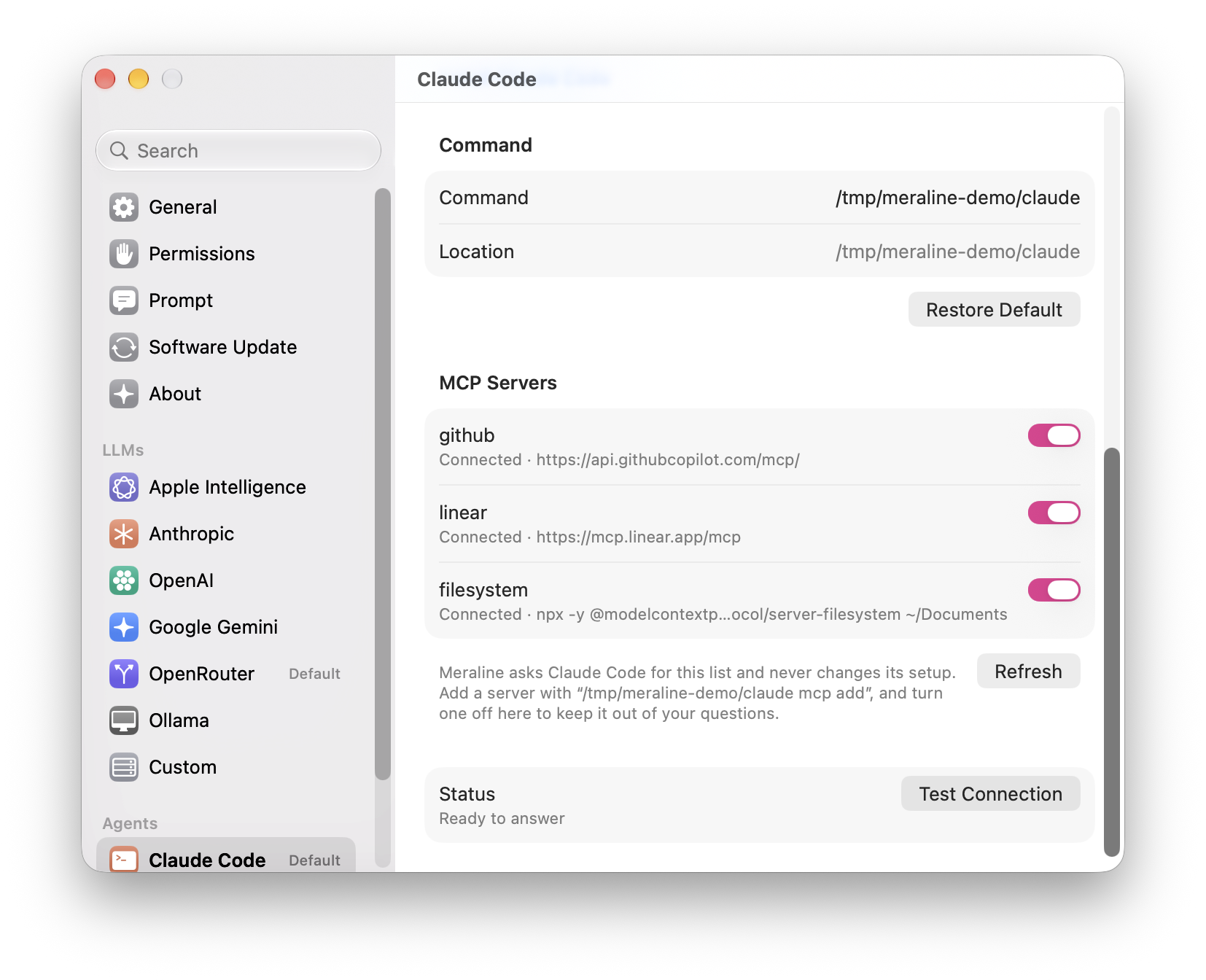
| Command-line agents | Claude Code, Codex, OpenCode, using the account they're signed in to and the MCP servers set up in them |
🔒 Stays private. API keys live in your Keychain. Conversations exist only in memory. OpenAI requests ask not to be stored, and command-line agents run in an empty temporary folder without saving a session. For a question you'd rather not see again, anonymous mode (⇧ ⌘ N) turns the sparkle graphite, in sunglasses, and keeps chats out of Recent Chats. When you do want to keep something, copy the answer or the whole conversation as Markdown.
📊 Shows what you've used. Settings › Usage counts how Meraline is used, by the hour, day, week, month, and year: questions and answers, tokens in and out with a chart, what they cost at OpenRouter's public prices or as Claude Code, OpenCode, and OpenRouter report it, which models and games, what the agents did, what went with your questions, and habits like your busiest hour and longest streak. Numbers only, kept on your Mac, never a word of what was said.
⚙️ Feels at home on a Mac. Settings look like System Settings, the icon follows light and dark mode, and updates install themselves. Settings › Prompt holds every instruction Meraline sends: pick the language answers and games are in (English, Czech, Slovak, and 22 more), give LLMs and agents instructions of their own, or rewrite a game's rules.
|
|
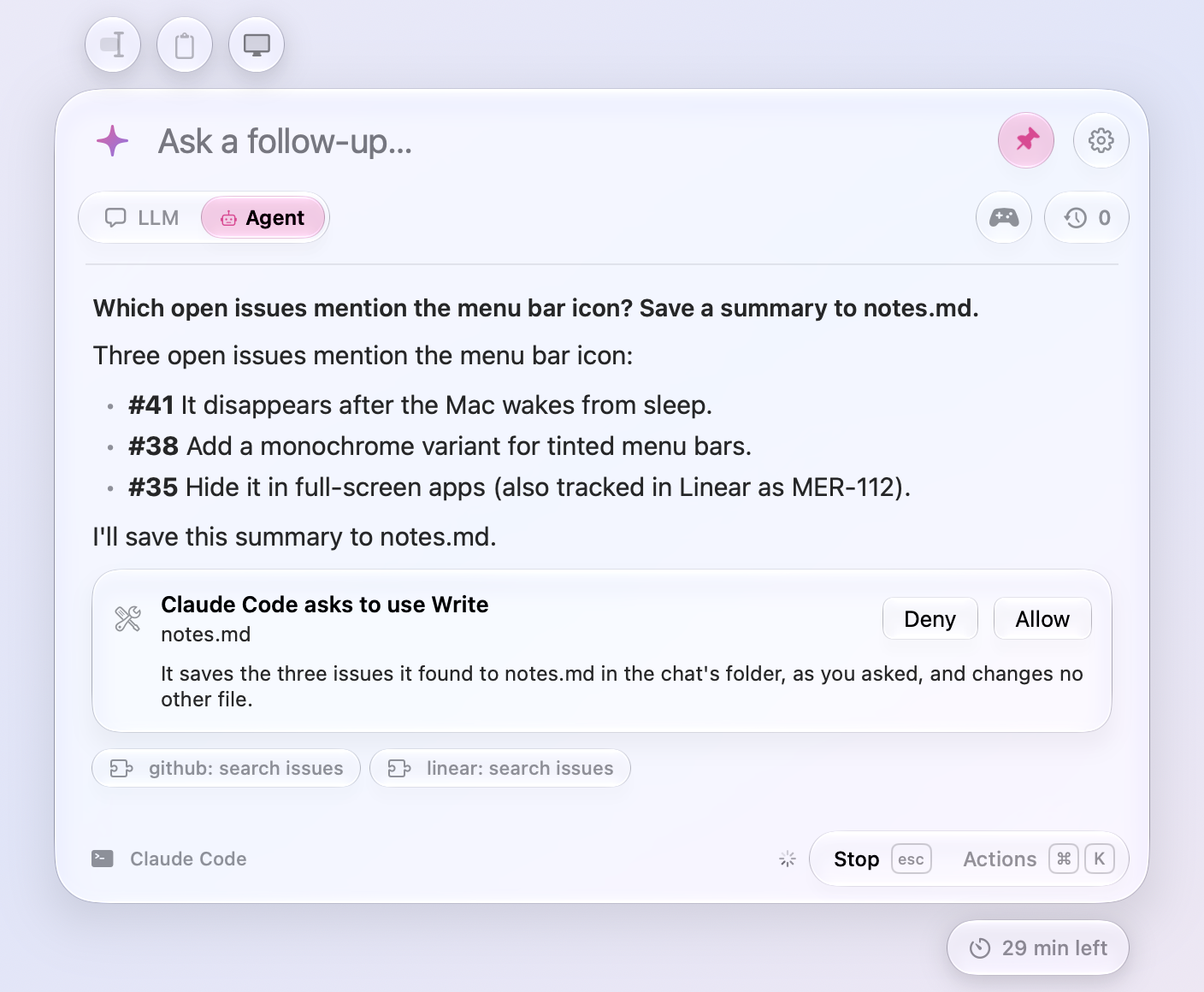
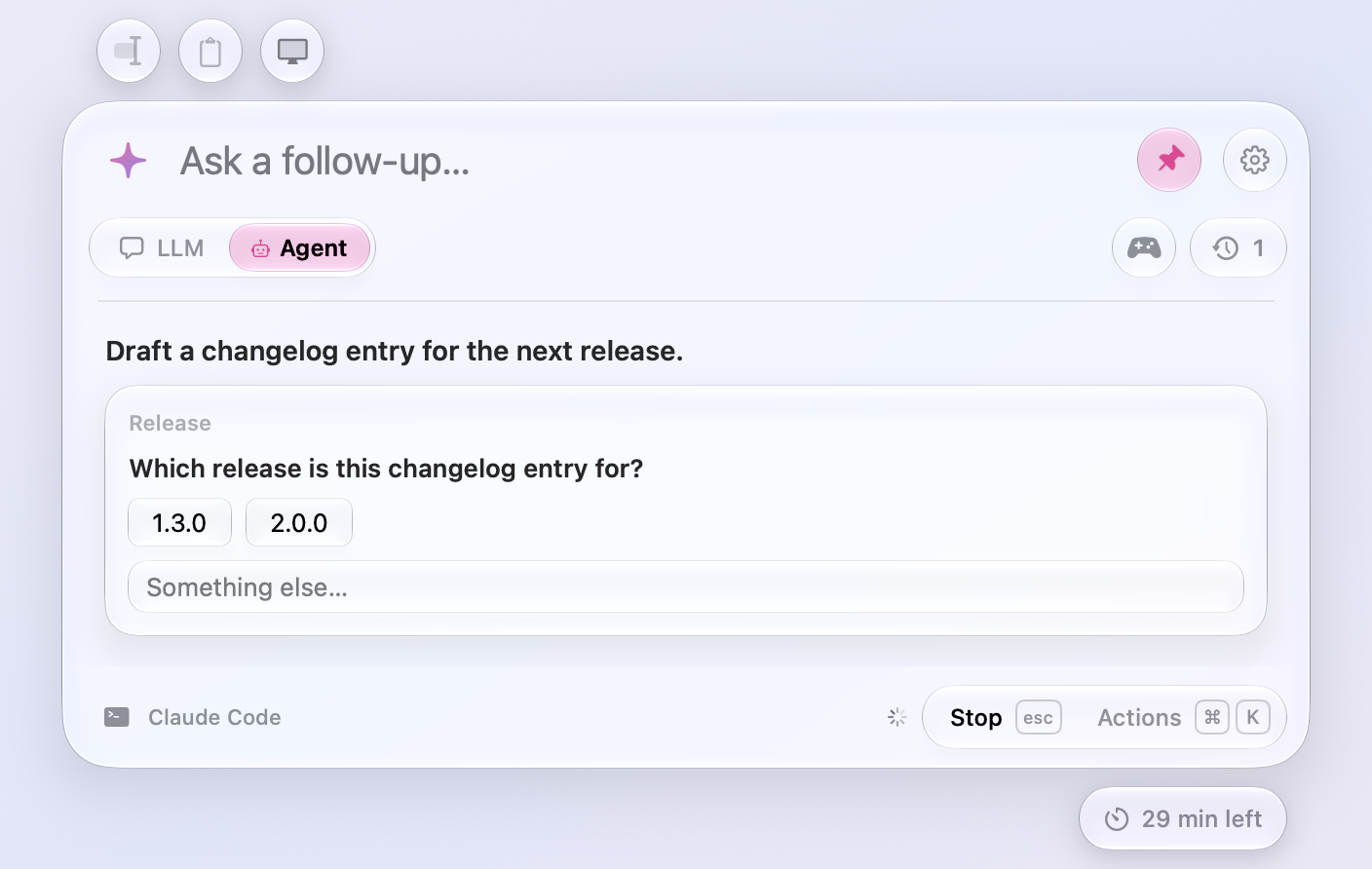
| Agents show the MCP tools they use, ask before writing to the chat's workspace, and say why | An agent's questions come with their choices |
|
|
| Eight word games unfold from the controller, one click each | The clock keeps your recent chats, to reopen or clear |
|
|
| Rewrite an answer in place, or paste it where you were | |
|
|
| Code comes in a box with a Copy button; tear an answer off into a note that stays on screen | |
|
|
| Agents hand over the files they make, ready to open, copy, or save | Every permission in one place, with what it's for |
|
|
| Settings look like System Settings; each agent lists its MCP servers with a switch for each |
Getting started
With Homebrew:
brew install --cask meldiron/tap/meraline
Or download the latest Meraline-<version>.dmg from Releases, open it, and drag Meraline into your Applications folder.
Then open Meraline. A sparkle appears in your menu bar, and the window opens so you can try it. On a Mac with Apple Intelligence turned on, you can ask a question right away. For other models, click the gear button (or press ⌘ ,) and connect a provider: paste an API key, or turn on Ollama, Claude Code, Codex, or OpenCode.
That's it. Press ⌥ Space whenever you have a question.
[!TIP]
ChatGPT, Gemini, Copilot, and Raycast also use ⌥ Space by default, and macOS quietly gives the shortcut to whichever app grabbed it last. The first time Meraline opens, it checks for them and offers another shortcut, such as ⌥ ⇧ Space, to try before you keep it. If Meraline doesn't open later, pick another in Settings › General.
Keyboard shortcuts
| Shortcut | What it does |
|---|---|
| ⌥ Space | Open or close Meraline (change it in Settings) |
| ↩ or ⇥ | Send |
| ⌫ in an empty input | Take out the selected text, then the last attachment |
| ⇧ ⌘ E | Add the text you had selected when you opened the window, or take it out again |
| ⇧ ⌘ V | Add what's on the clipboard, or take it out again |
| ⇧ ⌘ S | Add a screenshot of the screen, without Meraline, or take it out again |
| Esc | Stop the answer, then start a new chat, then close the window |
| ⌘ P | Pin or unpin the window |
| ⌘ K | Actions for the chat: search them, pick one with the arrows and ↩ (the sparkle's panel when no chat is open) |
| ⇧ ⌘ C | Copy the last answer |
| ⌘ ↩ | Close the window and paste the last answer into the app you were in |
| ⌥ ⇧ ⌘ C | Copy the whole conversation as Markdown |
| ⌘ T | Tear the last answer off into a floating note |
| ⌘ R | Ask the last question again; in a game, restart it, or play again once a round is over |
| ⌘ I | Show a hint in a game |
| ⌘ 1 or ⌘ 2 | Ask an LLM or an agent |
| ⌘ N | Start a new chat |
| ⇧ ⌘ ⌫ | Delete the chat, after asking; it skips Recent Chats |
| ⇧ ⌘ O | Show an agent's files in Finder |
| ⌘ O | Open the file an agent handed over |
| ⌘ S | Save the files an agent handed over to Downloads |
| ⇧ ⌘ N | Turn anonymous mode on or off |
| ⌘ , | Open Settings |
Privacy, and how to check it
Meraline is built so you don't have to take its word for any of this.
- No account and no server in between. Questions go straight from your Mac to the provider you chose. Meraline has no backend, no analytics, and no crash reporting. The only other connections are a once-a-day update check against
github.com, which you can turn off in Settings, and the pictures in a release's notes, fetched from GitHub when you open What's New. Watch the traffic with any network monitor and you'll see nothing else. - Nothing on disk. Conversations and games live in memory and are gone when you quit. The preferences file (
defaults read com.meldiron.meraline) holds settings only: shortcut, window placement, which providers are on, and the prompts you changed. - Chats last 30 minutes. Each chat is deleted from memory, with the folder its agent worked in, 30 minutes after its last message, in the window or in Recent Chats. The capsule under the window's bottom right counts down, turning pink in the last 5 minutes; click it to give the chat 30 minutes again. Start a new chat (⌘ N or Esc) and the last one goes to Recent Chats with the time it has left, which reopening it doesn't change, or is forgotten if it was anonymous.
- Keys in the Keychain. API keys are stored as Keychain items under the service
com.meldiron.meraline.api-keys, where Keychain Access can show and delete them. They never appear in preferences, logs, or diagnostics. - Command-line agents stay in charge of their own sign-in. Meraline runs the unmodified
claude,codex, andopencodecommands with session persistence off. It never reads or copies their tokens. The MCP servers set up in an agent are available to it here too, as the agent reports them; Settings › Agents lists them and lets you turn any of them off for Meraline alone, without touching the agent's own configuration. Each chat gives its agent a scratch folder in the temporary directory, holding only copies of the files and folders you attach, never your originals, and what the agent writes there. It is removed when the chat's time runs out, the chat is forgotten, or Meraline quits, and it takes in at most 20,000 files and folders. A file the agent hands you stays in that folder until you copy or save it, and it's marked as downloaded before it leaves for another app, so macOS checks any app or program in it before it first runs. Open never runs anything: scripts open as text, and apps are only shown in Finder. When Claude Code wants to write there, or has a question of its own, Meraline shows it and waits for you; Why? has it say in one line why it wants to. - The selection is read only when you ask. With Accessibility access, Meraline reads the selected text of the app in front, or which files are selected in Finder, when you press the shortcut, and at no other time. The text stays in memory, out of your question, unless you click the text cursor to add it. It skips password fields and secure input. When an app doesn't share its selection directly, Meraline presses that app's Copy command (or ⌘C, in an app like Zed that describes nothing but its window) and puts back what was on your clipboard straight away. Turn it off in Settings › General.
- Screenshots only when you click. The screen button takes a single picture of the display the window is on, with Meraline's own windows left out, and attaches it to your next question. It needs Screen Recording access, which macOS asks you for, but Meraline never records: nothing is captured until you click, and the picture lives in memory with the chat. The clipboard button reads your clipboard only when you click it; while the window is open, Meraline only checks what kind of thing is on it, to show whether there's something to add. Passwords that password managers mark as concealed are never read.
- Every access in one list. Settings › Permissions shows Accessibility and Screen Recording, the features each one turns on, and whether macOS allows it right now, with a button to ask for it and one that opens its page in System Settings.
- Off screen shares, if you want. Hide from Screen Sharing, in the sparkle's panel or Settings › General, asks macOS to leave the window out of screen sharing, recordings, and screenshots. It's off unless you turn it on. Apps that capture the whole display, such as QuickTime, can still show the window, so try it with yours first.
- On-device means on-device. Apple Intelligence answers come from the model inside macOS, and Ollama's from a model on your Mac. Nothing is sent anywhere, unless you pick one of Ollama's cloud models or point it at another machine.
- It's all open source. Search the code for
URLSession,Process, andKeychainto see every place Meraline talks to anything.
Automate it
Other apps and scripts can open Meraline through the meraline:// URL scheme, which makes it easy to wire up in Shortcuts, Raycast, or a shell alias:
| URL | What it does |
|---|---|
meraline://ask?text=… |
Opens the window with the question filled in |
meraline://ask?text=…&send=1 |
Fills it in and sends it |
meraline://ask?selection=… |
Opens the window with text to ask about, as if you had selected it; add text= and send=1 to ask right away |
meraline://ask?clipboard=1 |
Adds what's on the clipboard, as the clipboard button does |
meraline://ask?screen=1 |
Adds a screenshot of the screen the window opens on, as the screen button does. With send=1, the question waits for it, and isn't sent if it can't be taken |
meraline://ask?agent=1 |
Asks an agent; agent=0 asks an LLM. Works with everything above |
meraline://new |
Starts a new chat and opens the window |
meraline://play |
Opens the window with the games showing |
meraline://play?game=oddOneOut |
Starts a game: rhymeDuel, addAWord, categories, wordFootball, oddOneOut, fixTheTypo, speedDefinitions, or longestWord. Its title works too, as in odd-one-out |
meraline://mode?agent=1 |
Switches to Agent and opens the window; agent=0 switches to LLM, and meraline://mode alone to the other mode |
meraline://settings |
Opens Settings |
meraline://settings?pane=claudeCode |
Opens Settings on a page: general, prompt, permissions, usage, updates, about, or a provider such as anthropic, apple, or codex |
open "meraline://ask?text=$(python3 -c 'import urllib.parse,sys; print(urllib.parse.quote(sys.argv[1]))' 'Explain CRDTs in one paragraph')&send=1"
open "meraline://ask?text=What%27s%20wrong%20here%3F&screen=1&clipboard=1&send=1"
Updates and beta builds
Meraline checks for updates once a day and installs them quietly in the background; a capsule under the window, the menu bar menu, and Settings › Software Update show when one is ready. To try builds before they are released, switch Settings › Software Update › Update channel to Beta. After an update, a What's New capsule under the window opens the release notes, pictures included.
Something off? Settings › About › Copy Diagnostics gives you a report to paste into a bug report. It has no keys, questions, or answers in it. If Meraline ever quits unexpectedly, the next time you open the window it offers the same report, with where it crashed, once.
Build it yourself
You'll need Xcode 26 and XcodeGen. No Apple Developer account is needed to build and run.
brew install xcodegen
git clone https://github.com/Meldiron/meraline.git
cd meraline
scripts/dev_run.sh     # build and launch
scripts/test.sh        # run the tests (add --e2e to also run the installed command-line agents)
xcodegen generate followed by open Meraline.xcodeproj gets you into Xcode. CONTRIBUTING.md has the rest; Meraline is MIT licensed.
For maintainers
Every push to main and every pull request runs the tests in GitHub Actions and builds a preview of the installer, attached to the run as an artifact.
To ship a new version, push a tag:
git tag v1.0.1
git push origin v1.0.1
The Release workflow runs scripts/release.sh: it builds the app with the tag's version, signs it with the Developer ID certificate, notarizes and staples it, wraps it in a styled disk image that is signed and notarized in its own right, signs the update for Sparkle, and publishes a GitHub release with the .dmg, the .zip, appcast.xml, debug symbols, and checksums. Installed copies check https://github.com/Meldiron/meraline/releases/latest/download/appcast.xml for updates once a day.
Release notes come from CHANGELOG.md when the version has an entry there, and from the commits since the previous tag otherwise.
docs/releasing.md covers the pipeline step by step, the disk image design and how to edit it, running a release on your own Mac, and the secrets the workflow needs.
Yorumlar (0)
Yorum birakmak icin giris yap.
Yorum birakSonuc bulunamadi