mypilot
Health Gecti
- License — License: Apache-2.0
- Description — Repository has a description
- Active repo — Last push 0 days ago
- Community trust — 11 GitHub stars
Code Uyari
- network request — Outbound network request in cloudflare-push-relay/src/index.ts
- crypto private key — Private key handling in cloudflare-push-relay/src/index.ts
- network request — Outbound network request in cloudflare-worker/src/demo-gateway.ts
- network request — Outbound network request in cloudflare-worker/src/index.ts
Permissions Gecti
- Permissions — No dangerous permissions requested
This skill acts as a remote interaction console for Claude Code. It captures local CLI hook events and pushes them in real-time via a Cloudflare gateway and WebSocket to your mobile devices (iPhone, iPad, Apple Watch, or Android), allowing you to monitor and remotely approve actions.
Security Assessment
The tool handles sensitive data and operational control. It routes Claude Code hooks through an outbound network request to a Cloudflare worker relay, which then triggers Apple Push Notification services (APNs). The code involves private key handling for these push notifications. While the architecture relies on external network relays to function, the documentation explicitly notes that WebSocket communications are protected with end-to-end AES-256-GCM encryption. It does not request inherently dangerous system permissions.
Overall Risk: Medium. You are trusting a third-party relay to handle your CLI event data, though the encryption mitigates the risk of the relay reading your plaintext prompts.
Quality Assessment
The project appears active and well-maintained, with the latest push occurring just today. It uses the permissive Apache-2.0 license and features a detailed README with clear instructions. It has a small but present community footprint with 11 GitHub stars.
Verdict
Use with caution — the end-to-end encryption is a strong security feature, but developers should be comfortable routing their CLI event data through external Cloudflare workers.
MyPilot - Remote interaction console for Claude Code. 实时推送 Hook 事件到 iPhone/iPad/Apple Watch,支持远程审批与交互。

下载 MyPilot — iOS 版已在 App Store 海外各大区上架(中国大陆区暂不可用)。大陆用户可通过 TestFlight 体验。Android 版可在 GitHub Releases 下载 APK。
在线体验 — 无需部署网关,下载 App 后直接扫描 Demo Gateway 的二维码即可体验完整功能。
MyPilot 接收 Claude Code 的 Hook 事件并通过 WebSocket 实时推送到你的手机。在接管模式下,你可以直接在手机上审批权限、回答问题、提交 Prompt。
Apple Watch 推送 — 无需额外配置,APNs 推送通知自动镜像到配对的 Apple Watch。蜂窝版手表即使远离 iPhone 也能独立接收推送。手腕上的手表让你随时掌握 Claude Code 运行状态。
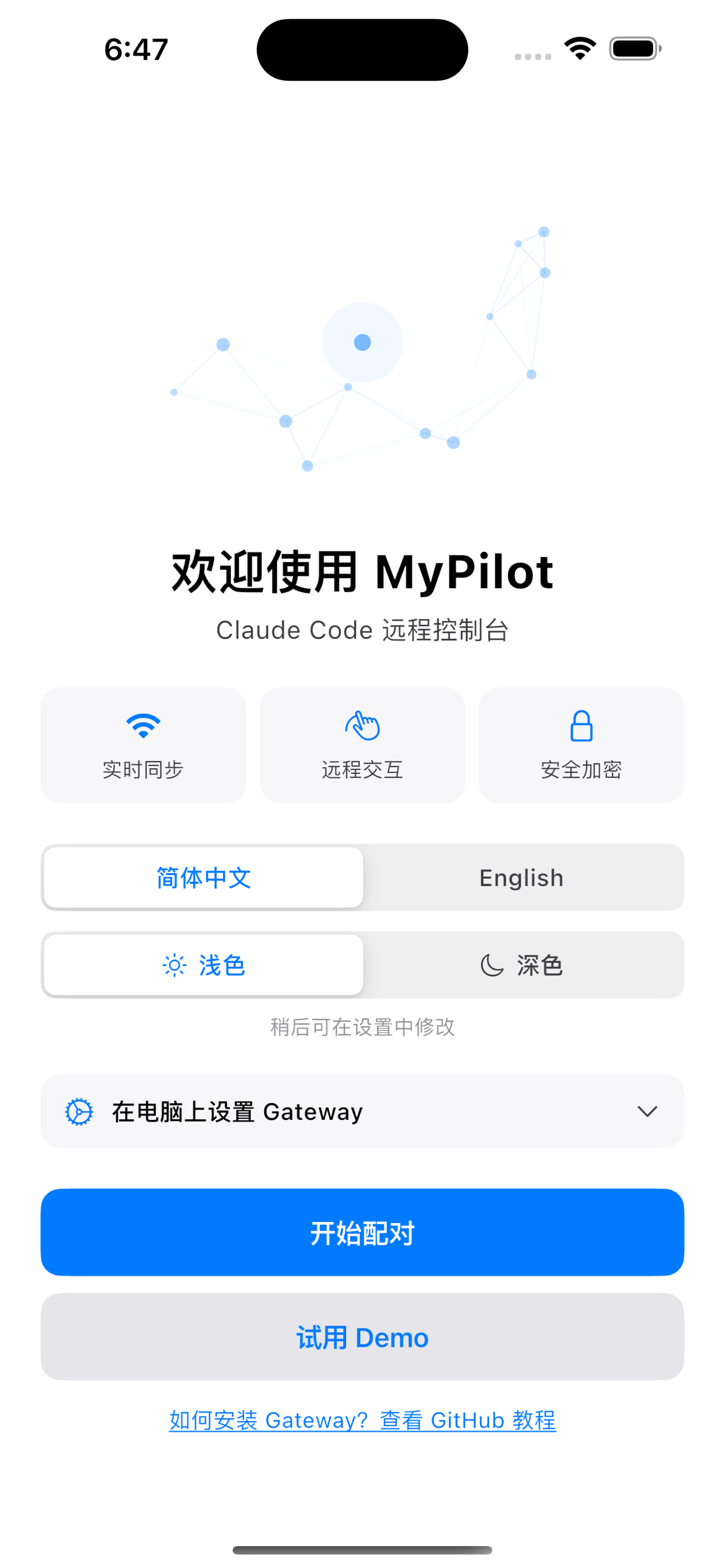
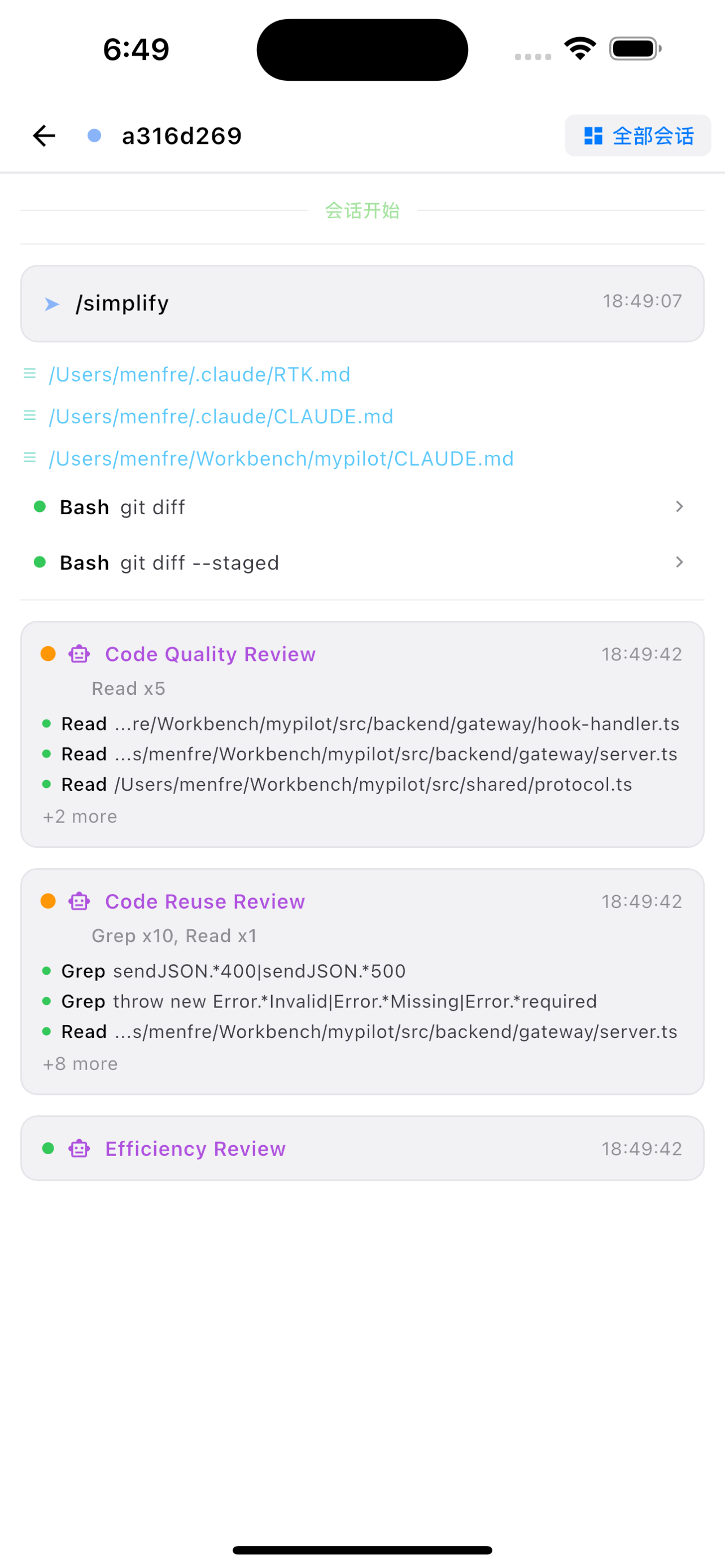
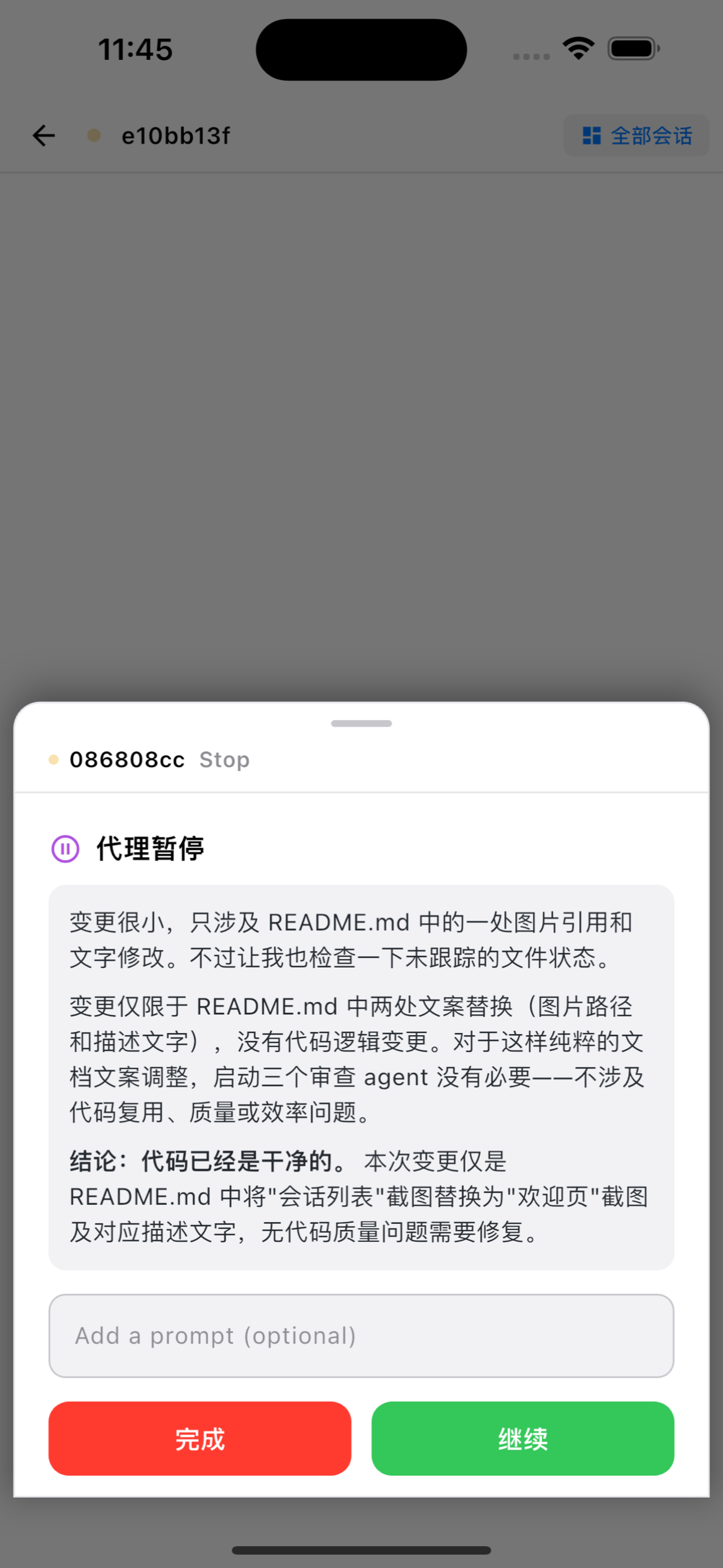
iPhone — 欢迎页 · 实时事件 · 接管模式
环境要求
- Node.js >= 20
- 客户端:MyPilot iOS App(App Store 海外区)或 TestFlight(中国大陆区)或 Android APK
- Claude Code CLI — 安装指南
快速开始
# 1. 安装
npm install -g mypilot

# 2. 配置 Claude Code Hooks
mypilot init-hooks

# 3. 启动网关(后台运行)
mypilot start
用 iPhone 上的 MyPilot 应用扫描终端中显示的二维码。二维码包含网关地址和加密密钥,连接所需的一切信息都在其中。
架构
Claude Code ──(command hook / curl)──▶ 网关 (:16321) ──(AES-256-GCM WebSocket)──▶ MyPilot App (设备 A)
                                        │  ├── POST /hook         ← Hook 事件接口       └──▶ MyPilot App (设备 B)
                                        │  ├── GET  /pair         ← 密钥验证
                                        │  └── WS   /ws-gateway   ← 加密 WebSocket(多设备)
                                        │
                                        └──▶ Push Relay ──(APNs)──▶ MyPilot App(iPhone / Apple Watch 推送通知)
网关与 MyPilot 应用之间的所有 WebSocket 通信均使用 AES-256-GCM 端到端加密,密钥通过二维码分发。同一密钥同时用于连接认证和消息加密,无需单独的 Token。
推送通知
当客户端断开 WebSocket 连接后,Gateway 将新事件转发至 Push Relay → APNs → 设备。
推送触发条件:设备离线(WebSocket 未连接)且距上次在线不超过 24 小时,Gateway 自动推送。设备重新上线后,Gateway 停止推送,改为 WebSocket 实时传输。
Apple Watch 推送逻辑:
- iOS 注册 APNs push token 时,系统自动在配对的 Apple Watch 上启用通知镜像,无需单独为手表注册 token
- APNs 推送通过系统级镜像机制同时送达 iPhone 和配对的手表
- GPS 版手表通过蓝牙/Wi-Fi 从 iPhone 间接接收;蜂窝版手表在远离 iPhone 时通过内置 eSIM 独立接收 APNs
- 用户在手表上可直接查看通知内容,实时掌握 Claude Code 运行状态,无需掏出手机
安全与可靠性
- 端到端加密 — AES-256-GCM,每条消息使用独立的随机 12 字节 IV 和 16 字节认证标签;网关在没有密钥的情况下无法读取明文,任何篡改都会通过认证标签被检测
- 密钥认证 — 客户端通过 WebSocket URL 中的预共享密钥进行身份验证
- 多设备支持 — 可同时连接多台 iPhone/iPad/Android 设备;每台设备获得唯一的
deviceId,接收所有广播,并可独立发送命令;同设备重连会无缝替换旧连接 - Apple Watch 推送 — APNs 推送通知同步送达配对的 Apple Watch,无需额外配置;蜂窝版手表可在远离 iPhone 时独立接收
- 心跳检测 — 30 秒间隔的 keep-alive ping 自动检测每台设备的失效连接
- 事件持久化 — 所有事件以 JSONL 格式记录到
~/.mypilot/logs/ - 断线恢复 — 客户端重连后可从上次收到的序列号继续接收,每台设备的离线消息缓冲区最多保存 200 条事件
CLI 命令
mypilot gateway                        # 启动网关服务(前台运行)
mypilot start                          # 后台启动网关
mypilot stop                           # 停止后台网关
mypilot restart                        # 重启网关(stop + start)
mypilot status                         # 查看网关状态(PID、端口)
mypilot init-hooks                     # 配置 Claude Code Hooks(自动合并到 ~/.claude/settings.json)
mypilot pair-info                      # 显示配对信息(IP + 二维码),用于重新连接
mypilot link list                      # 列出所有通信连接
mypilot link add <lan|tunnel> <url> [--label <label>]  # 添加连接(LAN 直连或隧道)
mypilot link remove <id>               # 移除连接
mypilot link enable <id>               # 启用连接
mypilot link disable <id>              # 禁用连接
mypilot push status                    # 查看推送通知状态
mypilot push setup <relay-url> <api-key>  # 配置推送通知
mypilot push disable                   # 禁用推送通知
Hook 配置
运行 mypilot init-hooks 自动配置所有必需的 Hooks。该命令会:
- 保留已有的 Hooks 配置,仅添加缺失的条目
- 修改
~/.claude/settings.json前提示确认 - 同时配置阻塞事件(带超时)和信息事件
如果你希望手动配置 Hooks,请在 ~/.claude/settings.json 的 hooks 字段中添加:
{
  "hooks": {
    "PreToolUse": [
      { "matcher": "", "hooks": [{ "type": "command", "command": "curl --noproxy localhost --noproxy 127.0.0.1 -s -X POST 'http://127.0.0.1:16321/hook' -H 'Content-Type: application/json' -d @-", "timeout": 999999 }] }
    ],
    "PostToolUse": [
      { "matcher": "", "hooks": [{ "type": "command", "command": "curl --noproxy localhost --noproxy 127.0.0.1 -s -X POST 'http://127.0.0.1:16321/hook' -H 'Content-Type: application/json' -d @-" }] }
    ],
    "PostToolUseFailure": [
      { "matcher": "", "hooks": [{ "type": "command", "command": "curl --noproxy localhost --noproxy 127.0.0.1 -s -X POST 'http://127.0.0.1:16321/hook' -H 'Content-Type: application/json' -d @-" }] }
    ],
    "PermissionRequest": [
      { "matcher": "", "hooks": [{ "type": "command", "command": "curl --noproxy localhost --noproxy 127.0.0.1 -s -X POST 'http://127.0.0.1:16321/hook' -H 'Content-Type: application/json' -d @-", "timeout": 999999 }] }
    ],
    "UserPromptSubmit": [
      { "matcher": "", "hooks": [{ "type": "command", "command": "curl --noproxy localhost --noproxy 127.0.0.1 -s -X POST 'http://127.0.0.1:16321/hook' -H 'Content-Type: application/json' -d @-", "timeout": 999999 }] }
    ],
    "Elicitation": [
      { "matcher": "", "hooks": [{ "type": "command", "command": "curl --noproxy localhost --noproxy 127.0.0.1 -s -X POST 'http://127.0.0.1:16321/hook' -H 'Content-Type: application/json' -d @-", "timeout": 999999 }] }
    ],
    "Stop": [
      { "matcher": "", "hooks": [{ "type": "command", "command": "curl --noproxy localhost --noproxy 127.0.0.1 -s -X POST 'http://127.0.0.1:16321/hook' -H 'Content-Type: application/json' -d @-", "timeout": 999999 }] }
    ],
    "SubagentStop": [
      { "matcher": "", "hooks": [{ "type": "command", "command": "curl --noproxy localhost --noproxy 127.0.0.1 -s -X POST 'http://127.0.0.1:16321/hook' -H 'Content-Type: application/json' -d @-", "timeout": 999999 }] }
    ],
    "SessionStart": [
      { "matcher": "", "hooks": [{ "type": "command", "command": "curl --noproxy localhost --noproxy 127.0.0.1 -s -X POST 'http://127.0.0.1:16321/hook' -H 'Content-Type: application/json' -d @-" }] }
    ],
    "SessionEnd": [
      { "matcher": "", "hooks": [{ "type": "command", "command": "curl --noproxy localhost --noproxy 127.0.0.1 -s -X POST 'http://127.0.0.1:16321/hook' -H 'Content-Type: application/json' -d @-" }] }
    ],
    "InstructionsLoaded": [
      { "matcher": "", "hooks": [{ "type": "command", "command": "curl --noproxy localhost --noproxy 127.0.0.1 -s -X POST 'http://127.0.0.1:16321/hook' -H 'Content-Type: application/json' -d @-" }] }
    ],
    "Notification": [
      { "matcher": "", "hooks": [{ "type": "command", "command": "curl --noproxy localhost --noproxy 127.0.0.1 -s -X POST 'http://127.0.0.1:16321/hook' -H 'Content-Type: application/json' -d @-" }] }
    ],
    "SubagentStart": [
      { "matcher": "", "hooks": [{ "type": "command", "command": "curl --noproxy localhost --noproxy 127.0.0.1 -s -X POST 'http://127.0.0.1:16321/hook' -H 'Content-Type: application/json' -d @-" }] }
    ],
    "StopFailure": [
      { "matcher": "", "hooks": [{ "type": "command", "command": "curl --noproxy localhost --noproxy 127.0.0.1 -s -X POST 'http://127.0.0.1:16321/hook' -H 'Content-Type: application/json' -d @-" }] }
    ],
    "PermissionDenied": [
      { "matcher": "", "hooks": [{ "type": "command", "command": "curl --noproxy localhost --noproxy 127.0.0.1 -s -X POST 'http://127.0.0.1:16321/hook' -H 'Content-Type: application/json' -d @-" }] }
    ],
    "ConfigChange": [
      { "matcher": "", "hooks": [{ "type": "command", "command": "curl --noproxy localhost --noproxy 127.0.0.1 -s -X POST 'http://127.0.0.1:16321/hook' -H 'Content-Type: application/json' -d @-" }] }
    ],
    "CwdChanged": [
      { "matcher": "", "hooks": [{ "type": "command", "command": "curl --noproxy localhost --noproxy 127.0.0.1 -s -X POST 'http://127.0.0.1:16321/hook' -H 'Content-Type: application/json' -d @-" }] }
    ],
    "FileChanged": [
      { "matcher": "", "hooks": [{ "type": "command", "command": "curl --noproxy localhost --noproxy 127.0.0.1 -s -X POST 'http://127.0.0.1:16321/hook' -H 'Content-Type: application/json' -d @-" }] }
    ],
    "TaskCreated": [
      { "matcher": "", "hooks": [{ "type": "command", "command": "curl --noproxy localhost --noproxy 127.0.0.1 -s -X POST 'http://127.0.0.1:16321/hook' -H 'Content-Type: application/json' -d @-" }] }
    ],
    "TaskCompleted": [
      { "matcher": "", "hooks": [{ "type": "command", "command": "curl --noproxy localhost --noproxy 127.0.0.1 -s -X POST 'http://127.0.0.1:16321/hook' -H 'Content-Type: application/json' -d @-" }] }
    ],
    "TeammateIdle": [
      { "matcher": "", "hooks": [{ "type": "command", "command": "curl --noproxy localhost --noproxy 127.0.0.1 -s -X POST 'http://127.0.0.1:16321/hook' -H 'Content-Type: application/json' -d @-" }] }
    ],
    "ElicitationResult": [
      { "matcher": "", "hooks": [{ "type": "command", "command": "curl --noproxy localhost --noproxy 127.0.0.1 -s -X POST 'http://127.0.0.1:16321/hook' -H 'Content-Type: application/json' -d @-" }] }
    ],
    "WorktreeCreate": [
      { "matcher": "", "hooks": [{ "type": "command", "command": "curl --noproxy localhost --noproxy 127.0.0.1 -s -X POST 'http://127.0.0.1:16321/hook' -H 'Content-Type: application/json' -d @-" }] }
    ],
    "WorktreeRemove": [
      { "matcher": "", "hooks": [{ "type": "command", "command": "curl --noproxy localhost --noproxy 127.0.0.1 -s -X POST 'http://127.0.0.1:16321/hook' -H 'Content-Type: application/json' -d @-" }] }
    ],
    "PreCompact": [
      { "matcher": "", "hooks": [{ "type": "command", "command": "curl --noproxy localhost --noproxy 127.0.0.1 -s -X POST 'http://127.0.0.1:16321/hook' -H 'Content-Type: application/json' -d @-" }] }
    ],
    "PostCompact": [
      { "matcher": "", "hooks": [{ "type": "command", "command": "curl --noproxy localhost --noproxy 127.0.0.1 -s -X POST 'http://127.0.0.1:16321/hook' -H 'Content-Type: application/json' -d @-" }] }
    ]
  }
}
带有 timeout: 999999 的事件为阻塞事件,可能需要用户交互。详见 Hook 文档。
工作模式
旁观模式(默认)
所有 Hook 事件实时推送到应用,事件立即返回 {},不影响 Claude Code 运行。
接管模式
需要用户交互的事件(PermissionRequest、Stop、Elicitation)会阻塞,等待你在 MyPilot 应用中响应。断开连接后自动恢复为旁观模式。
多台设备同时连接时,接管权互斥——同一时间只有一个设备能持有接管权。其他设备发起接管时会自动抢占,原设备回到旁观模式。
配对
启动网关时,终端会显示二维码。打开 MyPilot 应用扫描即可连接。
如需重新连接(例如应用已关闭),运行:
mypilot pair-info
此命令会显示配对二维码和连接详情(IP、端口、密钥),无需重启网关。
NAT 穿透
如果你的 iPhone 不在同一局域网(例如使用了 frp、ngrok、Cloudflare Tunnel 等隧道服务),请添加隧道连接:
mypilot link add tunnel wss://tunnel.example.com/ws-gateway --label "My Tunnel"
二维码将自动包含隧道地址,使 iOS 应用能够通过隧道连接。
Docker
docker compose build
# 设置 LAN_IP 为本机局域网 IP(iPhone 必须在同一网络)
LAN_IP=192.168.x.x docker compose up -d
LAN_IP 变量指定网关在二维码中广播的 IP 地址。若不设置,二维码可能包含 Docker 内部不可达的地址。
开发
npm install
npm run dev              # tsx 开发服务器(热重载)
npm run stop:dev         # 停止开发服务器
npm run restart:dev      # 重启开发服务器
npm run build            # tsc 编译
npm run typecheck        # 仅类型检查
npm test                 # vitest 测试

# Docker
npm run docker:build     # 构建 Docker 镜像
npm run docker:up        # 启动容器(自动检测 LAN_IP)
npm run docker:down      # 停止容器
npm run docker:restart   # 重新构建并重启
故障排除
| 问题 | 解决方案 |
|---|---|
| 网关无法启动 | 检查是否已在运行:mypilot status。必要时终止残留进程。 |
| 二维码无法扫描 | 确保 iPhone 和电脑在同一 WiFi 网络。尝试 mypilot pair-info 获取新的二维码。 |
| 应用无法连接 | 检查防火墙设置,确保本机 16321 端口开放。 |
| Hook 未触发 | 检查 ~/.claude/settings.json 中的配置。运行 mypilot init-hooks 重新配置。 |
| 二维码中 IP 不正确 | 设置 LAN_IP 环境变量,或启动网关后运行 mypilot pair-info。远程访问请使用 mypilot link add tunnel <url> 添加隧道连接。 |
| App 问题或建议 | 提交 Issue — 网关和 iOS App 的问题与建议均欢迎在此反馈。 |
数据目录
~/.mypilot/
├── key              # AES-256-GCM 加密密钥
├── gateway.pid      # 后台模式的 PID 文件
├── push.json        # 推送通知配置
├── links.json       # 通信链接配置
├── gateway-state.json  # 网关状态(模式、接管权、设备)
└── logs/
    └── events-YYYY-MM-DD.jsonl   # 按天存储的事件日志
许可证
Yorumlar (0)
Yorum birakmak icin giris yap.
Yorum birakSonuc bulunamadi