agentic-team-mcp
Health Uyari
- License — License: MIT
- Description — Repository has a description
- Active repo — Last push 0 days ago
- Low visibility — Only 6 GitHub stars
Code Gecti
- Code scan — Scanned 12 files during light audit, no dangerous patterns found
Permissions Gecti
- Permissions — No dangerous permissions requested
Bu listing icin henuz AI raporu yok.
Autonomous hierarchical multi-agent team (CEO -> Manager -> Workers) for Model Context Protocol (MCP). Mix Claude Code, Antigravity, Codex & Direct API with persistent SQLite queues and a real-time web UI.
Agentic Team MCP — Persistent Multi-Agent Orchestration for Model Context Protocol





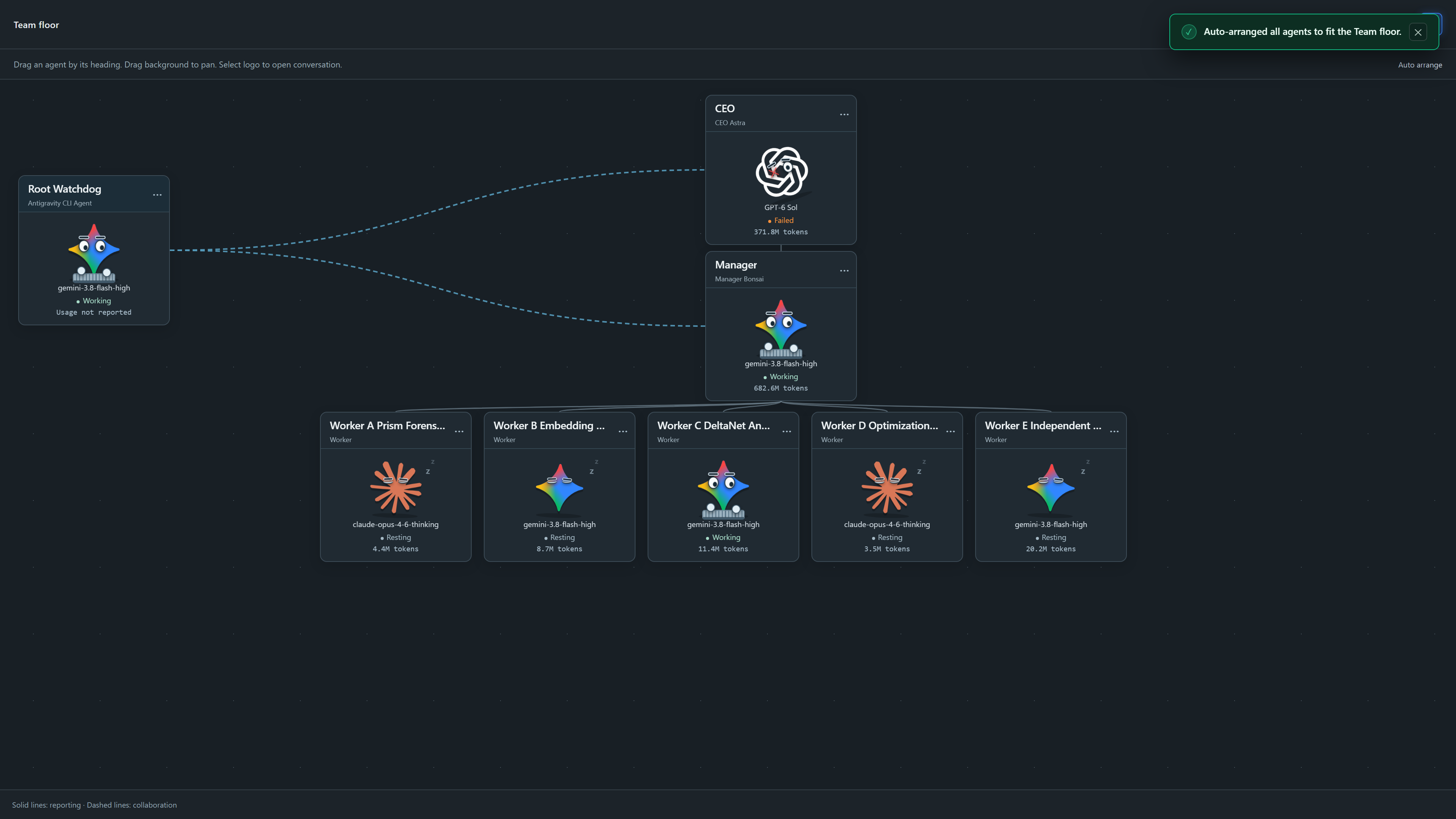
Live interactive Web Studio floor visualization showing Root Watchdog supervision, hierarchical reporting trees, and dynamic agent collaboration links. (See animated GIF: assets/web_studio_preview.gif)
Agentic Team MCP is an enterprise-grade, local-first multi-agent orchestration platform designed around the Model Context Protocol (MCP). It establishes a persistent, hierarchical agent workforce (Root Watchdog Supervisor → CEO Strategy → Manager Execution → Specialist Workers) that bridges native CLI coding environments (Claude Code, Gemini Antigravity, Codex) with unified direct API providers (DeepSeek, Z.ai/GLM, Google Gemini, OpenAI, and OpenRouter).
🚀 v0.2.0 Release Highlights
The v0.2.0 update introduces major runtime resilience upgrades, live human supervision bridges, an interactive Web Studio floor, and expanded test suites:
- 🛡️ Root Watchdog Supervision & Telegram Escalation Bridge:
- Always-on supervisor agent (
Root_Watchdog) continuously monitors team health, queue velocity, and agent lifecycles. - Bidirectional Telegram bridge (
core/telegram_bridge.py,core/telegram_supervisor.py) enables instant mobile alerts, human escalation queries, and command steering directly from your phone.
- Always-on supervisor agent (
- 🖥️ Full-Screen Interactive Web Studio Team Floor:
- Crisp, real-time agent floor visualization (
web/static/studio.js,web/static/workspace.css) displaying live node topology, reporting trees, and dynamic collaboration links. - Dedicated full-screen floor mode (
assets/web_studio_team_floor.png,assets/web_studio_preview.gif) with live status indicators, model badges, and interactive inspection drawers.
- Crisp, real-time agent floor visualization (
- ⚡ Hardened Runtime Resilience & Automatic Process Recovery:
- Enhanced loop monitor (
engine/loop_monitor.py) detects stalled turns, unhandled exceptions, and orphaned CLI processes with automatic recovery. - Resilient SQLite event sourcing with transactional durability across engine restarts and multi-client connections.
- Enhanced loop monitor (
- 🔄 Multi-Account Google OAuth Pool & Failover Management:
- Intelligent credential lease serialization and quota fallback (
core/auth_pool.py) across registered Google accounts (account_01,account_02,account_04). - Seamless support for
gemini-3.8-flash-highandclaude-opus-4-6-thinkingwith per-account quota isolation.
- Intelligent credential lease serialization and quota fallback (
- 🧪 Comprehensive Test Suite & Multimodal Expansion:
- Expanded test coverage (
tests/) including auth pool recovery, watchdog brains, telegram lifecycle, and backend security audits. - New multimodal handling foundation (
core/multimodal.py) for processing visual diagrams and screenshots.
- Expanded test coverage (
Author's Note
Abdulaziz Komilov (@menma4ever), student researcher in local model fine-tuning and quantization, building persistent, cost-effective multi-agent teams across native CLIs (Claude Code, Gemini Antigravity, Codex) and Model Context Protocol.
Modern agent frameworks often suffer from three fatal flaws: fragile ephemeral execution contexts, proprietary cloud lock-in, and ballooning API token costs. Agentic Team MCP was engineered to solve these problems by coupling persistent SQLite event sourcing with native CLI adapters (leveraging existing subscription authorizations like Claude Code, Gemini Antigravity, and Codex CLI) alongside high-efficiency open-weights models (DeepSeek-V3/R1 and GLM-5). The result is an autonomous, self-healing team architecture capable of executing complex engineering milestones locally, deterministically, and cost-effectively.
Visual Architecture
flowchart TD
    subgraph ClientLayer["User & Client Layer"]
        User["Developer / User"]
        ClaudeDesktop["Claude Desktop"]
        CursorIDE["Cursor IDE"]
        WebBrowser["Web Browser (Studio GUI)"]
        TelegramUser["Telegram Mobile Client"]
    end

    subgraph GatewayLayer["MCP & Gateway Layer"]
        MCPServer["FastMCP Stdio Server<br/>(mcp_server/server.py)"]
        WebStudio["Web Studio & REST Gateway<br/>(FastAPI / Uvicorn)"]
        TelegramBridge["Telegram Supervisor Bridge<br/>(core/telegram_bridge.py)"]
    end

    subgraph CoreLayer["Orchestrator Core"]
        Engine["Orchestrator Engine<br/>(engine/orchestrator.py)"]
        SQLiteStore["SQLite Event Sourcing<br/>(team.sqlite3)"]
        Queues["Task Queues & Loop Monitor"]
        WatchdogBrain["Watchdog Supervisor Engine<br/>(core/watchdog_brain.py)"]
    end

    subgraph TeamHierarchy["Hierarchical Agent Team"]
        Watchdog["Root Watchdog Agent<br/>(Global Supervisor & Bridge)"]
        CEO["CEO Agent<br/>(Strategic Planning & Architecture)"]
        Manager["Manager Agent<br/>(Milestone Breakdown & Task Dispatch)"]
        Worker1["Specialist Worker 1<br/>(Implementation / Code)"]
        Worker2["Specialist Worker 2<br/>(Documentation / QA)"]
    end

    subgraph ExecutionLayer["Execution Harnesses & Providers"]
        subgraph CLIAdapters["Native CLI Harnesses"]
            ClaudeCode["Claude Code CLI"]
            AntigravityCLI["Gemini Antigravity CLI"]
            CodexCLI["Codex CLI"]
            HermesCLI["Hermes / OpenClaw"]
        end
        subgraph DirectAPI["Direct API Providers"]
            DeepSeekAPI["DeepSeek (V3 / R1)"]
            ZaiAPI["Z.ai / GLM-5"]
            GeminiAPI["Google Gemini"]
            OpenAIAPI["OpenAI"]
            OpenRouterAPI["OpenRouter / SiliconFlow / Groq"]
        end
    end

    User --> ClaudeDesktop
    User --> CursorIDE
    User --> WebBrowser
    TelegramUser <--> TelegramBridge

    ClaudeDesktop -->|"stdio MCP"| MCPServer
    CursorIDE -->|"stdio MCP"| MCPServer
    WebBrowser -->|"HTTP / WebSocket"| WebStudio
    TelegramBridge <--> WatchdogBrain

    MCPServer -->|"Engine Actions"| Engine
    WebStudio -->|"REST / Event Streams"| Engine
    WatchdogBrain <--> Engine

    Engine <--> SQLiteStore
    Engine <--> Queues

    Watchdog -.->|"Supervises"| CEO
    Watchdog -.->|"Supervises"| Manager
    Engine --> CEO
    CEO -->|"Dispatches Roadmap"| Manager
    Manager -->|"Assigns Task"| Worker1
    Manager -->|"Assigns Task"| Worker2

    CEO -.->|"Executes via"| CLIAdapters
    CEO -.->|"Executes via"| DirectAPI
    Manager -.->|"Executes via"| CLIAdapters
    Manager -.->|"Executes via"| DirectAPI
    Worker1 -.->|"Executes via"| CLIAdapters
    Worker1 -.->|"Executes via"| DirectAPI
    Worker2 -.->|"Executes via"| CLIAdapters
    Worker2 -.->|"Executes via"| DirectAPI
Core Features Matrix
| Feature | Agentic Team MCP | Traditional Multi-Agent Frameworks | Standard MCP Servers |
|---|---|---|---|
| Persistence Model | Resilient SQLite Event Sourcing (resumes after restart/crash) | In-memory or ephemeral sessions | Ephemeral (lifetime of stdio pipe) |
| Team Hierarchy | Strict 3-Tier (Watchdog → CEO → Manager → Specialists) | Flat peer-to-peer or unstructured swarm | Single-agent tool provider |
| Execution Harness | Dual Harness (Native CLI Subprocesses + Direct API) | API-only (HTTP calls) | External tool execution only |
| Cost Optimization | Subscribed CLI Auth Pools (Claude Code, Antigravity, Codex) | Per-token commercial billing only | Host application pays per call |
| Local-First Security | Air-gapped local storage, zero telemetry, auto key-redaction | Cloud dashboard telemetry & logs | Depends on client implementation |
| Real-time Web Studio | Full visual canvas, live terminal streams, process monitors | Static CLI output or paid SaaS dashboard | None (headless) |
| Human In The Loop | Telegram Mobile Bridge & Root Watchdog supervision | Webhooks or email alerts | Host client UI only |
| Tool Protocol | Full Model Context Protocol (MCP) specification support | Custom proprietary tool schemes | MCP Standard |
Highlights
Autonomous Hierarchical Task Decomposition
- The CEO defines strategy, breaks roadmaps into phases, and delegates to the Manager.
- The Manager spawns and supervises dedicated Specialist Workers (e.g., Packaging Specialist, Documentation Specialist, Test Engineer).
- Workers report real results with artifact paths, automatically waking the supervisor upon completion.
Multi-Harness Runtime Execution
- Seamlessly mix and match execution environments: run high-level planning on Gemini Antigravity or Claude Code, run heavy code generation on Codex CLI, and run background bulk analysis on DeepSeek-V3 or Z.ai GLM-5.
- Built-in token and credential pool management rotation for seamless multi-account load balancing.
Resilient SQLite Event Sourcing & Session Persistence
- Every message, status change, tool execution, and artifact generation is immutably recorded in
team.sqlite3. - Complete machine restarts or process crashes are instantly recoverable without loss of agent state or conversation context.
- Every message, status change, tool execution, and artifact generation is immutably recorded in
Real-time Web Studio GUI
- Interactive visual agent graph with live status indicators (
idle,working,queued,blocked). - Integrated terminal monitors streaming subprocess stdout/stderr in real time.
- Comprehensive telemetry dashboards for tracking turn count, token consumption, and response times.
- Interactive visual agent graph with live status indicators (
Granular Security Boundary
- Strict workspace sandboxing: each specialist worker operates within its designated project directory (
workers/<name>/). - Automatic regex-based redaction of all sensitive API keys and tokens across console outputs and log files.
- Separate scoped authentication tokens for agent subprocesses versus the owner dashboard.
- Strict workspace sandboxing: each specialist worker operates within its designated project directory (
2-Minute Quickstart Guide
Prerequisites
- Python 3.11+ installed and available on your system
PATH. - Git installed.
- (Optional) Installed CLI tools:
claude(Claude Code),agy(Antigravity CLI), orcodex(OpenAI Codex).
Step 1: Installation & Setup
Windows (One-Click Setup)
Clone the repository and run the automated PowerShell setup script:
git clone https://github.com/menma4ever/agentic-team-mcp.git
cd agentic-team-mcp
.\Setup.ps1
Manual Virtual Environment Setup (Cross-Platform)
# 1. Clone the repository
git clone https://github.com/menma4ever/agentic-team-mcp.git
cd agentic-team-mcp

# 2. Create and activate a Python virtual environment
python -m venv .venv

# On Windows (PowerShell):
.venv\Scripts\Activate.ps1
# On Linux / macOS:
source .venv/bin/activate

# 3. Install core dependencies
pip install -r requirements.txt
Step 2: Configuration
Copy the clean example settings template to settings.json:
cp settings.example.json settings.json
Edit settings.json with your preferred API keys or enable local CLI harnesses:
{
  "api_keys": {
    "deepseek": "sk-your-deepseek-key",
    "zai": "your-zai-api-key",
    "gemini": "your-gemini-api-key",
    "openai": "",
    "anthropic": ""
  },
  "cli_auth_enabled": {
    "claude": true,
    "agy": true,
    "codex": false
  }
}
Step 3: Launching the Platform
Launch Web Studio & Orchestrator Engine
On Windows, simply double-click Launch.cmd or run:
Launch.cmd
Alternatively, from an activated virtual environment:
python main.py
This automatically boots the background orchestrator service, launches the Web Studio GUI, and opens your default browser at http://127.0.0.1:8765/#token=<token>.
Available Command-Line Arguments
python main.py [OPTIONS]

Options:
  --port INTEGER    Port for web studio & engine (default: 8765)
  --no-browser      Start engine and studio without opening browser
  --mcp             Run as stdio Model Context Protocol (MCP) server
  --console TEXT    Open human-in-the-loop interactive console for agent
Step 4: Connecting to MCP Clients
Agentic Team MCP operates as a high-performance stdio MCP server that connects directly to your background engine.
Claude Desktop Configuration
Add the server definition to your claude_desktop_config.json:
- Windows:
%APPDATA%\Claude\claude_desktop_config.json - macOS:
~/Library/Application Support/Claude/claude_desktop_config.json
{
  "mcpServers": {
    "agentic-team": {
      "command": "C:\\path\\to\\agentic-team-mcp\\.venv\\Scripts\\python.exe",
      "args": [
        "C:\\path\\to\\agentic-team-mcp\\main.py",
        "--mcp"
      ]
    }
  }
}
Cursor IDE Configuration
Add the configuration to .cursor/mcp.json in your workspace or global Cursor settings:
{
  "mcpServers": {
    "agentic-team": {
      "command": "C:\\path\\to\\agentic-team-mcp\\.venv\\Scripts\\python.exe",
      "args": [
        "C:\\path\\to\\agentic-team-mcp\\main.py",
        "--mcp"
      ]
    }
  }
}
Available MCP Tools Reference
When connected via MCP, Agentic Team exposes a comprehensive set of orchestration tools:
| Tool Name | Scope | Description |
|---|---|---|
list_projects |
Workspace | Enumerate all active and completed multi-agent team projects. |
create_project |
Workspace | Initialize a new project and provision the root CEO agent. |
get_team_tree |
Inspection | Retrieve the full hierarchical agent tree with live statuses and telemetry. |
get_agent_activity |
Owner | Inspect real-time execution event logs and command outputs. |
get_agent_conversation |
Owner | Read authenticated conversation messages and handoff records. |
create_manager |
Orchestration | Dispatch an operational Manager under the CEO for milestone management. |
spawn_worker |
Orchestration | Provision specialized workers with assigned task descriptions and harnesses. |
send_team_message |
Messaging | Dispatch targeted, authenticated peer or hierarchy messages. |
reconfigure_agent |
Management | Dynamically switch models or harnesses with saved state handoff. |
read_worker_status |
Status | Query worker lifecycle stage, current activity, and recent outputs. |
terminate_worker |
Cleanup | Safely decommission worker processes and clean up or archive workspaces. |
escalate_to_ceo |
Hierarchy | Bubble up blocking architectural or security issues to the CEO. |
team_action |
Action Bus | Unified action channel (read_file, write_file, update_status, report_result, etc.). |
Directory Structure
agentic-team-mcp/
├── assets/                  # Studio screenshots & preview assets
│   ├── web_studio_team_floor.png
│   ├── web_studio_preview.gif
│   └── web_studio_overview.png
├── Launch.cmd               # Fast Windows launcher
├── Setup.ps1                # Automated PowerShell virtualenv & dependency setup
├── LICENSE                  # MIT License
├── README.md                # Project documentation & guides
├── requirements.txt         # Core dependencies
├── settings.example.json    # Example configuration template
├── main.py                  # Main entry point (Web Studio, Engine & MCP Server)
├── core/                    # Core supervisor, telegram bridge, auth pool & config
│   ├── auth_pool.py         # Multi-account rotation & CLI auth slots
│   ├── catalog.py           # Dynamic model & harness discovery
│   ├── config.py            # Pydantic schema validation & redaction
│   ├── credential_store.py  # Secure local credential storage
│   ├── multimodal.py        # Visual analysis & image processing
│   ├── service.py           # Engine lifecycle & process locking
│   ├── telegram_bridge.py   # Telegram supervisor bridge & alert loop
│   ├── telegram_supervisor.py # Interactive mobile control endpoints
│   ├── watchdog_brain.py    # Root Watchdog intelligence & evaluation
│   └── workspace.py         # Sandboxed workspace directories
├── engine/                  # Orchestration core & persistence
│   ├── actions.py           # Agent action handlers & dispatching
│   ├── loop_monitor.py      # Stuck-loop detection & runaway turn prevention
│   ├── message_router.py    # Priority messaging & event routing
│   ├── models.py            # Pydantic data models for agents & tasks
│   ├── orchestrator.py      # Central event loop & agent scheduler
│   └── store.py             # SQLite event-sourcing database layer
├── harness/                 # Subprocess & provider execution harnesses
│   ├── cli_runner.py        # PTY/pipe adapters for Claude, Antigravity, Codex
│   └── direct_api.py        # Direct async streaming HTTP API client
├── mcp_server/              # Model Context Protocol stdio server
│   └── server.py            # FastMCP tool declarations & engine proxy
├── tests/                   # End-to-end integration & unit test suites
│   ├── test_auth_pool.py
│   ├── test_backend_audit.py
│   ├── test_engine.py
│   ├── test_google_quota_recovery.py
│   ├── test_release.py
│   ├── test_runtime_revision.py
│   ├── test_service.py
│   ├── test_telegram_bridge.py
│   └── test_watchdog_brain.py
└── web/                     # Web Studio dashboard & REST API
    ├── app.py               # FastAPI server & WebSocket endpoints
    └── static/              # Interactive graph, terminal streams, and UI
Community & Feedback
We welcome contributions, feedback, and questions from researchers and builders working on autonomous multi-agent systems and MCP tooling.
- Telegram: @zwyci
- Discord:
77terminator77 - GitHub Issues: menma4ever/agentic-team-mcp/issues
- GitHub Discussions: menma4ever/agentic-team-mcp/discussions
License
Distributed under the MIT License. See LICENSE for complete terms.
Yorumlar (0)
Yorum birakmak icin giris yap.
Yorum birakSonuc bulunamadi