very-happy
Health Warn
- License — License: MIT
- Description — Repository has a description
- Active repo — Last push 0 days ago
- Low visibility — Only 5 GitHub stars
Code Fail
- exec() — Shell command execution in .github/workflows/publish.yml
- process.env — Environment variable access in .github/workflows/publish.yml
- fs module — File system access in .github/workflows/publish.yml
Permissions Pass
- Permissions — No dangerous permissions requested
No AI report is available for this listing yet.
Work anywhere. Orchestrate coding agents and real terminal workflows from one Web command panel.
English · 简体中文
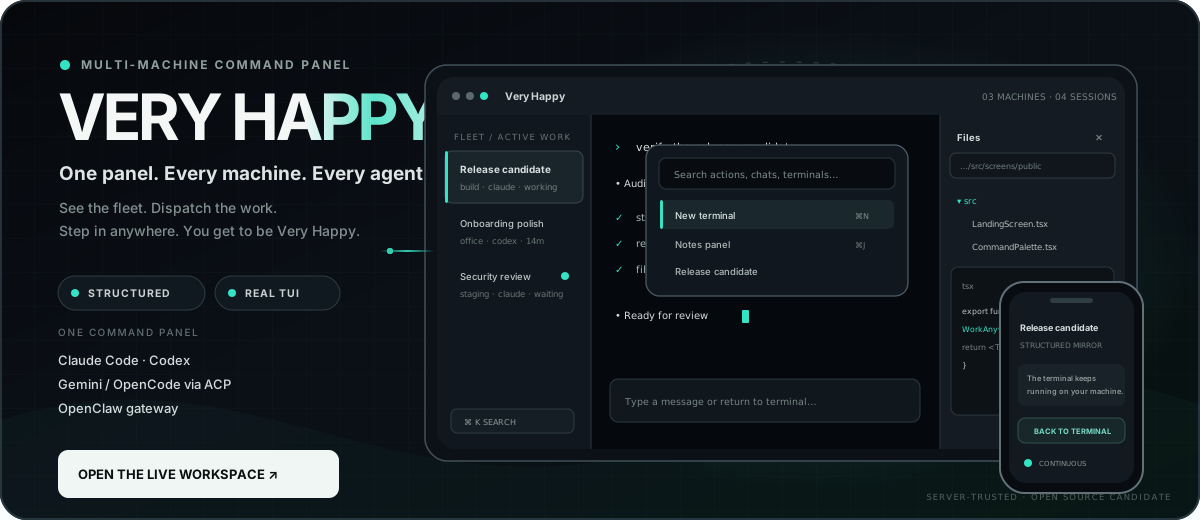
One panel. Every machine. Every agent. You get to be Very Happy.


Explore the live workspace · Connect a machine · Read the docs · Self-host
Very Happy is one open command panel for the computers and agents you control.
Its responsive Web UI gathers sessions from every connected machine, shows what
is running or waiting, lets you choose the machine and agent for new work, and
opens the corresponding structured conversation, real terminal, files, tasks,
notes, or notifications from a laptop, phone, tablet, or installed PWA.
It is not a browser repaint of one vendor's CLI and it is not merely a remote
shell. Very Happy preserves the surrounding thread: what is running, what the
agent changed, which machine owns the work, what needs your decision, and how to
continue after an interruption.
build server  ─┐
workstation   ─┼─>  ONE WEB / PWA PANEL  ─> choose machine + agent
field laptop  ─┘      sessions · status · tasks · files · terminals
Today, dispatch is explicit: you select the target machine and agent for each
new session. Provider-neutral automatic routing is roadmap, not a shipped claim.
[!TIP]
Use the Web/PWA as your daily workspace. Install the CLI once to pair a
machine and start its background daemon. Return to the CLI for diagnostics,
automation, recovery, or an intentional local launch—not because you need to
live in a second interface. The daemon remains required: Web-first is a UX
choice, not a browser-only architecture.
[!NOTE]
Choose the deployment that fits your work. Very Happy Cloud gives you the
fastest multi-device setup; self-hosting gives you control of the operator,
access policy, storage, and backups. See the privacy and security
model for sensitive environments.
One workspace. Three layers that do different jobs.
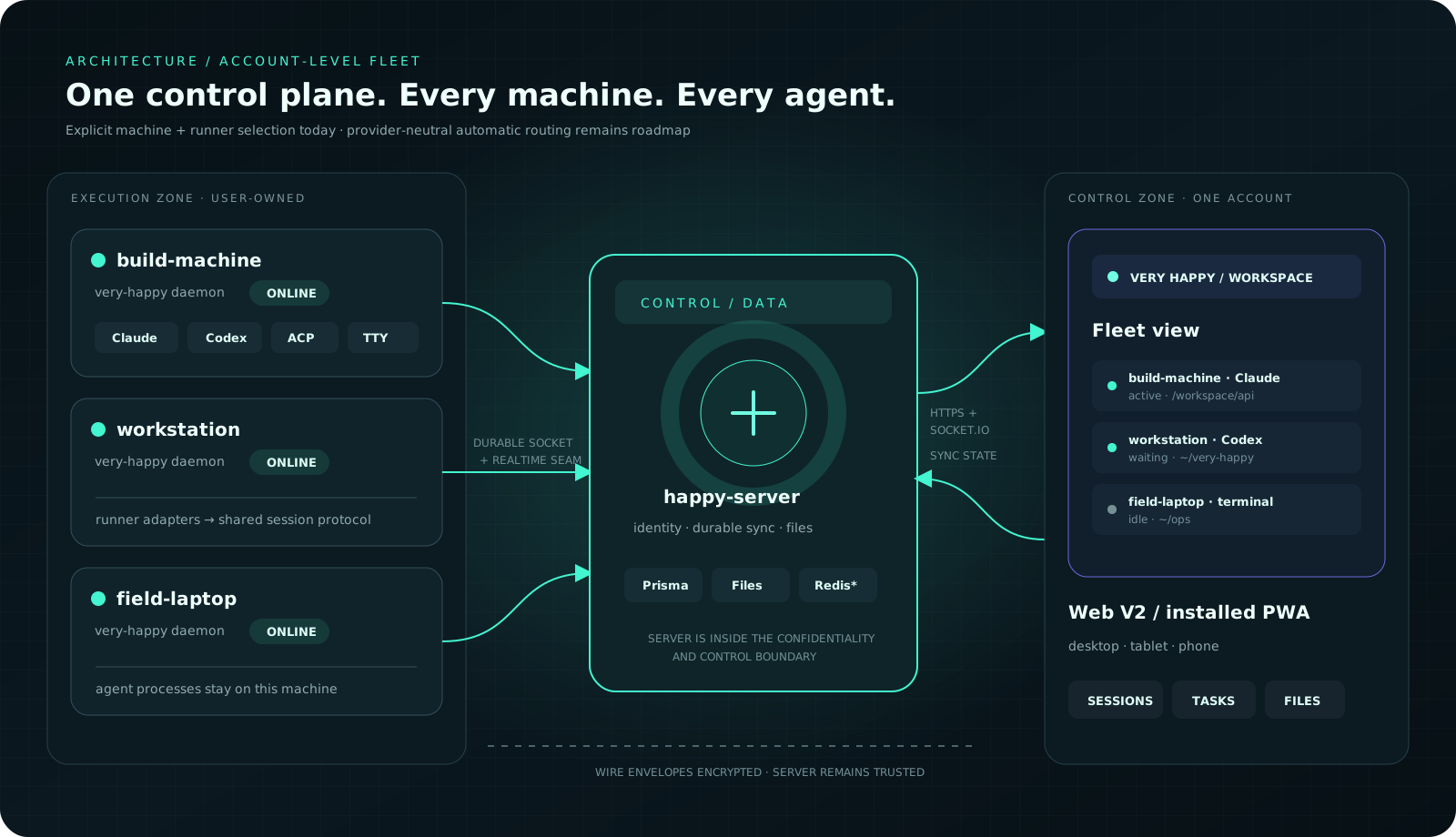
ACCOUNT-LEVEL FLEET · EXPLICIT MACHINE + RUNNER TARGETING · ONE CONTROL SURFACE
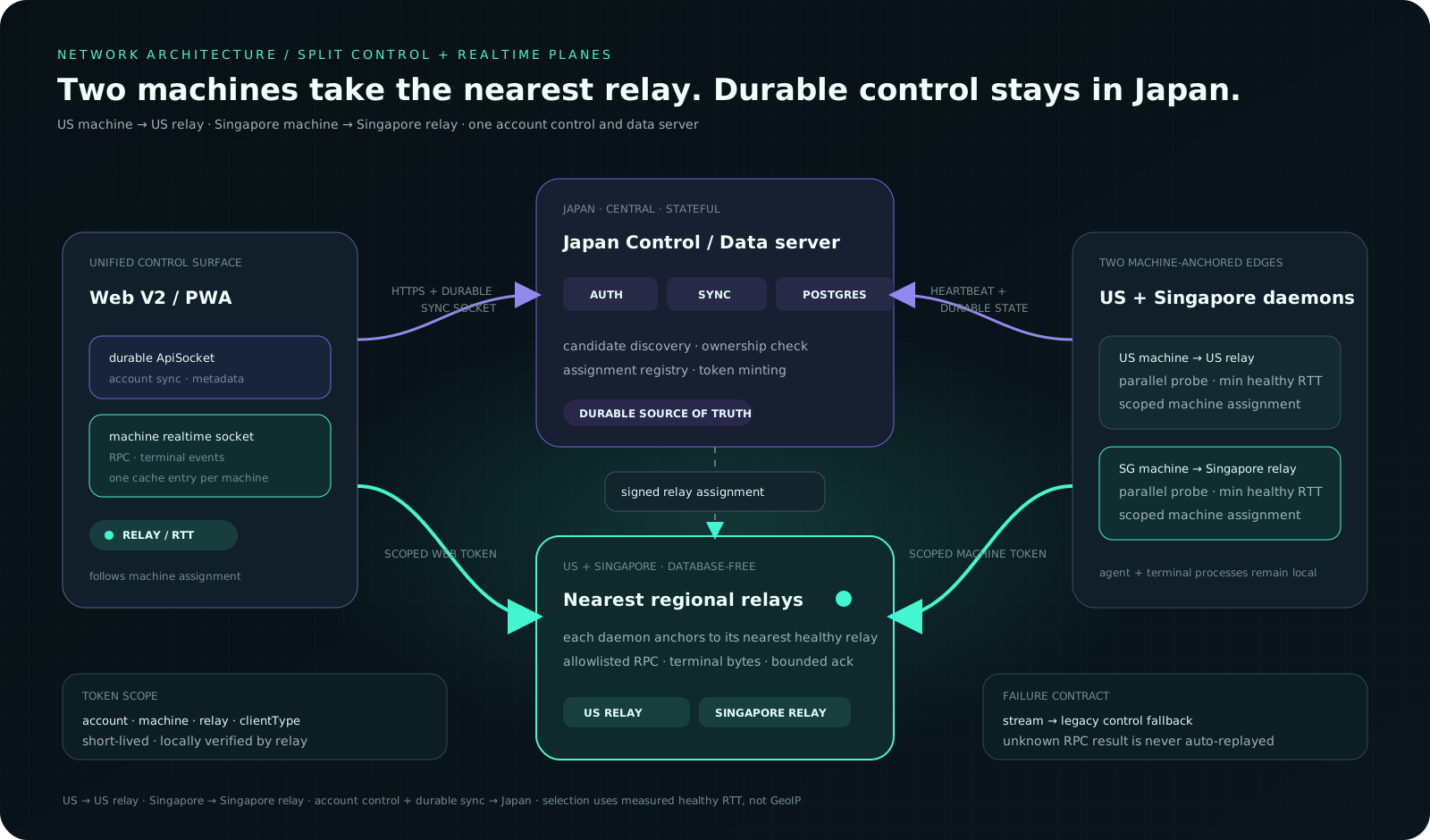
US + SINGAPORE MACHINE EDGES · CENTRAL DURABLE STATE · MEASURED RELAY RTT · SCOPED TOKENS
The control and data server remains the durable source of truth. Latency-sensitive
terminal bytes, machine/session RPC, and committed structured-message delivery
can use operator-configured regional relays chosen by measured daemon RTT, while
compatible clients retain the central fallback.
STRUCTUREDFollow messages, tools, diffs, permissions, usage, and resume state without living inside terminal chrome. Claude Code is the deepest structured integration today. |
UNIVERSAL TTYRun ordinary xterm-256color-compatible text processes inside a tmux-owned TTY. Reconnect to the same process, keep scrollback, search it, browse files, and use touch-first terminal controls. A coding agent is optional. |
WEB-FIRSTUse the responsive Web/PWA as the default surface. Start at a desk, check progress on a phone, and return without rebuilding the project state in your head. An optional Claude-only mirror can move between a hand-started TUI and structured conversation. |
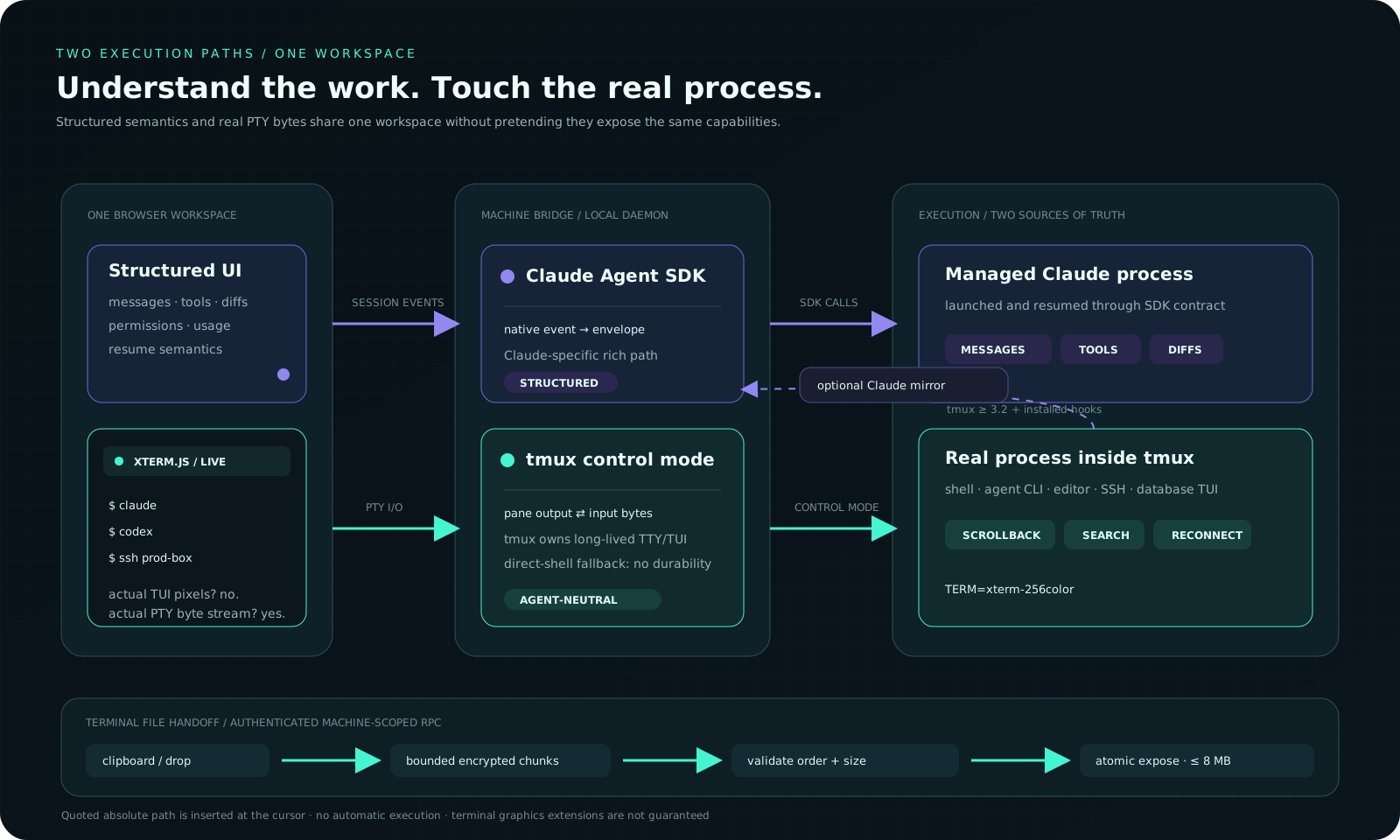
STRUCTURED SEMANTICS · REAL PTY BYTES · OPTIONAL CLAUDE MIRROR · BOUNDED FILE HANDOFF
The terminal is the compatibility layer. It forwards a real TTY and does not
care which brand—or category—of process is on the other side. A tool working in
a terminal does not automatically expose Claude-style structured events.
Durable terminals requiretmux; the optional Claude mirror requires tmux 3.2 or newer. Without tmux,
Web terminals use a non-persistent direct-shell fallback.
The browser terminal advertises TERM=xterm-256color and renders through
xterm.js. Common text TUIs are the compatibility target; sixel/Kitty graphics
and other terminal-specific extensions are not guaranteed.
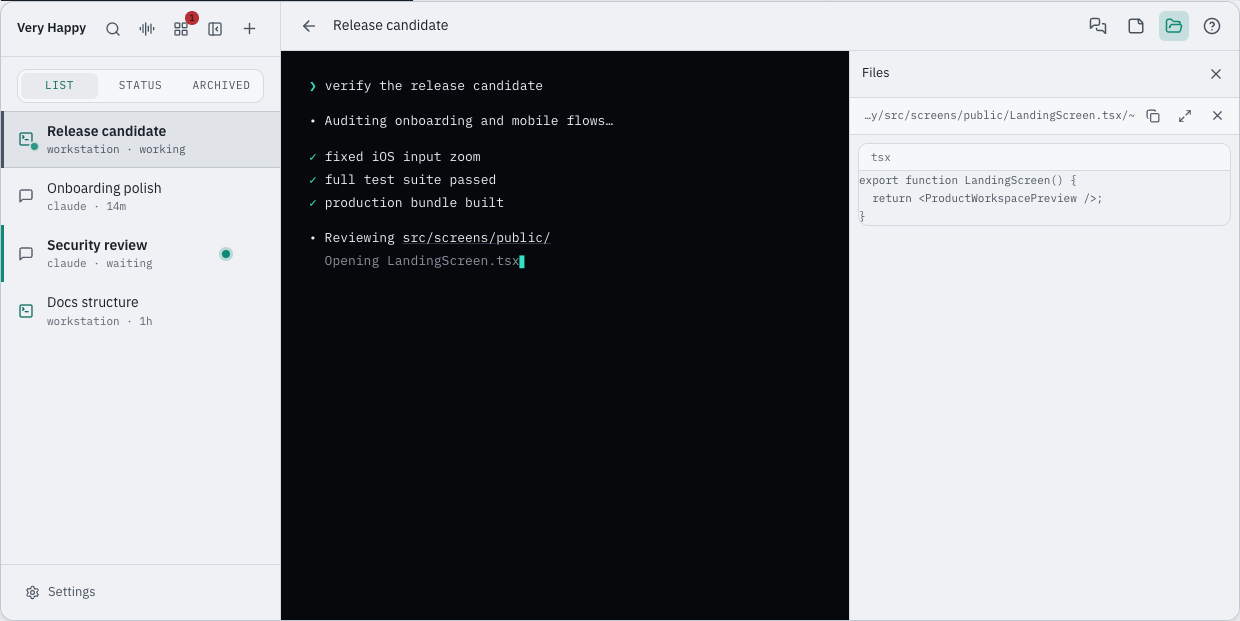
AUTHENTIC PRODUCT UI CONTRACTS · SANITIZED DATA · SIDEBAR + TERMINAL + FILE PREVIEW
Clipboard → target machine, without the detour
Paste a screenshot or drag a file straight into a Very Happy browser terminal.
The daemon receives it on the selected machine under~/.happy/uploads/terminal/, then Very Happy pastes a path quoted for the
daemon's default shell at the terminal cursor. The chosen Cloud or self-hosted
server is the trusted relay for this bounded transfer.
It never presses Enter for you.
Native Windows insertion requires the current daemon so the Web client can
distinguish cmd from PowerShell.
phone / laptop clipboard  ── chosen deployment ──>  selected machine
dragged file or screenshot                     ~/.happy/uploads/terminal/…
                                                        │
                                                        ╰─> shell-quoted path at cursor
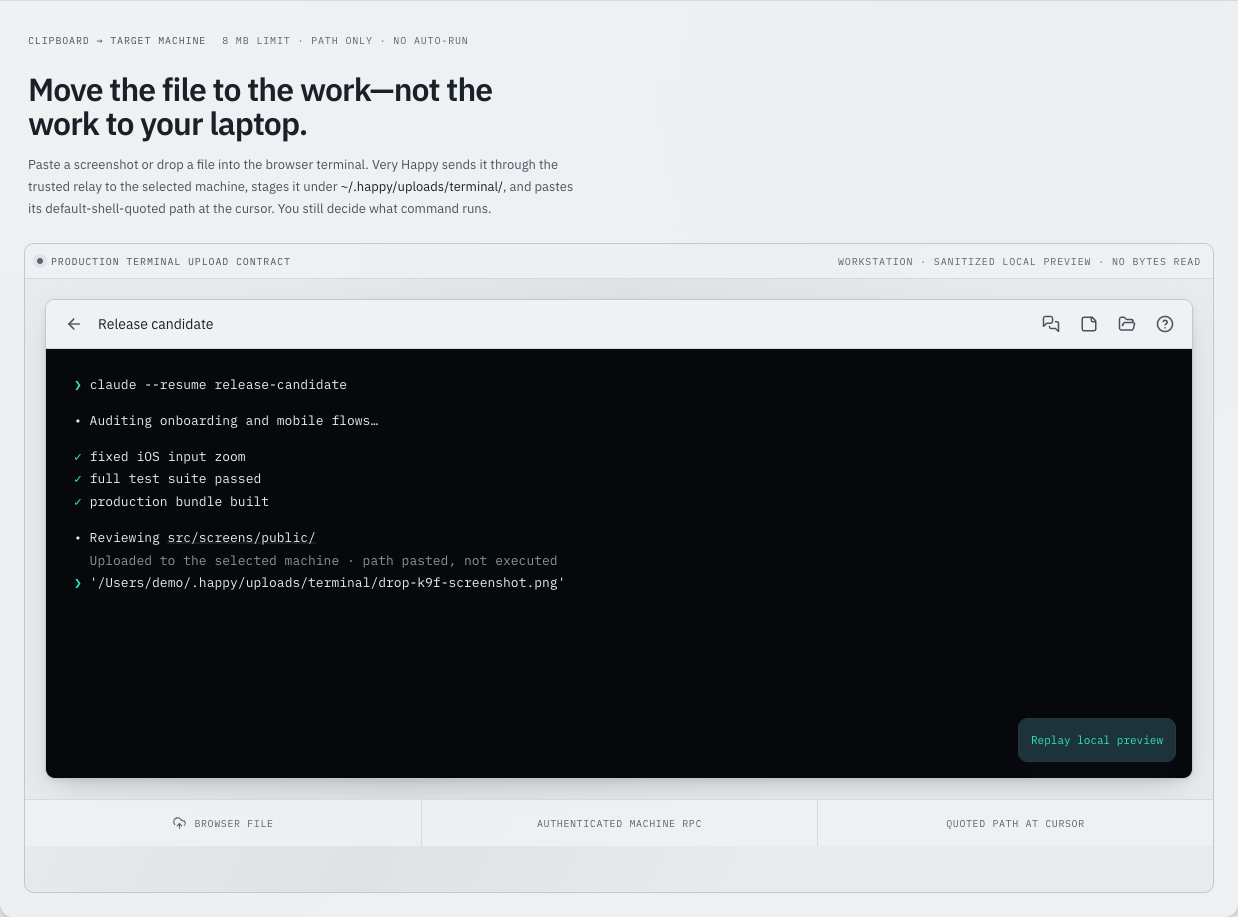
PASTE OR DROP · BOUNDED MACHINE RPC · ATOMIC TARGET FILE · NO AUTO-RUN
Terminal handoffs are capped at 8 MB, transferred in bounded chunks, and shown
with progress/error feedback. Older daemons retain the previous small-file
path; update the CLI and restart the daemon for larger files. Files pass through
the selected deployment on their way to the machine; choose Cloud or self-hosting
according to your environment.
Why choose Very Happy?
| The friction | What carries it for you |
|---|---|
| “My agents and terminals are scattered across several machines.” | One account sidebar and task board aggregate their sessions and attention state; start new work on the machine and agent you choose. |
| “Structured chat is pleasant, but sometimes I need the actual tool.” | Keep SDK-backed Claude and drop into a durable, unmodified agent TTY/TUI when necessary. |
| “I left my desk, so the work stopped being legible.” | A responsive Web/PWA workspace keeps conversations, terminals, files, tasks, notifications, and decisions within reach. |
| “Remote control must fit my operating model.” | Start with Very Happy Cloud for the fastest setup, or deploy the same open-source stack under your control. |
The philosophy is straightforward: stay high-level when that is faster, drop to
the raw machine when it is necessary, and make the interface carry as much
operational overhead as possible. The sections above show the supporting detail:
ordinary text TUIs remain compatible, the command palette preserves keyboard
speed, and bounded file handoff moves a local file to the selected machine
without auto-running a command.
One command to your first machine
On macOS or Linux, the hosted Cloud path can install the CLI, run diagnostics,
open the one-time browser approval, and start the detached daemon in one command:
(
  set -eu
  vh_installer=$(mktemp)
  trap 'rm -f "$vh_installer"' \
    EXIT HUP INT TERM
  curl -fsSL \
    https://veryhappy.dev/install.sh \
    -o "$vh_installer"
  sh "$vh_installer"
)
The bootstrap still needs Node.js because the CLI and daemon run on Node. Ifnode or npm is missing, install a supported Node.js release from the
official download page—npm is included—then
run the same command again. The script stops with this guidance instead of
invoking sudo or silently changing the system runtime.
The bootstrap is intentionally boring where trust matters. It:
- verifies a supported Node.js runtime;
- resolves the npm
latesttag once, validates it, and installs that exactvery-happy-cliversion; - runs
very-happy doctorwithout intentionally reading provider credential
values (review all diagnostic output before sharing it); - opens the normal short-lived Web approval flow; and
- runs
very-happy daemon startso the machine actually appears online.
The command downloads the complete script to a random temporary file before it
runs and removes it afterward. It never invokes sudo, installs tmux, writes
provider credentials, enables Claude hooks, or hides the trusted-relay warning.
Hosted bytes can change with a Web release: for the auditable path, download the
version-controlled script, compare it,
then run the local file. Its offline no-mutation preview is:
sh ./install.sh --dry-run
The script can connect terminal-based agents without a Claude credential. For
structured Claude, configure a supported provider credential in the daemon's
startup environment. If you add it after the bootstrap has started the daemon,
reload that environment with:
very-happy daemon stop && very-happy daemon start
npm install --global very-happy-cli
very-happy doctor
very-happy auth login
very-happy daemon start
Approve only a machine request you just initiated. Then open
veryhappy.dev, choose the connected machine,
and create your first session.
Machine requirements
| Requirement | Status | Why |
|---|---|---|
| Node.js 20.19+ within 20.x, 22.13+ within 22.x, or 24+, with npm | Required | Runs the CLI and daemon |
| Agent provider/runtime | Per agent | Structured Claude uses the bundled Agent SDK plus provider credentials; native terminals and other adapters need their local command or gateway |
tmux |
Recommended | Keeps real Web terminals alive across browser disconnects |
tmux 3.2+ |
Optional Claude mirror | Provides the create-time environment markers used by terminal → structured handoff |
For the first structured Claude session, configure ANTHROPIC_API_KEY or a
supported Bedrock, Vertex AI, or Foundry environment for the same OS user and
startup environment that runs the daemon. very-happy doctor reports only the
credential source category. See
configuration.
Provider credentials stay local by default. very-happy connect is a separate,
explicit flow that stores a selected OpenAI, Anthropic, or Gemini OAuth
credential on your chosen deployment so Web-launched integrations can use it;
it is currently used primarily by the Gemini path.
Self-hosted first connection
Deploy the relay first, use HTTPS, then keep all three endpoint variables in the
environment that starts the daemon:
export HAPPY_HOME_DIR="$HOME/.very-happy-relay.example.com"
export HAPPY_SERVER_URL=https://relay.example.com
export HAPPY_WEBAPP_URL=https://relay.example.com

npm install --global very-happy-cli
very-happy doctor
very-happy auth login
very-happy daemon start
Use a separate HAPPY_HOME_DIR for each relay. Tokens and machine IDs belong to
the relay that issued them. The supported public self-host path is the pinned
repository Docker build—not the upstream-owned happy-server-self-host npm
package. See Self-hosting.
Move at thought speed
⌘ K / Ctrl K command palette · ⌘ 1–9 / Ctrl 1–9 switch visible work · ⌘ J / Ctrl J notes
The production command palette searches actions, chats, and terminals. Saved
prompts use Command/Ctrl+.; mobile users open the same command surface from
the sidebar Search control.
Very Happy preserves terminal muscle memory: on macOS, Ctrl+K/J/N/R stay with
readline and the real TUI. Browser-reserved new/close chords work only where the
platform delivers them to an installed PWA; normal tabs use the explicitAlt+N and Alt+W fallbacks. See the precise
keyboard and touch reference.
Agent surface
| Adapter | Status | Experience |
|---|---|---|
| Claude Code | Shipped · deepest integration | Bundled Agent SDK structured sessions; native Claude TUI; optional Claude-only terminal mirror |
| Codex | Shipped | Dedicated Codex session path plus native terminal access |
| Gemini | Beta · implemented | Agent Client Protocol backend and preset |
| OpenCode | Beta · implemented | ACP-compatible preset over local stdio |
| Custom ACP command | Beta · implemented | Generic runner for a compatible Agent Client Protocol stdio endpoint |
| OpenClaw | Shipped | Its own local gateway adapter—not ACP |
| Pi / provider-aware routing | Roadmap | Candidate adapters and cross-provider subtask coordination, not shipped claims |
Agent Client Protocol is distinct from the older Agent Communication Protocol
that shares the ACP acronym. Support for a terminal-backed agent does not imply
structured parity with Claude.
What ships today
- Structured Claude conversations with tool calls, diffs, permissions, usage,
attachments, and resume. - Real tmux browser terminals with reconnect, scrollback, search, mobile input,
archived sessions, file access, and automatic recovery. - A machine file browser with rich previews for text, Markdown, images, and PDFs,
plus clickable files from agent output. - Clipboard and drag/drop handoff into a target-machine terminal, with an 8 MB
limit, bounded chunking, upload feedback, and quoted-path insertion without
auto-execution. - Task board, todo-provider commands, notes, notifications, Web Push, and HTTPS
webhooks. - A Claude-powered coordinator with text entry, session awareness, and dispatch
on its selected machine; voice entry is available when a compatible voice
service is configured. - Passwordless email-code and Google sign-in, optional password compatibility,
configurable signup/capacity controls, a hosted
public relay, and production-oriented self-hosting. - A mobile-friendly, proactively installable PWA—no app store required.
Optional Claude terminal mirroring is explicit and reversible:
very-happy install-terminal-hooks
# Remove only Very Happy's entries later:
very-happy install-terminal-hooks --remove
This modifies ~/.claude/settings.json (or$CLAUDE_CONFIG_DIR/settings.json) without deleting foreign hooks. Normal
SDK-backed Claude sessions do not require it.
MCP handoffs: make local work visible where you are
Very Happy injects a small MCP surface into managed sessions so an agent can do
more than print another line: it can hand text to your browser clipboard, open
a produced file in the Web preview, keep the session title useful, and report
progress. The exact tools deliberately follow the runner:
| Runtime path | MCP tools shipped today |
|---|---|
| Base managed Claude session | change_title, copy_to_clipboard, open_preview, report_progress |
| Managed Codex / Gemini / ACP bridge | change_title, copy_to_clipboard, open_preview |
| Assistant/meta-agent variant additions | sessions_list, session_read, session_send, session_spawn, session_kill, session_archive, terminals_list, terminal_read, terminal_send, memory_update, journal_append |
User-scoped plain claude, after opt-in |
copy_to_clipboard only |
Enable the narrow plain-terminal bridge with:
claude mcp add --scope user very-happy-clipboard -- very-happy mcp
That registration applies to every Claude session for the same OS user, not
only processes inside a Very Happy terminal. It needs the local daemon. The
assistant-only additions can read and mutate sessions, terminals, memory, and
journals; treat that variant and its prompt/tool permissions as a high-privilege
machine control surface. This is not a universal MCP or provider-routing claim.
See the exact integration contracts.
Configure integrations
| Capability | Setup |
|---|---|
| External Todo list | Add todoProvider to the machine's ~/.happy/settings.json; copy the provider contract and example. |
| Account webhook | Open Settings → Channels, save one HTTPS endpoint, and select completion / permission events. |
| Dispatch other sessions | Select an Assistant machine in Settings → Voice & Assistant, open Assistant (/assistant), and review its high-privilege permission setting. See the Assistant setup. |
| Script / IM adapter | Run very-happy spawn, send and sessions on the daemon machine — start work, message it, then list / read / stop / archive what you started. |
Compose it into a larger agent system
Very Happy is an execution surface, not a closed automation platform. The
coordinator, the roles it dispatches and the policy around them belong in your
adapter; what this project owns is the execution surface underneath. Generic
webhooks plus the CLI's automation commands are that
contract: spawn starts work (with an origin tag, a permission mode and an
agent of your choosing), send continues it, and sessions lets the adapter
see and steer what it started instead of dispatching blind. That is enough to
connect an issue tracker, scheduler, chat system, or a coordinator of your own
without teaching the core about any of them.
The adapter must own sender authorization, fixed workspace policy, deduplication,
rate limits, and least-privilege execution. Incoming messages are input, never
authorization by themselves.
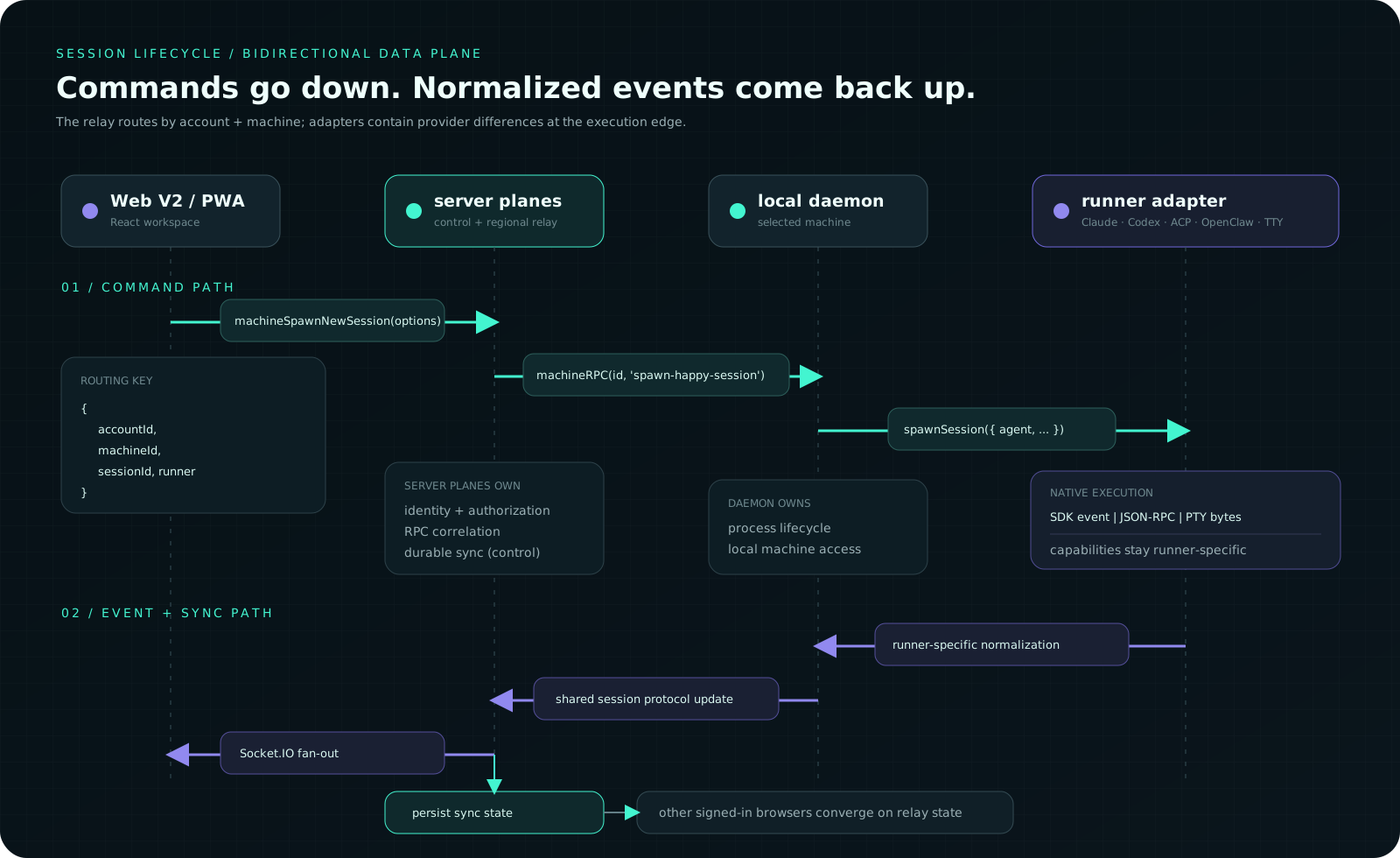
MACHINE-SCOPED RPC · RUNNER-SPECIFIC NORMALIZATION · DURABLE MULTI-BROWSER CONVERGENCE
Regional relay behavior and limits
The account/database server can stay central while latency-sensitive terminal
bytes, machine/session RPC, and structured-message delivery use operator-configured regional relays. Each daemon probes
the healthy candidates in parallel and anchors to the lowest measured RTT; the
browser follows that machine assignment with a short-lived, machine-scoped token.
The active relay and browser-to-relay RTT are visible in the terminal header.
This is measured routing, not a GeoIP guess, and relays do not need database
credentials. If discovery or a regional relay fails, current clients fall back
to the compatible control-server path. Self-hosted operators decide which relay
regions exist; hosted PoP availability is an operational fact, not an implied
global SLA. A future WebRTC direct path can use the same transport seam, with
regional relays remaining the fallback.
Structured input is persisted by the session runner before agent execution;
structured output receives its authoritative central id/seq before the relay
push. The control/data server therefore remains the recovery and history source,
while the regional plane shortens live delivery. It does not add token-level
Claude streaming by itself.
The control/data server synchronizes workspace state; the regional plane routes
latency-sensitive machine/session RPC, structured delivery, and terminal traffic. Encrypted
envelopes inherited from Happy remain defense in depth, but the Very Happy server
can recover account keys. Transport/storage encryption does not make the relay
zero knowledge. Read Architecture and
Security.
Direction, not marketing fiction
The roadmap moves toward more agent adapters, provider-aware subtask routing,
durable project/task memory, and a meta-agent that brings users decisions rather
than activity. The long-term visual concept is a multi-agent virtual office—
possibly pixel-art—where work, handoffs, and requests for attention become
spatially legible.
Those are roadmap concepts, not shipped features. The philosophy already ships:
work anywhere, keep the thread, and reduce the amount of operational state a
human has to hold. See the roadmap.
Run it, understand it, improve it
- Documentation index
- Getting started
- Self-hosting
- Configuration
- Upgrading and rollback
- Troubleshooting
- Development
- Contributing
- Security policy
The production frontend is packages/happy-web-v2. The upstream Expo/Tauripackages/happy-app is retained as an experimental seed for a possible future
desktop client; it is currently excluded from the pnpm workspace, production,
and the supported Very Happy client/security scope.
Attribution and license
Very Happy is a friendly, deeply modified fork of
slopus/happy and retains upstream copyright
and MIT terms. See LICENSE and NOTICE. Claude Code, Codex,
Gemini, OpenCode, OpenClaw, and other named agents are products or projects of
their respective owners. Very Happy is independent and is not affiliated with
them.
Reviews (0)
Sign in to leave a review.
Leave a reviewNo results found