AvaKit
Health Pass
- License — License: MIT
- Description — Repository has a description
- Active repo — Last push 0 days ago
- Community trust — 12 GitHub stars
Code Warn
- process.env — Environment variable access in apps/web/app/[locale]/docs/core/page.tsx
Permissions Pass
- Permissions — No dangerous permissions requested
No AI report is available for this listing yet.
next.js but for avalanche :)
AvaKit 🔺
The open-source, AI-native developer toolkit for Avalanche.






Scaffold a social-login dapp, deploy-ready, with agent context baked in. One core, four surfaces. No seed phrases, no boilerplate.
avakit.dev · Documentation · Templates
▶ Watch the 90-second demo — one command to a live, social-login Avalanche dapp: sign in with Google, deploy an NFT from the browser, and mint it on Fuji.
npm create avalanche-app@latest
That's it. Connect with a social login, read your balance, and send your first transaction on Avalanche in minutes.

Then deploy an NFT contract and mint it, straight from the browser, on Fuji:
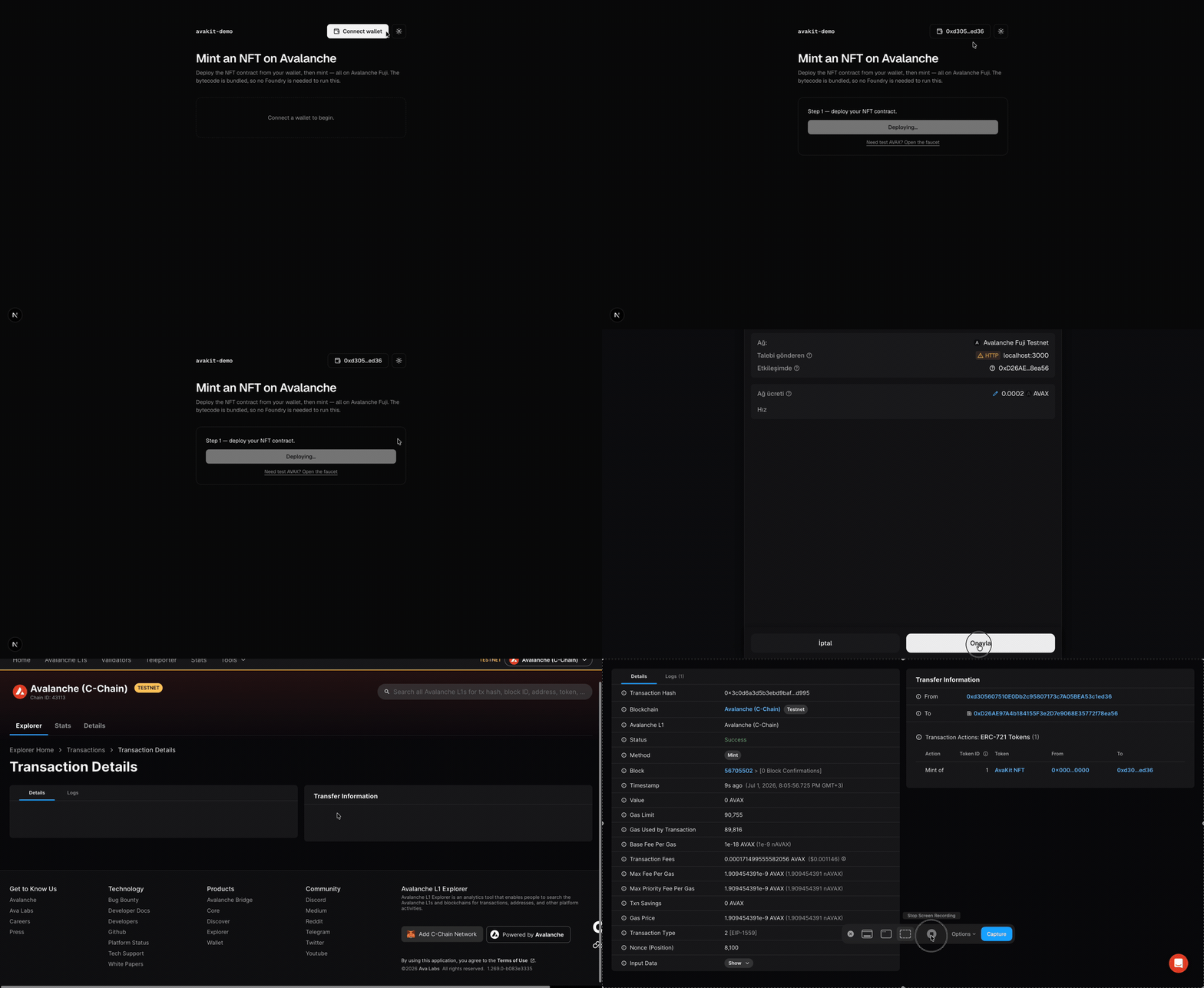
Proven live on Fuji. The mint in that clip is a real on-chain transaction; view it on Snowtrace (contract
0x7612…7786). No Foundry, no backend: the bytecode is bundled and deployed from the user's wallet.
Why AvaKit
Avalanche's C-Chain is EVM-compatible and end-user onboarding is already solved (Core wallet's seedless social login). The remaining friction is on the developer side: spinning up a modern dapp with onboarding wired up still takes hours. AvaKit removes that.
- Zero-setup onboarding: a temporary in-browser wallet appears so a newcomer can try a real Fuji transaction with nothing installed, and social login (Google, no seed phrase) or Core/MetaMask is the upgrade — for those, keys stay in the provider's HSM and AvaKit never touches them. (The burner is the exception, and holds its key in
localStorage— see SECURITY.md.) - AI-native by default: every generated app ships
CLAUDE.md,llms.txt, and.cursor/rules, and@avakit/mcplets Claude Code / Cursor scaffold, deploy, and read chain state for you. - shadcn/ui, themed: a clean design system with dark/light from day one. Copy-in components, no vendor lock-in.
- Deploy-ready: contracts compile to bundled bytecode, so you can deploy straight from the browser. Fuji testnet by default.
- Safe defaults: testnet-first, mainnet is explicit opt-in, secrets stay in env.
- Wrap, don't rewrite: built on viem, Web3Auth, and Foundry, packaged for a great DX.
Packages
| Package | What it is |
|---|---|
@avakit/core |
Framework-agnostic kernel: viem clients, wallet adapters, deploy helpers, chain data |
@avakit/react |
<ConnectAvalanche> social-login widget, <TransactionButton>, and hooks, built on shadcn/ui |
create-avalanche-app |
Batteries-included scaffolder (8 templates) |
@avakit/mcp |
MCP server: scaffold, deploy, and read Avalanche from Claude Code / Cursor |
@avakit/studio |
Local dev dashboard: spin up devnets, send Interchain messages, inspect data (npx @avakit/studio); also an MCP server |
Templates
npm create avalanche-app@latest my-app -- --template nft-mint
| Template | What you get |
|---|---|
minimal |
Social-login wallet, balance, and a first transaction |
nft-mint |
Deploy an ERC-721 from the browser, then mint |
token-gated-app |
Unlock content for holders of an access-pass NFT |
erc20-token |
Deploy an ERC-20, mint supply, and transfer |
icm-messenger |
Send a message between two Avalanche L1s over Interchain Messaging, on a one-command local devnet |
eerc-token |
Register, mint, and privately transfer tokens with hidden balances (Encrypted ERC) |
l1-launch |
Launch your own Avalanche L1 with one command, then explore it in a built-in dashboard |
token-bridge |
Bridge an ERC-20 between two Avalanche L1s with Interchain Token Transfer (ICTT) |
Every template ships with a social-login wallet, shadcn/ui (black & white, dark/light), and AI context files.
Use it in an existing app
npm install @avakit/react @avakit/core viem
"use client";
import { injectedAdapter } from "@avakit/core";
import { fuji } from "@avakit/core/chains";
import { AvaKitProvider, ConnectAvalanche } from "@avakit/react";

export function App() {
  return (
    <AvaKitProvider chains={[fuji]} adapters={[injectedAdapter()]}>
      <ConnectAvalanche />
    </AvaKitProvider>
  );
}
Add social login by installing @web3auth/modal and passing web3authAdapter({ clientId }) (from @avakit/core/web3auth).
@avakit/coreand@avakit/reactare ESM-only (useimport, notrequire; Node ≥ 20.11).
Build with an AI agent
Add the MCP server to Claude Code, Cursor, or Claude Desktop:
{
  "mcpServers": {
    "avakit": { "command": "npx", "args": ["-y", "@avakit/mcp"] }
  }
}
Then just ask: "Scaffold an nft-mint dapp and deploy it to Fuji."
Repository layout
packages/
  core/                 @avakit/core
  react/                @avakit/react
  mcp/                  @avakit/mcp
  studio/               @avakit/studio (local dashboard + MCP)
  create-avalanche-app/ scaffolder + 8 templates
apps/web/               the avakit.dev site (EN + TR)
examples/               live demo dapps (hello-avax, web3auth-demo)
docs/                   planning, PRD, architecture, ADRs, specs, security review
Contributing
pnpm install
pnpm build       # all packages (Turborepo)
pnpm test        # Vitest
pnpm lint        # Biome
pnpm typecheck   # TypeScript
Requirements: Node ≥ 20.11, pnpm ≥ 10. See CONTRIBUTING.md and the design docs in docs/. Conventions: English everywhere, shadcn/ui only, Framer Motion / GSAP for animation, latest stable versions.
License
MIT © AvaKit contributors
Built on viem, Web3Auth, Foundry, and shadcn/ui. Testnet-first (Fuji); mainnet is opt-in.
Reviews (0)
Sign in to leave a review.
Leave a reviewNo results found