reevesagents
Health Gecti
- License — License: NOASSERTION
- Description — Repository has a description
- Active repo — Last push 0 days ago
- Community trust — 80 GitHub stars
Code Basarisiz
- spawnSync — Synchronous process spawning in packages/orchestrator/scripts/smoke-approval-real.mjs
- process.env — Environment variable access in packages/orchestrator/scripts/smoke-approval-real.mjs
- spawnSync — Synchronous process spawning in packages/orchestrator/scripts/smoke-providers-real.mjs
- process.env — Environment variable access in packages/orchestrator/scripts/smoke-providers-real.mjs
- process.env — Environment variable access in packages/orchestrator/scripts/smoke-real.mjs
Permissions Gecti
- Permissions — No dangerous permissions requested
Bu listing icin henuz AI raporu yok.
ReevesAgents is a Free and Open Source workspace manager for AI CLI agents. No API key needed. Tui WebUi Mcp Cli all in one package.
ReevesAgents




GitHub: https://github.com/mertkayacs/reevesagents
ReevesAgents is a free and open source workspace manager for AI CLI agents. It
helps you use several vendor CLIs at the same time, without turning your local
machine into a heavy platform or locking the work into one model.
It is built for people who want the best parts of multiple providers while
keeping the workflow economical. Put each CLI where it is strongest: ask
DeepSeek to work on backend code, use Claude for product and website direction,
use Codex for a design system or implementation pass, and keep Hermes agents on
mail, web, search, or research tasks when those CLIs are configured for that
work.
ReevesAgents gives the work a shared local shape: runs, agents, tmux windows,
history, a TUI, and a local Web UI.
The UI is available in 9 languages: English, German, French, Spanish,
Portuguese, Italian, Turkish, Simplified Chinese, and Arabic.
Why ReevesAgents
Use more than one CLI without losing the thread. If you already jump between
Claude, Codex, DeepSeek, Hermes, OpenCode, or other agent CLIs, ReevesAgents
puts those sessions into one local workspace.
Stay vendor-flexible. Provider login still belongs to each provider CLI, but
ReevesAgents does not become another place for credentials or model traffic. You
can add, remove, or switch CLIs without rebuilding the way you manage runs.
Keep cost practical. Route work to the CLI that makes sense for the task
instead of pushing everything through one expensive default.
See the work at a glance. The Web UI is especially useful when several
agents are running: active runs, agents, models, permission modes, stop/delete
actions, and history are visible from one browser view while tmux keeps the real
CLIs alive.
| Surface | What it is good for |
|---|---|
| TUI | Fast keyboard-first control inside the terminal. |
| Web UI beta | One visual view of runs, agents, live panes, and history. |
| CLI | Scripts, quick spawn commands, doctor checks, and tmux opening. |
| tmux | Real provider CLI windows that keep running locally. |
| Pre-beta MCP | Experimental root/child orchestration for research workflows. |
Screenshots And GIFs
This launch-week demo shows the core workflow: split one project across the
CLIs that fit each job, keep every session local in tmux, and watch the whole
run from the TUI or Web UI.
TUI
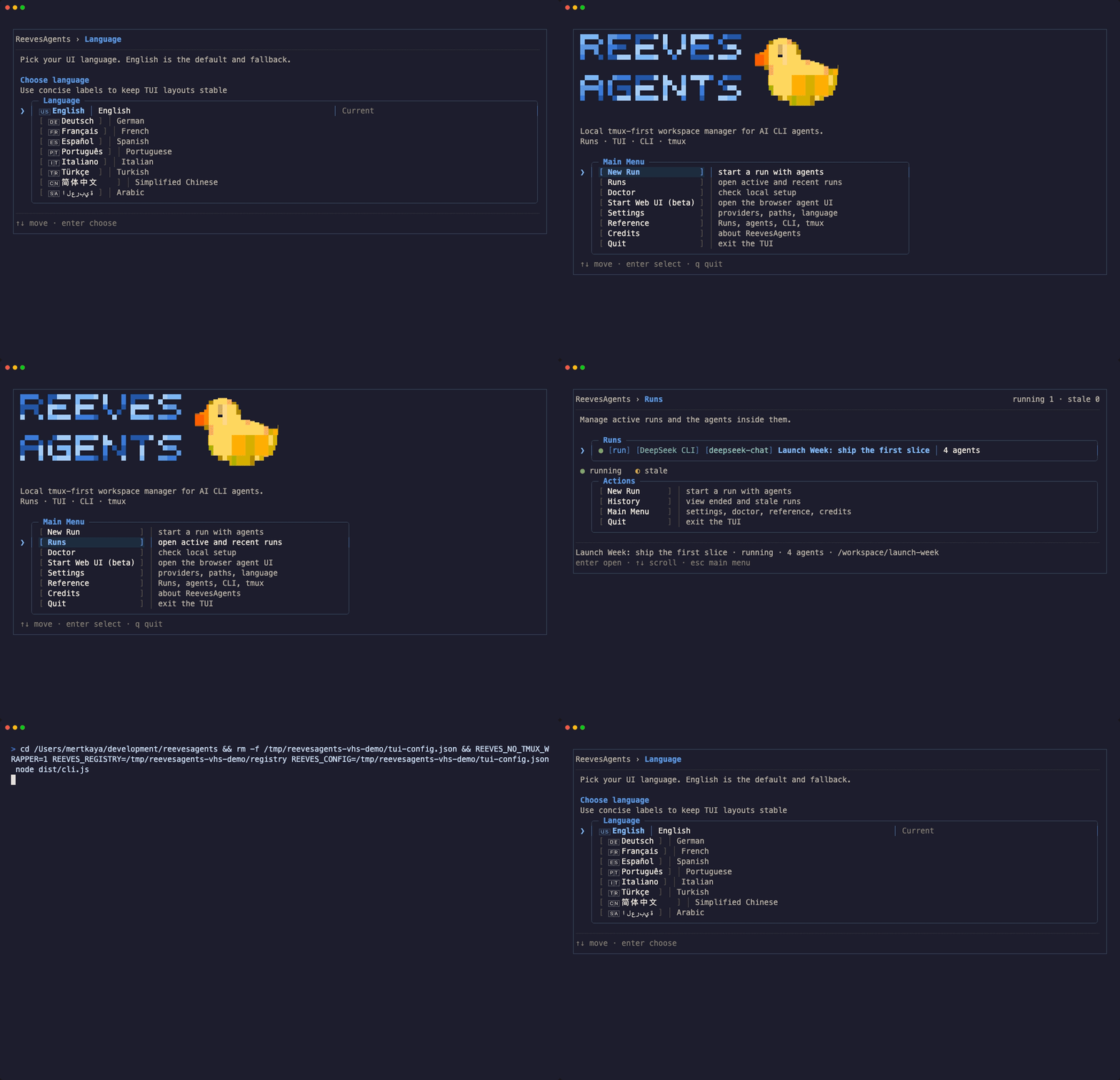
Recorded with VHS. Pick a language, jump from the ASCII-art welcome screen into
active runs, then open the run to see agents, tasks, status, and history.
Web UI Beta
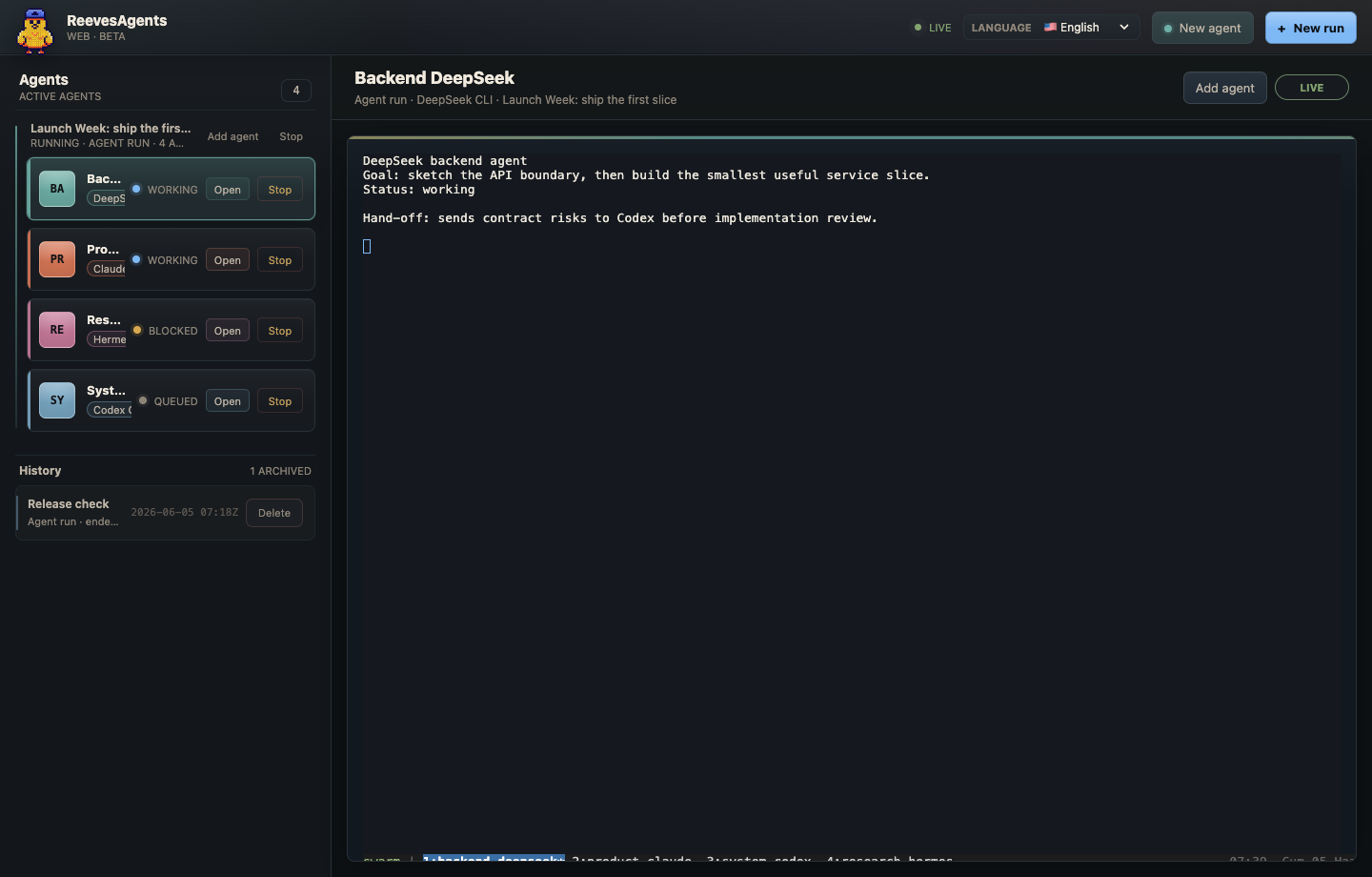
The same local run in the browser: DeepSeek drafts the backend, Claude Code
works on product and web direction, Codex reviews the implementation path, and
Hermes waits for explicit research approval.
Install
npm
npm install -g [email protected]
reevesagents doctor
reevesagents
One-shot:
npx [email protected] doctor
pnpm
pnpm add -g [email protected]
reevesagents doctor
reevesagents
One-shot:
pnpm dlx [email protected] doctor
Yarn
yarn dlx [email protected] doctor
Yarn Classic global install:
yarn global add [email protected]
reevesagents doctor
reevesagents
Bun
bun add -g [email protected]
reevesagents doctor
reevesagents
One-shot:
bunx [email protected] doctor
Homebrew
brew tap mertkayacs/reevesagents
brew install reevesagents
reevesagents doctor
reevesagents
Source
Use source when you want to inspect the code, contribute, or test the pre-beta
research package from the repository.
git clone https://github.com/mertkayacs/reevesagents.git
cd reevesagents
pnpm install
pnpm build
pnpm link --global
reevesagents doctor
reevesagents
Prerequisites
ReevesAgents is local-first. It expects a normal developer machine with tmux and
at least one provider CLI already installed.
Core Requirements
- macOS, Linux, or WSL.
- Node.js
20.19+. - tmux. Version
3.0+is recommended. - A normal interactive shell on
PATH. - At least one supported provider CLI on
PATH.
Native Windows is not the target runtime. Use WSL for Windows machines.
Provider CLIs
ReevesAgents can launch these provider CLIs when they are installed and
authenticated on your machine:
- Claude Code
- Codex CLI
- OpenCode
- Hermes
- Kimi
- DeepSeek
- Pi
- Qwen
- Aider
Provider login, models, tools, quotas, and permission prompts stay with each
provider. ReevesAgents does not store provider API keys and does not proxy model
traffic.
Quick Start
Start the TUI:
reevesagents
Start a named run from the CLI:
reevesagents spawn deepseek:backend claude-code:product codex:system hermes:research --name "launch week build" --prompt "Plan the backend, product surface, design system, and research notes."
Open the local Web UI:
reevesagents web
Check your machine:
reevesagents doctor
What It Feels Like
Instead of running one model and hoping it is the right one for every task, you
can split work by strength and cost. One run can hold a backend agent, a design
agent, a research agent, and a review agent. Each one stays in its own tmux
window, while the TUI and Web UI give you a calmer way to see what is alive,
what ended, and what needs attention.
This is not a cloud agent platform. It is a small local layer around real CLIs.
Web UI Beta
The Web UI is local and loopback-only.
reevesagents web
It lets you create runs, add agents, choose provider models and permission
modes, stop agents, delete ended work, and inspect history from the browser
while the real CLIs keep running in tmux.
The Web UI uses optional runtime packages that npm installs by default. If you
install with optional dependencies omitted, the CLI and TUI still work and the
Web command explains what is missing.
Pre-Beta Research: MCP Orchestrator
The stable reevesagents package is the CLI, TUI, and Web UI for direct agent
runs. MCP-connected root/child orchestration is separate and pre-beta.
Use this mode only if you want to test root/worker coordination, MCP setup, and
prompt injection that teaches agents how to use the ReevesAgents registry.
Research-only disclaimer: orchestrator mode is experimental. Do not use it
to create unattended fully autonomous agent systems. Be careful when routing
outputs between different provider CLIs, especially if one provider output is
used to prompt or evaluate another provider. Provider terms, data policies, and
automation rules differ, and some combinations may violate a provider's rules.
Review the terms for the CLIs you use and keep a human in control.
npm install -g [email protected] reevesagents-orchestrator@pre-beta-research
reevesagents-orchestrator setup
reevesagents web --prebeta-orchestrator
Equivalent global installs:
pnpm add -g [email protected] reevesagents-orchestrator@pre-beta-research
yarn global add [email protected] reevesagents-orchestrator@pre-beta-research
bun add -g [email protected] reevesagents-orchestrator@pre-beta-research
From source:
git clone https://github.com/mertkayacs/reevesagents.git
cd reevesagents
pnpm install
pnpm build
pnpm --dir packages/orchestrator build
pnpm link --global
pnpm --dir packages/orchestrator link --global
reevesagents-orchestrator setup
reevesagents web --prebeta-orchestrator
reevesagents-orchestrator setup may write MCP entries into provider CLI
configuration. Run reevesagents doctor andreevesagents-orchestrator setup --help first if you want to review the path
before changing local provider config.
Not Required
You do not need:
- ReevesAgents-stored API keys.
- A database.
- Docker.
- A background service or daemon.
- MCP setup for normal stable agent runs.
- Provider config writes during the stable
reevesagentsinstall.
Install is passive. The stable package has no postinstall script and does not
rewrite provider configuration.
Contributor Notes
End users do not need the development toolchain. Contributors use pnpm,
TypeScript, tsup, Vitest, ESLint, and Prettier from the repository.
The duck art is already committed. Re-rendering brand assets is a maintainer
task, not a user prerequisite.
License
Apache-2.0
Yorumlar (0)
Yorum birakmak icin giris yap.
Yorum birakSonuc bulunamadi