xshell
Health Uyari
- License — License: MIT
- Description — Repository has a description
- Active repo — Last push 0 days ago
- Low visibility — Only 6 GitHub stars
Code Basarisiz
- child_process — Shell command execution capability in npm/bin/xshell.js
- os.homedir — User home directory access in npm/bin/xshell.js
- process.env — Environment variable access in npm/bin/xshell.js
- fs module — File system access in npm/bin/xshell.js
- child_process — Shell command execution capability in npm/scripts/install.js
- execSync — Synchronous shell command execution in npm/scripts/install.js
- fs.rmSync — Destructive file system operation in npm/scripts/install.js
- os.homedir — User home directory access in npm/scripts/install.js
- process.env — Environment variable access in npm/scripts/install.js
- fs module — File system access in npm/scripts/install.js
- fs.rmSync — Destructive file system operation in npm/scripts/uninstall.js
- os.homedir — User home directory access in npm/scripts/uninstall.js
- process.env — Environment variable access in npm/scripts/uninstall.js
- fs module — File system access in npm/scripts/uninstall.js
- child_process — Shell command execution capability in npm/scripts/update.js
- spawnSync — Synchronous process spawning in npm/scripts/update.js
- os.homedir — User home directory access in npm/scripts/update.js
Permissions Gecti
- Permissions — No dangerous permissions requested
xshell is a native desktop dashboard for managing Claude Code sessions. It reads existing session and configuration data from the `~/.claude/` directory and spawns the official `claude` CLI as a subprocess when you start a session.
Security Assessment
Overall Risk: High
The tool exhibits extensive high-risk behaviors across its core files and lifecycle scripts. The main application binary, along with its dedicated install, uninstall, and update scripts, all execute shell commands and access the user's home directory.
Most notably, the installation and uninstallation scripts perform destructive file system operations (`fs.rmSync`) and run synchronous shell commands (`execSync`). While accessing the home directory and reading files are necessary for the tool's stated purpose (reading `~/.claude/` data), the use of destructive commands in automated scripts poses a significant risk to local data if those scripts are compromised or behave unexpectedly. The tool also reads environment variables. No hardcoded secrets or dangerous explicit permission requests were detected.
Quality Assessment
The project is actively maintained, having received updates very recently. It is properly licensed under the standard MIT license. However, it suffers from very low community visibility and adoption, with only 6 GitHub stars. This means the codebase has not undergone broader public scrutiny, which lowers community trust despite active development.
Verdict
Use with caution — while the tool's purpose is legitimate, its highly invasive file system and shell execution capabilities, combined with a lack of community oversight, require a thorough manual code review before installation.
A native home for your Claude Code sessions.

xshell
A native home for your Claude Code sessions.





Independent project. Not affiliated with, endorsed by, or a product of Anthropic. xshell reads files written by the official
claudeCLI and spawns it as a subprocess. "Claude" and "Claude Code" are trademarks of Anthropic, PBC.
Screenshots
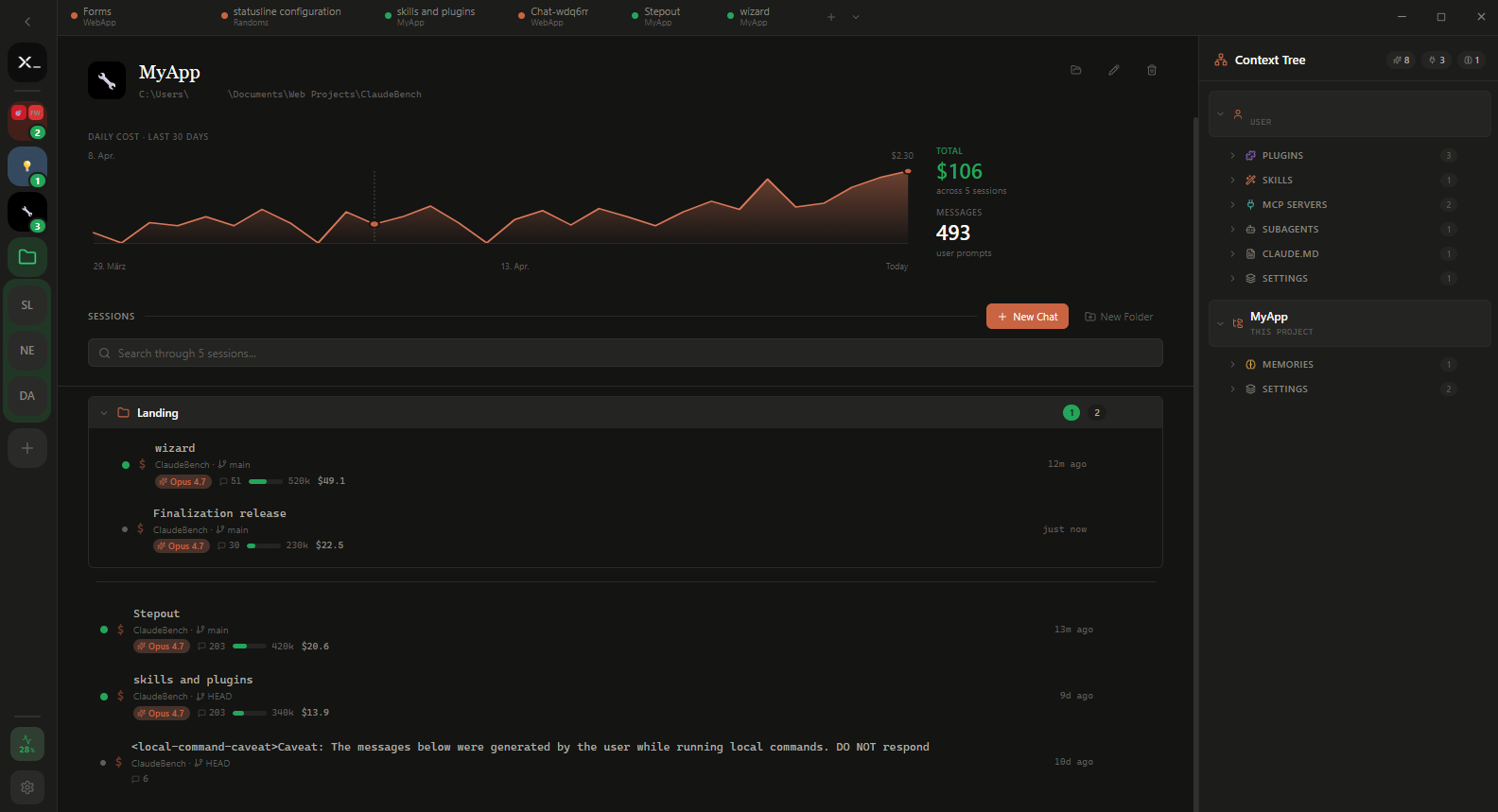
Project overview — daily cost across the last 30 days, every session in one list, full context tree on the right.
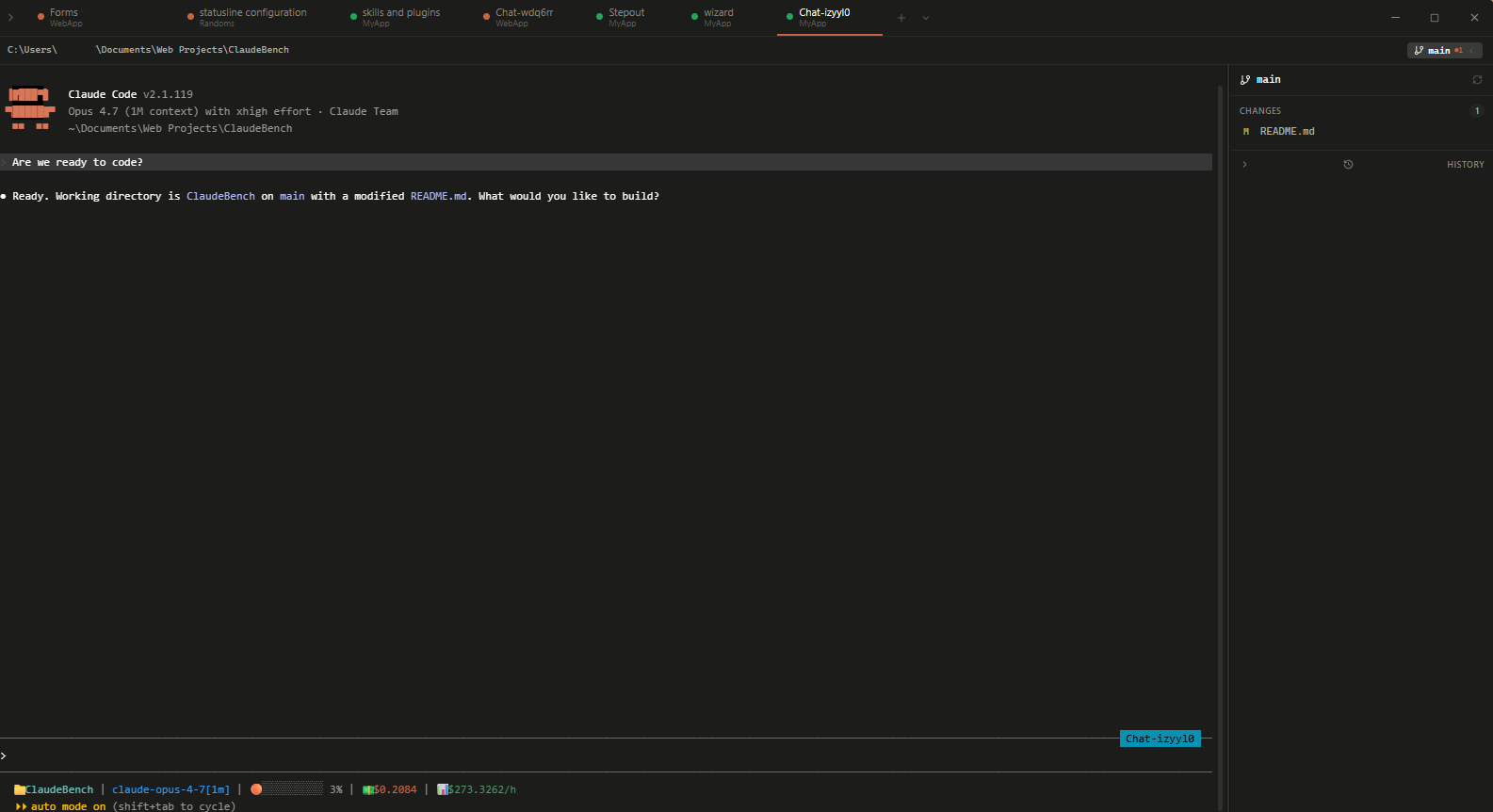
Claude Code session inside an xshell tab — inline git panel, live cost / context indicators in the status line.
Why this exists
Open terminal. cd somewhere. Type claude. Repeat for every project, every day.
xshell skips that. All your projects, all your past sessions, all the costs — one screen, one click.
How it works
xshell reads the files Claude Code writes to ~/.claude/ and spawns the claude CLI when you start a session. No API proxy, no telemetry, no replacement implementation. If Claude Code works on your machine, xshell works.
What you see
Every project on your machine that Claude Code has touched. Every session, sorted by what you opened last. Cost per session, per project, per day.
The data is all in ~/.claude/ already. xshell just shows it in one place.
Features
- 🗂️ Sidebar with every project Claude Code has touched. Pin, group, drag-and-drop.
- 📜 One-click session resume with full history per project.
- 💻 Real terminals, splittable side-by-side. xterm.js + native PTYs.
- 🌿 Live branch and worktree awareness in the sidebar.
- 🧩 Context tree for skills, agents, plugins, MCP servers, hooks, slash commands, and CLAUDE.md.
- 📊 Cost, context, and rate-limit tracking per session and across your account.
- 🪶 Inline git panel with diff counts and staging.
Built with Tauri 2 and Rust. Native on Windows, macOS, and Linux.
Install
The fastest way — works on Windows, macOS, and Linux:
npm install -g xshell-app
xshell
The npm install step downloads the right binary for your platform from the latest GitHub release into ~/.xshell/bin/. The xshell command then launches the app.
Or download an installer directly
| Platform | File |
|---|---|
| Windows | xshell_<version>_x64_en-US.msi or xshell_<version>_x64-setup.exe |
| macOS | xshell_<version>_universal.dmg |
| Linux | xshell_<version>_amd64.deb, xshell-<version>-1.x86_64.rpm, or xshell_<version>_amd64.AppImage |
The claude CLI must be installed and on PATH.
Contributing
Issues and pull requests welcome. See CONTRIBUTING.md for development setup, project structure, and PR guidelines.
License
MIT © 2026 xshell Contributors
xshell is independent software. It reads files written by Anthropic's claude CLI and runs claude as a subprocess. "Claude" and "Claude Code" are trademarks of Anthropic, PBC.
Yorumlar (0)
Yorum birakmak icin giris yap.
Yorum birakSonuc bulunamadi