plasticity-mcp
Health Uyari
- License — License: MIT
- Description — Repository has a description
- Active repo — Last push 0 days ago
- Low visibility — Only 5 GitHub stars
Code Gecti
- Code scan — Scanned 12 files during light audit, no dangerous patterns found
Permissions Gecti
- Permissions — No dangerous permissions requested
Bu listing icin henuz AI raporu yok.
Local MCP server for native Plasticity CAD automation on macOS, with an optional model review and print preparation Workbench.
Plasticity MCP
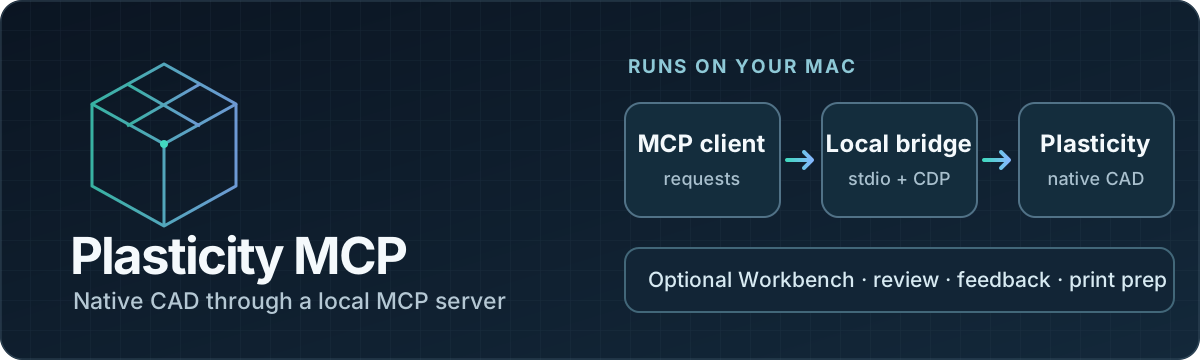
Control Plasticity from an MCP client: inspect and measure native CAD geometry, create and edit models, and export the result. An optional Workbench supports model review, dimensional feedback, and print preparation.
Runs locally on macOS Apple Silicon with Plasticity 26.1.3, with experimental adapter support for a separately prepared 26.2.1 copy. The MCP server connects to a Plasticity window selected by the user; it cannot run as a standalone cloud CAD service.
| CAD workflow | What the server provides |
|---|---|
| Inspect | Scene state, precise B-rep measurements, and references to bodies, faces, and edges |
| Model | Native creation and editing with document history, Undo, and Redo |
| Deliver | Document operations, import/export, and camera screenshots |
| Review | Optional local Workbench with measurement tables, dimensional feedback, and tablet annotations |
The server uses Plasticity's own command factories and document history through a loopback-only Electron CDP endpoint. It does not patch or re-sign the application. MCP geometry inputs use millimeters and degrees; native edits support Plasticity Undo and Redo.
What it provides
- Native Plasticity scene inspection, precise B-rep measurements, and revision-bound references to bodies, faces, and edges.
- Native CAD creation and editing, document operations, import/export, and camera screenshots.
- Agent guidance and workflows for image/sketch-driven design, functional clarification, fasteners, and practical strength screening.
- Optional Workbench for viewing models and measurement tables, submitting validated dimensional feedback, and tablet annotations on the same local network.
- Optional Creality Print workflow for slicing and print-job preparation. The agent waits for explicit user confirmation before starting a print.
See the full tool reference, acceptance matrix, and Workbench operations guide for details and current verification status.
Requirements
- macOS on Apple Silicon
- Plasticity 26.1.3 installed at
/Applications/Plasticity.app - Node.js 24 or newer
- Codex CLI for the Git-backed plugin installation below
This is an early, version-specific project. Live CAD and slicer operations depend on the installed applications and are not covered by mock tests alone. Check the acceptance matrix before relying on a specific operation.
Install and run
git clone https://github.com/Mesteriis/plasticity-mcp.git
cd plasticity-mcp
npm install
npm run start:plasticity
npm run setup:codex
setup:codex adds this GitHub repository as a Codex plugin marketplace and installs the plasticity-mcp plugin from Git. It records this checkout's path in a private file under ~/.plasticity-mcp so the two MCP servers can run the checked-out code and its installed dependencies. No machine-specific paths are committed. Open a new Codex chat after installation.
To use the MCP server without the plugin, register it directly instead:
codex mcp add plasticity -- npm --prefix "$PWD" start
Ask the agent to call plasticity_list_windows, then connect to an explicitly selected window with plasticity_connect.
The default MCP catalog shows the core connect, inspection, change-tracking, and screenshot tools plus plasticity_call. For any other operation, use plasticity_call with toolName: "catalog" and a search query to get its name and input schema, then call it through the same dispatcher. The full catalog remains available with npm run start:full; existing handlers and validation are the same in both modes.
The launcher does not terminate an existing Plasticity process to add MCP access. If it reports that a restart is needed, save your documents, close Plasticity yourself, then rerun the command. CDP listens on loopback only.
Before starting a new process, the launcher reads the Electron framework's fuse
configuration. It requires EnableNodeCliInspectArguments; builds that disable
or remove it fail immediately with a compatibility error instead of an inspector
timeout. The official Plasticity 26.2.1 build disables this fuse, so its
unmodified bundle remains unsupported by this startup method. An unreadable or
unrecognized fuse configuration also stops the launch with a diagnostic. The
check only reads the framework; it does not change application security settings.
The adapter can use a separately prepared experimental 26.2.1 copy with an
available inspector. It handles the Electron 42 startup pause, native binding
discovery, stores, selection, and changed factory contracts while preserving the
26.1.3 path. Select that copy explicitly and use a fresh temporary profile:
npm run start:plasticity-isolated -- --application /absolute/Experimental/Plasticity.app
Use the returned renderer endpoint as PLASTICITY_CDP_URL, then explicitly select
its window through MCP. The launcher does not prepare, patch, or sign the copy.
See the 26.2.1 compatibility report for the
security prerequisites, exact live coverage on both versions, and remaining
validation limits. See Electron's fuse documentation
for the inspector flag's behavior.
Optional Workbench
The Workbench is not required for chat-based use. Start it on the local machine with:
npm run start:workbench
In another terminal on the same Mac, run npm --workspace workbench run open:owner to open an authenticated owner session. The server address alone does not grant owner access.
To make it reachable by a tablet on the same private network, run npm run start:workbench -- --lan; the server prints its local address. Do not expose it to the public internet. Follow the Workbench guide for registration, sharing, backup, and recovery.
Development
npm test
npm run typecheck
npm --prefix workbench test
npm --prefix workbench run typecheck
npm --prefix workbench run build
Live acceptance checks use a real Plasticity session and can mutate a document. Read the corresponding acceptance guide and explicitly select a disposable test document before running them; they are not part of the default test suite.
Safety and scope
- Mutations are serialized and checked against the current document revision; stale references are rejected.
- After a timeout or lost connection during a mutation, inspect/reconcile the scene before issuing another change.
- Workbench dimensional inputs are validated in the browser and again on the server.
- Print submission and starting a print are separate actions; starting requires explicit user confirmation.
- This project does not replace Plasticity, provide certified engineering analysis, or guarantee printability or part strength. Strength tools are screening calculations whose assumptions and limitations must be reviewed.
Contributing and support
Read CONTRIBUTING.md before opening a pull request. Report security issues using the private reporting process in SECURITY.md. See SUPPORT.md for bug reports, feature requests, and usage questions. Contributions are released under the MIT License, with copyright attributed to Aleksand Meshchriakov.
Yorumlar (0)
Yorum birakmak icin giris yap.
Yorum birakSonuc bulunamadi