agent-orchestr
Health Pass
- License — License: MIT
- Description — Repository has a description
- Active repo — Last push 0 days ago
- Community trust — 19 GitHub stars
Code Fail
- rm -rf — Recursive force deletion command in tests/test_kill_target.py
Permissions Pass
- Permissions — No dangerous permissions requested
No AI report is available for this listing yet.
Live monitor and workspace orchestrator for AI coding agents (Herdr, OMP, Hermes, remote Hermes peers, Claude, Codex, Grok) in the Omarchy bar.
Agent Orchestrator
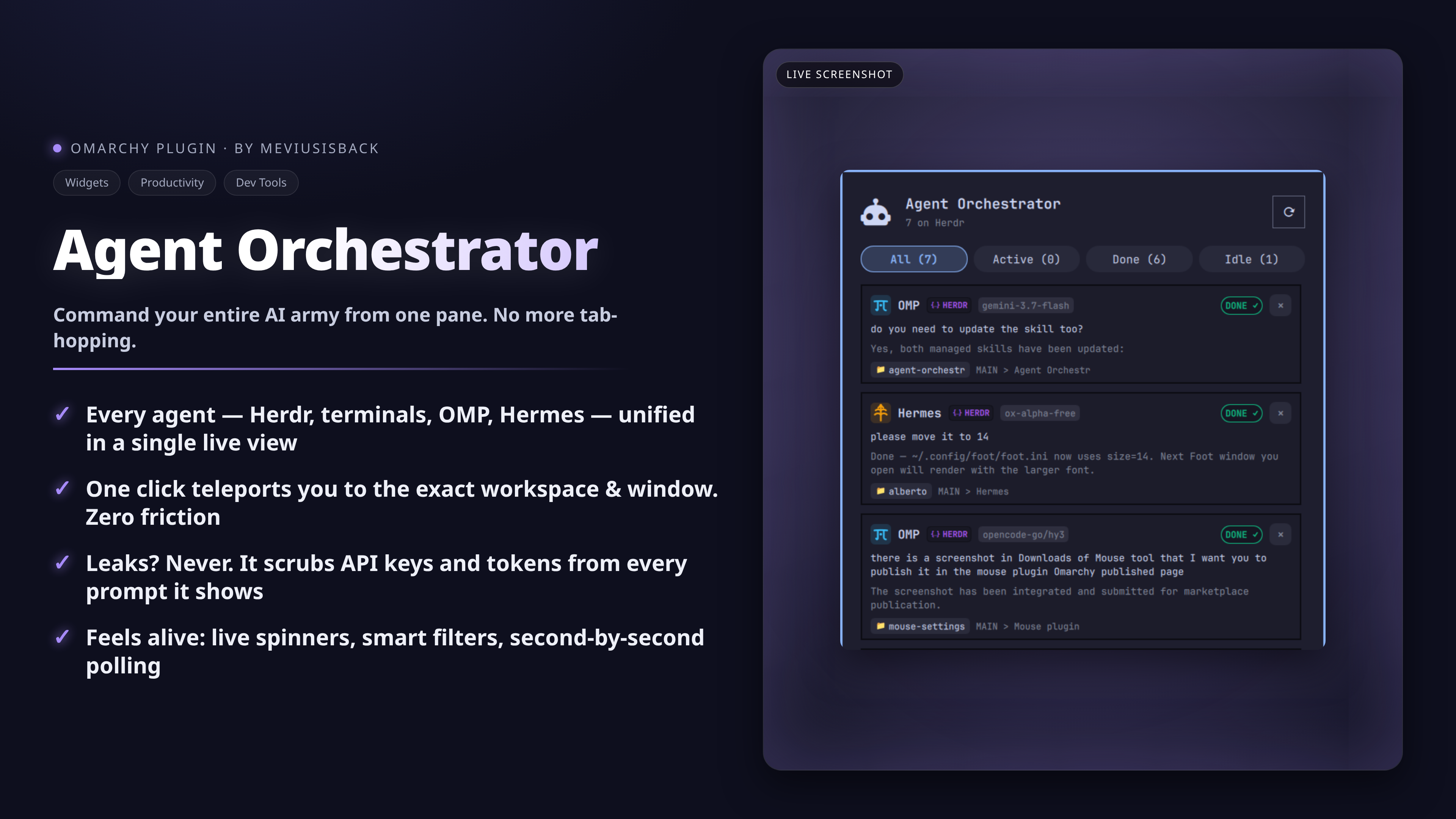
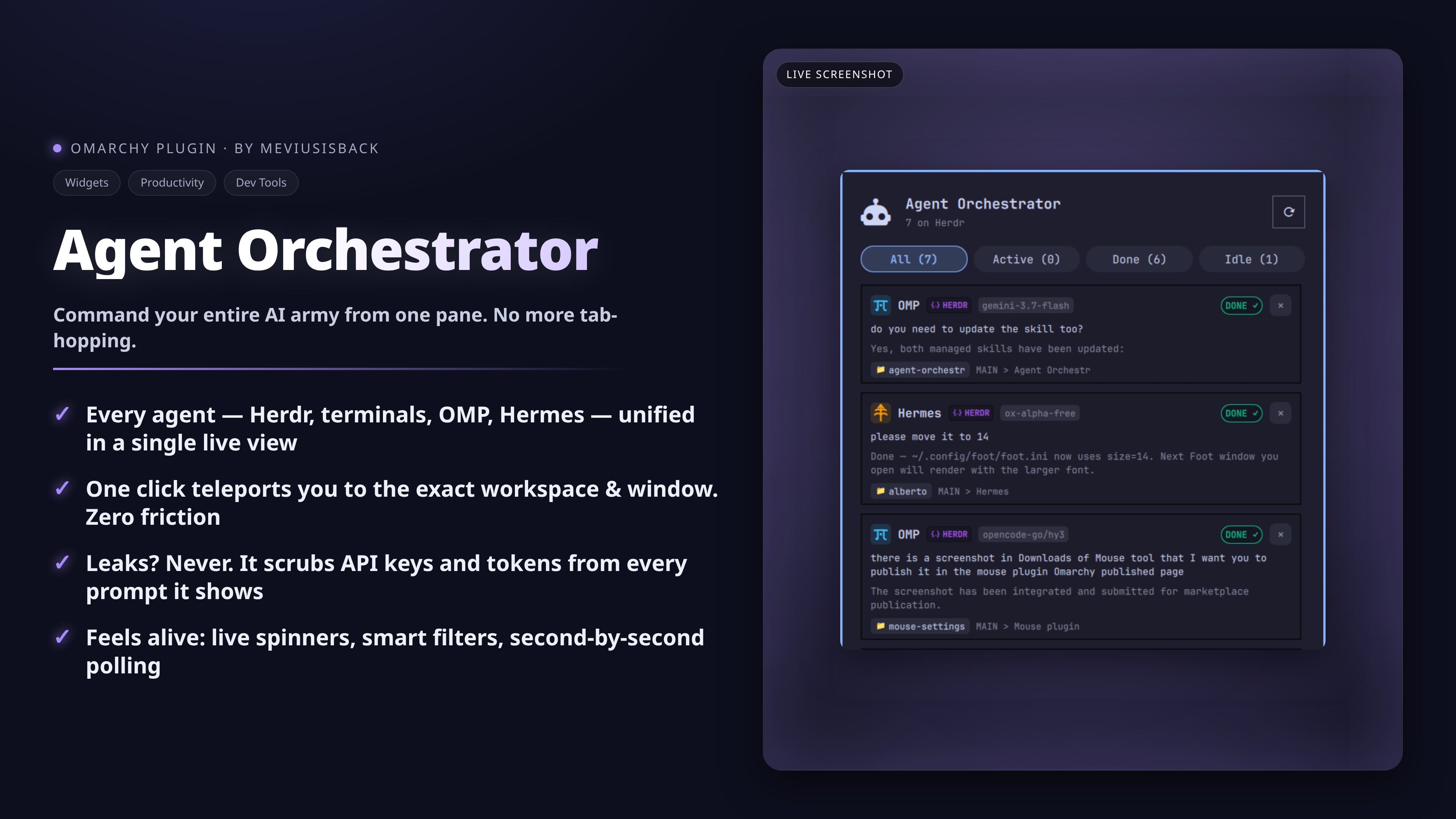
Live status, active tasks and one-click workspace switching for AI coding agents — Herdr, OMP, Hermes, Claude, Codex, OpenCode, Agy and Grok — right in the Omarchy bar.


Why
When several AI coding agents work at once — across terminals, Herdr panes and remote machines — you lose track of who's doing what and where. Agent Orchestrator collapses that into the bar: which agents are working, waiting or done, what they're doing, and one click to jump to the right workspace and window.
Features
- Live multi-source tracking — Herdr panes from both generations (0.9
herdr.socksnapshots and 0.1herdr-coreJSON-RPC rosters, local plus remote machines), remote Hermes peers (gateways registered withhermes peer add, read-only), standalone terminal windows (Ghostty, Foot, Kitty, Alacritty, WezTerm), OMP sessions (~/.omp/agent/sessions/), Hermes CLI and Desktop app databases (~/.hermes/state.db), and Grok Build TUI sessions ($GROK_HOME/active_sessions.json+events.jsonl). - One-click workspace & window switching — click any agent card to switch Hyprland workspaces and focus the exact terminal window, Herdr pane or Hermes Desktop window.
- Visual status bar display —
Iconmode (orchestrator glyph with activity badge and spinner while agents work),Statusmode (real-time ticker of active tasks),Compactmode (live counts like4 ag · 1 busy,3 done). - Interactive popup panel — smart filter tabs (
All,Working,Waiting,Done,Idle); rich cards with model tags, latest human prompt, real-time tool execution, repo/working-directory breadcrumbs and session indicators; terminate agent processes or close Herdr panes from card buttons. - Privacy first — automatic redaction of API keys and tokens in prompts, detail lines and error text (terminal and tab titles are shown exactly as the terminal sets them); optional
privacyHidePromptshides all task text in bar and cards (counts, status, repo and workspace only) for screen sharing. - Adaptive polling — 2 s refresh while the popup is open, 3 s while agents are working, and your configured interval (never below 3 s) when everything is idle.
Install
Via the Omarchy Marketplace / plugin manager:
omarchy plugin add https://github.com/meviusisback/agent-orchestr --enable
Or manually — symlink into the plugins directory:
mkdir -p ~/.config/omarchy/plugins
ln -sfn ~/repo/agent-orchestr ~/.config/omarchy/plugins/meviusisback.agent-orchestr
then add it to the status bar layout in ~/.config/omarchy/shell.json:
{
  "id": "meviusisback.agent-orchestr",
  "barDisplay": "Icon",
  "refreshIntervalSec": 3
}
and restart the shell:
omarchy restart shell
Usage
Toggle the popup with a global Hyprland key — add to ~/.config/hypr/bindings.lua:
o.bind("SUPER + A", "Agent Orchestrator", "omarchy shell meviusisback.agent-orchestr toggle")
Shell IPC commands:
omarchy shell meviusisback.agent-orchestr toggle    # popup on/off
omarchy shell meviusisback.agent-orchestr open     # explicit open
omarchy shell meviusisback.agent-orchestr close    # explicit close
omarchy shell meviusisback.agent-orchestr refresh  # force live refresh
Requirements
- Omarchy with Hyprland and the Quickshell shell
python3(collector uses the standard library plushttp.client)- One or more agent runtimes to watch: Herdr, OMP, Hermes CLI/Desktop, Claude Code, Codex, Grok — standalone terminal windows are picked up with nothing installed
- Optional:
hermesCLI (peer registration),herdrCLI (remote machines), the Claude Code status hook below for real Claude working/waiting/completed states
Configuration
| Key | Default | Description |
|---|---|---|
barDisplay |
"Icon" |
"Icon", "Status" or "Compact" |
refreshIntervalSec |
3 |
Polling frequency in seconds |
showIdleInBar |
false |
Badge count when all agents are idle |
maxTaskLength |
45 |
Max characters of the bar status ticker |
privacyHidePrompts |
false |
Hide agent task/prompt text in bar and cards (counts, status, repo, workspace only) |
Herdr generations: the 0.9 server is read from ~/.config/herdr/herdr.sock (session.snapshot, plus per-session sockets under ~/.config/herdr/sessions/); the 0.1 generation is read from its herdr-core socket under $XDG_RUNTIME_DIR/herdr-core/ (or HC_SOCKET) through terminal.list. A 0.1 terminal is an agent only when its program is a recognized agent and it reports state through the OSC 7501 record the core stores in status; shells are skipped and finished terminals dropped. Clicking a 0.1 card runs herdr-app do pane.focus --terminal <address> and focuses the Herdr window; ✕ sends terminal.kill to the core. Agents that never write a status record still appear, but with status inferred from their session transcript.
Remote sources (read-only — no focus, no terminate; those windows aren't on this desktop):
- Herdr — save a machine with
herdr machine add, verify SSH access and a matching remote Herdr install. The plugin reads enabled rows fromherdr machine list --jsonand queries each machine through the read-onlyherdr --session <name> api snapshot. - Hermes peers — register the gateway once with Hermes itself (
hermes peer add <name> --url http://host:8377 --key <API_SERVER_KEY>; remove withhermes peer remove <name>). The plugin reads thebot_peersblock of~/.hermes/config.yaml, loads the key from~/.hermes/.envinto anAuthorizationheader only, and polls each enabled peer over HTTP/1.1 or HTTPS pinned to the system CA bundle. Per tick it probes at most 4 peers (config order, rest reported as skipped) with ~5 calls and a 3 s budget each;http://is accepted for any peer host you configure — the key travels in theAuthorizationheader, so usehttps://outside your LAN — redirects never followed, proxies ignored. Peers on this machine (127.x,::1,localhost) are skipped — local discovery already covers them. Unreachable peers surface in the panel footer instead of silently showing no cards. - Hermes Desktop gateways — only non-secret labels and URLs from
~/.config/Hermes/connections.jsonare read; OAuth tokens stay with Hermes Desktop. A gateway also registered as a peer gets its label annotated with the peer's session count.
Claude Code status (optional): without help, every claude process reads as generic idle. For real working / waiting / completed states, install the bundled hook (purely additive — without it, behavior is today's fallback):
mkdir -p ~/.claude/hooks
cp hooks/claude-code-status.sh ~/.claude/hooks/
chmod +x ~/.claude/hooks/claude-code-status.sh
then merge its PreToolUse, UserPromptSubmit, Notification, Stop, SubagentStop and SessionEnd entries into ~/.claude/settings.json (merge the matchers alongside existing entries — don't replace the array). Each status file is keyed by the claude PID (walked from the hook's $PPID), removed on SessionEnd, pruned when a session was SIGKILLed.
How it works
agent_ctl.py collects every source into one JSON snapshot per tick — local processes/terminals, Herdr sockets, OMP sessions, Hermes databases (read-only ?mode=ro), Claude hook files (trusted only with a known status + fresh timestamp), Grok roster/events through one guarded reader (ownership, symlink, size and budget checks; anything planted degrades to "no detail", never a wrong card) — and Panel.qml renders bar and cards from it. Prompts, detail lines and error text pass secret redaction (API keys, tokens, the peer key itself) before they reach the panel; terminal and tab titles are displayed exactly as the terminal sets them. Everything renders as Text.PlainText, never rich text; peer transport uses http.client with the system CA bundle, bounded responses and a watchdog deadline per peer.
Verify with the hermetic suites (no network, no hyprctl, no real ~/.grok or ~/.hermes; the peer suite serving only a loopback http.server):
python3 tests/test_grok_sessions.py       # Grok collector fixtures
python3 tests/test_kill_target.py         # target verification, all patched
python3 tests/test_peer_sources.py        # peer parser, confined reader, transport guards
python3 tests/test_claude_hook_argv.py
python3 tests/test_discovery_regression.py
python3 tests/test_hermes_activity.py
python3 tests/test_remote_sources.py
Removal
omarchy plugin remove meviusisback.agent-orchestr
Or remove the symlink from ~/.config/omarchy/plugins/meviusisback.agent-orchestr and drop "meviusisback.agent-orchestr" from ~/.config/omarchy/shell.json.
License
MIT — see LICENSE.
Reviews (0)
Sign in to leave a review.
Leave a reviewNo results found