skillgrade
Health Gecti
- License — License: MIT
- Description — Repository has a description
- Active repo — Last push 0 days ago
- Community trust — 379 GitHub stars
Code Uyari
- fs module — File system access in eval.yaml
- fs module — File system access in examples/angular-modern/graders/check-modern-apis.js
- fs module — File system access in graders/check-eval-yaml.js
- process.env — Environment variable access in src/agents/acp.ts
Permissions Gecti
- Permissions — No dangerous permissions requested
This tool provides automated testing and evaluation for AI agent skills, allowing developers to run trial tasks and grade the results to verify correct agent behavior.
Security Assessment
The tool requires API keys (Gemini, Anthropic, or OpenAI) to function, which are accessed via standard environment variables. It reads and writes to the local file system to evaluate tests and generate reports. Docker is utilized as an isolated provider for running these tests. No hardcoded secrets or dangerous account permissions were detected. However, there are warnings regarding file system access in eval files and environment variable access. Overall risk: Low.
Quality Assessment
The project is highly active, with its most recent code push happening today. It is licensed under the standard MIT license and has established solid community trust, currently backed by 379 GitHub stars. The repository includes clear documentation, usage examples, and configuration references.
Verdict
Safe to use.
"Unit tests" for your agent skills
Skillgrade
The easiest way to evaluate your Agent Skills. Tests that AI agents correctly discover and use your skills.
See examples/ — superlint (simple) and angular-modern (TypeScript grader).
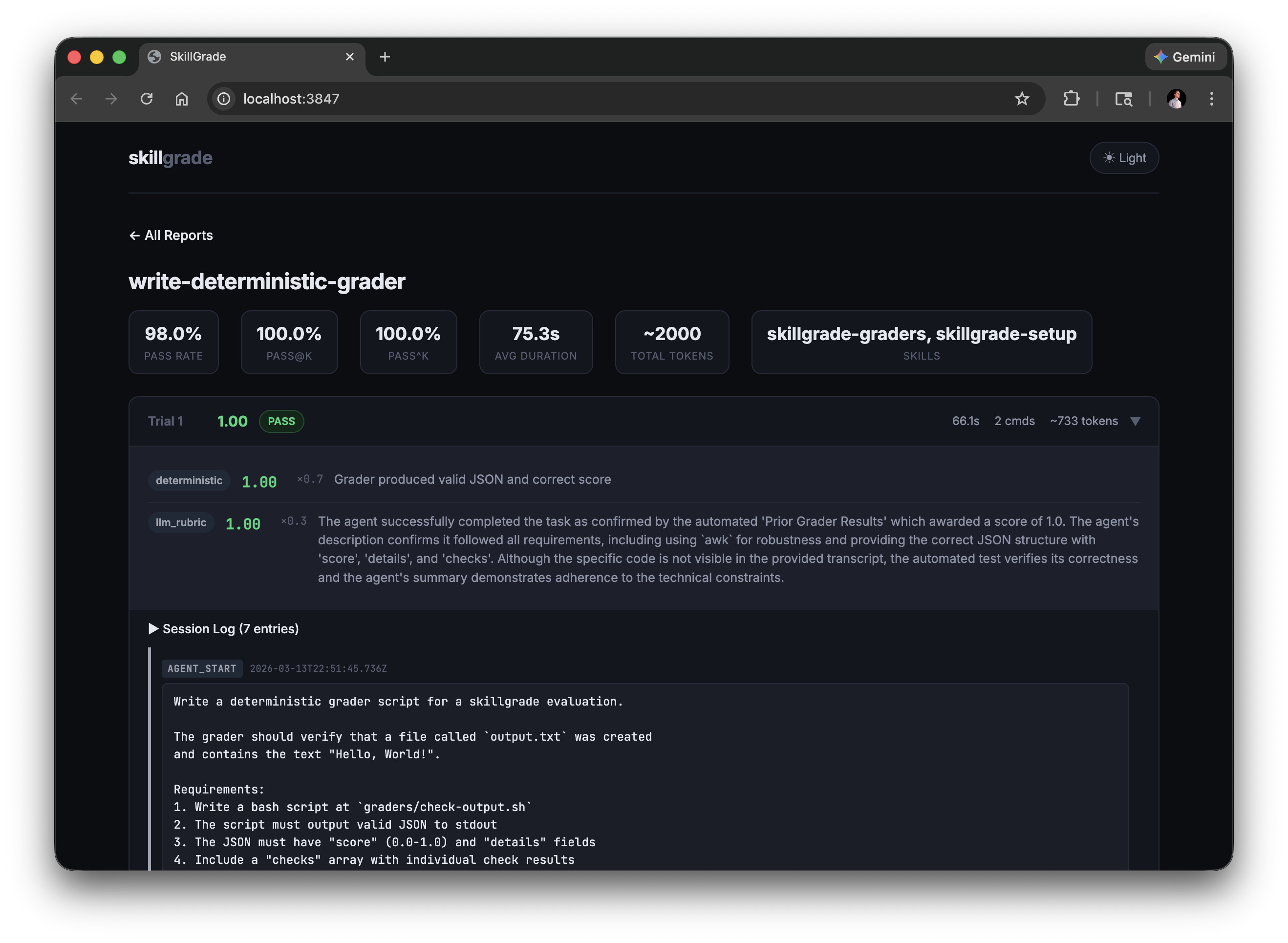
Quick Start
Prerequisites: Node.js 20+, Docker
npm i -g skillgrade
1. Initialize — go to your skill directory (must have SKILL.md) and scaffold:
cd my-skill/
GEMINI_API_KEY=your-key skillgrade init    # or ANTHROPIC_API_KEY / OPENAI_API_KEY
# Use --force to overwrite an existing eval.yaml
Generates eval.yaml with AI-powered tasks and graders. Without an API key, creates a well-commented template.
2. Edit — customize eval.yaml for your skill (see eval.yaml Reference).
3. Run:
GEMINI_API_KEY=your-key skillgrade --smoke
The agent is auto-detected from your API key: GEMINI_API_KEY → Gemini, ANTHROPIC_API_KEY → Claude, OPENAI_API_KEY → Codex. Override with --agent=claude.
4. Review:
skillgrade preview          # CLI report
skillgrade preview browser  # web UI → http://localhost:3847
Reports are saved to $TMPDIR/skillgrade/<skill-name>/results/. Override with --output=DIR.
Presets
| Flag | Trials | Use Case |
|---|---|---|
--smoke |
5 | Quick capability check |
--reliable |
15 | Reliable pass rate estimate |
--regression |
30 | High-confidence regression detection |
Options
| Flag | Description |
|---|---|
--eval=NAME[,NAME] |
Run specific evals by name (comma-separated) |
--grader=TYPE |
Run only graders of a type (deterministic or llm_rubric) |
--trials=N |
Override trial count |
--parallel=N |
Run trials concurrently |
--agent=gemini|claude|codex|acp |
Override agent (default: auto-detect from API key) |
--provider=docker|local |
Override provider |
--acp-command=CMD |
ACP agent command (e.g., gemini --acp) |
--output=DIR |
Output directory (default: $TMPDIR/skillgrade) |
--validate |
Verify graders using reference solutions |
--ci |
CI mode: exit non-zero if below threshold |
--threshold=0.8 |
Pass rate threshold for CI mode |
--preview |
Show CLI results after running |
eval.yaml Reference
version: "1"

# Optional: explicit path to skill directory (defaults to auto-detecting SKILL.md)
# skill: path/to/my-skill

defaults:
  agent: gemini          # gemini | claude | codex | acp
  provider: docker       # docker | local
  trials: 5
  timeout: 300           # seconds
  threshold: 0.8         # for --ci mode
  grader_model: gemini-3-flash-preview  # default LLM grader model
  acp:                   # ACP agent configuration (optional)
    command: gemini --acp  # command to start ACP-compatible agent
    env:                  # optional environment variables
      DEBUG: "1"
  docker:
    base: node:20-slim
    setup: |             # extra commands run during image build
      apt-get update && apt-get install -y jq
  environment:           # container resource limits
    cpus: 2
    memory_mb: 2048

tasks:
  - name: fix-linting-errors
    instruction: |
      Use the superlint tool to fix coding standard violations in app.js.

    workspace:                           # files copied into the container
      - src: fixtures/broken-app.js
        dest: app.js
      - src: bin/superlint
        dest: /usr/local/bin/superlint
        chmod: "+x"

    graders:
      - type: deterministic
        setup: npm install typescript    # grader-specific deps (optional)
        run: npx ts-node graders/check.ts
        weight: 0.7
      - type: llm_rubric
        rubric: |
          Did the agent follow the check → fix → verify workflow?
        model: gemini-2.0-flash          # optional model override
        weight: 0.3

    # Per-task overrides (optional)
    agent: claude
    trials: 10
    timeout: 600
String values (instruction, rubric, run) support file references — if the value is a valid file path, its contents are read automatically:
instruction: instructions/fix-linting.md
rubric: rubrics/workflow-quality.md
Graders
Deterministic
Runs a command and parses JSON from stdout:
- type: deterministic
  run: bash graders/check.sh
  weight: 0.7
Output format:
{
  "score": 0.67,
  "details": "2/3 checks passed",
  "checks": [
    {"name": "file-created", "passed": true, "message": "Output file exists"},
    {"name": "content-correct", "passed": false, "message": "Missing expected output"}
  ]
}
score (0.0–1.0) and details are required. checks is optional.
Bash example:
#!/bin/bash
passed=0; total=2
c1_pass=false c1_msg="File missing"
c2_pass=false c2_msg="Content wrong"

if test -f output.txt; then
  passed=$((passed + 1)); c1_pass=true; c1_msg="File exists"
fi
if grep -q "expected" output.txt 2>/dev/null; then
  passed=$((passed + 1)); c2_pass=true; c2_msg="Content correct"
fi

score=$(awk "BEGIN {printf \"%.2f\", $passed/$total}")
echo "{\"score\":$score,\"details\":\"$passed/$total passed\",\"checks\":[{\"name\":\"file\",\"passed\":$c1_pass,\"message\":\"$c1_msg\"},{\"name\":\"content\",\"passed\":$c2_pass,\"message\":\"$c2_msg\"}]}"
Use
awkfor arithmetic —bcis not available innode:20-slim.
LLM Rubric
Evaluates the agent's session transcript against qualitative criteria:
- type: llm_rubric
  rubric: |
    Workflow Compliance (0-0.5):
    - Did the agent follow the mandatory 3-step workflow?

    Efficiency (0-0.5):
    - Completed in ≤5 commands?
  weight: 0.3
  model: gemini-2.0-flash    # optional, auto-detected from API key
Uses Gemini or Anthropic based on available API key. Override with the model field.
Combining Graders
graders:
  - type: deterministic
    run: bash graders/check.sh
    weight: 0.7      # 70% — did it work?
  - type: llm_rubric
    rubric: rubrics/quality.md
    weight: 0.3      # 30% — was the approach good?
Final reward = Σ (grader_score × weight) / Σ weight
CI Integration
Use --provider=local in CI — the runner is already an ephemeral sandbox, so Docker adds overhead without benefit.
# .github/workflows/skillgrade.yml
- run: |
    npm i -g skillgrade
    cd skills/superlint
    GEMINI_API_KEY=${{ secrets.GEMINI_API_KEY }} skillgrade --regression --ci --provider=local
Exits with code 1 if pass rate falls below --threshold (default: 0.8).
Tip: Use
docker(the default) for local development to protect your machine. In CI,localis faster and simpler.
Environment Variables
| Variable | Used by |
|---|---|
GEMINI_API_KEY |
Agent execution, LLM grading, skillgrade init |
ANTHROPIC_API_KEY |
Agent execution, LLM grading, skillgrade init |
OPENAI_API_KEY |
Agent execution (Codex), skillgrade init |
Variables are also loaded from .env in the skill directory. Shell values override .env. All values are redacted from persisted session logs.
ACP Agent
Agent Client Protocol (ACP) is an open protocol that standardizes communication between AI coding agents and clients. Using an ACP-compatible agent allows you to evaluate skills without managing API keys directly.
Quick Start
# Use Gemini CLI in ACP mode (requires gemini CLI installed)
skillgrade --agent=acp --acp-command="gemini --acp"

# Or configure in eval.yaml
defaults:
  agent: acp
  acp:
    command: gemini --acp
ACP-Compatible Agents
Any agent that supports the ACP protocol can be used:
| Agent | Command |
|---|---|
| Gemini CLI | gemini --acp |
| Other ACP agents | Check agent documentation |
How It Works
- skillgrade starts the ACP agent as a subprocess
- Communication happens via JSON-RPC 2.0 over stdio
- No API key required — authentication is handled by the ACP agent
- Works best with
--provider=localsince the ACP agent needs to be available in your environment
CLI Options
| Flag | Description |
|---|---|
--agent=acp |
Use ACP-compatible agent |
--acp-command=CMD |
Command to start the ACP agent |
The --acp-command can also be set in eval.yaml under defaults.acp.command.
Best Practices
- Grade outcomes, not steps. Check that the file was fixed, not that the agent ran a specific command.
- Instructions must name output files. If the grader checks for
output.html, the instruction must tell the agent to save asoutput.html. - Validate graders first. Use
--validatewith a reference solution before running real evals. - Start small. 3–5 well-designed tasks beat 50 noisy ones.
For a comprehensive guide on writing high-quality skills, check out skills-best-practices. You can also install the skill creator skill to help author skills:
npx skills add mgechev/skills-best-practices
License
MIT
Inspired by SkillsBench and Demystifying Evals for AI Agents.
Yorumlar (0)
Yorum birakmak icin giris yap.
Yorum birakSonuc bulunamadi