echoo
Health Uyari
- No license — Repository has no license file
- Description — Repository has a description
- Active repo — Last push 2 days ago
- Low visibility — Only 5 GitHub stars
Code Uyari
- Code scan incomplete — No supported source files were scanned during light audit
Permissions Gecti
- Permissions — No dangerous permissions requested
This is a macOS-native application designed to eliminate context switching. It detects text in your active apps, runs AI-powered processing on it via keyboard shortcuts or voice commands, and returns results inline without forcing you to switch windows.
Security Assessment
Risk Rating: Medium
The tool requires significant operating system permissions to function. It actively monitors keystrokes and captures text input, and the README suggests it can process entire files, indicating broad file system access. Additionally, it makes external network requests to AI providers via user-provided API keys (BYOK). While the developers claim the app itself never sees your data and it avoids web views, no source code was available for the automated scan to verify these claims or to check for hardcoded secrets. Its deep system-level integrations combined with the lack of an independent code audit warrant caution.
Quality Assessment
The project appears to be under active development, with its last push occurring just two days ago. However, it has a very low community footprint, evidenced by only 5 GitHub stars. Crucially, the repository lacks a software license, meaning that technically all rights are reserved by the author and it is not truly open-source. This absence limits legal use, modification, and distribution for other developers.
Verdict
Use with caution: while the application is actively updated and utilizes a secure BYOK network model, its extensive system access, missing open-source license, and unverified code require you to place significant trust in the developer.
Echoo - A macOS application that saves you hours by stopping context switching.

Echoo
Use AI in any app without leaving it.
Echoo detects the text you type, executes commands triggered by voice or shortcuts, and returns results inline. Fix grammar, adjust tone, translate, summarize - on text or entire files. New in v0.12.1-beta: run Claude Code Skills by voice or shortcut, skip the CLI, and get the result back on screen without losing context.



Download for macOS · Marketplace · Report Bug · Request Feature
Workflows · Models · Quick Start · What's New

How it works
- Echoo detects the current text or file
- Trigger a command by voice or shortcut
- Get the result back inline
New in v0.12.1-beta, Echoo extends the same model to Claude Code Skills:
- Trigger a skill by voice or shortcut
- Echoo runs it for you without pulling you into the CLI
- The result comes back on screen, inside the flow you were already in
Example:
/github-trending Give me a daily AI-powered summary of trending GitHub repositories.Echoo can return a compact on-screen summary like: bytedance/deer-flow (42k) for research and coding, pascalorg/editor (4.5k) for TypeScript editing, and supermemoryai/supermemory (18k) for fast AI memory infrastructure.
BYOK - Bring your own API key. Your text goes directly to your chosen provider. Echoo never sees your data. Built with Swift and SwiftUI. No Electron. No web views.
Table of Contents
- Quick Start
- Core Workflows
- Bring Your Own Model
- Default Shortcuts
- What's New
- Why Echoo
- Privacy
- Keep Echoo Shipping
- Community
- Links
Quick Start
- Download - Grab the latest version from echoo.ai.
- Install - Open the DMG and drag Echoo to Applications.
- Set up - Launch Echoo, grant Accessibility permission, and add your API key.
- Use it - Select text anywhere, press a shortcut, get the result inline.
Optional:
- Local LLM - Point Echoo at Ollama, LocalAI, or LiteLLM for fully private, zero-cost AI.
- Voice model - Download Parakeet v3 (~650 MB) in Settings for on-device speech recognition.
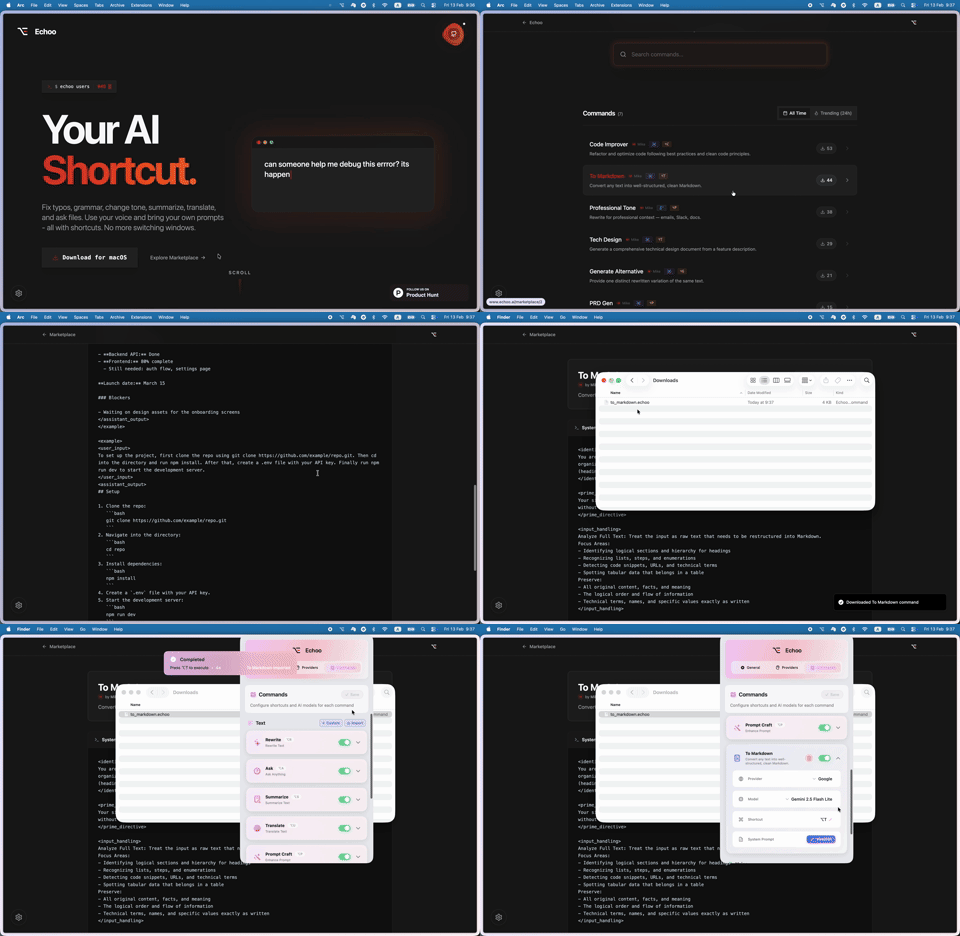
- Marketplace - Browse and install community commands at echoo.ai/marketplace.
Permissions
| Permission | Required | Purpose |
|---|---|---|
| Accessibility | Yes | Capture selected text and simulate keyboard shortcuts |
| Microphone | Optional | Voice dictation and voice instruction commands |
| Screen Recording | Optional | Screen context screenshots for AI processing |
Requires macOS 14 (Sonoma) or later.
Core Workflows
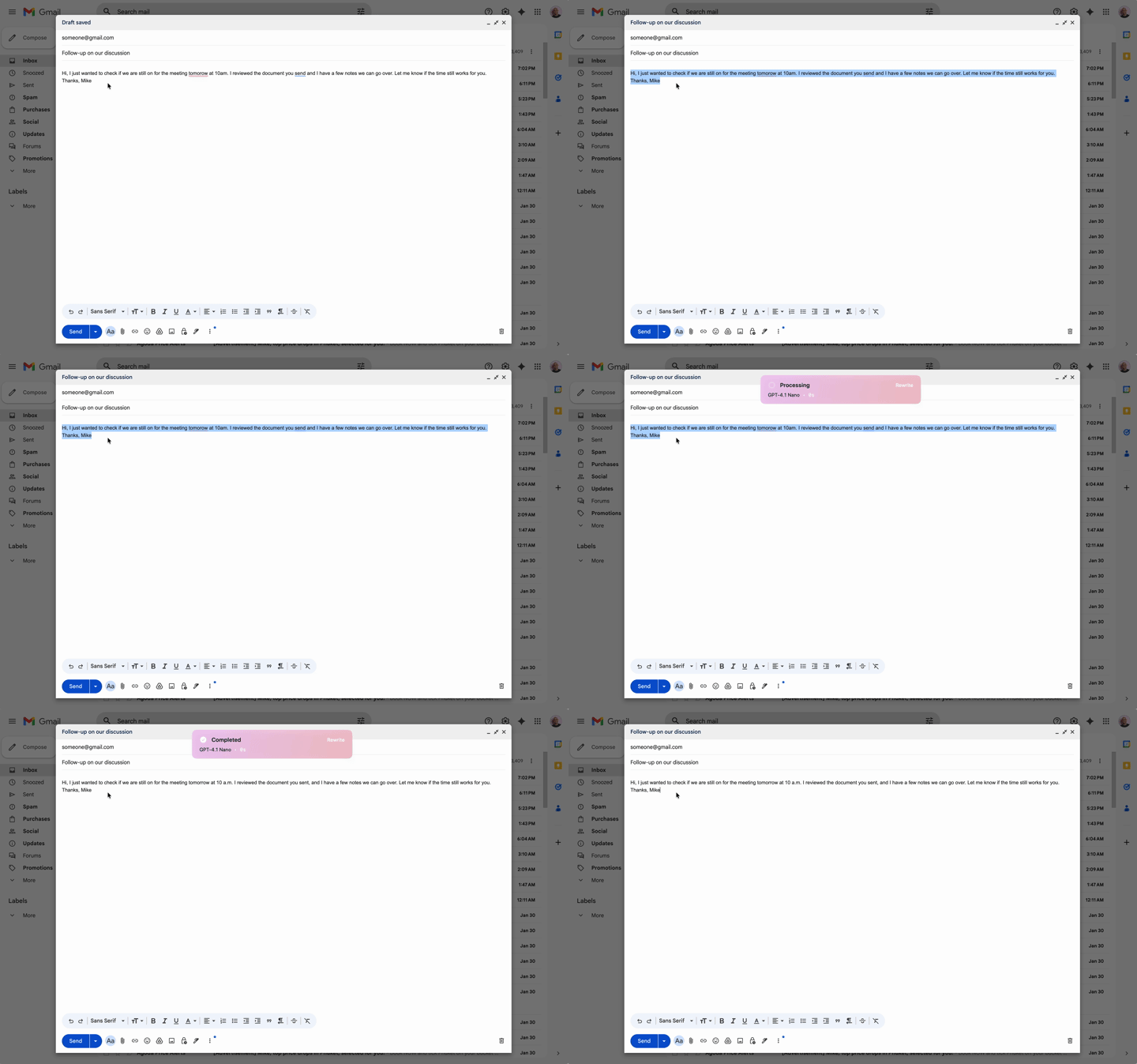
Transform text inline
Echoo detects the current text automatically, runs the command you trigger by voice or shortcut, and returns the result inline. Fix grammar, change tone, translate, summarize, or run a custom prompt without breaking flow.
- Rewrite (
⌥R) - Fix grammar and polish. Replaces your selection inline. - Summarize (
⌥S) - Key points and action items in a popup. - Translate (
⌥T) - Translate to any language without switching apps. - Ask (
⌥A) - Ask questions about selected text. Answers in a popup. - Prompt Craft (
⌥P) - Optimize any prompt using a multi-layer architecture.
Each command can use a different AI provider, model, and temperature.

Dictate and post-process
Speak the text you want to insert, then optionally run a command before Echoo places the final result in your app. On-device transcription powered by NVIDIA Parakeet v3 - 25 languages, zero cloud dependency.
- Dictate (
⌥V) - Speak and text appears at your cursor. Push-to-talk or toggle mode. - Post-processing - Chain dictation into any command (e.g., dictate then auto-translate to French).
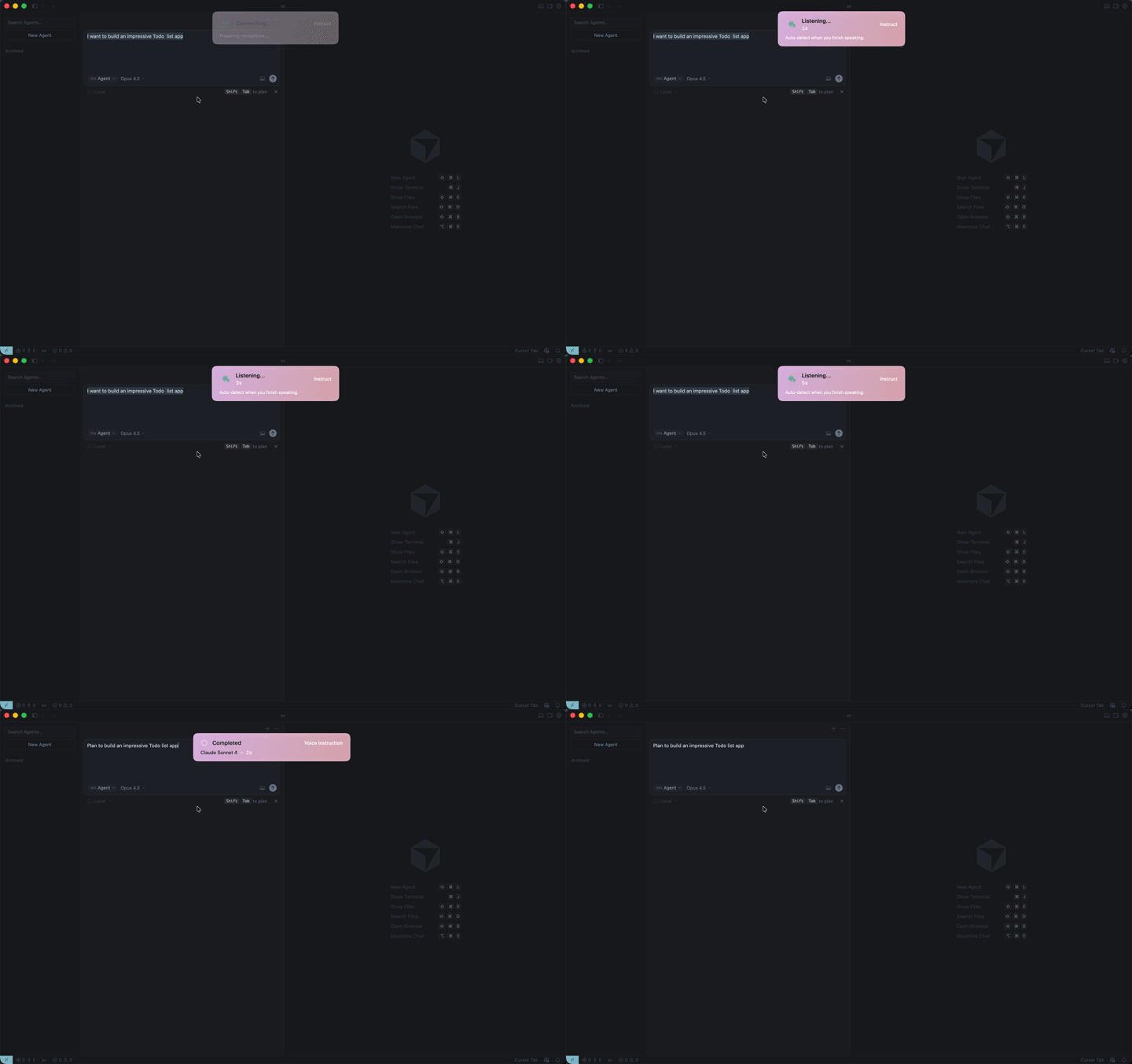
- Voice Instruct (
⌥I) - Instead of dictating content, say what should happen: "Make this shorter" or "Translate this to Spanish." - Read Aloud (
⌥L) - Select text and hear it spoken aloud. Auto-detects language. Optionally run any AI command before speaking (summarize, translate, simplify). Adjustable speed (0.5x–2x). - Voice Launcher (
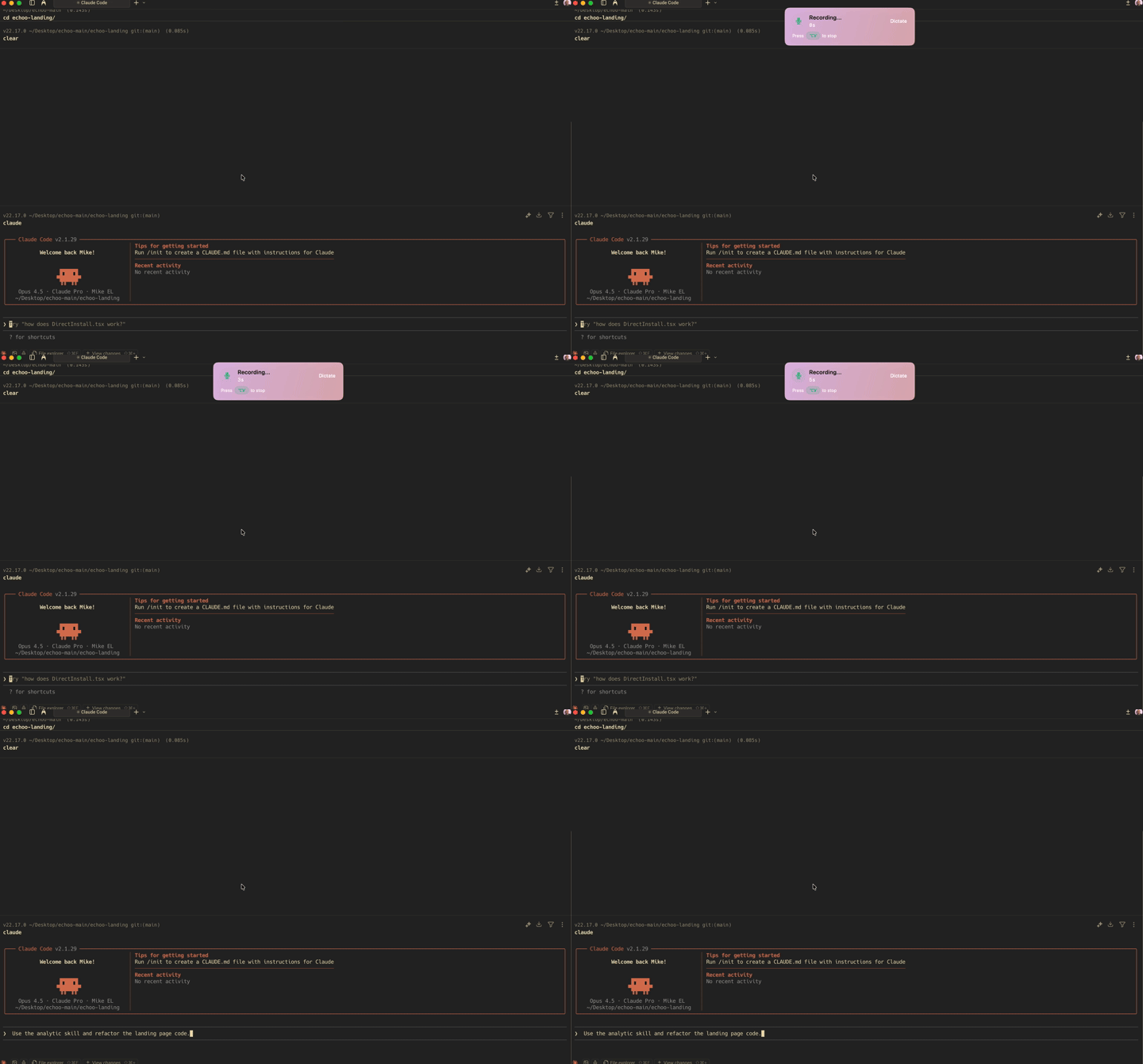
⌃hold) - Hold the Control key, say a command name, and it executes. That now includes Claude Code Skills, so repo-aware workflows can start with your voice instead of a terminal command.
Run commands on files
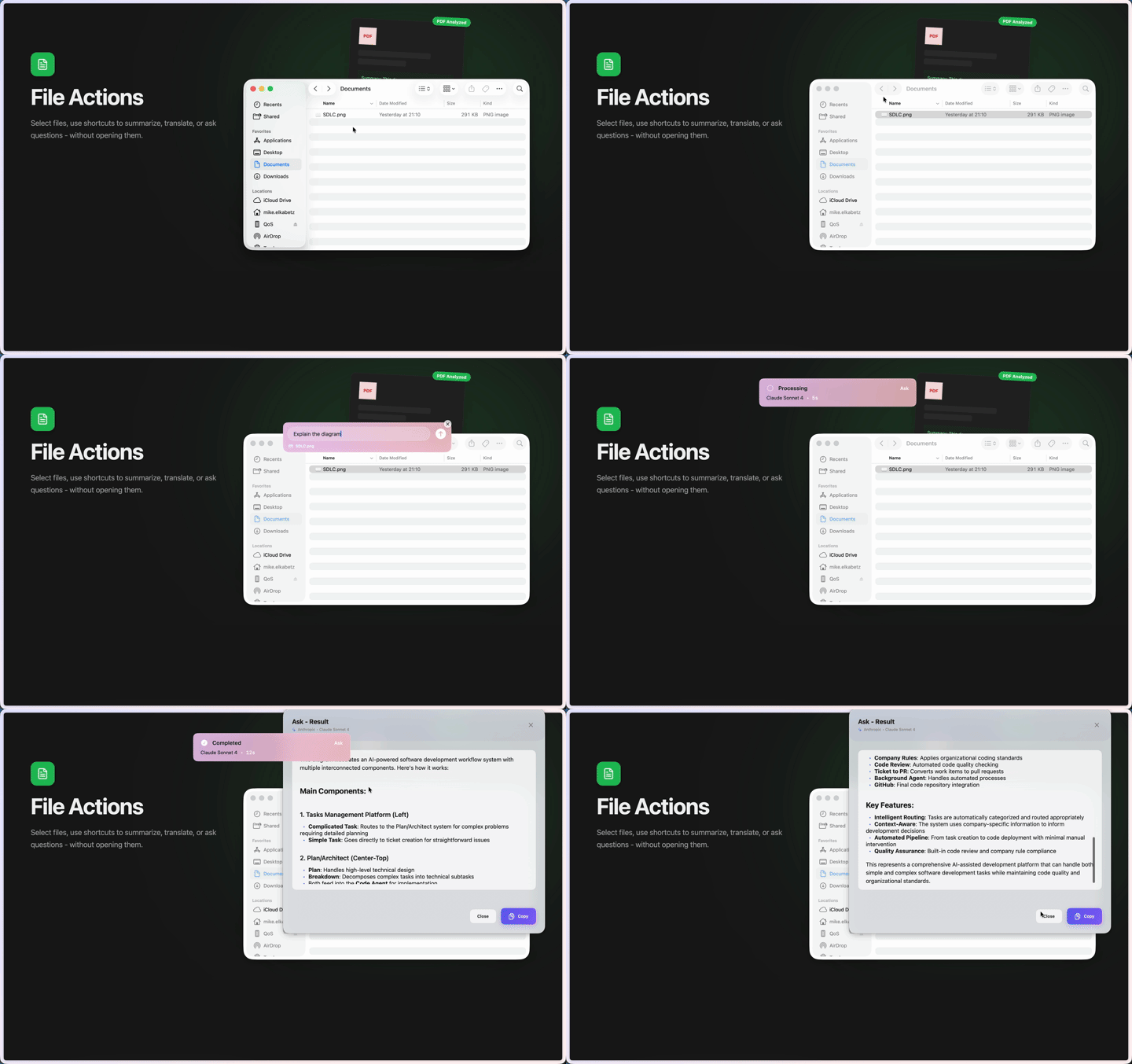
Select files in Finder and run the same command system on them. Summarize documents, translate content, extract information, or ask questions - without opening each file. Supports PDF, DOC, and TXT.
Commands adapt to text, screen, and voice
In Echoo, commands are reusable system prompts that work across different inputs and outputs. Use them to post-process dictation, add screen context when the answer depends on what you see, or clean up text before Read Aloud plays it back.
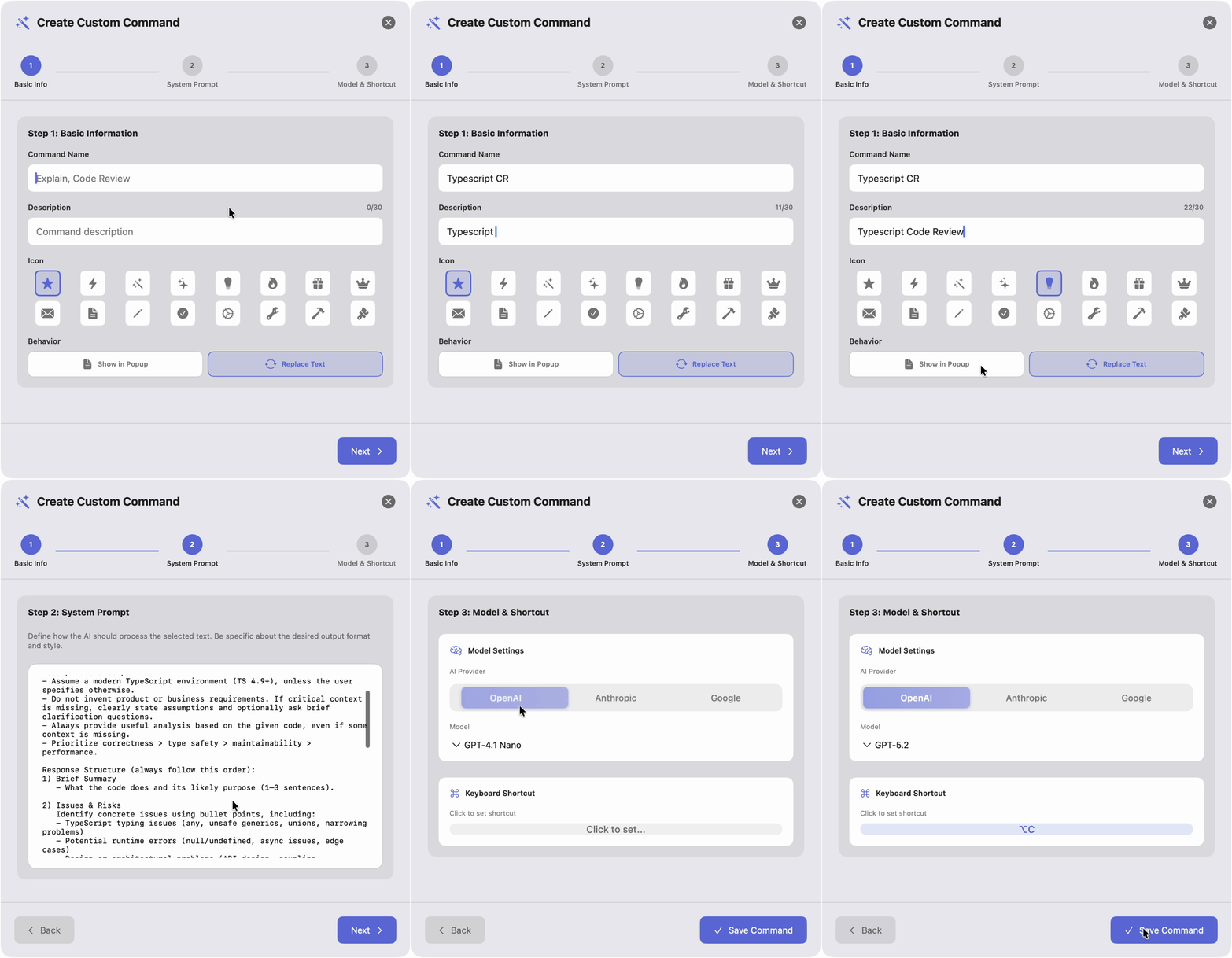
- Custom system prompts - Write any prompt, assign a shortcut.
- Text or voice input - Create text-based or voice-triggered commands.
- Inline or popup - Choose whether the response replaces text or appears in a popup.
- Per-command model - Assign a different provider and model to each command.
- Claude Code Skills - This is the new workflow. Run Claude Code Skills by voice or shortcut, skip the CLI, and get the result back on screen. When needed, Echoo still uses the right folder in the background for repo-aware work.
- Real skill example - Ask
/github-trendingfor a daily AI-powered summary and Echoo brings back the top repositories, what they do, and why they matter in one compact result. - Screen context - Toggle on to attach a screenshot with any command. AI gets your text + what's on screen. Uses macOS ScreenCaptureKit.
- Import & export - Share commands as
.echoofiles or download from the marketplace.
Bring Your Own Model
Echoo does not lock you into one provider. Keep the same shortcut and command workflow while choosing the model that fits your privacy, speed, and cost needs.
Cloud models
Best for reach, speed, and the latest frontier models.
| Provider | Models | Default |
|---|---|---|
| OpenAI | GPT-4.1 Nano, GPT-5 Mini, GPT-5.2 | GPT-4.1 Nano |
| Anthropic | Claude Haiku 4.5, Claude Sonnet 4.5, Claude Opus 4.6 | Claude Haiku 4.5 |
| Gemini 2.5 Flash Lite, Gemini 2.5 Pro, Gemini 3 Pro, Gemini 3 Flash | Gemini 2.5 Flash Lite |
Local models
Best for privacy, offline use, and full control. Your data never leaves your device.
| Provider | Description |
|---|---|
| Ollama | Run open-source models locally (Llama, Mistral, etc.) |
| LocalAI | OpenAI-compatible local inference server |
| LiteLLM | Proxy for 100+ model providers behind a unified API |
Each command can use a different provider and model. Switch freely per workflow.
Default Shortcuts
All shortcuts use the Option (⌥) key and are fully customizable in Settings.
| Shortcut | Command |
|---|---|
⌥R |
Rewrite - Fix grammar & polish (inline replace) |
⌥S |
Summarize - Key points (popup) |
⌥T |
Translate - Translate to chosen language (popup) |
⌥A |
Ask - Q&A about selected text (popup) |
⌥P |
Prompt Craft - Optimize a prompt (popup) |
⌥V |
Dictate - Voice to text (on-device) |
⌥I |
Voice Instruct - Speak to edit text |
⌥L |
Read Aloud - Text-to-speech with AI pre-processing |
⌃ (hold) |
Voice Launcher - Say a command name to execute it |
Custom commands get their own shortcuts from a dedicated pool.
What's New
v0.12.1-beta - Claude Code Skills
- A new way to use Claude Code - Echoo now lets you run Claude Code Skills by voice or keyboard shortcut, without opening the CLI first.
- Results come back on screen - Instead of jumping into a terminal and breaking flow, you stay in context and get the response directly in Echoo's normal result surface.
- Fits the rest of Echoo - Claude Code Skills now feel like part of the same system as text commands, voice workflows, file actions, and screen-aware tasks.
v0.11.1-beta - Auto Select All & Voice Launcher Control Key
- Auto select all - No more
⌘Abefore running inline commands. Echoo automatically selects all text when nothing is selected, so you can just press your shortcut and go. - Voice Launcher default key changed - Voice Launcher now defaults to the Control key (⌃) instead of Fn. Hold Control, speak a command name, and it executes. Fully customizable in Settings.
v0.11.0-beta - Heading to Official Release
Echoo is heading toward its first official release. This is the most complete version yet.
- Screen Context - Attach a screenshot to any command so the AI can see what's on your screen. Uses macOS ScreenCaptureKit. Toggle per-command in Settings. Works with built-in, custom, and voice instruction commands. When using voice instruction without selected text, Echoo switches to screen-only analysis mode.
- Voice Launcher - Hold a key (default: Control ⌃), speak a command name, and it executes instantly. Works with all built-in commands, custom commands, and marketplace commands. Recognizes variations ("re-write", "summarise", "read out loud"). A voice-activated command palette - no shortcut memorization needed.
- Read Aloud with AI Pre-Processing - Select any text and hear it spoken aloud using macOS text-to-speech. Auto-detects language across 25+ languages. Adjustable speed (0.5x-2x). Chain any AI command as a pre-processing step - e.g., summarize an article, translate the summary to French, then hear it read aloud.
- Undo support - Every inline text replacement can be undone with
⌘Z. Echoo restores your original text instantly. - Cleaner command management - Disabled commands are now removed from the active command list, keeping your workspace clean.
- UX refinements - Quality-of-life fixes across text processing, clipboard handling, and voice flows.
v0.10.6 - Model Updates, Voice Engine & Polish
- Latest models - Updated to GPT-5.2, Claude Opus 4.6, Gemini 3 Pro/Flash, and more.
- Voice custom commands - Create custom commands triggered by voice input.
- UI refinements - Improved settings layout, command cards, and overall polish.
- Dark mode - Full dark mode support across the entire app.
- Notch-aligned toasts - Processing and error notifications align elegantly with the macOS notch.
- Onboarding - Guided first-run experience for permissions, API key, and command overview.
- Completion sound - Optional audio feedback when processing finishes.
- Dramatically improved voice engine - Parakeet v3 for faster, more accurate on-device speech recognition.
- Bug fixes and stability improvements across text processing, clipboard handling, and voice flows.
Why Echoo
Most AI tools live behind a chat window. You copy text, switch tabs, paste it, write a prompt, wait, copy the result, switch back, and paste again. The workflow breaks every time.
Echoo is a macOS AI shortcut layer built for inline execution instead of chat-window context switching. Select text in any app, trigger a command by voice or shortcut, and the result appears right where you're working. Same for files, dictation, screen-aware tasks, and now Claude Code Skills that can run without pulling you into the CLI.
Free, open source, and built in public.
Privacy
Your data belongs to you.
- BYOK - Bring your own API key. Text goes directly to your chosen provider. Echoo never sees your data.
- On-device voice - Dictation runs entirely on your Mac using Parakeet v3. Your voice never leaves your machine.
- Local data - All settings and history stay on your machine in a local database.
- No training - Your text is never used to train models.
- Local LLM option - With Ollama, LocalAI, or LiteLLM, everything stays on-device. Zero external API calls. Works offline.
- Hardened runtime - Signed and notarized macOS app with hardened runtime enabled.
Keep Echoo Shipping
Echoo is free, open source, and built in public. If it saves you time, support the project and help fund more workflows, integrations, and polish.
Community
People understand the workflow once they use it.
"It is exactly what an AI assistant should be, with the minimum interface necessary and very transparent."
- Bernard, Writer at VVMac Magazine
"I've tried many tools claiming to do something similar, but none are even remotely as intuitive and user-friendly. Love it!"
- Dvir, CEO
Have a bug or a feature idea?
- Bug Reports - Open an Issue
- Feature Requests - Open an Issue
- Discussions - GitHub Discussions for questions, ideas, or community conversations
- Marketplace - Share your custom commands with the community at echoo.ai/marketplace
Links
- Website: www.echoo.ai
- Download: echoo.ai/get/Echoo.dmg
- Releases: GitHub Releases
- Marketplace: echoo.ai/marketplace
- Blog: echoo.ai/blog
- Ko-fi: ko-fi.com/echooai
- Twitter: @echoo_app
- About Me: mike.org.il
- LinkedIn: Michael Elkabetz
Yorumlar (0)
Yorum birakmak icin giris yap.
Yorum birakSonuc bulunamadi