AgentBar
Health Uyari
- License — License: MIT
- Description — Repository has a description
- Active repo — Last push 0 days ago
- Low visibility — Only 5 GitHub stars
Code Basarisiz
- rm -rf — Recursive force deletion command in Scripts/build.sh
- child_process — Shell command execution capability in Scripts/hooks/antigravity/antigravity.js
- execSync — Synchronous shell command execution in Scripts/hooks/antigravity/antigravity.js
- os.homedir — User home directory access in Scripts/hooks/antigravity/antigravity.js
- process.env — Environment variable access in Scripts/hooks/antigravity/antigravity.js
- fs module — File system access in Scripts/hooks/antigravity/antigravity.js
- child_process — Shell command execution capability in Scripts/hooks/claude/lifecycle.js
- execSync — Synchronous shell command execution in Scripts/hooks/claude/lifecycle.js
- fs.rmSync — Destructive file system operation in Scripts/hooks/claude/lifecycle.js
- os.homedir — User home directory access in Scripts/hooks/claude/lifecycle.js
- process.env — Environment variable access in Scripts/hooks/claude/lifecycle.js
- fs module — File system access in Scripts/hooks/claude/lifecycle.js
- child_process — Shell command execution capability in Scripts/hooks/claude/permission.js
- execSync — Synchronous shell command execution in Scripts/hooks/claude/permission.js
- fs.rmSync — Destructive file system operation in Scripts/hooks/claude/permission.js
- os.homedir — User home directory access in Scripts/hooks/claude/permission.js
- process.env — Environment variable access in Scripts/hooks/claude/permission.js
- fs module — File system access in Scripts/hooks/claude/permission.js
- os.homedir — User home directory access in Scripts/hooks/claude/update.js
- process.env — Environment variable access in Scripts/hooks/claude/update.js
- fs module — File system access in Scripts/hooks/claude/update.js
- os.homedir — User home directory access in Scripts/hooks/codex/notify.js
- process.env — Environment variable access in Scripts/hooks/codex/notify.js
- fs module — File system access in Scripts/hooks/codex/notify.js
- child_process — Shell command execution capability in Scripts/hooks/cursor/cursor.js
- execSync — Synchronous shell command execution in Scripts/hooks/cursor/cursor.js
- fs.rmSync — Destructive file system operation in Scripts/hooks/cursor/cursor.js
- os.homedir — User home directory access in Scripts/hooks/cursor/cursor.js
- process.env — Environment variable access in Scripts/hooks/cursor/cursor.js
- fs module — File system access in Scripts/hooks/cursor/cursor.js
- child_process — Shell command execution capability in Scripts/hooks/gemini/gemini.js
- execSync — Synchronous shell command execution in Scripts/hooks/gemini/gemini.js
- fs.rmSync — Destructive file system operation in Scripts/hooks/gemini/gemini.js
- os.homedir — User home directory access in Scripts/hooks/gemini/gemini.js
- process.env — Environment variable access in Scripts/hooks/gemini/gemini.js
- fs module — File system access in Scripts/hooks/gemini/gemini.js
- rm -rf — Recursive force deletion command in Scripts/install.sh
- rm -rf — Recursive force deletion command in Scripts/test/antigravity-watcher-test.sh
Permissions Gecti
- Permissions — No dangerous permissions requested
Bu listing icin henuz AI raporu yok.
Approve Claude Code permission prompts right from your menu bar — no terminal switching — plus live status for every AI coding agent (Claude, Codex, Copilot, Antigravity).
 AgentBar


One menu bar item for all your AI coding agents.
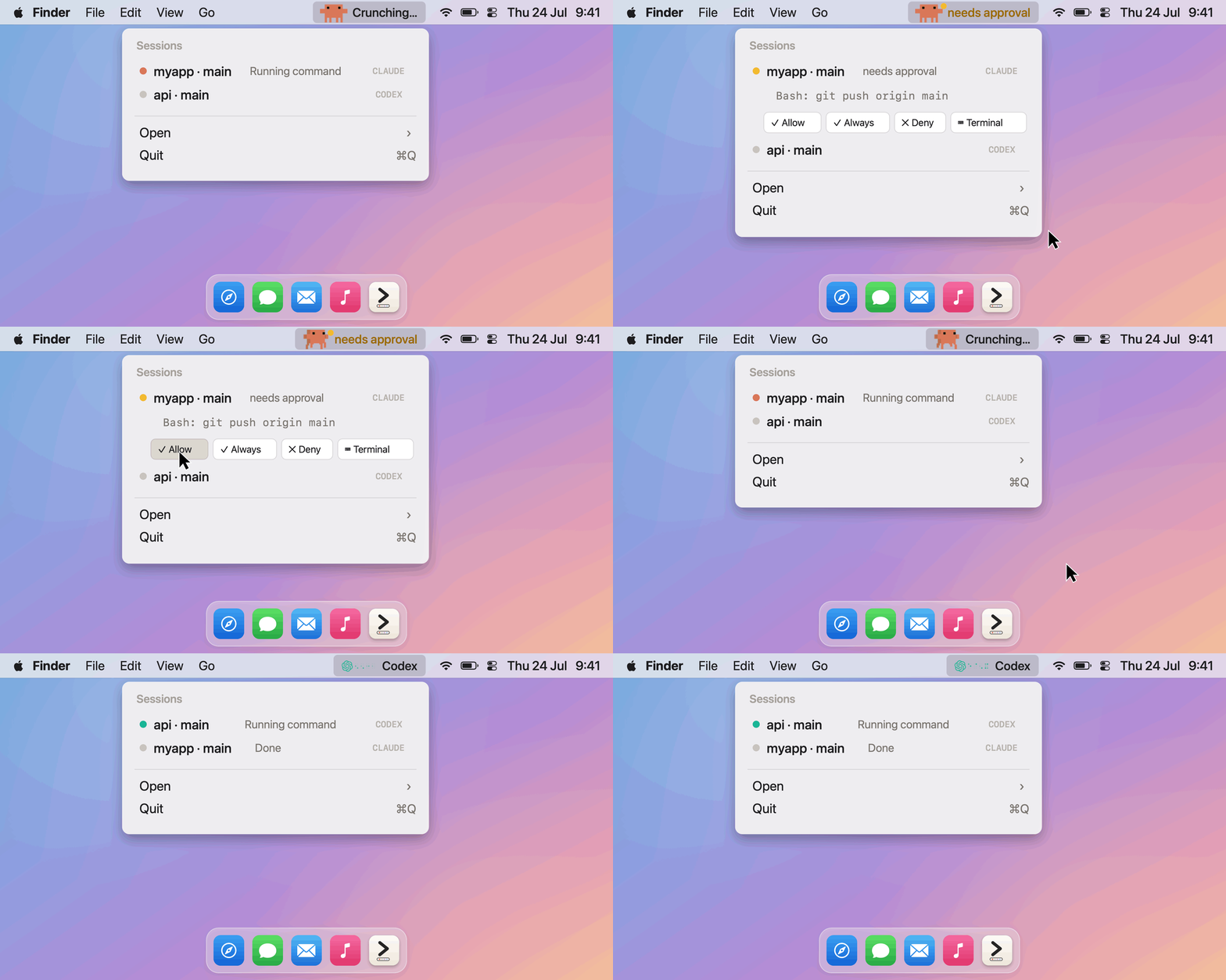
Menu bar mode
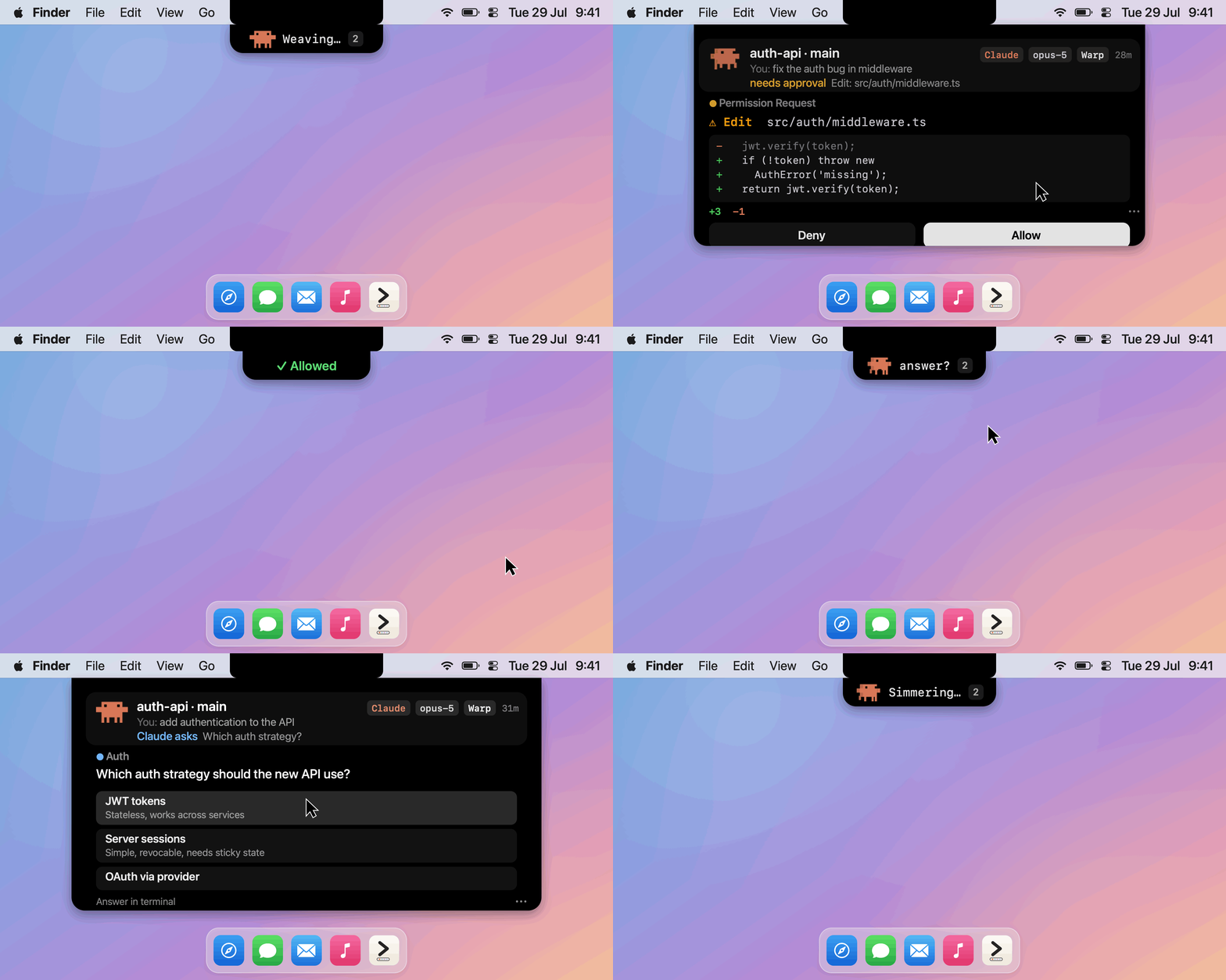
Dynamic Island mode — pick either (or both) in the welcome window
AgentBar is a lightweight, native macOS app that shows the live state of your
AI coding sessions — Claude Code and Claude Cowork, Codex, Cursor CLI, Gemini CLI,
plus GitHub Copilot and Google Antigravity in one place. Each agent gets its own mark built from its
real identity — Clawd the crab for Claude, the OpenAI knot with a braille dot-matrix
for Codex, the official pixel-art head for Copilot, the pixel rainbow arch for
Antigravity — and it always surfaces the session that needs you most.
Live in the menu bar, as a Dynamic Island pill under the notch, or both —
you pick on first launch.
On Linux, the same protocol drives the agentbar CLI.
On Windows, AgentBar for Windows is a
native system-tray counterpart that shares the same ~/.agentbar hook protocol.
Quick start
curl -fsSL https://raw.githubusercontent.com/michalstrnadel/AgentBar/main/Scripts/install.sh | bash
- The app lands in
/Applications, launches, and installs its Claude Code hooks.
A welcome window asks where it should live — menu bar, Dynamic Island, or both. - Open a new Claude Code session (hooks load at session start) and give it any task.
- Watch it: the mascot animates while the agent works, and the moment it
asks for permission you get a needs approval row — click ✓ Allow,
✓ Always, or ✕ Deny right there. No terminal switch needed.
That's the whole loop. More install options below; troubleshooting at the bottom.
What the installer changes (and how to undo it)
AgentBar is local-only — no telemetry, and the only network call it ever makes is the
update check against GitHub Releases. The install touches exactly these,
all reversible (see Uninstall):
- Copies the hook scripts to
~/.agentbar/hooks/. - Merges AgentBar hook entries into your Claude Code settings —
~/.claude/settings.json,
and yourCLAUDE_CONFIG_DIRif you set one. Existing hooks are preserved. - Adds a
notifyline to~/.codex/config.tomlonly if you use Codex and have none;
merges into~/.cursor/hooks.json/~/.gemini/settings.jsononly if those exist. - The SessionStart hook launches AgentBar in the background when an agent session begins.
The installer prints this summary before doing anything, and never modifies a tool you
don't use. Hooks are snapshotted per session — start a new agent session afterward.
Features
- Two surfaces, your pick — the classic menu bar item, a Dynamic Island
pill under the notch, or both. Pick it in the welcome window on first launch,
change it any time from Appearance…; no relaunch. See
Dynamic Island. - Live status per agent — an animated mascot works the bar while an agent works:
Clawd the crab (Claude), the knot + a braille dot-matrix that literally spells
codex (Codex), the pixel mascot head + dots spelling copilot (Copilot), and the
animated pixel rainbow arch (Antigravity). - Permission alerts — an amber dot the moment an agent waits for your approval.
- Multi-session — every running session listed with project, git branch, and state;
click a row to jump to its app or terminal. - Open anything — launch Claude, Codex, Copilot, or Antigravity straight from the menu.
- Two looks — full-color mascots, or a monochrome System mode that matches the menu bar.
- Remote Allow/Deny — answer Claude Code permission prompts straight from the menu:
see exactly what's requested, then Allow once, Always allow, Deny, or defer to terminal. - Answer questions too — when Claude asks a multiple-choice question, the island
and the menu show the actual options: tap one and the session continues, no
terminal switch. The terminal wizard stays live the whole time — whoever answers
first wins. multiSelect and multi-question calls get toggles and an Answer button. - Turn recaps — a finished session's row says what finished: one line of the
agent's closing words under "Done", not just a green dot. - Sound cues (opt-in) — four tiny synthesized retro-console motifs: needs
approval, question, done, and an answer-confirm tick. Generated in code (no audio
files), silent while your screen is locked, off until you flip them on in Settings
or the menu. - Built-in updates — a quiet daily check of GitHub Releases plus Check for
Updates… in the menu; one click installs the new version and relaunches. - Linux too — the
agentbarCLI is a full peer of the menu bar app:
live status, pending approvals,a/dremote Allow/Deny, digit keys to answer
questions, waybar module. - Nothing else — no dock icon, no countdown timers, no sounds unless you ask
for them, nothing that unfolds over your screen on its own. One process, tiny
footprint.
Requirements
- macOS 12+ (Apple Silicon or Intel) for the menu bar app — or Linux via the
agentbarCLI - Node.js (for the hook scripts; found via Homebrew paths or your login shell)
- Xcode Command Line Tools to build the macOS app from source
Install
One-liner — downloads the latest release (or builds from source when none exists):
curl -fsSL https://raw.githubusercontent.com/michalstrnadel/AgentBar/main/Scripts/install.sh | bash
Homebrew:
brew install --cask michalstrnadel/tap/agentbar
Via your AI agent — paste into Claude Code (or any coding agent):
Install AgentBar: run
curl -fsSL https://raw.githubusercontent.com/michalstrnadel/AgentBar/main/Scripts/install.sh | bash
From source:
git clone https://github.com/michalstrnadel/AgentBar.git && cd AgentBar
./Scripts/build.sh
open "build/AgentBar.app"
First launch installs the Claude Code hooks automatically (and the Codex notify hook if~/.codex exists). New agent sessions appear in the bar from then on.
Updating: the app checks GitHub Releases daily and offers new versions in the menu
(Check for Updates… works any time). Homebrew users can keep usingbrew upgrade --cask agentbar — both paths install the same bundle.
What install touches: hook scripts are copied to
~/.agentbar/hooks/, hook
entries are merged into your Claudesettings.json(~/.claudeand a customCLAUDE_CONFIG_DIR, both; existing hooks are preserved), anotifyline is added
to~/.codex/config.tomlonly if none exists, and — only for tools you already
have — hook entries are merged into~/.cursor/hooks.jsonand~/.gemini/settings.json. A config that exists but isn't valid JSON is never
touched. The Claude SessionStart hook also auto-launches AgentBar in the
background when a session begins. Hooks are snapshotted per session — start a new
agent session after installing.
Linux (CLI)
The protocol is just files (~/.agentbar, see docs/protocol.md)
and the hooks are plain Node — so on Linux, the agentbar CLI is the frontend:
git clone https://github.com/michalstrnadel/AgentBar.git && cd AgentBar
./Scripts/cli/agentbar install-hooks   # wires Claude/Codex/Cursor/Gemini hooks
sudo ln -s "$PWD/Scripts/cli/agentbar" /usr/local/bin/agentbar   # optional

agentbar                 # session list (same rows as the macOS menu)
agentbar watch           # live view; a = allow, d = deny, 1-9 = answer a question, q = quit
agentbar requests        # pending approvals & questions with the mini-diff / options
agentbar approve --always
agentbar answer Blue     # answer a pending question by option label (or number)
Remote Allow/Deny works exactly like on macOS: while agentbar watch (or awaybar poll) is running, a Claude Code permission prompt appears in the CLI and
your a/d answers it — and when Claude asks a multiple-choice question, its
options render right in the list and a digit key (or agentbar answer) picks one.
With no watcher running, hooks stay silent and the normal terminal prompt appears. Waybar module:
"custom/agentbar": {
  "exec": "agentbar waybar", "return-type": "json", "interval": 15
}
The CLI works on macOS too (same protocol, handy over SSH). A native tray app
(StatusNotifierItem) may come later if there's demand.
Uninstall
osascript -e 'quit app "AgentBar"'
rm -rf ~/.agentbar
# remove the AgentBar hook entries (they all reference ~/.agentbar/hooks/):
#   ~/.claude/settings.json (and your CLAUDE_CONFIG_DIR) — delete rules whose command contains "/.agentbar/hooks/"
#   ~/.codex/config.toml       — delete the notify line referencing "/.agentbar/hooks/"
#   ~/.cursor/hooks.json       — delete entries whose command references "/.agentbar/hooks/cursor/"
#   ~/.gemini/settings.json    — delete hook groups whose command references "/.agentbar/hooks/gemini/"
Agent support
| Agent | Live status | Open | Mascot | Notes |
|---|---|---|---|---|
| Claude Code (CLI + desktop) | full | yes | Clawd the crab | hooks: prompt, tool, permission, stop, lifecycle |
| Claude Cowork (desktop) | working / approval / question / done — older local mode only | yes | Clawd the crab | watched, not hooked: Cowork gives each session a throwaway config dir, so there is nothing to install into. CoworkWatcher reads the audit log the app writes per session. Newer desktop builds run Cowork inside a VM that writes no session files on the host — those sessions can't be shown until the app exposes something host-side |
| Codex CLI | turn-complete | yes | knot + braille dot-matrix | via Codex notify (auto-installed); no per-tool granularity upstream |
| Cursor CLI | working / done | yes | pointer | hooks in ~/.cursor/hooks.json (auto-wired if Cursor is installed) |
| Gemini CLI | working / done | yes | spark | hooks in ~/.gemini/settings.json (auto-wired if Gemini is installed) |
| GitHub Copilot | — | yes | pixel head + dot-matrix | no public event API yet; everything else is wired and waiting |
| Google Antigravity | working / done | yes | pixel rainbow arch + dot-matrix | hooks in ~/.gemini/antigravity{,-cli}/hooks.json (auto-wired); desktop 2.3.x only honors per-workspace .agents/hooks.json, and only PostToolUse fires — quiet sessions decay to done |
Hook readiness: Claude Code, Codex (notify), Cursor (hooks.json), Gemini
(settings.json), and Antigravity (hooks.json) hooks all install automatically at launch (idempotently — every
launch re-checks, nothing is duplicated) for the tools you have. Copilot ships with its mascot, menu entry, and
the keystroke-approval backend already in place — the moment it exposes session
events, support is one small hook script away.
Dynamic Island
Instead of (or alongside) the menu bar item, AgentBar can live as a pill just under
the notch:
- At rest it's tiny — the mark of whichever agent is working, plus one line of
what it's doing, plus a count once two or more sessions are live. Nothing running,
and it shrinks to the mark alone. It never grows on its own: even a pending
approval stays a pill that says approve?. - Push the pointer up to the notch and it opens — whatever needs you leads as
a boxed hero row: what you asked for ("You: fix the auth bug in middleware"), a
coloured status line, and chips naming the agent, model, the terminal (or app)
it lives in and how long it's been at it. The other sessions follow as quiet
one-liners named by their task. Click a row to jump to that session. The
collapsed pill itself is click-through and never opens by accident: tab strips
and toolbars living at the top of a maximized window stay fully usable under it. - Answer right there — a waiting approval is a proper Permission Request
card: the tool and its target, the mini-diff with +3 −1 counts, Allow /
Deny in front and Always allow / Answer in terminal quiet beside them.
Your answer flashes back in the pill — ✓ Allowed — as the panel folds away.
An AskUserQuestion shows as a Claude asks card naming the question (the
options stay in the agent's own UI for now). - No notch, or an external display? Same panel, centred at the top of whichever
screen your pointer is on. It steps aside for fullscreen windows, and it never
takes focus — you can keep typing in your editor with the panel open.
In Island-only mode the menu bar item is hidden, so the panel's ⋯ button carries
Appearance, the global Allow/Deny shortcut, Check for Updates and Quit.
Remote Allow/Deny
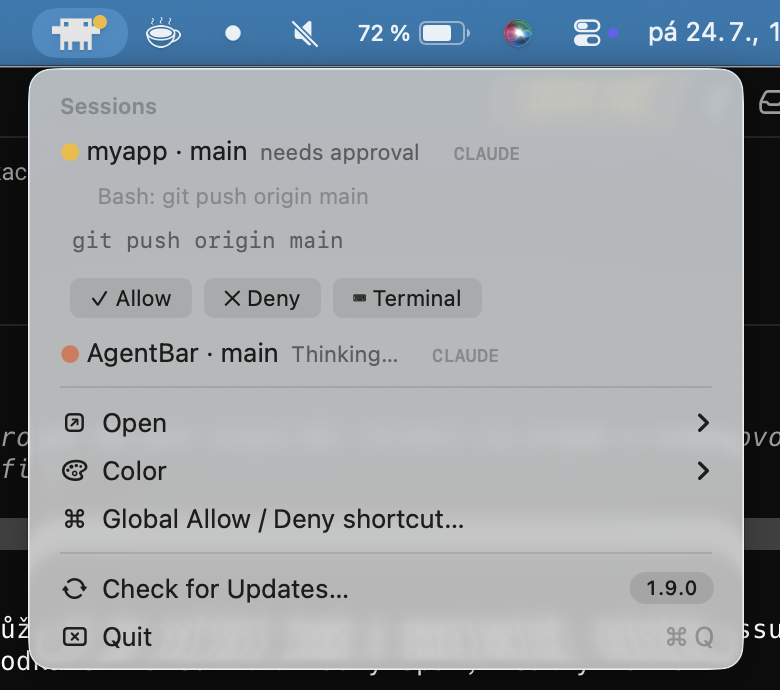
When a Claude Code session asks for permission, the request appears right under the
yellow "needs approval" row: what's requested (e.g. Bash: git push origin main; full
input in the tooltip) plus an inline button strip — ✓ Allow, ✓ Always (only
when Claude Code suggests a rule; the rule is in the tooltip), ✕ Deny, and
⌨ Terminal / ⧉ Claude app to answer in the session's own UI instead. Clicking
the session row does the same hand-off. Decisions return through Claude Code's PermissionRequest hook,
so the terminal prompt never appears; if AgentBar isn't running, quits mid-wait, or
you ignore the request for 10 minutes, the prompt shows in the terminal exactly as
before. (Known cosmetic issue: the terminal dialog can flash briefly even when
approved from the menu — upstream claude-code #12176.)
Codex and Copilot have no decision hooks, so their rows offer Approve in terminal
(sends keystroke) — AgentBar focuses the session's terminal and presses the approval
key. Best-effort by design, and it needs the Accessibility permission (the menu item
offers to open System Settings until it's granted).
How it works
Tiny hook scripts (Node.js) write one JSON file per session to ~/.agentbar/state.d/.
The app watches that folder and renders. No sockets, no daemons; the only network
traffic is the update check against GitHub Releases.
Permission approvals use two more folders of the same protocol: the blocking hook
writes requests.d/, the app answers into answers.d/.
Troubleshooting
- No sessions appear — hooks load when a session starts: open a new agent
session after installing. If you use a customCLAUDE_CONFIG_DIR, see
issue #4. - Cowork sessions don't appear — newer Claude desktop builds run Cowork inside
an isolated VM: the session's audit log lives on the VM's disk image, so nothing
exists on the host for AgentBar to read. Upstream limitation; sessions from the
older host-side "local mode" still show. - Still nothing — the installer needs
node; if none is found the Claude hooks
are skipped (logged to Console.app). Install Node.js and relaunch AgentBar. - Codex rows never show — if
~/.codex/config.tomlalready had anotify
entry, AgentBar deliberately leaves it alone; wireScripts/hooks/codex/notify.js
into your existing notify chain manually. - Keystroke approval does nothing — grant AgentBar the Accessibility permission
(the menu item offers to open System Settings). - macOS says it "cannot verify AgentBar is free of malware" — the app is ad-hoc
signed, not notarized. Don't click Move to Trash; click Done, then either
right-click the app ▸ Open, or runxattr -dr com.apple.quarantine /Applications/AgentBar.appand open it again.
The install script and the Homebrew cask do this for you; the dialog mainly
appears after downloading the zip manually from Releases. brew outdatedreports an old AgentBar version — the in-app updater swaps/Applications/AgentBar.appwithout telling Homebrew, so brew's install record
lags behind after an in-app update. Runbrew upgrade --cask agentbarto
re-sync; both update paths install the exact same release bundle, so nothing
is lost either way.
License
MIT — see LICENSE. Third-party marks: see
THIRD_PARTY_NOTICES.md.
Yorumlar (0)
Yorum birakmak icin giris yap.
Yorum birakSonuc bulunamadi