headroom
Health Gecti
- License — License: MIT
- Description — Repository has a description
- Active repo — Last push 0 days ago
- Community trust — 19 GitHub stars
Code Gecti
- Code scan — Scanned 12 files during light audit, no dangerous patterns found
Permissions Gecti
- Permissions — No dangerous permissions requested
Bu listing icin henuz AI raporu yok.
Local-first AI coding quotas and ship status, on your menu bar, iPhone, Watch and an ESP32 desk display.
Headroom
Your AI coding quotas and ship status — on the desk, in the menu bar, and on your phone.
When you're deep in Claude, Codex, or Cursor, you shouldn't have to dig through
billing pages, gh, and Vercel to answer: Am I about to hit a limit? Did CI
go red? Is prod healthy?
Headroom is a local-first desk gadget + macOS menu bar (+ optional iPhone)
that consolidates that into one glance:
| Always on | What you see |
|---|---|
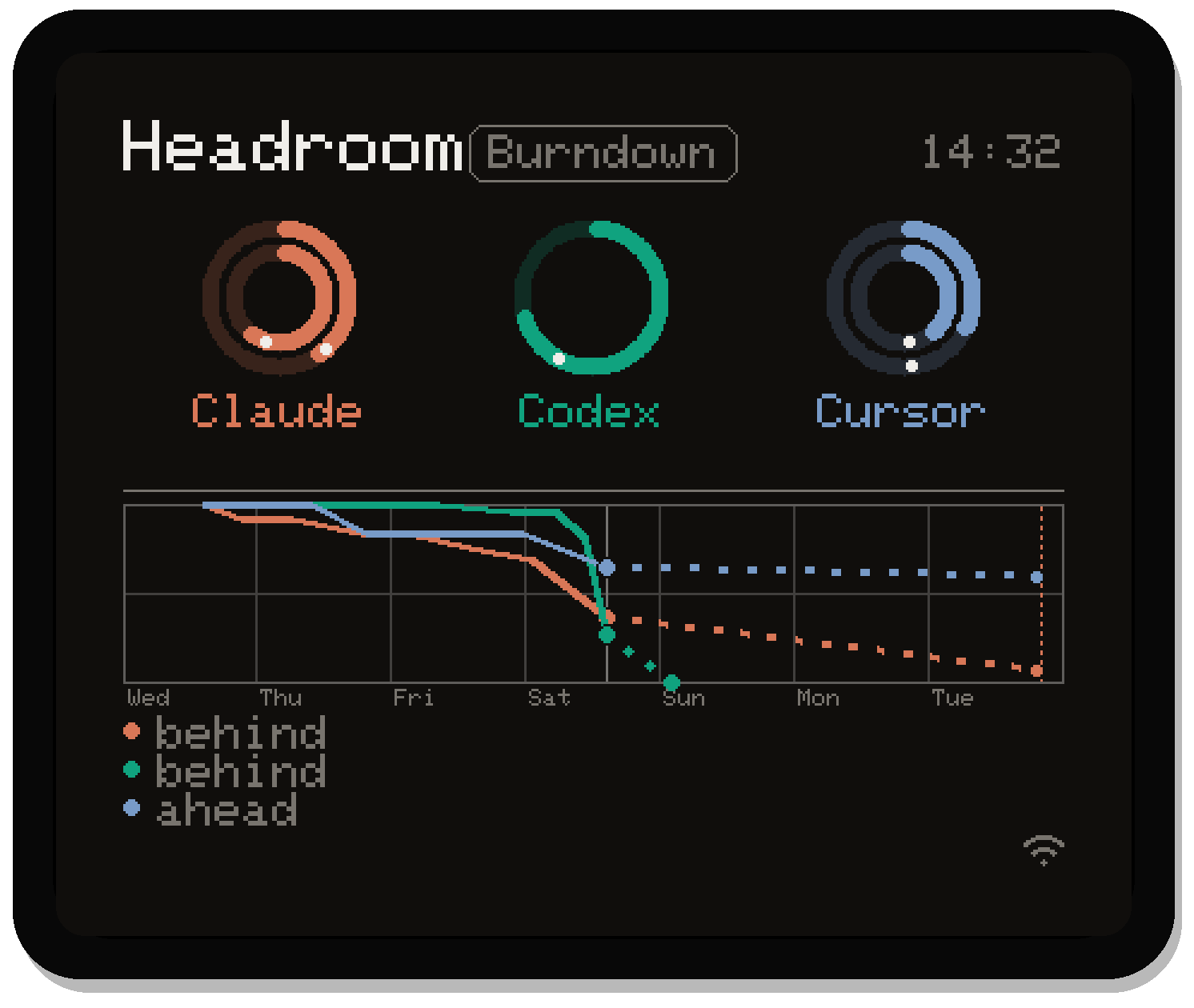
| ESP32 AMOLED | Quota rings for the same three providers the menu bar shows, with a combined seven-day burndown |
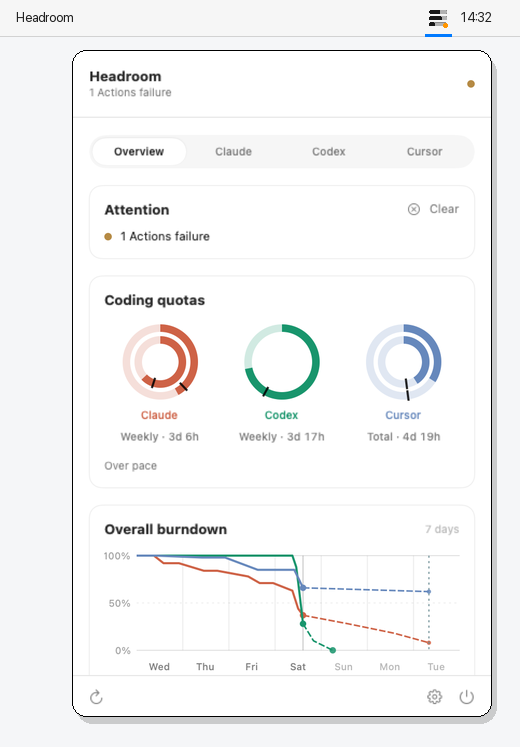
| Menu bar | Thin remaining-quota meters for the first three enabled providers + amber/red attention pip |
| Popover | Overview rings, daily burn, spend, Activity / Services |
| Notification Center | The same widget the iPhone runs: rings small, combined burndown medium |
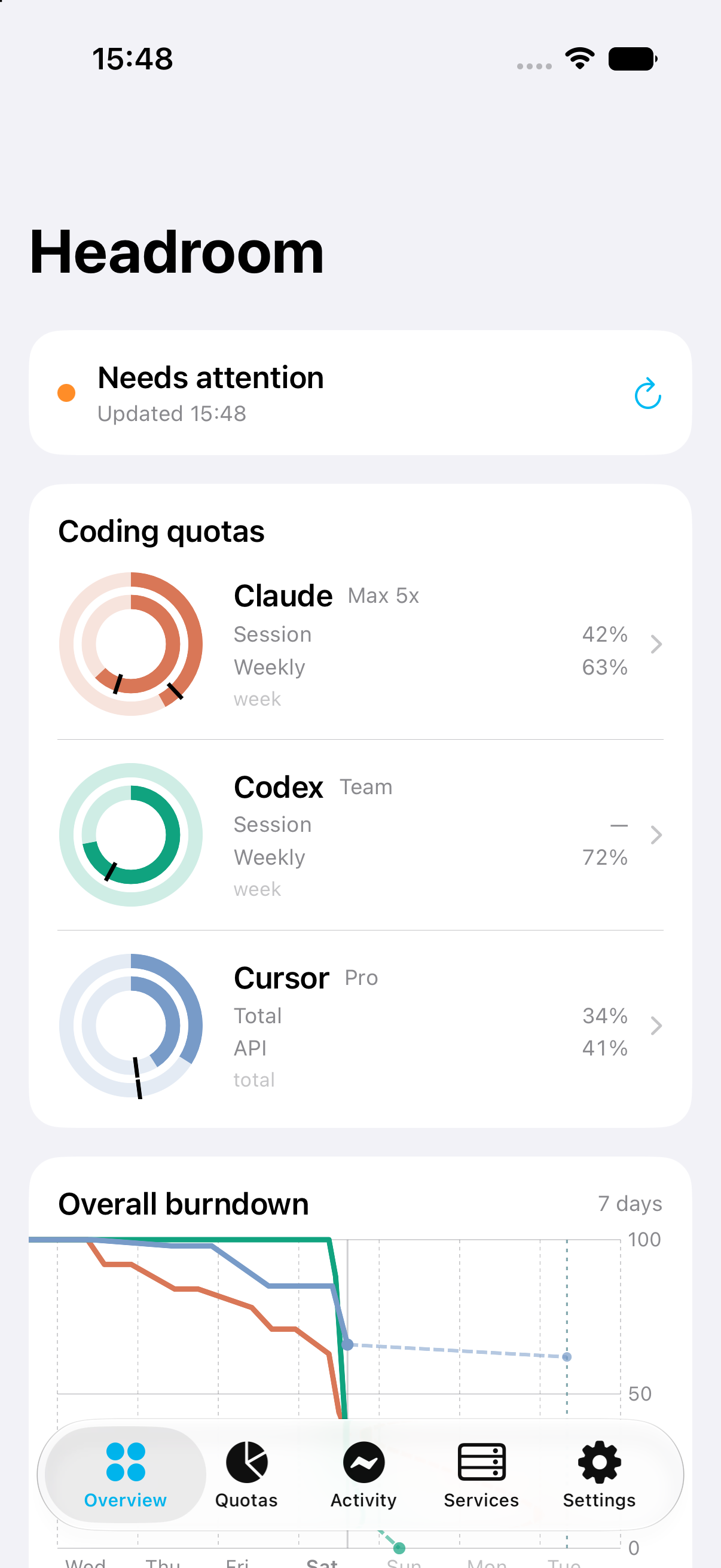
| iPhone / iPad | Quotas, burndown, activity, services, controls, notifications, widgets |
| Apple Watch | Two complications: one ring per source, or the week's burndown |
One Python host on your Mac reads local auth + CLIs and serves a single JSON
feed. No cloud account for Headroom itself — your tokens stay on the machine.
  ~/.claude JSONL + OAuth          Mac (Python, stdlib)              Clients
  ~/.codex + Cursor state.vscdb    ┌──────────────────┐             ┌──────────────┐
  ~/.gemini + Windsurf profile    ─▶│ headroom_        │◀── HTTP ────│ Menu bar app │
  Copilot / JetBrains / Zed       │ server.py :8737  │◀── HTTP ────│ iPhone app   │
  Vercel / git / gh / SB / Plaus. │ + usb_bridge     │◀── HTTP/USB─│ ESP32 /usage │
  ~/.headroom/{config,sources}    └──────────────────┘             └──────────────┘
Hardware is optional. The menu bar alone is useful. The Waveshare
ESP32-S3-Touch-AMOLED-1.8 (368×448) is the always-on desk glance — same feed,
tap a slot for detail, tap the header to switch Burndown / Activity, and
long-press to force-refresh. Its three rings are the same three the menu bar
draws — the host picks them and the board draws what it is sent, so a newer
provider, an extra account, your pinned order and your color overrides all
reach the desk. The default lower half combines those providers into the same
seven-day burndown the Mac, phone and medium widget show.
Why it exists
- Quota anxiety is real. Session / weekly windows, pace, and spend are
scattered across products. Headroom puts hottest pool % + pace on one
ring (and a menu-bar tick per provider in focus). - Ship status is ambient. Failed Actions, Vercel builds, Supabase alerts
and RLS holes, and listening local servers surface as an attention pip — not
another tab. - Local-first. The host talks to credentials and CLIs you already have.
The board can fall back to USB CDC when hotel Wi‑Fi blocks mDNS.
Requirements
| Need | Notes |
|---|---|
| macOS 14+ | Menu bar app |
| Python 3.9+ | Bundled host is stdlib only (system /usr/bin/python3) |
| At least one AI coding tool | Claude, Codex, Cursor, Copilot, Gemini, Windsurf, JetBrains AI or Zed, already signed in locally |
| Optional: iPhone / iPad (iOS 17+) | Same LAN or Tailscale as the Mac |
| To build from source: Xcode and XcodeGen | Not either/or — the .xcodeproj is generated, so brew install xcodegen is required, not optional |
| Optional: PlatformIO | Only if you flash the ESP32 |
No Headroom cloud account. Tokens stay on your Mac.
Quick start
Option A — macOS from a GitHub Release
- Download Headroom-macOS.zip from
Releases.
If no release exists yet, use Option B. - Unzip and open
Headroom.app(notarized builds open normally;
ad-hoc builds need right-click → Open once). - Click the menu bar meters → the Welcome sheet appears.
- On a Release
.app, the host starts automatically and installs a
LaunchAgent so it stays up at login (and after you quit the menu bar).
Use Start host & keep at login only if that didn’t happen. - Confirm which providers were detected → Continue.
Updating. scripts/update-app.sh replaces an
installed Headroom.app with the current Release. It refuses anything that is
not notarized and signed by the project's team, and it brackets the swap withlaunchctl bootout / bootstrap — the host runs from inside the bundle under
a KeepAlive agent, so replacing the app under a live agent leaves launchd
holding the old code.
./scripts/update-app.sh --check
./scripts/update-app.sh
Option B — macOS from source
git clone https://github.com/michellzappa/headroom.git
cd headroom
./scripts/build-app.sh          # embeds host → dist/Headroom.app
open dist/Headroom.app
Or the two-piece flow (host from clone, debug app):
./scripts/install-host.sh
./scripts/gen-project.sh          # embeds host + writes Headroom.xcodeproj
cd macos
xcodebuild -project Headroom.xcodeproj -scheme Headroom \
  -configuration Debug -derivedDataPath .build build
open .build/Build/Products/Debug/Headroom.app
Foreground try (no login item): ./scripts/install-host.sh --foreground
Uninstall LaunchAgent: ./scripts/uninstall-host.sh (--purge wipes ~/.headroom)
Opening the project in Xcode
A fresh clone contains no .xcodeproj, and that is expected: macos/project.yml
is the source of truth and XcodeGen writes the project from it, so the generatedmacos/Headroom.xcodeproj is gitignored. On a new Mac, write it first:
brew install xcodegen
./scripts/gen-project.sh
open macos/Headroom.xcodeproj
Go through the script rather than calling xcodegen generate yourself.project.yml lists macos/host as a source directory, and that folder is a
gitignored copy of the host made by sync-embedded-host.sh — on a fresh clone
bare xcodegen stops at a missing source directory, which does not point at the
real cause. The script syncs first.
Anything touching the watch app needs the beta toolchain, and that includes the
iPhone app, which embeds it. Stable Xcode reports a watchOS SDK and still
resolves every watch destination to "watchOS 26.5 is not installed":
open -a /Applications/Xcode-beta.app macos/Headroom.xcodeproj
Regenerate after any pull that adds files. A new file under Shared/ will not be
in the project you generated last week, and the failure reads as a missing type
rather than a stale project. Quit Xcode before regenerating — replacing the
project underneath a running Xcode is what produces "The project “Headroom” is
not a valid property list" on a file that is perfectly valid.
Option C — iPhone
- Install via the TestFlight link when published,
or build from source (docs/ios-companion.md). - Keep the Mac host running (Option A/B).
- On the phone: allow Local Network, pick your Mac under Nearby Macs.
- On the Mac: Settings → iPhone pairing → Copy mobile token, paste once
on the phone → Connect.
The phone uses the mobile token. The ESP32 uses the separate host token.
See Tokens below.
First run (Mac)
~/.headroom/sources.jsonis seeded from local detection — only providers
that look signed-in are enabled. If none are found, every quota source stays
on so the UI can show sign-in errors.- The Welcome sheet lets you confirm toggles before the overview appears.
- Edit
~/.headroom/config.jsonlater for git authors / GitHub org / timezone.
curl -s localhost:8737/health | python3 -m json.tool
curl -s localhost:8737/setup  | python3 -m json.tool
Two kinds of source
Onboarding and Settings keep them apart, because they answer different
questions and take different setup:
- AI coding tools — Claude, Codex, Cursor, Copilot, Gemini, Windsurf,
JetBrains AI, Zed. How much plan is left. Read from the sign-in already on
the Mac, so there is nothing to paste. - Dev tools — Vercel, Git, GitHub Actions, Supabase, Plausible, local
servers. What your projects are doing. Some want a key, pasted once in
Mac Settings (Keychain — never sent to the phone or written into/usage).
| Dev tool | Where |
|---|---|
| GitHub Actions | Settings → GitHub token (or gh / HEADROOM_GITHUB_TOKEN) |
| Supabase | Settings → Supabase PAT |
| Plausible | Settings → Plausible Stats API key |
| Vercel | Already signed into the Vercel CLI |
| Git / local servers | dev_root + git_authors in ~/.headroom/config.json |
Which repos Actions watches is editable in Settings → GitHub Actions: owner
filters, an always-watch list, and the discovery cap. Settings also shows the
repos those settings resolve to on this machine.
Both lists toggle under Settings, each in its own section — the same flags
drive the menu bar, overview rings, iPhone, and the board.
More than one account per tool. Personal Claude and work Claude, two
ChatGPT logins, a second Cursor profile — each is a separate plan with its own
quota, and Headroom used to show only whichever one the CLI wrote last. Add the
others in Settings → Extra accounts: pick the provider, name it, and point
it at the credential location that login already uses.
| Provider | What to point it at |
|---|---|
| Claude | A second config folder — CLAUDE_CONFIG_DIR, e.g. ~/.claude-work |
| Codex | A second CODEX_HOME, e.g. ~/.codex-work |
| Gemini | A second Gemini CLI home, e.g. ~/.gemini-work |
| Cursor / Windsurf | Another profile's state.vscdb |
No tokens are pasted and nothing new is signed in: the host imports the
credentials that CLI already wrote into ~/.headroom/oauth/, then refreshes
that copy — it does not write back into Claude Code's Keychain. Each account
gets its own row, ring, burndown and history under the id claude:work, and
can be reordered or switched off like any other source — the default login
keeps the plain claude id, so nothing recorded under it moves. Copilot,
JetBrains AI and Zed stay single-account: their credentials are one per Mac,
with no second location to point at.
The list lives in ~/.headroom/accounts.json, and adding or removing one
restarts the host (a couple of seconds) so the sample schema and the meters
are rebuilt together.
Colors are yours. Each provider ships with its brand color, which is a good
default and a bad rule — two Claude accounts are the same brand, and a Cursor
blue next to a Sky blue is two rows you have to read to tell apart. Click the
dot on a provider row in Settings for a grid of 24 colors plus Default. The
host stores the override in ~/.headroom/sources.json and resolves it intoaccent, so the menu bar, popover rings, burndown charts, iPhone and its
widget all repaint together — and the ESP32 too, once it is running firmware
from this version or later. Dev-tool rows have no brand color: their dot is the
health light, so they stay as they are.
Order picks the top 3. Drag the AI rows in Settings to reorder them, and
that order is pinned in ~/.headroom/sources.json. Compact
surfaces — the menu-bar tanks, the widgets, and the board's three rings —
show the first three enabled providers. The host does the picking and ships
the ids as focus in /usage, so the Mac, the phone, its widget and the desk
never disagree about which three even when one of them is a poll behind. A
provider added in a later release lands at the end of your order instead of
jumping the queue.
ESP32 desk display (optional)
cp firmware/src/config_example.h firmware/src/config.h— Wi‑Fi SSIDs +
Mac hostname (scutil --get LocalHostName) or fallback IP.- Paste the host token into
HOST_TOKEN(~/.headroom/tokenafter first
start — not the mobile token). cd firmware && pio run -t upload && pio device monitor
Update the Mac host before flashing: the board reads its three providers from/usage?view=device → providers[], which a host older than 1.0.9 does not
send. A board that gets no providers says so on the glance rather than guessing.
Wi‑Fi first; USB CDC fallback when LAN fails. Tap a glance slot for detail,
tap the header to switch Burndown / Activity; long-press home →POST /sync/refresh.
Tokens (host vs mobile)
/usage carries repo names, commit subjects, local paths/ports, and spend.
The host binds 0.0.0.0 so LAN clients can reach it — non-loopback callers
must present a token. Loopback (menu bar, curl localhost) needs nothing.
| Name | File | Who uses it |
|---|---|---|
| Host token | ~/.headroom/token |
ESP32 (HOST_TOKEN), any generic LAN client |
| Mobile token | ~/.headroom/mobile-token |
iPhone only (Mac Settings → Copy mobile token) |
Send either as X-Headroom-Token: or Authorization: Bearer. The mobile token
is scoped by Mac Settings → iPhone pairing permissions (read / refresh /sources / servers). Override the host token with auth_token, or open the
LAN with "require_auth": false, in ~/.headroom/config.json.
Troubleshooting
| Symptom | Fix |
|---|---|
| Welcome / host isn’t running | Tap Start host & keep at login in the popover |
| Host unhealthy | tail -f ~/.headroom/logs/headroom.err (owner-only, but it names your repos and ports, so read before pasting into an issue) |
| Empty provider | Sign into that app/CLI; enable under Settings → AI coding tools |
| Empty dev tool | Paste its key under Settings, then enable it under Dev tools |
| iPhone won’t pair | Confirm mobile token (not host token); Local Network allowed |
| ESP32 says NO HOST | The panel names the failing half — SSID, resolved address, token, and why. pio device monitor prints the same plus the two curl checks to run on the Mac |
| Gatekeeper blocks .app | Prefer a notarized Release; otherwise right-click → Open. Signing setup: docs/releasing.md |
| Restart host | launchctl kickstart -k gui/$(id -u)/com.centaur-labs.headroom |
| Build a fresh .app | ./scripts/build-app.sh → dist/Headroom.app |
No .xcodeproj in the clone |
Expected — it is generated. ./scripts/gen-project.sh, then open it |
| Xcode: not a valid property list | The project was regenerated while Xcode held it open. Quit Xcode and reopen; the file on disk is fine (plutil -lint it to confirm) |
| Xcode: watchOS 26.5 is not installed | Stable Xcode; reopen with /Applications/Xcode-beta.app |
What it tracks
AI coding tools — plan left, and what it cost:
| Source | How |
|---|---|
| Claude | Keychain OAuth → Anthropic usage; token value via pricing.py |
| Codex | ~/.codex/auth.json → weekly window, pace, reset credits, spend |
| Cursor | state.vscdb → Auto / API / total + on-demand |
| Copilot | GitHub token → premium / chat quota |
| Gemini | ~/.gemini OAuth → Pro / Flash buckets |
| Windsurf | IDE plan cache → daily / weekly |
| JetBrains AI | Local AIAssistantQuotaManager2.xml → monthly credits |
| Zed | Keychain session → edit-prediction quota |
| Daily burn | Per-day %-point burn across enabled coding providers |
Dev tools — what the projects are doing:
| Source | How |
|---|---|
| Vercel | CLI auth → recent team deployments |
| Git | Commits under dev_root matching git_authors |
| GitHub Actions | Failed / running runs (Settings token / Keychain / gh) |
| Supabase | Project health + security advisor lints via Settings PAT |
| Plausible | Site visitors / realtime via Settings Stats API key |
| Local servers | lsof TCP LISTEN → labeled ports (stop from the menu bar) |
Failures keep the last-good snapshot (cache_util.keep_stale). Each row is one
entry in BASE_SOURCES in host/sources_config.py, tagged group="ai" orgroup="devtools" — that tag is what splits the two lists in onboarding and
Settings. Adding a dev tool is one registry entry; adding a coding provider is
one entry + a fetcher module. A provider whose credentials sit at a path you
can point elsewhere also carries an account_kind, which is what lets one
entry expand into several rows — see Extra accounts above.
Reference
Personal config (~/.headroom/config.json)
| Key | Purpose |
|---|---|
timezone |
Local day boundary for burn + timestamps |
dev_root |
Where git / GitHub repo discovery walks |
git_authors |
git log --author patterns (empty = all authors) |
vercel_team_slugs |
Preferred Vercel team(s); empty → CLI current team |
github_org_prefix |
Owner filter for discovered Actions repos — one "owner/" or a list of them; empty = every repo found (Settings → GitHub Actions) |
github_always_repos |
Always-watched owner/name list (Settings → GitHub Actions) |
github_max_discovered |
Cap on auto-discovered repos (Settings → GitHub Actions) |
plausible_sites |
Optional domain filter / fallback when the key cannot list sites |
plausible_host |
Cloud or self-hosted base URL (default https://plausible.io) |
plausible_range |
Primary window: day, 24h (default), 7d, or 30d |
auth_token |
Override the generated host token |
require_auth |
false opens /usage to the whole network (default true) |
mobile_permissions |
iOS grants: read, refresh, sources, servers |
Source preferences (~/.headroom/sources.json)
Seeded from local detection on first run, then written by Settings. Three keys:enabled ({id: bool}), order (pinned provider ids — the first three
enabled become focus), and accents ({id: "#RRGGBB"} — only the rows you
recolored; delete an entry to go back to the shipped color).
Extra accounts (~/.headroom/accounts.json)
Written by Settings → Extra accounts; editable by hand if you prefer, and
picked up on the next host start. Each entry is a label plus a credential
location — never a token.
{
  "claude": [{ "slug": "work", "label": "Work", "root": "~/.claude-work" }],
  "codex":  [{ "slug": "alt",  "label": "Alt",  "root": "~/.codex-alt" }]
}
root is the config folder for Claude / Codex / Gemini and the state.vscdb
itself for Cursor / Windsurf. The row shows up as claude:work everywhere a
source id does — sources[], providers[], focus, burndown, samples.
Endpoints
Everything below is loopback-open and token-gated off-box.
| Path | Notes |
|---|---|
GET /usage |
Full flat JSON for the menu bar (~40KB) |
GET /usage?view=device |
~5KB projection the ESP32 polls |
GET /health |
Host version + build, uptime, compact source status, cache age, last board check-in |
GET /setup |
Detected credentials + enabled map + order / focus / accents (first-run sheet) |
GET /github/watch |
Actions owner filters, always-watch list, cap, and the repos they resolve to (loopback) |
POST /github/watch |
Replace those watch settings (loopback) |
GET /accounts |
Extra logins per provider + who can hold them (loopback) |
POST /accounts |
Add (provider/label/root) or drop (remove) an extra login, then restart (loopback) |
GET /mobile/permissions |
Four effective permissions for the paired iOS app |
POST /sync/refresh |
Force-refresh (LAN OK — ESP32 long-press) |
POST /sources |
Toggle sources (enabled map), pin provider order (order list), and/or recolor rows (accents map — #RRGGBB, null restores the default). Loopback or paired iOS with sources scope |
POST /supabase/refresh |
Force Supabase poll (loopback) |
POST /plausible/refresh |
Force Plausible poll (loopback) |
POST /local/stop |
Stop server (loopback or paired iOS with servers scope) |
POST /attention/ack |
Clear the current warning everywhere until its reasons change |
POST /mobile/permissions |
Replace iOS grants (loopback/Mac settings only) |
The served document is rebuilt once per poll tick and cached as bytes.attention.level is ok | warn | critical — acknowledgement is stored by
fingerprint so clearing on one surface clears the same warning everywhere.
Host version
launchd keeps whatever host it was given running across app updates, so the
menu bar can end up reading a build it never shipped. /health reportsversion (host/VERSION) and build (fingerprint of shipped .py files).
The app offers Update host in the popover when the two disagree.
macOS / iOS marketing versions track host/VERSION; CFBundleVersion is the
git commit count. Cut releases with ./scripts/cut-release.sh — see
docs/releasing.md.
Tests
cd host && python3 -m unittest discover -p "test_*.py"
./scripts/gen-project.sh && cd macos && xcodebuild test -project Headroom.xcodeproj -scheme Headroom -derivedDataPath .build CODE_SIGNING_ALLOWED=NO
cd firmware && pio run
gen-project.sh writes macos/Headroom.xcodeproj, which is generated and
gitignored — see Opening the project in Xcode.
host/test_contract.py and macos/Tests/ContractTests.swift pin the /usage
shape. CI runs host + firmware + macOS on push (.github/workflows/ci.yml).
Shared chrome names live in docs/glossary.md /Shared/HeadroomCopy.swift.
Board notes
Waveshare ESP32-S3-Touch-AMOLED-1.8. SH8601 over QSPI; AXP2101 + TCA9554
must come up before the panel — see firmware/src/main.cpp / pin_config.h.
Black screen? Try TCA9554_ADDR = 0x21 in pin_config.h (some revisions
strap the expander there). pio device monitor and the USB bridge cannot share
the port.
More docs
| Doc | For |
|---|---|
| docs/ios-companion.md | iPhone build, pairing, widgets |
| docs/watch.md | Apple Watch complications and how data reaches the wrist |
| docs/appstore.md | App Store listing copy + screenshot plan |
| docs/privacy.md | Privacy policy (ASC URL) |
| docs/install-links.md | Release + TestFlight URLs |
| docs/releasing.md | Notarize, TestFlight, cut-release |
| CHANGELOG.md | What changed in each tagged version |
| docs/glossary.md | Shared chrome names |
| docs/rings.md | Ring / pace semantics |
| docs/attention.md | Attention rollup policy (not Settings) |
| docs/agent-attention.md | Coding-agent attention gateway |
| docs/backlog.md | What's queued and why |
| CONTRIBUTING.md | Build, test, and PR expectations |
| SECURITY.md | Threat model and how to report a hole |
Contributing
Build and test commands are in CONTRIBUTING.md; the short
version is that the host is stdlib-only Python and every surface has to keep
agreeing about the shape of /usage. Security reports go through
SECURITY.md rather than a public issue.
Signing identifiers belong to the maintainer: the bundle prefix iscom.centaur-labs (Centaur Labs is the entity behind the App Store listing),
and $HEADROOM_TEAM_ID defaults to that team. Both are overridable, and
unsigned local builds need neither. See CONTRIBUTING.md.
License
MIT — see LICENSE.
Headroom reads local state that other tools leave on your Mac. It is not
affiliated with, endorsed by, or supported by Anthropic, OpenAI, Anysphere,
GitHub, Google, JetBrains, Zed, Codeium, Vercel, Supabase, or Plausible. Those
names appear here to say what is being measured. Any of them can change a file
format or an endpoint without notice, and the matching provider goes quiet
until Headroom catches up.
Yorumlar (0)
Yorum birakmak icin giris yap.
Yorum birakSonuc bulunamadi