tailhome
Health Gecti
- License — License: MIT
- Description — Repository has a description
- Active repo — Last push 0 days ago
- Community trust — 24 GitHub stars
Code Gecti
- Code scan — Scanned 12 files during light audit, no dangerous patterns found
Permissions Gecti
- Permissions — No dangerous permissions requested
Bu listing icin henuz AI raporu yok.
The start page that builds itself from your tailnet.
tailhome
The start page that builds itself from your tailnet.
A self-hosted launcher for your Tailscale network: published apps and coding agents' previews, at http://home/.



Web apps get links; others, such as SSH or Postgres, get copyable addresses. tailhome runs as one container (Linux amd64, arm64 and armv7) or one binary (also macOS and Windows). It joins your tailnet itself, so it needs no Tailscale on the host and no API credentials.
It checks the devices it can reach, including other members' laptops and phones, and everyone who can open it sees the whole list. See security and privacy.
tailhome is pre-1.0 with one maintainer, who runs it daily. Settings and defaults may change between 0.x releases; read the release notes before upgrading.
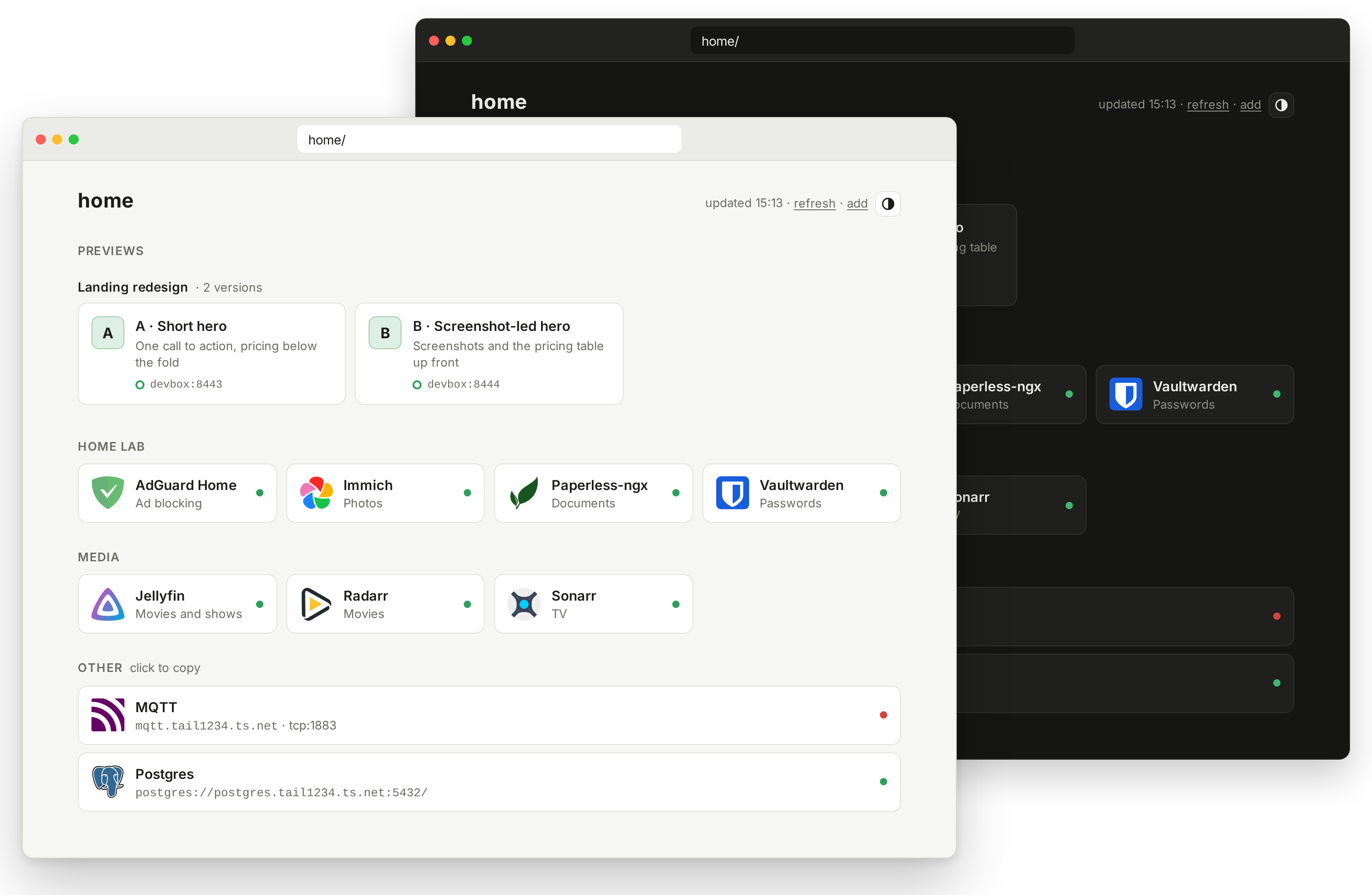
Groups and descriptions shown here use overrides or OAuth. New installs group apps under Apps.
Why tailhome
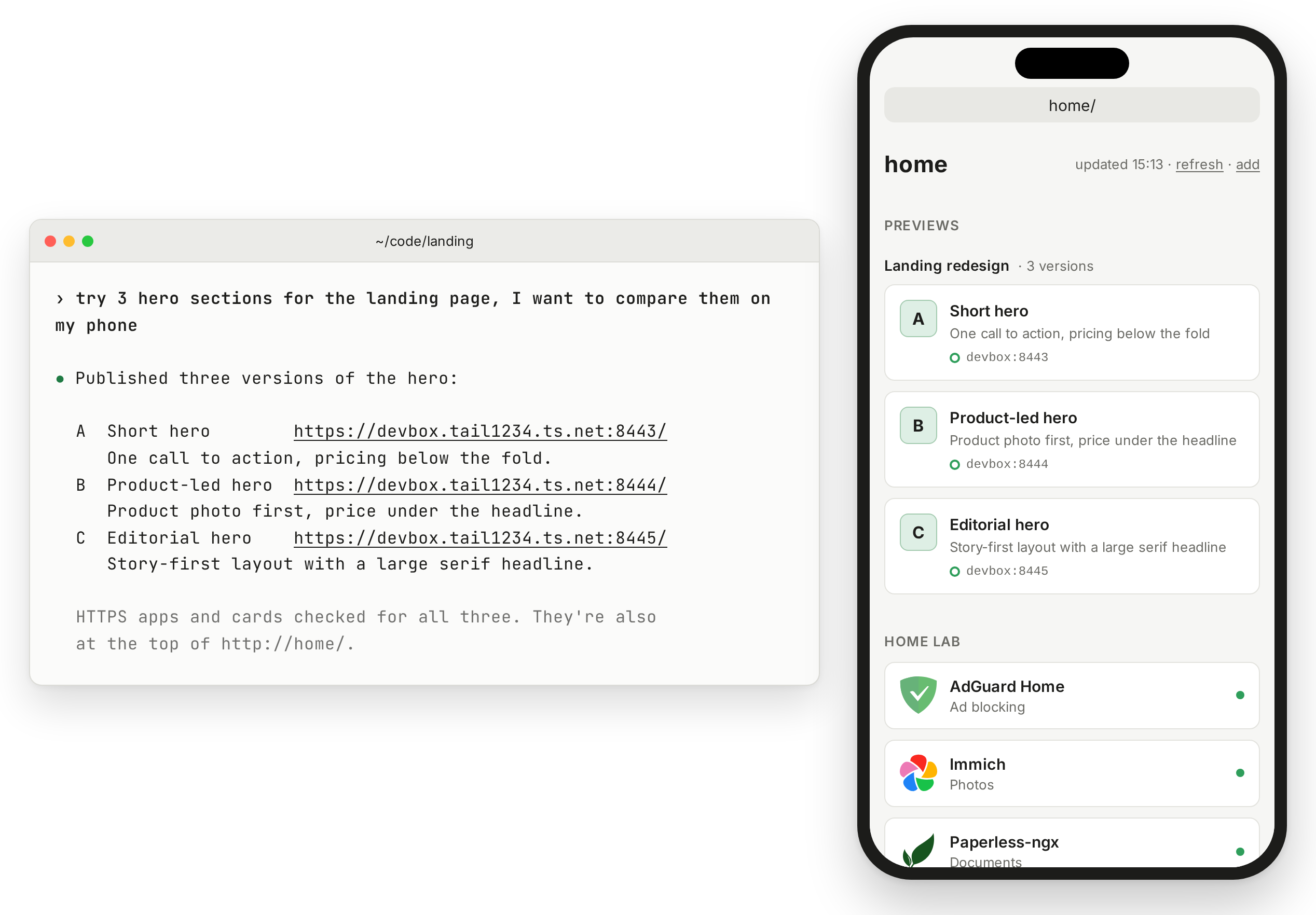
tailhome keeps your app list up to date by discovering what you publish on your tailnet with tailscale serve, DockTail or TSDProxy. Your coding agents' work appears too: with the tailnet-preview skill, an agent publishes what it built as a private HTTPS preview, and tailhome lists it above your apps. Ask for three versions and they share one heading, as A, B and C.
It is a launcher, not a dashboard. Homepage and Glance have widgets and feeds; tailhome can feed them its app list. It does not read Docker labels or look behind reverse proxies.
Which apps appear
- A Tailscale Service tailhome can reach. Optional OAuth also lists Services it cannot reach.
- A device app: an app at a device's own tailnet name on HTTPS port 443. Apps behind paths or a shared proxy need separate publishing.
- A preview a coding agent published with
tailscale serve, on port 443 or on a preview port you allow.
An app at nas:8080 appears once you publish it with one command. See discovery rules, certificates and publishing tools.
Quick start
Before you start:
- Enable MagicDNS and HTTPS Certificates in your DNS settings.
- On the Docker host, use Docker Compose 2.24.0 or later.
- On devices that open Services, use Tailscale 1.86 or later. On Linux before 1.94, also run
sudo tailscale set --accept-routes.
Create compose.yaml. The env_file and ./config lines are optional:.env holds OAuth credentials, and config/overrides.yaml holds tile overrides. A missing overrides file is fine.
services:
  tailhome:
    image: ghcr.io/mickey/tailhome:latest
    env_file: [{ path: .env, required: false }] # optional OAuth client, see docs/setup.md
    environment:
      TZ: Etc/UTC # your time zone, for the "updated" time
      TAILHOME_OVERRIDES: /config/overrides.yaml
    volumes:
      - tailhome-data:/data
      - ./config:/config:ro # put overrides.yaml here
    restart: unless-stopped

volumes:
  tailhome-data:
mkdir -p config
docker compose up -d
docker compose logs -f
Open the login link in the logs to add tailhome to your tailnet. When the logs show serving https://home.<tailnet>.ts.net, open http://home/ from a tailnet device. Keep the trailing slash. It redirects to that HTTPS address. Open a tile to launch an app; see page controls, health dots and shortcuts.
[!NOTE]
Disable key expiry for the newhomedevice on the Machines page. Ifhomeis taken, use the address in the logs, such ashome-1. Keep the state volume: deleting it creates a new node.
tailhome needs no host ports, Docker socket or extra capabilities. See the setup guide for docker run, binaries, systemd and unattended login.
Previews from coding agents
With the optional tailnet-preview skill, a coding agent publishes the app it is working on with tailscale serve, hands you a private HTTPS link and later removes only what it published. tailhome lists each preview at the top of the page, with the title and description the agent chose.
The skill runs on the machine where the app runs, your laptop or a remote server, on Linux or macOS. It needs Python 3.9 or later and the Tailscale CLI, and works without tailhome. Install it there with Node 22.20 or later, and pick your agent when asked:
npx skills add mickey/tailhome --skill tailnet-preview -g
Claude Code:
/plugin marketplace add mickey/tailhome
/plugin install tailnet-preview@tailhome
omp:
omp plugin marketplace add mickey/tailhome
omp plugin install tailnet-preview@tailhome
Gemini CLI:
gemini extensions install https://github.com/mickey/tailhome --ref main
Copy the skill where your agent finds skills. Many clients read ~/.agents/skills; Claude Code reads ~/.claude/skills:
git clone --depth 1 https://github.com/mickey/tailhome.git
mkdir -p ~/.agents/skills ~/.claude/skills
cp -R tailhome/skills/tailnet-preview ~/.agents/skills/
ln -s ~/.agents/skills/tailnet-preview ~/.claude/skills/tailnet-preview
The installation reference covers other clients, the Tailscale CLI on macOS and Python.
The first time, the agent asks which HTTPS ports it may use and suggests 8443-8452. Chat approval authorizes publishing; listing extra ports in tailhome needs the setting below. To skip the question next time, set TAILNET_PREVIEW_PORTS in the agent's environment.
[!IMPORTANT]
Extra preview ports are off by default. To list previews on that range, add this to tailhome'senvironment:incompose.yaml, then rundocker compose up -d:TAILHOME_PREVIEW_PORTS: 8443-8452Without it, agents can still publish previews on those ports and hand you links, but
home/won't show them. Port 443 needs no extra-port setting: the skill's preview card, a JSON description markedpreview: true, identifies it as a preview.
A preview is private to your tailnet, not to you: anyone your Tailscale policy lets in can open it, and anyone who can open tailhome sees its title. Keep the app running and its machine awake. A reachable Serve listener can keep a preview listed after the app stops; unreachable previews disappear. Ask the agent to remove previews when done. See preview privacy and lifetime.
Customize tiles
Put overrides.yaml in config/ to change labels, groups, icons and links, or hide an entry:
jellyfin:
  group: Media
  description: Films and TV
postgres:
  hidden: true
See all fields and overrides.example.yaml. For groups and descriptions from the admin console, set up an OAuth client.
Documentation
Security and privacy
[!WARNING]
Anyone who can open tailhome sees every listed app and preview, with its name, description and status, on the page and both JSON endpoints, including apps their own access rules block. Restrict access to tailhome accordingly. Hiding an entry hides it for everyone; it does not revoke access to the app.
- tailhome refreshes every five minutes by default and probes port 443 and your configured preview ports. Large tailnets can need several refreshes. See device discovery and preview checks for timing, requests and filtering. Use
TAILHOME_DEVICES=offto stop device discovery. - Icons load from
cdn.jsdelivr.net. To avoid it, seticonoverrides to your own URLs. - Like other Tailscale nodes, tailhome uploads diagnostic logs to Tailscale. Set
TS_NO_LOGS_NO_SUPPORT=trueto stop uploads. - Previews on different ports of one device share its cookies. Don't publish an untrusted preview on a device whose other apps keep you logged in.
Report vulnerabilities through SECURITY.md. To contribute, see CONTRIBUTING.md. Licensed under MIT.
Yorumlar (0)
Yorum birakmak icin giris yap.
Yorum birakSonuc bulunamadi