ArgusAgent
Health Uyari
- License — License: MIT
- Description — Repository has a description
- Active repo — Last push 0 days ago
- Low visibility — Only 5 GitHub stars
Code Gecti
- Code scan — Scanned 12 files during light audit, no dangerous patterns found
Permissions Gecti
- Permissions — No dangerous permissions requested
Bu listing icin henuz AI raporu yok.
A persistent, reviewed multi-agent runtime for long-horizon research and engineering.
Argus
Persistent, reviewed autonomy for long-horizon research and engineering
Argus coordinates specialized AI roles that can plan, execute, verify, pause,
and resume work beyond a single model turn.





Website ·
Video demo ·
Technical report ·
Feature guide ·
English / 简体中文
Manager → Planner → Engineer ⇄ Reviewer
Overview
Most agents are optimized for one conversation or one coding turn. Argus is
built for work that lasts. It persists project state, separates execution from
judgment, and resumes from verified progress instead of starting over.
| Capability | Description |
|---|---|
| Persistent projects | Tasks, checkpoints, decisions, skills, evidence, and runtime state survive sessions and upgrades. |
| Independent review | Execution and verification remain separate; Reviewer evaluates evidence, limitations, and completion. |
| Four-role runtime | Manager, Planner, Engineer, and Reviewer have explicit authority and responsibilities. |
| Real tool use | Agents work through files, terminals, APIs, experiments, and inspectable artifacts. |
| Domain extensibility | Verticals define domain-specific stages, tools, evidence requirements, and completion standards. |
| Multiple interfaces | Operate Argus from the terminal cockpit, Web UI, desktop host, chat bridges, plugins, or HTTP APIs. |
| Multiple backends | Use GitHub Copilot CLI, Codex CLI, Claude Code, OpenCode, Pi, Grok Build, Qoder, or DeepSeek Harness. |
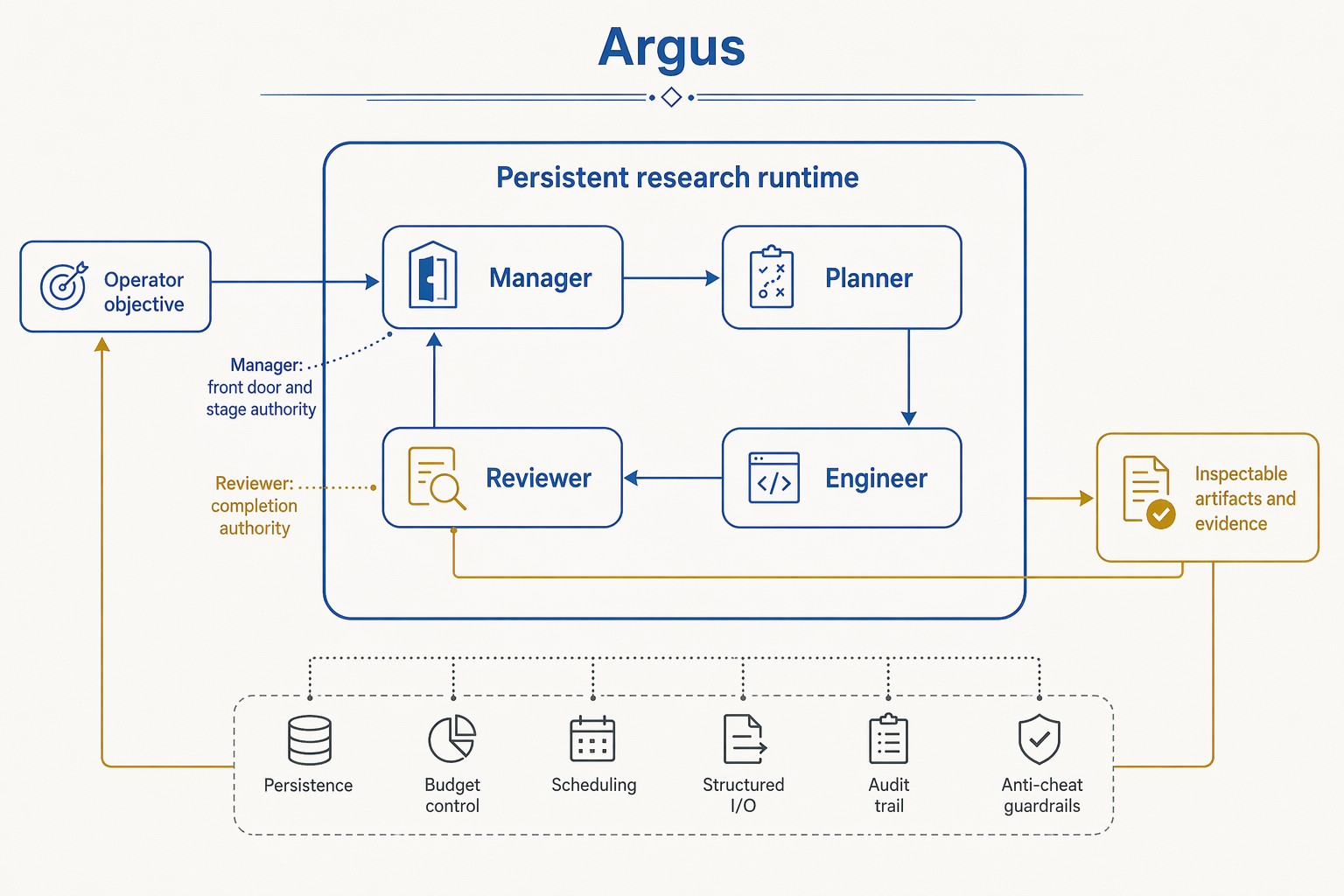
Runtime model
| Role | Authority | Responsibility |
|---|---|---|
| Manager | Control | Interprets operator intent, chooses the workflow, and owns stage transitions. |
| Planner | Direction | Decomposes objectives into executable work and defines the evidence each task must produce. |
| Engineer | Execution | Implements code, conducts research, runs experiments, and creates inspectable artifacts. |
| Reviewer | Verification | Independently checks correctness, evidence quality, limitations, and completion. |
The host persists the campaign state around these roles. A project can stop,
resume, survive a runtime replacement, and continue from its latest verified
position. See the feature and runtime-flow guide for the
state machine, role boundaries, and reliability behavior.
Installation
Requirements
- Python 3.11 or newer
- Node.js 22.12 or newer
- Git
- One supported agent CLI with valid authentication
Docker is not required for a standard installation.
Source installation
git clone https://github.com/microsoft/ArgusAgent.git
cd ArgusAgent

python3 -m venv .venv
. .venv/bin/activate
python -m pip install --upgrade pip
pip install -e .
Install and authenticate a backend. For GitHub Copilot CLI:
npm install -g @github/copilot
copilot login

argus --setup --non-interactive \
  --backend copilot \
  --accept-house-rules
argus
npm beta
npm install -g @github/copilot
copilot login
npm install -g @argusevolve/argus@beta

argus --setup --non-interactive \
  --backend copilot \
  --accept-house-rules
argus
Supported backends
| Backend | CLI | Authentication |
|---|---|---|
| GitHub Copilot | npm install -g @github/copilot |
copilot login |
| OpenAI Codex | npm install -g @openai/codex@latest |
codex login |
| Claude Code | npm install -g @anthropic-ai/claude-code |
Run claude, then /login |
| Pi | npm install -g --ignore-scripts @earendil-works/pi-coding-agent |
Run pi, then /login |
| OpenCode | Official installer | opencode auth login |
| Grok Build | Official installer | grok login |
| Qoder | npm install -g @qoder-ai/qodercli |
qodercli login |
| DeepSeek Harness | npm install -g @deepseek-ai/dsh |
Configure the dsh model provider |
Using Argus
argus                                # open the terminal cockpit
argus --web                          # open the Web UI
argus --status                       # inspect current runtime state
argus doctor                         # agent-assisted inspection and repair
argus doctor --advisor none --verify # deterministic checks without a model call
Terminal cockpit
The default argus command starts a local backend when needed and opens the
terminal cockpit. Use it to talk to Manager, follow active work, inspect
evidence, answer operator-owned decisions, and resume projects.
Web UI
argus --web
The preferred local address is
http://127.0.0.1:8799. Argus selects the next
available port when necessary. For a remote server, keep the service bound to
localhost and use an SSH tunnel:
ssh -L 8799:127.0.0.1:8799 user@server
Coding-agent plugin
The packaged plugin exposes Argus through MCP and host-specific skills for
Codex and Claude Code. Installation commands and host behavior are documented
in plugins/argus/README.md.
Agent-skill integration
The portableargus-runtime-orchestration
skill lets another capable agent invoke Argus, monitor durable missions, handleNeeds you interventions, and close work with evidence.
Project structure
| Path | Description |
|---|---|
argus_skill/ |
Python runtime, role orchestration, verticals, tools, WebAPI, and built-in skills. |
frontend/ |
Terminal cockpit, Web UI, shared frontend contracts, and checked-in production bundles. |
desktop/ |
Windows Electron host and frozen-backend packaging. |
plugins/ |
MCP plugin package and host-specific skills. |
integrations/ |
Portable integrations for external agent environments. |
tests/ |
Runtime, contract, integration, and interface test suites. |
technical_report/ |
Technical report source, evidence, figures, and compiled PDF. |
docs/FEATURES.md |
Implemented features, runtime flows, and reliability scenarios. |
Technical report
The repository includes the complete report package:
Development
python3 -m venv .venv
. .venv/bin/activate
python -m pip install --upgrade pip
pip install -e ".[dev]"

python -m ruff check argus_skill tests
python -m pytest -q
python -m build
Frontend development requires Node.js 22.12 or newer:
npm --prefix frontend/web ci
npm --prefix frontend/web test
npm --prefix frontend/web run typecheck

npm --prefix frontend/tui ci
npm --prefix frontend/tui test
Updating a source installation
cd ArgusAgent
git pull --ff-only
. .venv/bin/activate
pip install -e .
argus --version
argus doctor --advisor none --verify
Security and support
- Review the security policy before reporting a vulnerability.
Do not disclose security vulnerabilities through public GitHub issues. - Use GitHub Issues for bugs
and feature requests, following the guidance in SUPPORT.md. - Read the Code of Conduct before participating.
Contributing
This project welcomes contributions and suggestions. Most contributions require you to agree to a
Contributor License Agreement (CLA) declaring that you have the right to, and actually do, grant us
the rights to use your contribution. For details, visit Contributor License Agreements.
When you submit a pull request, a CLA bot will automatically determine whether you need to provide
a CLA and decorate the pull request appropriately. You only need to do this once across all repos
using our CLA.
This project has adopted the Microsoft Open Source Code of Conduct.
For more information, see the Code of Conduct FAQ
or contact [email protected].
Trademarks
This project may contain trademarks or logos for projects, products, or services. Authorized use
of Microsoft trademarks or logos is subject to and must follow
Microsoft's Trademark & Brand Guidelines.
Use of Microsoft trademarks or logos in modified versions of this project must not cause confusion
or imply Microsoft sponsorship. Any use of third-party trademarks or logos is subject to those
third parties' policies.
Yorumlar (0)
Yorum birakmak icin giris yap.
Yorum birakSonuc bulunamadi