Build-CLI
Health Gecti
- License — License: MIT
- Description — Repository has a description
- Active repo — Last push 0 days ago
- Community trust — 21 GitHub stars
Code Gecti
- Code scan — Scanned 12 files during light audit, no dangerous patterns found
Permissions Gecti
- Permissions — No dangerous permissions requested
Bu listing icin henuz AI raporu yok.
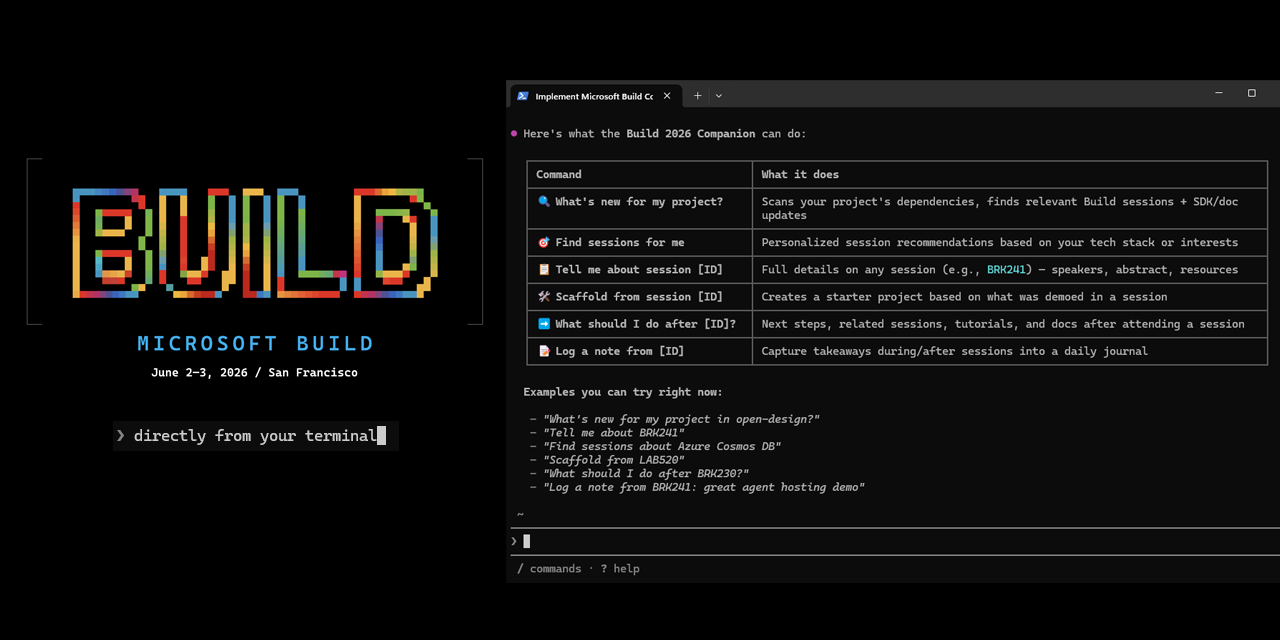
Experience Microsoft Build, directly from your terminal, with GitHub Copilot CLI and the Microsoft Build CLI.
Microsoft Build CLI
A GitHub Copilot CLI skill that connects your local project to the Microsoft Build session catalog. It reads your dependencies, finds relevant sessions, and helps you act on what you learn — all from your terminal.
Quick Start
- Open GitHub Copilot CLI in any project and run:
/plugin install microsoft/Build-CLI - Restart your Copilot CLI session:
/restart - Try:
What Build sessions are relevant to my project?
The skill reads package.json, requirements.txt, .csproj, go.mod, and other dependency files, maps them to Microsoft products, and searches the live Build 2026 session catalog.
Requirements
- GitHub Copilot CLI installed and authenticated
- Node.js 22+ (recommended) — enables the
@microsoft/events-clifor faster local search and caching. Without Node.js, the skill falls back to direct HTTP and everything still works.
What You Can Do
Before Build — plan your schedule
| Ask the skill to… | Example |
|---|---|
| Find sessions for your project | "What Build sessions should I attend?" |
| See what's new for your tech stack | "What's new at Build for Azure Cosmos DB?" |
| Look up a session by code | "Tell me about session BRK155" |
During Build — capture what matters
| Ask the skill to… | Example |
|---|---|
| Log notes tied to a session | "Log a note from session BRK155: great agent demo" |
| Get next steps after a session | "What should I do after session BRK155?" |
After Build — ship what you learned
| Ask the skill to… | Example |
|---|---|
| Scaffold a project from a session | "Scaffold a project from session BRK155" |
| See what changed for your project | "What changed at Build for my project?" |
How It Works
The skill is a thin layer over the live Build 2026 catalog API — no stale data, no manual updates. For SDK docs and code samples, it falls back to the Microsoft Learn MCP Server.
Session results are a starting point. For broad topics, ask the agent to refine ("show me more Foundry sessions about observability") or browse the full catalog at build.microsoft.com/sessions.
[!NOTE]
Build-CLI targets Build 2026 and also indexes past events (Build 2025, Ignite 2025). It supports any future event that follows the same catalog endpoint pattern. It is not a replacement for the event app or session browser — it's a developer-first complement to them.
Supported Clients
| Client | Configuration |
|---|---|
| GitHub Copilot CLI | /plugin install microsoft/Build-CLI then /restart |
| VS Code | Open Extensions (Ctrl+Shift+X), search @agentPlugins microsoft-events, and install |
| Visual Studio 2026 | Copy skills/microsoft-build/ to a supported skill location |
| Claude Code | /plugin marketplace add microsoft/Build-CLI then /plugin install microsoft-events@microsoft-events-marketplace |
Scope and Limitations
- Event-scoped: Targets Build 2026, with Build 2025 and Ignite 2025 also available. The architecture supports any event that uses the same catalog endpoints.
- Dependency-driven: Recommendations are only as good as the dependency files in your project root. If your project doesn't have a manifest file, tell the skill your stack directly.
- Not offline: Requires network access to query the catalog and Learn MCP server.
Contributing
See CONTRIBUTING.md for details on how to contribute to this project.
Trademarks
This project may contain trademarks or logos for projects, products, or services. Authorized use of Microsoft
trademarks or logos is subject to and must follow
Microsoft's Trademark & Brand Guidelines.
Use of Microsoft trademarks or logos in modified versions of this project must not cause confusion or imply Microsoft sponsorship.
Any use of third-party trademarks or logos are subject to those third-party's policies.
Yorumlar (0)
Yorum birakmak icin giris yap.
Yorum birakSonuc bulunamadi