Hybrid-Computer-Use
Health Warn
- License — License: MIT
- Description — Repository has a description
- Active repo — Last push 0 days ago
- Low visibility — Only 7 GitHub stars
Code Pass
- Code scan — Scanned 12 files during light audit, no dangerous patterns found
Permissions Pass
- Permissions — No dangerous permissions requested
No AI report is available for this listing yet.
Official code for "Hybrid Computer Use: A Unified Programmatic, Semantic, and Visual Interface for General Agents"
Hybrid Computer Use
A Unified Programmatic, Semantic, and Visual Interface for General Agents
Haoqing Wang1* · Xiaoyi Zhang1† · Sicheng Fan2 · Zhexin Zhang3 · Xinjie Zhang1 · Jiahao Li1 · Bin Li1 · Yan Lu1
1Microsoft Research 2Fudan University 3Tsinghua University






Paper · Results · See it work · How it works · Quick start · Docs · Citation
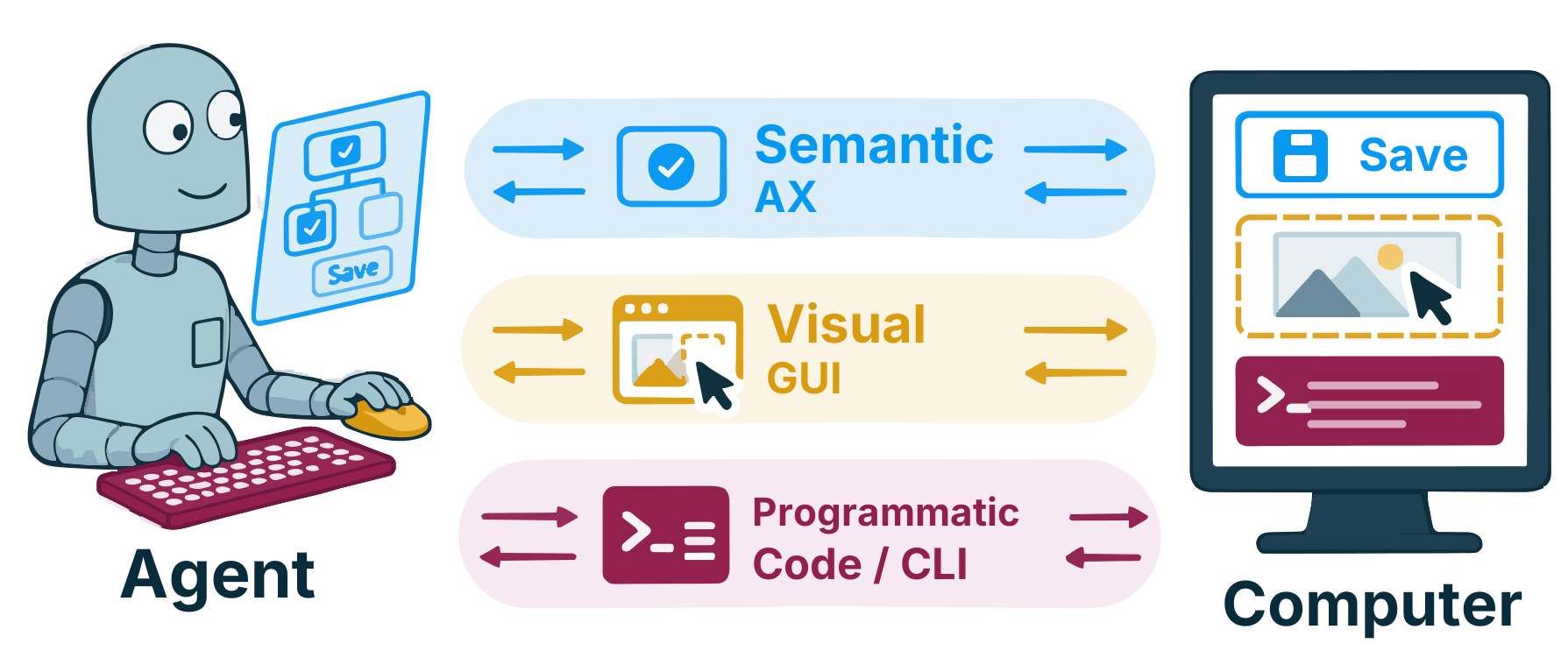
Hybrid Computer Use (HCU) is an open-source Model Context Protocol (MCP)
server, computer-use, for computer-use agents. It lets coding agents such as
Codex, Claude Code, Gemini CLI, and Grok Build operate Linux, macOS, and
Windows desktops through the accessibility tree (AT-SPI2, AXUIElement, UI
Automation), screenshots, and pointer and keyboard input. It adds two tools,AX and GUI, next to the agent's own shell and file tools, so the agent
picks the right channel at each step:
| Channel | Tool | What the agent does with it |
|---|---|---|
| Programmatic | the agent's shell and file tools | Edit files, query data, run command-line tools |
| Semantic | AX |
Read a compact accessibility tree with short refs (a1, w1, r12), run up to 64 actions in one call with waits, and get back a diff |
| Visual | GUI |
Take full-desktop screenshots, zoom into dense regions, and send batched pointer and keyboard input |
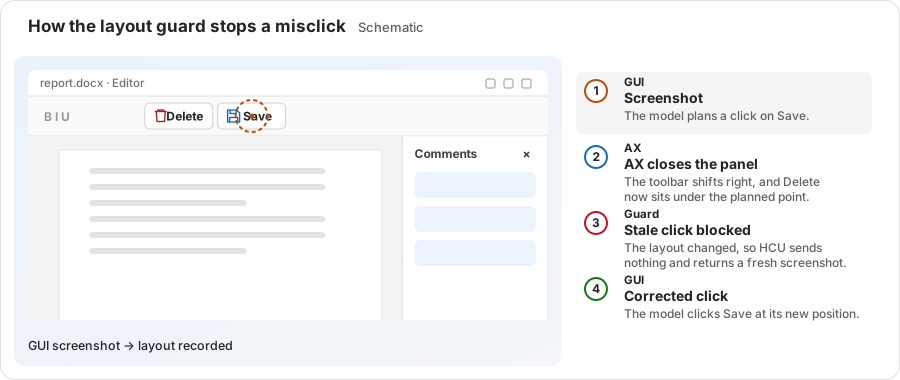
Before it sends any input, HCU checks the live target of every AX action and
the live window layout of every GUI coordinate. An action planned on a
desktop that has since changed is rejected, not sent.
Results
Each comparison keeps the model, agent harness, tasks, and step budget fixed
and changes only the computer-use interface. The baseline is
CUA Driver.
| Benchmark | Platform | Model | HCU | CUA Driver | Cost |
|---|---|---|---|---|---|
| OSWorld 2.0 (108 tasks) | Linux | GPT-6 Astra | 72.37% Partial | 68.82% | about the same |
| OSWorld 1.0 (360 tasks) | Linux | GPT-5.4 | 70.13% | 62.47% | −59.1% |
| Windows Agent Arena (111 tasks) | Windows | GPT-5.4 | 80.86% | 71.89% | −50.6% |
| MacAgentBench, UI subset (28 tasks) | macOS | GPT-5.4 | 25 / 28 | 24 / 28 | −51.4% |
| WeaveBench (114 tasks) | Linux | GPT-5.4 | 53.25% | 46.37% | −46.3% |
- On OSWorld 2.0, HCU with Claude Opus 5 reaches 35.19% Binary, the highest
of all full-set systems, at 20.3% lower cost than the official GUI loop. - On OSWorld 1.0 with four frontier models (GPT-5.4, Claude Opus 5.5,
Gemini 3.8 Flash, Grok 4.7), HCU raises the mean score by 6.48 points with
17% fewer Steps and 30% lower cost.
See it work
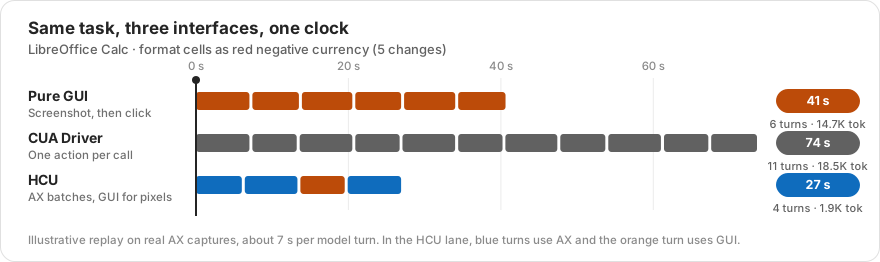
The same Calc task through three interfaces, on one clock. HCU reads the
dialog, batches four changes through AX, zooms with GUI to check the red
negative format, then clicks OK and waits for the dialog to close.
When one channel changes the desktop, the other channel's stale plan is
caught before it clicks the wrong control.
How it works
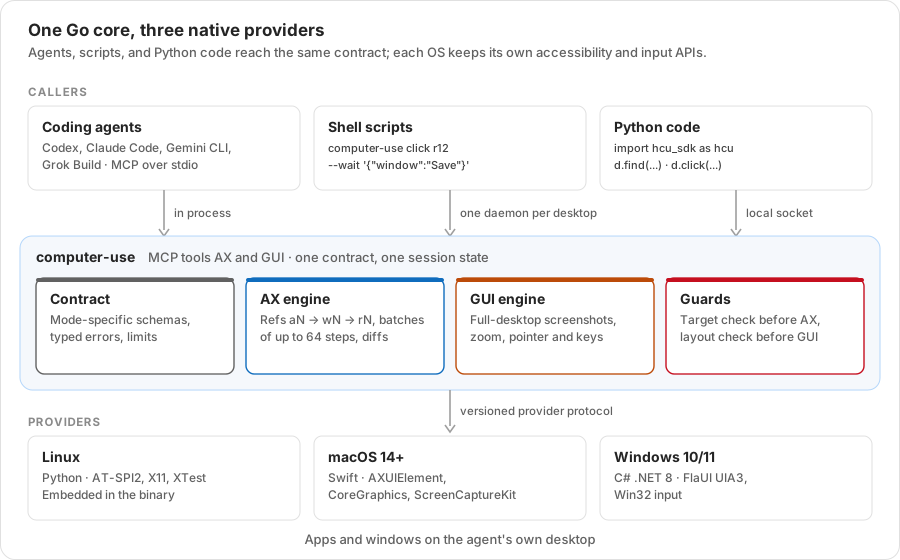
One Go core implements the contract once. Coding agents call it over MCP;
shell scripts and Python code share one daemon per desktop. Each operating
system has its own provider for accessibility, screenshots, and input.
An AX call batches known steps and waits inside the call:
{
  "mode": "act",
  "actions": [
    {"type": "click", "ref": "r12"},
    {"type": "wait", "window": "Export"},
    {"type": "type", "text": "q3.csv"},
    {"type": "keypress", "keys": ["ENTER"]}
  ]
}
Every AX and GUI result starts with one JSON status line (ok, code,hint, input_emitted, completed), followed by the effect on each target,
the open windows, and a compact AX diff or a screenshot.
Quick start
1. Build
make build-local   # Linux binary in artifacts/computer-use (Go 1.22+)
make smoke         # check that stdio MCP exposes AX and GUI
make build-macos   # macOS bundle in artifacts/macos/ (Swift 6.2+)
make build-windows # Windows bundle in artifacts/windows/ (.NET 8, PowerShell 7)
Run artifacts/computer-use doctor as the signed-in desktop user to check
permissions and dependencies. See Native platforms.
2. Connect an agent
Codex (~/.codex/config.toml):
[mcp_servers.computer_use]
command = "/abs/path/to/artifacts/computer-use"
args = ["mcp"]
startup_timeout_sec = 60
tool_timeout_sec = 180
Claude Code:
claude mcp add computer_use -- python3 \
  /abs/path/to/hcu/osworld/guest_files/claude_mcp_schema_adapter.py \
  /abs/path/to/artifacts/computer-use mcp
python3 -m hcu.render_agent_config writes complete configurations, withinstructions/base.md and instructions/hybrid.md, for Codex, Claude Code,
Gemini CLI, and Grok Build. See Computer Use MCP.
HCU sends real input to the signed-in desktop. Use a dedicated desktop or a
disposable VM for untrusted tasks.
3. Or drive it from the shell and Python
The CLI and the Python SDK share one daemon per desktop, so refs carry over
between them:
computer-use apps                                    # list windows (w1, w2, ...)
computer-use find w1 --role button --name-has Save   # find refs (r12, ...)
computer-use click r12 --wait '{"window":"Save"}'    # act, then wait for a window
computer-use gui screenshot                          # full-desktop screenshot
computer-use gui zoom 600 60 680 100                 # enlarge a region
import hcu_sdk as hcu  # PYTHONPATH=sdk/python

d = hcu.connect()
w = d.apps().windows[0].ref
save = d.find(w, role="button", name_contains="Save").matches[0]
d.click(save.ref, wait={"window": "Save"})
See Code entry points for async use and programmatic tool calling.
Platform support
| OS | Native provider | Evaluated on |
|---|---|---|
| Linux (X11) | Python, embedded in the binary: AT-SPI2, X11, XTest | OSWorld 1.0 and 2.0, WeaveBench |
| macOS 14+ | Swift: AXUIElement, CoreGraphics, ScreenCaptureKit | MacAgentBench |
| Windows 10/11 | C# .NET 8: UI Automation (FlaUI UIA3), Win32 | Windows Agent Arena |
Documentation
Start with the documentation guide, or go straight to a topic:
| Guide | Read it to |
|---|---|
| Computer Use MCP | Build and run the server, connect agents, and look up the AX and GUI contract and errors |
| Code entry points | Use the daemon, the CLI, the Python SDK, and programmatic tool calling |
| Native platforms | Set up Linux, macOS, and Windows permissions and providers |
| Running OSWorld | Reproduce the OSWorld 1.0 and 2.0 evaluations |
| Architecture | Change the code: packages, request path, and state models |
FAQ
What is Hybrid Computer Use?HCU is a computer-use interface for general coding agents. It is an MCP server
with two tools: AX reads and acts on the accessibility tree, and GUI works
with screenshots and pointer and keyboard input. The agent keeps its own shell
and file tools, so one agent can mix code, accessibility, and pixels in a
single task.
A screenshot loop sends a full image at every step and acts only through
pixels. HCU lets the agent act on named controls by ref, batch up to 64
actions in one call, read back only a diff, and use screenshots only when
pixels matter. Agents keep a stable, cacheable context.
Those drivers also act through the accessibility tree, but one action per call
and in the background of a shared desktop. HCU targets a desktop the agent
has to itself: it batches actions with in-call waits, returns diffs, and checks
the live target and layout before input. With the same model and harness, HCU
scores higher than CUA Driver at lower cost (see Results).
Any MCP client can use it. The repository ships configurations for Codex,
Claude Code, Gemini CLI, and Grok Build. Providers exist for Linux (X11),
macOS 14+, and Windows 10/11.
Yes. The computer-use command line and the hcu_sdk Python package share
one daemon per desktop, so refs carry over between them. See
Code entry points for async use and programmatic tool calling.
Agent S2 routes GUI localization to specialist models. CoAct-1 and StateAct
build multi-agent systems that hand GUI work to a dedicated GUI operator or
subagent. UFO2 combines UI Automation and visual control detection with GUI
and application-API execution. HCU instead adds two tools, AX and GUI, to
one general agent and leaves the choice of channel to the model. See Section 2
of the paper.
Follow Running OSWorld. Each task runs in a fresh
Docker/QEMU guest with one agent and one MCP process, and the official
evaluator scores the result.
Citation
The paper is on arXiv as 2610.41432. A copy of the PDF is in
paper/Hybrid-Computer-Use.pdf.
@article{wang2026hcu,
  title   = {Hybrid Computer Use: A Unified Programmatic, Semantic, and Visual Interface for General Agents},
  author  = {Haoqing Wang and Xiaoyi Zhang and Sicheng Fan and Zhexin Zhang and Xinjie Zhang and Jiahao Li and Bin Li and Yan Lu},
  journal = {arXiv preprint arXiv:2610.41432},
  year    = {2026}
}
Contributing and license
Run make test before you open a pull request. CONTRIBUTING.md
explains the contract golden tests and layout rules.
HCU is released under the MIT License. Files adapted from
OSWorld-V2 remain under Apache 2.0; see THIRD_PARTY_NOTICES.md.
Reviews (0)
Sign in to leave a review.
Leave a reviewNo results found