asides
Health Uyari
- License — License: Apache-2.0
- Description — Repository has a description
- Active repo — Last push 0 days ago
- Low visibility — Only 6 GitHub stars
Code Gecti
- Code scan — Scanned 12 files during light audit, no dangerous patterns found
Permissions Gecti
- Permissions — No dangerous permissions requested
Bu listing icin henuz AI raporu yok.
Talk through bugs while you test; get them transcribed on your Mac and appended to a Markdown note in your repo. macOS menu-bar app + CLI.
asides
Freeze your screen, click what's wrong, say why. It lands in your coding agent's chat as your
own message, with the screenshot, the elements you clicked and what you measured. Transcribed
locally, on your Mac or PC, on Windows or Linux.
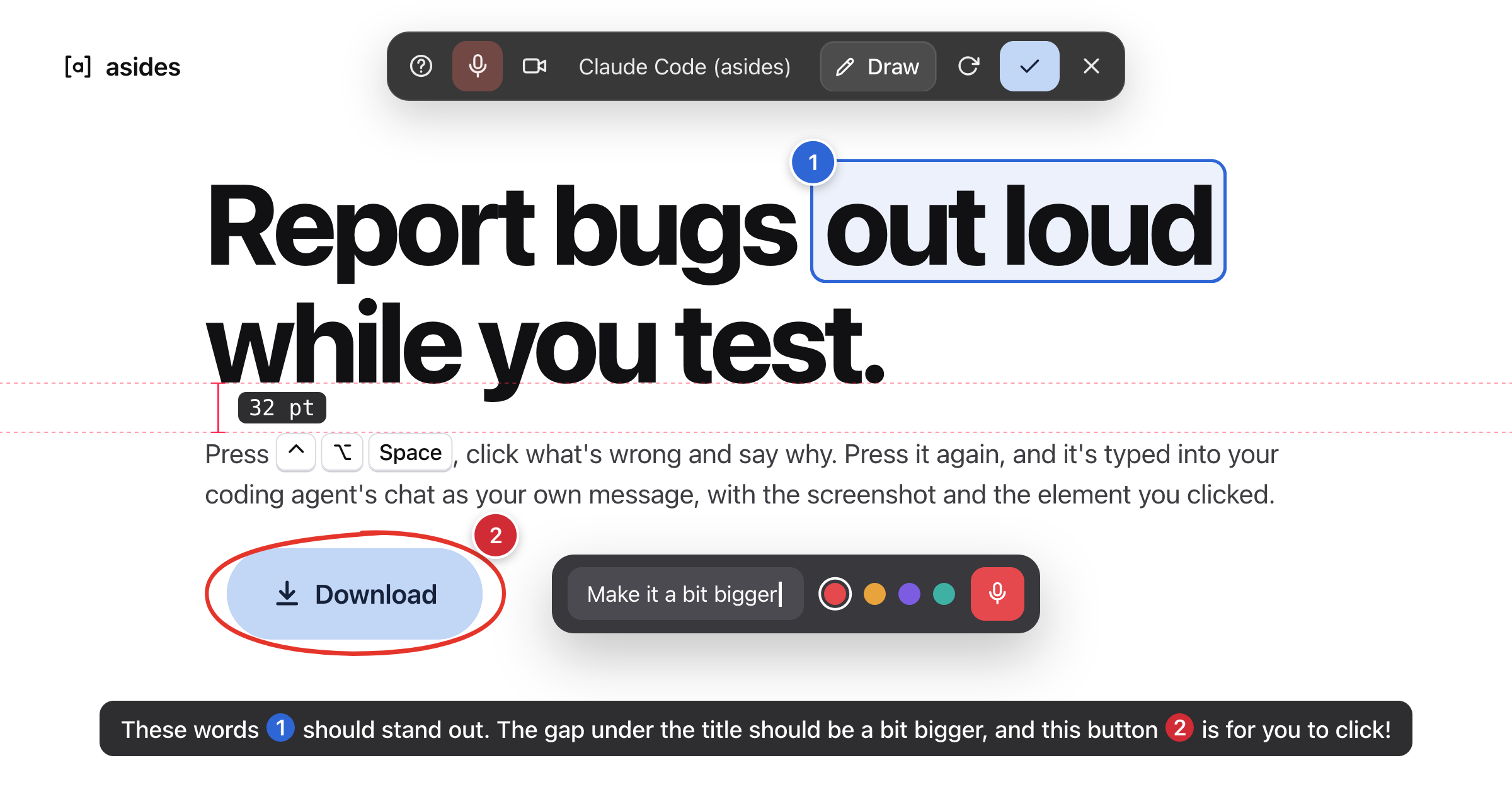
⌃⌥Space   freeze the screen (and start listening)      Windows, Linux: Ctrl+Alt+Space
click     pin what's under the pointer; drag to pin an area; talk
⌃⌥Space   send it to the agent session you typed into last
- Into the session you're already in: Claude Code, Codex, Cursor, Gemini CLI, Copilot CLI,
OpenCode and 16 more, in Terminal, iTerm, Ghostty, WezTerm,
Diri, or tmux, Zellij or screen in any terminal (on Windows and Linux, any
terminal). Nothing to install in the agent. - For anything on screen: pins name the element (
button "Save", and in browsers the page and
a CSS-like location). Measure like PixelSnap, draw arrows, take partial screenshots. - Local and free: whisper.cpp on your Mac's GPU (on
Windows and Linux, the CPU). No account, no API key, no audio leaves your computer.
Install
asides.mihaicristian.dev picks the download for your
system. Every file is signed, and also in the
releases.
macOS
macOS 14 or later, Apple silicon.
brew tap mihaicristianfarcas/asides https://github.com/mihaicristianfarcas/asides
brew install --cask mihaicristianfarcas/asides/asides
Or download the disk image and drag
asides to Applications. On first launch it offers to link the asides command into/usr/local/bin (macOS may ask for your password).
Windows
Windows 10 (2004) or 11: run the installer for
x64 or
Arm64 (no administrator needed). On first
launch asides puts the asides command on your PATH. What differs.
Linux
GNOME or KDE on Wayland, or any X11 desktop, with Vulkan. What differs.
| x86_64 | Arm64 | Then | |
|---|---|---|---|
| Debian, Ubuntu, Mint | .deb | .deb | sudo apt install ./asides-linux-*.deb |
| Fedora, openSUSE | .rpm | .rpm | sudo dnf install ./asides-linux-*.rpm (zypper install on openSUSE) |
| Arch | makepkg -si, beside PKGBUILD |
||
| Any other | .tar.gz | .tar.gz | ./install.sh, from the archive, for you alone |
From source
Needs Rust, the Xcode Command Line Tools and CMake (brew install cmake).
git clone https://github.com/mihaicristianfarcas/asides && cd asides
make install   # ~/Applications/asides.app, and the command in ~/.local/bin
On Windows, scripts\package-windows.ps1; on
Linux, scripts/package-linux.sh.
Get started
- Open asides. Setup walks you through the permissions, the voice model (190 MB) and where new
sessions open, or skip it. asides lives in the menu bar (or the notification area) as[a]. - Start your agent (
claude,codex…) in Terminal, iTerm, Ghostty, WezTerm or Diri, or in tmux
anywhere (on Windows and Linux, any terminal), as usual. - In the app you're testing, press
⌃⌥Space, click, talk, and press⌃⌥Spaceagain.
Pins, measuring and screenshots work without a voice model; skipped, it's downloaded the first time
you click the pill's microphone.
Documentation
- Using asides: the tools, keys, where asides go, the window and the command
- Settings:
config.toml - Privacy and permissions
- Troubleshooting; questions in
Discussions - Security: what asides protects, and reporting a vulnerability
- Contributing and Architecture
License
MIT or Apache 2.0, at your option. Contributions are dual licensed
the same way. The Whisper models are OpenAI's, under MIT, downloaded from
Hugging Face.
Yorumlar (0)
Yorum birakmak icin giris yap.
Yorum birakSonuc bulunamadi