canvas-obsidian
Health Uyari
- License — License: MIT
- Description — Repository has a description
- Active repo — Last push 0 days ago
- Low visibility — Only 5 GitHub stars
Code Gecti
- Code scan — Scanned 12 files during light audit, no dangerous patterns found
Permissions Gecti
- Permissions — No dangerous permissions requested
Bu listing icin henuz AI raporu yok.
Sync Canvas courses into a local Obsidian vault — transcribed lecture notes, a cross-lecture concept graph, homework and deadlines — then study it with Claude or Gemini over MCP.
Canvas Knowledge Graph & Study Assistant
Turn your Canvas courses into a local Obsidian vault — lecture slides transcribed
to markdown, a cross-lecture concept graph, homework prompts, announcements and
syllabus — then study it with Claude or Gemini through MCP, grounded in your own
material with citations.
Local-first: everything lands as plain markdown you own, on your machine.
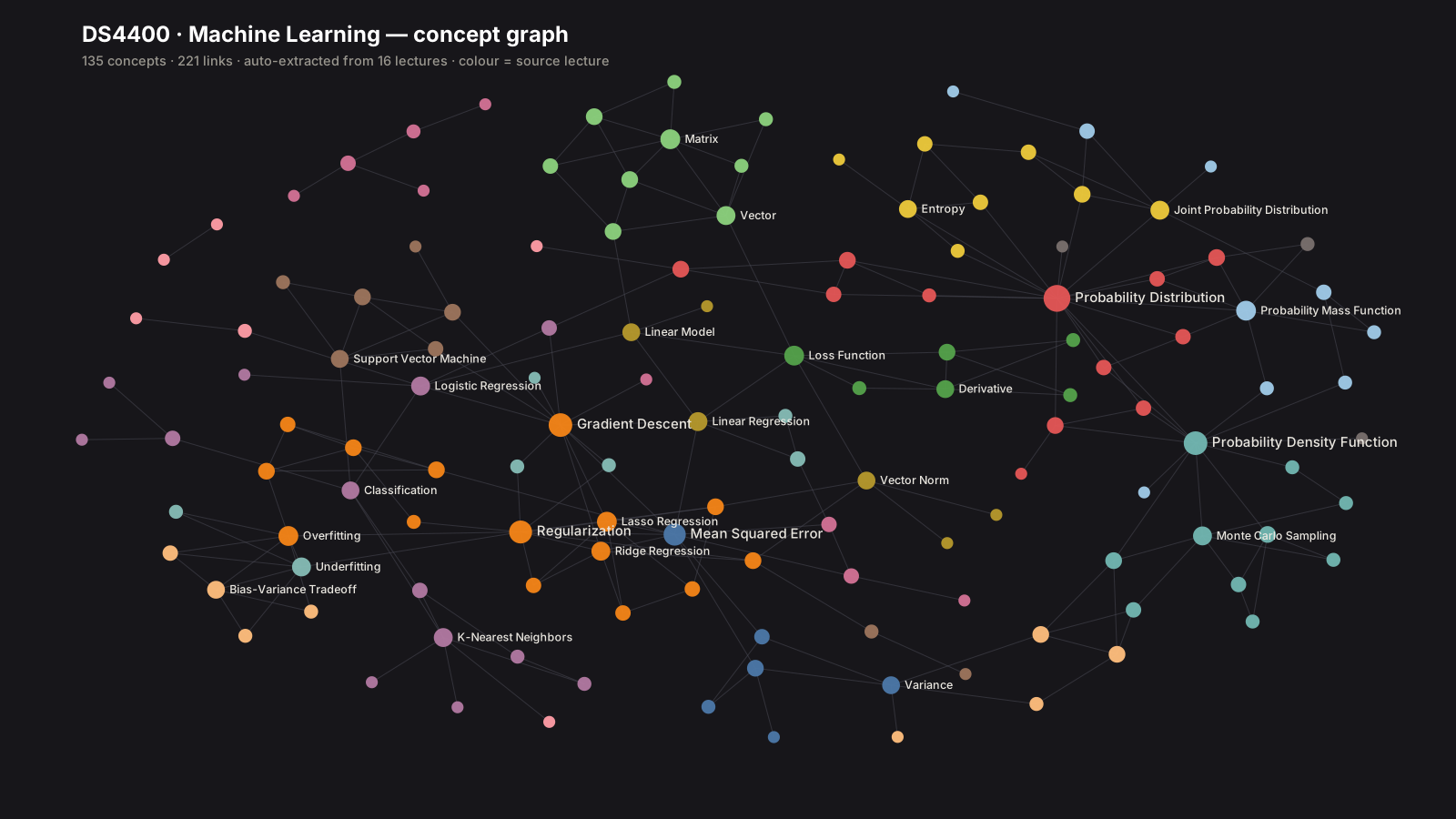
Example output — 135 concepts and 221 links auto-extracted from one course's
16 lectures, coloured by source lecture. You get a graph of your own classes,
whatever they are; nothing here is subject-specific. Concepts are merged across
lectures, so a concept links to every lecture that touches it. The same vault opens
directly in Obsidian for graph view and backlinks — or regenerate this image for any
of your courses with tools/graph_svg.py.
Why this, when Canvas AI tools already exist?
Honest positioning — several mature tools already overlap with parts of this:
- Canvas API MCP servers exist that wrap the Canvas API far more completely
(90+ tools, including grading and instructor features). If all you want is to
talk to Canvas from an LLM, use one of those — the live-Canvas tools here are
deliberately thin. - Hosted study assistants do RAG over your course files, and concept-map
generators turn uploaded PDFs into diagrams. Both are cloud SaaS: your material
lives on their servers.
What this does that they don't:
- Builds a real Obsidian vault — plain
.mdwith[[wikilinks]], a concept graph
merged across lectures (a concept links to every lecture it appears in), plus
backlinks and graph view for free. - Local-first, you own the data. Nothing is hosted; the markdown outlives this tool.
- Free on a subscription you already have — the vault is exposed over MCP, so
Claude (Pro/Max) or the free Gemini CLI is the chat layer. No per-query API metering. - One index across all your classes, with homework prompts and code notebooks in it.
If you want a polished hosted product, use the SaaS. If you want your course knowledge
as files you keep, this.
Requirements
- Python 3.10+
- LibreOffice — converts
.pptx/.docxto PDF for transcription
(macOSbrew install --cask libreoffice, Debian/Ubuntuapt install libreoffice).
Auto-detected on$PATH; override withSOFFICE=/path/to/soffice. - A Canvas API token (Canvas → Account → Settings → New Access Token)
- A Gemini API key (free tier) — used only
to transcribe slides and extract concepts
Setup
python3 -m venv .venv
.venv/bin/pip install -r requirements.txt
cp .env.example .env      # then fill it in
.env (gitignored — never commit it):
CANVAS_URL=https://<your-school>.instructure.com
CANVAS_TOKEN=<your Canvas access token>
GEMINI_API_KEY=<your Gemini API key>
# CANVAS_TZ=America/New_York   # optional; defaults to your Canvas account timezone
Sync your classes
.venv/bin/python -m canvas_vault.sync               # every class you're taking this term
.venv/bin/python -m canvas_vault.sync --list        # show detected classes, change nothing
.venv/bin/python -m canvas_vault.sync --only CS101  # just one class
Per class: ingest (files + homework → markdown via Gemini vision) → updates
(announcements + syllabus) → extract (concept graph) → dashboard, then one
course-tagged search index.
First run takes a while (tens of MB of slide decks through a vision model) and
may hit Gemini's free-tier daily quota. It is resumable — everything is content-hash
cached, so just run it again; finished files cost nothing and aren't re-downloaded.
A class whose Files tab the instructor disabled degrades to assignments-only rather
than failing.
Individual steps still work: python -m canvas_vault.ingest <course_id>,python -m canvas_vault.extract <SLUG>, python -m canvas_vault.updates <course_id>,python -m canvas_vault.dashboard, python -m canvas_vault.chat index.
Keeping up with the term
Courses change daily — announcements, new slides, new assignments. Re-running
the sync is the incremental update: unchanged files aren't re-downloaded, cached
files don't re-hit the model, and the search index only re-embeds what changed. It
finishes by telling you what's new:
What's new:
  DS4400
    - announcement: 2026-07-28 — Dan Office Hours 7/28
    - new assignment: Homework #4
  index: 3 chunk(s) updated
Two ways to stay current, and they work together:
tools/install-daily-sync.sh          # macOS: sync every morning at 07:30 (launchd)
tools/install-daily-sync.sh 18 00    # ...or a different time
tools/install-daily-sync.sh --uninstall
The scheduled job runs the sync with --quiet, which writes to cache/sync.log only
when something actually changed — no daily noise. On Linux, the same effect with
cron: 30 7 * * * cd /path/to/repo && .venv/bin/python -m canvas_vault.sync --quiet.
Or just ask your LLM — the MCP refresh tool syncs on demand: "check my courses
for anything new."
Layout
notes/<SLUG>/          transcribed markdown (lectures, hw-*, code-*, announcements)
vault/Dashboard.md     deadlines across ALL classes
vault/<SLUG>/          concepts/ lectures/ updates/ Dashboard.md   <- open in Obsidian
Open the vault/ folder as an Obsidian vault for the graph, backlinks and dashboards.
Study with an LLM — Vault + MCP
canvas_vault/mcp_server.py exposes your classes + live Canvas to any MCP client (Claude Desktop,
Claude Code, Gemini CLI): list_courses, upcoming_assignments, announcements,syllabus, search_notes (semantic search over your slides, homework and notebooks),concept, and refresh (pull anything new from Canvas on demand). Every tool takes
an optional course slug — omit it to span all classes.
Connecting a client
Every MCP client takes the same server definition — only the file it lives in
differs. Use absolute paths: clients don't run in the repo directory.
{
  "mcpServers": {
    "canvas": {
      "command": "/absolute/path/to/canvas-obsidian/.venv/bin/python",
      "args": ["-m", "canvas_vault.mcp_server"],
      "cwd": "/absolute/path/to/canvas-obsidian"
    }
  }
}
| Client | Where that block goes |
|---|---|
| Claude Code | .mcp.json — already in this repo, picked up automatically |
| Claude Desktop | macOS ~/Library/Application Support/Claude/claude_desktop_config.json · Windows %APPDATA%\Claude\claude_desktop_config.json · Linux ~/.config/Claude/claude_desktop_config.json |
| Gemini CLI | ~/.gemini/settings.json (or .gemini/settings.json per project) |
| Cursor | .cursor/mcp.json in the project (or ~/.cursor/mcp.json globally) |
| VS Code / Copilot | .vscode/mcp.json — note VS Code nests servers under "servers" rather than "mcpServers" |
| Continue | .continue/mcpServers/mcp.json |
Merge into the existing mcpServers object if the file already has one — don't
overwrite it. Restart the client afterwards; most only read config at launch.
A note on Groq, OpenAI and other providers: MCP is a client protocol, not a model
API. Groq, OpenAI and Together are inference providers — they don't connect to MCP
servers themselves. To use those models with this server, point an MCP-capable client
that supports custom providers (Continue, Cline, LibreChat, Goose) at them; the server
definition above is unchanged. The zero-extra-cost paths are Claude (Pro/Max
subscription) and the Gemini CLI free tier.
What to actually ask it
The client picks the right tool on its own — you just talk normally. Answers about
course content are grounded in your material and cite the lecture and section they
came from, so you can go read the source.
Staying on top of the term
- "What's due this week across all my classes?"
- "Did I miss any announcements? Anything change about the exam?"
- "What's the late policy in my ML class?" (reads the syllabus)
Understanding something
- "Explain gradient descent the way my professor did, not the textbook version."
- "I don't follow slide 12 of Lecture 8 — walk me through it."
- "My notes mention KL divergence in two different lectures. Are they saying the
same thing?"
Exam prep — this is where it earns its keep:
- "Here's the topic list from the midterm 2 announcement. For each topic, pull what
my lectures actually say and tell me which ones I have thin coverage on." - "Make me a one-page cheat sheet for midterm 2 using only my course material."
- "Quiz me on entropy and cross-entropy. Ask one question at a time, check my answer
against the lecture, and tell me what I got wrong." - "Which topics on the study guide appear in the fewest of my notes?" (finds the
gaps you'd otherwise discover during the exam)
Following the thread between ideas — the concept graph makes this possible:
- "What do I need to understand before MLE makes sense? Trace the prerequisites."
- "Which lectures does regularization show up in, and how does the treatment differ?"
- "Show me everything connected to the bias–variance tradeoff in my course."
Homework and code
- "What is homework 3 actually asking for? Break it into steps." (reads the prompt PDF)
- "Which lecture covers the method I need for problem 2?"
- "Find the notebook where we implemented gradient descent from scratch and explain
how the epoch loop works."
If something isn't in your synced material, it'll tell you rather than invent an
answer. And when it's wrong, the citation tells you exactly which slide to check.
Aimed at understanding your own material — how you use it on graded work is between
you and your course's academic-integrity policy.
Privacy, cost and terms
- Your Canvas token stays in
.env, is read only by this tool, and is never sent
through MCP or to any model. - Course content is sent to Google's Gemini API during ingestion (slides, homework
prompts) to transcribe it. If that's not acceptable for your material, don't ingest it. - Self-hosted, single-user by design. Instructure's API terms prohibit sharing your
token with third parties — running this yourself with your own token is fine; offering
it as a hosted service for other students is not. - Ingestion costs $0 on Gemini's free tier (slower); chat costs $0 on a Claude
subscription or the free Gemini CLI.
Development
.venv/bin/python -m pytest -q
Render a course's concept graph as a standalone SVG (this is how the image above
was made — the layout is seeded, so regenerating produces no diff churn):
.venv/bin/python tools/graph_svg.py DS4400
.venv/bin/python tools/graph_svg.py DS4400 --size 2000x1100 --label-degree 8 --out docs/ml.svg
Tests that need a built vault skip automatically.
Two development tools evaluate output quality against hand-labelled gold sets.
Both are written for one specific course — swap in your own cases to use them:
.venv/bin/python tools/eval_graph.py       # concept graph: link recall + noise-node exclusion
.venv/bin/python tools/eval_retrieval.py   # RAG: recall@k and MRR for realistic questions
They exist because "the output looks fine" is not a measurement: a prompt tweak, a
chunker change, or a different embedding model can quietly degrade quality, and these
are what catch it.
License
MIT — see LICENSE.
Yorumlar (0)
Yorum birakmak icin giris yap.
Yorum birakSonuc bulunamadi