UEFN-dream-bot-team
Health Uyari
- License — License: MIT
- Description — Repository has a description
- Active repo — Last push 0 days ago
- Low visibility — Only 5 GitHub stars
Code Uyari
- network request — Outbound network request in project-template/Claude/hooks/agent-console-server.py
Permissions Gecti
- Permissions — No dangerous permissions requested
Bu listing icin henuz AI raporu yok.
"Claude Code multi-agent starter kit for UEFN — twelve specialized subagents (each with one narrow job), a plan-first workflow with two independent review gates, a shared cross-project lessons skill, and an optional real-time Agent Console. Free, documented, works for one island or fifty."
UEFN Dream Bot Team
A Claude Code multi-agent starter kit for building UEFN (Unreal Editor for Fortnite) experiences —
seventeen specialized subagents, each with one narrow job, instead of one general-purpose assistant
trying to do everything and stepping on its own toes.
Built by someone juggling ~50 UEFN islands at once. Free, fully documented, works for one island or
fifty.
Screenshots
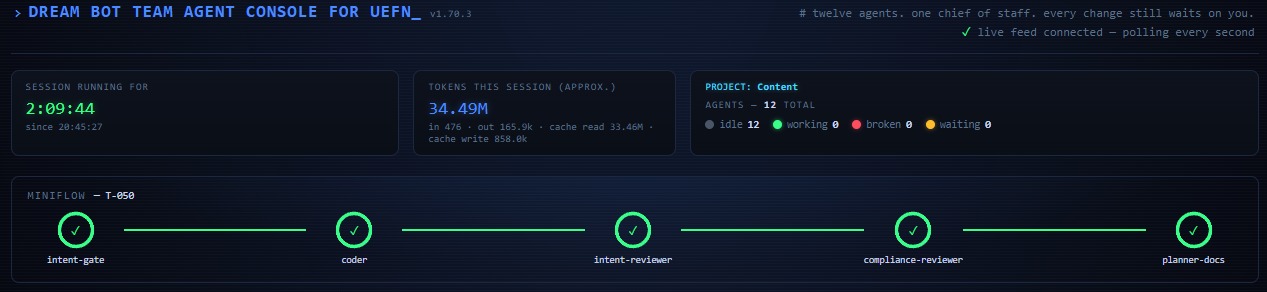
The Agent Console header — session stats, token usage, and the "miniflow" rail tracking a
task live through its five gated stages (intent-gate → coder → intent-reviewer →
compliance-reviewer → planner-docs):
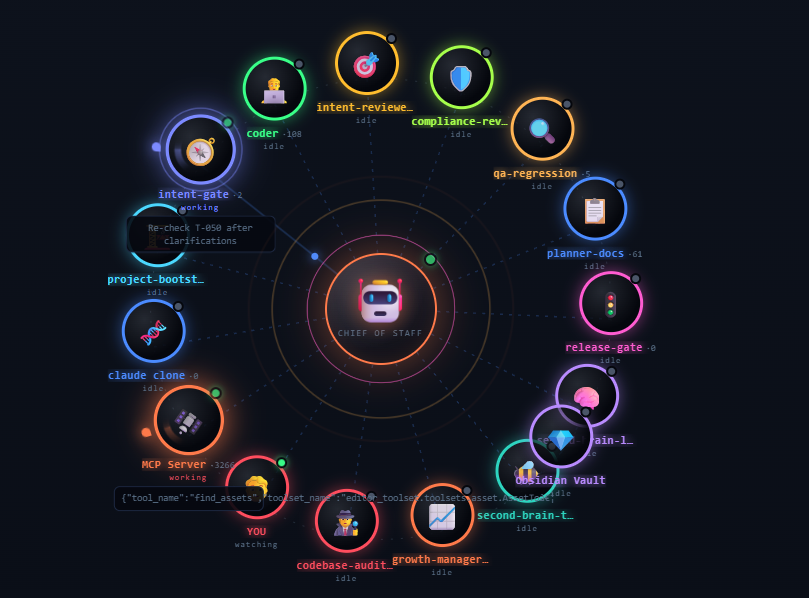
The full Agent Console — the header above, plus every agent's live status at a glance:
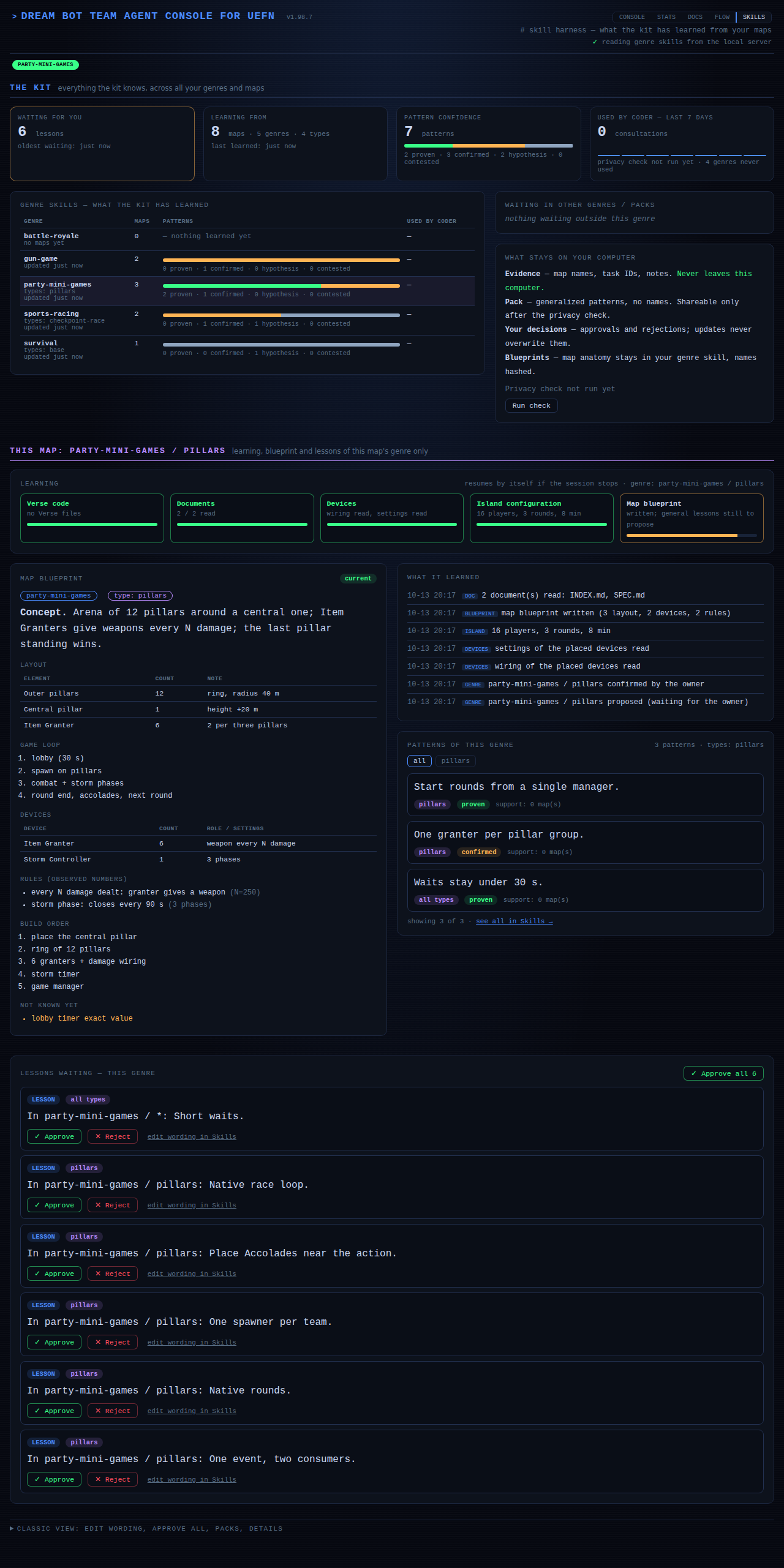
The Skills page — what the kit has learned across all your maps (top), and what it learned
from the map you are working on (below): learning steps, the map blueprint, a log of what it
read, the patterns of the genre and the lessons waiting for your approval. Sample data:
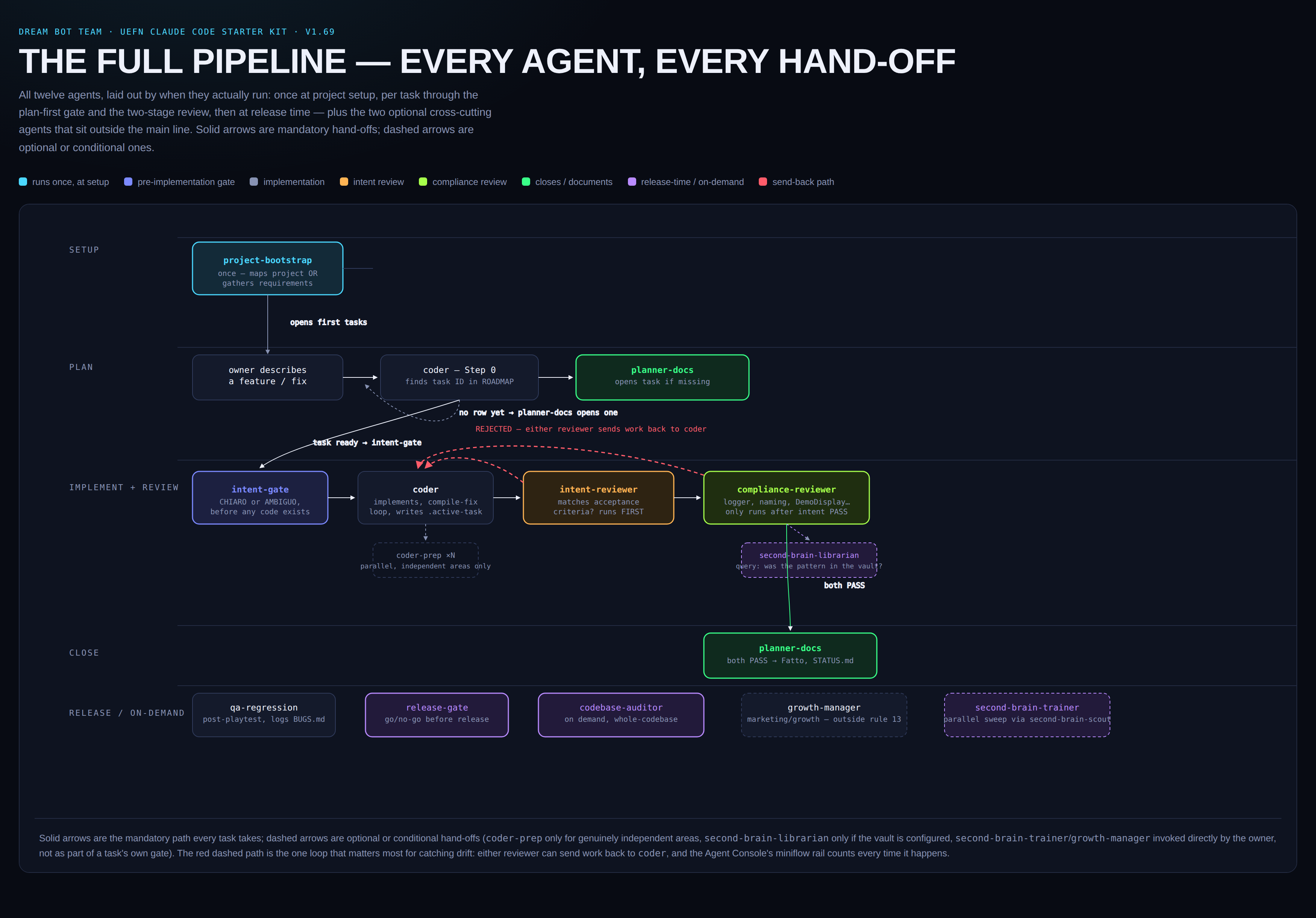
The full pipeline — every agent and every hand-off, end to end:
What's new (v1.98)
- The kit learns from your maps by itself. At the first session on a map it reads the Verse
code, compares your project documents with the code (and corrects the ones that are wrong), reads
the devices placed in the level, their wiring and settings, and the island configuration through
the UEFN MCP. It never interviews you, and if the session stops it resumes where it stopped. - Map blueprint. What it learned becomes a blueprint inside the genre skill: how a map of
this kind is built (layout with counts, game loop, devices and how they are wired, rules with the
numbers observed, build order). It follows your development: when code, documents or devices
change, the blueprint is marked out of date and rewritten at the next session. Items it could not
read are retried at the next starts (never invented), and every analysed map also queues 3 to 5
general lessons for your approval. - You confirm genre and map type before anything is saved. The genre is one of Epic's official
Discover genres; the map type is a free name (pillars, red-vs-blue, checkpoint-race...). The
kit only proposes them: you confirm or correct both on the Skills page, and until then nothing
touches your skills. Confirming saves the waiting blueprint and lessons by itself. - IP variants. A map that is the same base game dressed for an IP is a type of the same
genre: the kit reads the IP from your documents, proposes it as the type (the shared base isbase), and the blueprint of the variant records only what differs from the base. - Skills page rebuilt: the kit overview on top (waiting lessons, maps, genres and types,
confidence, privacy), the genre of this map below, Approve all for waiting lessons, and the
SKILLS tab blinks on every console page when something waits for you. - Docs & Status page: releases are listed in delivery order (P0-R1, P1-R1, P1-R2...).
- The console follows the kit: after an update the console server restarts on the new version,
and it stops when you leave the session. - Releases are published by GitHub.
publish.cmdruns the tests, commits, pushes and tags;
the workflow in.github/workflows/release.ymlthen creates the GitHub Release from the
changelog.
Your map data stays private: blueprints and evidence live in a local layer of your own genre skill,
names are hashed, and only generalized patterns can be shared, after a privacy check.
Earlier: v1.83
- Skills page — the kit learns from your maps (
agent-console-skills.html). Genre skills
(survival, roguelike, …) used to stay empty until three maps had been studied. Now a genre skill
starts learning from your first map: after a playtest theskill-reflectoragent queues lessons,
and you approve, edit or reject each one on the Skills page. Every pattern carries a
confidence level from your own maps (hypothesis → confirmed → proven), and a map that contradicts
a pattern marks it contested instead of overwriting it. - Your map data stays on your computer. Map names, task IDs and notes live in a private
local/layer that is never exported or committed. Only generalized patterns (pack/) can be
shared, and only after a privacy check. Incoming community packs are merged by pattern ID into a
proposal you review; your own evidence always wins. - Everything is English and looks the same: all five consoles (Console, Stats, Docs, Flow,
Skills) share one header, theme and menu, and show an update notice when a newer GitHub Release
exists. - Docs & Status console redesigned around what is still open: roadmap grouped by release with
progress, open bugs sorted by severity, priorities and owner actions, and a live activity rail.
Design ideas for the Skills mechanics are adapted from
tigerless-labs/autoharness (MIT, seeTHIRD-PARTY-NOTICES.md).
What's new (v1.79)
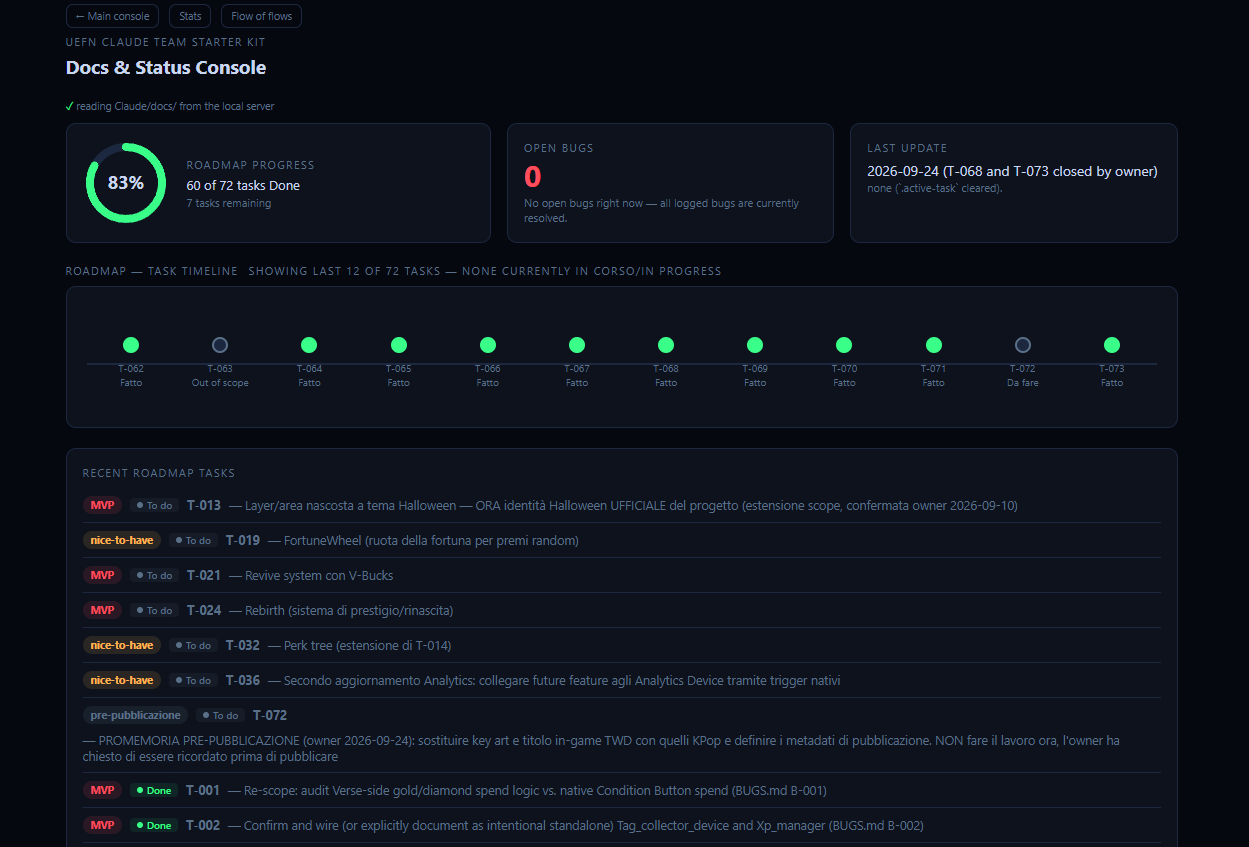
- Docs & Status console (
agent-console-docs.html) — a second dashboard page reading your
project's realClaude/docs/*.mdfiles (ROADMAP.md, BUGS.md, STATUS.md, SPEC.md,
RETENTION-NOTES.md, RELEASE-READINESS.md) straight off disk, no hardcoded sample data. Shows a
roadmap-progress ring, a "Recent roadmap tasks" list (code — description, status, priority) and
a "Recent bug backlog" list (severity, status, description) sorted so what's still open surfaces
first, plus a click-to-open readable render of every doc. - Flow of Flows console (
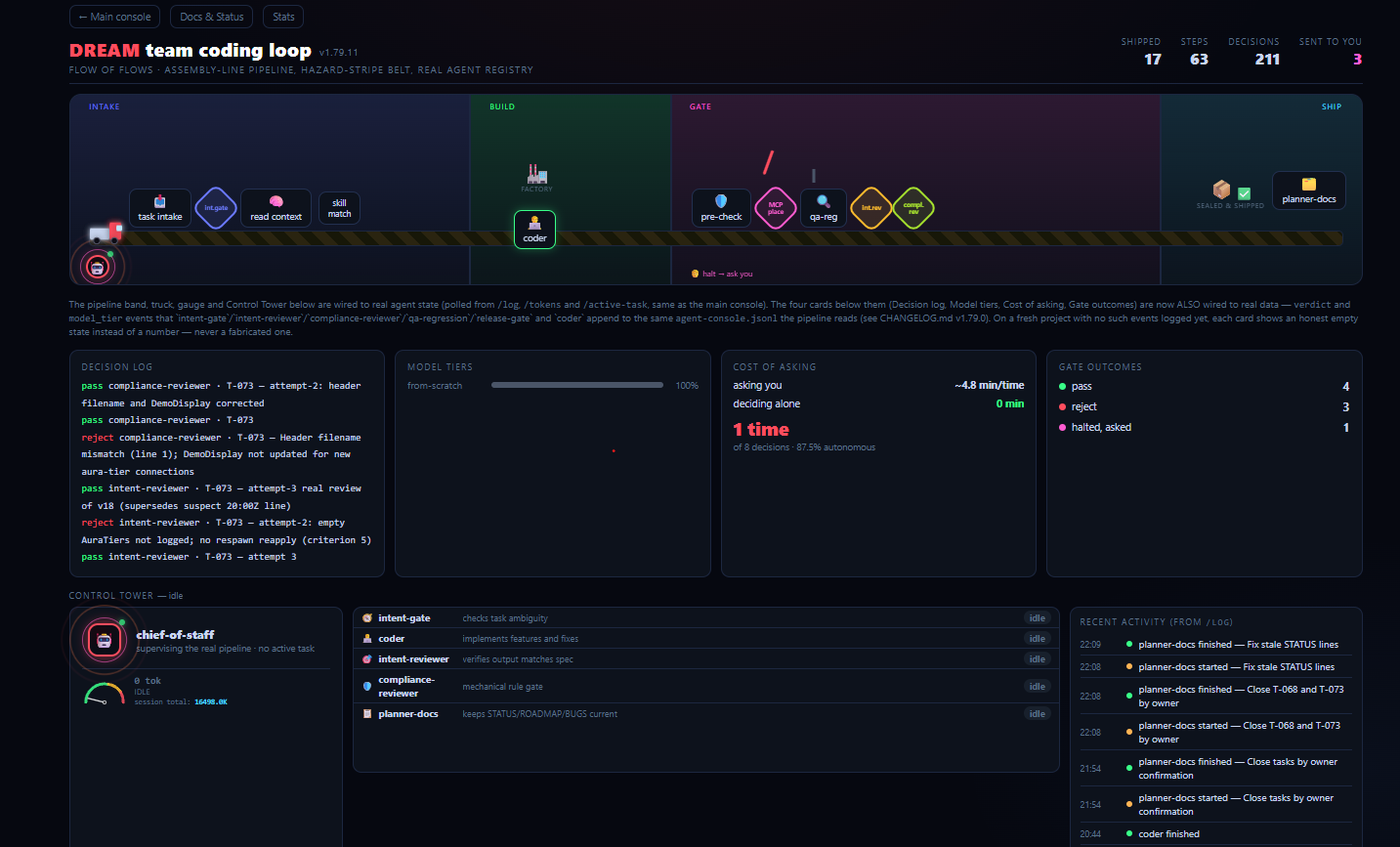
agent-console-flow.html) — an assembly-line-style pipeline
visualization of the same real agent activity (start/stop events, token usage, active task),
with a "Control Tower" token gauge that now correctly drops back to idle instead of sticking to
a stale agent after a crashed/killed session. - Server concurrency fix (
agent-console-server.ps1/.py) — the local dashboard server no
longer blocks every open tab for up to 10 seconds when a Fortnite API lookup is slow. - New shared skills:
game-ui-designer,genre(roguelike/survival pattern evidence), andfortnite-growth-lessons.
Docs & Status — roadmap progress ring, open-bug count, a "Recent roadmap tasks" list and a
"Recent bug backlog" list, both sorted so what's still open surfaces first:
Flow of Flows — the same real agent activity as an assembly-line pipeline, with a Control
Tower token gauge and a live decision log:
Full details for every version in CHANGELOG.md.
What's in the box
- Seventeen agents, each doing one job: project setup, an independent ambiguity check before any
code is written, the actual Verse coding with a mandatory compile-fix loop, two separate review
gates (spec adherence, then mechanical rule conformance — never the same agent grading both),
regression/bug hunting after every playtest, documentation that stays current, a go/no-go release
check, and an optional second-brain (Obsidian) integration for reusable mechanics. - A plan-first workflow: every code change ties to a tracked task, and a task isn't marked done
until two independent reviewers have both signed off — no agent grades its own work. - A shared cross-project skill (
uefn-lessons) that never resets: something learned fixing a
bug on project #12 stops being invisible on project #37. - An optional real-time Agent Console — a local dashboard showing which agent is working, a
live "miniflow" rail for the review-gate sequence, MCP server activity, and token usage. mcp-tool-contracts: a single source of truth for which MCP tool to use for which check, so
the same instruction never quietly diverges across three different agent files.
Getting started
Read SETUP-GUIDE.md first — it covers both setup phases (once per machine, then
once per project), explains what each agent does and why, and has a troubleshooting section for the
Agent Console and the MCP connection. Setup is deliberately manual in a few places rather than a
one-click script, so you see exactly what's being installed.
Full version history is in CHANGELOG.md.
Repo layout
project-template/       Files copied into each UEFN project's Content/ folder (hooks, docs
                         templates, the Agent Console, per-project CLAUDE.md)
user-level-agents/       The 17 agent definitions, installed once into ~/.claude/agents/
user-level-memory/       Base rules loaded in every session, installed into ~/.claude/CLAUDE.md
user-level-skills/       Shared skills (uefn-lessons, mcp-tool-contracts, and others),
                         installed once into ~/.claude/skills/
second-brain-template/   Optional Obsidian vault template for the second-brain integration
SETUP-GUIDE.md           Full setup instructions and troubleshooting
CHANGELOG.md             Version history
Contributing
Issues and pull requests are welcome — see CONTRIBUTING.md. If you
hit a bug in the kit itself (not in your own UEFN project), open an issue with the agent/hook
involved and what you expected vs. what happened. Please follow the
Code of Conduct; report security problems privately as described inSECURITY.md.
License
MIT — see LICENSE. Use it, fork it, ship it in your own team's setup.
Yorumlar (0)
Yorum birakmak icin giris yap.
Yorum birakSonuc bulunamadi