claude-code-tokscope
Health Uyari
- License — License: Apache-2.0
- Description — Repository has a description
- Active repo — Last push 0 days ago
- Low visibility — Only 6 GitHub stars
Code Gecti
- Code scan — Scanned 12 files during light audit, no dangerous patterns found
Permissions Gecti
- Permissions — No dangerous permissions requested
Bu listing icin henuz AI raporu yok.
Token usage per skill, subagent and phase for Claude Code: CLI, HTML report, live dashboard and benchmarks.
tokscope
tokscope measures the tokens that Claude Code uses. It shows the tokens per session, skill, subagent and phase.
It reads the transcripts that Claude Code writes to ~/.claude/projects. It keeps the numbers in a local SQLite database.
You can see the numbers in the terminal, in an HTML report, or in a live local dashboard.
Use it to measure a skill or agent change before and after you make it.
Screenshots
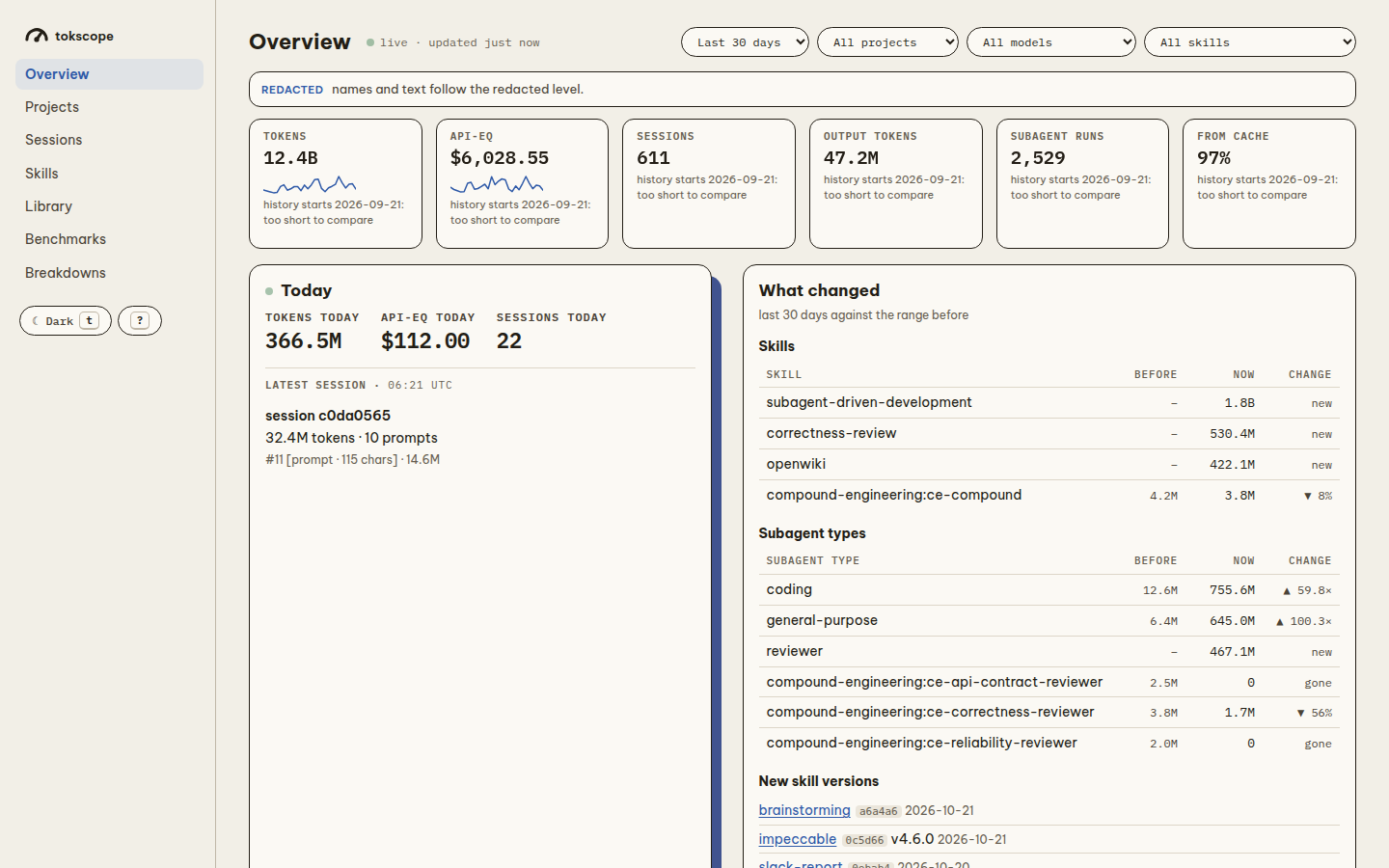
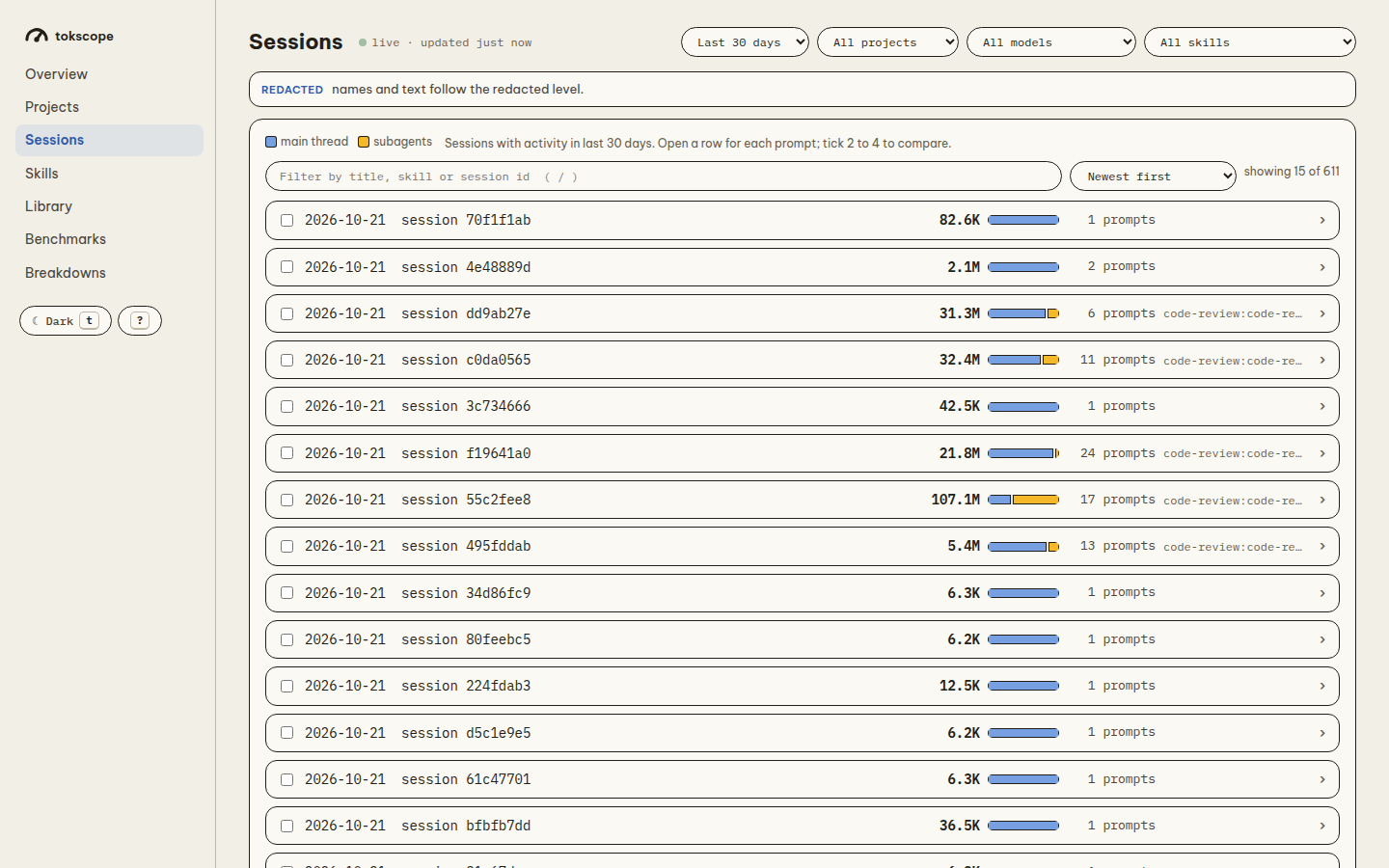
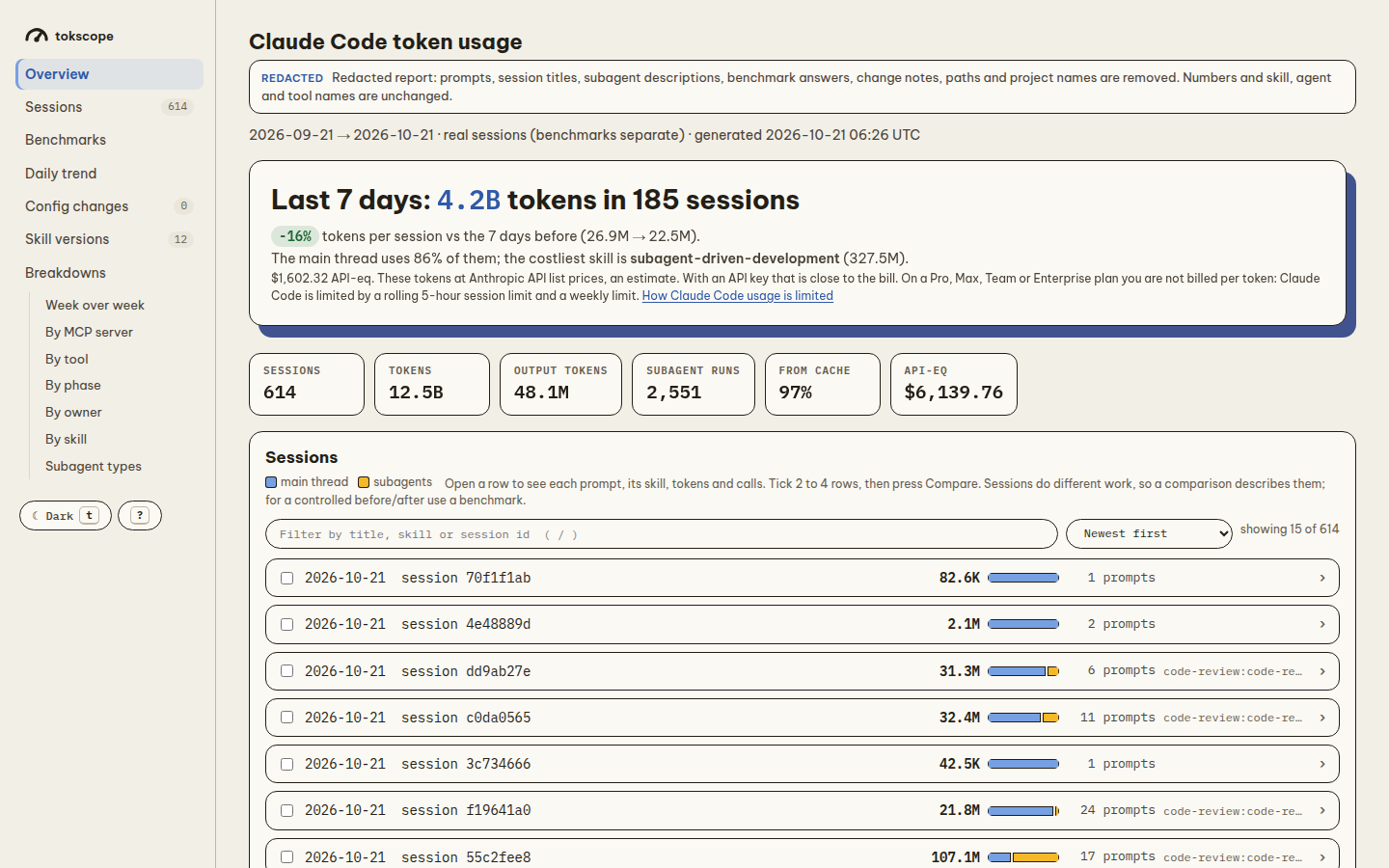
These come from tokscope serve --privacy redacted and tokscope report --privacy redacted, so they show no project names, paths or prompt text.
Overview (tokscope serve): today's totals, and what changed against the range before, for skills and subagent types.
Sessions (tokscope serve): each session with its tokens, split between the main thread (blue) and subagents (yellow). Open a row to see each prompt, or tick 2 to 4 rows to compare them.
Report (tokscope report): one HTML file with the last-7-days summary, the totals, the sessions and the breakdowns.
The dashboard also has Projects, Skills, Library and Benchmarks pages. They are not shown here, because they read real paths and skill names.
Requirements
- Python 3.10 or later. The CLI has no dependencies.
- Claude Code, for the mod and for benchmarks and replays.
python3on yourPATH, if you run the CLI from a clone withbin/tokscope(this is whatsetup.shlinks).- git, for benchmarks, replays and skill versions.
- Linux, or macOS 12.3 or later.
setup.shandbin/tokscopeusereadlink -f, which older macOS does not have.
Install
tokscope has two parts: the CLI tokscope and a Claude Code mod in mod/. The package is not on PyPI.
Install it from a clone with one script:
git clone <repo-url> claude-code-tokscope
cd claude-code-tokscope
./setup.sh
The script does two things. It is safe to run again.
- It links
bin/tokscopeto~/.local/bin/tokscope. - It adds the clone's
mod/folder toCLAUDE_CODE_PLUGIN_DIRSin~/.claude/settings.json. It keeps a copy of the old file assettings.json.bak.
Start a new Claude Code session to load the mod. If ~/.local/bin is not on your PATH, the script tells you.
Check that the CLI works:
tokscope --version
To remove the link and the settings entry, run ./setup.sh --uninstall. Your data stays in the clone's data/ folder.
Move or delete the clone and the link breaks. Run ./setup.sh again from the new place.
Install without the script
To install the CLI as a package, run this in the clone. Both commands put tokscope in ~/.local/bin.
pipx install . # or: uv tool install .
To run one command without an install:
uvx --from . tokscope summary
Then add the full path of the clone's mod/ folder to CLAUDE_CODE_PLUGIN_DIRS in ~/.claude/settings.json yourself.
Use : to separate several folders.
What the mod does
The mod finds the CLI in this order:
- The path in
TOKSCOPE_CLI. - The first
tokscopeonPATH. ~/.local/bin/tokscope.
If the mod finds no CLI, /tokscope and the pane tell you how to install it.
The mod adds the slash command /tokscope and an optional live pane. It writes a mark for each Skill and Agent tool call to data/marks/.
It ingests the session when the session ends.
Where tokscope keeps its data
tokscope keeps its data in one folder, the data home. tokscope selects the data home in this order:
$TOKSCOPE_HOME, if you set it.- The clone, if you run
bin/tokscopeor an editable install (pipx install -e). $XDG_DATA_HOME/tokscope, else~/.local/share/tokscope.
The data home holds these items:
| Path | Contents |
|---|---|
data/tokscope.db |
The SQLite database |
data/marks/ |
The marks from the mod |
data/skills/ |
The files of each skill version |
data/otel/ |
The OTel logs (optional receiver) |
reports/ |
The HTML reports |
bench/tasks/ |
The benchmark tasks |
bench/snapshots/, bench/replay/ |
Benchmark snapshots and replay worktrees |
privacy.key |
The key for the aliases in shared reports |
phases.json |
Your phase map (optional) |
To change the phase map, copy tokscope/phases.json to the data home. Then edit the copy.
Optional: the OTel receiver
collector/otlp_receiver.py is a small OTLP/HTTP JSON receiver on 127.0.0.1:4318. It writes a JSONL file per day to data/otel/.
The receiver is not part of the package. TOKSCOPE_DATA_DIR sets the folder where it writes. You can run it as a systemd user service:
# ~/.config/systemd/user/tokscope-receiver.service
ExecStart=/usr/bin/python3 -I /path/to/tokscope/collector/otlp_receiver.py
Quick start
Read your transcripts into the database:
tokscope ingestShow the tokens per phase in the terminal:
tokscope summary --by phaseOpen the HTML report in the browser:
tokscope openStart the live dashboard:
tokscope serveIn Claude Code, show the tokens of the current session:
/tokscope
How to use
See a session
In the terminal, give the session id:
tokscope session <session-id>
The command ingests the session first. Then it shows the tokens by owner, skill and phase. It also shows the skill version of each skill.
In Claude Code, use one of these commands:
/tokscope
/tokscope session <session-id>
/tokscope with no word shows the current session.
Show a summary
tokscope summary --by skill --since 2026-10-01 --project edgeful --limit 25
--bytakesphase,skill,agentormodel. The default isphase.--sincetakes an ISO date.--projectkeeps only the project folders that contain the text.
Open the report
tokscope open ingests the new transcripts, writes the report and opens it in the browser:
tokscope open
To write the report without a browser, use tokscope report. The default file is reports/report.html.
tokscope report --since 2026-10-01 --project edgeful --out reports/october.html
In Claude Code, use /tokscope open. The old word /tokscope report does the same.
The report has a Usage section and a Benchmarks section. Usage shows the sessions, the daily chart, the change markers and the breakdowns.
The breakdowns show the tokens by MCP server, tool, skill, owner, phase and subagent type. Press ? in the report for the keyboard shortcuts.
Run the live dashboard
The dashboard is a local web server. It reads the database for each request. It ingests new transcripts in the background.
Start the dashboard:
tokscope serveOpen
http://127.0.0.1:8765/overviewif the browser does not open.Press Ctrl+C in the terminal to stop the dashboard.
The dashboard has seven pages: Overview, Projects, Sessions, Skills, Library, Benchmarks and Breakdowns.
A filter bar at the top sets the range, project, model and skill for every number on the page. The URL keeps the filters.
The range is the last 7, 30 or 90 days, or all time. The default range is the last 30 days.
The Overview page updates when new data arrives. The other pages show a "New data · reload" button.
The dashboard answers only on 127.0.0.1. It refuses requests from other hosts.
Options:
tokscope serve --port 8766        # default port: 8765
tokscope serve --interval 30      # seconds between background ingests (default: 10)
tokscope serve --no-open          # do not open the browser
tokscope serve --privacy redacted # show only redacted data
If the port is in use, tokscope tells you which port to try.
See your projects and their MCP servers
The Projects page shows each project where you used Claude Code. For each project, it shows the sessions, the tokens in the last 30 days and in all time, and the API-equivalent cost.
tokscope adds worktrees, eval copies and subfolders to the repository that they belong to. This works also when the worktree folder is deleted: tokscope uses the name (<repo>-worktrees/<name>, or a hidden folder such as <repo>/.worktrees/<name> or <repo>/.claude/skills/<skill>/eval). Temporary folders (/tmp and scratchpads) are in one group. The page does not show benchmark runs.
If a folder that is not a project still shows in the list, write a projects.json file in the data folder. ignore is a list of patterns. A pattern is a folder name or a path (~ is your home folder), and * matches any text:
{"ignore": ["brichan-s55-*", "~/scratch/*"]}
tokscope does not count the sessions of an ignored folder in any project.
Select a project to see its MCP servers. For each server, the table shows these items:
- The source:
local,project(.mcp.json),user, a plugin, or a claude.ai connector. - How the server runs: the transport, and the command or the host.
- The names of its environment variables and headers. The page never shows their values.
- The calls and the approximate result tokens in the transcripts of the project.
- A never used here label for a server that the project did not use.
A server with the same name in a source of lower precedence is shadowed: Claude Code does not use it.
Click Check health to run claude mcp list in the project folder. The check starts the stdio servers and connects to the remote servers, so it can take a minute.
The check shows the status of each server, for example Connected, Needs authentication or Pending approval. It also shows the claude.ai connectors that the configuration files do not list.
The Projects page shows only at the full privacy level, because it shows real paths.
Add or remove an MCP server
To add a server to a project:
- Open the project and open Add a server.
- Type the name. Select the scope and the transport.
local: only you, in this project. Claude Code writes it in~/.claude.json.project: the.mcp.jsonfile of the project. Everyone who uses the repository gets it.user: you, in every project.
- For
stdio, type the command and the arguments, one argument on each line. Forhttp, type the URL. - Add environment variables (
stdio) or headers (http) if the server needs them. - Click Add server.
tokscope runs claude mcp add-json in the project folder, so Claude Code writes its own files. tokscope does not write ~/.claude.json or .mcp.json.
In project scope, write a secret as a reference, for example ${API_KEY}. Claude Code reads the value from your environment, and the file that you commit does not contain the secret.
If a value in project scope is not a reference, the dashboard asks you before it continues. The dashboard never shows a value again.
To remove a server, click Remove in its row. tokscope runs claude mcp remove with the scope of that row.
You cannot remove a plugin server or a claude.ai connector here. Use /plugin for a plugin server, and claude.ai for a connector.
If a server needs authentication, its row shows the claude mcp login command. Run that command in a terminal.
To add a server from the official MCP Registry:
- Open Find in the MCP Registry and search, for example for
postgres. The registry can take up to 30 seconds to answer. - Read the description, the repository and the version of each result. Make sure that you trust the author.
- Click Use on one way to run the server. The choices are an npm package (
npx), a PyPI package (uvx), a container (docker) and a remote URL. The dashboard fills in the Add a server form. - Type the values. A secret stays empty: type its value, or a reference such as
${API_KEY}. Replace each<…>argument with a real value. - Click Add server.
The dashboard sends only your search words to registry.modelcontextprotocol.io. It installs nothing until you click Add server.
tokscope records each change in data/mcp-changes.jsonl in the data folder. The record has the name and the scope of the server, but no value.
Read your skills
The Library page shows the skills that you wrote. Use it to read the SKILL.md file and the other files of a skill.
tokscope finds skills in these folders:
~/.claude/skills(your personal skills).- The
.claude/skillsfolder of each project where a session ran.
tokscope does not show plugin skills or the skills that Claude Code includes.
tokscope hides a skill that an installer added. These are the signs of an installer:
- A link into
~/.agents/skills(fromnpx skills). - An entry in
~/.agents/.skill-lock.jsonor in theskills-lock.jsonfile of the project. - A file with a name that ends in
install.jsonin the skill folder.
Select Show installed to see these skills too.
If tokscope shows a skill in the wrong group, write a library.json file in the data folder:
{"mine": ["boxd-cli"], "installed": ["impeccable"]}
The Library page shows file contents only at the full privacy level.
Check a skill against STE
The STE check tab lists the STE100 findings for a Markdown file of a skill. Each finding shows the line number, the rule and the text.
Click the line number to see that line in the source. A "hard" finding breaks an STE rule. A "hint" can be correct text: read it before you change it.
Each card in the list shows the number of hard findings in its SKILL.md. Select Most STE findings to sort the skills by this number.
The check runs scripts/ste-lint.py from the asd-ste100 skill that you installed. To use a different linter, set TOKSCOPE_STE_LINT to the path of a ste-lint.py file.
tokscope checks a file again only after the file changes.
Optimize a skill
The Optimize section of a skill page runs claude -p on a copy of your skill. The run uses one or more guide skills:
optimize-skill: uses fewer tokens and keeps the same output. It runs test prompts in subagents, so it costs more.asd-ste100: writes the text again in STE100 and checks it withste-lint.py.unslop: removes AI tells from the text.
To optimize a skill:
- Open the skill in the Library and open Optimize.
- Select the guide skills, the model and the maximum cost.
- Click Optimize, then click Run it. The run cannot spend more than the maximum cost (
--max-budget-usd). - The run page shows the time and each step of the run, for example
Read,Editor a skill. It also shows the files that changed. If no step comes for 2 minutes, the page tells you. To stop the run, click Cancel the run. - When the run ends, the page shows a summary with the time and the cost. For each file, it shows the words and the STE counts before and after.
- Compare each changed file. Select Side by side, Diff, After (the new text) or Before (the old text). The side-by-side view marks the changed words.
- Optional: benchmark the draft. In Benchmark, select a task and the number of runs for each version, then click Run the benchmark. The page shows the cost limit before the runs start. When the runs end, it shows the pass rate, the median cost, the tokens and the time for the current skill and for the draft.
- Make your decision in the bar at the bottom of the page. Click Approve and apply to write the draft into the skill folder, or click Reject to remove the draft.
If the skill has no benchmark task, use Make a task for this skill. Type a prompt that uses the skill and the words that a good answer has. tokscope runs the task in a copy of your repository at HEAD, with each skill version pinned in that copy.
You cannot benchmark a personal skill, because Claude Code uses the personal copy and not the pinned copy.
The run writes only in its job folder, bench/optimize/<job>/ in the data folder. tokscope counts the sessions of the run as experiments, not as your work.
Your skill folder changes only when you click Apply to the skill. If the skill changed after the run started, tokscope does not apply the run. Start a new run.
When you apply a run, tokscope keeps the old version. To compare the two versions on a task, use the tokscope bench command that the page shows.
You can optimize only your own skills. An installer can replace an installed skill, and then your change is lost.
The dashboard accepts a change only from a page that it served. A page from a different site cannot start a run.
Share a report safely
CAUTION: The default report contains your prompts, session titles, subagent descriptions, benchmark answers and paths. Do not send the default report to other persons.
Make a redacted report before you share it:
tokscope report --privacy redacted   # writes reports/report-redacted.html
tokscope report --privacy numbers    # writes reports/report-numbers.html
| Level | Contents |
|---|---|
full |
All data (default) |
redacted |
Numbers and names. No prompts, titles, descriptions, answers or paths. |
numbers |
Numbers only. Each name becomes an alias, for example skill-3fa9c1. |
tokscope builds a shared report from a redacted copy of the database.
The aliases come from the key in privacy.key (mode 600). One skill gets the same alias in each report from one machine.
Names of built-in Claude Code tools and agents (Read, Explore) do not change. The phase names from phases.json do not change.
Track skill versions
tokscope records a skill version each time a skill changes. A skill version is a hash of the skill folder: SKILL.md and the files next to it.
The hash does not include hidden files, caches, eval and test folders, or files over 1 MB.
The mod records the skill version of each Skill call. tokscope ingest hashes each skill again.
List all skills with their skill versions, first-seen dates, loads and median tokens per load:
tokscope skillsShow one skill:
tokscope skills <skill>Recover older skill versions from the SKILL.md text in old transcripts:
tokscope skills import [<skill>]
In Claude Code, use /tokscope skills [name].
tokscope keeps the files of each skill version in data/skills/<skill>/<version>/. You can compare two skill versions with a diff.
A version: line in the SKILL.md frontmatter shows as a label next to the hash.
The report and the dashboard Skills page have a "Skill versions" section. It shows a card for each changed skill.
Each card shows the loads, the median tokens per load, the change from the previous skill version, and the diff.
tokscope marks a skill version with fewer than 5 loads as "few". Do not make a decision from these numbers.
These medians come from different work. For a fair comparison, run a benchmark or a replay. Redacted and numbers reports do not show the diffs.
Benchmark or replay two skill versions
CAUTION: bench run and replay run start new claude -p sessions. Each run costs money or plan usage. Set --runs before you start. For a replay, also set --budget. For a benchmark, the task sets max_budget_usd per run.
A benchmark runs a fixed task. A replay sends the prompts of a real session again.
Find the hashes of the skill versions:
tokscope skills xia2Prepare the task snapshot (once per task):
tokscope bench prepare <task>Run the benchmark with one variant per skill version:
tokscope bench run <task> --skill xia2 --skill-versions 25e2fd,9ee5a7 --runs 3Compare the variants again at a later time.
bench runalso shows this comparison at the end.tokscope bench diff <task>
To replay a real session instead:
tokscope replay plan <session-id>
tokscope replay run <session-id> --skill xia2 --skill-versions 25e2fd,9ee5a7 --runs 4 --budget 6
tokscope replay diff <session-id>
A task is a JSON file in bench/tasks/. It holds a prompt, variants and a regex grader.
To benchmark a skill, put the skill command in the prompt, for example "/xia2 how does usage metering work".
tokscope replaces {version} and {skill} in the prompt. The variants change order each round (a, b, b, a), because the first run fills the prompt cache.
After you edit a grader, apply it again to the stored answers with tokscope bench regrade <task>.
Each replay run uses a new git worktree at the commit where the session started. It permits only read-only tools.
It deletes the worktree after the run. Live data sources can change the answers, so read the answers too.
After each run, tokscope does a skill check. It compares the SKILL.md text in the transcript with the pinned skill version:
| Result | Meaning |
|---|---|
ok |
The model read the pinned skill version. |
other text |
The model read a different copy of the skill. |
not loaded |
The model did not call the skill. |
unconfirmed |
Claude Code kept no text to compare. |
Compare the variants only on ok runs.
You cannot pin a plugin skill or a skill with a copy in ~/.claude/skills. tokscope tells you before a run starts. You can pin a skill version only after tokscope keeps its files. Edit the skill. Then run tokscope ingest.
Record a config change
Record a change to a subagent or a skill. tokscope then compares the sessions before and after the change.
tokscope change "reviewer: fable -> opus" --agent reviewer
tokscope change "trim xia2 rules" --skill xia2 --at 2026-10-15T09:00 --days 14
- A change needs
--agentor--skill. --atis the ISO time of the change. The default is now.--daysis the length of the before and after windows. The default is 14.
To list the changes with their impact:
tokscope change
The report shows each change as a marker on the daily chart and as a before/after card.
Use the live pane
The live pane shows the tokens of the current session next to the chat.
Show the pane:
/tokscope pane onClose the pane:
/tokscope pane off
/tokscope pane with no word changes the pane between on and off. The pane is off by default. New sessions use your last choice.
If you close the pane by hand, the mod sets the pane to off.
The pane updates after each main-loop turn. It shows these items:
- The session tokens, with main thread and subagents.
- The last 8 turns, with tokens in and out, the list price, and the subagents, MCP servers and tools of each turn.
- The tokens by owner and by skill, with the skill version.
With the pane focused, press r to refresh it. Press o to open the report.
Command reference
| Command | What it does |
|---|---|
tokscope ingest [--project TEXT] [--session ID] |
Reads new transcripts into the database (incremental) |
tokscope session ID [--json] |
Ingests one session and shows its tokens |
tokscope summary [--by phase|skill|agent|model] [--since DATE] [--project TEXT] [--limit N] |
Shows a table in the terminal |
tokscope report [--out FILE] [--privacy LEVEL] [--since DATE] [--project TEXT] |
Writes the HTML report |
tokscope open [same options as report] |
Ingests, writes the report and opens it |
tokscope serve [--port N] [--interval S] [--no-open] [--privacy LEVEL] |
Starts the live dashboard |
tokscope skills [SKILL] |
Lists skill versions |
tokscope skills import [SKILL] |
Recovers older skill versions from transcripts |
tokscope change [NOTE] [--agent A] [--skill S] [--at TIME] [--days N] |
Records or lists config changes |
tokscope bench prepare|run|diff|regrade TASK [--runs N] [--variants A,B] [--skill S --skill-versions A,B] |
Runs a benchmark |
tokscope replay plan|run|diff ID [--runs N] [--budget USD] [--model M] [--skill S --skill-versions A,B] |
Replays a session |
tokscope mark |
Reads marks from stdin (the mod uses it) |
| In Claude Code | What it does |
|---|---|
/tokscope |
Shows the current session |
/tokscope session <id> |
Shows a different session |
/tokscope open |
Opens the report (/tokscope report does the same) |
/tokscope skills [name] |
Lists skill versions |
/tokscope pane on|off |
Shows or closes the live pane |
Notes
- Dollars are estimates. Each dollar figure is "API-eq": the tokens at API list prices. On a Pro, Max, Team or Enterprise plan, you do not pay per token.
The real limits are the 5-hour session limit and the weekly limit. See Claude Code costs. - Phases are direct or carried. A phase is direct when its skill runs in that prompt. tokscope calls a phase carried when a later prompt loads no skill and keeps the last phase.
- By skill overlaps By owner. By skill shows the main-thread tokens and the subagent tokens of a skill. By owner also counts the subagent tokens. Do not sum the two tables.
- Tool tokens are estimates. The API reports usage per model request, not per tool call. tokscope estimates MCP and tool tokens from the size of each result (4 characters per token). These numbers have a
~mark. - A personal skill cannot be pinned. A skill in
~/.claude/skillshas priority over a project copy. - The default report holds private text. Use
--privacy redactedor--privacy numbersbefore you share it. - Local data stays local. Git ignores
data/,reports/,bench/snapshots/,bench/replay/,bench/*.logandprivacy.key.tokscope ingestcan build the database again from the transcripts. It cannot recover the OTel logs or the marks. - Transcripts expire. Claude Code deletes transcripts after
cleanupPeriodDays. Set it to a high value (for example 365) to keep more history.
Development
Run the Python tests:
python3 -m unittest discover -s tests
Run the mod tests and the mod validator:
claude plugin test mod
claude plugin validate mod
If claude is an alias in your shell, use ~/.local/bin/claude.
CI (.github/workflows/ci.yml) runs these jobs:
- It runs the Python tests on Python 3.10, 3.12 and 3.13.
- It builds the wheel, installs it outside the repo and runs it on an empty data home.
- It runs
claude plugin validate modand the mod tests with a pinned Claude Code version.
Versions
tokscope has one version number. The current version is 0.1.0.
- Change the version in
tokscope/__init__.py. - Change
versioninmod/.claude-plugin/plugin.jsonto the same number. - Add an entry for the version to
CHANGELOG.md.
tests/test_version.py fails if the three do not agree. tokscope --version shows the version.
License
Apache License 2.0. See LICENSE and NOTICE.
Copyright 2026 Minh Tran.
Yorumlar (0)
Yorum birakmak icin giris yap.
Yorum birakSonuc bulunamadi