Plexus
Health Warn
- License — License: Apache-2.0
- Description — Repository has a description
- Active repo — Last push 0 days ago
- Low visibility — Only 5 GitHub stars
Code Fail
- os.homedir — User home directory access in apps/web/app/api/agent/[id]/file/route.ts
Permissions Pass
- Permissions — No dangerous permissions requested
This tool provides a local web dashboard to synchronize configuration files, rules, and skills across multiple AI coding agents (such as Claude Code, Cursor, and Codex). It acts as a centralized hub to configure your local development environment.
Security Assessment
Overall Risk: Medium. The application is designed to read and modify your local user configuration files. This is confirmed by the automated scan flagging access to the user home directory (`os.homedir`), which it uses to locate and write agent files like `CLAUDE.md`. Because it manages local configurations, it inherently handles your local setup paths and agent settings. It does not request explicitly dangerous system permissions, and no hardcoded secrets were detected. While it primarily acts as a local dashboard, users should be aware that it reads and writes to their local file system.
Quality Assessment
The project is actively maintained, with its latest push occurring today. It uses a standard Apache-2.0 open-source license. However, it currently has very low community visibility and adoption, with only 5 GitHub stars. This means the project has not yet been widely vetted by the developer community, so unseen bugs or edge cases in the file synchronization process (like overwriting custom configurations) are possible.
Verdict
Use with caution — it is an active, locally-focused tool, but its low community adoption and ability to modify local user directories warrant a careful review of its syncing behavior before applying it to critical environments.
一键配置各类 AI Agent 工具的 MCP、Skills 和规则;支持 Claude Code、Codex、Cursor、Gemini CLI、Qwen Code 等。 One-click local setup for MCP servers, skills, and rules across AI coding agents.
Plexus
Plexus Agent Config - local Claude Code, Cursor, Codex, Gemini CLI, and Qwen Code config sync.
一个本地控制台,把 Rules、MCP Servers 和 Skills 同步到你常用的 AI 编程工具。
先导入你已经配置好的 Claude Code、Cursor、Codex、Gemini CLI、Qwen Code 等工具,再用一次点击同步到其他 Agent。
Latest Release · 简体中文 · English
如果 Plexus 帮你少维护几份重复的 Agent 配置,欢迎点个 Star,让更多多 Agent 用户看到它。




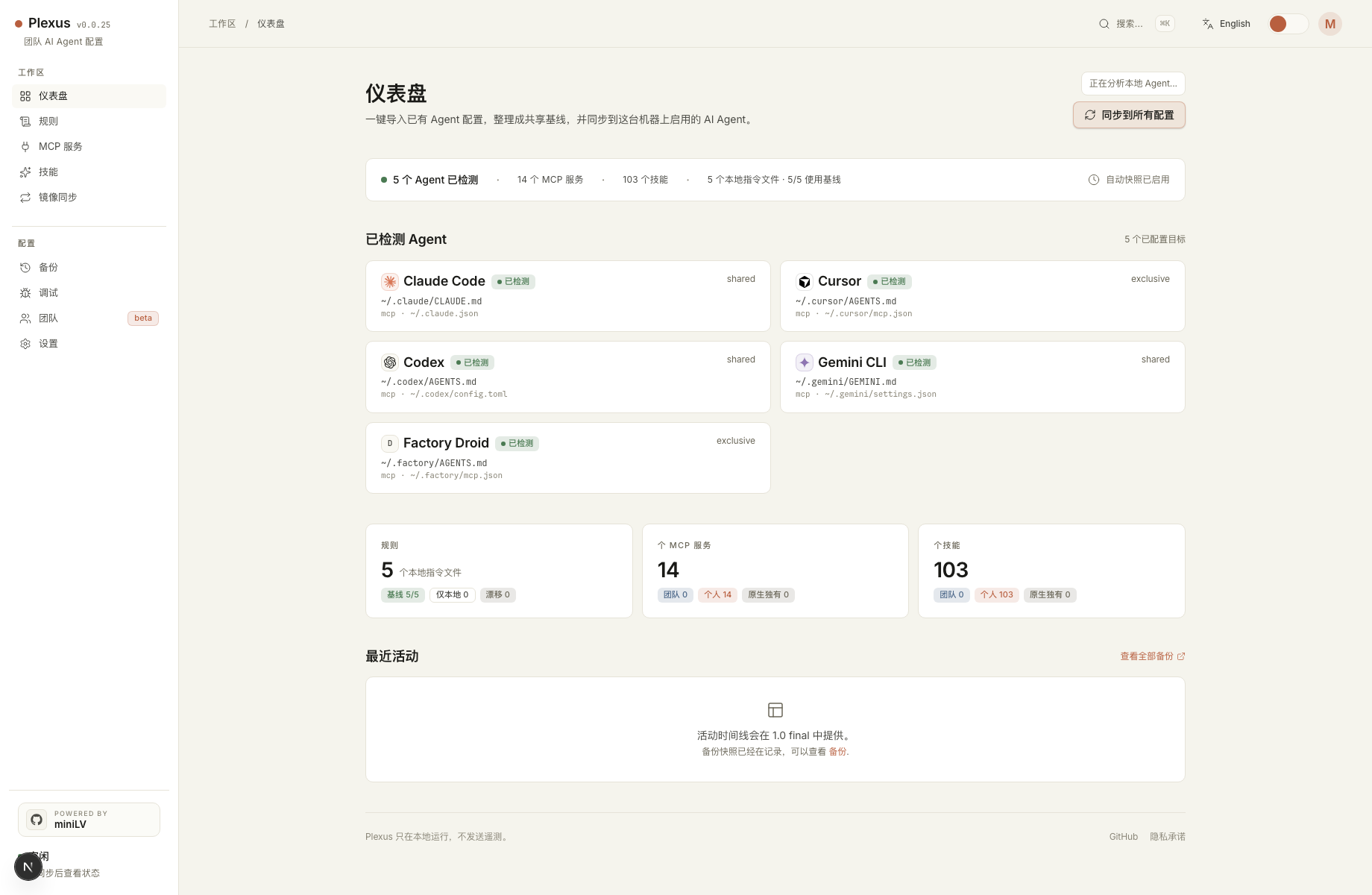
为什么需要 Plexus?
现在的 AI 编程工作很少只用一个工具。你可能用 Claude Code 做规划,用 Cursor 写代码,用 Codex 跑自动化,再偶尔切到 Gemini CLI、Qwen Code、Windsurf 或 Kiro。问题是,每个工具都有自己的配置文件、MCP 格式、Skill 目录和指令文件。
于是每次有一个好用配置,都要重复做几遍:
- 把同一个 MCP Server 复制到多个 agent 的原生配置里
- 让
CLAUDE.md和AGENTS.md保持一致 - 在不同工具的 skill / prompt 目录里维护相似文件夹
- 出问题后很难知道到底改了哪里
- 想回滚一次同步,又担心覆盖掉 auth、history 或个人设置
Plexus 的目标很简单:给这些工具一个本地的 single source of truth。
30 秒看懂
如果你同时使用 Claude Code、Cursor、Codex、Gemini CLI 或 Qwen Code,并且已经厌倦了在五六个地方手动维护同一份配置,Plexus 就是为这个场景做的。
它会先扫描你本机已有的配置,遇到多个来源时让你选择一个 Primary Agent,随后把 Rules、MCP Servers 和 Skills 写入 ~/.config/plexus/ 作为本地基线,再投射回每个 Agent 的原生位置。每次写入原生文件前都会创建 snapshot,后悔了可以从 Backups 页面恢复。
Plexus 能做什么?
| 能力 | Plexus 管什么 |
|---|---|
| 全局规则 | 在 ~/.config/plexus/personal/rules/global.md 维护一份基线,投射到 CLAUDE.md 和 AGENTS.md |
| MCP Servers | 把团队层和个人层的 MCP 同步到每个 agent 的原生格式 |
| Skills | 把 Markdown skill bundle 链接或复制到各 agent 的 skill 目录 |
| Mirror | 从一个 agent 选择有效配置,预览差异后同步到其他 agent |
| Backups | 每次写入原生文件前自动 snapshot,并支持从 dashboard 恢复 |
| Team Layer | 订阅一个 Git repo,分发团队认可的 MCP 和 skills |
Plexus 不运行 MCP Server。它只是一个本地 dashboard,用来安全地编辑、同步和回滚配置。
一张图看懂同步模型
Plexus 不要求所有 AI 工具改成同一种格式。它只在本机维护一份 canonical config,然后按文件类型选择最合适的投射方式:Rules 和 Skills 优先软链接,MCP 对专用文件使用 cache symlink,对共享文件使用 partial-write。
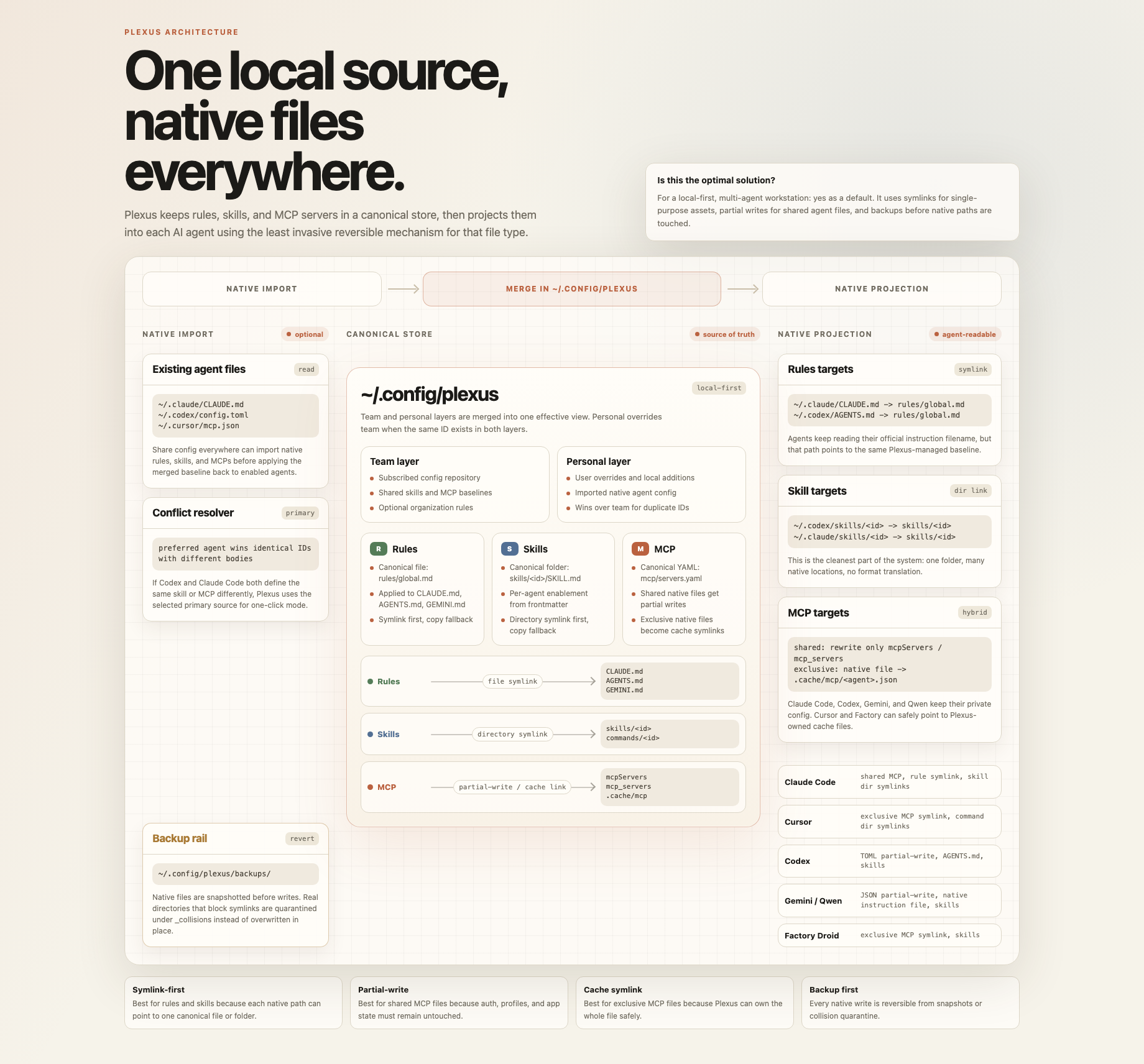
这张图也可以在本地 dashboard 里打开:/architecture/config-sharing-map.html。
Agent Catalog 和手动新增入口在 Settings -> Agent Catalog。如果一个新工具还不在内置列表里,可以点 Add agent 先登记它的 instruction file;Plexus 会负责查看、编辑和备份,后续再逐步补齐 MCP / Skills adapter。
快速开始
需要 Node 20。
Plexus 现在通过一个 npm 包发布,内部的 core 和 web dashboard 已经随包带上,不需要分别安装多个包。
npm install -g plexus-agent-config
plexus
不想全局安装也可以直接运行:
npx -y plexus-agent-config@latest start
也可以先检查 Plexus 能识别哪些 agent:
plexus detect
从源码运行
git clone https://github.com/miniLV/Plexus.git
cd Plexus
npm ci
npm run dev
第一次使用时,只需要点 Dashboard 右上角的 Share config everywhere:
- Plexus 会检测已安装的 Agent,并导入它们已有的 Rules、MCP Servers 和 Skills。
- 页面会展示 smart-merge preview;同 ID 冲突才使用你选择的 Primary Agent。
- Plexus 会把配置应用到 enabled agents,并在写入原生文件前创建 snapshot。
如果想用本地 CLI:
npm run link
plexus
移除本地链接:
npm run unlink
支持的 Agent
| Agent | Rules 目标 | MCP 目标 | Skills 目标 | MCP 写入方式 |
|---|---|---|---|---|
| Claude Code | ~/.claude/CLAUDE.md |
~/.claude.json |
~/.claude/skills/ |
partial write |
| Cursor | ~/.cursor/AGENTS.md |
~/.cursor/mcp.json |
~/.cursor/commands/ |
symlink or copy |
| Codex | ~/.codex/AGENTS.md |
~/.codex/config.toml |
~/.codex/skills/ |
partial write |
| Gemini CLI | ~/.gemini/GEMINI.md |
~/.gemini/settings.json |
~/.gemini/skills/ |
partial write |
| Qwen Code | ~/.qwen/QWEN.md |
~/.qwen/settings.json |
~/.qwen/skills/ |
partial write |
| Factory Droid | ~/.factory/AGENTS.md |
~/.factory/mcp.json |
~/.factory/skills/ |
symlink or copy |
Partial write 表示 Plexus 只重写 MCP section,保留同一个文件里由 agent 自己管理的 auth、history、profile 和 settings。
Settings 里还有 Agent Catalog,会列出 Windsurf、Kiro、VS Code Copilot、Cline、Roo Code、Kilo Code、Continue、Aider、Amp、OpenHands、Zed AI 等常见工具。没有 native adapter 的工具会作为 manual preset 展示,用户可以一键把它们注册成 custom agent 来追踪 instruction file。
手动新增入口在 Settings -> Agent Catalog -> Add agent。这适合新工具还没出现在内置列表、或者你的工具路径和预设不同的情况。
工作原理
Plexus 把 canonical config 放在 ~/.config/plexus/:
~/.config/plexus/
├── config.yaml
├── team/
├── personal/
│   ├── mcp/servers.yaml
│   ├── rules/global.md
│   └── skills/<id>/SKILL.md
├── .cache/mcp/
└── backups/
team/ 层设计为来自共享 Git repo。personal/ 层属于本机用户,并且会覆盖同 ID 的 team entry。
对于 Cursor、Factory Droid 这类单用途 MCP 文件,Plexus 会优先使用 symlink。对于 ~/.claude.json、~/.codex/config.toml、~/.gemini/settings.json 和 ~/.qwen/settings.json 这种共享原生文件,Plexus 只 partial-write MCP section。
Team Starter Repo
可以直接用 miniLV/agent-primer 作为第一份团队基线。它包含:
rules/global.md:共享的 agent 行为准则skills/<id>/SKILL.md:团队可复用 skillsmcp/servers.yaml:团队认可的 MCP servers
plexus join https://github.com/miniLV/agent-primer.git
plexus pull
plexus sync
也可以在 dashboard 里操作:打开 Team,点击 使用 agent-primer,再点击 加入。如果这个 repo 是 private,确保本机 GitHub credential 可用,或者改用 SSH URL:[email protected]:miniLV/agent-primer.git。
这条命令会把 agent-primer clone 到 ~/.config/plexus/team/。之后 Plexus 会把它当作 team layer,再叠加你本机的 ~/.config/plexus/personal/:
agent-primer repo
  rules/global.md        -> Plexus Team Rules
  skills/*/SKILL.md      -> Plexus Team Skills
  mcp/servers.yaml       -> Plexus Team MCP

local machine
  ~/.config/plexus/team/     # git clone of agent-primer
  ~/.config/plexus/personal/ # your overrides, secrets, local paths
举个例子:团队把 code-review skill 加进 agent-primer,所有成员只需要执行 plexus pull && plexus sync,这个 skill 就会进入 Claude Code、Cursor、Codex 等已启用 agent 的 skill 目录。团队把 github MCP 留成 optional placeholder;个人需要时,在 Plexus 的 MCP 页面启用它,并在 personal layer 里补自己的 token。
注意:team repo 里的 MCP 如果依赖个人 token、本机路径或数据库连接,应该先保持 placeholder / optional,再由个人在 ~/.config/plexus/personal/ 里覆盖或补全。
CLI
plexus              start the dashboard
plexus start -p 7777
plexus detect       list detected agents
plexus join <url>   clone a team config repo into ~/.config/plexus/team
plexus pull         pull the configured team repo
plexus sync         import, share, and apply config to all enabled agents
plexus sync --prefer codex
plexus status       show team subscription and sync status
plexus help
安全模型
- Plexus 是 local-first。
- Plexus 不执行 MCP Server。
- 每次写入 agent 原生文件前都会创建 snapshot。
- 共享配置文件采用 partial-write,只改 Plexus 管理的 MCP section。
- 专用 MCP 文件优先使用 symlink/copy,写入前会 quarantine 原文件。
- Debug snapshots 只返回 metadata,不返回文件内容。
- 导入的 MCP
env会以明文存在本地 personal store。 - 不要在没有审查和脱敏的情况下,把
~/.config/plexus/personal/推到团队 repo。
开发
npm ci
npm run verify
常用命令:
npm run check
npm run test:core
npm run build --workspace=plexus-agent-config-core
npm run build --workspace=plexus-agent-config-web
当前状态
Plexus 仍处于 alpha 阶段。本地工作流已经可以在 macOS 和 Linux 上使用,但仍有一些限制:
- 暂不管理 project-scoped MCP 文件
- Dashboard 里的 team config PR proposal 还没做
- Custom agents 目前只是 instruction-file registry records
- Rules apply 当前只覆盖内置 agents
- Windows 支持还未验证
License
Reviews (0)
Sign in to leave a review.
Leave a reviewNo results found