swarm-legacy
Health Uyari
- License — License: MIT
- Description — Repository has a description
- Active repo — Last push 0 days ago
- Low visibility — Only 9 GitHub stars
Code Gecti
- Code scan — Scanned 12 files during light audit, no dangerous patterns found
Permissions Gecti
- Permissions — No dangerous permissions requested
Bu listing icin henuz AI raporu yok.
Swarm (legacy) — web dashboard + autopilot for AI coding agents. Superseded by miopea/swarm-next; maintenance only.
Swarm (legacy)
[!IMPORTANT]
This is Swarm (legacy). It has been superseded by Swarm Next.New hives should start on Swarm Next — an architecture-first rewrite and the
project that continues active development. Swarm (legacy) stays available for
existing hives and receives maintenance only.Moving an existing hive across? See
Swarm Next migration finalization
and theswarm migration preview / finish / reversecommands.
A web-based control center for AI coding agents — Claude Code, Gemini CLI, and Codex CLI. Manage one agent or ten from a single browser tab — with autopilot, a task board, AI coordination, and email integration.
Every agent session runs in a managed PTY. The web dashboard gives you real-time visibility into all of them: read their output, type into their terminals, create and assign tasks, and let background drones handle routine approvals so your agents never stall. A Queen conductor watches the hive, proposes task assignments, detects when work is done, and drafts email replies — all surfaced as proposals you approve with one click.
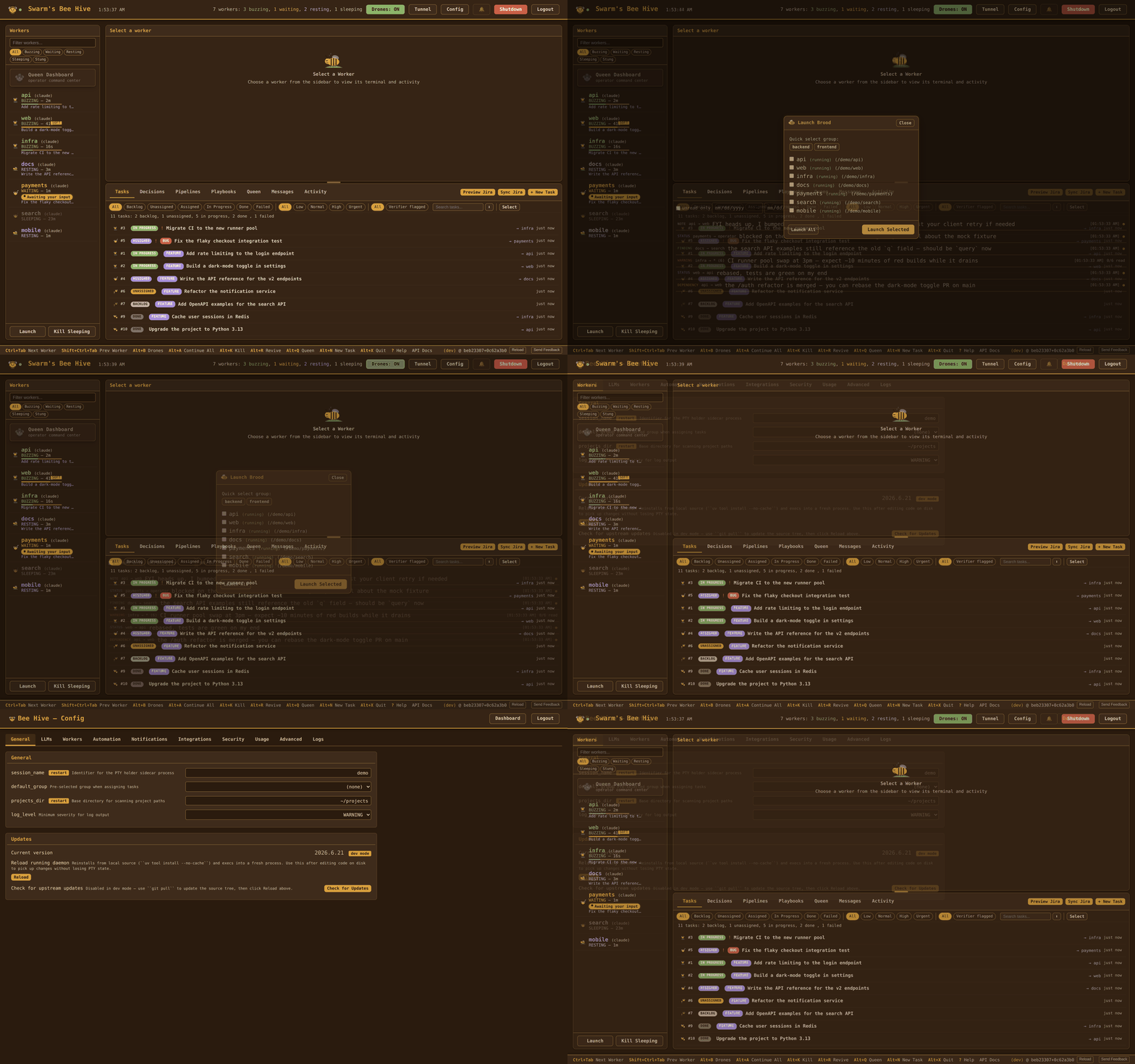
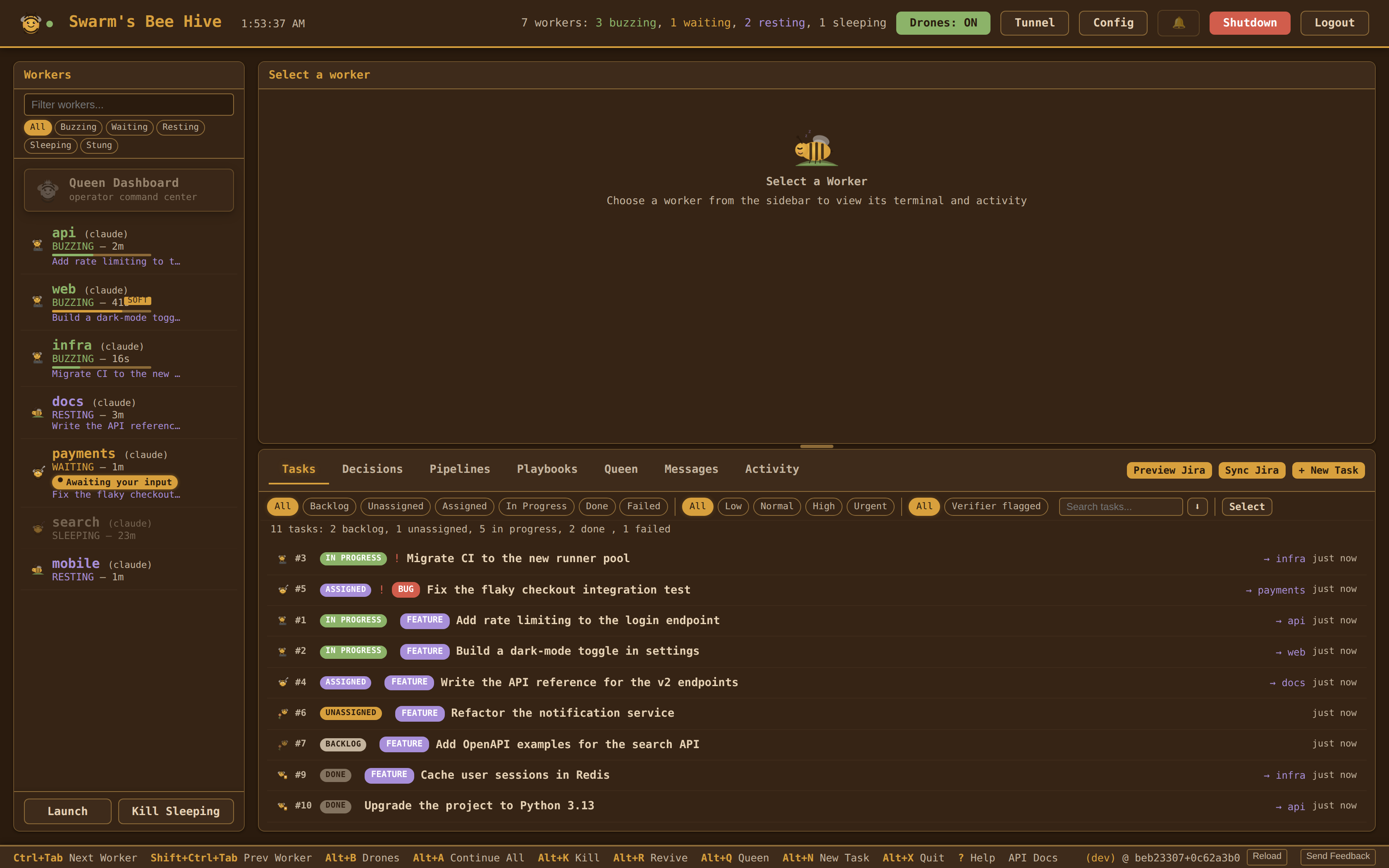
Contents
Start here: Why Swarm (legacy) · Features · Requirements · Installation · Quick Start · Install as App (PWA)
Using it: Web Dashboard · Task System · Pipelines · Queen & Proposals · MCP for Workers
Integrations: Email · Jira · Remote Access · Updating
Reference: Documentation · Service Management · CLI Reference · Environment Variables · Configuration · REST API · Architecture
Contributing: Testing · Development · Contributing · License
Why Swarm (legacy)
Your agent sessions never stall. Drones — Swarm's background poll workers — auto-approve safe prompts, revive crashed agents, and escalate the hard decisions to the Queen (a headless Claude conductor) or the operator. You stop babysitting and start reviewing results.
You manage work, not windows. Create tasks on a board. The Queen assigns them to the right worker based on project descriptions. When a worker finishes, the Queen detects it and proposes completion — you approve with one click.
Your browser is the control room. Interactive terminal attach lets you type directly into any worker's agent session from the dashboard. Drag an email onto the task board to create a bug ticket. When it's fixed, a draft reply lands in your Outlook.
It works for one session too. You don't need ten agents to benefit. Even a single agent session gets autopilot, a task queue, and a dashboard with terminal access.
Features
Web Dashboard (primary interface)
- Live terminal attach -- type into any worker's agent session from the browser (PTY over WebSocket)
- Task board -- compact one-or-two-line task rows; click a row to open the full Edit modal with a WYSIWYG description editor (formatting toolbar, paste-from-Word/Outlook → Markdown, View-source toggle), priority/filtering, dependencies, and inline file attachments
- Drag-and-drop import -- drop
.eml/.msgfiles (or an Outlook message tile, or a Jira issue URL /KEY-N) onto the task board to create a task with the source content imported and rendered as Markdown - Queen proposals -- approve or reject AI recommendations with confidence scores, one click or in bulk
- Config editor -- tabbed UI: General, LLMs, Workers, Automation, Notifications, Integrations, Security, Usage, Advanced, Logs
- Approval rules editor -- visual regex rule builder for drone auto-approve/escalate decisions
- Worker management -- spawn ad-hoc workers, launch groups, kill/revive individuals, all at runtime
- Outlook integration -- connect via OAuth from the config page, fetch emails directly
- Browser notifications -- push alerts when workers need attention
Autopilot
- Background drones -- specialized watchers handle routine decisions so workers don't stall (see Drones below for the full roster)
- Queen conductor -- headless Claude that assigns tasks, detects completion, resolves conflicts
- Proposal system -- Queen actions require operator approval; nothing executes without your sign-off
- Approval rules -- regex patterns decide what drones auto-approve vs escalate to the Queen
- Skill workflows -- tasks dispatch as Claude Code skill commands (
/fix-and-ship,/feature,/verify), backed by a SQLite registry with per-skill usage counts - Per-worker Swarm slash commands -- every worker auto-installs
/swarm-status,/swarm-handoff,/swarm-finding,/swarm-warning,/swarm-blocker,/swarm-progressinto its.claude/commands/so the most-used coordination tools show up in/helpand read cleanly in transcripts - Per-worker Swarm Skills -- workers also auto-install the
/swarm-checkpointSkill (runs/check, then commits on green or reports a blocker on red) and the/swarm-coordinateSkill (advisory peer/task survey for delegation suggestions; never auto-creates tasks) - Pipelines -- multi-step workflows with agent, automated, and human steps, dependency ordering, templates, and 5-field cron schedules (e.g.
"30 14 * * 1-5"for weekday afternoons; legacyHH:MMstill works) - Approval-rate gauge -- dashboard header shows the drones' auto-approval percentage over the last 24h;
GET /api/drones/approval-rateexposes the counters - Sandbox opt-in -- enable Claude Code's native sandbox via
sandbox:inswarm.yaml; Swarm detects CC version at install time and merges the overrides into~/.claude/settings.jsonwhen supported
Drones
Drones are specialized background sweepers that share the daemon's poll loop. Each runs at its own cadence and writes every action to the buzz log so the operator can audit and tune.
- IdleWatcher -- nudges RESTING/SLEEPING workers that have an assigned task; recovers post-reload sessions whose client-side MCP tools dropped by injecting
/mcpand following up with the task description - InterWorkerMessageWatcher -- nudges idle workers about unread inter-worker messages; widens the filter when the worker has no active task so informational findings/notes are not lost
- PressureManager -- system-wide memory/swap watcher that suspends and resumes workers under host-level pressure
- ContextPressure drone -- watches per-worker
context_pct; injects/compactwhen the conversation fills (soft tier auto-compacts idle workers; hard tier interrupts BUZZING workers and defers WAITING ones) - Verifier drone -- adversarial post-completion check that fires after every
swarm_complete_task; tier 1 deterministic gates (empty diff / no/checkevidence / open peer warning) short-circuit before any LLM call, tier 2 calls a dedicated verifier subprocess. Reopens the task with findings as a peer warning, or escalates to a Queen thread after the second consecutive failed retry. Operator override viaqueen_force_complete_taskskips verification. - OversightHandler / TaskLifecycle / FileOwnership / StateTracker -- supporting drones for Queen oversight, task transitions, file-claim coordination, and state classification
Worker Coordination (MCP)
- MCP server -- Swarm exposes an HTTP MCP server at
/mcpso the agents themselves can coordinate via tool calls - 24 coordination tools --
swarm_check_messages,swarm_send_message,swarm_task_status,swarm_claim_file,swarm_complete_task,swarm_create_task,swarm_park_task(hand the current task back to the queue),swarm_block_on_external(mark a task blocked on an external dependency so the swarm stops nudging it),swarm_get_learnings,swarm_get_playbooks(recall reusable procedures synthesized from past successes),swarm_report_progress,swarm_report_blocker(declare task-dependency blocker, suppresses idle nudges),swarm_query_peers(read-only snapshot of peer worker state for handoff decisions),swarm_note_to_queen(lightweight side-channel note),swarm_draft_email(create a Microsoft Graph draft in the operator's Outlook Drafts folder — never sent automatically), the task-lifecycle set (swarm_start_task,swarm_edit_task,swarm_unblock_task,swarm_archive_task,swarm_block_on_operator,swarm_relabel_blocker,swarm_annotate_resolution,swarm_request_jira_ticket), andswarm_batch(run multiple ops in one round-trip) - Inter-worker messages -- workers send findings, warnings, dependencies, and status updates to each other (or broadcast)
- File claims -- advisory locks prevent two workers from editing the same file at once
- Learnings -- resolutions from completed tasks are searchable by other workers for context
- Compact telemetry -- every
/compactlogs tokens before/after and the compression ratio so you can measure how effective compaction is per worker
Service handlers (pipeline AUTOMATED steps)
shell_command,webhook_notify,headless_claude-- run shell commands, post webhooks, or invoke a headless Claude as a pipeline stepfile_uploader,youtube_scraper-- upload files to a sink, pull new videos from tracked YouTube channelsclaude_code_security-- runclaude code security scan --json, deduplicate findings by(rule_id, path, line), and return them for downstream steps to turn into tasks
Also included
- Jira integration -- two-way sync with Jira Cloud (OAuth 2.0), import/export tasks, create Jira issues from the task board
- REST API -- full JSON API with 250+ routes and OpenAPI docs at
/api/docs/ui(openhttp://localhost:9090/api/docs/uiwith the dashboard running) - SQLite persistence -- tasks, proposals, messages, pipelines, skills, and history are stored in
~/.swarm/swarm.db; YAML is the seed/import format - Resource monitoring -- memory/swap thresholds with optional auto-suspend of workers on system pressure
- In-app feedback -- a footer button opens a bug / feature / question form; submissions are filed as GitHub issues via the
ghCLI, with a preview-and-edit step and automatic redaction of sensitive paths - Remote access -- Cloudflare Tunnel support for reaching the dashboard from a phone or remote machine; optional named domain via
tunnel_domain - Notifications -- terminal bell, desktop, and browser push alerts
- Tool-usage analytics --
swarm analyze-toolssummarises MCP calls, errors, and active workers from the buzz log so you can spot tool descriptions that need rewriting - Test harness reproducibility --
swarm test --pin-model=<id>records an infra snapshot (model, provider, worker count, env fingerprint) in every test report so regressions are debuggable instead of mysterious
Requirements
- Python 3.12+ (ships with the SQLite 3 stdlib Swarm uses for
swarm.db) - uv
- GitHub CLI (
gh) — optional; required only for the in-app feedback submitter - WSL users: systemd must be enabled inside WSL for the auto-start service.
swarm initdetects when it's not and offers to configure/etc/wsl.conffor you (requires sudo). - At least one AI coding agent CLI:
- Claude Code (
claude) — production-ready, also powers the Queen conductor - Gemini CLI (
gemini) — experimental - Codex CLI (
codex) — experimental
- Claude Code (
Installation
uv tool install git+https://github.com/miopea/swarm-legacy.git
This puts swarm on your PATH. No clone, no venv. Then run the setup wizard:
swarm init
This does four things:
- Installs Claude Code hooks -- auto-approves safe tools (Read, Edit, Write, Glob, Grep) so workers don't stall on every file access
- Generates config -- scans
~/projectsfor git repos, lets you pick workers and define groups, writes to~/.config/swarm/config.yaml - Installs background service -- systemd user service (Linux/WSL) or launchd Launch Agent (macOS) that auto-starts the dashboard on boot and restarts on crash.
- Sets API password -- optionally protects the web dashboard's config page from unauthorized changes
The dashboard is live at http://localhost:9090 immediately after init. On WSL, a VBS auto-start script is placed in your Windows Startup folder so the full chain works unattended: Windows boots → VBS wakes WSL → systemd starts → dashboard is ready.
If a config already exists, swarm init offers three choices: keep the current config, port settings (carry over passwords, drone/queen tuning, notifications, etc. while refreshing workers from a new project scan), or start fresh (backs up the old config to .yaml.bak).
Quick Start
The dashboard is already running after swarm init. Open it and launch your first workers:
- Open
http://localhost:9090 - Click Launch Brood and select the workers or groups to start
Workers appear in real-time. Attach to any terminal, create tasks, and let drones handle the rest.
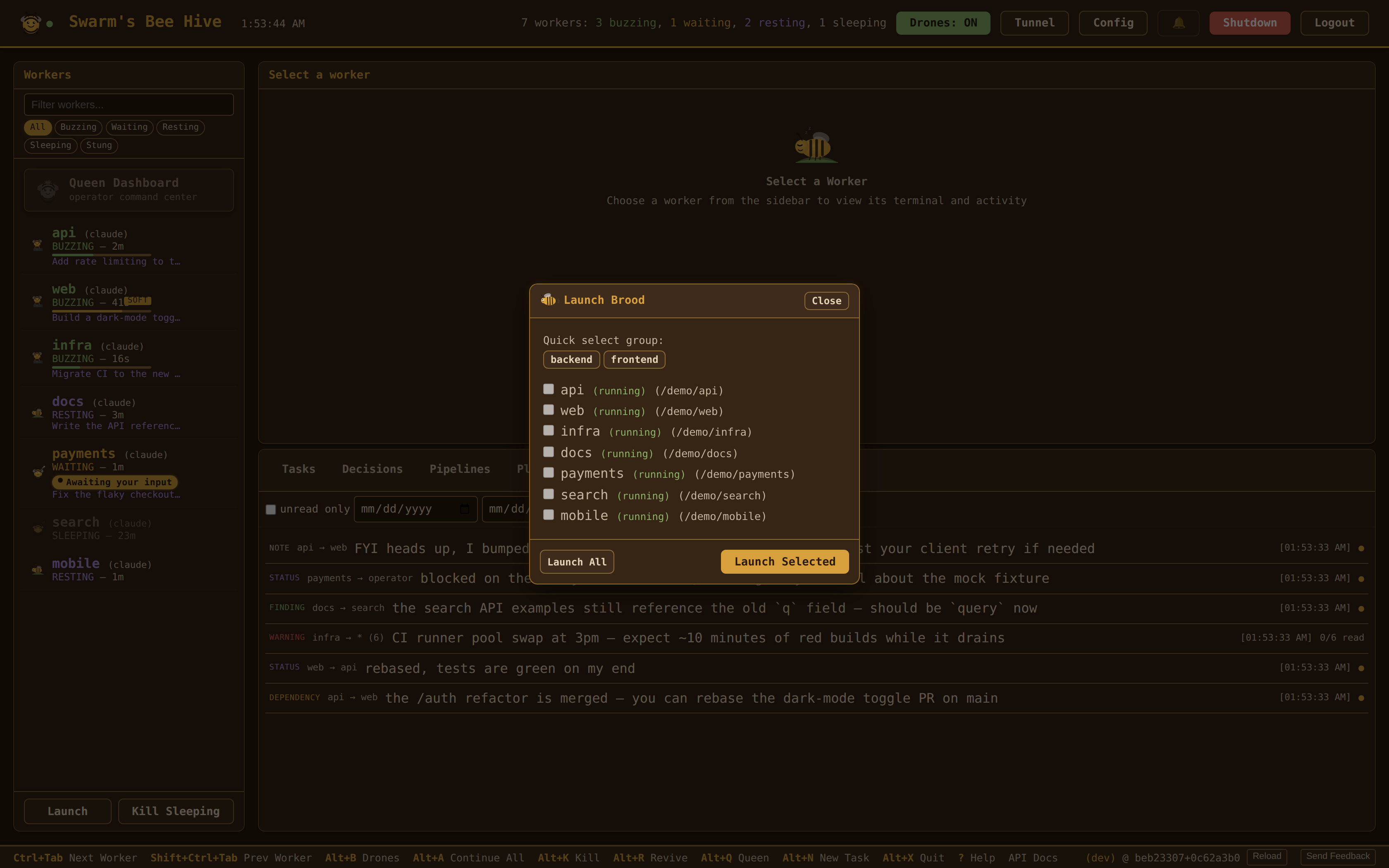
The dashboard auto-starts on boot — just open the app each day. You can also launch workers from the CLI with swarm start (see CLI Reference).
Install as App (PWA)
Installing the PWA is the recommended way to use Swarm -- it gives you a native-app experience with its own window and title bar.
- Chrome / Edge: open
http://localhost:9090, then click the install icon in the address bar (or menu → Apps → Install Swarm). - Safari (macOS / iOS): Share → Add to Home Screen / Add to Dock (limited PWA support — some features may be missing).
- Firefox: desktop PWAs are not supported; use a bookmark instead.
No offline mode: Swarm is fully server-rendered and requires a live connection to the daemon. There is no service worker and no cached app shell — /sw.js is a kill switch that unregisters itself and clears any cache a previous version left behind. If the server restarts, the app auto-reconnects when it comes back.
App badge: the app icon shows a badge with the count of pending proposals (via the PWA Badge API).
Share target: the manifest declares a Web Share Target, so Swarm appears in the OS share sheet. Share a screenshot, a link, or selected text to it and the dashboard opens a New Task modal pre-filled with the shared title/text/URL, with any shared files already attached.
Web Dashboard
The web dashboard is the primary interface. It auto-starts on boot via systemd (Linux/WSL) or launchd (macOS) and connects via WebSocket for real-time updates. Open the PWA or visit http://localhost:9090 (port configurable via port in swarm.yaml).
What you get:
- Worker sidebar -- live state indicators (BUZZING/RESTING/WAITING/STUNG), one-click continue/kill/revive
- Interactive terminal -- click "Attach" to open any worker's agent session in an in-browser terminal (full xterm.js PTY). Type commands, approve plans, interact directly. The terminal uses xterm's WebGL renderer on Windows and Linux and the DOM renderer on macOS/iOS (falling back to the Canvas renderer if the WebGL context is lost).
- Task board -- filterable by status and priority; tasks render as compact rows (click to open the Edit modal); WYSIWYG description editor with formatting toolbar, live preview, and View-source toggle; drag
.eml/.msg/ Outlook tiles / Jira URLs to create tasks; Queen proposals banner with approve/reject/approve-all - Config page -- tabbed editor with sections for General, LLMs, Workers, Automation (drones · Queen · workflows · pipelines), Notifications, Integrations (Microsoft Graph + Jira via OAuth), Security, Usage, Advanced, and Logs (live log viewer with severity filter and a running-daemon log-level dropdown)
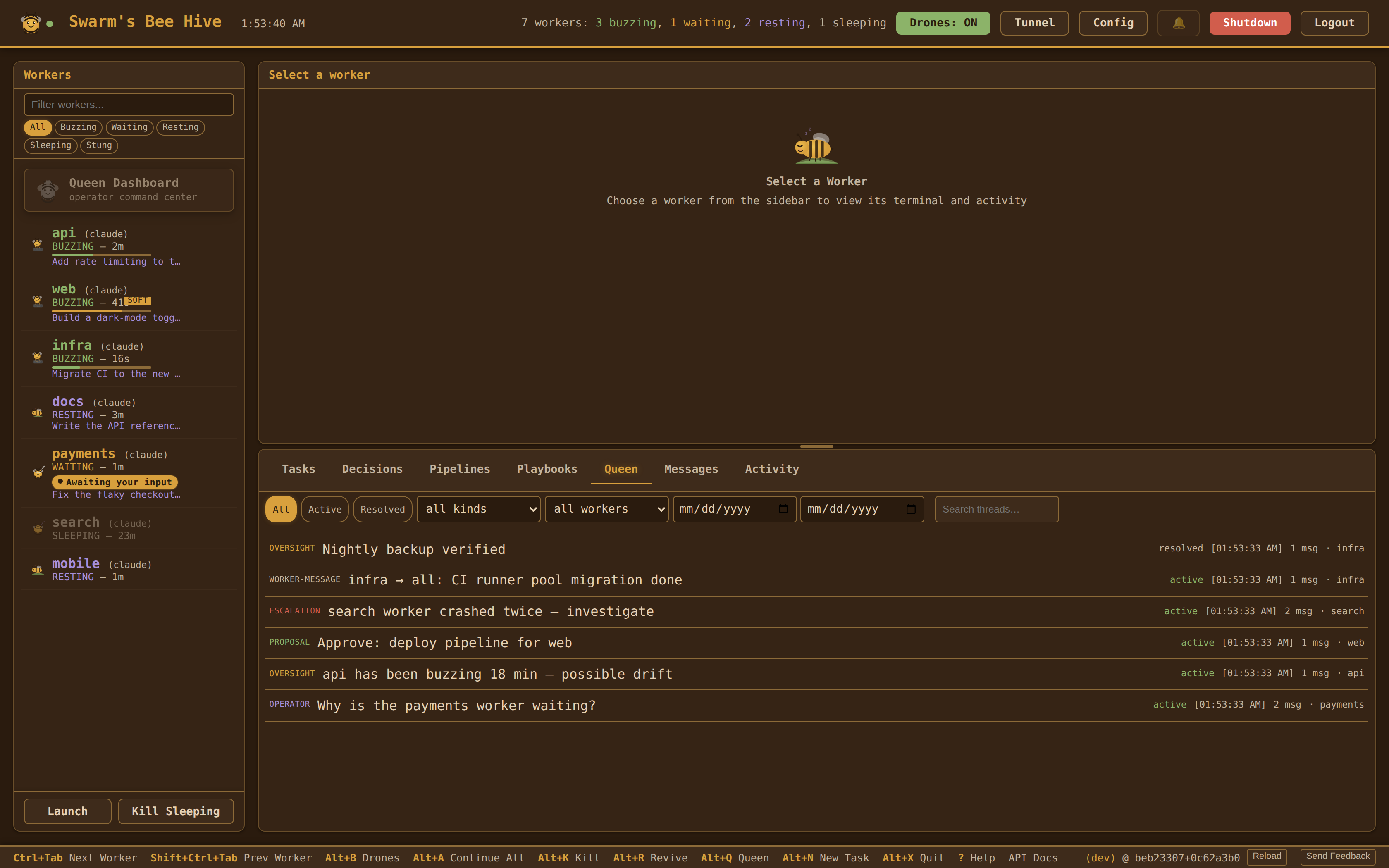
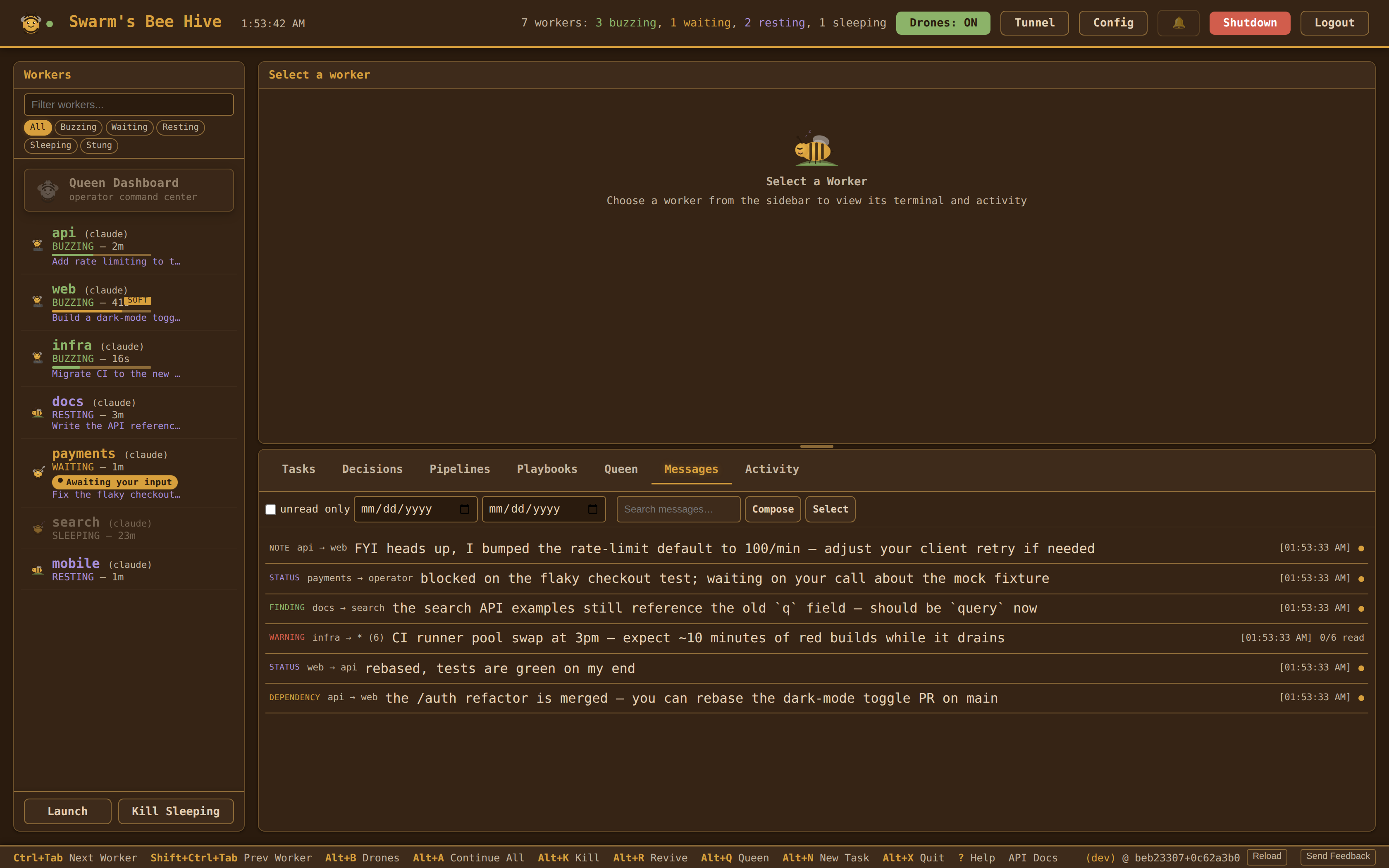
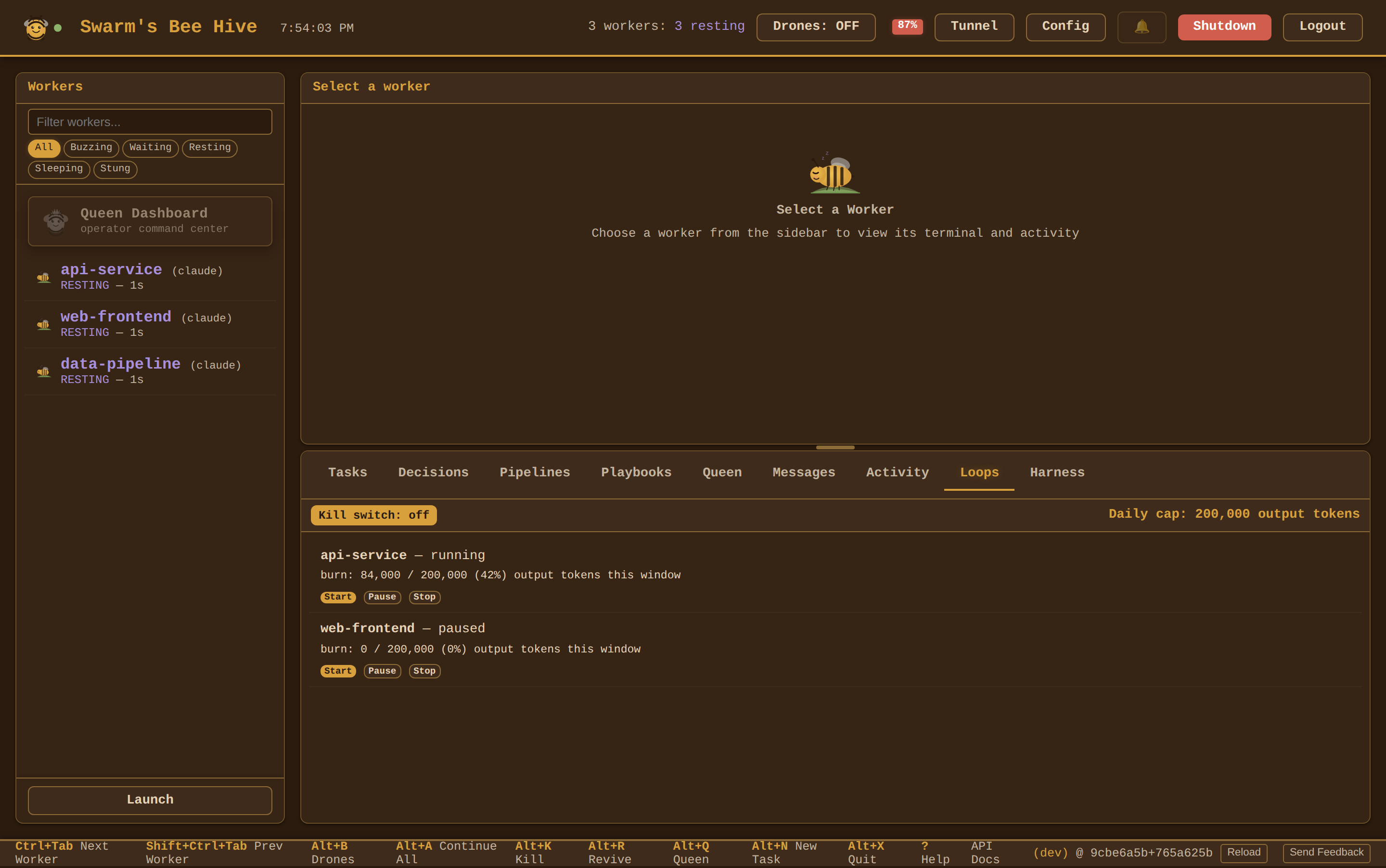
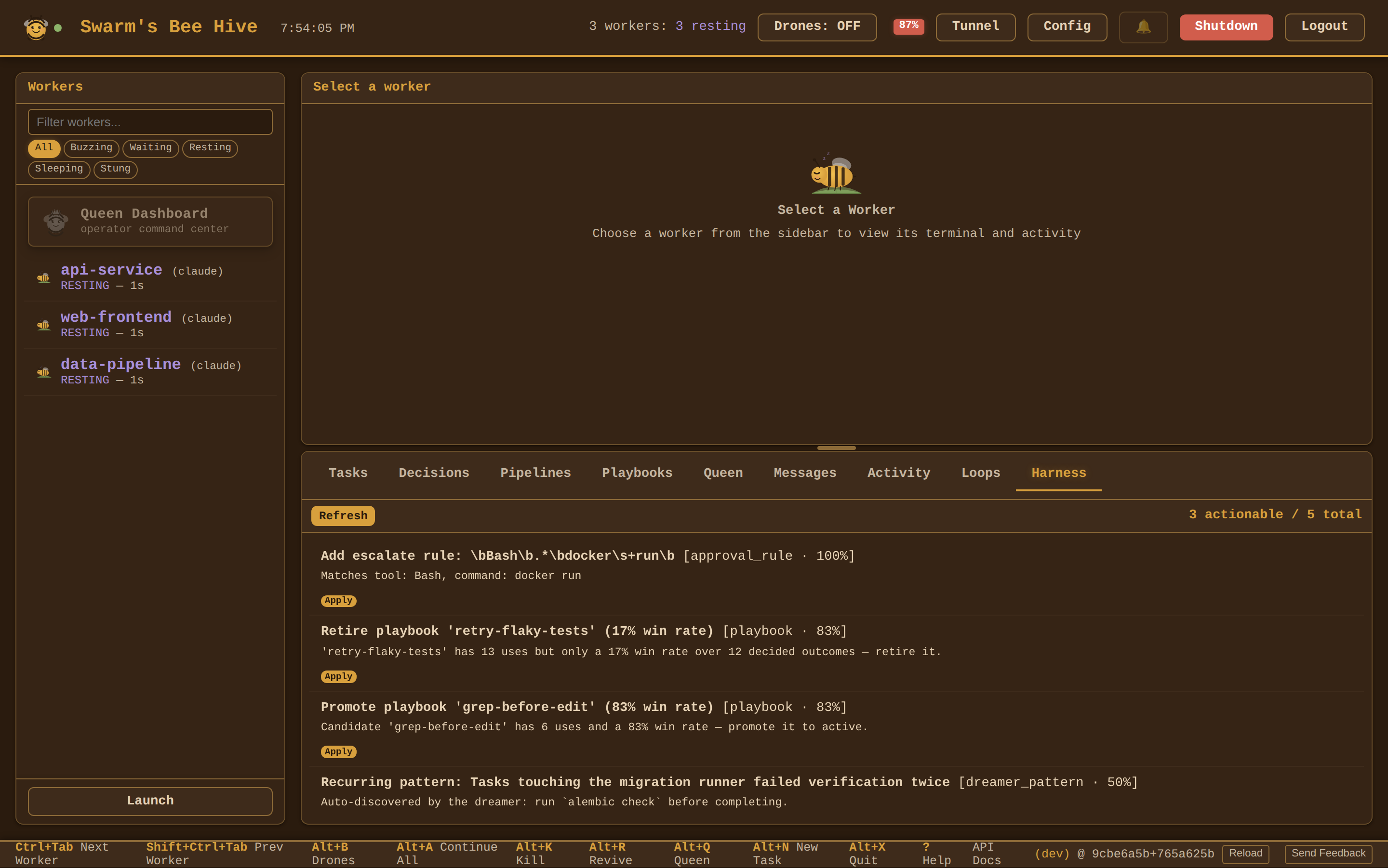
- Bottom-panel tabs -- the work surface switches between Tasks, Decisions (Queen proposals + decision history), Pipelines (multi-step workflow runs), Playbooks (procedures synthesized from past successes), Loops (standing-loop controls), and Harness (improvement digest)
- Queen tab -- searchable archive of every Queen thread (operator chats, oversight findings, escalations, proposals); filter by status (active/resolved), kind, and worker, or search titles + message bodies; click a thread for a read-only transcript, and reopen a resolved one to follow up
- Messages tab -- the inter-worker message stream (findings, warnings, dependencies, status, notes): content search, unread-only and date filters, click a message for full detail, compose to a worker or broadcast, and bulk-delete;
*broadcasts collapse to one row with per-recipient read state - Activity tab -- the buzz log: a real-time feed of autopilot decisions and system events, with browser push alerts
- Loops tab -- operator controls for standing background-improvement loops: per-worker start/pause/stop, a global kill switch, and a live per-loop token-burn readout against the daily cap (loops are off until you start one)
- Harness tab -- the harness-improvement digest: the signals Swarm already mines (error-prone tools, suggested approval rules, playbook win-rates, dreamer-mined patterns) surfaced with one-click apply for the low-risk actions — operator-gated, never autonomous
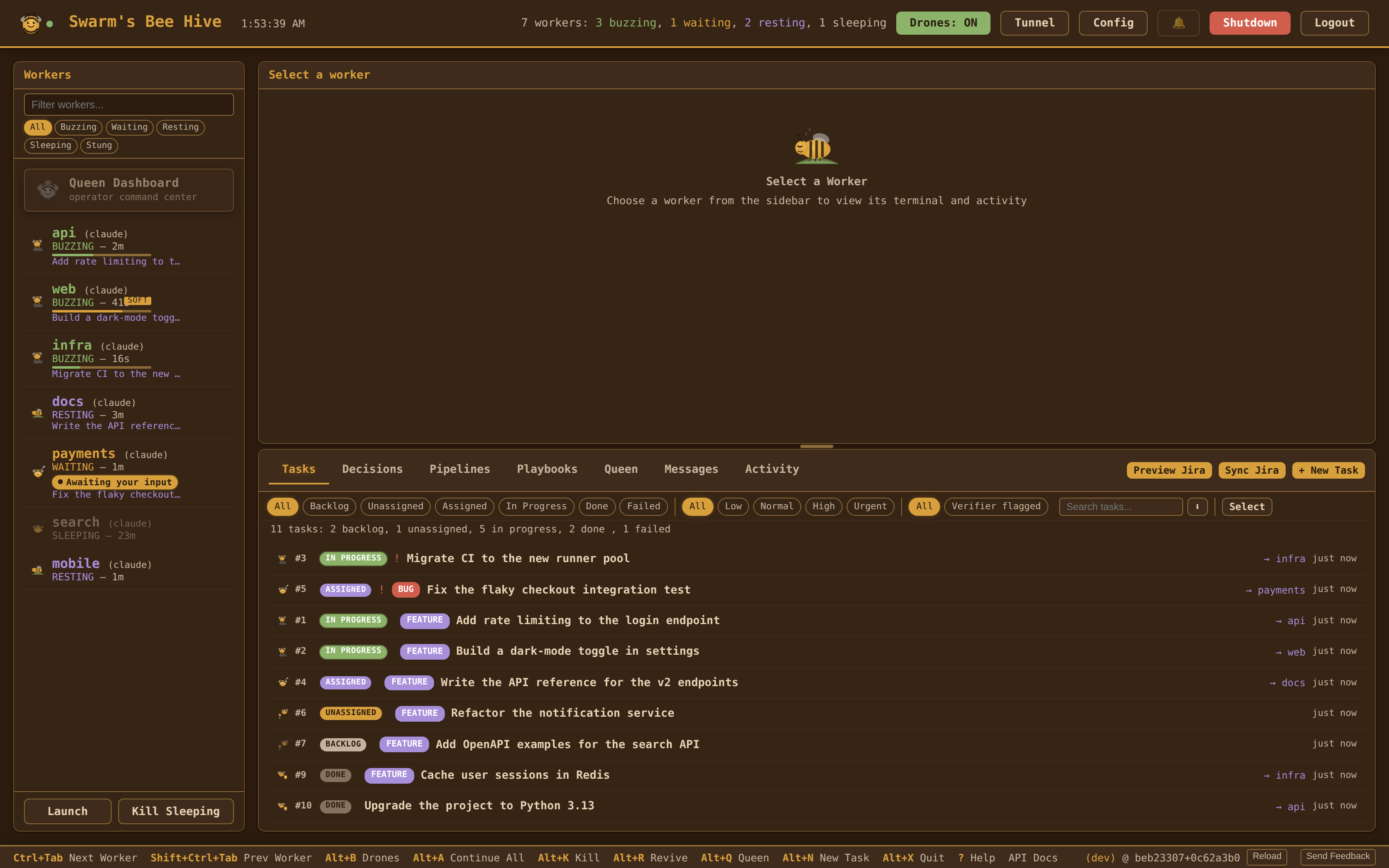
Login & passkeys
Setting api_password in the config (or the SWARM_API_PASSWORD env var) turns on the session gate for the whole dashboard, not just the config page: every route requires either a signed session cookie or an Authorization: Bearer <api_password> header. A handful of paths stay exempt so the app can boot and recover — /login, /logout, /ready, /static/*, the PWA manifest and icons, the passkey login endpoints, and the OAuth callbacks.
- Login page at
/login— password sign-in sets the session cookie; sessions expire after 24 hours of inactivity. Repeated failures from one IP lock that IP out for 15 minutes after 5 attempts. - Passkeys (WebAuthn) — register a passkey from the Config page and sign in with Touch ID / Windows Hello / a security key instead of typing the password. Manage or delete registered passkeys from the same page; the password can be changed there too.
/mcpis gated separately — MCP HTTP endpoints use their own bearer token rather than the dashboard credential, so a worker or an external MCP client never has to hold the dashboard password. Genuine same-machine callers on loopback are trusted; tunnelled traffic is not.
If no password is configured, the gate is skipped entirely — local unprotected installs keep working as before.
Keyboard Shortcuts
| Key | Action |
|---|---|
Ctrl+] / Ctrl+Tab / Alt+] |
Next worker |
Ctrl+[ / Shift+Ctrl+Tab / Alt+[ |
Previous worker |
Alt+B |
Toggle drones |
Alt+A |
Continue all idle workers |
Alt+K |
Kill worker |
Alt+R |
Revive worker |
Alt+N |
New task |
Alt+X |
Back to the dashboard home (/) |
Alt+H |
Kill the whole session |
Ctrl+K / Cmd+K |
Global search (command palette over workers, tasks, messages) |
Ctrl+F / Cmd+F |
Search the terminal (when a terminal is attached and focused) |
? |
Show the keyboard-shortcut help overlay |
Task System
Tasks flow through a skill-based workflow pipeline. Each task type maps to a Claude Code slash command that handles the full pipeline — planning, execution, testing, and committing.
Task Types and Workflows
| Type | Skill Command | Pipeline |
|---|---|---|
| Bug | /fix-and-ship |
Trace root cause → TDD fix → minimal patch → commit & push |
| Feature | /feature |
Read patterns → implement → test → validate |
| Verify | /verify |
Pull latest → run tests → verify behavior → report pass/fail |
| Chore | (inline steps) | Complete task → validate → commit |
If a task fails, mark it failed from the task row actions (or via POST /api/tasks/{id}/fail). Failed tasks can be reopened (POST /api/tasks/{id}/reopen) or reassigned without losing history — the full audit trail lives in task_history.
Skill commands are configurable via the workflows: section in swarm.yaml. Set a value to empty to disable skill invocation for that type and fall back to inline instructions.
Task Lifecycle
- Create -- from the dashboard, CLI (
swarm tasks create), or by dragging an email onto the task board - Assign -- Queen proposes an assignment (or operator assigns manually) → worker receives skill invocation. Tasks with
depends_onare blocked until all dependency tasks are completed. - Execute -- worker's agent session runs the skill pipeline
- Complete -- Queen detects idle worker, proposes completion with resolution summary → operator approves
- Reply (optional) -- if the task came from an email, a draft reply is created in Outlook
Tasks also support file attachments via the dashboard UI. Drag .eml or .msg files onto the task board to create tasks from emails — see Email Integration for setup and reply drafting.
Pipelines
Pipelines are multi-step workflows that layer on top of the task board. Use them when a job is bigger than a single task — e.g. "triage → fix → verify → deploy" — and you want each step handled by a different actor.
Step types:
- AGENT -- dispatched to a worker (runs a skill command like
/fix-and-ship) - AUTOMATED -- runs a built-in action (e.g. pull latest, run tests)
- HUMAN -- blocks on operator approval before moving forward
Pipelines support per-step dependencies, templates for common shapes, and lifecycle controls (start / pause / resume). State is persisted in SQLite; the dashboard shows a live view of in-flight pipelines and their steps.
Manage pipelines from the dashboard or the REST API (/api/pipelines, see REST API).
Queen & Proposals
Swarm runs two Queen instances by design:
- Interactive Queen — a full Claude Code PTY session, your conversational coordinator. Reached by clicking the Queen worker tile in the dashboard. Stateful, learning-aware, thread-aware. Handles operator-facing work: answering questions, framing trade-offs, directing workers via
queen_prompt_worker, posting decision threads. - Headless Queen — a stateless
claude -psubprocess, the swarm's decision function for high-volume drone-driven calls: drone auto-assign, oversight of stuck workers, completion verification, escalation analysis. Parallel, shallow, cheap. Never touches the operator's conversation directly.
All Queen actions (from either) that affect workers or tasks go through the proposal system — the operator reviews and approves or rejects each one from the dashboard.
What the Queens Do
- Analyze workers — when drones escalate a stuck worker, the headless Queen assesses the situation and recommends an action (continue, send message, restart, or wait)
- Assign tasks — headless Queen matches idle workers to pending tasks based on descriptions and project context
- Detect completion — headless Queen monitors assigned workers for completion signals (commits, test results, "done" messages); a high-confidence "not done" verdict backs off re-polling for 30 min instead of re-asking every 5
- Draft email replies — generates professional replies for email-sourced tasks when completed
- Coordinate with the operator — the interactive Queen converses, surfaces what matters, and uses Queen-tier MCP tools (
queen_prompt_worker,queen_reassign_task,queen_force_complete_task,queen_save_learning,queen_post_thread) to act on operator directives
Proposal Flow
Headless Queen analyzes hive state
  → creates proposal (assignment, escalation, or completion)
  → proposal appears in dashboard with confidence score
  → operator approves or rejects
  → approved actions execute automatically
Interactive Queen CLAUDE.md
The interactive Queen reads her role from ~/.swarm/queen/workdir/CLAUDE.md — seeded on first daemon start from the QUEEN_SYSTEM_PROMPT constant in swarm.queen.runtime. The operator can edit this file; the Queen also edits it herself to document coordination policies learned through operator feedback.
On each daemon startup, Swarm reconciles the on-disk CLAUDE.md against the shipped constant using a three-state compare (what shipped last time vs what shipped now vs what's on disk):
- Shipped unchanged → no-op regardless of local edits.
- Shipped changed, no local edits → auto-update in place.
- Shipped changed AND local edits present → drift-flagged: Swarm writes
CLAUDE.md.shipped-latestandCLAUDE.md.shipped-lastalongside your live file, notifies the Queen's inbox, logs a buzz entry. Your live file is never auto-overwritten.
Reconcile from the CLI:
swarm queen sync-claude-md                     # three-way status (no writes)
swarm queen sync-claude-md --accept-shipped    # take the new ship; discard local edits
swarm queen sync-claude-md --keep-local        # acknowledge drift; preserve local
Configuration
queen.system_prompt— headless-decision prompt only. Prepended to theclaude -pcalls (auto-assign, oversight, completion eval, escalation). Leave empty on fresh install and the daemon seedsHEADLESS_DECISION_PROMPTautomatically. The interactive Queen's role lives in~/.swarm/queen/workdir/CLAUDE.md, not this field.queen.min_confidence— confidence threshold on a0.0–1.0scale (default0.7). Proposals at or above the threshold are eligible for auto-execution; below it they stay pending until the operator approves.queen.cooldown— minimum seconds between headless-Queen invocations (default30, rate limiting)queen.oversight— proactive monitoring of active workers: prolonged-BUZZING detection, task-drift checks, and an hourly oversight call budget- Auto-tuning — Swarm records when an operator overrides a drone decision and surfaces
swarm.yamldiff suggestions from the "Tuning Suggestions" card in the dashboard
Plans always require human approval regardless of confidence (confidence is forced to 0.0).
MCP for Workers
Swarm runs an MCP (Model Context Protocol) server on the same port as the dashboard so the agents themselves can coordinate without going through the operator. Each worker is registered as an MCP client pointing at http://localhost:9090/mcp, and gets access to these tools:
| Tool | Purpose |
|---|---|
swarm_check_messages |
Read pending messages sent to this worker |
swarm_send_message |
Send a finding, warning, dependency, or status to another worker (or broadcast) |
swarm_task_status |
Query the task board (all / pending / assigned / mine); pass {number: N} to fetch the full detail of a single task — description, priority, type, tags, deps, jira key, acceptance criteria, context refs, attachments, resolution |
swarm_create_task |
Create a task, optionally targeted at another worker |
swarm_start_task |
Declare that you are now working one of your assigned tasks — this is what moves it to in-progress (the daemon no longer infers it from PTY activity) |
swarm_complete_task |
Mark the currently assigned task done with a resolution |
swarm_edit_task |
Correct the title or description of a task assigned to you, so the next reader sees the truth instead of a correction buried in a message thread |
swarm_archive_task |
Remove one of your own unstarted tasks from the board (filed by mistake, duplicate, throwaway probe). Archived, not destroyed — beats closing it with an invented resolution, since resolutions become learnings |
swarm_park_task |
Hand the current task back to ASSIGNED (an intentional set-down, not a blocker) |
swarm_report_progress |
Report phase / percent / narrative status — broadcasts over WebSocket to the dashboard |
swarm_report_blocker |
Declare a task blocked on another task; IdleWatcher skips nudges until the upstream task completes or a new message arrives |
swarm_block_on_operator |
Declare the task blocked on a human decision (merge authorization, spend approval, a credential only the operator can rotate) — no upstream task number needed |
swarm_relabel_blocker |
Change why one of your blocked tasks is blocked without unblocking it (the upstream shipped, but now a human must decide) |
swarm_unblock_task |
Clear the blocker on your own blocked task and take it back — returns to ASSIGNED and stays yours |
swarm_annotate_resolution |
Flag a closed task's resolution as stale or wrong so the next worker served it as a learning sees the caveat; adds a note, never rewrites the original |
swarm_request_jira_ticket |
Request that one of your Swarm tasks be raised as a Jira issue — files a proposal for operator approval, does not create the ticket |
swarm_query_peers |
Read-only snapshot of peer worker state (name, state, current task, context %, idle time, queue depth) to decide whether to hand off — never interrupts a peer |
swarm_note_to_queen |
Send a lightweight side-channel note to the Queen (auto-relays into her PTY; not a formal message) |
swarm_draft_email |
Create a draft email in the operator's Outlook Drafts folder via Microsoft Graph. Draft is never auto-sent — operator reviews + sends manually. Requires the Graph integration to be configured. |
swarm_claim_file |
Take an advisory lock on a file path (60s TTL) before editing shared code |
swarm_get_learnings |
Search resolutions and learnings from previously completed tasks |
swarm_get_playbooks |
Recall reusable procedures synthesized from previously-successful tasks (look before re-deriving a solved approach) |
swarm_batch |
Run multiple swarm_* ops in a single round-trip (sequential; nested batch rejected) |
The server speaks both Streamable HTTP (POST /mcp) and legacy SSE (GET /mcp/sse + POST /mcp/message) so any MCP-capable client works. Claude Code hook installation wires this up automatically during swarm init.
Queen MCP tools
The interactive Queen has her own, elevated MCP tool surface — separate from the worker-facing tools above. She uses these to observe hive state and act on it on the operator's behalf:
| Tool | Purpose |
|---|---|
queen_view_worker_state |
State, task, PTY tail for any worker |
queen_view_task_board |
Open and recent tasks |
queen_view_messages |
Raw inter-worker message log (pass full=true when relaying verbatim) |
queen_view_message_stream |
Same log joined to recipient state; actionable_only=true narrows to idle + unread |
queen_view_buzz_log |
System activity feed |
queen_view_drone_actions |
What the drones are deciding |
queen_query_learnings |
Operator corrections from past decisions |
queen_prompt_worker |
Push a prompt into a worker's PTY (elevated: workers cannot do this to each other) |
queen_reassign_task |
Move a task between workers |
queen_edit_task |
Correct any non-terminal task's title, description, or acceptance criteria |
queen_unblock_task |
Clear a blocked task's blocker and hand it back to the same worker, still assigned (the owner-preserving exit from BLOCKED) |
queen_archive_task |
Remove any task from the board — not just an unstarted one — without completing it; archived, not destroyed (row and history are kept) |
queen_force_complete_task |
Close a task the worker finished but forgot to mark done |
queen_interrupt_worker |
Stop a stuck worker |
queen_post_thread / queen_reply / queen_update_thread |
Thread conversation with the operator |
queen_save_learning |
Record a judgement correction |
Email Integration
Swarm integrates with Microsoft Graph to create tasks from Outlook emails and draft replies on completion.
Setup
- Register an Azure AD app with
Mail.ReadWriteandoffline_accesspermissions - Add
http://localhost:9090/auth/graph/callbackas a redirect URI - Configure in swarm.yaml:
integrations:
  graph:
    client_id: "your-azure-app-client-id"
    tenant_id: "your-tenant-id"        # or "common" for multi-tenant
- Connect from the Config page in the web dashboard (OAuth PKCE flow — no client secret needed)
How It Works
- Import — drag
.eml/.msgfiles onto the task board, drag a message tile straight from the Outlook desktop client (Swarm prefers the Graph fetch path so the full body and attachments come along, not just the subject), or fetch directly from Outlook via the dashboard. Each email becomes a task with the original message attached. - Assign — the Queen proposes the right worker; the operator approves (or assigns manually).
- Work — the worker runs the task's skill pipeline.
- Reply drafted — when the task is marked complete, the Queen writes a 3–4 sentence professional reply and saves it to your Outlook Drafts folder. It is never auto-sent.
- Review and send — open Outlook, review the draft, and send manually.
HTML email bodies are converted to Markdown before storage (paragraphs, lists, headings, blockquotes, code, inline marks, embedded cid: images), so task descriptions read cleanly in the dashboard and pasted Outlook content survives a round-trip into the WYSIWYG task editor.
Tokens are stored in ~/.swarm/swarm.db (secrets table) and auto-refreshed on expiry.
Jira Integration
Swarm integrates with Jira Cloud for two-way task sync — import Jira issues as Swarm tasks and push status updates back to Jira.
Setup
Authentication uses Atlassian OAuth 2.0 (3LO):
- Register an app at developer.atlassian.com/console/myapps/
- Add
http://localhost:9090/auth/jira/callbackas a callback URL - Enable scopes:
read:jira-work,write:jira-work,read:jira-user,offline_access(read:jira-useris required to resolve your own account ID, which is how imports are routed) - Configure in swarm.yaml:
integrations:
  jira:
    enabled: true
    client_id: "your-atlassian-app-id"
    client_secret: "$JIRA_CLIENT_SECRET"   # plain text or $ENV_VAR reference
    projects: [PROJ]                       # legacy single `project: PROJ` still migrates
- Connect from the Config page in the web dashboard (OAuth flow — tokens auto-refresh)
How It Works
- Import: routing is by assignee, not by label. The import query is
project IN (...) AND assignee = currentUser() AND statusCategory != Done, narrowed to the issue types inissue_types(Story / Task / Bug / Sub-task by default — Epics are containers, not work). Deduplicates by Jira key.import_labelandimport_filterno longer exist; a config still carrying them is reported as a stale key. - Drag-and-drop import: drop a Jira issue URL (or a bare
KEY-N) onto the task panel and a singlePOST /api/jira/import-by-keycall pulls the issue, comments, and attachments into a new task — no JQL config needed for one-off imports. - ADF → Markdown: descriptions and comments authored in Atlassian Document Format are converted to Markdown on import (paragraphs, headings, lists, blockquotes, code blocks, inline marks, mentions, emojis, links), so the rendered task description matches what you see in Jira.
- Export: task status changes in Swarm auto-sync back to Jira via transitions and completion comments
- Create: push Swarm tasks to Jira as new issues with mapped type/priority (Bug→Bug, Feature→Story, Chore/Verify→Task)
- Sync frequency: configurable via
sync_interval_minutes(default5). Swarm status changes are always pushed to Jira on the next sync; Swarm does not overwrite Jira-side edits on fields it doesn't manage. - Ticket badge: a task synced from Jira shows its key (
KEY-N) as a badge on its row in the task board — click it to open the issue. If Jira is connected but no site URL was recorded (tokens predating that field), the badge still renders, dashed and non-clickable, so provenance is visible rather than silently absent. - Acceptance criteria: a linked task with no criteria gets them synthesized from the description it already mirrors — on assign, on Queen reassign, and on link (create-then-link assigns before the key exists, so linking is when the Jira context actually arrives). Gated on
drones.verifier_criteria_synthesis(default on); the verifier default-passes a task with no criteria, which is what this closes. - Tokens: stored in
~/.swarm/swarm.db(secretstable), auto-refreshed on expiry
Full walkthrough: docs/jira-setup.md.
Configuration
integrations:
  jira:
    enabled: true
    client_id: "your-atlassian-app-id"
    client_secret: "$JIRA_CLIENT_SECRET"
    projects: [PROJ, OTHER]       # sync whole projects; legacy single `project:` still migrates
    issue_types: [Story, Task, Bug, Sub-task]
    sync_interval_minutes: 5
    read_only: false              # true = import/discover normally, refuse every write and log it
    # Status maps are PER PROJECT — workflows differ between projects, so a global
    # map transitions someone's ticket to a state nobody chose. An unmapped project
    # is refused rather than guessed.
    project_status_maps:
      PROJ:
        pending: "To Do"
        in_progress: "In Progress"
        completed: Done
        failed: "To Do"
    # Discovery proposes a map; nothing writes to real tickets until you confirm it.
    confirmed_projects: [PROJ]
Remote Access
Swarm includes built-in Cloudflare Tunnel support for accessing the dashboard from a phone or remote machine — no port forwarding required. Toggle it from the dashboard toolbar (Tunnel ON/OFF). Configure a named domain with tunnel_domain in swarm.yaml.
Updating
The dashboard checks for updates automatically on startup and shows a banner when a new version is available — click Update & Restart to install it. You can also check manually from the dashboard footer. Your config (swarm.yaml) is never touched by upgrades.
Claude Code hooks and the cross-task hook script (~/.swarm/hooks/cross-task-hook.sh) are automatically reinstalled every time the daemon starts (swarm serve), so they stay in sync with the installed package version — no manual swarm init or swarm install-hooks needed after upgrades.
Documentation
CHANGELOG.md is the authoritative record of what has shipped. Additional reference docs:
docs/features-roadmap.mdanddocs/claude-code-roadmap.md— historical roadmap (Tier 1–3 items shipped, deferred items, future research bundles).docs/websocket-protocol.md— real-time dashboard ↔ daemon WebSocket event and command protocol.docs/multi-llm-providers.md— architecture reference for the Gemini / Codex / OpenCode worker backends.docs/claude-code-insights.md— reference notes on Claude Code internals informing future improvements.docs/qa-mobile-findings-2026-05-20.md— mobile-viewport QA findings snapshot.docs/jira-setup.md— end-to-end Jira Cloud setup walkthrough (OAuth app, scopes, connecting, status-map confirmation).docs/project-notes.md— working notes for contributors and agents: architecture, conventions, dev-vs-installed version, debugging the dashboard.docs/specs/— design specs for in-flight and shipped work (Jira integration v2, playbook synthesis, state-tracker refactor, and others).docs/openapi.yaml— the OpenAPI spec served at/api/docsand rendered at/api/docs/ui.
Service Management
swarm init handles service setup automatically (systemd on Linux/WSL, launchd on macOS). These commands are for manual overrides:
swarm install-service              # install/start the service
swarm install-service --uninstall  # remove it
systemctl --user status swarm      # check status
journalctl --user -u swarm -f     # stream service logs
Uninstalling the service leaves your config and database untouched — ~/.config/swarm/ and ~/.swarm/ (including swarm.db) are preserved so you can reinstall without losing state.
WSL prerequisite: systemd must be enabled inside WSL. swarm init detects when it's not and offers to configure /etc/wsl.conf automatically (requires sudo). After enabling, restart WSL (wsl --shutdown from PowerShell) and re-run swarm init.
CLI Reference
| Command | Description |
|---|---|
swarm start [target] |
Launch workers + web dashboard + open browser |
swarm launch <target> |
Start workers (group name, worker name, number, or -a) |
swarm serve |
Run web dashboard in foreground |
swarm status |
One-shot status check of all workers |
swarm send <target> <msg> |
Send a message to a worker, group, or all |
swarm kill <worker> |
Kill a worker's PTY process |
swarm tasks <action> |
Manage tasks (list, create, assign, complete) |
swarm web start|stop|status |
Manage web dashboard as background process |
swarm daemon |
Headless daemon with REST + WebSocket API |
swarm stop |
Stop a running swarm daemon (graceful SIGTERM, then SIGKILL) |
swarm holder-restart |
Restart the PTY holder in place via handoff — every worker's PTY survives, workers don't lose their Claude Code conversation |
swarm init |
Set up hooks, config, background service, and API password |
swarm update |
Check for and install updates from GitHub |
swarm validate |
Validate config |
swarm install-hooks |
Install Claude Code auto-approval hooks |
swarm install-service |
Install/manage background service (systemd or launchd) |
swarm check-states |
Diagnostic: show current worker states from PTY ring buffer |
swarm analyze-tools [--since=7d] [--json] |
Summarise MCP tool usage from the buzz log (calls / errors / error samples per tool) |
swarm db <stats|export|prune|backup|restore|check> |
Database management — inspect, export, prune, back up, restore, and integrity-check ~/.swarm/swarm.db. restore recovers from a backup (newest auto-backup by default), keeping the replaced DB at swarm.db.pre-restore |
swarm queen sync-claude-md [--accept-shipped|--keep-local] |
Three-way reconcile the interactive Queen's CLAUDE.md against the shipped QUEEN_SYSTEM_PROMPT constant. No flags = status report; --accept-shipped overwrites on-disk with shipped; --keep-local ack drift + preserve edits |
swarm queen contribute-claude-md |
Reverse-sync local interactive-Queen CLAUDE.md edits back into the shipped QUEEN_SYSTEM_PROMPT constant — for promoting operator-tuned coordination policy into the next ship |
swarm test [--pin-model=<id>] |
Run supervised orchestration tests — scaffolds a synthetic project, auto-resolves proposals, and generates an AI-powered report to ~/.swarm/reports/. --pin-model records the model identifier in the infra snapshot for reproducible regressions |
swarm tunnel [--port N] |
Start Cloudflare Tunnel for remote HTTPS access |
Global Flags
| Flag | Env Var | Description |
|---|---|---|
-c <path> |
Config file path. Honoured only when ~/.swarm/swarm.db has no user data (fresh install / explicit DB-empty bootstrap); silently ignored on populated DBs with a WARNING log. |
|
--log-level <LEVEL> |
SWARM_LOG_LEVEL |
Logging verbosity (DEBUG, INFO, WARNING, ERROR) |
--log-file <path> |
SWARM_LOG_FILE |
Log to file |
--version |
Show version and exit |
Environment Variables
| Variable | Description |
|---|---|
SWARM_PORT |
Override the web dashboard / API server port (default: 9090). If 9090 is already in use, set SWARM_PORT=9091 (or any free port) before launching swarm serve. |
SWARM_SESSION_NAME |
Override the session name |
SWARM_WATCH_INTERVAL |
Override the poll interval (seconds) |
SWARM_DAEMON_URL |
Connect to a remote daemon URL |
SWARM_API_PASSWORD |
Set API password (alternative to config file) |
SWARM_DEV |
Switch installed binary to dev mode (1 = auto-detect source, or path to source root). Re-invokes via uv run, skips update checks, serves web assets from source tree. |
SWARM_LOG_LEVEL |
Override log verbosity (DEBUG, INFO, WARNING, ERROR) |
SWARM_LOG_FILE |
Log to file (path) |
Environment variables override the corresponding config file values.
Configuration
All settings are managed from the web dashboard at /config — a tabbed editor with sections for General, LLMs, Workers, Automation (drones · Queen · workflows · pipelines), Notifications, Integrations, Security, Usage, Advanced, and Logs. Changes save directly to ~/.swarm/swarm.db and are hot-applied in the same request — no daemon restart required.
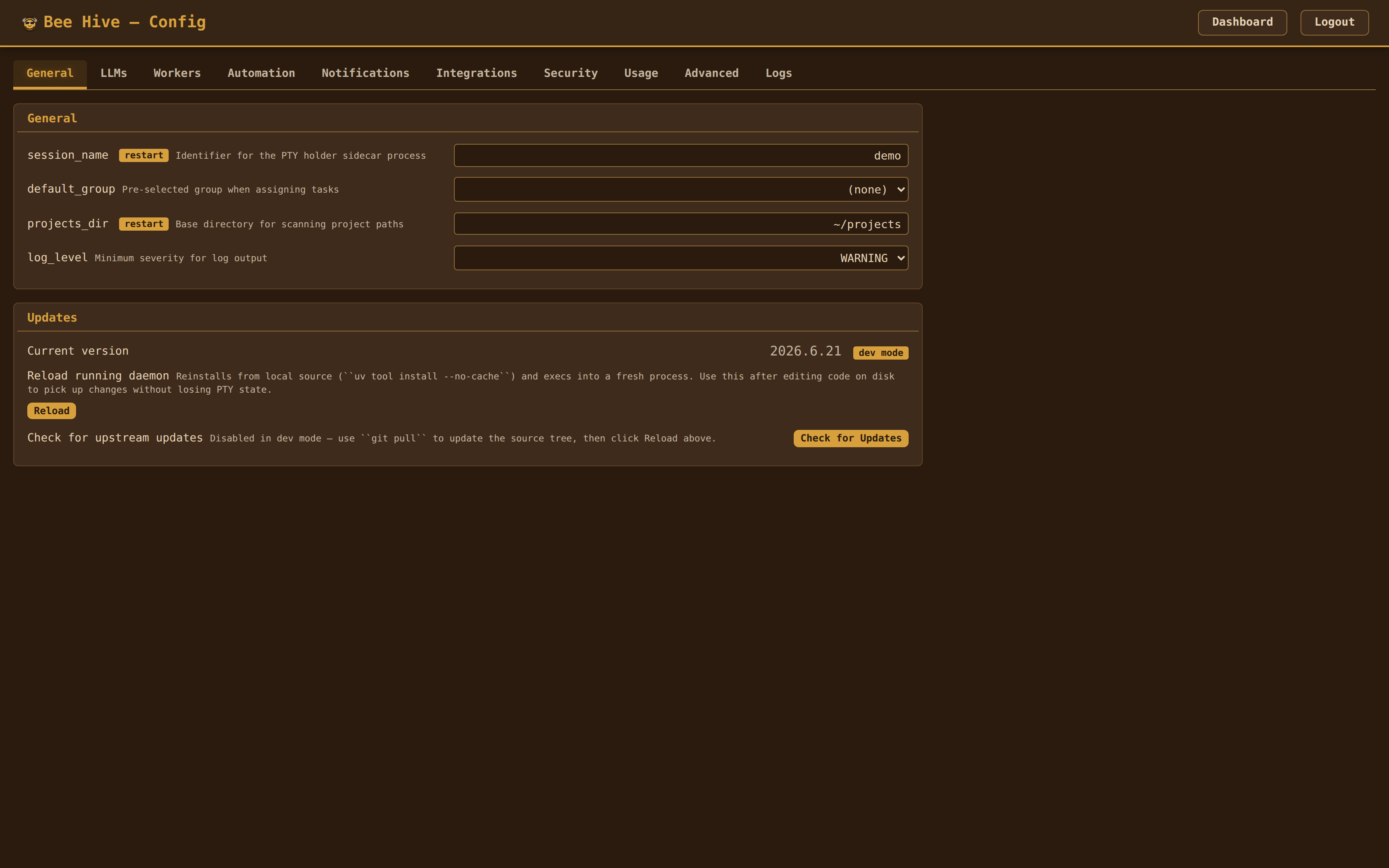
Runtime state lives in SQLite — ~/.swarm/swarm.db is the source of truth. On first run Swarm seeds the DB from a YAML (renaming the source file to config.yaml.migrated once consumed); from then on the daemon reads and writes workers, groups, approval rules, tasks, proposals, task history, messages, pipelines, buzz log, secrets, and scalar config directly from the DB. Dashboard edits hit the DB immediately and are hot-applied in the same request; YAML is not re-written by the dashboard. Use swarm db stats, swarm db export, swarm db backup, swarm db restore, and swarm db prune to inspect and maintain it (the daemon also auto-backs-up daily and runs an integrity check).
YAML is a bootstrap-only seed. swarm init writes the initial config to ~/.config/swarm/config.yaml and you can also place a swarm.yaml in your project directory. The YAML loaders are consulted only when swarm.db has no user data (fresh install, explicit DB-empty bootstrap). For a populated DB the YAML loaders — including the -c /path/to/config.yaml flag — are intentionally ignored, with a WARNING log on every silently-discarded -c. Re-importing from YAML after first run is possible but explicit; treat swarm.yaml as a seed/import format, not a live mirror.
Full Example
session_name: swarm
projects_dir: ~/projects
port: 9090                             # web UI / API server port
provider: claude                       # global default: claude | gemini | codex
watch_interval: 5                      # seconds between poll cycles
log_level: WARNING                     # DEBUG, INFO, WARNING, ERROR
trust_proxy: false                     # trust X-Forwarded-For when behind a reverse proxy
domain: ""                             # public domain (used as WebAuthn RP ID)

workers:
  - name: api
    path: ~/projects/api-server
    description: "NestJS API — handles auth, users, and billing"
    isolation: worktree               # run in git worktree for file isolation
  - name: web
    path: ~/projects/frontend
    description: "Next.js dashboard — admin UI, reports, settings"
    provider: gemini                   # per-worker override (experimental)
  - name: tests
    path: ~/projects/test-suite

groups:
  - name: default
    workers: [api, web]
  - name: all
    workers: [api, web, tests]

default_group: default                 # auto-launched when no target specified

drones:
  enabled: true
  poll_interval: 5.0                   # seconds between polls
  poll_interval_buzzing: 0.0           # override for BUZZING (0 = 2× base)
  poll_interval_waiting: 0.0           # override for WAITING (0 = base)
  poll_interval_resting: 0.0           # override for RESTING (0 = 3× base)
  sleeping_poll_interval: 30.0         # interval for SLEEPING workers
  auto_approve_yn: false               # auto-approve Y/N prompts
  max_revive_attempts: 3               # revives before giving up
  escalation_threshold: 120.0          # seconds idle before escalating to Queen
  max_poll_failures: 5                 # consecutive failures before circuit breaker
  max_idle_interval: 30.0              # max backoff interval when idle
  auto_stop_on_complete: true          # stop drones when all tasks complete
  auto_approve_assignments: true       # drones auto-approve Queen task assignments
  idle_assign_threshold: 3             # seconds idle before proposing assignment
  auto_complete_min_idle: 45.0         # seconds idle before proposing completion
  sleeping_threshold: 900.0            # seconds idle before RESTING → SLEEPING
  stung_reap_timeout: 30.0             # seconds before auto-removing a STUNG worker
  context_warning_threshold: 0.7       # warn at 70% context usage
  context_critical_threshold: 0.9      # alert at 90% context usage
  speculation_enabled: false           # speculative task prep (experimental)
  allowed_read_paths:                  # Read() auto-approved for these paths
    - ~/.swarm/uploads/
  state_thresholds:
    buzzing_confirm_count: 3           # consecutive readings before BUZZING → RESTING
    stung_confirm_count: 2             # consecutive readings before → STUNG
    revive_grace: 15.0                 # seconds grace after revive (ignore STUNG)
  approval_rules:
    - pattern: \bplan\b                # plans always escalate to operator
      action: escalate
    - pattern: "delete|remove|drop"    # destructive actions escalate
      action: escalate
    - pattern: ".*"                    # everything else auto-approved
      action: approve
  reconcile_interval_seconds: 90.0     # task-board invariant reconciler sweep
  idle_nudge_max_repeats: 3            # consecutive no-progress nudges before escalating
  native_goal_enabled: true            # seed task acceptance_criteria as a native /goal
  native_goal_max_turns: 25            # runaway bound baked into the /goal condition
  assign_affinity_floor: 0.5           # min affinity score to auto-assign a task to a worker
  assign_operator_engagement_minutes: 10.0  # skip auto-nudge if operator typed recently
  dreamer_interval_seconds: 14400.0    # pattern-mining drone sweep (4h)
  dreamer_lookback_hours: 24.0         # buzz-log window the dreamer mines
  dreamer_min_pattern_count: 3         # repeats before a pattern becomes a learning
  # Native /loop coexistence (task #761)
  native_loop_coexistence_enabled: true  # leave workers parked between /loop fires undisturbed
  native_loop_grace_seconds: 30.0      # padding on the ScheduleWakeup dwell before re-nudging
  # Per-task token-budget governor (task #762)
  task_token_ceiling: 0                # output-token budget per task (0=off); escalates + parks on breach
  # Standing background-improvement loops (task #765)
  standing_loop_daily_token_cap: 200000  # rolling 24h per-loop output-token cap
  standing_loop_topics: []             # override the built-in deterministic topic set when non-empty

queen:
  enabled: true
  cooldown: 30.0                       # min seconds between Queen invocations
  min_confidence: 0.7                  # below this, proposals require approval
  max_session_calls: 20                # API calls before rotating session
  max_session_age: 1800.0              # seconds before rotating session (30 min)
  queen_thread_retention_days: 90      # purge resolved Queen chat threads after N days (0 = keep forever)
  system_prompt: |
    You coordinate agents working across our codebase.
    Match tasks to workers by project path. Never assign overlapping
    files to two workers on the same codebase.
  oversight:
    enabled: true
    buzzing_threshold_minutes: 15.0    # alert if worker buzzes longer than this
    drift_check_interval_minutes: 10.0 # how often to check for task drift
    max_calls_per_hour: 6              # rate limit for oversight API calls

coordination:
  mode: worktree                       # "single-branch" or "worktree"
  auto_pull: true                      # auto-pull changes from remote
  file_ownership: warning              # "off", "warning", or "hard-block"
  message_retention_days: 30           # prune read inter-worker messages after N days (unread are never auto-deleted; 0 = keep forever)

workflows:
  bug: /fix-and-ship
  feature: /feature
  verify: /verify
  # chore: /my-custom-skill           # override chore workflow

integrations:
  graph:
    client_id: "your-azure-app-id"
    tenant_id: "your-tenant-id"
  jira:
    enabled: true
    client_id: "your-atlassian-app-id"
    client_secret: "$JIRA_CLIENT_SECRET"
    projects: [PROJ]
    sync_interval_minutes: 5
    read_only: false
    project_status_maps:
      PROJ:
        completed: Done
        in_progress: "In Progress"
    confirmed_projects: [PROJ]

custom_llms:
  - name: deepseek
    command: ["deepseek-cli"]          # CLI command to launch the provider
    display_name: DeepSeek
    tuning:
      idle_pattern: "\\$\\s*$"
      busy_pattern: "thinking"

provider_overrides:
  gemini:
    idle_pattern: "❯\\s*$"
    approval_key: "y"

notifications:
  terminal_bell: true                  # ring the terminal bell for high-priority events
  desktop: true                        # OS desktop notifications (libnotify / osascript)
  debounce_seconds: 5.0                # min gap between notifications for the same event
  # browser push notifications are delivered automatically to any connected dashboard
  # that has granted the Notification API permission (approval needed, queen intervention, etc.)

resources:                             # system resource monitoring
  enabled: true
  poll_interval: 10.0                  # seconds between resource snapshots
  elevated_mem_pct: 80.0               # mem % -> ELEVATED warning
  high_mem_pct: 90.0                   # mem % -> HIGH (auto-suspend workers if suspend_on_high)
  critical_mem_pct: 95.0               # mem % -> CRITICAL
  elevated_swap_pct: 40.0              # swap % -> ELEVATED (only escalates when mem is also strained)
  high_swap_pct: 70.0
  critical_swap_pct: 85.0
  suspend_on_high: true                # auto-suspend workers at HIGH pressure
  dstate_scan: true                    # scan for wedged (D-state) processes
  dstate_threshold_sec: 120.0          # D-state age before alerting

action_buttons:                        # dashboard action bar buttons
  - label: "Revive"
    action: revive                     # built-in: revive, refresh, kill
    style: secondary                   # CSS class: secondary, queen, danger
  - label: "Refresh"
    action: refresh
    style: secondary
  - label: "Clear Session"
    command: /clear                    # custom: sends text to worker
    show_mobile: false                 # hide on mobile
  - label: "Get Latest"
    command: /get-latest
  - label: "Kill"
    action: kill
    style: danger

task_buttons:                          # task row action buttons
  - label: "Edit"
    action: edit                       # edit, assign, done, unassign, fail, reopen, log, retry_draft, remove
  - label: "Assign"
    action: assign
  - label: "Done"
    action: done
  - label: "Reopen"
    action: reopen

test:
  enabled: false
  port: 9091                           # separate port for test dashboard
  auto_resolve_delay: 4.0             # seconds before auto-resolving proposals
  report_dir: ~/.swarm/reports
  auto_complete_min_idle: 10.0

# api_password: "your-secret"         # protect config mutations
# tunnel_domain: my-swarm.example.com  # named Cloudflare tunnel domain
# log_file: ~/.swarm/swarm.log        # optional file logging
# daemon_url: http://localhost:9090    # dashboard connects via daemon API
Notable Fields
provider-- global AI provider (claude,gemini,codex). Claude is production-ready; Gemini and Codex are experimental stubs. Per-workerprovideroverrides the global default.workers[].description-- helps the Queen match tasks to workers; shown in dashboardsdefault_group-- auto-launched when you runswarm startwith no targetdrones.approval_rules-- regex pattern → action (approveorescalate) for choice menusqueen.system_prompt-- headless-decision prompt only (auto-assign, oversight, completion eval, escalation). Leave empty to auto-seedHEADLESS_DECISION_PROMPTon daemon start. The interactive Queen's role lives in~/.swarm/queen/workdir/CLAUDE.md, edited in place (seeswarm queen sync-claude-mdfor update-drift reconciliation).workflows-- override skill commands per task type; set to empty to disabledrones.poll_interval_buzzing/waiting/resting-- per-state poll interval overrides (set to0to use defaults derived frompoll_interval: buzzing=2×, waiting=1×, resting=3×)drones.allowed_read_paths-- paths where Read() tool auto-approves without escalationdrones.auto_complete_min_idle-- seconds a worker must be idle before Queen proposes task completiondrones.idle_nudge_max_repeats-- consecutive no-progress idle-nudges before the watcher escalates to the operator instead of re-poking (0= unbounded)drones.native_goal_enabled/native_goal_max_turns-- seed a task'sacceptance_criteriaas a native/goalon providers that support it (Claude Code);max_turnsis the runaway bound baked into the conditiondrones.dreamer_interval_seconds/dreamer_lookback_hours/dreamer_min_pattern_count-- the pattern-mining "dreamer" drone: how often it sweeps the buzz log, the window it mines, and how many repeats before a pattern becomes a learningdrones.native_loop_coexistence_enabled/native_loop_grace_seconds-- native/loopsupport: leave a worker parked between loop fires undisturbed (no idle-nudge / assign-over);grace_secondspads the ScheduleWakeup dwell read from the workerdrones.task_token_ceiling-- per-task OUTPUT-token budget ceiling (0= off); on breach the task is escalated and parked (ACTIVE → BLOCKED) without interrupting the PTYdrones.standing_loop_daily_token_cap/standing_loop_topics-- standing background-improvement loops: rolling 24h per-loop output-token cap (the loop sleeps when exhausted), and an optional override of the built-in deterministic topic setaction_buttons-- customize the dashboard action bar (built-in actions or custom commands)task_buttons-- customize the task row action buttonstunnel_domain-- custom domain for a named Cloudflare tunnel (leave empty for random subdomain)integrations.graph-- Azure AD app credentials for Outlook email integrationintegrations.jira-- Jira Cloud credentials and sync settings (OAuth 2.0)queen.oversight-- automated monitoring of worker progress (buzzing threshold, drift checks, rate limits)coordination-- multi-worker coordination mode (single-branchorworktree) and file ownership tracking (off,warning,hard-block)workers[].isolation--"worktree"to run the worker in a git worktree for file isolationcustom_llms-- define custom AI CLI tools beyond the built-in claude/gemini/codex providersprovider_overrides-- customize state detection patterns, approval keys, and env settings per providerdrones.state_thresholds-- tunable hysteresis for state detection (buzzing confirm count, stung confirm count, revive grace period)drones.sleeping_threshold-- seconds of idle before a RESTING worker is shown as SLEEPING (reduced poll rate). Also governs when INV-2 demotes that worker's ACTIVE task (#1538), so lowering it shortens how long a pause may last before the task returns to ASSIGNEDdrones.stung_reap_timeout-- seconds before a STUNG worker is auto-removeddrones.context_warning_threshold/context_critical_threshold-- fractions of Claude's context window that trigger warning / critical alertstrust_proxy-- honorX-Forwarded-Forwhen running behind a reverse proxydomain-- public domain used as the WebAuthn Relying Party ID for passkey authresources-- memory / swap thresholds; at HIGH workers auto-suspend, at CRITICAL the operator is paged. Also enables D-state process scanning.
REST API
The daemon exposes a JSON API on the same port as the web dashboard. All mutating /api/ endpoints require an X-Requested-With header (CSRF protection).
Endpoints
| Group | Routes | Description |
|---|---|---|
| Health | GET /health, GET /ready, GET /api/health |
Liveness, readiness, server status |
GET /api/usage |
Token usage statistics (per-worker, queen, total) | |
GET /api/resources, GET /api/resources/history |
Memory / swap / system pressure stats | |
GET /api/search |
Global dashboard search (workers, tasks, messages) | |
GET /api/docs, GET /api/docs/ui |
OpenAPI spec and Swagger UI | |
| Workers | GET /api/workers, GET /api/workers/{name} |
List workers, worker detail |
POST /api/workers/{name}/send, /continue, /kill, /revive, /escape, /interrupt, /analyze |
Worker actions | |
POST /api/workers/launch, /spawn, /continue-all, /send-all, /discover |
Bulk operations | |
| Drones | GET /api/drones/log, GET /api/drones/status |
Drone state |
POST /api/drones/toggle, POST /api/drones/poll |
Drone control | |
GET /api/drones/rules/analytics |
Rule hit statistics | |
GET /api/drones/approval-rate |
Auto-approval rate over a rolling window (?hours=24) |
|
GET /api/drones/tuning |
Drone tuning suggestions | |
POST /api/drones/rules/suggest |
AI-suggested approval rules | |
| Standing loops | GET /api/standing-loops |
Per-loop status + token-burn readout (backs the Loops tab) |
POST /api/standing-loops/start, /pause, /stop |
Per-worker standing-loop control ({worker} body) |
|
POST /api/standing-loops/kill-switch |
Global kill switch ({on} body) |
|
| Harness | GET /api/harness-digest |
Operator-gated improvement digest (backs the Harness tab) |
| Tasks | GET /api/tasks, POST /api/tasks |
List / create tasks |
POST /api/tasks/{id}/assign, /start, /complete, /fail, /unassign, /reopen |
Task lifecycle | |
POST /api/tasks/{id}/approve, /reject |
Plan-mode approval gate (user-channel tasks) | |
POST /api/tasks/{id}/force-complete |
Force-close a wedged task (bypasses the verifier/BLOCKED guard) | |
PATCH /api/tasks/{id}, DELETE /api/tasks/{id} |
Edit / remove | |
POST /api/tasks/bulk |
Bulk action over multiple tasks (complete / fail / reopen / assign / remove) | |
POST /api/tasks/cross |
Create a cross-project handoff task | |
GET /api/tasks/export, GET /api/tasks/history |
Export the board / search task history | |
POST /api/tasks/from-email, POST /api/tasks/{id}/attachments |
Email import, file upload | |
POST /api/tasks/{id}/retry-draft |
Retry email draft generation | |
GET /api/tasks/{id}/history |
Per-task audit trail | |
| Proposals | GET /api/proposals |
List pending proposals |
POST /api/proposals/{id}/approve, /reject |
Approve / reject | |
POST /api/proposals/reject-all |
Bulk reject | |
GET /api/decisions |
Proposal history / audit trail | |
| Queen | GET /api/queen/queue, GET /api/queen/health |
Queen call-queue status, runtime health |
GET /api/queen/oversight |
Queen oversight monitor status | |
GET /api/queen/threads, POST /api/queen/threads |
List (filter ?status&kind&worker&q&since&until&limit&offset) / start a thread |
|
GET /api/queen/threads/{id}, POST /api/queen/threads/{id}/messages |
Thread transcript / post a reply | |
POST /api/queen/threads/{id}/resolve, /reopen |
Resolve or reopen a thread | |
GET /api/queen/learnings, DELETE /api/queen/learnings/{id} |
List / delete saved Queen learnings | |
| Messages | POST /api/messages/send |
Send an inter-worker message (finding, warning, dependency, status, note) |
GET /api/messages, GET /api/messages/{worker} |
Recent messages (filter ?q&unread_only&since&until&limit&offset) / inbox for a worker |
|
POST /api/messages/{worker}/read, POST /api/messages/delete |
Mark read / bulk delete by id | |
| Playbooks | GET /api/playbooks, GET /api/playbooks/analytics |
List playbooks / synthesis analytics |
GET /api/playbooks/{name}/events |
Event history for a playbook | |
POST /api/playbooks/{name}/promote, /retire |
Promote to fleet-active / retire | |
| Attention | GET /api/attention |
Command-center attention feed (active threads needing the operator) |
POST /api/attention/{id}/reply, /resolve |
Respond to / resolve an attention item | |
| Analytics | GET /api/analytics/summary |
Task throughput, completion-time, and per-worker stats (?days=N) |
| Pipelines | GET /api/pipelines, POST /api/pipelines |
List / create pipelines |
GET /api/pipelines/{id}, PUT /api/pipelines/{id}, DELETE /api/pipelines/{id} |
Read / update / delete | |
POST /api/pipelines/{id}/start, /pause, /resume |
Pipeline lifecycle | |
POST /api/pipelines/{id}/steps/{step_id}/complete|fail|skip |
Per-step transitions | |
| MCP | POST /mcp, GET /mcp, DELETE /mcp |
Streamable HTTP MCP transport |
GET /mcp/sse, POST /mcp/message |
Legacy SSE MCP transport | |
| Groups | POST /api/groups/{name}/send |
Broadcast to group |
| Config | GET /api/config, PUT /api/config |
Read / update config |
POST /api/config/workers, DELETE /api/config/workers/{name} |
Worker CRUD | |
POST /api/config/groups, PUT /api/config/groups/{name}, DELETE /api/config/groups/{name} |
Group CRUD | |
POST /api/config/workers/{name}/save |
Save a running worker to config | |
POST /api/config/workers/{name}/add-to-group |
Add a worker to a group | |
| Skills | GET /api/skills |
List registered skills with {name, description, task_types, usage_count, last_used_at} |
GET /api/config/projects |
Scan for projects | |
| Jira | GET /api/jira/status |
Jira sync status and stats |
GET /api/jira/preview |
Preview importable Jira issues | |
POST /api/jira/sync |
Trigger manual Jira sync | |
POST /api/tasks/{id}/jira, POST /api/tasks/{id}/jira/refresh |
Create / refresh the Jira issue linked to a task | |
| Auth | GET /auth/jira/login, /callback, /status, POST /auth/jira/disconnect |
Jira OAuth flow |
GET /auth/graph/login, /callback, /status, POST /auth/graph/disconnect |
Graph OAuth flow | |
| Coordination | GET /api/coordination/ownership |
File ownership map |
GET /api/coordination/sync |
Auto-pull sync status | |
| Other | GET /api/conflicts |
Active file conflicts |
GET /api/notifications, POST /api/notifications |
Notification history / raise a notification | |
POST /api/client-vitals |
Browser heartbeat posted every 30s (heap, WebSocket bytes, terminal/canvas counts, platform, renderer). Diagnostics only — a tab crash leaves evidence behind in the daemon log | |
| Tunnel | POST /api/tunnel/start, /stop, GET /api/tunnel/status |
Remote access |
| Session | POST /api/session/kill, POST /api/server/stop |
Shutdown |
POST /api/server/restart |
Restart the server | |
| Files | POST /api/uploads |
File upload |
| WebSocket | GET /ws |
Live event stream (workers, tasks, drones, proposals) |
GET /ws/terminal |
Interactive terminal attach (PTY bridge) |
Auth: when api_password is set, every route requires a session cookie or Authorization: Bearer <api_password> — see Login & passkeys for the exempt paths and the separate /mcp token.
Security
- All mutating
/api/endpoints require anX-Requested-Withheader (CSRF protection) - Rate limited at 60 requests/minute per client IP
api_passwordgates the entire dashboard behind a session cookie or Bearer token, with a login page, WebAuthn passkey sign-in, a 24-hour idle timeout, and per-IP lockout after 5 failed attempts/mcp,/mcp/sse, and/mcp/messageuse a dedicated MCP bearer token instead of the dashboard credential, since they can trigger code execution in worker PTYs
Architecture
┌─────────────────────────────────────────────────────────┐
│  Web Dashboard (:9090)                                   │
│  interactive terminals · keyboard shortcuts              │
│  drag-and-drop email                                     │
├─────────────────────────────────────────────────────────┤
│  REST API + WebSocket          Proposals UI              │
│  OpenAPI docs · search         Swagger at /api/docs/ui   │
├─────────────────────────────────────────────────────────┤
│  Background Drones             Queen Conductor           │
│  (poll → decide → act)         (headless claude -p)      │
│  approval rules · revive       analyze · assign · reply  │
├─────────────────────────────────────────────────────────┤
│  Task Board · Pipelines        Email / Jira Integration  │
│  skill workflows · steps       Microsoft Graph · Jira API│
│  .eml/.msg import              OAuth · two-way sync      │
├─────────────────────────────────────────────────────────┤
│  MCP Server (/mcp)             Inter-worker Messages     │
│  24 worker · 18 Queen tools    findings · warnings · etc │
│  file claims · learnings       dedup · read tracking     │
│  playbooks (synthesized)       health-sweep · digests    │
├─────────────────────────────────────────────────────────┤
│  SQLite (~/.swarm/swarm.db)    Notification Bus          │
│  tasks · proposals · history   terminal · desktop · push │
│  messages · pipelines · config resource monitor          │
├─────────────────────────────────────────────────────────┤
│  PTY Holder (sidecar)                                    │
│  ┌────────┐ ┌────────┐ ┌────────┐                        │
│  │ worker │ │ worker │ │ worker │  ...                   │
│  │  api   │ │  web   │ │ tests  │                        │
│  └────────┘ └────────┘ └────────┘                        │
└─────────────────────────────────────────────────────────┘
Worker states:
- BUZZING -- actively working (Claude is processing)
- RESTING -- idle, waiting for input
- SLEEPING -- idle beyond
drones.sleeping_threshold(default 900 s / 15 min); drones usesleeping_poll_interval(default30s) for reduced polling frequency. AWorkerbuilt without a config falls back to the in-codeSLEEPING_THRESHOLD = 1200.0— that fallback only applies to fixtures and tests, since the daemon passes the configured value at construction (#1415). Not display-only: since #1538, INV-2 demotes a paused worker's ACTIVE task once it reads SLEEPING, so this threshold also decides how long a pause may last before the task returns to ASSIGNED. - WAITING -- blocked on a prompt (plan approval, choice menu, user question)
- STUNG -- exited or crashed
The PTY-over-WebSocket terminal bridge supports up to 20 concurrent sessions.
Decision layers:
- Hooks -- per-worker Claude Code hooks for instant tool approvals
- Drones -- background polling that auto-approves, revives, and escalates
- Queen -- headless Claude for cross-worker coordination, task assignment, and email replies
Testing
swarm test runs a supervised end-to-end orchestration test against a dedicated instance (port 9091 by default).
- Scaffolds a synthetic project -- copies a fixture project to a temp directory and initializes a git repo with pre-loaded tasks from
tasks.yaml - Auto-resolves proposals -- a TestOperator subscribes to new proposals, waits
auto_resolve_delayseconds (default4.0), then asks the Queen to evaluate and approve or reject each one - Generates an AI-powered report -- computes aggregated stats (decision distribution, rule hits, state changes, latency, Queen confidence), runs a headless LLM for actionable suggestions (rule changes, threshold adjustments, uncovered patterns), and writes a markdown report with cross-run trend comparisons
Reports are saved as JSONL logs at ~/.swarm/reports/. Configure via the test: section in swarm.yaml.
Development
git clone https://github.com/miopea/swarm-legacy.git
cd swarm-legacy
uv sync                    # install dependencies
uv run swarm --help        # run CLI from source
uv run pytest tests/ -q    # run test suite
uv run ruff check src/     # linting
uv run ruff format src/    # formatting
Releases
Swarm (legacy) uses calver (YYYY.M.D[.N]). The release helper at scripts/release.py bumps the version anchor across pyproject.toml and src/swarm/__init__.py and promotes CHANGELOG.md's ## Unreleased section to a dated entry in a single motion. The global /ship slash command auto-detects this script and runs it before committing — no manual invocation required for normal flows. See ~/.claude/CLAUDE.md (Release Management) for the contract every release script must honour.
Contributing
Contributions are welcome — see CONTRIBUTING.md for setup,
the local test/lint gate, and code conventions. Bug reports and feature
requests go in GitHub issues.
License
MIT — see LICENSE.
Yorumlar (0)
Yorum birakmak icin giris yap.
Yorum birakSonuc bulunamadi