hermes-brain-template
Health Warn
- License — License: MIT
- Description — Repository has a description
- Active repo — Last push 0 days ago
- Low visibility — Only 5 GitHub stars
Code Pass
- Code scan — Scanned 12 files during light audit, no dangerous patterns found
Permissions Pass
- Permissions — No dangerous permissions requested
No AI report is available for this listing yet.
Obsidian second-brain vault template for a Hermes AI agent — session archive + memory review pipeline, Kanban boards, templates, Canvas pipeline map, Dataview queries, and cross-platform (Windows/Linux/macOS) install scripts.
Hermes Brain — Obsidian Vault Template for Hermes Agent (including OpenClaw)
Give your Hermes/OpenClaw agent a memory it can't forget — and you can actually read.
Every session your agent runs gets archived as plain markdown, deduped and
secret-scrubbed automatically, and staged for you to review before anything
becomes permanent. No black box, no vendor lock-in — it's just an Obsidian
vault, so you can search it, link it, graph it, and back it up like any
other notes.




🚀 Try it in 60 Seconds (Verifiable)
# 1. Clone the template
git clone https://github.com/mistrysiddh/hermes-brain-template.git my-second-brain
cd my-second-brain

# 2. Run the installer (choose your OS)
#    Linux/macOS:        ./_System/Scripts/Installers/install.sh
#    Windows PowerShell: powershell -ExecutionPolicy Bypass -File .\_System\Scripts\Installers\install.ps1

# 3. Self-test the bundled MCP server (vault_search, read_note, stage_memory_candidate, ...)
python _System/Scripts/hermes_brain_mcp.py --test

# 4. List pending memory candidates (prints [] on a fresh vault)
python _System/Scripts/promote_memory.py --list
✅ Verification: step 3 ends with "All hermes-brain-mcp self-tests PASSED" and step 4 prints []. No Hermes install is needed for either check.
Why this instead of nothing?
- You stop losing context. Every Hermes session gets archived automatically — nothing lives only in a chat log you'll never scroll back to.
- You stay in control of what becomes "memory." Nothing gets promoted to Hermes's real memory without a human reading and approving it first.
- It's just markdown. Open it in Obsidian,
grepit, put it in git, read it in Notepad — no proprietary format, no export step. - Set up once, in one paste. A single prompt into your Hermes chat installs the vault and wires up hourly archiving — see below.
Why this instead of [alternative]?
| Hermes Brain | Raw chat logs | Vector-DB memory (e.g. Mem0) | Generic Obsidian PKM | |
|---|---|---|---|---|
| Human review before "memory" | ✅ staged in 04-Archives/Memory-Review/, nothing auto-promotes |
❌ nothing structured | ❌ auto-embedded, opaque | N/A — no agent pipeline |
| Readable without special tooling | ✅ plain markdown | ✅ but unstructured | ❌ needs the vendor's UI/API | ✅ |
| Portable / no vendor lock-in | ✅ your files, your git repo | ✅ | ❌ tied to the service | ✅ |
| Built-in agent-usage analytics | ✅ token usage, vault audit, agent performance — all in Dashboard.md |
❌ | Varies | ❌ |
| Zero setup for a Hermes agent specifically | ✅ one-paste install prompt | N/A | ❌ separate integration work | ❌ generic, no agent wiring |
Use a vector-DB memory service if you want the agent to auto-recall
semantically similar things with zero human-in-the-loop. Use this
template if you want to see and approve what your agent remembers,
in a format you already own.
💡 What You Solve With This Template
| Your Pain Point | How This Template Fixes It | Verify in <2 min |
|---|---|---|
| 🔌 AI agents can't access your knowledge | MCP server connects Hermes Agent/Obsidian to LLMs | python _System/Scripts/hermes_brain_mcp.py --test -> all self-tests PASSED |
| 🧠 Manual memory triage is slow | --review mode lists candidates with full note preview |
python _System/Scripts/promote_memory.py --review -> shows interactive prompt |
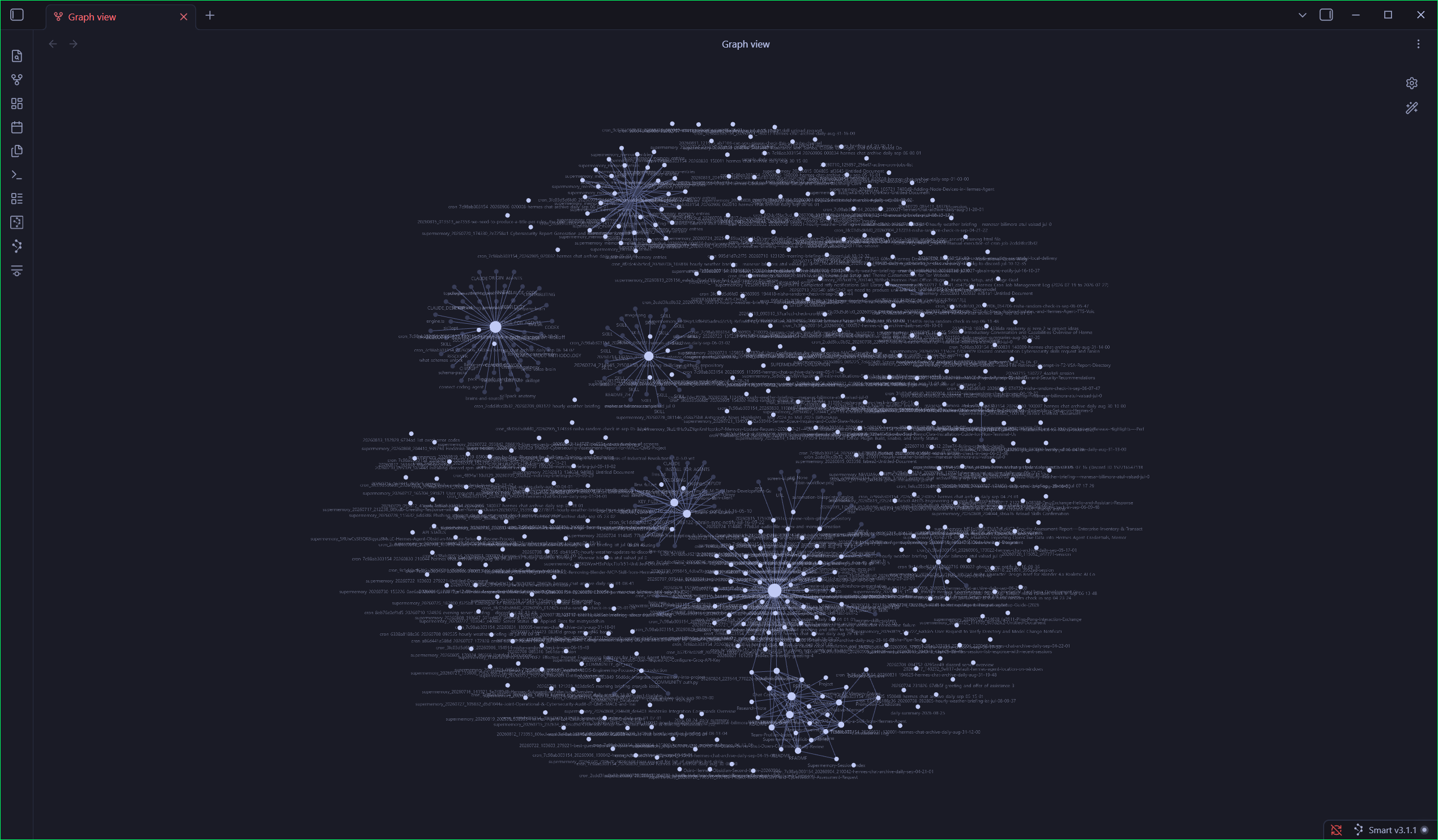
| 👁️ Graph view is unusable noise | Color-coded folders + size-by-note-relevance | Open vault -> Graph view shows Project/Area/Resource clusters |
| 💥 Installers overwrite your profile | Smart installers skip 02-Areas/User-Profile.md if non-empty |
Edit profile -> re-run installer -> profile unchanged |
| 📚 Documentation is scattered | Structured PARA vault + ADR/project/research templates | tree -L 2 shows standardized folders |
What's inside
04-Archives/Daily/YYYY/MM/DD/*.md   →   04-Archives/Memory-Review/*.md   →   Hermes native MEMORY.md / USER.md
     (raw session archive)                    (staged candidate                 (durable, injected every
                                            facts, human-reviewed)            turn — promoted by hand)
The vault is structured according to the PARA Method (Projects, Areas, Resources, Archives) with a dedicated _System/ core:
01-Projects/— Active projects with goals and deadlines, architectural decision records (01-Projects/ADR/), and an Obsidian Dataview database (Projects.base).02-Areas/— Long-term standards, human alignment parameters (02-Areas/User-Profile.md), installed skills catalog, team roster, and the 11-dimension [[02-Areas/Skills/Personality-Judgment-Framework|Personality Judgment Framework]].03-Resources/— Domain knowledge hubs ([[03-Resources/MOCs/Technology-Stack-MOC|Technology Stack]], [[03-Resources/MOCs/Cybersecurity-MOC|Cybersecurity]], [[03-Resources/MOCs/AI-ML-MOC|AI/ML]], [[03-Resources/MOCs/Agentic-Architecture-MOC|Agentic Architecture]]), technical research inquiries (03-Resources/Research/), and reference guides (03-Resources/Guides/).04-Archives/— Historical and completed items: [[04-Archives/Daily/Timeline|Daily Session Timeline]], [[04-Archives/Daily/Chat-Correlation|Chat Correlation]], 3-stage memory staging ([[04-Archives/Memory-Review/Memory-Board.kanban|Memory Kanban]]), and telemetry/audit reports (04-Archives/Audit-Reports/)._System/— Operational core: Reusable note templates (_System/Templates/), cross-platform automation scripts (_System/Scripts/), and visual architecture canvases (_System/Canvases/Memory-Pipeline.canvas).Dashboard.md&_System/Canvases/Dashboard-Beta.md— Live command centers providing immediate visibility into active projects, token telemetry, archiver health, recent sessions, and skill analytics.- Preconfigured Obsidian plugins: Dataview, Smart Connections, Local REST API, Kanban, plus two bundled themes — Tokyo Night and Nemoclaw.
This repo ships as a template only — no personal data, chat history, or
API keys are included. See SETUP.md for the full breakdown of
what was intentionally left out.
Quick start
🌐 Interactive Web Tour: Explore the memory pipeline simulator, live architecture explorer, and MCP tool tester on the Hermes Brain Showcase Website.
🚀 Option 1 — One-Line Terminal Install (Fastest, directly from GitHub)
Open your terminal and run the one-liner. It automatically clones or downloads the latest template directly from GitHub, sets up your vault, configures your Hermes CLI environment (HERMES_VAULT_PATH), and optionally registers the hourly session archiver:
Linux / macOS / WSL:
curl -fsSL https://raw.githubusercontent.com/mistrysiddh/hermes-brain-template/main/_System/Scripts/Installers/install.sh | bash
Windows (PowerShell):
irm https://raw.githubusercontent.com/mistrysiddh/hermes-brain-template/main/_System/Scripts/Installers/install.ps1 | iex
Non-interactive flags are supported: --dest <path> --backend <ollama|python|skip> --test (PowerShell: -Dest <path> -Backend <ollama|python|skip> -Test).
📦 Option 2 — GitHub "Use this template" or Clone
If you want your own private/custom git repository:
- Click the green Use this template button on GitHub to create your personal vault repository.
- Clone your repository:
git clone https://github.com/<your-username>/<your-vault-repo>.git cd <your-vault-repo> - Run the interactive installer from inside the cloned folder:
- Linux / macOS:
chmod +x _System/Scripts/Installers/install.sh ./_System/Scripts/Installers/install.sh - Windows (PowerShell):
powershell -ExecutionPolicy Bypass -File .\_System\Scripts\Installers\install.ps1
- Linux / macOS:
The installer guides you through destination selection, optional local embeddings (Ollama / sentence-transformers), and registering your vault with the Hermes CLI.
🤖 Option 3 — One Paste into Hermes Agent (Easiest for Hermes users)
If you already run a Hermes agent, skip cloning and manual scripting entirely: open
INSTALL_PROMPT.md and paste the master prompt straight into
your Hermes chat:
- Prompt 1 — installs the vault only
- Prompt 2 — sets up the hourly archiving cron job only (vault must already exist)
- Prompt 3 (master) — does both in one paste: install the vault, then set up the hourly cron job, no follow-up needed
🧪 Option 4 — Zero-Commitment Trial (Scratch Vault)
Not ready to install anything yet? Copy the template into a temporary scratch
directory and open it in Obsidian without touching your real config or
registering anything with Hermes:
Linux / macOS:
./_System/Scripts/Installers/try.sh
Windows (PowerShell):
powershell -ExecutionPolicy Bypass -File .\_System\Scripts\Installers\try.ps1
Delete the scratch copy any time. Run Option 1 or 2 when you are ready to keep it for real.
🛠️ Option 5 — Full Manual Control
Prefer configuring everything by hand? Follow SETUP.md step by step.
🌐 Option 6 — GitHub Codespaces (Zero-Local-Setup Trial)
No local install needed. Click the badge below to spin up a ready-to-run environment in your browser:

Once the Codespace loads, run the scratch-vault trial:
./_System/Scripts/Installers/try.sh
This creates a temporary vault at /tmp/hermes-brain-trial that you can open in Obsidian (via the Obsidian URI scheme or by copying files out). When you're done, just delete the Codespace — no cleanup needed on your machine.
Tip: Codespaces gives you 60 hours/month free on the GitHub Free plan — plenty for evaluating the template.
Cross-platform scripts
| Purpose | Windows | Linux/macOS |
|---|---|---|
| Memory consolidation ("dream cycle") | python _System\Scripts\consolidate_memory.py |
python3 _System/Scripts/consolidate_memory.py |
| Skill-to-Chat-Links regeneration | python _System\Scripts\generate_skill_links.py |
python3 _System/Scripts/generate_skill_links.py |
| Trend digest — Ollama backend | _System\Scripts\pipeline.ps1 |
_System/Scripts/pipeline.sh |
| Trend digest — sentence-transformers backend | _System\Scripts\New-TrendDigest.ps1 |
_System/Scripts/trend_digest.sh |
| Hourly session archiving + token tracking | python _System\Scripts\hourly_archive.py |
python3 _System/Scripts/hourly_archive.py |
| Instant session archiving (manual trigger) | python _System\Scripts\archive_now.py |
python3 _System/Scripts/archive_now.py |
| Session enrichment (add summaries) | python _System\Scripts\enrich_session.py |
python3 _System/Scripts/enrich_session.py |
| Semantic search index (build/update/serve) | python _System\Scripts\semantic_search.py |
python3 _System/Scripts/semantic_search.py |
| Session tagging & topic tracking | python _System\Scripts\session_tagger.py |
python3 _System/Scripts/session_tagger.py |
| Future skill forecast | python _System\Scripts\skill_forecast.py |
python3 _System/Scripts/skill_forecast.py |
| Vault integrity audit | python _System\Scripts\vault_audit.py |
python3 _System/Scripts/vault_audit.py |
| Agent performance dashboard | python _System\Scripts\agent_performance.py |
python3 _System/Scripts/agent_performance.py |
| Install / set up vault + cron | .\_System\Scripts\Installers\install.ps1 |
./_System/Scripts/Installers/install.sh |
| Uninstall / clean up vault | .\_System\Scripts\Installers\uninstall.ps1 |
./_System/Scripts/Installers/uninstall.sh |
| Update template in existing vault | .\_System\Scripts\Installers\update.ps1 |
./_System/Scripts/Installers/update.sh |
| Zero-commitment trial run (scratch vault) | .\_System\Scripts\Installers\try.ps1 |
./_System/Scripts/Installers/try.sh |
| Seed sample/demo data (preview only, opt-in) | python _System\Scripts\seed_sample_data.py . |
python3 _System/Scripts/seed_sample_data.py . |
Requirements
- Obsidian (free)
- A Hermes Agent install (or OpenClaw), if you want the automated session-archive/memory pipeline
- Optional, for the trend-digest scripts: Ollama or Python 3 with
sentence-transformers
FAQ
Do I need to run a local LLM (Ollama, etc.)?
No. The core vault, session archiver, and memory-review pipeline work with any Hermes agent — no local models required. The optional trend-digest scripts (pipeline.sh, trend_digest.py, etc.) are the only parts that need Ollama or sentence-transformers for embeddings.
Is my data private?
Yes. Everything lives in your local vault (or your private fork of this template). No data is sent to this repo or any external service unless you configure it to (e.g., enabling the Local REST API plugin and exposing it).
Can I use this without Hermes / OpenClaw?
Absolutely. The vault structure, templates, Dataview queries, Kanban boards, and scripts are all usable as a standalone Obsidian "second brain" template. The Hermes-specific automation (hourly archiving, INSTALL_PROMPT.md) simply won't run without a Hermes agent.
What's the difference between the "Use this template" button and the one-line install?
- Use this template → creates your own private repo on GitHub with full history. Best if you want to version-control your personal vault.
- One-line install (
curl ... | bash) → downloads the latest template directly to your machine, no GitHub account needed. Best for quick local setup.
Why are Daily/, Memory-Review/, and .smart-env/ git-ignored?
They contain your personal session data, API keys, and plugin state. The template only ships the structure (folders, templates, scripts). See SETUP.md for the full list of intentionally excluded paths.
How do I update the template after I've installed it?
Run the update script from inside your vault:
./_System/Scripts/Installers/update.sh     # Linux/macOS
.\\_System\\Scripts\\Installers\\update.ps1   # Windows
This pulls the latest template files (scripts, templates, configs) without touching your personal data in Daily/, Memory-Review/, etc.
Where do I ask questions or request features?
Open a Discussion — there's a welcome post to get started. Bugs and PRs go in Issues.
Security notes
- Never commit real vault content back into this template repo —
Daily/,Memory-Review/*(exceptTEMPLATE.md),Research/*(exceptREADME.md),.smart-env/, and all.obsidian/plugins/*/data.jsonfiles are already
git-ignored for exactly this reason. - The Local REST API plugin generates its own API key on first enable —
store it via your Hermes agent's protected env (hermes config set env.OBSIDIAN_REST_API_KEY "..."), never as a plaintext note in the vault. - Run only one session-archiving cron job per vault — concurrent writers
toDaily/manifest.jsonlwill race and corrupt the index.
Vault Structure
Here is the organized folder structure of the Hermes Brain template:
├── 01-Projects/
│   ├── ADR/
│   │   └── README.md
│   ├── Hermes-Agent-Vault-Setup.md
│   ├── Projects.base
│   └── README.md
├── 02-Areas/
│   ├── README.md
│   ├── Skills/
│   │   ├── Installed-Skills-Index.md
│   │   ├── Lessons-Learned/
│   │   │   └── README.md
│   │   └── Personality-Judgment-Framework.md
│   ├── Team-Profiles-Index.md
│   └── User-Profile.md
├── 03-Resources/
│   ├── README.md
│   ├── Guides/
│   │   ├── Dataview-Query-Library.md
│   │   └── Kanban-Usage.md
│   ├── MOCs/
│   │   ├── AI-ML-MOC.md
│   │   ├── Agentic-Architecture-MOC.md
│   │   ├── Cybersecurity-MOC.md
│   │   └── Technology-Stack-MOC.md
│   └── Research/
│       └── README.md
├── 04-Archives/
│   ├── README.md
│   ├── Daily/
│   │   ├── .gitkeep
│   │   ├── Chat-Correlation.md
│   │   ├── README.md
│   │   └── Timeline.md
│   ├── Memory-Review/
│   │   ├── HERMES-PREAMBLE.md
│   │   ├── Memory-Board.kanban
│   │   └── TEMPLATE.md
│   └── README.md
├── _System/
│   ├── README.md
│   ├── Canvases/
│   │   ├── Dashboard-Beta.md
│   │   ├── Memory-Pipeline.canvas
│   │   └── Personality-Judgment-Canvas.canvas
│   ├── Scripts/
│   │   ├── Installers/
│   │   │   ├── install.ps1
│   │   │   ├── install.sh
│   │   │   ├── try.ps1
│   │   │   ├── try.sh
│   │   │   ├── uninstall.ps1
│   │   │   ├── uninstall.sh
│   │   │   ├── update.ps1
│   │   │   └── update.sh
│   │   ├── agent_performance.py
│   │   ├── archive_now.ps1
│   │   ├── archive_now.py
│   │   ├── build_fixture_vault.py
│   │   ├── consolidate_memory.py
│   │   ├── dream_cycle.py
│   │   ├── enrich_session.ps1
│   │   ├── enrich_session.py
│   │   ├── generate_skill_links.py
│   │   ├── hourly_archive.py
│   │   ├── New-TrendDigest.ps1
│   │   ├── pipeline.ps1
│   │   ├── pipeline.sh
│   │   ├── pull_supermemory.py
│   │   ├── seed_sample_data.py
│   │   ├── semantic_search.py
│   │   ├── session_tagger.py
│   │   ├── skill_forecast.py
│   │   ├── sync_to_hermes.py
│   │   ├── tag_skill_map.json
│   │   ├── trend_digest.py
│   │   └── trend_digest.sh
│   ├── Templates/
│   │   ├── Architecture-Decision-Record.md
│   │   ├── Daily-Review.md
│   │   ├── Lesson-Learned.md
│   │   ├── Personality-Judgment-Analysis.md
│   │   ├── Personality-Judgment-Dashboard.md
│   │   ├── Project.md
│   │   └── Research-Note.md
├── assets/
│   ├── graph-view-screenshot.png
│   └── install-demo.png
├── docs/
│   ├── LICENSE
│   └── CHANGELOG.md
├── .gitignore
├── Dashboard.md
├── INSTALL_PROMPT.md
├── MOC.md
├── README.md
├── SETUP.md
└── Welcome.md
Structure Explanation:
- 01-Projects/ — Active projects with goals and deadlines
- 02-Areas/ — Long-term standards, skills, and user profile
- 03-Resources/ — Domain knowledge (MOCs, research, guides)
- 04-Archives/ — Historical items (daily sessions, memory review)
- _System/ — Operational core (templates, scripts, canvases)
This PARA-based structure keeps everything organized and discoverable.
💖 Support & Sponsor
If you find Hermes Brain useful for your agent workflows and personal knowledge management, consider supporting its maintenance and continued development:

- GitHub Sponsors: sponsor @mistrysiddh
- ⭐ Star this repository: Helping more builders and AI researchers find the project!
✅ Trust Through Verification
Every claim in this README is verifiable by you in <5 minutes:
| Claim | How You Verify It |
|---|---|
| "MCP server exposes the vault to agents" | python _System/Scripts/hermes_brain_mcp.py --test → all self-tests PASSED |
| "--review mode shows full notes" | python _System/Scripts/promote_memory.py --review → select candidate → see note_content output |
| "Installers preserve profiles" | 1. Edit 02-Areas/User-Profile.md 2. Re-run installer 3. git diff shows no changes |
| "Install is healthy" | ./_System/Scripts/Installers/verify_install.sh (Windows: verify_install.ps1) → all checks pass |
| "Graph view uses color-coding" | Open vault → Graph view → note colors match folder colors in file explorer |
| "Zero personal data in template" | grep -r "mistrysiddh|100\.93\.0\.4|@hermes-brain-general" . → returns only docs/links |
You run these checks → you trust the template.
License
MIT — see LICENSE. Use, fork, and adapt freely.
Contributing
Issues and PRs welcome — especially more platform-specific install fixes,
additional Obsidian plugin recipes, or extra automation scripts.
Discussions
are enabled if you'd rather ask a question first — start with the
welcome post.
See CODE_OF_CONDUCT.md for community guidelines.
Reviews (0)
Sign in to leave a review.
Leave a reviewNo results found