mitshe
Health Warn
- License — License: MIT
- Description — Repository has a description
- Active repo — Last push 0 days ago
- Low visibility — Only 9 GitHub stars
Code Fail
- child_process — Shell command execution capability in apps/api/docker/executor/session-server/server.js
- execSync — Synchronous shell command execution in apps/api/docker/executor/session-server/server.js
- process.env — Environment variable access in apps/api/docker/executor/session-server/server.js
- fs module — File system access in apps/api/docker/executor/session-server/server.js
- exec() — Shell command execution in apps/api/docker/executor/workflow-runner/src/executors/ai.ts
- network request — Outbound network request in apps/api/docker/executor/workflow-runner/src/executors/ai.ts
Permissions Pass
- Permissions — No dangerous permissions requested
This tool is a self-hosted, chat-driven AI development platform. It automates software engineering workflows by creating isolated Docker environments where AI agents can clone repositories, analyze code, execute terminal commands, and open pull requests.
Security Assessment
The overall risk is Medium. The tool is designed to execute shell commands (`child_process`, `execSync`) and modify the file system, which is expected for a CI/CD and automation platform. However, these capabilities introduce significant risk if the tool or its AI providers are compromised. It makes outbound network requests to external AI APIs and heavily accesses environment variables to handle sensitive data like API keys and GitHub tokens. No hardcoded secrets were detected, but because the README explicitly demonstrates passing sensitive GitHub tokens (`ghp_xxx`) directly into chat prompts, there is a strict dependency on the platform properly securing its chat logs and database.
Quality Assessment
The project is actively maintained, with its most recent code push happening today. It uses the permissive MIT license and features a robust CI pipeline. However, it suffers from extremely low community visibility, currently boasting only 9 GitHub stars. Consequently, the codebase has not undergone the widespread peer review typical of more popular open-source security tools, meaning undiscovered vulnerabilities are more likely.
Verdict
Use with caution — the tool's inherent requirement to execute system commands and handle high-value secrets demands that you strictly isolate its deployment and thoroughly review its internal security practices before use.
AI development platform sessions in isolated Docker containers, workflow automation, self-hosted.
mitshe
Chat-first AI development platform — automate workflows, manage sessions, and ship code through conversation.


Talk to mitshe like you'd talk to a colleague. Connect GitHub, describe what you need, and it handles the rest — creates branches, writes code with Claude Code, runs tests, opens PRs. Each task runs in an isolated Docker container. Self-hosted, bring your own API keys.
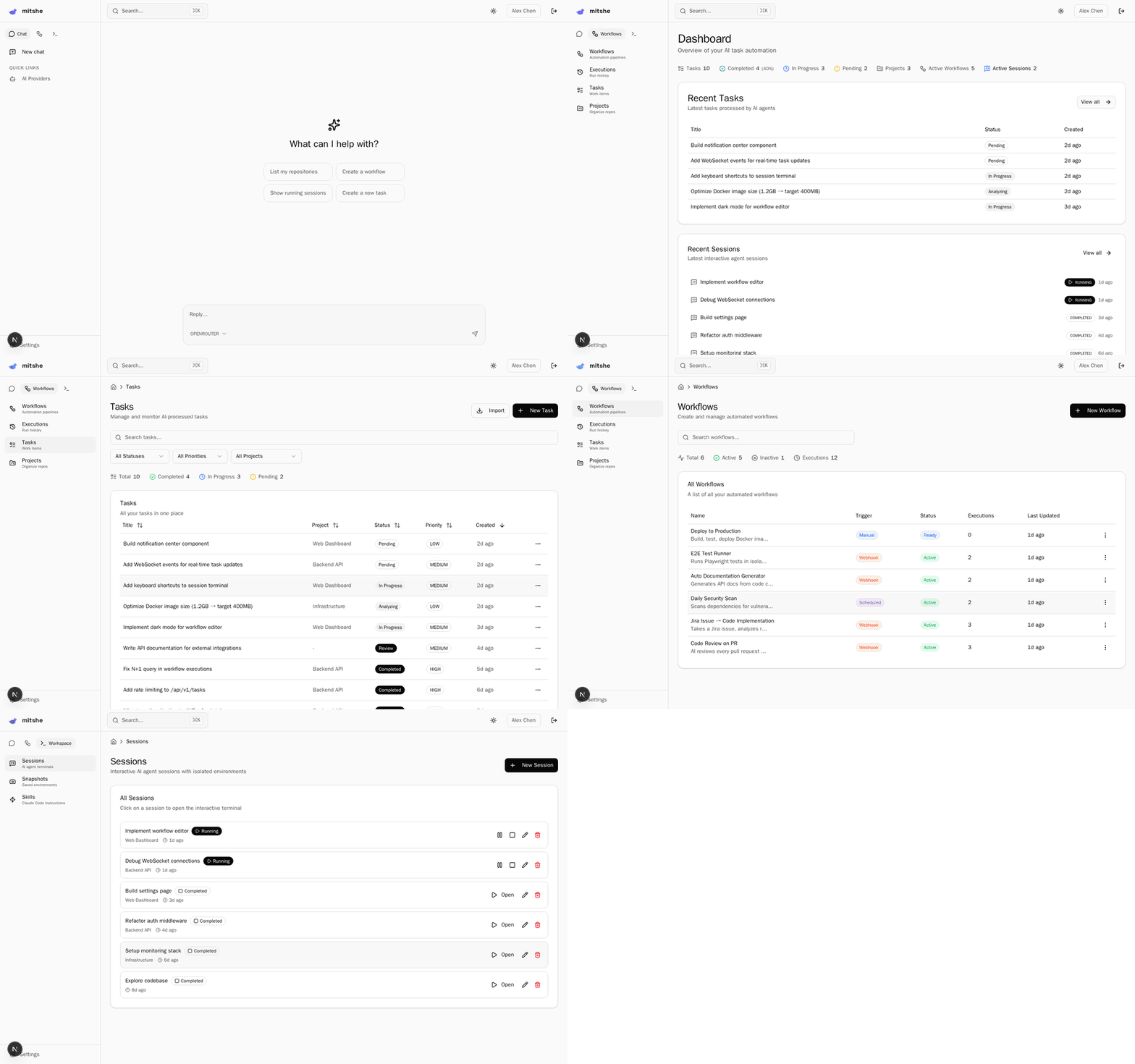
What it does
Chat with AI that actually does things:
You: "Connect my GitHub, here's my token: ghp_xxx"
AI:  ✓ GitHub connected. Synced 12 repositories.

You: "Take the login bug from Jira and fix it"
AI:  → Creates session → Claude Code analyzes the code → fixes bug → creates PR
Workflows that run on autopilot:
- Jira issue created → AI reviews → code changes → PR → Slack notification
- Manual trigger → clone repo → AI generates code → commit → push
Interactive AI sessions:
- Claude Code in isolated Docker containers
- Full terminal, file editor, git access
- Snapshot sessions to reuse later
Quick start
docker run -d \
  --name mitshe \
  -p 3000:3000 \
  -p 3001:3001 \
  -v mitshe-data:/build/data \
  -v /var/run/docker.sock:/var/run/docker.sock \
  ghcr.io/mitshe/mitshe:latest
Open http://localhost:3000. Create your account. Add an AI provider key. Start chatting.
Features
- AI Chat — natural language interface to manage everything (workflows, sessions, tasks, integrations)
- 40+ MCP tools — AI can create sessions, run workflows, connect GitHub, manage tasks, all through conversation
- Claude Code sessions — interactive terminals with Claude Code in isolated Docker containers
- Workflow engine — visual builder + 150+ node types (triggers, AI actions, git, notifications)
- Snapshots — freeze a configured session, reuse it for new tasks
- Skills — reusable CLAUDE.md instructions for Claude Code
- Multi-provider — Claude, OpenAI, OpenRouter, Gemini, Groq (BYOK)
- Self-hosted — your data, your keys, your infrastructure
- Light mode — single Docker container with SQLite, no external dependencies
Update
docker stop mitshe && docker rm mitshe
docker pull ghcr.io/mitshe/mitshe:latest
docker run -d \
  --name mitshe \
  -p 3000:3000 \
  -p 3001:3001 \
  -v mitshe-data:/build/data \
  -v /var/run/docker.sock:/var/run/docker.sock \
  ghcr.io/mitshe/mitshe:latest
Data persists in the mitshe-data volume.
Develop
# Prerequisites: Node.js 20+, pnpm 9+, Docker, just
git clone https://github.com/mitshe/mitshe.git
cd mitshe
just setup

# Configure
cp .env.example .env
cp apps/api/.env.example apps/api/.env

# Build executor image (required for sessions and workflows)
just executor-build

# Start
just dev
Frontend: http://localhost:3000 | API: http://localhost:3001
Run just to see all commands.
Stack
Next.js 16 + NestJS 11 + TypeScript + Prisma + PostgreSQL/SQLite + Redis + BullMQ + React Flow + shadcn/ui + Tailwind CSS 4
Contributing
See CONTRIBUTING.md.
License
MIT
Reviews (0)
Sign in to leave a review.
Leave a reviewNo results found