PaperBanana-CN
Health Gecti
- License — License: MIT
- Description — Repository has a description
- Active repo — Last push 0 days ago
- Community trust — 64 GitHub stars
Code Basarisiz
- exec() — Shell command execution in .github/workflows/release.yml
Permissions Gecti
- Permissions — No dangerous permissions requested
Bu listing icin henuz AI raporu yok.
Scientific figure workbench with independent VLM/image connections, Chinese UI, and unified size controls.
English · 简体中文
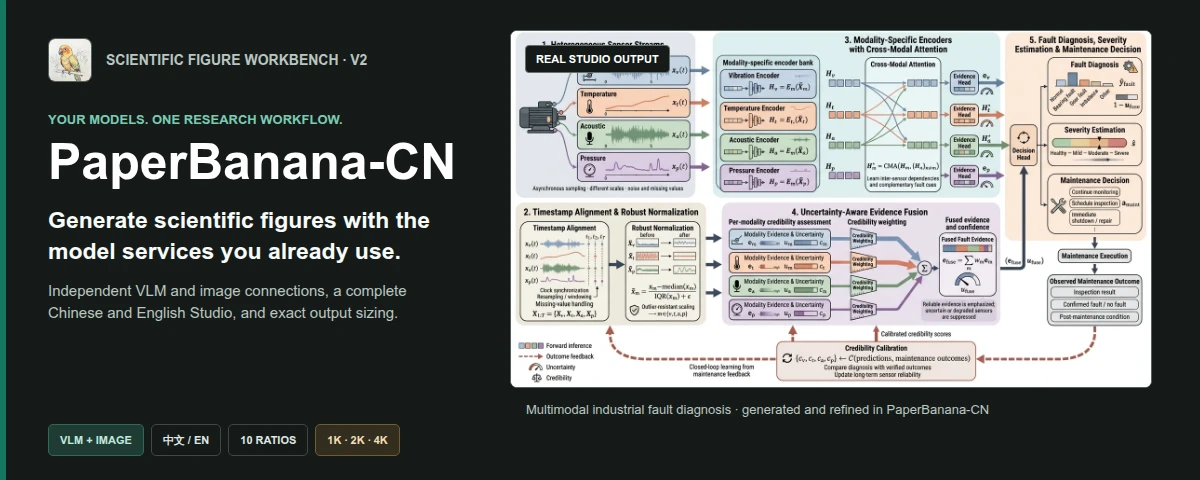









Turn method descriptions and research data into scientific diagrams and statistical plots.
Keep the PaperBanana workflow; choose your own VLM, image service, interface language, aspect ratio, and resolution.
See it work
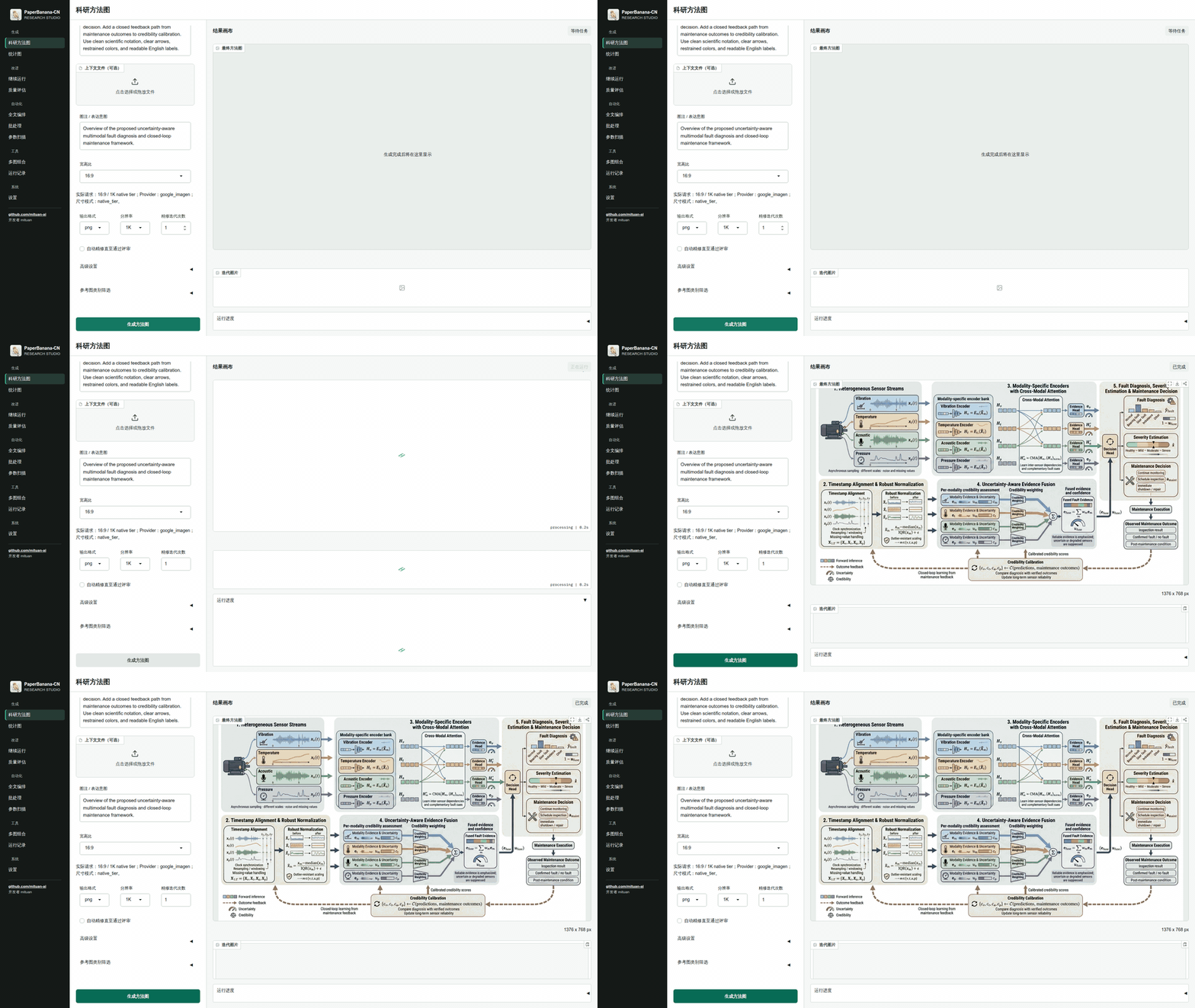
One real Studio run: configured input → live pipeline stages → completed result. No credentials or private endpoints are shown.
Real outputs, not mockups
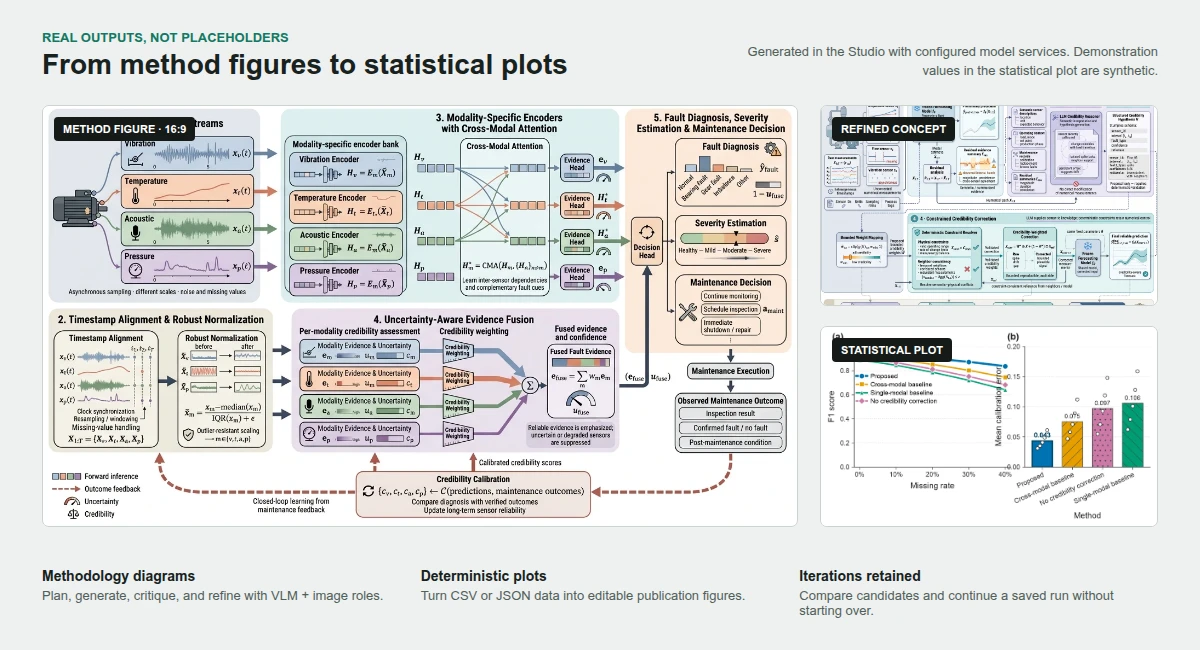
The methodology diagrams were generated and refined through the configured VLM and image roles.
The statistical plot uses PaperBanana's deterministic plotting path; its values are synthetic
demonstration data.
What V2 actually adds
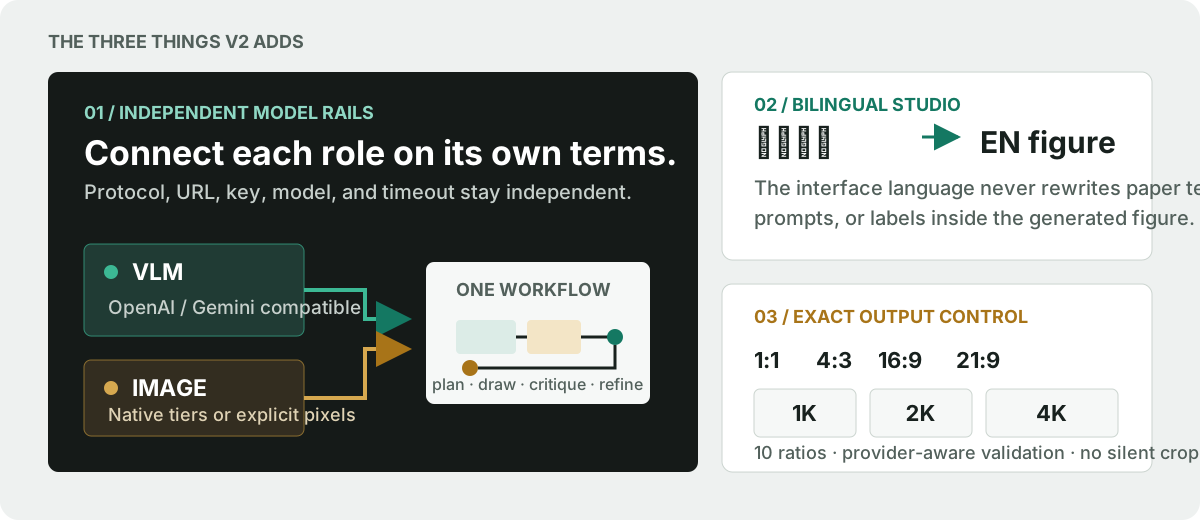
| Independent model rails | A complete bilingual Studio | Exact output control |
|---|---|---|
| Give the VLM and image generator different protocols, Base URLs, API keys, model names, and timeouts. | Switch the interface between Chinese and English without rewriting prompts, paper text, or labels inside the figure. | Choose 10 aspect ratios and 1K / 2K / 4K; unsupported combinations fail before a paid image request. |
Studio, CLI, and MCP resolve the same saved connections. API keys remain outside the repository,
are never filled back into the browser, and are excluded from run metadata.
Start in 60 seconds
1. Launch the desktop Studio
You need Python 3.10-3.12, uv, and a desktop browser:
uvx paperbanana-cn studio
Open http://127.0.0.1:7860. uvx uses an isolated environment and does not modify Debian or
Ubuntu's system Python.
2. Connect the two model roles
Open Settings → VLM connection, enter the protocol, Base URL, API key, exact model name, and
timeout, then select Save and use. Repeat under Image connection.
Show the connection manager[!TIP]
The two roles may use the same relay or completely different services. Editing a saved
connection does not activate it, and leaving the key field blank preserves the existing key.
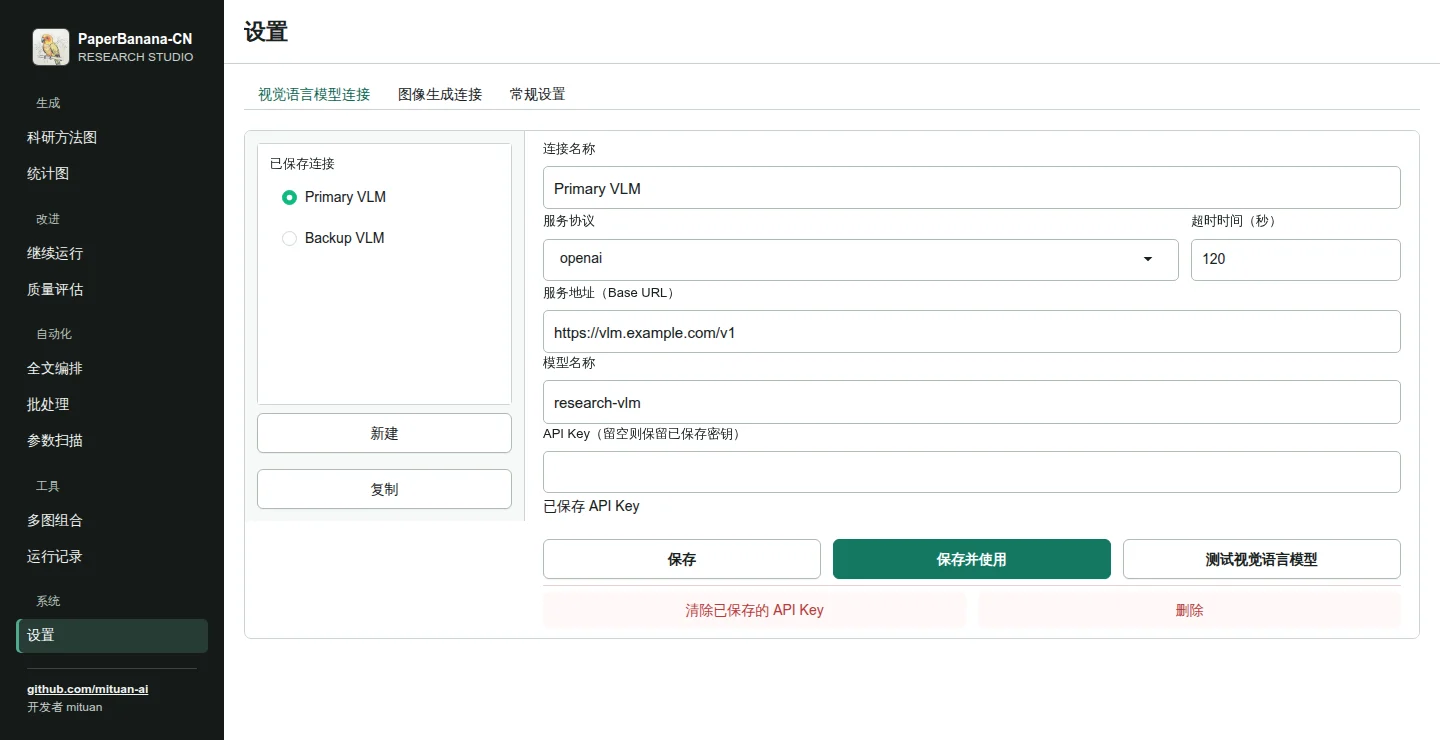
Supported protocols, credential storage, connection tests, and explicit legacy mode are documented
in the connection guide.
3. Generate
Choose Methodology diagram, add the method content and communicative intent, select the aspect
ratio and resolution, and run. The result canvas keeps the final figure, real output size,
iteration history, and download actions together.
The same task from the CLI:
paperbanana-cn generate \
  --input method.txt \
  --caption "Overview of the proposed architecture" \
  --aspect-ratio 16:9 \
  --resolution 2K \
  --format png
A workbench built around the result
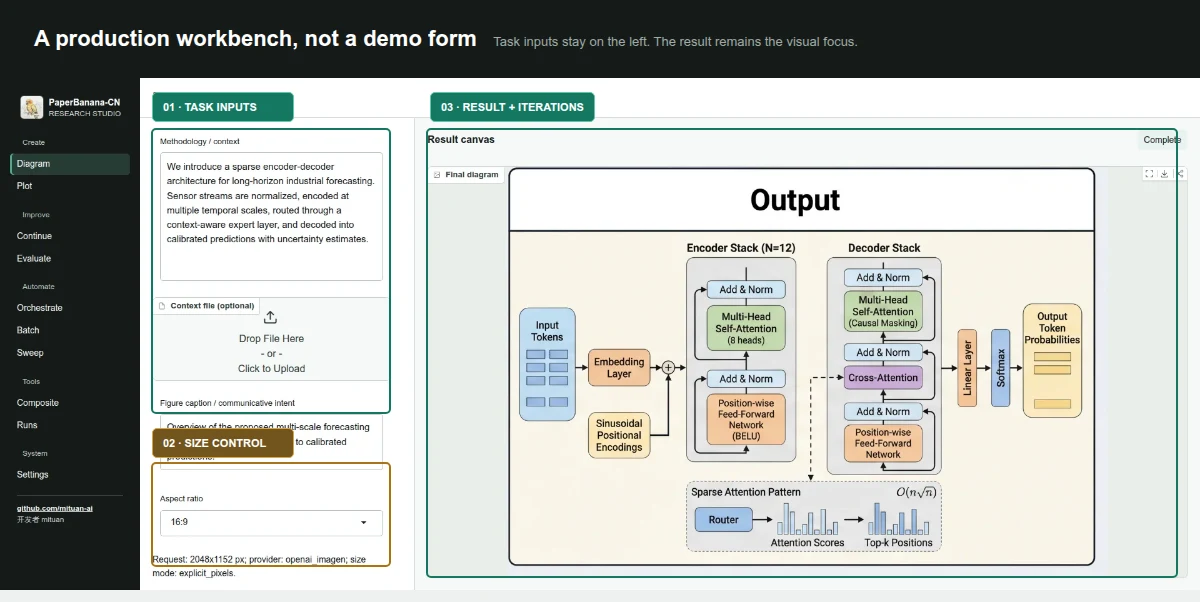
| Area | Workflows | Required connections |
|---|---|---|
| Create | Methodology diagram, statistical plot | VLM + image / VLM only |
| Improve | Continue a saved run, quality evaluation | Determined by the run / VLM only |
| Automate | Full-paper orchestration, batch, parameter sweep | Determined by the task |
| Tools | Multi-panel composite, run browser | None |
Task inputs stay in the left work area. The result canvas is the visual center; completed logs
collapse out of the way, while failed runs keep the input and expose the actionable error.
One scientific workflow
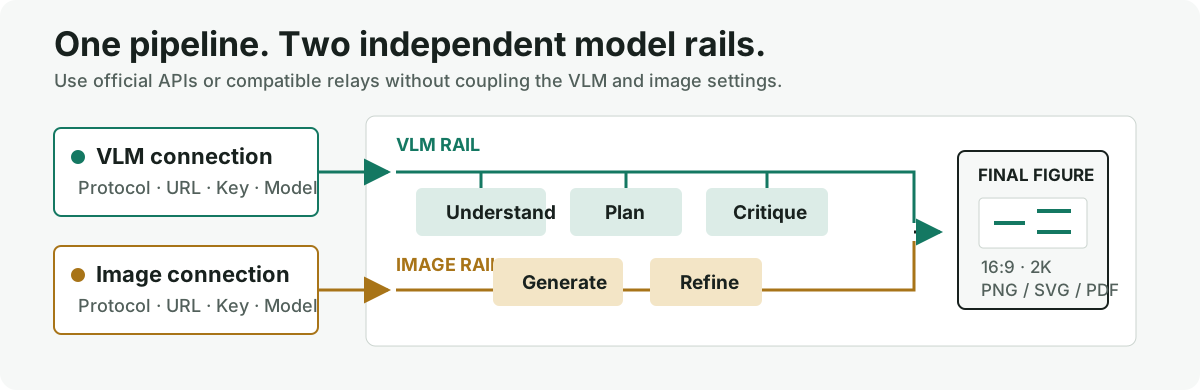
PaperBanana-CN does not maintain a second scientific pipeline. Retrieval, planning, candidate
generation, critique, refinement, deterministic plotting, recovery, batch processing,
orchestration, and vector export continue through the upstream PaperBanana workflow.
Use it your way
| Entry point | Best for | Start here |
|---|---|---|
| Studio | Interactive figure production and connection management | paperbanana-cn studio |
| CLI | Reproducible local runs and scripts | paperbanana-cn generate --help |
| MCP | Calling 11 figure tools from an MCP client | paperbanana-cn mcp |
| GitHub Action | Generating figures inside a repository workflow | Action reference |
| Docker | A pinned, isolated runtime | ghcr.io/mituan-ai/paperbanana-cn:2.0.1 |
| Colab | Trying the package in a hosted notebook | Quickstart notebook |
{
  "mcpServers": {
    "paperbanana-cn": {
      "command": "uvx",
      "args": ["paperbanana-cn", "mcp"]
    }
  }
}
The server reads the same active connections as Studio and CLI. See the
MCP guide for all
11 tools and their arguments.
docker run --rm -p 7860:7860 \
  -v paperbanana-cn-config:/home/paperbanana/.config/paperbanana-cn \
  -v paperbanana-cn-data:/home/paperbanana/.local/share/paperbanana-cn \
  -v paperbanana-cn-outputs:/work/outputs \
  ghcr.io/mituan-ai/paperbanana-cn:2.0.1 \
  studio --host 0.0.0.0
Output control without surprises
Aspect ratios
1:1 · 4:3 · 3:2 · 5:4 · 16:9 · 21:9 · 4:5 · 3:4 · 2:3 · 9:16
Resolution tiers
1K · 2K · 4K
Each image adapter declares whether it accepts native tiers, explicit pixels, fixed presets, or a
prompt hint. Studio shows the actual request size or native tier. It never silently crops,
stretches, or substitutes an unsupported ratio.
Install the command in an isolated, uv-managed environment:
uv tool install paperbanana-cn
paperbanana-cn studio
Run the current source checkout:
git clone https://github.com/mituan-ai/PaperBanana-CN.git
cd PaperBanana-CN
uv sync
uv run paperbanana-cn studio
The default package includes Studio, MCP, PDF input, OpenAI-compatible services, and Gemini.
| Optional adapter | Install |
|---|---|
| AWS Bedrock | uv tool install "paperbanana-cn[bedrock]" |
| Anthropic | uv tool install "paperbanana-cn[anthropic]" |
| LiteLLM | uv tool install "paperbanana-cn[litellm]" |
| All optional providers | uv tool install "paperbanana-cn[all-providers]" |
For CI, read credentials from environment variables rather than command-line values:
paperbanana-cn connections add \
  --role vlm \
  --name "Primary VLM" \
  --provider openai \
  --base-url "https://vlm.example.com/v1" \
  --model "your-vlm-model" \
  --api-key-env VLM_API_KEY
V1 is preserved. V2 moves forward.
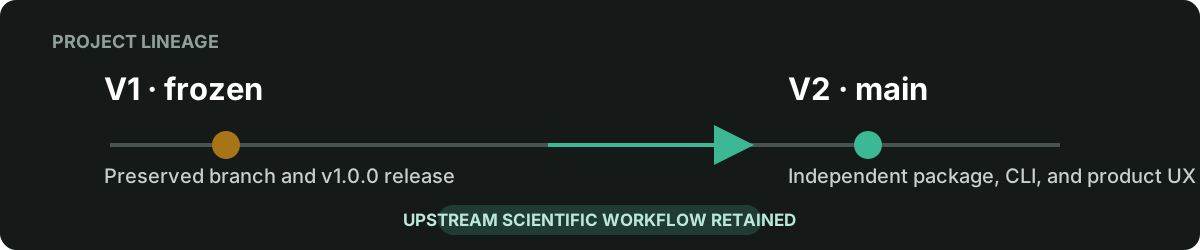
V2 is maintained on main as the paperbanana-cn distribution, paperbanana_cn Python module,
and paperbanana-cn command. V1 remains available as a frozen historical release:
Project and community
PaperBanana-CN is maintained by mituan.
- Ask usage questions in Discussions.
- Report reproducible bugs in Issues.
- Report vulnerabilities through Private Vulnerability Reporting.
- Read CONTRIBUTING.md before opening a pull request.
PaperBanana-CN is released under the
MIT License. Its scientific
figure-generation core is based onllmsresearch/paperbanana.
This is an unofficial community implementation and is not affiliated with or endorsed by the
upstream authors.
git clone https://github.com/mituan-ai/PaperBanana-CN.git
cd PaperBanana-CN
uv sync --extra dev
uv run pytest tests/ -q
uv run ruff check paperbanana_cn/ mcp_server/ tests/ scripts/
Never upload API keys, private relay URLs, unpublished papers, private datasets, local connection
stores, or generated run directories.
Star history
Yorumlar (0)
Yorum birakmak icin giris yap.
Yorum birakSonuc bulunamadi