marmonitor
Health Uyari
- License — License: MIT
- Description — Repository has a description
- Active repo — Last push 0 days ago
- Low visibility — Only 5 GitHub stars
Code Basarisiz
- child_process — Shell command execution capability in bin/postinstall.cjs
- fs module — File system access in bin/postinstall.cjs
- fs.rmSync — Destructive file system operation in bin/preuninstall.cjs
- os.homedir — User home directory access in bin/preuninstall.cjs
- fs module — File system access in bin/preuninstall.cjs
- process.env — Environment variable access in src/banner/index.ts
- exec() — Shell command execution in src/cli.ts
- rm -rf — Recursive force deletion command in src/cli.ts
- process.env — Environment variable access in src/cli.ts
Permissions Gecti
- Permissions — No dangerous permissions requested
This is a tmux status bar monitor that tracks active AI coding sessions (Claude, Codex, Gemini) in real time by reading local process information and session files.
Security Assessment
Overall risk: Medium. The tool behaves as expected for a system monitor but relies on several sensitive operations. It routinely executes shell commands (`child_process`) and reads environment variables to gather system data and process states. Because it interfaces directly with tmux, it requires access to the user's home directory. The primary security concern is its use of destructive file system operations (`fs.rmSync`, `rm -rf`). While these are isolated in the install/uninstall lifecycle scripts (`postinstall.cjs`, `preuninstall.cjs`) to clean up application files, any unexpected bugs in these scripts could potentially delete user data. No hardcoded secrets or external network requests were detected.
Quality Assessment
Quality is Moderate. The project is actively maintained (last pushed today) and is properly licensed under the permissive MIT license. However, community trust and visibility are currently very low. With only 5 GitHub stars, the project has not yet undergone widespread peer review or testing by the broader developer community.
Verdict
Use with caution — the core functionality is useful and well-intentioned, but the combination of low community review, shell command execution, and destructive cleanup scripts warrants a careful review of the source code before installing.
tmux status bar monitor for AI coding agents — track Claude, Codex, Gemini sessions in real time

tmux status bar monitor for Claude Code, Codex & Gemini — track AI coding sessions in real time



English | 한국어
Why marmonitor?
Running multiple AI coding agents in tmux is now the norm — Claude Code refactoring your backend, Codex writing tests in another pane, Gemini reviewing docs in a third. But as sessions multiply, you hit the same wall:
- You switch to a pane only to find the agent has been waiting for
allowfor 10 minutes - You forget which window has the Codex session you were just working with
- You have no idea how many tokens you've burned across sessions
There's no dashboard for this. You're alt-tabbing between panes, checking each one manually.
marmonitor fixes this. One line in your tmux.conf, and your status bar becomes a live control panel for every AI session on your machine.
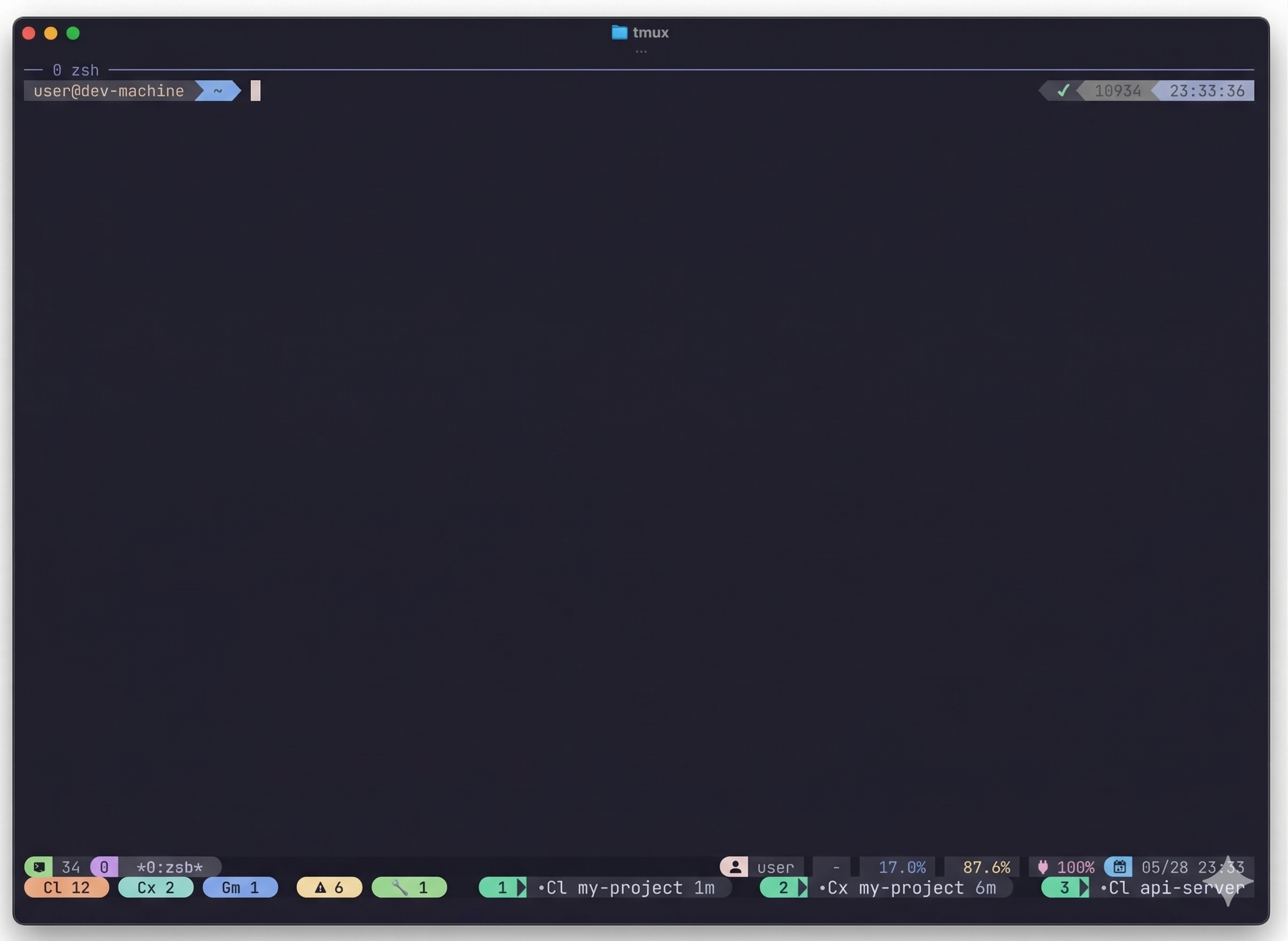
Agent counts, phase badges, and numbered attention pills — all in your tmux bar
What it does
tmux statusline — always visible at the bottom of your terminal:
- Agent counts (
Cl 12,Cx 2,Gm 1) — how many sessions are running - Phase alerts (
⏳ 1,🤔 2,🔧 1) — which sessions need attention - Numbered pills (
1 ⏳Cl my-project allow,2 •Cx api-server 6m) — jump to any session withOption+1~5
Attention priority — sessions that need your input come first:
- ⏳
permission(allow waiting) is always #1 — you need to approve - 🤔
thinking(AI responding) is #2 — result coming soon - Then most recently active sessions, so you can quickly return to what you were working on
Quick jump — press Option+1 to jump directly to the #1 attention session's tmux pane. No searching through windows.
Full status — marmonitor status shows everything:
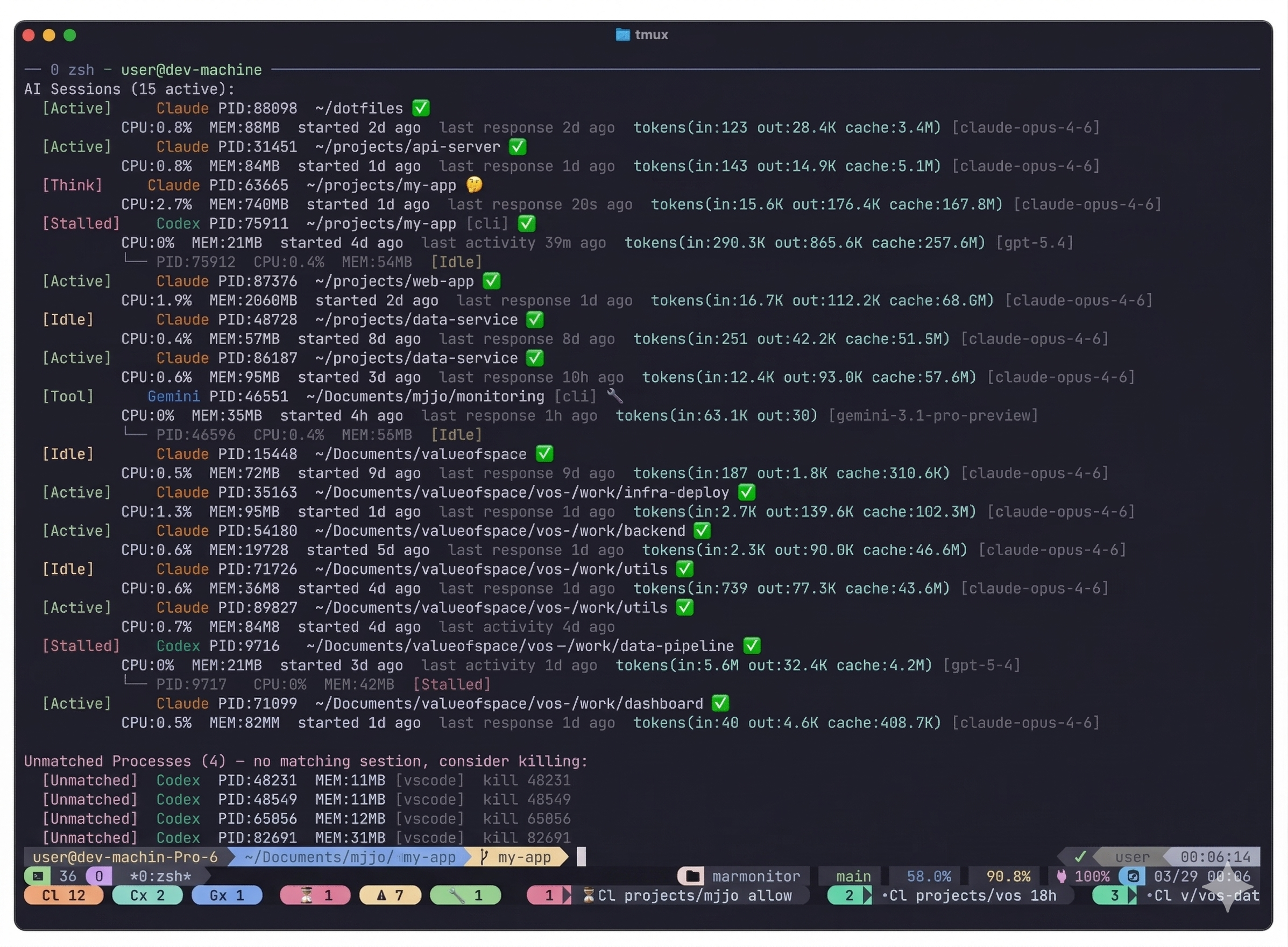
All sessions with status, tokens, phase, CPU/MEM, and worker process tree
Zero instrumentation — no API keys, no agent plugins, no code changes. marmonitor reads local process info and session files from the outside. Two commands to get started: npm install -g marmonitor then marmonitor setup tmux.
Built for the tmux + AI multi-session workflow. If you run 5+ AI coding sessions daily across different projects, marmonitor turns context-switching from guesswork into a glance at your status bar.
Supported Agents
| Agent | Detection | Session Enrichment | Phase Tracking |
|---|---|---|---|
| Claude Code | Native binary | Tokens, timestamps, model | thinking, tool, permission, done |
| Codex | Binary + cmd fallback | Tokens, timestamps, model | thinking, tool, done |
| Gemini | cmd fallback | Tokens, timestamps, model | thinking, tool, done |
Install
1. Install marmonitor
npm install -g marmonitor
2. Set up tmux integration
marmonitor setup tmux
This adds the marmonitor-tmux plugin to your ~/.tmux.conf. Then press prefix + I inside tmux to activate.
After upgrading marmonitor, run:
marmonitor update-integration
This checks whether your tmux integration also needs a TPM/plugin update.
If you updated the TPM plugin with prefix + U but click actions or popup keybindings still behave like the old version, re-apply the plugin in the running tmux server:
tmux run-shell ~/.tmux/plugins/marmonitor-tmux/marmonitor.tmux
This mainly affects existing tmux sessions after a plugin upgrade. Fresh installs via prefix + I usually load the current bindings immediately.
set -g @plugin 'mjjo16/marmonitor-tmux'
Requires tpm.
Manual install (without tpm)git clone https://github.com/mjjo16/marmonitor-tmux ~/.tmux/plugins/marmonitor-tmux
Add to ~/.tmux.conf:
run-shell ~/.tmux/plugins/marmonitor-tmux/marmonitor.tmux
git clone https://github.com/mjjo16/marmonitor.git
cd marmonitor
npm install && npm run build
npm link
Quick Start
Once installed, your tmux status bar automatically shows AI session badges. You also get:
| Shortcut | Action |
|---|---|
prefix + a |
Attention popup — choose a session to review |
prefix + j |
Jump popup — pick a session to jump to |
prefix + m |
Dock — compact monitor pane |
Option+1~5 |
Direct jump to attention session #1~5 |
CLI commands:
marmonitor status       # Full session inventory
marmonitor attention    # What needs your input?
marmonitor watch        # Live full-screen monitor
marmonitor help         # All commands and options
Phase Icons
| Icon | Phase | Meaning |
|---|---|---|
| ⏳ | permission |
AI requesting tool approval — user input needed |
| 🤔 | thinking |
AI generating a response |
| 🔧 | tool |
Approved tool executing |
| ✅ | done |
Response complete, awaiting next instruction |
Status Labels
| Label | Meaning |
|---|---|
[Active] |
CPU activity detected |
[Idle] |
Process alive, no recent activity |
[Stalled] |
No activity for extended period |
[Dead] |
Session file exists but process is gone |
[Unmatched] |
AI process found but no matching session |
tmux Plugin
The marmonitor-tmux plugin handles all tmux setup automatically:
- 2nd status line with agent badges and attention pills
- Key bindings for popup, jump, and dock
- Option+1~5 direct jump
All settings are customizable via @marmonitor-* options. See the plugin README for details.
Badge styles
tmux badges and terminal text output can share one style via integration.tmux.badgeStyle.
basic— default colored pillsbasic-mono— monochrome pills with Powerline borderstext— plain colored text, no filled backgroundtext-mono— grayscale text only
Configuration
Config is loaded from (first found wins):
$XDG_CONFIG_HOME/marmonitor/settings.json~/.config/marmonitor/settings.json~/.marmonitor.json
# View current config path and values
marmonitor settings-path
marmonitor settings-show

# Generate a starter config
marmonitor settings-init --stdout
Example Config
{
  "display": {
    "attentionLimit": 10,
    "statuslineAttentionLimit": 5
  },
  "status": {
    "stalledAfterMin": 20,
    "phaseDecay": {
      "thinking": 20,
      "tool": 30,
      "permission": 0,
      "done": 5
    }
  },
  "integration": {
    "tmux": {
      "badgeStyle": "basic",
      "keys": {
        "attentionPopup": "a",
        "jumpPopup": "j",
        "dockToggle": "m",
        "directJump": ["M-1", "M-2", "M-3", "M-4", "M-5"]
      }
    }
  }
}
Uninstall
marmonitor uninstall-integration    # Remove tmux settings + restore status bar
npm uninstall -g marmonitor         # Remove CLI
Safety
- Read-only by default — observes only, never modifies your sessions
- No network — zero outbound connections, all data stays local
- Conservative defaults — all integrations are opt-in
- tmux-first — terminal-native WezTerm/iTerm2 surfaces are currently paused
Contributing
See CONTRIBUTING.md for setup, commit conventions, and PR guidelines. For architecture details, see ARCHITECTURE.md.
Known Limitations
- Pane jump requires tmux
- WezTerm / iTerm2 native bars are paused for now; tmux is the supported surface
- Gemini permission detection is limited due to Ink TUI architecture
- Phase detection relies on heuristics — accuracy varies by agent
- macOS first; Linux support is untested
License
MIT — MJ JO
Yorumlar (0)
Yorum birakmak icin giris yap.
Yorum birakSonuc bulunamadi