mkagent
Health Warn
- License — License: Apache-2.0
- Description — Repository has a description
- Active repo — Last push 0 days ago
- Low visibility — Only 6 GitHub stars
Code Fail
- fs module — File system access in .github/workflows/upstream-drift.yml
- spawnSync — Synchronous process spawning in apps/cli/src/client.test.ts
- process.env — Environment variable access in apps/cli/src/client.test.ts
- network request — Outbound network request in apps/cli/src/client.test.ts
- process.env — Environment variable access in apps/cli/src/commands.test.ts
- Hardcoded secret — Potential hardcoded credential in apps/cli/src/commands.test.ts
- process.env — Environment variable access in apps/cli/src/index.ts
- process.env — Environment variable access in apps/cli/src/server-spawner.ts
Permissions Pass
- Permissions — No dangerous permissions requested
No AI report is available for this listing yet.
A local-first, Pi-powered AI agent workspace for Desktop, WebUI, and CLI
MkAgent
A local-first, Pi-powered AI agent workspace for Desktop, WebUI, and CLI.



Website · Documentation · 中文文档 · Quick Start · Community ·
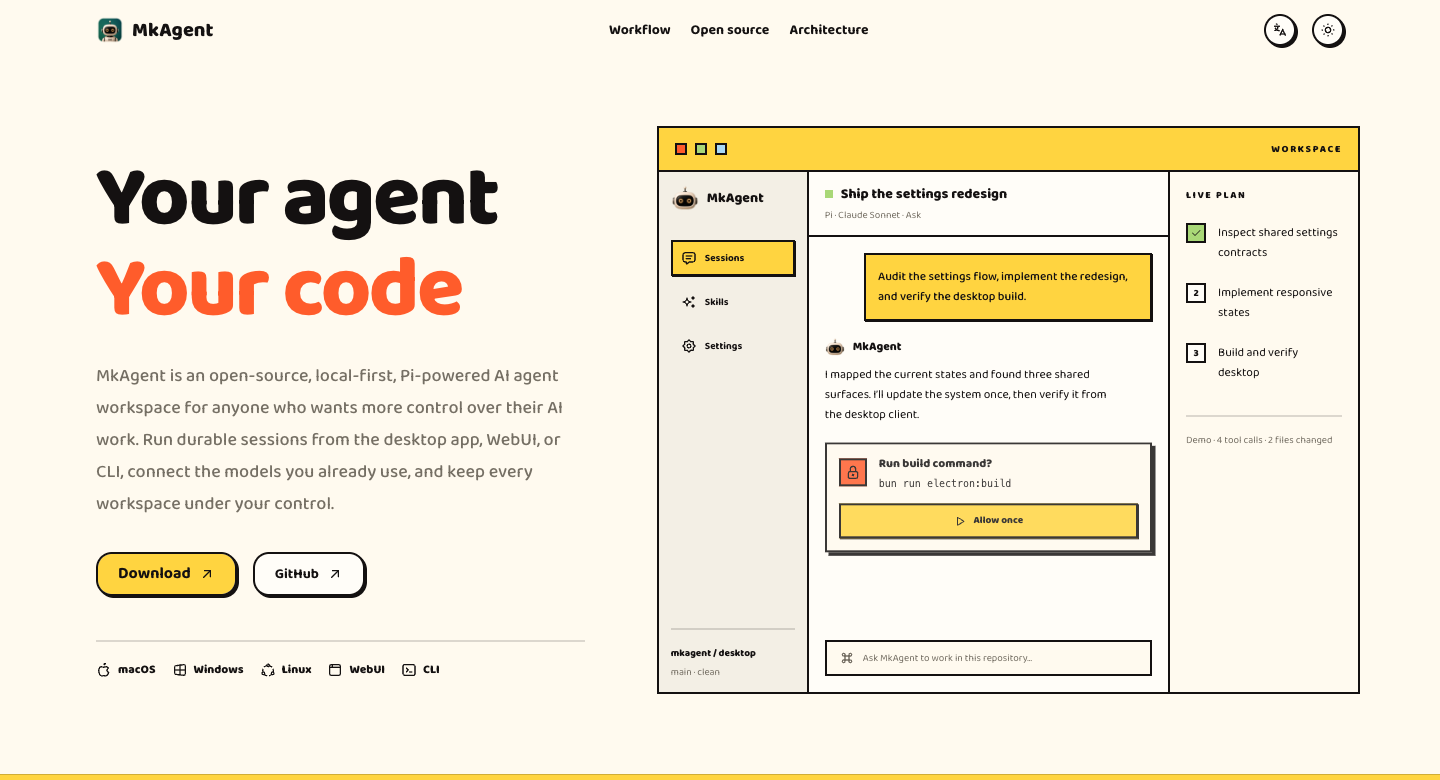
MkAgent is an open-source, local-first AI agent workspace for anyone who wants more control over
their AI work. Download and use it through Desktop, WebUI, or CLI, or extend its open-source
foundation to build your own desktop agent product. Powered by the
Pi agent runtime, it combines persistent local workspaces,
model flexibility, browser tools, and document tools in one application.
Application state stays under your local data directory, and credentials are stored through the
operating system credential manager.
Features
- Local-first workspaces — keep sessions, files, settings, and workspace history on your machine.
- Flexible model connections — use ChatGPT Plus, Claude Pro/Max, provider API keys,
OpenAI-compatible or Anthropic-compatible endpoints, and local Ollama models. - Desktop, WebUI, and CLI — work through the Electron app, a browser-based renderer, or an RPC
command-line client backed by the same runtime. - Agent workflows — create and branch sessions, build plans, use Skills, resume work, manage
follow-ups, and run multiple windows. - Built-in tools — browse the web, work with attachments, render Markdown and code, and inspect
or transform common document formats. - Explicit control — choose Explore, Ask, or Execute permission modes, configure a network
proxy, and switch between English and Simplified Chinese.
Tech Stack
- Bun — Workspace runtime, package manager, scripts, and tests.
- Electron — Cross-platform desktop application shell.
- React and TypeScript — Shared user
interface and typed application code. - Vite and Tailwind CSS — Renderer tooling and styling.
- Pi — Agent runtime, model providers, sessions, and tool execution.
Interfaces
| Interface | Best for | Command |
|---|---|---|
| Desktop | Full local experience and browser pane | bun run electron:dev |
| WebUI | Browser access to the headless server | bun run server:prod |
| CLI | Scripting, remote control, and terminal workflows | bun run apps/cli/src/index.ts --help |
Getting started
Prerequisites
- Bun 1.3.14 or later
- Node.js 18 or later
- Git
- Python 3.12 and
uvfor the complete document-tool test suite
Run the Desktop app
git clone https://github.com/MkThingsHQ/mkagent.git
cd mkagent
bun install --frozen-lockfile
bun run electron:dev
MkAgent creates its default workspace at ~/.mkagent/workspaces/default. The configuration root can
be isolated for development or testing with CONFIG_DIR=/path/to/directory.
Common commands
| Command | Description |
|---|---|
bun run electron:dev |
Start the Electron development environment |
bun run electron:start |
Build and launch Electron once |
bun run server:prod |
Build and start the headless server with WebUI |
bun run cli:build |
Build the CLI bundle |
bun run test |
Run unit and isolated tests |
bun run validate:ci |
Run the full type, test, document-tool, and localization gate |
More commands and environment variables are documented in the
development guide.
Architecture
MkAgent is a Bun workspace with a shared runtime and renderer across its three interfaces:
apps/
  electron/              Electron main, preload, renderer, and Browser pane
  webui/                 Browser adapter for the shared renderer
  cli/                   RPC command-line client
packages/
  core/                  Stable DTOs, events, and error contracts
  shared/                Configuration, credentials, prompts, Skills, theme, and i18n
  ui/                    Shared React UI and content renderers
  server-core/           RPC transport, sessions, and runtime orchestration
  server/                Headless server
  pi-agent-server/       Pi agent subprocess
  session-tools-core/    Plans, Skills, browser, and session tools
Read the architecture guide for runtime boundaries, process ownership, and
data flow.
Documentation
The complete documentation is available in English and
Simplified Chinese.
| Area | Guides |
|---|---|
| Start here | Development, architecture, testing |
| Models | Connections, Ollama |
| Work | Workspaces, sessions, Skills |
| Tools | Browser, attachments, document tools |
| Runtime | CLI, permissions, network proxy |
| Project | features, releases, upstream synchronization |
Contributing
Contributions are welcome. Fork the repository, create a focused branch, include tests and
documentation with behavioral changes, and run the relevant checks before opening a pull request.
For the complete local gate:
bun run validate:ci
git diff --check
Use GitHub Issues for bugs and feature requests.
Links
- Website — Learn more about MkAgent.
- Documentation — Explore setup, architecture, models, tools, and development guides.
- Chinese documentation — Read the Simplified Chinese guides.
- Discord — Join the community and get help.
- GitHub Issues — Report bugs or request features.
Project lineage
MkAgent started from selected architecture and code in
Craft Agents OSS v0.11.2
(a60ebc1a5a7c) and continues with an independent Git history and product boundary. MkAgent is not
affiliated with or endorsed by the upstream project. See NOTICE for attribution and the
comparison guide for the current differences.
Author
OpenFox is an independent developer building products and developer
tools. His products include:
- MkAgent — A local-first, Pi-powered AI agent workspace for Desktop, WebUI,
and CLI. - TanStarter — Ship Faster with TanStack, Cost Less with Cloudflare.
- MkSaaS — Make Your AI SaaS Product in a Weekend.
- MkImage — Make Any Images Possible.
- Mkdirs — Launch AI-powered directory in 30 minutes.
- MkDollar — The all-in-one platform to help you make first dollar online.
License
Licensed under the Apache License 2.0. You may use, modify, and distribute the code,
including for commercial purposes, subject to the license terms and the attribution in
NOTICE.
Reviews (0)
Sign in to leave a review.
Leave a reviewNo results found