membridge
Health Uyari
- License — License: NOASSERTION
- Description — Repository has a description
- Active repo — Last push 0 days ago
- Low visibility — Only 5 GitHub stars
Code Basarisiz
- fs.rmSync — Destructive file system operation in app/main.js
- fs module — File system access in app/main.js
- network request — Outbound network request in app/main.js
- child_process — Shell command execution capability in bin/membridge.js
- spawnSync — Synchronous process spawning in bin/membridge.js
- fs.rmSync — Destructive file system operation in bin/membridge.js
- process.env — Environment variable access in bin/membridge.js
- fs module — File system access in bin/membridge.js
- os.homedir — User home directory access in lib/adapters/claude-code.js
- os.homedir — User home directory access in lib/adapters/codex.js
Permissions Gecti
- Permissions — No dangerous permissions requested
Bu listing icin henuz AI raporu yok.
A shared memory and collaboration tool for teams. Syncs context between Claude Code, Codex, Gemini, and any AI agent.
MemBridge — your team's AI work, in one place
One app where your whole team sees what everyone's AI coding tools are
doing — and where the tools themselves stay on the same page.
MemBridge is a team collaboration app for AI-assisted development. It lives
in your menu bar, and its dashboard is the product: one unified,
summary-first feed of everything your team's AI tools got done — you and
your teammates, across every project, newest first — plus, underneath it all,
a memory engine that keeps Claude Code, Codex, Gemini CLI, and any other
agent aware of each other's work, across tools and across teammates.
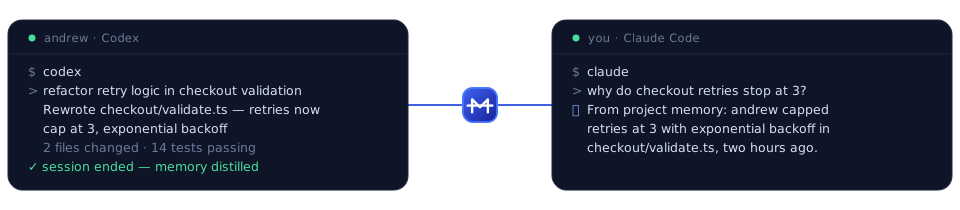
So when Andrew's Codex refactors checkout validation, you see it in the
feed — leading with what got done, not just the prompt — and your Claude
Code already knows about it the next time you open the project.
The whole dashboard is three surfaces: Home (the feed), project
pages, and Settings. Nothing else to learn.
Everything starts local: no cloud, no accounts, no API keys until you decide
to connect a team. (Prefer a terminal? Everything the app does is also a
CLI.)
The dashboard — three surfaces
The header is just: logo · a running/sync status pill (click it to sync
now) · Invite · a settings gear. Everything else is one of three
surfaces.
Home — the unified feed
The default view is a single centered column: every ask your team's AI
tools completed, you and your teammates, across all projects, newest first.
Each entry is summary-first — it leads with what got done, with the
original prompt tucked underneath as a muted Asked: line — and carries a
per-person avatar, the tool that did it, a project pill, the files it
touched, and a relative time. A session that's still running (or a tool that
doesn't distill) shows a Working on: line instead, so unfinished work
never looks finished.
Three quiet filter chips sit above the feed — person, project,
tool — populated from the feed itself. Click a person anywhere to filter
the feed to them; click a project pill to open its page. If the team backend
is briefly unreachable, the feed still renders your local work with a
one-line notice and recovers on the next poll.
Project pages
Open any project and you get one merged stream — your local work and your
teammates' interleaved, same summary-first format, grouped by day. The
header carries Copy for AI (a trimmed, redacted digest on your clipboard
for pasting into ChatGPT, claude.ai, or any web AI that can't see your disk)
and a ⋯ menu for everything else: open the memory log, see the
context-file targets, pause/resume, share with the team or unlink, remove
the injected memory block, or delete the project. The roadmap generator
lives in a collapsed section at the bottom.
Settings
One place for app settings and all management. Team: switch or rename
a team, manage members and roles, mint and revoke invite links, create/join
another team or leave, and your account with log out. Projects: add a
project, run the detected-tools scan, and manage the watched-projects list
(pause or delete) — the way to reach a project with no recent feed activity.
Plus the usual settings: session summaries (distillation toggle and
checkpoint knobs), bring-your-own-key and planner model, sync interval and
target files, and a self-hosted-backend card for operators. No config-file
editing required.
Signing up, creating a team, inviting people, joining, and linking projects
all happen right in the app — no terminal required.
Teammates who haven't installed anything can still follow along: the
hosted web workspace (web/, Next.js + Supabase) opens
invite links at /join/<token>, shows a day-grouped feed with filters,
project stats, and member/role/invite management from any browser.
How it works — the memory engine
Every AI coding assistant keeps its own siloed session history. Claude Code
doesn't know what Codex did this morning; your Codex has no idea what your
teammate's Claude Code shipped an hour ago.
But every major tool already reads a per-project context file at startup —CLAUDE.md for Claude Code, AGENTS.md for Codex and most agents,GEMINI.md for Gemini CLI — and writes its session transcripts to a known
folder on disk. MemBridge's background daemon connects the two: it watches
the transcripts, distills a brief per-project memory, and injects it into
every context file inside a clearly-delimited block:
Claude Code ─┐ ┌─> CLAUDE.md (read by Claude Code)
Codex ───────┼─> per-project shared ────┼─> AGENTS.md (read by Codex & most agents)
any tool ────┘ memory └─> GEMINI.md… (configurable)
⇅
team sync (opt-in, redacted) — your teammates' MemBridge daemons
<!-- membridge:begin -->
## Shared AI memory (MemBridge)
Recent asks across tools:
- 2026-07-09 10:00 · Claude Code: Build the login page with OAuth
- 2026-07-09 10:06 · Codex: Add unit tests for the login form
Teammates' AI activity (MemBridge team sync):
- 2026-07-09 10:30 · Andrew · Codex: Refactor checkout validation
Files recently modified by AI tools: src/login.js
<!-- membridge:end -->
The rest of your file is never touched, and the Remove block button (ormembridge remove) strips the blocks cleanly.
Beyond the brief block, MemBridge keeps a structured memory database inside
each project at .membridge/:
memory.json— every AI update as a structured entry: timestamp,
which tool, what was asked, and exactly which files it touched, plus an
index of the project's local files (ignore-aware, sonode_modules/.gitnever pollute it) that lets one LLM point another at
the precise files a change refers to.memory.md— the same memory rendered as markdown, readable by humans
and by any agent that opens the project.
Add .membridge/ to your project's .gitignore if you don't want the
memory committed — or commit it to share AI context with your whole team.
Quick start
Install the app + CLI (macOS, Apple Silicon) with one command. It
downloads the pinned release, installsMemBridge.appto/Applications
and themembridgeCLI to/usr/local/bin, and launches with no
Gatekeeper warning:curl -fsSL https://membridge.me/install.sh | shThe app opens with zero prompts —
curldownloads without thecom.apple.quarantineflag that triggers Gatekeeper. Installing the CLI
into/usr/local/binmay ask for your password once. Prefer to read before
you run?curl -fsSL https://membridge.me/install.sh -o install.shand
inspect it — it verifies the download's SHA-256 before touching your disk.
On Intel Macs, Windows, or a server, use the CLI via npm instead.Watch your own tools sync. That's the zero-setup core: the Home feed
fills with your work, and Claude Code and Codex start seeing each
other's work. No account needed for any of this.Create your team from the header Invite button (or Settings →
Team): sign up, create the team, mint an invite, and share the link (add
an expiry or use cap if you like).
The backend ships with the app — nothing to install or configure.Teammates join by opening the invite link in the web workspace (one
click, works before they've installed anything) — then install the app
so their own AI activity flows into the feed. Terminal folks:membridge join <link>does signup and join in one command.Share a project from Settings → Projects (or a project page's
⋯menu) — and commit the resulting.membridge/team.jsonso teammates'
clones connect
too. When MemBridge spots a clone of a repo a teammate already shares
(same normalized git remote), it suggests the link in the dashboard —
nothing is shared until you confirm (or opt into"team": { "autoLink": true }).
What leaves your machine (and only for linked projects): the same
redacted digest entries you see in .membridge/memory.md — timestamps, tool
names, redacted asks, relative file paths. Never file contents, never
unlinked projects, and row-level security means only your team's members can
read any of it.
Team sync talks to a Supabase project. Official builds ship pointed at the
hosted MemBridge backend (baked into lib/backend.json),
so users configure nothing. To run your own instead:
- Create a Supabase project (free tier is plenty),
open its SQL Editor, and runsupabase/schema.sql
followed by the files insupabase/migrations/
(invite links, roles, the feed the apps use). - Grab the Project URL and
anonpublic key from Settings → API. Both are
safe to publish — the anon key is meant for client apps, and row-level
security is what protects the data. - Either bake them into
lib/backend.jsonbefore building, or point an
existing install at them per-machine:membridge team setup --url https://<ref>.supabase.co --anon-key <anon key>
Session summaries (distillation)
Harvested summaries (the agent's last chat message) are decent; a summary
the agent writes on purpose is better. The app asks once, on first run,
whether to turn this on; the Settings → Session summaries card toggles it
any time (CLI: membridge setup-hooks / remove-hooks).
Enabled, it registers a
Stop hook in~/.claude/settings.json. When a Claude Code session that edited files
tries to stop, the hook blocks the stop once and asks the agent to save
one JSON line — via a single pre-approved append command, no narration — to<project>/.membridge/summaries.jsonl:
{"session":"<id>","ts":"<ISO time>","goal":"What was asked.","did":"What changed in the project.","decisions":"Key choices.","gotchas":"Surprises.","highlights":[{"file":"lib/feed.js","note":"why it matters"}]}
MemBridge merges these as high-quality Distilled summaries that take
precedence over harvested ones everywhere — the context block, memory.md,
the Copy-for-AI digest, and the team feed (redacted like everything else
before it leaves the machine). So the feed your teammates read is written by
the agent that did the work, on purpose.
Checkpoints, not one-shot. A ten-turn session shouldn't be frozen by a
summary it wrote in turn two. The first checkpoint is asked once a session
has distill.minEdits edits (default 1); after that, the hook re-blocks
every distill.checkpointEvery further edits (default 4) and asks for a
fresh line summarizing the whole session so far, phrased as the outcome a
teammate would experience. Each line is appended, never edited — the newest
line is the summary; older ones are the session's history. The context
block and team feed always show the latest checkpoint, while memory.md
keeps the full numbered sequence so anyone can read the whole arc of a long
session. Both knobs live under Settings → Session summaries → Advanced.
Consent model. Nothing is installed silently: the daemon never touches~/.claude/settings.json on its own — only the first-run prompt, the
Settings toggle, or membridge setup-hooks do, they append without
disturbing your existing hooks — the Stop hook plus one narrow auto-approve
rule so the summary write never raises a permission prompt — and turning it
off strips exactly what was added. The hook itself is strictly fail-open —
any error, a paused/untracked project, a too-small session, ordistill.enabled: false means Claude Code stops normally, uninterrupted. It
never blocks the same stop twice.
Codex fallback (tiering). Claude Code is the enforced tier — the Stop
hook guarantees the ask. Tools reading AGENTS.md (Codex and friends) have
no hook, so they get the requested tier: the injected block carries a
standing instruction to append the same summary line on task completion.
Well-behaved agents comply; nothing breaks when they don't — MemBridge just
falls back to the harvested summary.
Roadmaps — the bring-your-own-key upgrade
The free core never talks to any API. Add your own Anthropic API key in
Settings and each project page's roadmap section (collapsed at the
bottom) becomes a generator:
- Describe what you want to build next; the estimated cost sits on the
button before you click (about 1¢ per roadmap with the default model). - You get a phased plan where every task names the AI model that should do
it — "Everyday — Haiku" up to "Frontier — Fable", plus an independent
"Cross-check — Codex" — each with a one-line reason and a size. The
routing philosophy is baked in: start cheap, escalate on failure — never
the reverse. - The actual cost, from real usage, is shown afterwards. The plan is saved
to.membridge/plan.json, and one line —Current roadmap: …— is
written into the shared memory block, so Claude Code and Codex see the
plan too. - What's sent to Anthropic (with your key, only when you click Generate):
the project's name, your goal, recent asks (already redacted), file paths
touched, and top-level folder names. Never file contents, never other
projects.
The CLI
Everything above is also a command — the app and the CLI are the same
daemon at feature parity, so headless boxes, Linux, and terminal-first
teammates are first-class:
npm install -g membridge
membridge scan # read-only: see which AI tools and projects it found
membridge start # run the background daemon
membridge dashboard # open the same dashboard in your browser
| Command | What it does |
|---|---|
membridge start / stop / status |
Manage the background daemon |
membridge dashboard |
Open the web UI at http://127.0.0.1:7437 |
membridge sync [--dry-run] [--project <path>] |
One sync pass right now |
membridge scan |
Read-only report of discovered tools and projects |
membridge remove [--project <path>] |
Strip injected memory blocks |
membridge enable-autostart / disable-autostart |
Run at login |
membridge setup-hooks / remove-hooks |
Session distillation hook (see above) |
membridge signup / login / logout |
Team account |
membridge join <link-or-code> |
Accept an invite (creates the account if needed) |
membridge team create / invite / revoke-invite |
Create a team, mint and revoke invite links |
membridge team link / unlink / list |
Share (or stop sharing) a project with your team |
membridge team setup |
Advanced: point at a self-hosted backend |
membridge mcp |
Start a read-only MCP server over stdio (see below) |
MCP server (read-only)
membridge mcp exposes the same shared memory as a set of read-only MCP
tools — list_projects, get_project_memory, get_recent_activity,search_memory — so MCP-capable clients (Claude Desktop, Cursor, Cowork, ...)
can query it live, over stdio. No trigger/side-effect tools: nothing it
exposes can push/pull team sync, write a context file, or mutate state, and
every text field is redacted the same way CLAUDE.md/AGENTS.md injection is.
It's opt-in: @modelcontextprotocol/sdk and zod are not part of MemBridge's
core install (npm install membridge stays zero-dependency), so a one-time
install is needed the first time you use it:
npm install @modelcontextprotocol/sdk zod
Then point your MCP client's config at:
{
"mcpServers": {
"membridge": {
"command": "membridge",
"args": ["mcp"]
}
}
}
Supported AI coding tools
| Tool | Support | How |
|---|---|---|
| Claude Code | Built in | Reads ~/.claude/projects transcripts, writes CLAUDE.md |
| Codex (OpenAI) | Built in | Reads ~/.codex/sessions rollouts, writes AGENTS.md |
| Gemini CLI | Custom adapter | Point a config-driven adapter at its logs, add GEMINI.md to targets |
| Cursor, opencode, Copilot CLI, … | Custom adapter | Any tool that logs sessions as JSONL works — no code required |
Configuration (advanced)
The Settings view covers the common options. Under the hood it's~/.membridge/config.json (created on first run), which also holds the
advanced ones:
{
"intervalSec": 60, // how often to sync
"dashboardPort": 7437,
"targets": ["CLAUDE.md", "AGENTS.md"], // add "GEMINI.md" etc.
"exclude": ["C:\\work\\secret-project", "*archive*"],
"redactDefaults": true, // built-in secret redaction (see below)
"redact": [], // your own regexes, replaced with [redacted]
"redactExtra": [], // additive, same syntax as redact
"maxPrompts": 8,
"maxFiles": 10,
"distill": { "enabled": true, "minEdits": 1, "checkpointEvery": 4 }, // Stop-hook session checkpoints
"adapters": {
"claude-code": { "enabled": true },
"codex": { "enabled": true },
"custom": []
}
}
To pause a single project, click Pause in the dashboard — or drop an empty.membridge-off file in its root.
Connect any other AI tool (custom adapters)
If a tool logs its sessions as JSONL anywhere on disk, wire it up in config —
no code required:
"custom": [{
"id": "mytool",
"displayName": "MyTool",
"dir": "/home/me/.mytool/sessions",
"fields": {
"project": "dir", // dot-path to the project path on each line
"timestamp": "when", // dot-path to an ISO timestamp
"text": "say", // dot-path to the user's message
"role": "who", // optional filter field...
"roleValue": "user" // ...and required value
}
}]
Dot-paths work for nested fields (payload.cwd). If the project path appears
only once per file (like Codex's session_meta), MemBridge carries it forward
automatically.
Privacy and security
- 100% local by default. The daemon binds to
127.0.0.1only; nothing
leaves your machine unless you opt in. The two optional network paths:
team sync (only redacted digest entries, only for projects you explicitly
link) and the roadmap generator (your own Anthropic key, only when you
click Generate, sending only the redacted digest listed above; the key
lives in~/.membridge/config.json, chmod 600, never in any project
folder, and is never shown back to the dashboard page). No telemetry. - Secrets are redacted by default, everywhere text leaves a transcript —
the injectedCLAUDE.md/AGENTS.mdblock,.membridge/memory.mdandmemory.json, the Copy-for-AI digest, the roadmap prompt, and team-sync
pushes all flow through one redaction pipeline before anything is written or
sent. Covered out of the box (redactDefaults, on unless set tofalse):
AWS / GitHub / Google / Slack / Anthropic / OpenAI key formats, JWTs, PEM
private-key blocks, credentials embedded inpostgres://…@connection URIs,Authorization/Bearerheader values, and genericpassword=/api_key:
assignments (the value is redacted, the key name kept). A Shannon-entropy
backstop also catches standalone high-entropy blobs (24+ chars) that match
no known shape — while deliberately leaving file paths, URLs, git SHAs,
UUIDs (your session ids), and repeated identifiers alone. Each match becomes
a named[redacted:<name>]marker so you can see what was scrubbed.- Add your own patterns with
redact/redactExtra(matched case-insensitively,
replaced with a bare[redacted]); both are additive to the defaults. - Set
redactDefaults: falseto turn the built-in layer off entirely (then
only yourredact/redactExtrapatterns apply). - This is a backstop, not a guarantee. Regex-and-entropy redaction cannot
recognize every secret shape — a novel token format or a secret split across
words can slip through. Treat it as defense in depth on top of the real
rule: don't paste live credentials into your AI sessions, and useexclude
or a.membridge-offfile for projects that handle sensitive material.
- Add your own patterns with
- Team data is minimal and scoped. Only linked projects sync; entries are
redacted before upload; file references outside the project fall back to
the basename so absolute paths never leak usernames or machine layout; git
remote credentials are stripped from repo URLs; and row-level security
restricts every row to your team's members. - Transcripts are read-only (incrementally, by byte offset). The only files
MemBridge writes are the configured context files — inside its own markers —
plus its own state in~/.membridge.
FAQ
Do I need the terminal?
No. Installing the app, creating a team, inviting people, sharing projects,
and every setting are all in the UI. The CLI exists for Linux/headless
machines and people who prefer it.
Do I need an account?
Only for the team layer. Syncing your own tools with each other works with
zero accounts, zero keys, and zero network.
Do I need an API key?
No. An Anthropic API key (added in Settings) unlocks exactly one optional
feature: per-project roadmaps (the roadmap section on each project page),
billed to your key at roughly a cent per roadmap.
Does my whole team need the app installed?
Everyone whose AI activity should sync runs MemBridge. Teammates who just
want to see what's happening can use the hosted web workspace — the feed,
projects, and member management work from a browser alone.
How do I make Codex aware of what Claude Code did?
Just run MemBridge. It summarizes recent Claude Code activity intoAGENTS.md, which Codex reads automatically — and vice versa intoCLAUDE.md.
Does it work with more than two tools?
Yes. Adapters are pluggable: Claude Code and Codex are built in, and the
config-driven custom adapter connects anything that logs JSONL. All tools
share the same memory.
Will it mess up my existing CLAUDE.md / AGENTS.md?
No. MemBridge only ever rewrites the content between its <!-- membridge -->
markers. Your own notes are preserved byte-for-byte, and removing the block
restores files exactly.
How much overhead does it add?
Near zero: it reads only the bytes appended since the last pass, sleeps between
syncs (60s default), and has zero runtime dependencies.
Development
node test/run-tests.js # zero-dependency offline suite (temp dirs + mock Supabase)
npm run app # run the tray app from source (Electron)
npm run dist:mac # build the macOS menu-bar app (zip; feeds the curl installer)
The core stays zero-dependency; Electron is a devDependency used only by the
tray app. CI runs the suite on Linux, Windows, and macOS across Node 18/20/22,
and the "Build app" workflow produces macOS builds on Apple runners.
The suite is fully offline and hermetic: it runs in temp dirs and talks to
mock backends (the advisor honors a MEMBRIDGE_API_BASE override; team sync
honors MEMBRIDGE_TEAM_URL). To hack on the dashboard against fake data
without touching your real ~/.membridge, run the daemon with theMEMBRIDGE_HOME, MEMBRIDGE_CLAUDE_DIR, MEMBRIDGE_CODEX_DIR andMEMBRIDGE_PORT env overrides pointed at a scratch folder.
Code map: lib/scan.js (adapters → events → sync),lib/digest.js (memory block + injection),lib/memorydb.js (per-project .membridge/ DB),lib/redact.js (the redaction pipeline),lib/hooks.js + lib/consent.js
(distillation hook + consent),lib/feed.js (merge local + team activity into the unified feed),lib/advisor.js (BYOK roadmaps, raw fetch, zero deps),lib/teamsync.js (team sync, raw fetch against Supabase),lib/server.js (local HTTP API),lib/dashboard.js +lib/dashboard-team.js (the whole web UI, no build
step), bin/membridge.js (CLI),web/ (hosted team workspace, Next.js). The working product
plan is PLAN.md; recent changes are in CHANGELOG.md.
Roadmap
The working plan lives in PLAN.md. Next up:
- Presence ("Andrew's Claude Code is working in src/checkout right now")
- Web workspace parity with the desktop dashboard's team features
- LLM-powered summaries (optional API key): richer memory in fewer lines
- Import ChatGPT / claude.ai data exports
- First-class adapters for Gemini CLI, Cursor, opencode, Copilot CLI
- Signed + notarized macOS builds
License
MIT
Yorumlar (0)
Yorum birakmak icin giris yap.
Yorum birakSonuc bulunamadi