ai-omni-skills
Health Uyari
- License — License: MIT
- Description — Repository has a description
- Active repo — Last push 0 days ago
- Low visibility — Only 7 GitHub stars
Code Basarisiz
- execSync — Synchronous shell command execution in cli.js
- rm -rf — Recursive force deletion command in distributions/update-distribution-assets.sh
Permissions Gecti
- Permissions — No dangerous permissions requested
Bu listing icin henuz AI raporu yok.
For AI enthusiasts who try every new tool and watch their skills fragment. One source of truth for AI agent skills (SKILL.md) + cross-tool sync toolkit: MCP server, shared instructions, and one-command wiring for Claude Code, Codex, Gemini, Kimi, Cursor, Kilocode, OpenCode.
Omni Skills




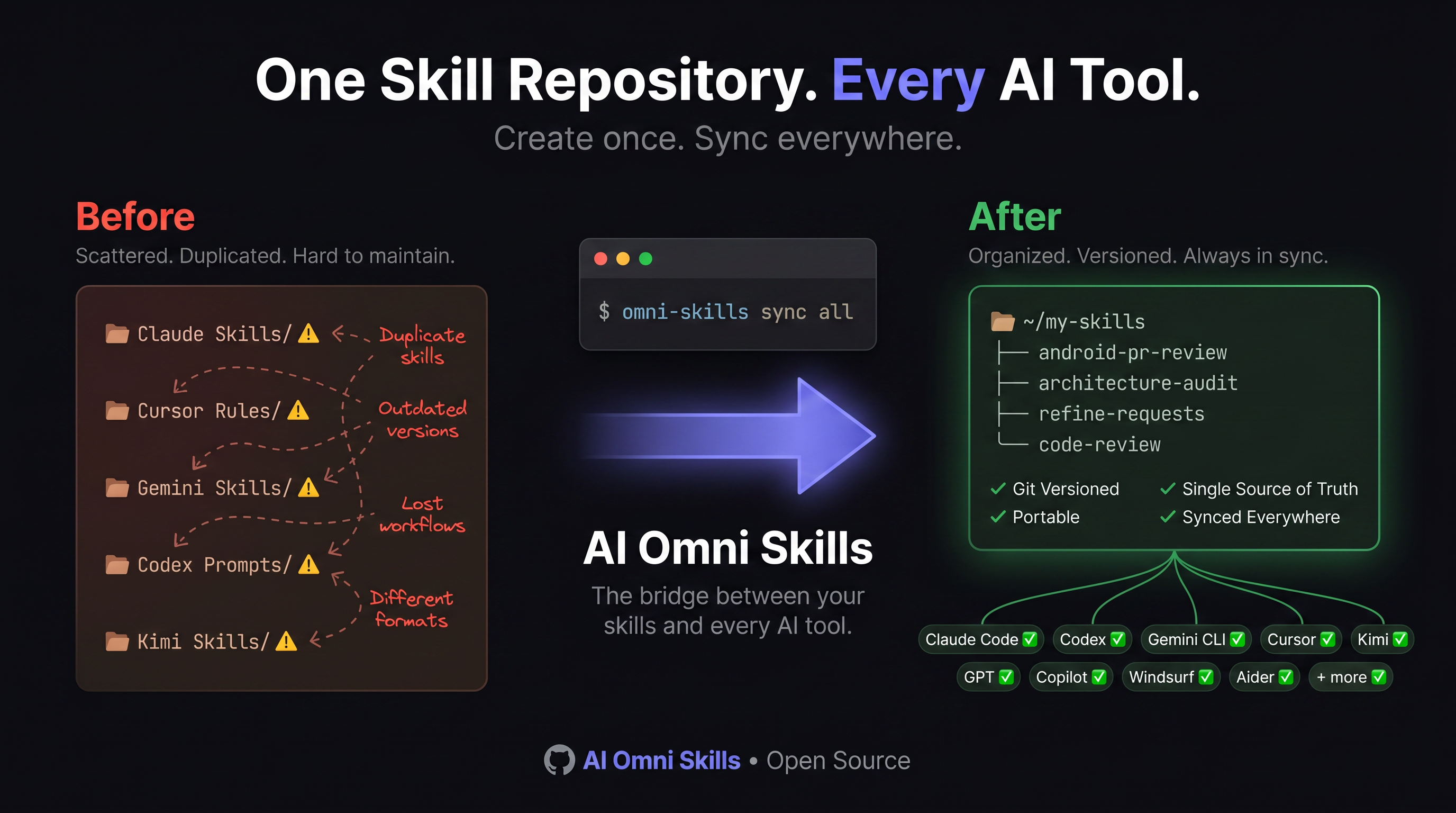
I try every AI tool. My skills scattered everywhere. This unifies them.
A CLI + MCP server that takes the skills you've collected across all your AI coding tools and unifies them into a single canonical store. Then it syncs them into every tool you use — Claude, Codex, Kimi, Gemini, Cursor, Zed, Cline, Z.AI, and anything else that follows.
The Problem This Solves
I am that person who installs every new AI coding tool the day it drops. Claude Code, Codex, Gemini CLI, Kimi, Cursor, Cline, Continue.dev, Zed — I have tried them all. And each one wanted its own instruction file, its own skill directory, its own configuration.
This is what my system looked like before:
| Mess | What I Found |
|---|---|
| Duplicate AGENTS.md files | 70 copies of the same 1,649-byte template across 16 projects |
| Orphaned skills | 15 speckit skills hidden in a tool's skills directory — no other tool could see them |
| Marketplace dumps | 203 generic skills cloned into a project from a public marketplace |
| Stale templates | Old project-only rules in every repo while my real rules were in a different file |
| Private skills leaking | Project-specific skills mixed with generic skills in the same repo |
| Iron laws drifting | A 98KB instruction file manually copy-pasted between two rewrite repos |
| New tool = manual setup | Every new AI tool meant manually copying config files, one by one |
Every tool had a piece of my knowledge. No tool had the full picture. The more tools I tried, the more fragmented my setup became.
What This Toolkit Does
Omni Skills is a single-purpose tool: it finds all the skills and instruction files you've accumulated, puts them in one place, and wires them into every AI tool you use.
# One canonical store. Every tool sees it.
omni-skills sync all   # Claude, Codex, Kimi, Gemini, Cursor, Cline, Zed, etc.
Three Portability Tiers
| Tier | What | Mechanism |
|---|---|---|
| A | SKILL.md skills + shared instructions + MCP server |
Symlinks + local MCP server exposing list_skills / read_skill |
| B | Hooks | Canonical hooks transpiled into each tool's native hook format |
| C | Other assets | Symlinks from your config repo to per-tool paths |
The MCP Server
Every AI tool that supports MCP registers this server and can call:
// list_skills — discover what's available
{
  "name": "list_skills",
  "result": [
    {"name": "clean-code", "description": "Pragmatic coding standards..."},
    {"name": "refine-requests", "description": "Refine a task by comparing acceptance criteria..."}
  ]
}

// read_skill — load the full instructions before acting
{
  "name": "read_skill",
  "arguments": {"name": "systematic-debugging"},
  "result": "# Systematic Debugging\n\nNO FIXES WITHOUT ROOT CAUSE..."
}
Skills are discovered from your private skill repos, live-reloaded when files change, and exposed as both tools and prompts.
Quick Start
Install
Choose one of the following. Native binaries do not require Node.js.
npm
npm install -g ai-omni-skills
Every release is published with npm provenance — verifiably linked to a GitHub commit and GitHub Actions workflow.
macOS / Linux (Homebrew)
brew tap moatazhamada/tap
brew install omni-skills
Windows (Winget)
winget install omni-skills
GitHub Releases
Download the binary for your platform from the releases page and place it in your PATH.
Prerequisites
You need your own private repository for your skills. This toolkit does not include skills — it connects the skills you already have to every AI tool you use.
# 1. Clone this toolkit (the code, not the skills)
git clone https://github.com/YOURUSER/ai-omni-skills.git
cd ai-omni-skills
npm link

# 2. Run the auto-scan setup
omni-skills setup
# Auto-detects your installed AI tools, finds your skill directories,
# suggests cleanup, and generates ~/.config/skills/config.json

# 3. Sync to every AI tool
omni-skills sync all

# 4. Verify health
omni-skills doctor

# 5. Run the verification suite
node verify.js
Setup Flags
# Override defaults without questions
omni-skills setup --public=~/my-skills-public --private=~/my-skills-private
omni-skills setup --toolkit=/path/to/this/repo
26 Supported AI Tools
| Tool | Type | Config | Skills Dir | MCP |
|---|---|---|---|---|
| Claude Code | CLI | ~/.claude/CLAUDE.md |
✓ | ✓ |
| OpenAI Codex | CLI | ~/.codex/AGENTS.md |
✓ | ✓ |
| Kimi | CLI | ~/.kimi/AGENTS.md |
✓ | ✓ |
| Gemini CLI | CLI | ~/.gemini/GEMINI.md |
— | ✓ |
| Cursor | Editor | ~/.cursor/rules/ |
— | ✓ |
| Kilocode | VS Code | ~/.kilocode/rules/ |
✓ | ✓ |
| OpenCode | CLI | ~/.config/opencode/ |
— | ✓ |
| Aider | CLI | ~/.aider.conf.yml |
— | — |
| Continue.dev | VS Code | ~/.continue/config.yaml |
— | ✓ |
| Cline | VS Code | ~/.cline/rules.md |
✓ | ✓ |
| Roo Code | VS Code | ~/.roo/rules.md |
✓ | ✓ |
| Windsurf | Editor | ~/.windsurf/rules.md |
— | ✓ |
| Zed | Editor | ~/.config/zed/settings.json |
— | ✓ |
| Tabby | Self-hosted | ~/.tabby/config.toml |
— | — |
| PearAI | Editor | ~/.pearai/config.json |
— | — |
| Void | Editor | ~/.void/config.json |
— | — |
| JetBrains Junie | IDE | .junie/guidelines.md |
— | — |
| JetBrains AI Assistant | IDE | .aiassistant/rules/ |
— | — |
| Claude Desktop | Desktop | ~/Library/…/Claude/… |
— | ✓ |
| Devin | Desktop | — | — | — |
| Factory Droid | CLI | — | — | — |
| Z.AI (GLM 5.2) | Model API | — | — | —¹ |
¹ Z.AI works through existing tools. Point Claude Code, Cline, or Zed at the GLM Coding Plan endpoint. For VS Code Copilot, install the glm-copilot extension.
Tools with MCP support get the skills MCP server registered automatically. Tools with skills directories get symlinks to all your canonical skills.
The omni-skills CLI
| Command | Does |
|---|---|
omni-skills mcp |
Run the MCP server over stdio (what each tool launches). |
omni-skills index |
Regenerate INDEX.md files and the managed SHARED.md skill block. |
omni-skills workflow [list|run <name>] |
List chainable skill workflows or run one. |
omni-skills sync [tool|all] [--dry-run] |
Wire instructions, skills dirs, MCP config, hooks, and assets. |
omni-skills check [--move] [--dry-run] |
Find orphaned skills and dangling/foreign symlinks. |
omni-skills classify [path] [--depth=N] [--dry-run] |
Scan for instruction files, detect sensitive content, sort public/private. |
omni-skills discover |
Scan your entire system for AI tools, instruction files, skill directories, and projects. |
omni-skills setup |
Auto-scan system, detect tools, suggest cleanup, generate config. |
omni-skills doctor |
Health check: verify symlinks, config, indexes, and skill counts. |
omni-skills report [--enhance] |
Usage statistics and heuristic improvement tips. |
omni-skills init [--dry-run] |
Interactive setup: scan, classify, route, wire. |
omni-skills security [scan] |
Check/install NVIDIA SkillSpector. Scan skills for vulnerabilities. |
omni-skills create [name] |
Create a new skill with interactive wizard. |
omni-skills create from <file> |
Convert an existing file into a skill. |
omni-skills help |
Show help. |
Workflows
Chain skills together into repeatable sequences. A workflow is a named list of skills that execute in order — like a playbook for common tasks.
# List all workflows
omni-skills workflow list

# Run a workflow
omni-skills workflow run release-prep
omni-skills workflow run advanced-feature-dev
Simple Workflow (linear)
---
name: release-prep
description: Lint, test, and commit before release
steps:
  - lint-and-validate
  - testing-patterns
  - commit-suggest
---
Advanced Workflow (loops, conditions, parallel)
---
name: advanced-feature-dev
description: Full feature development with quality gates
goal: "Feature is specified, implemented, tested, and committed"
steps:
  - skill: refine-requests
    goal: "Requirements are clear and have acceptance criteria"
    max_retries: 2

  - loop:
      goal: "Specification is approved"
      until: "user says approved"
      max_iterations: 3
      steps:
        - skill: speckit-specify
        - skill: speckit-checklist

  - condition:
      check: "spec is complex (more than 5 requirements)"
      then:
        - skill: speckit-plan
      else:
        - skill: speckit-tasks

  - skill: speckit-implement
    goal: "All tasks are implemented"

  - parallel:
      goal: "All quality checks pass"
      branches:
        - steps:
            - skill: lint-and-validate
        - steps:
            - skill: testing-patterns
        - steps:
            - skill: speckit-analyze

  - skill: speckit-git-commit
    goal: "Clean commit with good message"
---
Step types:
| Type | Syntax | What it does |
|---|---|---|
| Skill | skill: name |
Load and execute one skill |
| Goal | goal: "..." |
Success condition for this step |
| Retry | max_retries: 3 |
Retry if step fails |
| Loop | loop: { until, max_iterations, steps } |
Repeat until condition met |
| Condition | condition: { check, then, else } |
Branch based on a check |
| Parallel | parallel: { branches: [...] } |
Run branches concurrently |
Workflow features:
- Goals: Every step has a clear "done" condition
- Loops: Repeat refinement cycles until you approve
- Conditions: Adapt to complexity — simple features skip heavy planning
- Parallel: Quality checks run together, not one-by-one
- Retries: Auto-retry flaky steps before giving up
Workflows live in your private repo under workflows/ — they are personal, not shared.
🔒 Security Scanning (NVIDIA SkillSpector)
Research shows 26.1% of AI skills contain vulnerabilities and 5.2% show likely malicious intent. Omni Skills integrates with NVIDIA SkillSpector to scan your skills before you install them.
SkillSpector detects 64 vulnerability patterns across 16 categories:
- Prompt injection, data exfiltration, privilege escalation
- Supply chain attacks, malware, credential harvesting
- Excessive agency, tool misuse, system prompt leakage
Quick Start
# Check SkillSpector status
omni-skills security

# Scan all skills in your canonical store
omni-skills security scan

# Scan without LLM (faster, static analysis only)
omni-skills security scan --no-llm

# Scan a specific skill directory
omni-skills security scan ~/my-skills-private/clean-code
Install SkillSpector
git clone https://github.com/NVIDIA/skillspector.git
cd skillspector
python3 -m venv .venv && source .venv/bin/activate
pip install -e .
Or use Docker:
docker run --rm -v "$PWD:/scan" ghcr.io/nvidia/skillspector scan /scan
✨ Creating New Skills
Instead of creating skills through an agent and then moving them, create them directly:
# Interactive wizard
omni-skills create

# With name and description
omni-skills create refine-requests "Refine ticket acceptance criteria"

# Convert an existing file into a skill
omni-skills create from ./my-instructions.md

# Then index and sync
omni-skills index
omni-skills sync all
This creates a SKILL.md with proper frontmatter in your private skills store.
How to Store Your Skills
This toolkit is code only. Your skills live in a separate repository (or two) that you control.
Recommended Structure
# Your private skills repository (never published)
~/my-skills-private/
  ├── SHARED.md                    ← Generated shared instructions
  ├── INDEX.md                     ← Generated skill index
  ├── config.json                  ← Toolkit configuration
  │
  ├── clean-code/SKILL.md
  ├── systematic-debugging/SKILL.md
  ├── refine-requests/SKILL.md
  ├── codebase-memory/SKILL.md
  ├── mobile-ui-patterns/SKILL.md
  ├── dependency-updates/SKILL.md
  ├── build-optimizer/SKILL.md
  └── ... (all your skills)
  │
  ├── projects/                     ← Per-project instruction files
  │   ├── project-alpha/AGENTS.md
  │   ├── project-beta/AGENTS.md
  │   └── project-gamma/
  │       ├── Core Rules.md
  │       └── Core Rules Compact.md
  │
  ├── workflows/                     ← Chainable skill sequences
  │   ├── release-prep/WORKFLOW.md
  │   ├── feature-dev/WORKFLOW.md
  │   └── debug-trace/WORKFLOW.md
  │
  └── large-projects/
      └── project-gamma/
          └── ensure_symlinks.sh
Why Private?
Your skills are personal — they contain:
- Your coding style and preferences
- Your project's internal conventions and architecture
- Your proprietary workflows and domain knowledge
- Your private project structures
No one needs to see your refine-requests skill or your review-feedback workflow. The toolkit is public because it is generic infrastructure. The skills are private because they are your intellectual property.
How I Use This (Real Stats)
My personal setup — after unifying:
| Metric | Value |
|---|---|
| AI tools wired | 9 (Claude, Codex, Kimi, Gemini, Cursor, Kilocode, OpenCode, Windsurf, Claude Desktop) |
| Skills in canonical store | 49 (all private, all mine) |
| Stale template files deleted | 77 — eliminated duplicate AGENTS.md/GEMINI.md copies |
| Orphaned skills rescued | 15 — from ~/.kimi/skills/ to canonical store |
| Duplicate skills removed | 15 — from a project's marketplace clone |
| Generic marketplace skills archived | 203 — removed from active project, not lost |
| Weekly health check | Auto-runs omni-skills doctor every Sunday at 9:17 AM |
| Instruction files moved to canonical | 5 — project-specific rules, no more drift |
| Core project rules | 98KB file, single source, symlinked to 2 other repos |
| New tool onboarding | omni-skills sync <tool> — one command |
Weekly Health Check
A scheduled cron job runs omni-skills doctor every Sunday morning to catch drift before it becomes a problem:
omni-skills doctor    # Check all symlinks, config, indexes
omni-skills check     # Scan for orphaned skills
omni-skills report    # Usage stats and improvement tips
Verification
Before trusting the system, verify it:
node verify.js
# === Skills Ecosystem Verification ===
# [config]        ✓ loads successfully
# [skill paths]   ✓ 2 paths exist
# [skills scan]   ✓ 49 skills found, no duplicates
# [skill files]   ✓ all files valid
# [SHARED.md]     ✓ exists
# [instruction]   ✓ 6 symlinks + 1 regular valid
# [skills dirs]   ✓ 4 tools, 49 skills each, all healthy
# [MCP configs]   ✓ 7 tools, all have skills server
# ✓ ALL CHECKS PASSED (24 passed)
Tests
npm test
14 tests, Node's built-in runner, no extra dependencies. Covers:
sensitive.js— denylist detection (company names, ticket IDs, API keys, internal URLs)fs-utils.js— symlink management, managed block insertion/updatesskills.js— skill scanning, frontmatter parsing, hidden directory filtering
CI runs on every push via GitHub Actions.
License
MIT — see LICENSE.
Star & Contribute
If this tool helps you, give it a star ⭐
Found a bug? Want a new feature? Have a question?
- Open an issue — bug reports, feature requests, questions
- Open a discussion — ideas, show-and-tell, Q&A
- Open a PR — contributions welcome
Author: Moataz Mohamed · GitHub · npm
Built by someone who tries every new AI tool and got tired of watching their skills fragment across 18 projects. If you also have a .claude/, .kimi/, .codex/, .gemini/, .cursor/, and .kilocode/ directory on the same machine, this is for you.
Yorumlar (0)
Yorum birakmak icin giris yap.
Yorum birakSonuc bulunamadi