boxery
Health Warn
- License — License: MIT
- Description — Repository has a description
- Active repo — Last push 0 days ago
- Low visibility — Only 6 GitHub stars
Code Fail
- exec() — Shell command execution in core/boxery-core.mjs
- process.env — Environment variable access in core/boxery-core.mjs
- spawnSync — Synchronous process spawning in core/boxery-jobs.ts
- process.env — Environment variable access in core/boxery-jobs.ts
- spawnSync — Synchronous process spawning in core/copy-stream.mjs
- rm -rf — Recursive force deletion command in core/copy-stream.mjs
- process.env — Environment variable access in core/copy-stream.mjs
- rm -rf — Recursive force deletion command in e2e.sh
Permissions Pass
- Permissions — No dangerous permissions requested
No AI report is available for this listing yet.
Spin up and manage VMs across local, remote and cloud from your agents

Spin up and manage VMs across local, remote and sandbox providers from your agents.





Install · MCP server · pi extension · CLI · Backends · All docs
Early-stage, experimental software. Expect rough edges and breaking changes between releases.
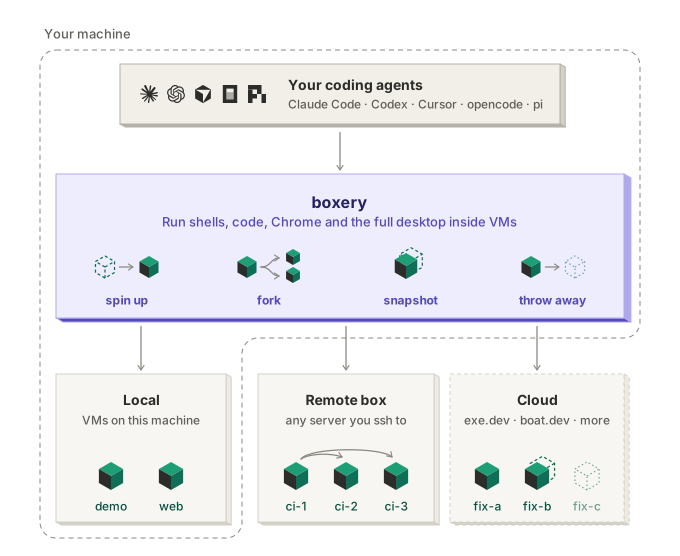
boxery lets your agents manage their own Linux VMs: on your Mac, a Linux server, a sandbox provider like exe.dev or boat.dev, or all of them at once. Your agent stays on your machine with your login and setup; the VM is where it works, and your keys never go in.
What it's for
- Dev boxes. A full Linux machine per project or branch.
ssh demo.boxery, or open it in VS Code. - Safe sandboxes. Let an agent install anything and run code you don't trust, away from your laptop and your keys.
- Parallel attempts. Fork a running VM, try three fixes at once, keep the one that works.
- Browser and desktop tasks. Chrome, clicks and screenshots on a real desktop you can watch live.
- Always-on agents and long jobs. Run them on a server or in the cloud, and they keep going after you close your laptop.
Why boxery
- Built for agents. Agents create, fork and drive VMs themselves over MCP: Claude Code, Codex, Cursor, opencode or any MCP client, plus a native pi extension.
- Fast. A full desktop VM in about 13 s on libvirt, or a headless one with no desktop at all. Snapshot a running VM in about 1 s.
- Mix VM providers. One MCP server drives your Mac, a Linux server and sandbox providers (exe.dev, boat.dev) at once, with the same tools on each.
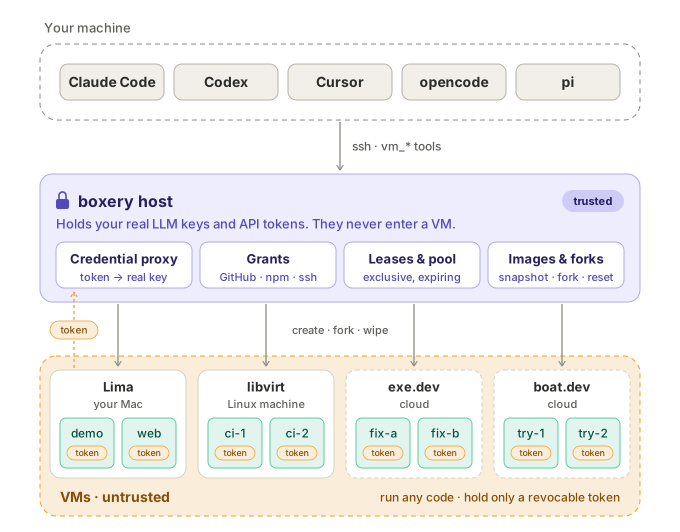
- Your credentials never enter a VM. VMs get a revocable token, and the host swaps in your real key. A VM gets nothing by default, not even an LLM, until you grant it.
How it works
- On your machine, the boxery MCP server (or pi extension) gives your agent the
vm_*tools. - The boxery host is a machine you run: your Mac, a Linux box, or a small VPS for cloud VMs. The tools reach it over ssh. It holds your keys and grants, and creates, forks and wipes VMs.
- The VMs are untrusted. They run anything, and hold only a revocable token that the host swaps for your real key.
Your machine and the host can be the same one. Security model →
Quick start
Give this prompt to your agent:
Read github.com/modem-dev/boxery and set up boxery on this machine.
Then spin up a VM with `boxery new demo` and open its desktop.
Or by hand, on a Mac:
brew install lima jq node
npm install -g boxery-vm
boxery-host init --backend lima && boxery-host build-base
boxery setup local
build-base builds the desktop image once (about 3 min); skip it if you only want headless VMs. On Linux or in the cloud, see the install guide.
Then connect your agent:
npx add-mcp boxery-vm      # Claude Code, Codex, Cursor, VS Code, opencode, Zed, …
pi install npm:boxery-vm   # or the native pi extension
And ask: "Clone my repo in a VM, start the dev server, and screenshot the homepage in Chrome."
What your agent gets
| Tools | |
|---|---|
vm_bash vm_read vm_write vm_edit vm_jobs vm_copy |
Shell, files and background jobs |
vm_screenshot vm_click vm_type vm_key vm_scroll vm_browser |
Computer use and Playwright on the desktop |
vm_manage vm_info |
Create, fork, snapshot, revert and remove VMs |
vm_grant vm_lease |
Ask you to grant access (GitHub, ssh-agent, env vars), or lease a VM from a shared pool |
You can also drive VMs yourself with the CLI: boxery attach demo, boxery desktop demo.
Documentation
| Install | Hosts on every backend, laptop setup, LLM providers |
| MCP server | stdio on your laptop, or Streamable HTTP over Tailscale |
| pi extension | --vm, /vm commands, tools, fan-out |
| CLI reference | Every boxery and boxery-host command, and their --json output |
| Backends | libvirt, Lima, Cloud Hypervisor, exe.dev, boat.dev, and the backend contract |
| Grants | Give a VM LLM providers, GitHub/HTTPS APIs (secret stays on the host), your ssh-agent, env vars, or files |
| Named hosts | Multiple hosts, one controller and MCP server |
| Shared pool & leases | Several agents, one pool of VMs, no collisions |
| Security model | Credential proxy, isolation, what a VM can and can't reach |
| Architecture | Design, roadmap, and failure modes |
Status
The exe.dev, boat.dev and Cloud Hypervisor backends are experimental. See the roadmap.
Contributing
Bug reports and PRs are welcome. See CONTRIBUTING.md.
npm run lint && npm test && npm run test:shell
Sponsor
Sponsored by Modem.

License
MIT © Ben Vinegar
Reviews (0)
Sign in to leave a review.
Leave a reviewNo results found