setupscore
Health Uyari
- License — License: MIT
- Description — Repository has a description
- Active repo — Last push 0 days ago
- Low visibility — Only 6 GitHub stars
Code Gecti
- Code scan — Scanned 12 files during light audit, no dangerous patterns found
Permissions Gecti
- Permissions — No dangerous permissions requested
Bu listing icin henuz AI raporu yok.
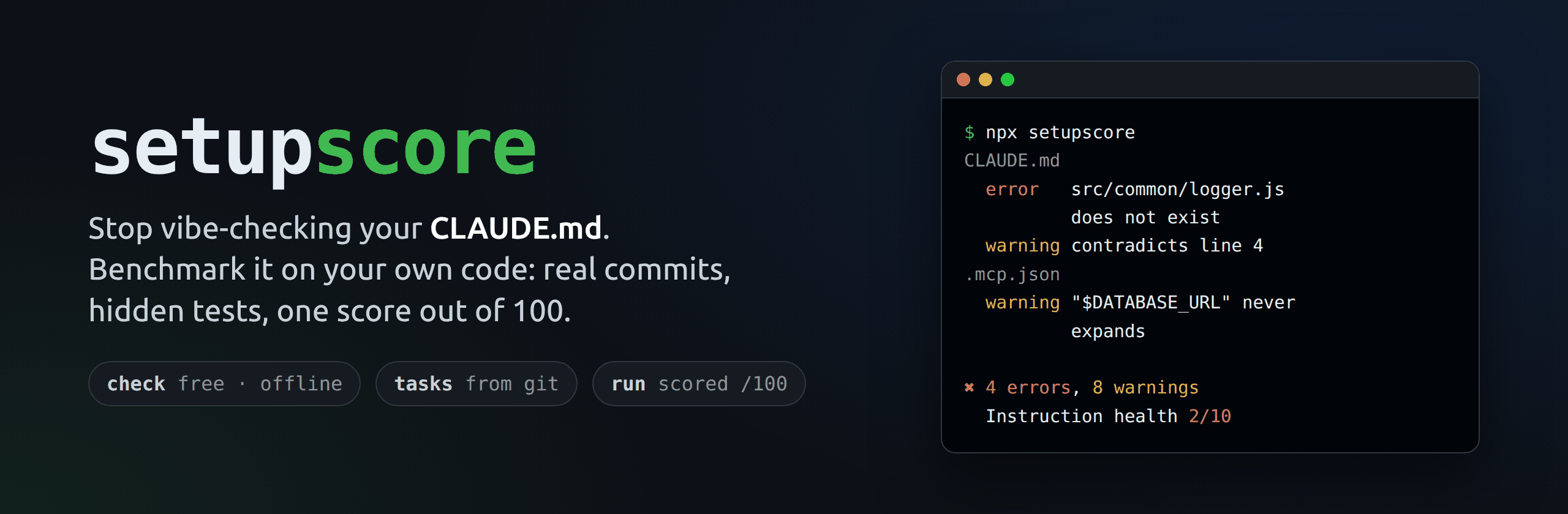
Stop vibe-checking your CLAUDE.md. Benchmark it on your own code. Real commits. Hidden tests. One score out of 100.




Quick start · What it checks · Measure your setup · CI · Rules · FAQ
setupscore
Check your Claude Code setup before it quietly makes Claude worse.
CLAUDE.md, rules, skills, subagents, settings.json and .mcp.json rot like any other code. A folder gets renamed and the path in CLAUDE.md now points nowhere. A script is removed but the instructions still say to run it. Two rules start to disagree. Someone pastes an API key into a skill. Claude doesn't complain; it just does a worse job.
Quick start
npx setupscore          # check: free, offline, about a second
npx setupscore run      # measure: real tasks from your git history, scored out of 100
Requires Node.js 22.12 or newer. check works on macOS, Linux and Windows; run works on macOS, Linux and WSL2.
Two tools in one
setupscore check |
setupscore run |
|
|---|---|---|
| Question it answers | Is my setup broken? | Does my setup actually help Claude? |
| How | Lints CLAUDE.md, .claude/ and .mcp.json |
Gives Claude Code real tasks from your git history, with and without your setup, and checks the work with hidden tests |
| Result | Errors, warnings and an instruction health score out of 10 | A Setup Score out of 100, with 95% ranges |
| Network and AI | None. Nothing leaves your machine | Uses your Claude key or subscription, inside an OS sandbox |
| Cost | Free | A few dollars for 5 tasks (you set the budget) |
| Time | About a second | Minutes |
What it looks like
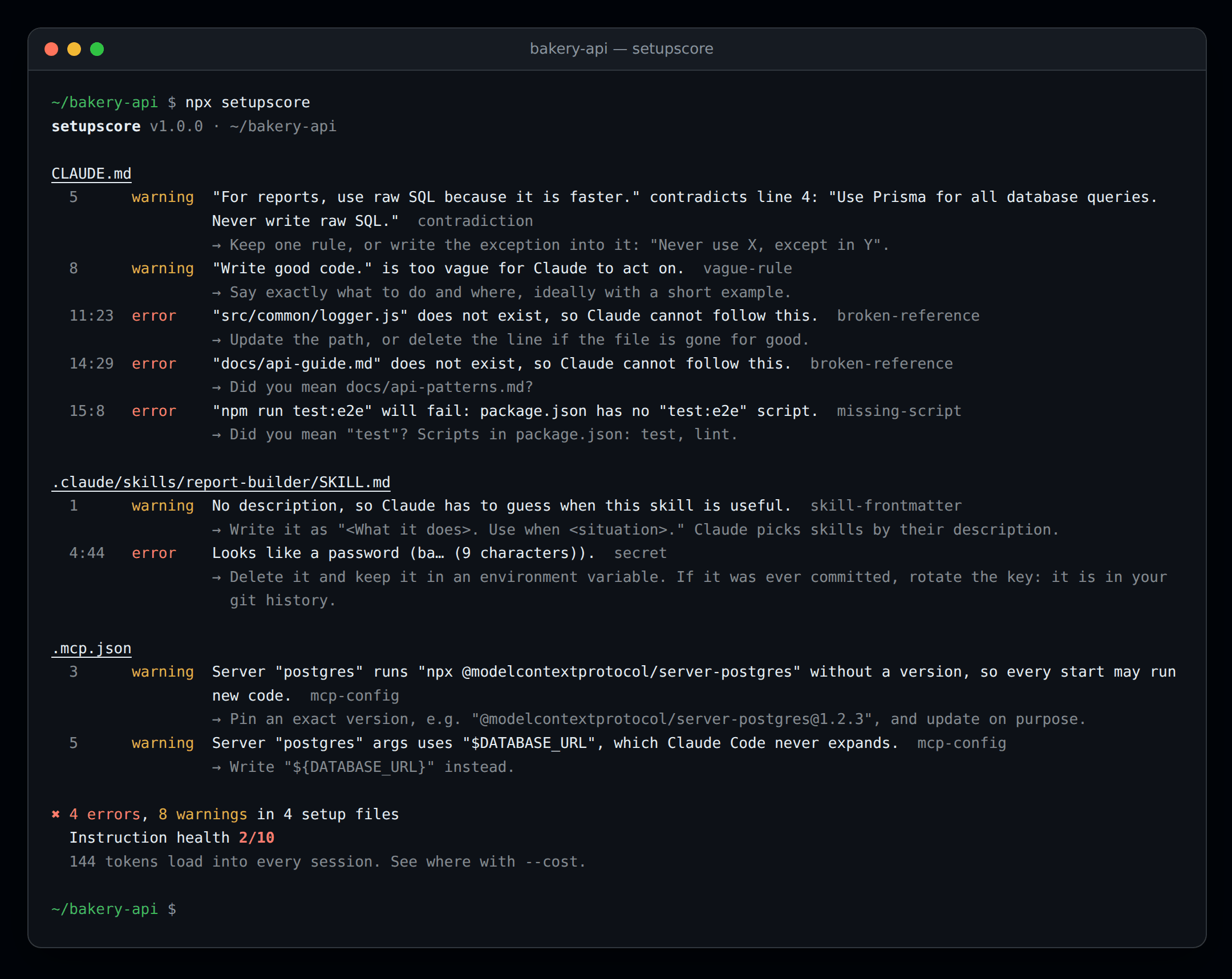
This is the example project in this repo, which is broken on purpose (output shortened). Secrets are never printed in full.
The same output as text$ npx setupscore
CLAUDE.md
5 warning "For reports, use raw SQL because it is faster." contradicts line 4: "Use Prisma for all database queries. Never write raw SQL." contradiction
→ Keep one rule, or write the exception into it: "Never use X, except in Y".
8 warning "Write good code." is too vague for Claude to act on. vague-rule
11:23 error "src/common/logger.js" does not exist, so Claude cannot follow this. broken-reference
14:29 error "docs/api-guide.md" does not exist, so Claude cannot follow this. broken-reference
→ Did you mean docs/api-patterns.md?
15:8 error "npm run test:e2e" will fail: package.json has no "test:e2e" script. missing-script
→ Did you mean "test"? Scripts in package.json: test, lint.
.claude/skills/report-builder/SKILL.md
1 warning No description, so Claude has to guess when this skill is useful. skill-frontmatter
4:44 error Looks like a password (ba… (9 characters)). secret
.mcp.json
3 warning Server "postgres" runs "npx @modelcontextprotocol/server-postgres" without a version, so every start may run new code. mcp-config
5 warning Server "postgres" args uses "$DATABASE_URL", which Claude Code never expands. mcp-config
→ Write "${DATABASE_URL}" instead.
✖ 4 errors, 8 warnings in 4 setup files
Instruction health 2/10
Install
You don't have to install anything: npx setupscore always runs the latest version. To pin it in a project:
npm install --save-dev setupscore     # or: pnpm add -D setupscore / yarn add -D setupscore
npx setupscore
Or install it globally with npm install -g setupscore, then run setupscore anywhere.
Usage
npx setupscore                    # check the current folder
npx setupscore check ../my-api    # check another folder
npx setupscore --fix              # fix paths to files that were renamed or moved
npx setupscore --cost             # see how many tokens each file adds to every session
npx setupscore --json             # machine-readable output for CI and other tools
npx setupscore --strict           # fail on warnings too
npx setupscore --quiet            # show errors only
npx setupscore rules              # list every rule and why it matters
What it checks
| Rule | Level | Finds |
|---|---|---|
broken-reference |
error | A file path in your instructions that doesn't exist |
broken-import |
error | An @path import in CLAUDE.md that points to a missing file |
missing-script |
error | npm run x / pnpm run x / npm test where the script doesn't exist |
invalid-config |
error | settings.json or .mcp.json that isn't valid JSON, or frontmatter that can't be read |
secret |
error | API keys, tokens and passwords written into setup files |
misnamed-file |
warning | claude.md, .Claude/ or skill.md: wrong letter case, so Claude Code on Linux never loads it |
risky-permission |
warning | "Bash" allowed without limits, rm/curl/git push with no prompt, bypassPermissions |
env-not-denied |
warning | A local .env file Claude is allowed to read |
mcp-config |
warning | Unpinned npx/uvx MCP servers, $VAR that never expands, plain http:// |
contradiction |
warning | Two rules that say opposite things |
vague-rule |
warning | Rules like "write good code" that give Claude nothing to act on |
duplicate-rule |
warning | The same rule written twice |
too-long |
warning | CLAUDE.md over 200 lines or a skill over 500 lines (Anthropic's guidance) |
deep-import |
warning | @import chains deeper than Claude Code follows |
unused-path-rule |
warning | A .claude/rules/ file whose paths: match no file, so it never loads |
skill-frontmatter |
warning | Skills with a missing, one-word or invalid name or description |
agent-frontmatter |
warning | Subagents without a name or a useful description |
Every rule is explained, with good and bad examples, in docs/rules.md.
Files it reads
CLAUDE.md and CLAUDE.local.md (in any folder), files they @import, and everything in .claude/: rules/, skills/*/SKILL.md, agents/, commands/, settings.json, settings.local.json. It also reads .mcp.json. It skips node_modules, .git and build output.
Auto-fix
--fix only changes something when the right answer is certain:
- the file was renamed in git history, or
- exactly one file with that name exists somewhere else in the project.
It only rewrites that path on that line, keeps your line endings, and prints every change. A guess like "did you mean docs/api-patterns.md?" is shown as a hint and never applied.
Context cost
npx setupscore --cost
This shows how many tokens each file adds, and when: on every message, only when Claude works in a folder, or only when a skill is used. It counts roughly 4 characters per token, so treat the numbers as estimates.
Measure your setup with Claude Code
npx setupscore doctor                 # 1. is this machine ready?
export ANTHROPIC_API_KEY=sk-ant-... # 2. or CLAUDE_CODE_OAUTH_TOKEN from `claude setup-token`
npx setupscore run --baseline         # 3. your setup vs no setup
$ npx setupscore run --baseline
...
setupscore run 20261105-101500-a1b2 · 5 tasks × 2 setups × 2 repeats · $4.50 spent

  Setup     Source   Score  Success (95% range)  Cost/try  Turns  Rule breaks  vs none
  A         working  97     100% (72%–100%)      $0.24     14     1            +60 pts
  baseline  none     40     40% (17%–69%)        $0.21     11     0

Verdict: Setup A passed 100% of attempts (likely between 72% and 100%). That is +60 points over no instructions, and the ranges do not overlap: your setup clearly helps.

Tasks
  a41c9e2  Add GST to invoice totals                         A 2/2  baseline 2/2
  7d03b18  Retry failed payment webhooks                     A 2/2  baseline 1/2
  c92e5af  Validate phone numbers on signup                  A 2/2  baseline 1/2
  1be7f40  Paginate the orders endpoint                      A 2/2  baseline 0/2
  58aa3d1  Cache product prices for five minutes             A 2/2  baseline 0/2

Suggestions  (details: npx setupscore suggest)
  1. Tell Claude to run the tests before it finishes — Claude did not run the tests in 6 of 10 attempts.

Report: .setupscore/runs/20261105-101500-a1b2/report.html
This is an example: your numbers depend on your project, your tasks and the model. npx setupscore suggest --apply run-tests would add the suggested step to CLAUDE.md for you.
How a run works:
flowchart LR
  A["Your git history"] -->|"commits that changed code and tests"| B["Tasks<br/>tests fail before, pass after"]
  B --> C["Claude Code in an OS sandbox<br/>at the commit before, tests hidden"]
  C -->|"setup A: yours"| D["Hidden tests put back and run"]
  C -->|"setup B: none or older"| D
  D --> E["Setup Score 0–100<br/>with 95% ranges"]
Tasks come from your git history (see below).
Each task goes to Claude Code (
claude -p) in a throwaway clone at the commit before the change, with the commit's tests hidden. Claude works on its own copy ofnode_modules. This happens once for every setup you compare and every repeat.Then Claude's copy of
node_modulesis thrown away, and the commit's tests, test helpers, fixtures and test settings are put back and run the way the commit ran them. Editing a test or the test script can't fake a pass. setupscore also records:- whether Claude broke a "never use
X" rule from your instructions, - whether it ran the tests itself,
- which skills it used,
- its turns and cost.
- whether Claude broke a "never use
The Setup Score (0–100) combines several parts. Every success rate comes with a 95% range, and setupscore only calls a difference real when the ranges don't overlap, so you don't chase noise.
- success: 40
- rule following (in solved attempts): 20
- consistency: 15
- cost per solved task: 15
- instruction health: 10
Every part except health rewards solved attempts, so a setup that solves nothing keeps only its health points.
| Command | What it does |
|---|---|
setupscore run |
Score your current setup (--setup-a working) |
setupscore run --baseline |
...and compare it with Claude using no instructions at all |
setupscore run --setup-b main |
...or with the setup on another branch, tag or commit |
setupscore run --resume <id> |
Continue a run that stopped (budget, Ctrl+C or SIGTERM) with the same settings; finished tries are kept |
setupscore report [--format html|markdown|json] [--output file] |
Show a run again |
setupscore suggest [--apply <id>] |
Changes to CLAUDE.md based on what went wrong, and apply one |
setupscore watch --model <id> |
Re-run the last run with another model, and show what got worse |
Cost. Every try is a real Claude Code session on your key or subscription. setupscore shows the plan and an estimate and asks first. The defaults (--repeat 2, --budget 5, --attempt-budget 1.5, --max-turns 30) keep a run of 5 tasks to a few dollars. When the budget is used up, no new session starts; sessions already running finish, and every result is kept. Ctrl+C stops a run cleanly too.
Safety. Claude runs with permissions skipped, because nobody is there to approve them, so it always runs inside the OS sandbox:
- Only the throwaway clone and a few temp and log folders are writable.
- Only the Claude API and your package registries can be reached.
~/.ssh, cloud and deploy credentials,~/.npmrc, shell history and your.envfiles are hidden.- A fresh, empty Claude config folder is used, so your personal
~/.claudesettings and memory don't affect the result. - Claude can't look up the answer: the clone has no later commits in reach, your real folder and its git metadata are hidden, and digging through git objects makes the attempt count as failed.
Each run's results are saved in .setupscore/runs/, readable only by you, with credentials removed from the transcripts.
Scoring, verdicts, resuming and every option are explained in docs/run.md.
Turn git history into test tasks
npx setupscore tasks # build tasks from your git history
setupscore run does this automatically when there are no tasks yet, and saves the tasks it builds; run setupscore tasks on its own to look at the tasks first. setupscore tasks finds commits that changed both code and tests. For each one, it checks out the commit before it, adds the commit's tests with their helpers, fixtures and test settings, and runs them: they must fail. Then it checks out the commit itself, and the same test command must pass. Only then is it a fair task, because the tests really check the change. The commit title, the files involved and the names of the new tests become the task prompt. Results go to .setupscore/tasks.json, so add .setupscore/ to your .gitignore.
On commander.js, for example, it builds 6 tasks out of the 8 most recent candidate commits in about 90 seconds. The 2 it skips only added tests for behaviour that already existed.
Installing dependencies and running tests means running the project's code, so it all happens in your operating system's own sandbox. No Docker is needed. Tests get no network, can only write to a throwaway copy of the repo and a few temp and log folders, and can't read ~/.ssh, cloud credentials or your .env files. See docs/sandbox.md for the details.
| Option | Default | |
|---|---|---|
--limit <n> |
10 | Stop after this many valid tasks |
--since <date> |
Only commits after a date, e.g. 2026-01-01 or "6 months ago" |
|
--timeout <seconds> |
120 | Time limit for each test run |
--sandbox none |
No isolation. CI only (or add --yes) |
|
--json |
Machine-readable output |
JavaScript and TypeScript projects only for now (npm, pnpm, Yarn or Bun). The test runner in your test script gets the commit's test files: node --test, Jest, Vitest, Mocha, AVA, tap, uvu and Bun are recognised. Use tasks.test in setupscore.yml for anything else.
Configuration
Most projects need none. To change a rule's level or turn it off, add setupscore.yml (or .setupscore.yml) to the project root:
version: 1
rules:
  vague-rule: off        # off, warning or error
  too-long: error
ignore:
  - "examples/**"        # folders or files to skip
tasks:
  test: "vitest run {files}"   # optional: how to run test files ({files} is replaced)
  install: "pnpm install"      # optional: how to install dependencies
sandbox:
  domains:                     # optional: extra hosts the install step may reach
    - npm.mycompany.dev
agent:
  bin: "/opt/claude/bin/claude"  # optional: how "run" starts Claude Code (like --claude-bin)
  model: claude-sonnet-5-5       # optional: the model "run" tests (like --model)
Flags on the command line win over agent:. setupscore run also uses your rules and ignore settings when it measures instruction health.
To silence one line, put a comment above it in any markdown file:
<!-- setupscore-disable-next-line vague-rule -->
- Follow our best practices doc.
Use <!-- setupscore-disable --> to turn every rule off for a whole file, or <!-- setupscore-disable secret --> to turn off just one.
Use it in CI
# .github/workflows/setupscore.yml
name: setupscore
on: [pull_request]
permissions:
  contents: read
jobs:
  check:
    runs-on: ubuntu-latest
    steps:
      - uses: actions/checkout@v7
      - uses: actions/setup-node@v7
        with:
          node-version: 22
      - run: npx setupscore@1
Or use the GitHub Action, which can also score the setup on pull requests and post the result as a comment:
# .github/workflows/setupscore.yml
name: setupscore
on: [pull_request]
permissions:
  contents: read
  pull-requests: write                        # for the results comment
jobs:
  setup:
    runs-on: ubuntu-latest                    # or macos-latest; "run" needs a sandbox, so not Windows
    steps:
      - uses: actions/checkout@v7
        with:
          fetch-depth: 0                      # tasks come from git history
      - uses: mohamedsabith/setupscore@v1
        with:
          command: run                        # or "check" (free)
          args: --setup-b origin/main --limit 5 --budget 3 --fail-under 60
          anthropic-api-key: ${{ secrets.ANTHROPIC_API_KEY }}
| Input | Default | What it does |
|---|---|---|
command |
check |
check (free, offline) or run (calls Claude Code and costs money) |
args |
Extra arguments. Quotes work as in a shell (--claude-bin "my agent"); nothing is expanded |
|
version |
0 |
setupscore version from npm: the newest 1.x, or an exact version such as 1.0.0 |
claude-code-version |
latest |
Claude Code version to install for run |
anthropic-api-key |
For run: a secret such as ${{ secrets.ANTHROPIC_API_KEY }} |
|
claude-code-oauth-token |
For run, instead of the key: a token from claude setup-token |
|
comment |
true |
For run on pull requests: post the results as a comment and update it on every push |
Outputs: exit-code (see the table below) and report (the path of this run's Markdown summary). A run also adds its summary to the job summary. A comment that can't be posted (for example without pull-requests: write) is a warning, never a failure.
Secrets aren't available to pull requests from forks, so command: run stops there before installing anything, with a message saying so. Use command: run only for branches in your own repository, and command: check for everything else. The action uses the runner's Node.js if it's 22.12 or newer, and only sets one up otherwise.
Exit codes:
| Code | Meaning |
|---|---|
0 |
No errors |
1 |
Errors found (or warnings with --strict), no usable tasks, or a score below --fail-under |
2 |
Bad usage or an invalid config file |
3 |
An environment problem, such as a missing sandbox tool, Claude Code not installed or no API key (run setupscore doctor), or no attempt could be scored (for example the Claude API was unreachable the whole time) |
4 |
A run stopped early (budget used up or Ctrl+C); continue it with --resume |
Every error message says what went wrong and what to do next. If you hit something unexpected, run it again with SETUPSCORE_DEBUG=1 and include the output in a bug report.
JSON output (--json) has schemaVersion: 1. Fields may be added in later versions, but they will never be renamed or removed within a schema version.
{
  "schemaVersion": 1,
  "tool": { "name": "setupscore", "version": "1.0.0" },
  "health": 2,
  "summary": { "files": 4, "errors": 4, "warnings": 8, "fixable": 0, "startupTokens": 144 },
  "issues": [
    { "rule": "broken-reference", "severity": "error", "file": "CLAUDE.md", "line": 11, "column": 23,
      "message": "\"src/common/logger.js\" does not exist, so Claude cannot follow this.", "fixable": false }
  ]
}
Use it from code
import { check } from 'setupscore';

const result = check('.');
console.log(result.health, result.errors, result.warnings);
for (const issue of result.issues) console.log(issue.file, issue.line, issue.message);
FAQ
Does it send my code anywhere? check doesn't: it reads files on disk and runs git log to find renames, with no network requests and no AI calls. tasks only goes online to install your dependencies from your package registry. run sends the task prompts and the files Claude reads to the Claude API, exactly as Claude Code does when you use it yourself. Results stay in .setupscore/ on your machine.
Do I need Docker? No. tasks and run use the sandbox built into macOS, or bubblewrap on Linux and WSL2 (with socat and ripgrep). See docs/sandbox.md.
Why does run need an API key when I'm already signed in to Claude Code? Your normal sign-in lives in your keychain or home folder, which the sandbox hides on purpose. Set ANTHROPIC_API_KEY, or run claude setup-token and set CLAUDE_CODE_OAUTH_TOKEN to use your subscription.
How many tasks do I need? Five tasks with 2 tries each are enough to see big differences. setupscore tells you when a difference could be chance; add --repeat 3 or more tasks for small ones.
What is "instruction health"? A quick score from 0 to 10: 10, minus 1 per error and 0.5 per warning. Use it to track your setup over time.
I got a false alarm. Please open an issue with the line that was flagged. Avoiding false alarms matters more than catching everything. Meanwhile, silence it with a disable comment.
Does it support Codex (AGENTS.md) or Cursor rules? Not yet. Claude Code comes first, and Codex and Cursor are planned next.
Roadmap
- Now (Claude Code):
check: a free, offline linter.tasks: test tasks from git history.run: a test bench with a Setup Score, in an OS sandbox with no Docker.report,suggestandwatch.- A GitHub Action.
- Next: Codex (
AGENTS.md) and Cursor rules, with the same tasks and the same score, so you can compare agents too. - Later: Python and Go projects, and a shared history of scores across a team.
Contributing
Bug reports, false-alarm reports and new rules are very welcome. See CONTRIBUTING.md.
License
MIT © Mohamed Sabith
setupscore tasks and setupscore run download @anthropic-ai/sandbox-runtime (Apache-2.0) on first use. It isn't bundled or installed with setupscore.
Yorumlar (0)
Yorum birakmak icin giris yap.
Yorum birakSonuc bulunamadi