sedjem
Health Uyari
- License — License: AGPL-3.0
- Description — Repository has a description
- Active repo — Last push 0 days ago
- Low visibility — Only 8 GitHub stars
Code Uyari
- network request — Outbound network request in .github/scripts/repo_stats.py
Permissions Gecti
- Permissions — No dangerous permissions requested
Bu listing icin henuz AI raporu yok.
Sedjem: transcribe Egyptian Arabic–English meetings on your own computer, with speakers told apart by voice. Desktop app for Windows and Linux, plus benchmarks and notes.


Transcripts of Egyptian Arabic–English meetings and calls, made on your own computer,
with each speaker told apart by voice.
mohammedel-sayedahmed.github.io/sedjem





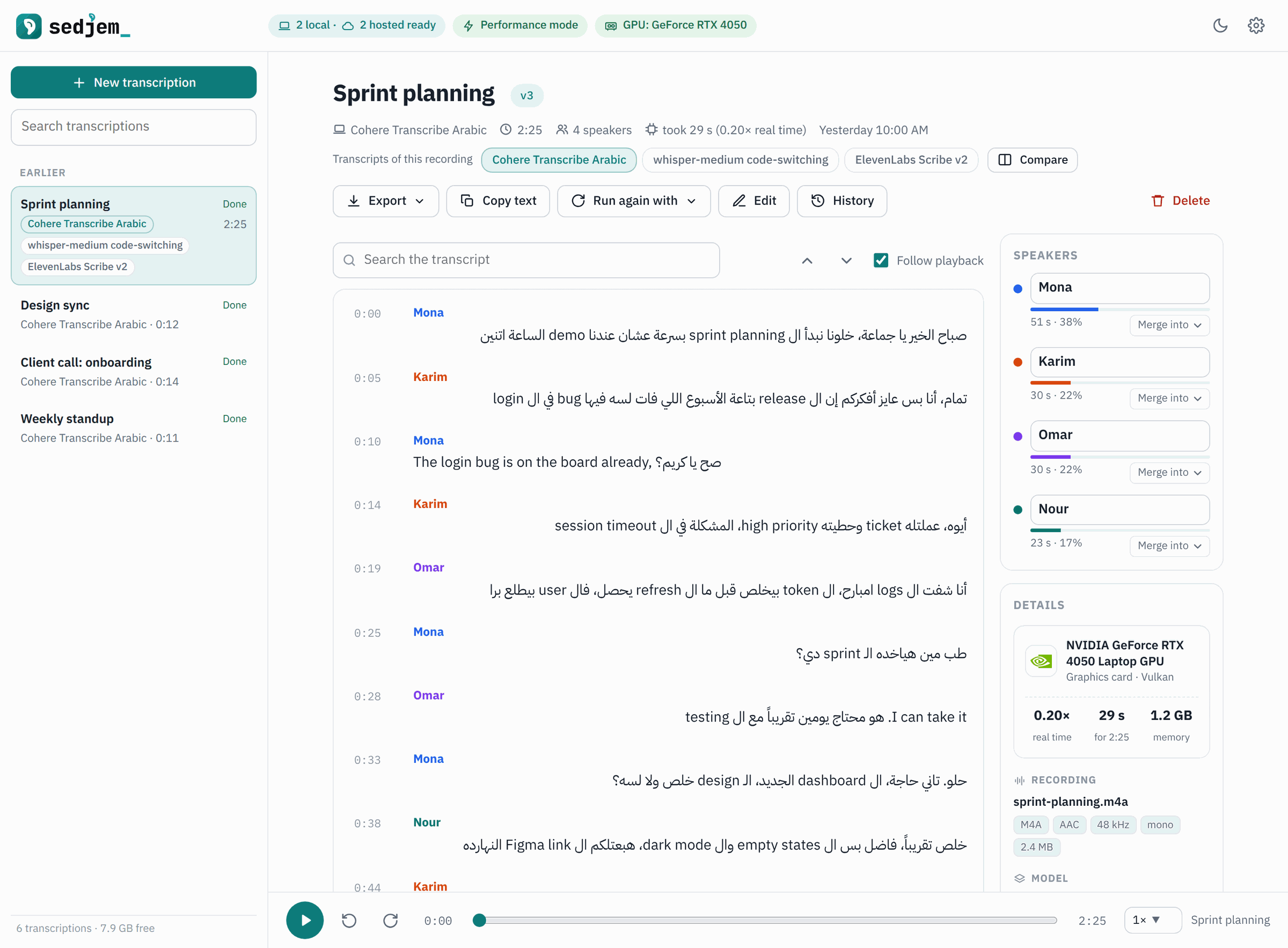
Egyptian tech teams talk in Arabic sentences full of English words: deadline, sprint,
merge request. Many speech-to-text models handle this badly. Some write the English words in
Arabic letters (on the Egyptian test set, several kept only 8–25% of them in Latin script), others
turn Egyptian speech into formal Arabic. Sedjem (the ancient Egyptian word for "to hear") runs models
that were measured to do better, labels who said what by listening to their voices, and keeps the
recording on your machine unless you choose a hosted service.
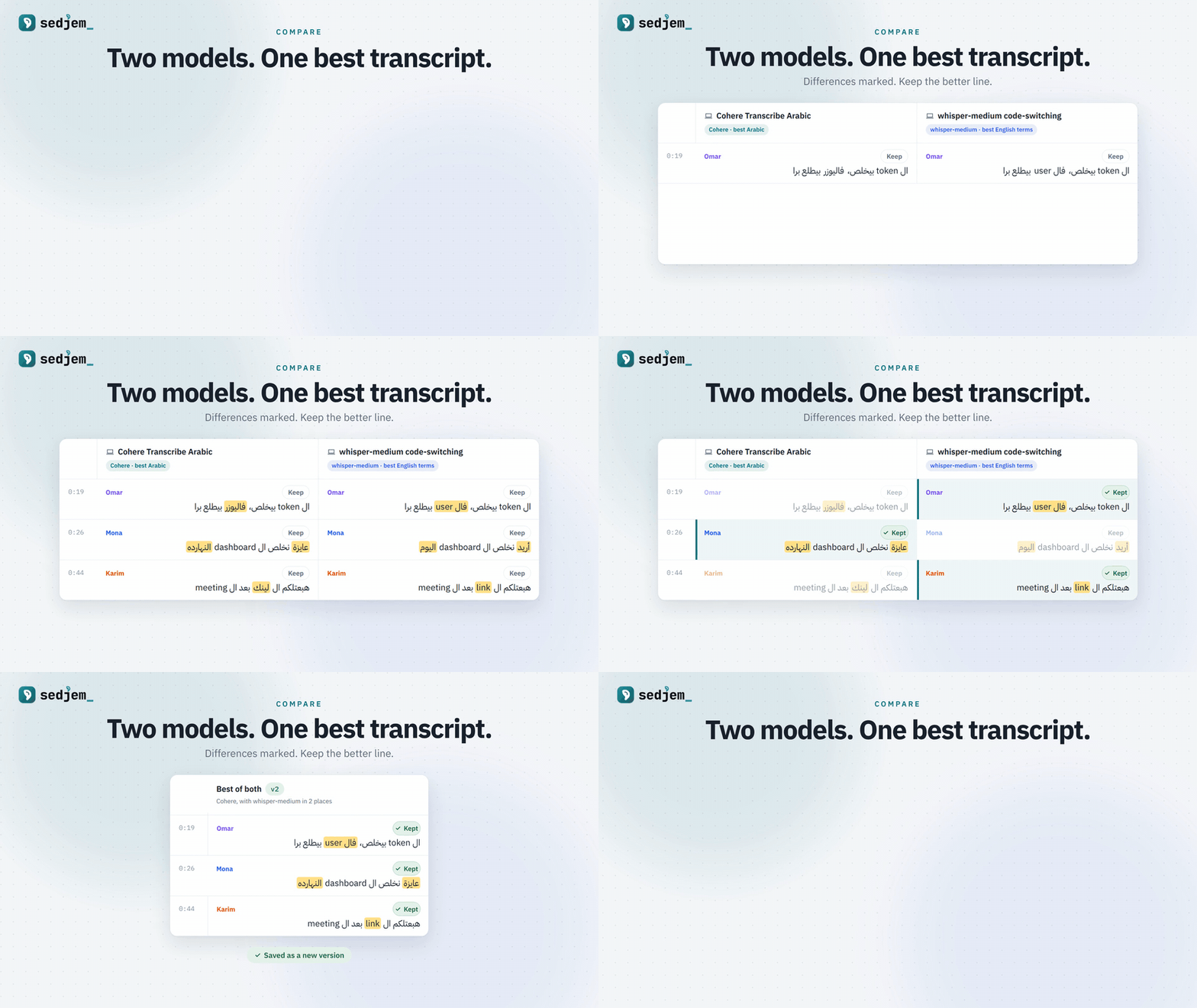
Watch the 60-second video (1920 x 1080, with music; another soundtrack). Its source is in docs/video/.
What it does
Transcribe
- Opens audio or video recordings (mp3, m4a, wav, ogg, flac, mp4, mkv, webm and more), dropped in,
chosen, or read in place from a path on the computer. - Runs three models on your computer: Cohere Transcribe Arabic, a whisper-medium fine-tune for
Arabic–English code-switching, and Whisper large-v3 with an Egyptian style hint. - Labels speakers by voice, with the speaker model chosen in Settings: TitaNet-small by default, or
another such as NVIDIA's Nemotron-3-Diarization. Give the number of people, or let it estimate. - Or sends the recording to one of nine hosted services with your own API key: ElevenLabs,
Speechmatics, Google Gemini, Deepgram, AssemblyAI, Azure AI Speech, OpenAI, Groq and Mistral.
A recording is uploaded only after you tick the box that allows it, every time. - Uses a graphics card when one works: Cohere through Vulkan on any GPU, Whisper through CUDA on
NVIDIA cards. Without one it runs on the processor. - Shows the transcript as it is written, with the time left, and can be cancelled at any time.
- Takes a YouTube link to a video or a playlist: each video is downloaded (up to 720p, to play beside
its transcript) and transcribed, or takes the captions people made for it. A playlist becomes a
course, saved as files to paste into a chat assistant for study notes. Downloading is for personal
use, within YouTube's terms.
Read, correct and export
- Plays the audio in step with the text. Click a line to hear it, search, rename or merge speakers,
and correct lines by hand. - Lays out each line in its own direction, so an Arabic line that starts with an English word still
reads right to left. - Exports plain text, SRT or WebVTT subtitles, Markdown or JSON, through a save dialog in the
desktop app. - Keeps the details of every run with its transcript: the model, the recording, the computer and
the speed, with the makers' logos next to the hardware and the system. The exports carry them too.
Keep versions, compare models
- Keeps a history for every transcript. Version 0 is what the model wrote and never changes. Each
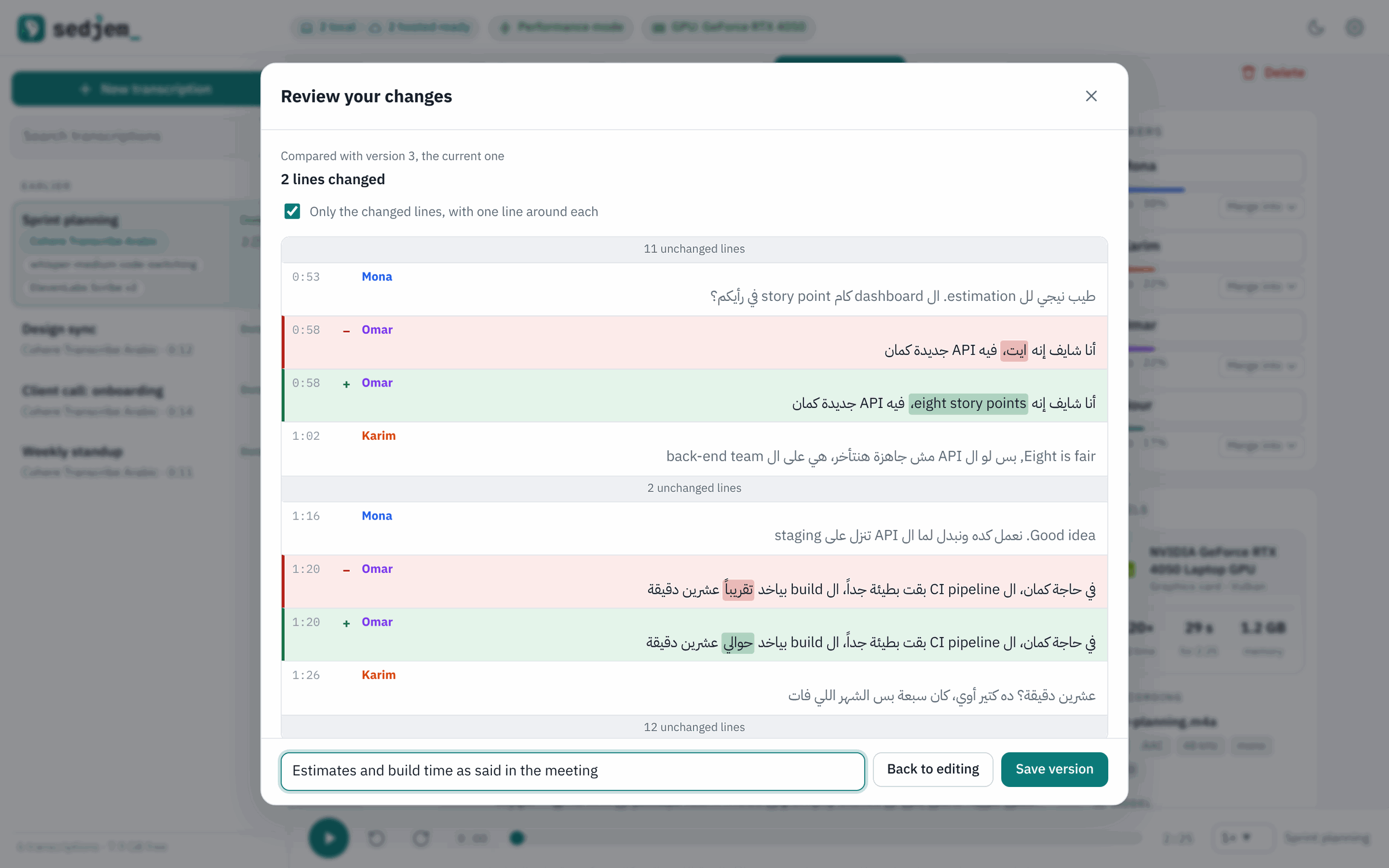
edit session is shown as a diff, the waygit diffshows one, and saved as a new version with an
optional message. Any version can be viewed, exported or restored. - Groups the transcripts of one recording made with different models, whether with Run again with
or by adding the same file twice. - Compares them side by side, with the words that differ marked, and combines the best parts: keep
a row or a time range from another model, review the result as a diff, and save it as a new
version. - Treats each recording like a repository with a main line and branches. The model transcripts are
its branches, a new branch can start from any version of any of them, and one transcript can be
chosen as the main one: it is listed first, opened from the recording, and combined into from any
branch, with each stretch's source and version kept in its History.
Work with an assistant
- Answers assistants such as Claude Desktop, Claude Code, Cursor and VS Code over MCP, even while the
app is closed: they can list, search and read the transcripts and courses, read long ones in pieces,
and point to the lecture and the moment in the video. When saving is turned on in Settings (it is
off by default), an assistant can also save a corrected version of a transcript that you ask for;
every earlier version stays. Prompts for summaries, meeting minutes, study notes, quizzes and
flashcards come with it. - Assistants see only what Settings → Assistants allows: courses, other recordings, or neither, and
any transcription or course can be hidden from them. A log shows what they asked. See
assistants.
Models and settings
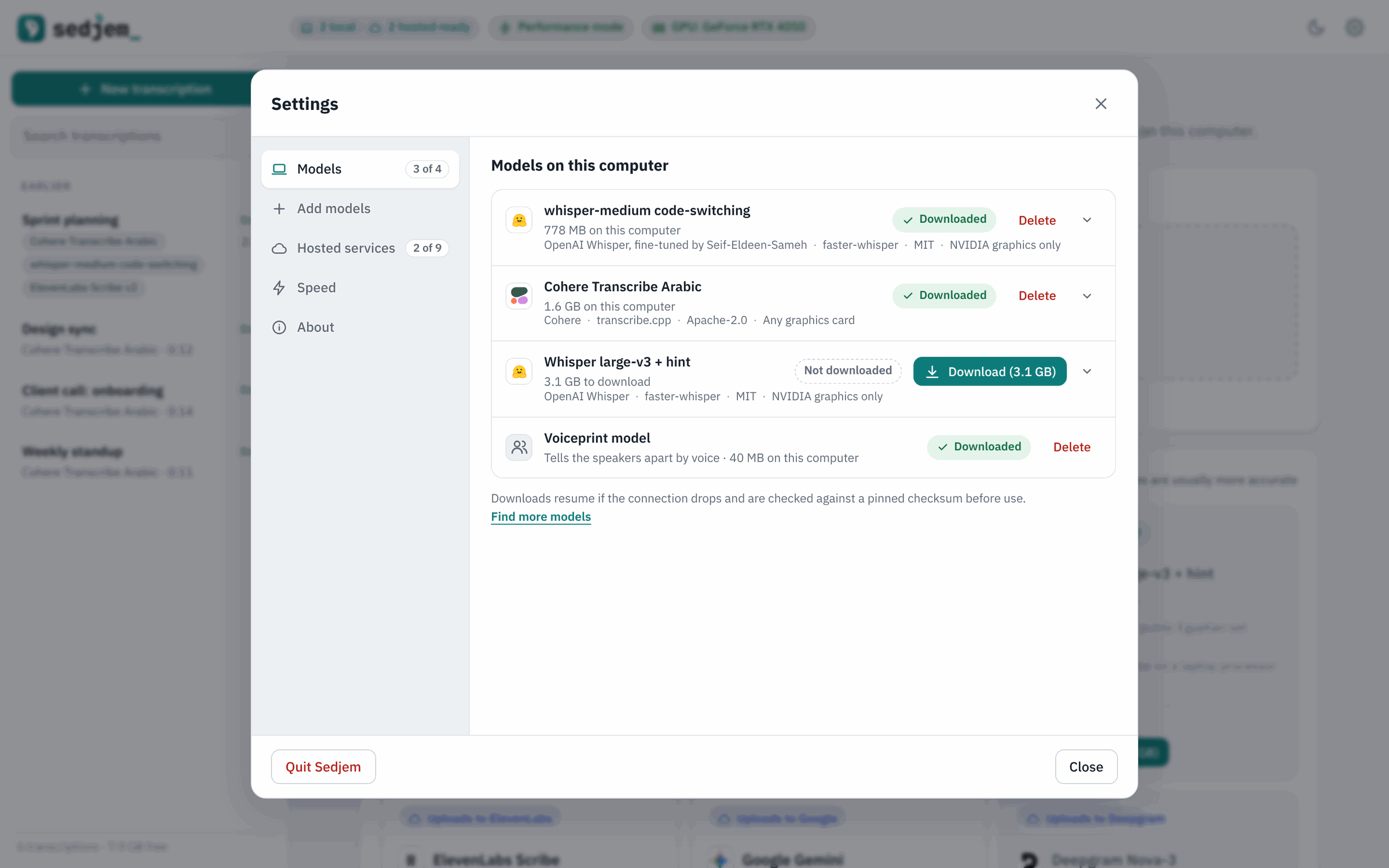
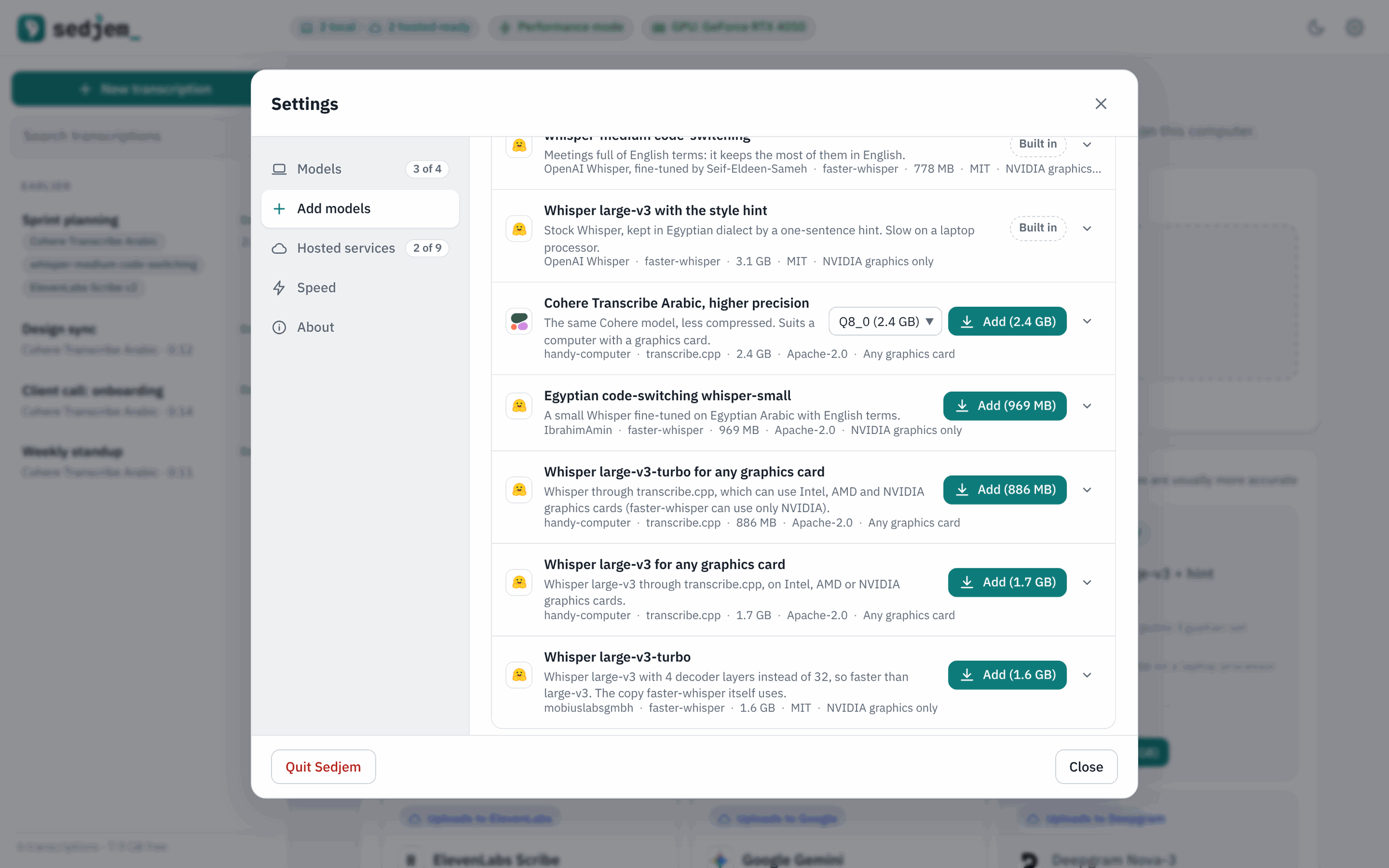
- Adds models from a Hugging Face link, or with one click from a Recommended list that gives the
evidence, size, licence and graphics cards for each. - Settings has tabs for Models, Add models, Hosted services, Speed, Assistants and About.
- Downloads resume if the connection drops and are checked against pinned checksums.
- Has a dark theme, and contacts nothing on the internet except the model downloads, YouTube for the
links you add, the hosted services you choose, GitHub to check for updates when allowed, and
Aptabase for the usage counts below. - Sends anonymous usage counts to Aptabase, in the EU, a few times a month: the version, the system and
the computer in broad terms, some settings, which models are downloaded, and how many transcriptions,
exports and other actions there were, with which models; never recordings, transcripts or names, and
no identifier. They are on by default, the first start says so, and the switch in Settings → About
orDO_NOT_TRACK=1turns them off. See usage counts. - Tells when a newer version is out, from stable releases or the latest tested changes, and updates
itself when asked: a git checkout by fast-forward, the Windows app through its installer. See
updates.
Models
| Model | Runs on | Word error rate, Egyptian test set | English terms kept in English | One hour of audio takes |
|---|---|---|---|---|
| Cohere Transcribe Arabic | your computer | 13.4% | 77% | about 20 min |
| whisper-medium code-switching (default) | your computer | 18.5% | 90% | 30–45 min |
| Whisper large-v3 with an Egyptian style hint | your computer | 20.8% | 88% | about 2 h |
| ElevenLabs Scribe v2 | ElevenLabs | 13.1% (published) | not measured | not measured |
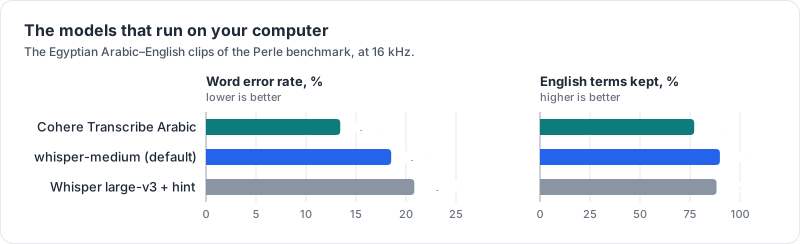
The three local models from the table: Cohere makes the fewest errors, whisper-medium keeps the most English terms in English.
The test set is 40 Egyptian Arabic–English clips from the public
Perle benchmark. Times were measured on
the project's test laptop, with an Intel Core i5-1245U and no NVIDIA GPU (details in
the results); other computers will differ. ElevenLabs' figure comes from
Perle's paper, on its own clips, so it can't be compared
directly with the project's.
Real meetings are much harder than the benchmark. On an hour of real work meetings with two to five
people, the local models' text differed from ElevenLabs' transcripts on 44% (Cohere) and 49%
(whisper-medium) of the words, mostly because they drop or misspell short English terms in fast
exchanges. Speaker labels did better: in meetings of two or three people, 8–9% of words went to
the wrong person, against 6% for ElevenLabs' own labels. Treat the local transcripts as private
drafts. For minutes that people will rely on, a hosted model is still more accurate. The method and
every number are in the results.
Speaker labels
Four speaker models can be chosen in Settings → Models: the voiceprint models TitaNet-small (the
default, 40 MB), TitaNet-large and 3D-Speaker CAM++, and NVIDIA's Nemotron-3-Diarization (397 MB),
which does the whole job in one model and also hears when two people talk at once. On the meeting
excerpts and on two public sets, ArzEn's Egyptian Arabic–English interviews and AMI's English
meetings, Nemotron gave the least to the wrong person.
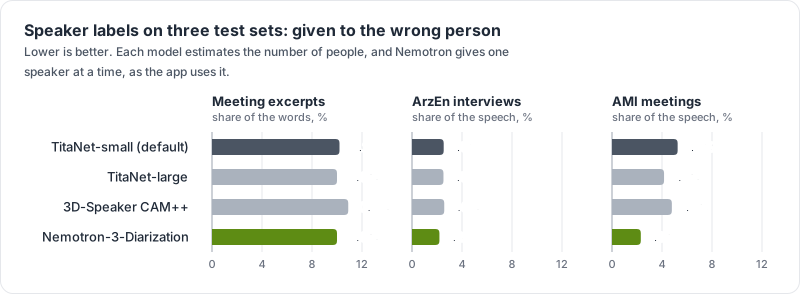
The share of the words (meeting excerpts) or of the speech (ArzEn and AMI) given to the wrong person, with the number of people estimated.
TitaNet-small stays the default: it is level with Nemotron on meetings of two or three people, a
tenth of its size and four to six times faster. Nemotron is the better choice for meetings of four or
more people and for heavy crosstalk. The method, the tables, the conclusions and the sources are in
speaker labels.
Hosted services
Each one needs your own API key, entered in Settings → Hosted services. Apart from ElevenLabs'
published figure, none of them has been measured on Egyptian speech by the project.
| Service | Model the app uses | Arabic–English | Speaker labels |
|---|---|---|---|
| ElevenLabs | Scribe v2 | code-switching, the best published result | built in |
| Speechmatics | Arabic–English bilingual pack | code-switching | built in |
| Google Gemini | Gemini 3.5 Transcribe | code-switching | built in |
| AssemblyAI | Universal-3.5 Pro | code-switching | built in |
| OpenAI | gpt-transcribe, or gpt-4o-transcribe-diarize for labels | told to expect both | built in |
| Groq | Whisper large-v3 with the Egyptian hint | like the local Whisper large-v3 | from the speaker model on your computer |
| Mistral | Voxtral Mini Transcribe 2 | detects the language | built in |
| Deepgram | Nova-3, ar-EG |
one language per recording | built in |
| Azure AI Speech | fast transcription, ar-EG |
one language per recording | built in |
Prices, free tiers, what each service keeps and whether it trains on your audio are in
the app notes.
Screenshots
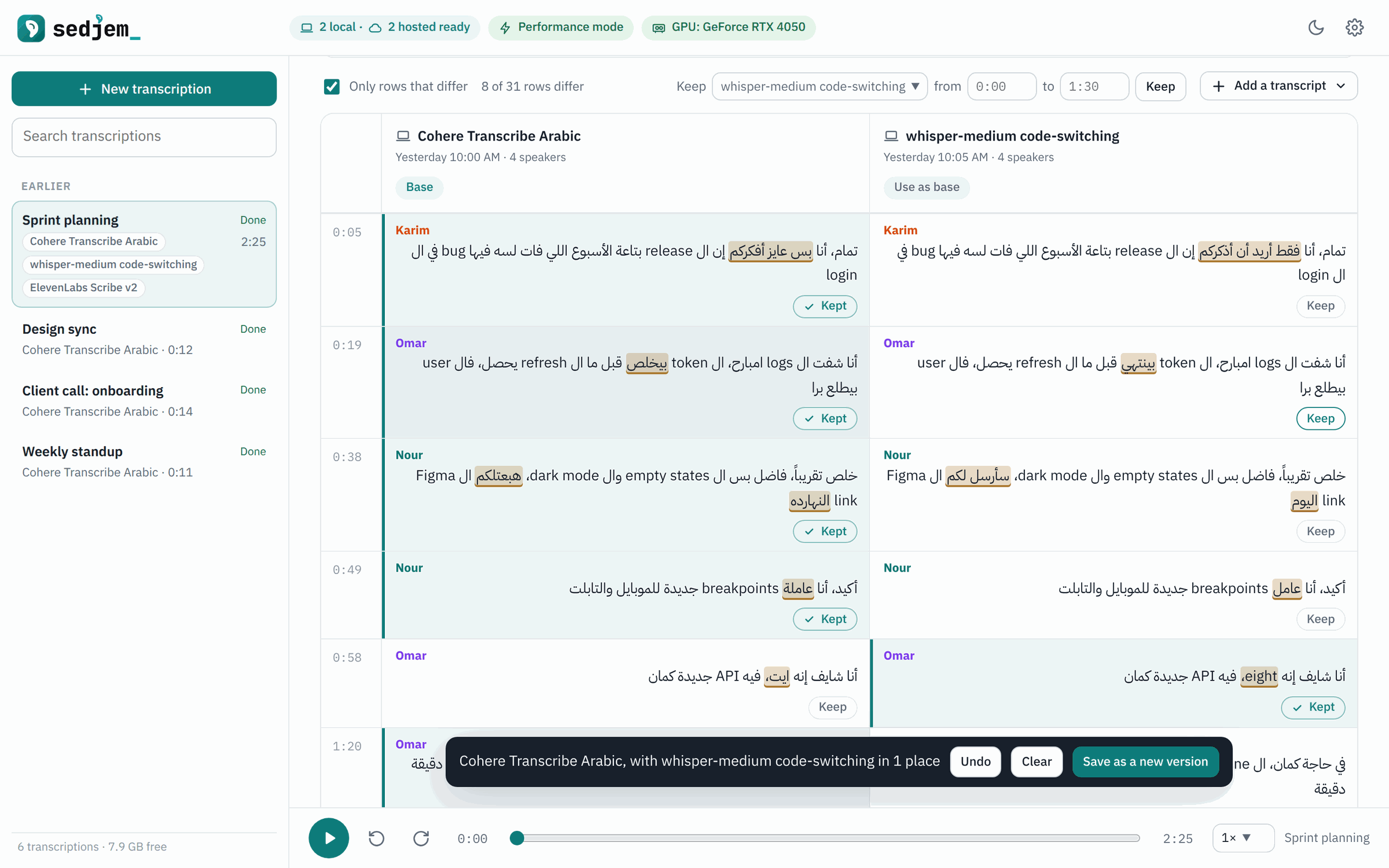
Two models on the same recording, side by side. Keep the rows each one got right and save the result as a new version.
 |
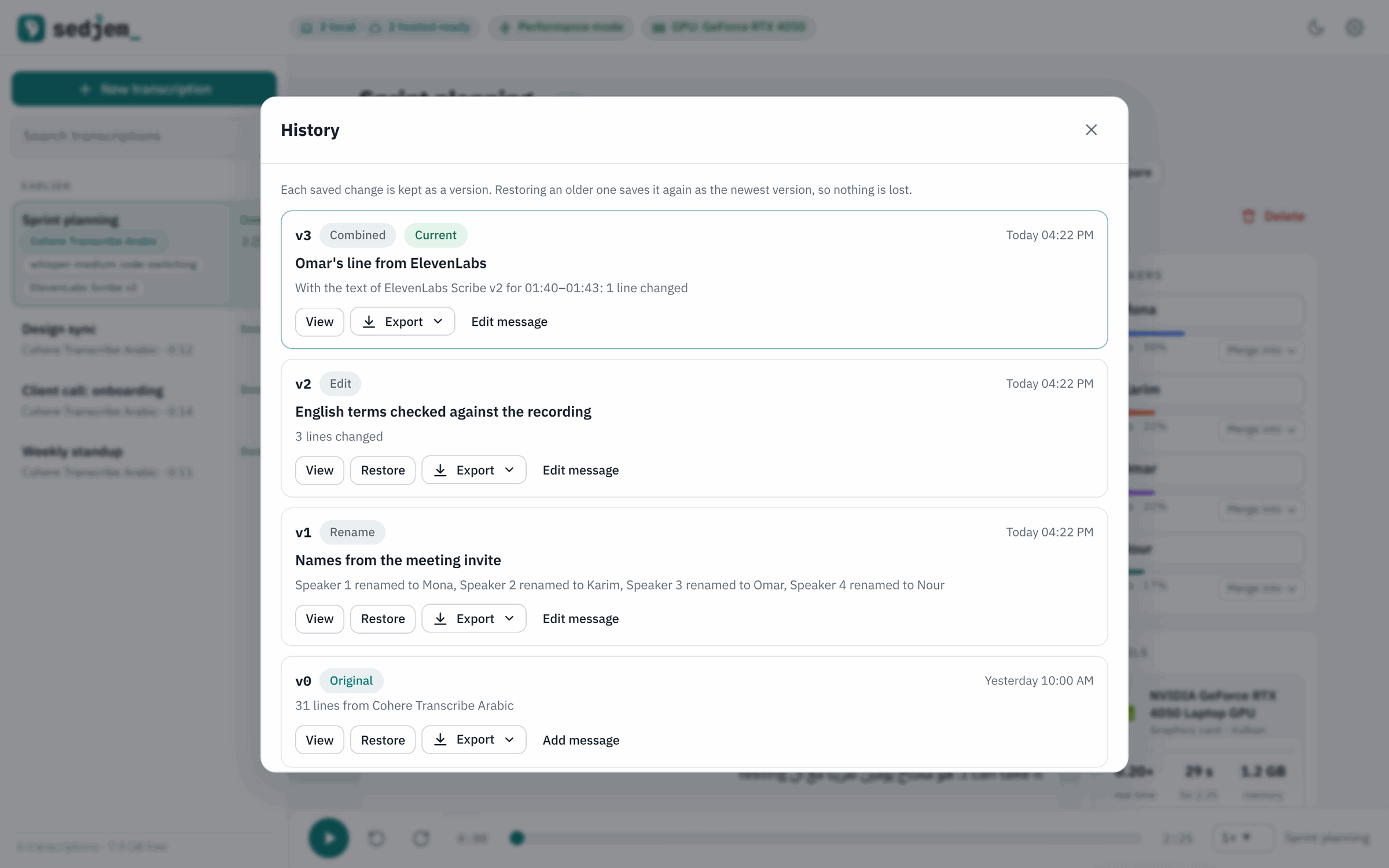 |
| Every edit session is reviewed as a diff before it is saved. | The history keeps the model's output as version 0 and every change after it. |
 |
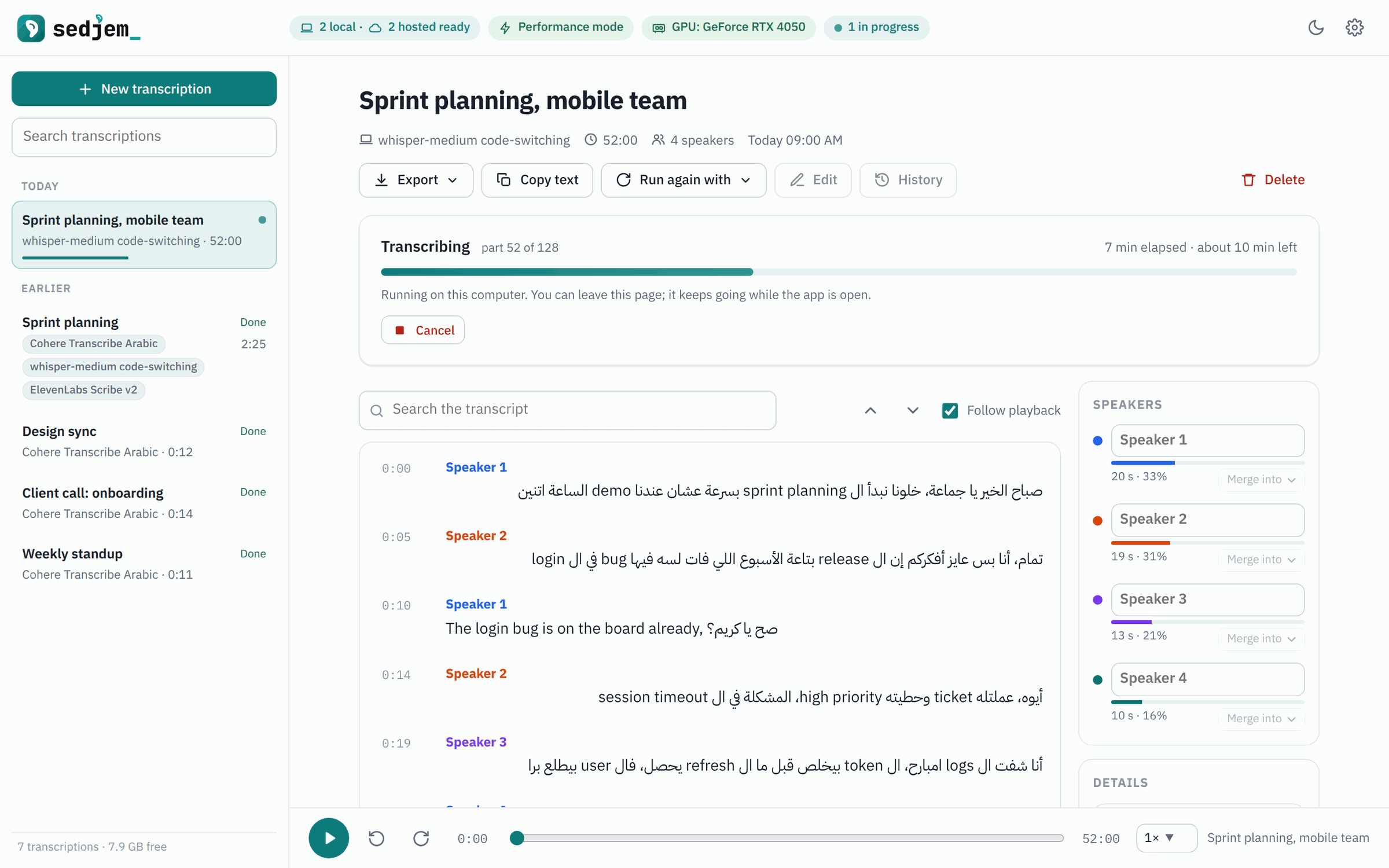 |
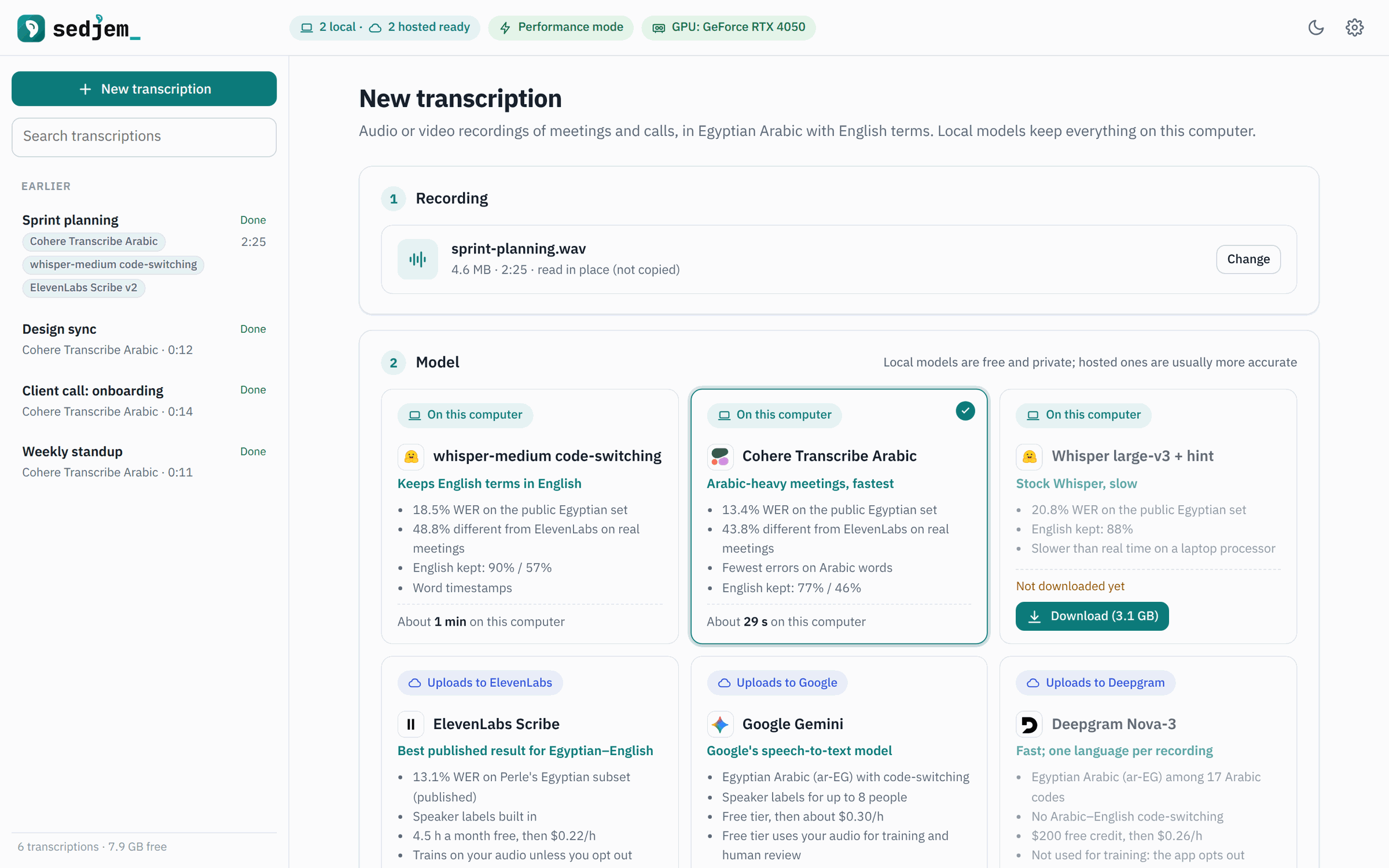
| Pick a recording and a model. Each card lists what that model is good at. | The lines appear while the model works. Cancel at any time. |
 |
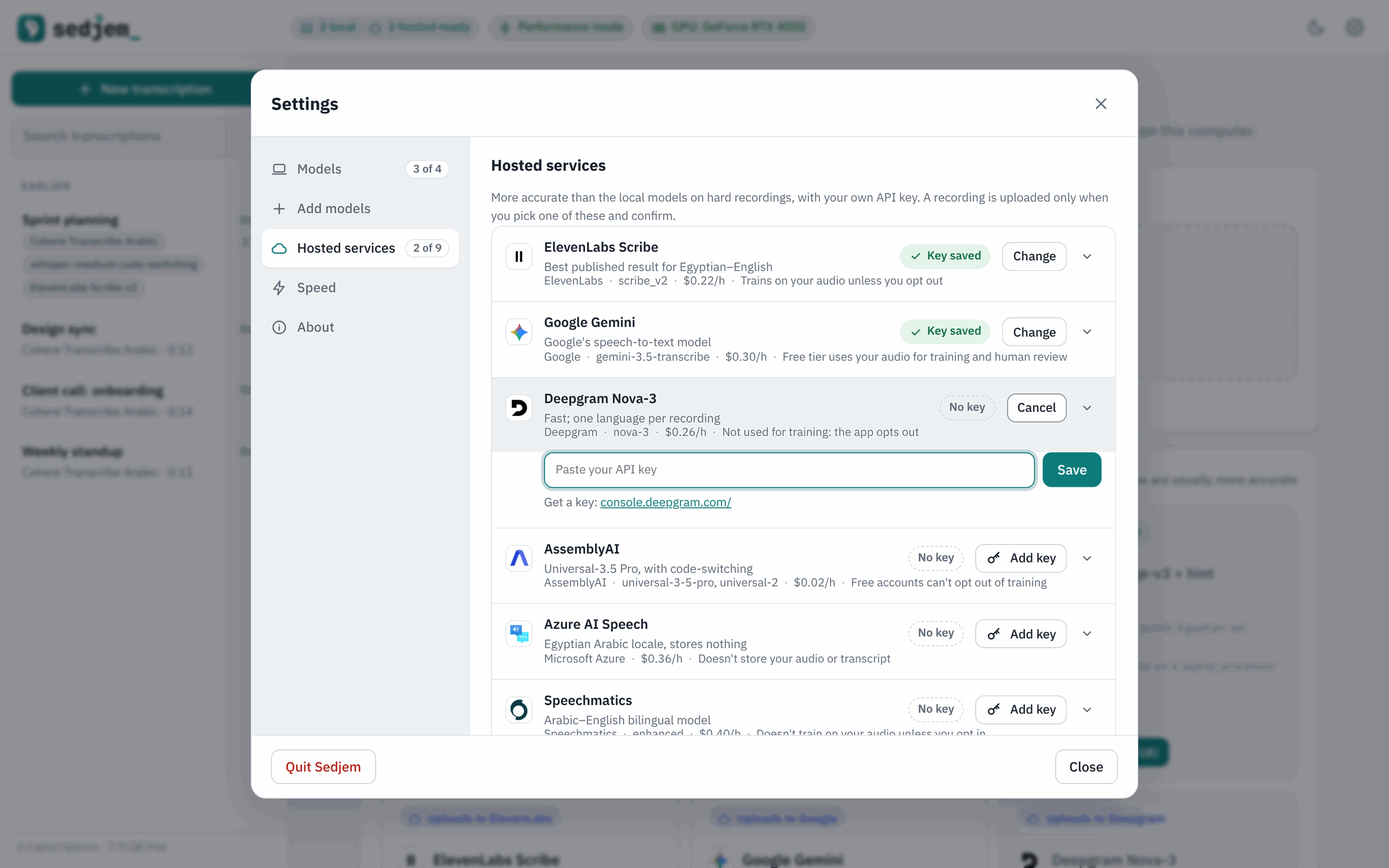 |
| Download or remove the local models. | Add a key for a hosted service. Each form opens only when asked. |
 |
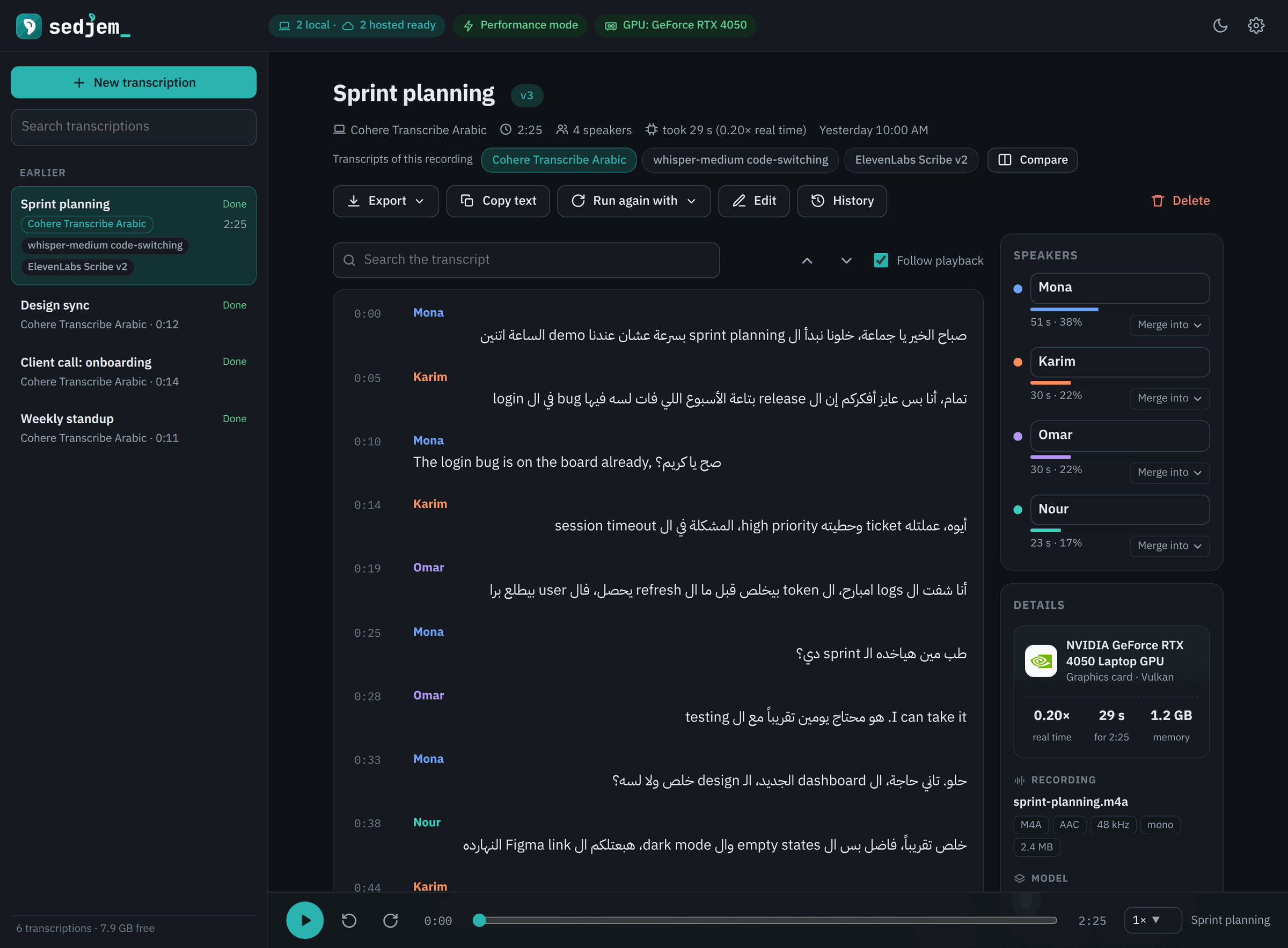 |
| More models for these meetings, added in one click. | Dark theme. |
The transcripts in the screenshots are made up, and so are the names.
Install
Windows
Download Sedjem-<version>-setup.exe from the latest release.
It installs for your user, without admin rights (about 80 MB). The installer isn't signed, so when it comes from
a browser, Windows SmartScreen warns that its publisher is unknown; choose More info, then Run anyway.
Sedjem's own updates don't show this warning. Installed by hand, the installer has a Privacy page with the box
for the anonymous usage counts, and the privacy policy lists everything Sedjem sends.
Another way to install is coming: once winget has accepted the package, this will install Sedjem too:
winget install MohammedElsayedAhmed.Sedjem
From source, install Python 3.12 and Git, then in PowerShell (the terminal of
VS Code and Windows Terminal) or the Command Prompt:
git clone https://github.com/MohammedEl-sayedAhmed/sedjem.git
cd sedjem
py -3.12 -m venv .venv
.venv\Scripts\pip install -r requirements.txt -r requirements-desktop.txt
.\app.cmd
With uv instead of pip, the two middle lines are uv venv .venv --python 3.12
and uv pip install --python .venv -r requirements.txt -r requirements-desktop.txt.
.\app.cmd opens Sedjem in a window of its own (Edge WebView2), without a console. PowerShell runs a
file in the current folder only with .\ in front. If nothing opens, .venv\Scripts\python -m app.desktop
shows why. To build the installer yourself, see the desktop notes.
Linux
You need Python 3.12 and uv.
git clone https://github.com/MohammedEl-sayedAhmed/sedjem.git
cd sedjem
uv venv .venv --python 3.12
uv pip install --python .venv -r requirements.txt
./app.sh              # opens Sedjem at http://127.0.0.1:8765
./app.sh --desktop    # or in a window of its own
The latest release also has a Linux
build (Sedjem-<version>-linux-x64.tar.gz): unpack it and run Sedjem/Sedjem.
On first start, open Settings → Models and download whisper-medium (778 MB) or
Cohere (1.6 GB). TitaNet-small, the speaker model for speaker labels (40 MB), comes with the first
one; the other speaker models can be chosen and downloaded under Speaker labels on the same tab.
The desktop app
The desktop app opens Sedjem in a native window (Edge WebView2 on Windows, GTK WebKit or Qt on
Linux) with native open and save dialogs. Where that isn't available it uses an app-mode browser
window, then a browser tab. --browser goes straight to the browser window, and --server runs only
the server, for any browser to use. The details are in the desktop notes, and so is
how to uninstall it on Windows and Linux.
How it works
The recording is cut at pauses (Silero VAD) into pieces of up to 25 seconds, and each piece goes to
the speech model. Separately, a voiceprint model (NVIDIA TitaNet-small by default) describes what the
voice sounds like every 0.75 seconds, and spectral clustering groups those voiceprints into speakers.
NVIDIA's Nemotron-3-Diarization, which can be chosen instead in Settings, does this in one model: it
gives every speaker's probability every 10 ms, and on the test meetings it did better with five people.
Whisper gives every word a time, so each word gets the speaker whose voice is heard at that
moment; for Cohere, which gives no word times, the pieces are cut where the voice changes.
It all runs on the processor, or on a graphics card when one works.
The app is a small Python web server bound to 127.0.0.1 with a plain HTML and JavaScript interface.
The desktop version shows the same interface in a native window and is packaged with PyInstaller.
Your transcriptions, their versions, audio copies and API keys stay in the app's data folder.
Command line
The same pipeline works without the app:
.venv/bin/python transcribe.py meeting.m4a --speakers 3        # or --speakers 0 to estimate
.venv/bin/python transcribe.py call.wav --engine cohere --speakers 2
It prints the transcript and saves it, with timings and speakers, as text and JSON. Setup, options
and speeds are in the command-line notes.
Background
Sedjem came out of a search for speech-to-text models that handle Egyptian Arabic–English meetings
on an ordinary laptop. Open models were measured on public Egyptian code-switching test sets and on
real work meetings, and Sedjem runs the ones that did best. R2T2, the model the search started from,
was tried first and is not usable for this: it wrote most English terms in Arabic letters. The
project notes have the whole story:
| Use case | the recordings, the test audio and the original question |
| Trials and issues | every experiment in order, what broke and how it was fixed |
| Results | method, public benchmark, phone audio, real meetings, caveats |
| Speaker labels | how voices are told apart, the speaker models compared on real meetings, ArzEn and AMI, and which to use |
| Command line | setup, options, speed and memory |
| Market research | hosted services and open models, free tiers, privacy terms |
| Recommendation | what to use for which job |
| Disk space and cleanup | what gets installed where, and how to remove it |
| The app | using Sedjem, versions, comparing, its settings, API keys, privacy |
| Desktop app | running, building and testing on Windows and Linux |
| Assistants | connecting Claude, Cursor or VS Code over MCP, and what they may see |
| Updates | the two channels, what is sent to GitHub, and updating from the app or by hand |
| Usage counts | what is sent to Aptabase and when, what never is, turning it off, and the public totals |
| Privacy policy | everything Sedjem contacts and when, what stays on the computer, and turning the usage counts off |
Name and logo
Sedjem is the ancient Egyptian word for "to hear", written with the sign of an ear. The logo draws that
ear as the app icon and again as the dot of the j, and ends the name with a typing cursor: sound heard,
then written down. The idea, the colour and mono versions, how to use them and the SVG and PNG files are
in docs/brand.
Activity
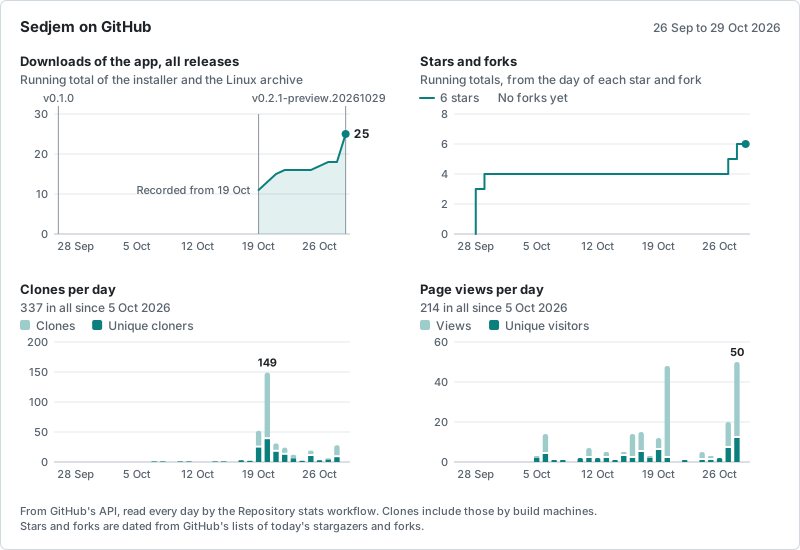
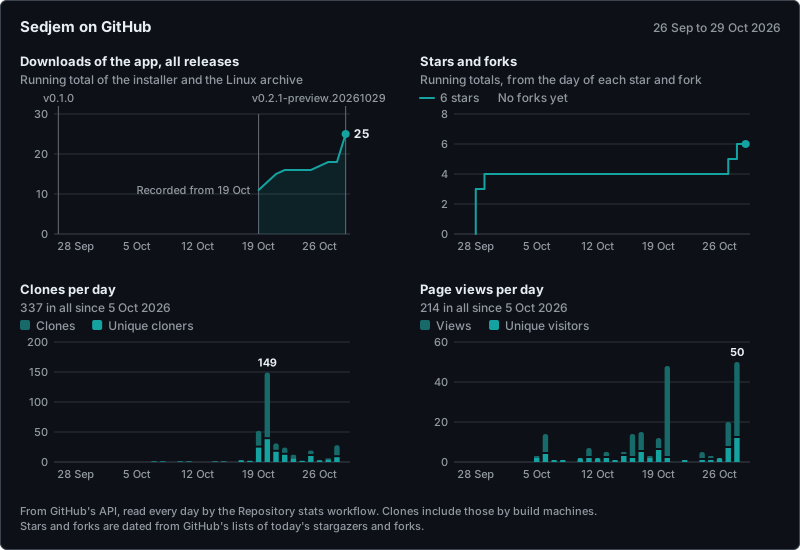
The stats workflow redraws these charts every day from GitHub's own numbers. The tables behind them are in
the stats summary.
Usage
Totals from the app's anonymous usage counts, published once a month
(how they are made):
No totals yet: the counts start with Sedjem 0.3.0, and the first month's totals will be here once that month has
been exported.
Thanks
Sedjem stands on other people's work: the
whisper-medium Arabic–English code-switching fine-tune,
Cohere Transcribe Arabic (the
GGUF build from
handy-computer, run with transcribe.cpp), OpenAI Whisper through
faster-whisper and CTranslate2,
sherpa-onnx with NVIDIA TitaNet and 3D-Speaker CAM++,
NVIDIA Nemotron-3-Diarization (run with NumPy), Silero VAD, PyAV,
pywebview, PyInstaller and Inno Setup. The benchmarks use the
Perle,
ArzEn and AMI
test sets; the papers and licences behind the speaker labels are listed in
their references.
Licence
Sedjem is made by Mohammed El-sayed Ahmed and is free software under the
GNU Affero General Public License v3.0 (AGPL-3.0-only). You can use, study, change and
share it. If you distribute a modified version, or run one as a service for others, you must publish
its source under the same licence, and keep the author credit in its About section and README (the
NOTICE file has the exact terms). Versions published up to 25 September 2026 were under the
MIT licence.
For use without these conditions, for example inside a closed-source product, commercial licences
are available from the author: contact Mohammed El-sayed Ahmed.
Contributions are welcome; by sending one you agree that it may be distributed under both the AGPL
and the commercial licence.
The models keep their own licences: the whisper-medium fine-tune and Whisper large-v3 are MIT (check
the fine-tune's card for its training data), Cohere Transcribe Arabic and the Whisper tokenizer are
Apache-2.0, NVIDIA TitaNet-small comes under the NeMo toolkit's Apache-2.0 licence and TitaNet-large
is CC-BY-4.0, 3D-Speaker CAM++ is Apache-2.0, and
NVIDIA Nemotron-3-Diarization is under the OpenMDW 1.1 licence, which allows commercial use. The desktop build bundles
third-party packages under their own licences, including the FFmpeg libraries that come with PyAV
(LGPL). The hosted services are used under their own terms. The full-colour logos of the models,
services and some systems are the brands' own files, taken from their brand pages and sites (and one
from LobeHub's icons, MIT); each file's source and the terms
found for it are listed in app/static/logos/SOURCES.md. The
single-colour logos of the hardware and the other systems come from
Simple Icons (CC0). The trademarks belong to their owners, and the logos
are shown only to identify the hardware, systems, models and services the app names; this does not
mean that any of them endorses Sedjem.
Yorumlar (0)
Yorum birakmak icin giris yap.
Yorum birakSonuc bulunamadi