session-recorder-chrome-extension
Health Uyari
- License — License: AGPL-3.0
- Description — Repository has a description
- Active repo — Last push 0 days ago
- Low visibility — Only 8 GitHub stars
Code Basarisiz
- rm -rf — Recursive force deletion command in .github/workflows/deploy.yml
- network request — Outbound network request in e2e/record-export.spec.ts
- process.env — Environment variable access in e2e/support.ts
Permissions Gecti
- Permissions — No dangerous permissions requested
Bu listing icin henuz AI raporu yok.
Free, open-source Chrome bug recorder for AI coding agents. Capture console errors, network requests, screenshots and voice; export Markdown for Claude Code, Cursor, Codex and ChatGPT.

Session Recorder
Record a bug. Hand your AI agent the whole story.
Session Recorder is a free, open-source, local-first Chrome extension for
recording web bugs for AI coding agents. It captures clicks, console errors,
network requests and responses, screenshots, video, voice narration, DOM
interactions, annotations, and uploaded files, then exports an LLM-ready
Markdown report for Claude Code, Codex, Cursor, ChatGPT, and other coding
agents.
Reproducing a bug for an AI coding agent means describing a hundred little
things: what you clicked, what the app requested, the error in the console, what
you expected. Session Recorder captures all of it while you use your app, then
exports one clean report your agent can read.
Website: azimi.me/session-recorder-chrome-extension
· Example report
· Claude Code
· Cursor
· Codex
· ChatGPT
What you get
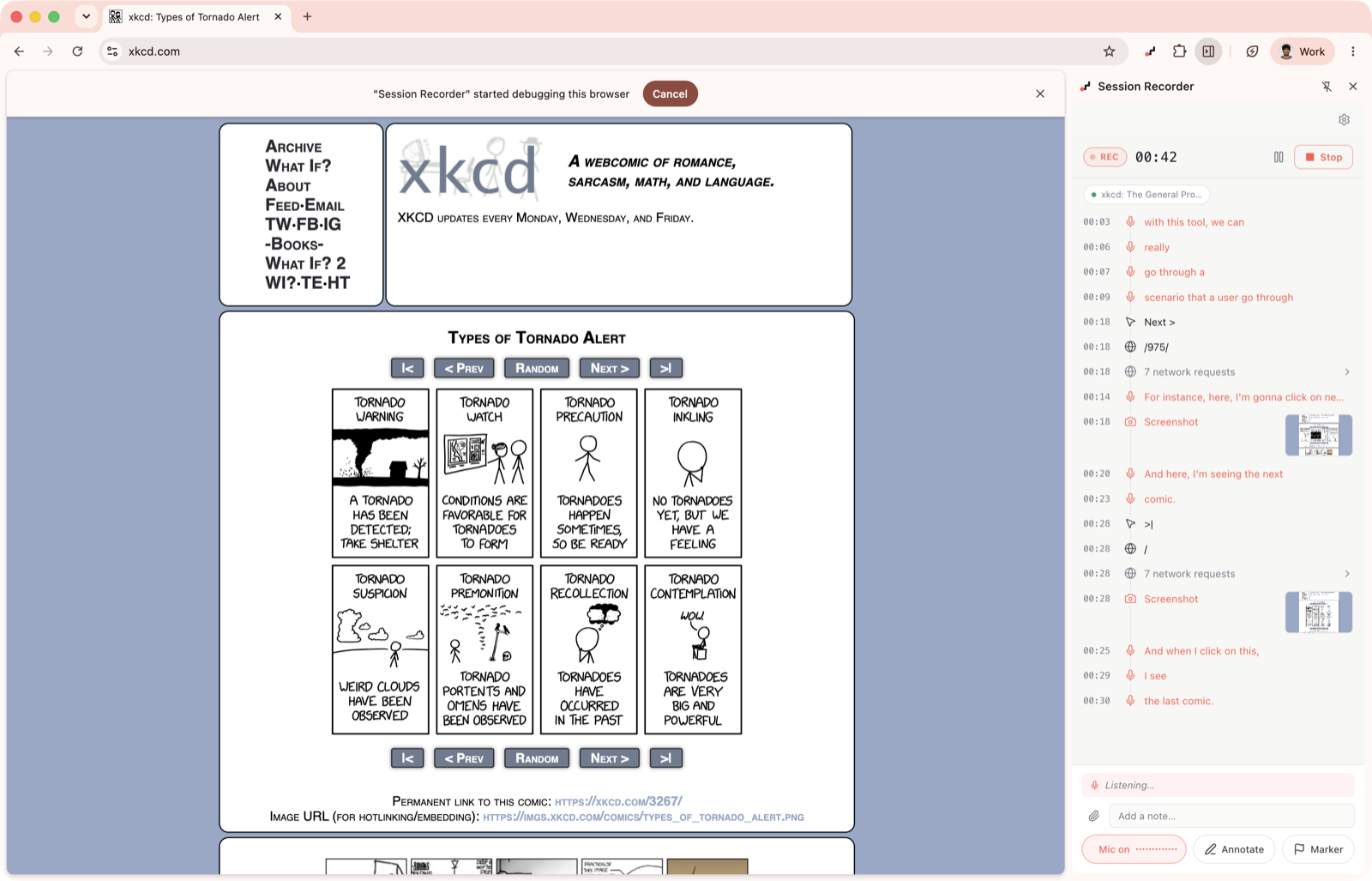
- one timeline of everything that happened, in order: clicks, typing, text
selections, page changes, network requests and their responses, console
errors, and screenshots - your own voice, transcribed in real time and slotted in next to what you were
doing, so the report reads like you walking the agent through it - video of the tab, with its sound, that pauses and resumes with the session
and plays inline in the report - arrows and boxes you draw right on the page, saved into the report as an image
- sessions that follow you: when the app opens a new tab, recording continues
there and comes back when the tab closes - an OpenAPI spec compiled from the requests your app made, when you turn it on
- a report sized to fit your model, with a live token estimate for each level
- secrets hidden by default and nothing uploaded: it all stays on your machine
Dial in how much you capture
The arrow next to Record opens capture options: a detail slider that sets
screenshot frequency, pointer tracking, and how much of each request body to
keep, plus switches to start video, mic narration, and the API spec.
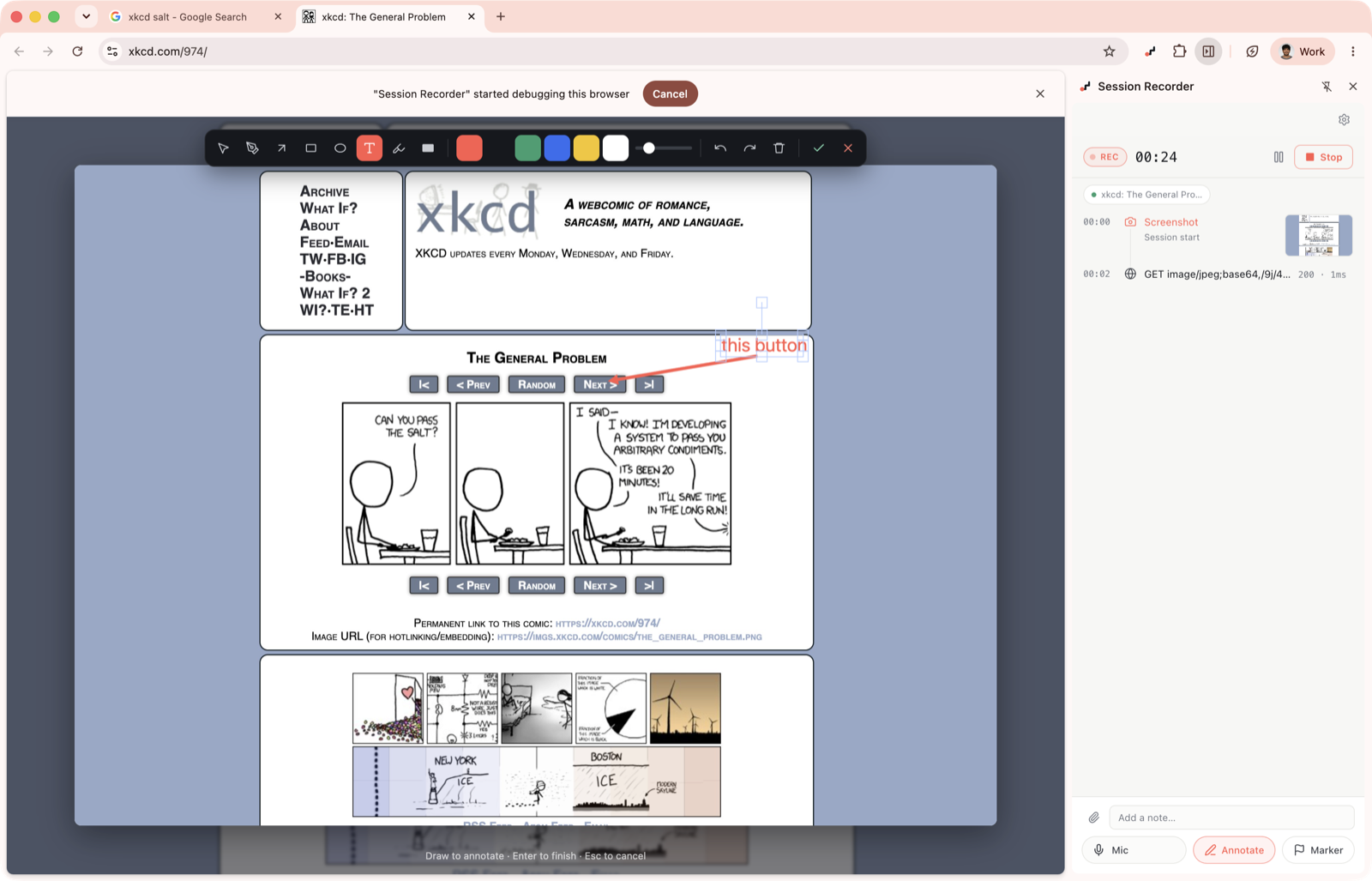
Point at the problem
Freeze the screen and mark it up. The annotated image goes straight into the
report, so your agent sees the exact thing you meant.
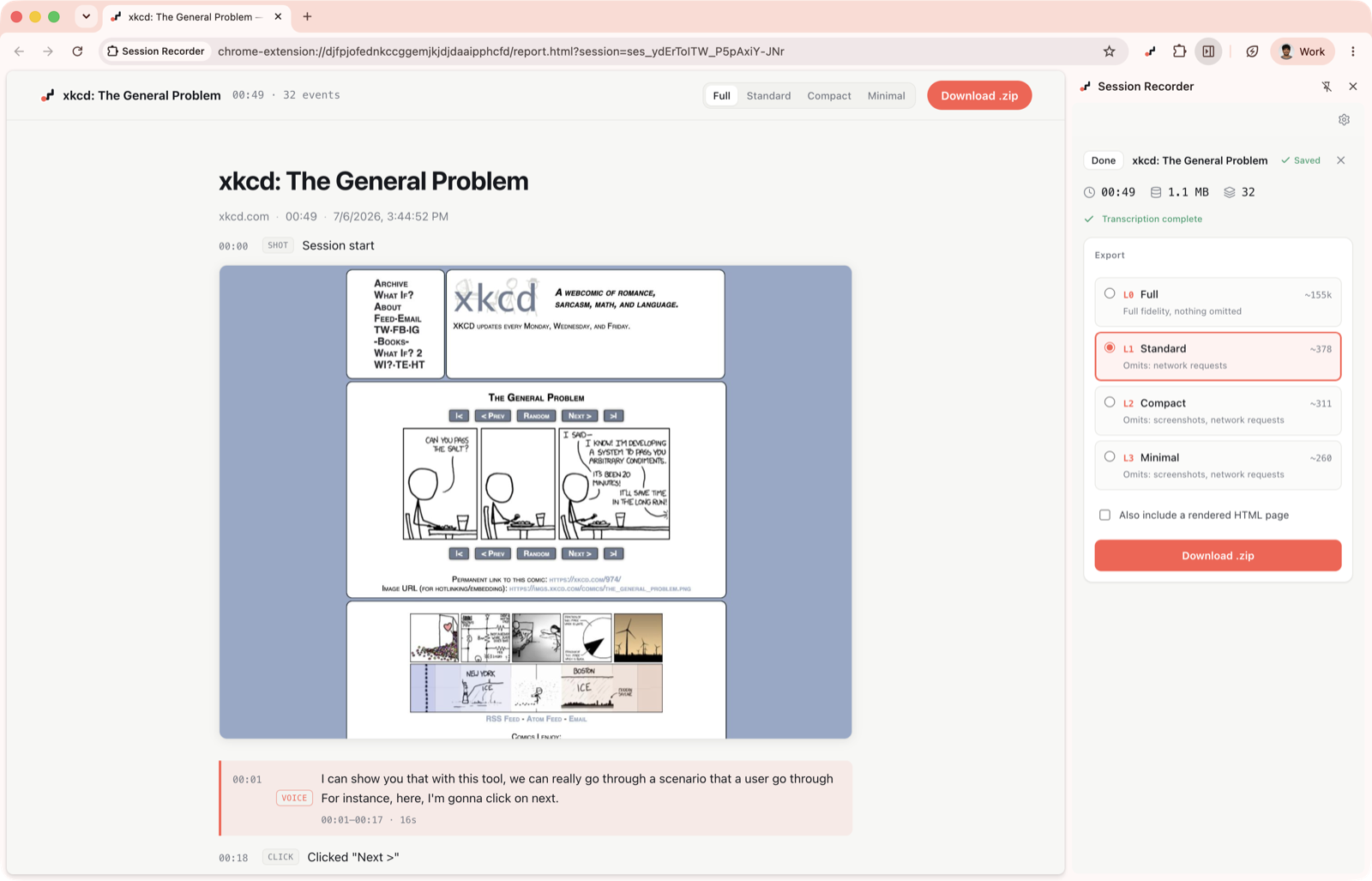
Right-sized for any model
Long sessions get big. Pick a level and see the estimated token count before you
export. The same recording can be re-exported at any level later. Your explicit
signals (voice, annotations, notes, and errors) are never trimmed.
Secrets stay secret
Passwords, auth headers, and tokens are masked before anything is saved. You can
add your own rules or turn masking off per session in the settings.
Install
Chrome Web Store
Add Session Recorder to Chrome —
click the toolbar icon to open the side panel, then click Record.
While recording, Chrome shows a "... is being debugged" banner. That is how
the extension taps the network and console streams. If the debugger cannot
attach, the session still records interactions, navigation, voice,
annotations, and files, and the report notes the gap.
From source
pnpm install
pnpm build            # -> .output/chrome-mv3
In Chrome, open chrome://extensions, enable Developer mode, click Load
unpacked, and select .output/chrome-mv3. Click the toolbar icon to open the
side panel, then click Record.
Develop and test
pnpm dev              # WXT dev server with HMR
pnpm compile          # typecheck
pnpm test             # unit and integration tests (vitest)
pnpm test:e2e         # Playwright end-to-end (add :headed for a visible browser)
The end-to-end suite in e2e/ loads the built extension into
Chromium, records a session against the bundled demo/ page, exports
through the real side-panel UI, and checks the zip: the report contains the
actions and marker, and a typed password appears nowhere in the output.
Voice narration and transcription (optional)
Talk while you record to explain what's happening. With Deepgram (Nova-3)
configured, the extension transcribes in real time over a streaming websocket.
Each utterance lands on the timeline stamped at the moment you began speaking,
so the report reads: narration "while clicking 'Checkout'". OpenAI
(gpt-4o-transcribe) and ElevenLabs (Scribe v2) transcribe in batches instead.
Set the provider, model, and API key on the options page. The key stays inchrome.storage.local. Without a key, sessions keep the raw audio.
Using a report with an LLM agent
Unzip the export and give report.md to your coding agent. It is a
chronological narrative with [mm:ss] timestamps joining interactions, network
summaries, errors, narration, and annotations. At L2 and L3 it stands alone
without the asset files. See docs/report-format.md
for a suggested prompt.
Step-by-step workflows, with a copy-pasteable prompt for each:
- Claude Code — unzip into the repo and point it at
report.md - Cursor — attach with
@report.md, plus a reusable project rule - Codex — local CLI and cloud tasks, plus an
AGENTS.mdsnippet - ChatGPT — upload one self-contained file
Or copy the Markdown browser bug report template.
Or read a complete example report
and what AI coding agents actually need from a bug report.
Why we need each permission
debugger: network, console, and exception capture through CDPsidePanel: the recording and export UItabsandwebNavigation: multi-tab tracking and navigation eventsscripting: content-script activationstorageandunlimitedStorage: sessions live in IndexedDBoffscreen:MediaRecorderfor voice and videotabCapture: video recording of the tabdownloads: save the exported zipalarms: flush the event buffer while recording<all_urls>: record whatever app you point it at
Under the hood
For contributors: the extension captures network and console throughchrome.debugger, navigation through chrome.webNavigation, and interactions
through content scripts. Voice and tab video record in an offscreen document;
screenshots come from the debugger. Everything flows through one funnel in the
background service worker into IndexedDB, and trimming at export is
deterministic (no LLM). The full design is in PLAN.md andIMPLEMENTATION.md.
Project layout
entrypoints/         background (orchestrator), 3 content scripts,
                     sidepanel + options (React), offscreen + mic-permission
lib/session/         frozen contract: types, event registry, settings, messaging
lib/capture/         debugger, network, console, screenshots, multitab, redaction
lib/export/          trimmer, markdown renderer, shape-summary, tokens, zip, bundle
lib/transcription/   provider interface + OpenAI-compatible / Deepgram / ElevenLabs
lib/storage/         IndexedDB layer + batched event writer
e2e/                 Playwright end-to-end suite
demo/                local test page that exercises every capture path
Not in v1
Backend upload and shareable links, LLM-powered summarization, Firefox and
Safari ports, and DOM snapshot replay. See PLAN.md §11.
License
Session Recorder is free software under the
GNU Affero General Public License v3.0.
You may use it, modify it, and redistribute it. If you distribute a modified
version — or run one as a network service — you must release your full source
under the same license. In practice that means nobody can take this, close the
source, and sell it as their own product.
Copyright © 2026 Mohsen Azimi.
Yorumlar (0)
Yorum birakmak icin giris yap.
Yorum birakSonuc bulunamadi