mokalabs
Health Uyari
- License — License: MIT
- Description — Repository has a description
- Active repo — Last push 0 days ago
- Low visibility — Only 7 GitHub stars
Code Uyari
- process.env — Environment variable access in apps/docs/astro.config.mjs
Permissions Gecti
- Permissions — No dangerous permissions requested
Bu listing icin henuz AI raporu yok.
See every MCP message. Chat with any LLM and MCP server, compare models, call tools, and see what your AI editor (Copilot, Cursor, Claude, Gemini) sends to your MCP servers. 100% local.

Moka
See every MCP message.
Chat with any LLM, plug in any MCP server, agent or skill, and inspect every call. Or put Moka in front of your AI editor and see what it sends to your servers. One command, zero config, 100% local.



npx @mokalabs/sandbox
Node 20+. Picks up your API keys from the environment and ships with a demo MCP server, so the first run has working tools.
⭐ If Moka saves you time, a star helps other people find it.
Test your tools across models
Write prompts with the tools a model should (and shouldn't) call, and run them on local and cloud models at once, several times each. See which model picks the right tool with the right arguments, and why a run failed. Suggest tests writes a first set from your tools.
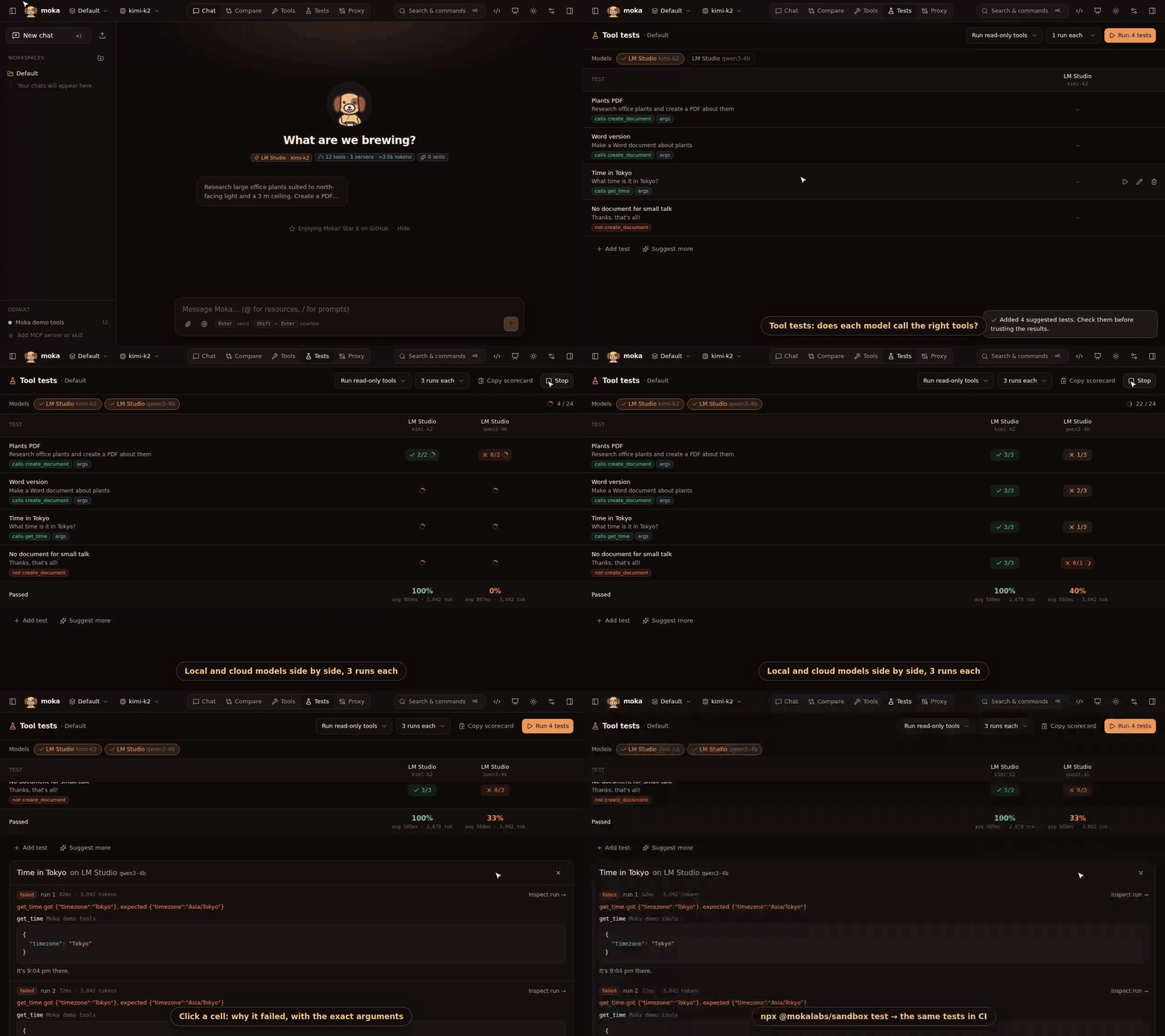
Tests live in your moka.json, and npx @mokalabs/sandbox test --models a,b --runs 3 runs them in CI (exit code 1 on failure). Tools that may write don't run during tests. Tool tests guide →
Compare models
Run one prompt against several models with the same MCP tools, side by side: answers, tool calls, latency and tokens.
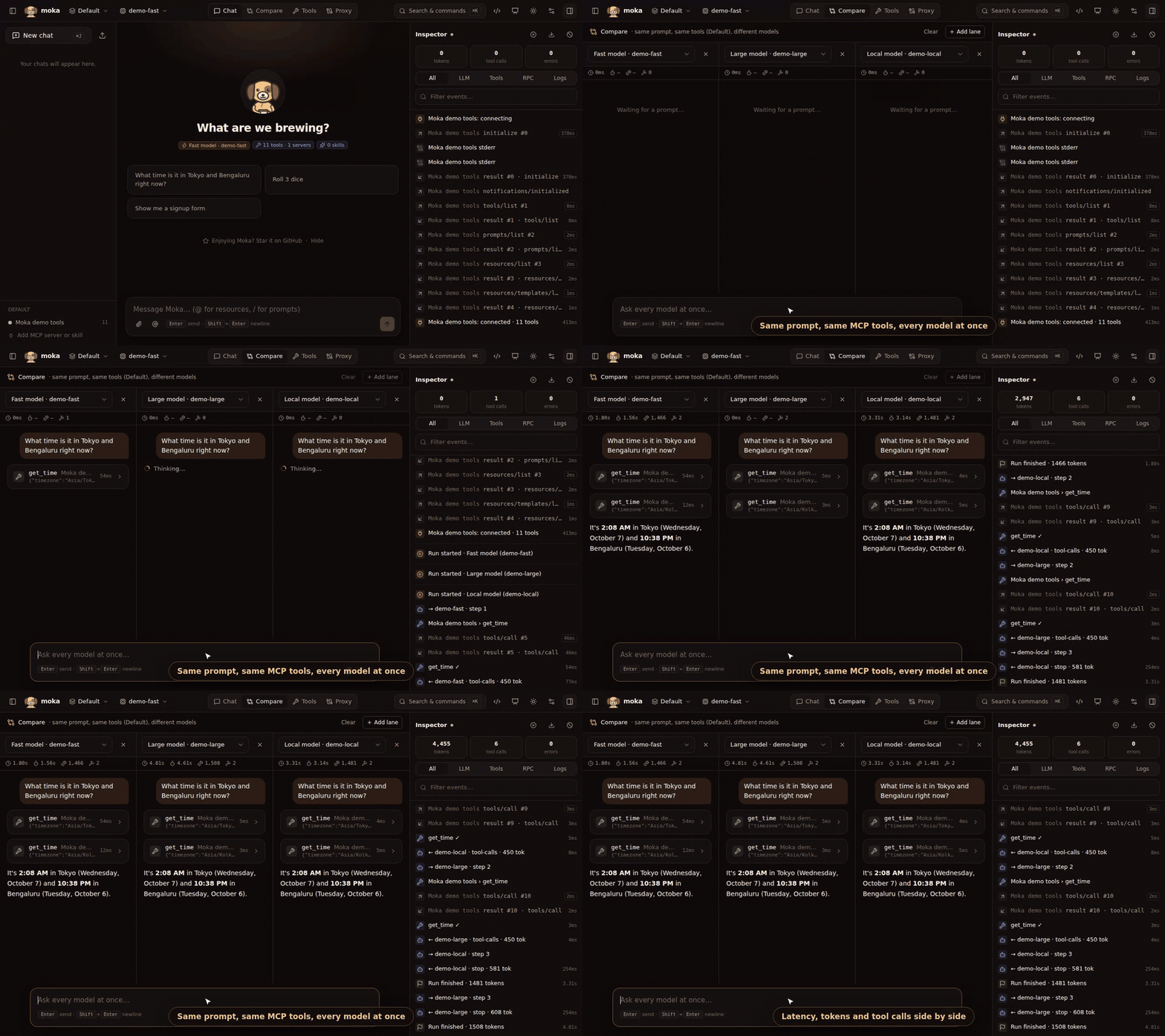
OpenAI, Anthropic, Gemini, Azure OpenAI, Ollama, LM Studio, OpenRouter, Groq, DeepSeek, Mistral, xAI and Together are built in, plus any OpenAI-compatible gateway (vLLM, LiteLLM, a corporate proxy). Compare guide →
Call tools directly
Pick any tool, resource or prompt from your MCP servers and run it from a form generated from its schema. No model needed. Long-running tools show live progress.
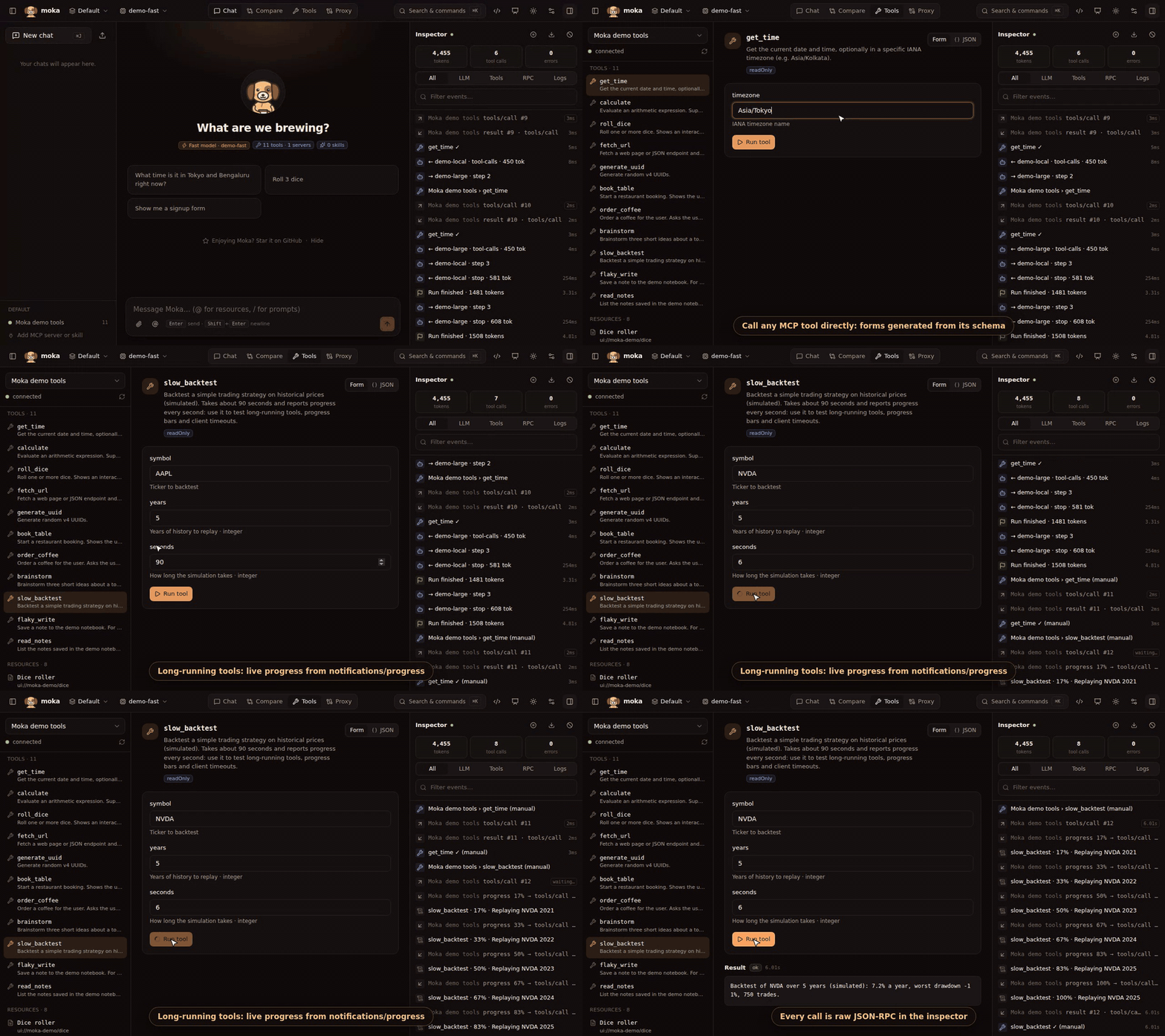
stdio, Streamable HTTP and SSE servers, with OAuth sign-in, elicitation and sampling, on MCP 2026-07-28 and the 2025 revisions (what changed →). Add servers from a gallery or paste your Claude Desktop, Cursor or VS Code mcp.json. Tool runner guide →
See what your AI editor sends to your MCP servers
Put the Moka proxy in front of the MCP servers of GitHub Copilot (VS Code), Cursor, Claude Desktop, Claude Code, Windsurf or Gemini. Every message between them shows up in Moka's Proxy tab, live: timeouts, retries, late replies and errors.
npx @mokalabs/proxy wrap     # finds your editor configs and asks before changing anything
npx @mokalabs/sandbox        # → Proxy tab
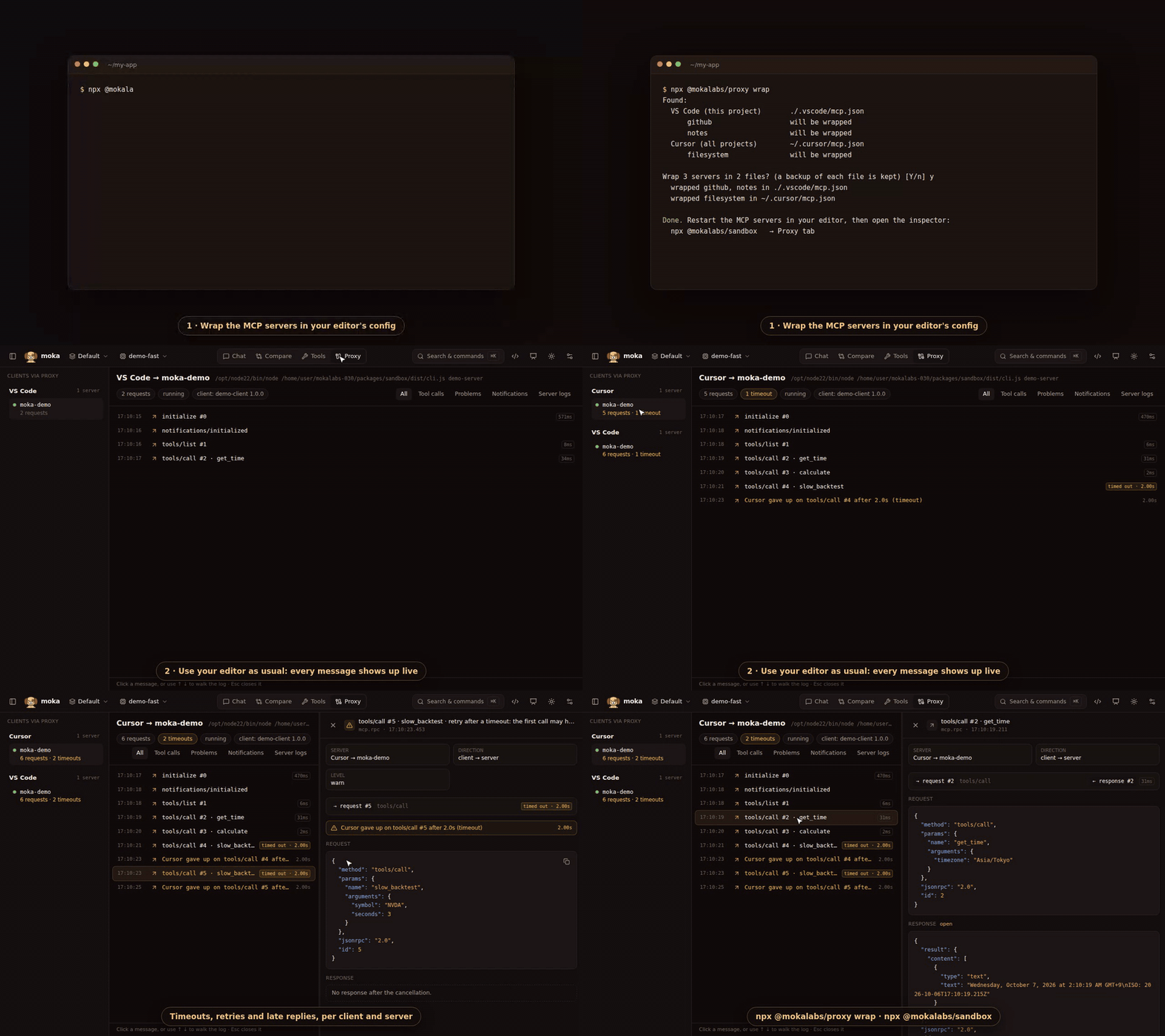
Messages pass through untouched. Export saves everything recorded as one JSON file, with secrets redacted, ready for a bug report. npx @mokalabs/proxy unwrap puts your configs back. Proxy guide →
Chat and inspect every call
Chat with any model and your MCP servers. The inspector shows every LLM step, tool call and raw JSON-RPC message, each response paired with its request.
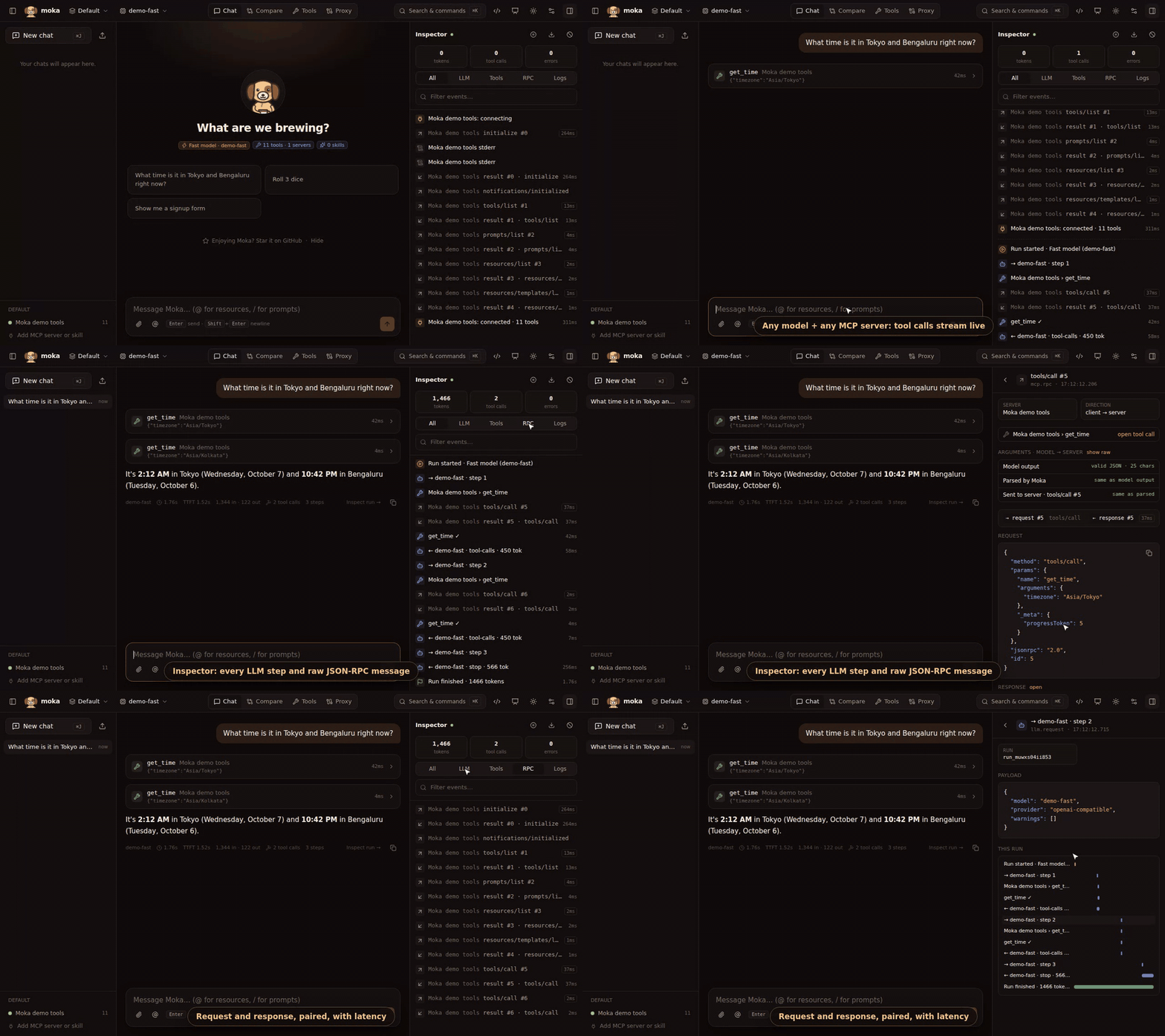
Retries of a tool call are grouped as attempts, with a warning when a retry may have written twice. You can also see a call's arguments as the model streamed them and as the server received them. Inspector guide →
Pages, diagrams and files, next to the chat
Ask any model for an HTML dashboard and it opens beside the chat; Mermaid diagrams draw in place. Documents your tools make (PDF, Word, HTML, CSV) open there too. Attach PDFs and Word files: models that read PDFs get the file, and local models (LM Studio, Ollama) get its text, read in your browser.
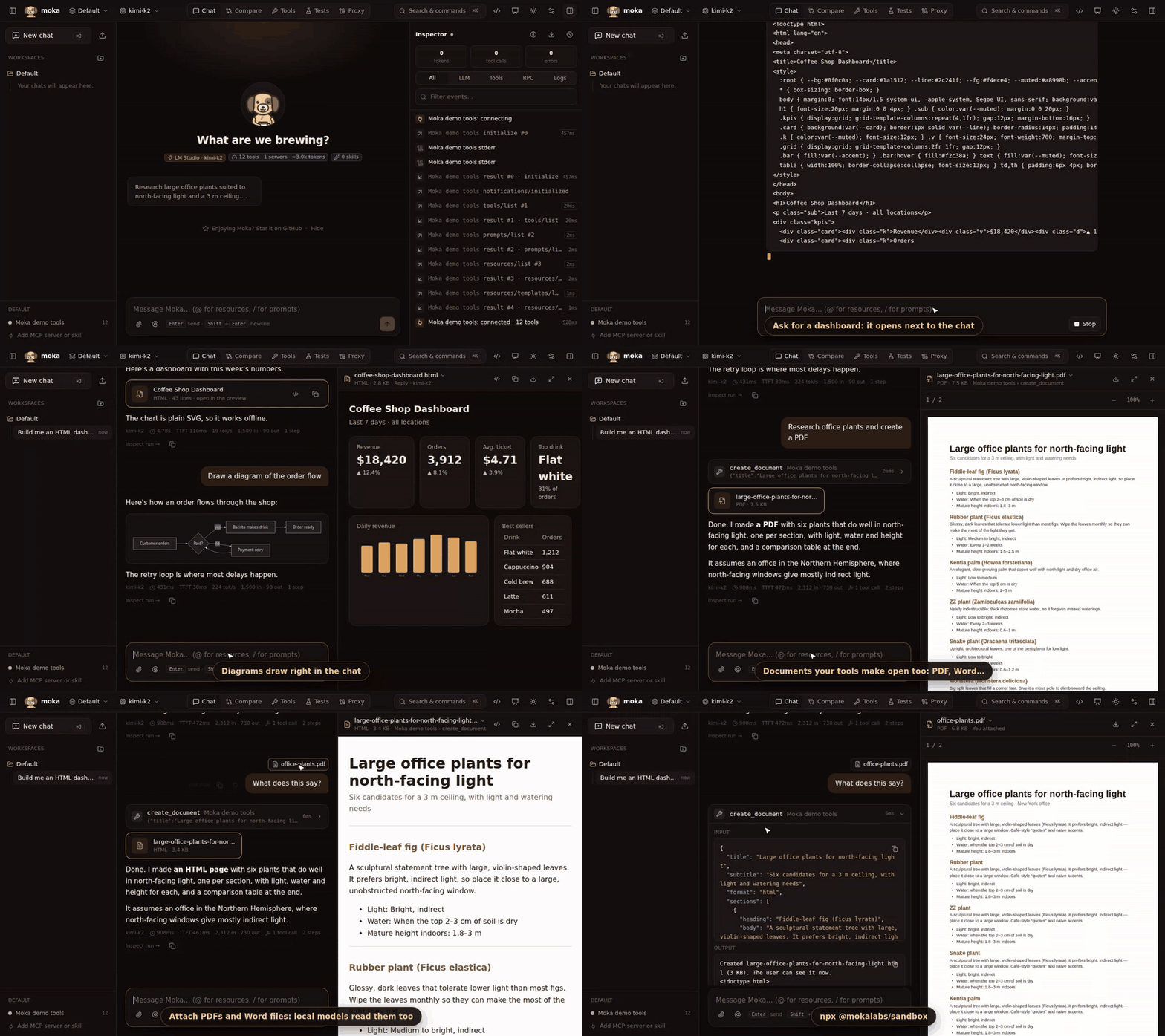
Pages run sandboxed, and a banner shows any host they load from, with one click to block it. MCP servers can return files as images, embedded resources or resource links. Files guide →
Generative UI, from your own agent
Point Moka at a LangGraph, CopilotKit or ADK agent over AG-UI or A2A, and get a chat UI, generative UI and the inspector for it. Tools that answer with A2UI render as real forms and cards. Button presses go back to the agent.
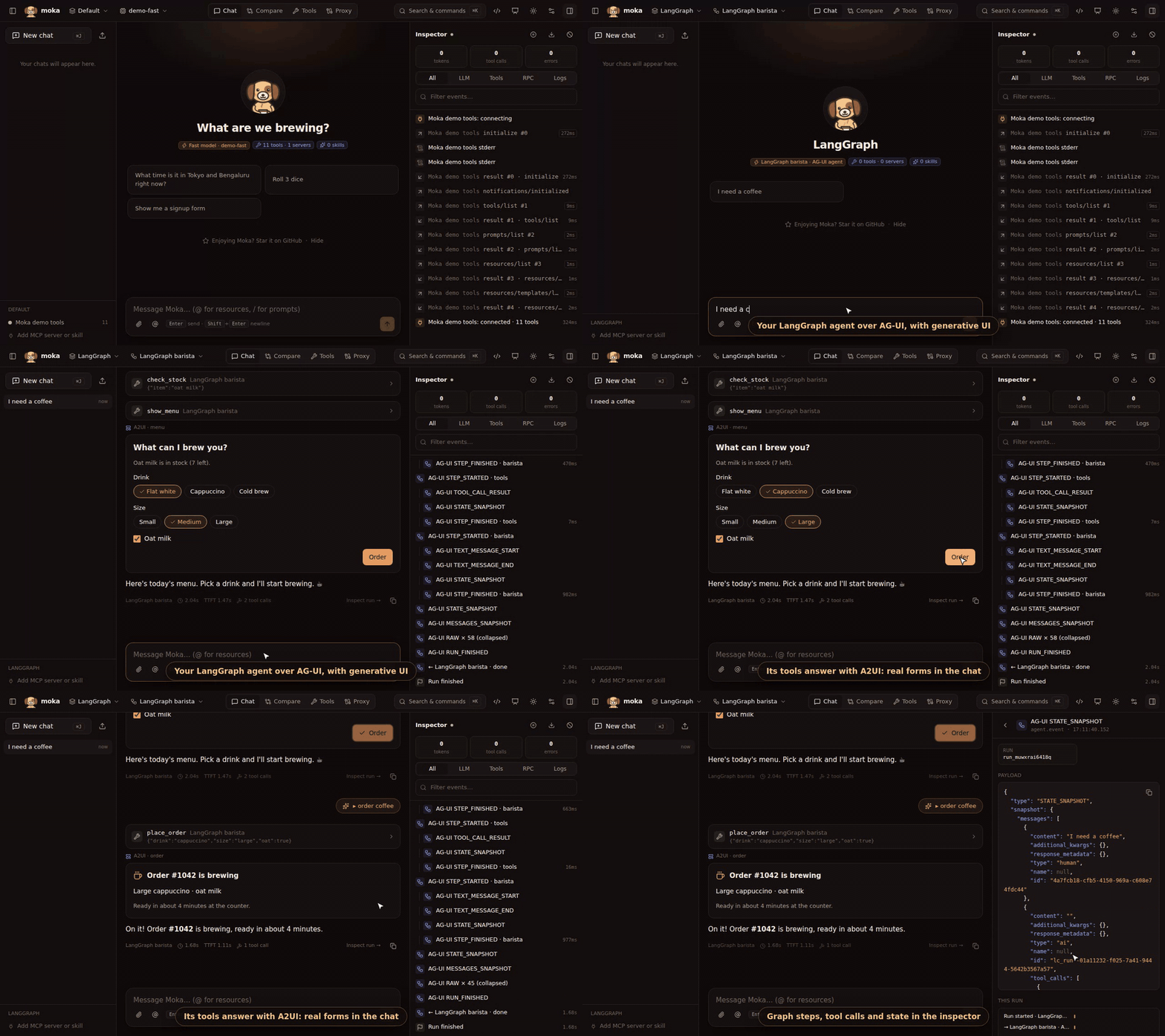
The agent in this clip is in examples/langgraph-a2ui. Moka also renders MCP Apps, and any model can answer with A2UI through the built-in render_ui tool. Generative UI guide →
Know what your MCP servers tell the model
- Security check. Every server is checked as it connects: hidden instructions (
<IMPORTANT>, "don't tell the user"), invisible characters, requests for SSH keys ormcp.json, tools shadowing another server's, and tools that changed since you trusted them, with a before/after diff. Servers your editor uses are checked too, through the proxy. Security guide → - Context budget. Tool definitions go with every message. Moka shows how many tokens each server and tool costs, and lets you hide the ones a workspace doesn't need. MCP servers guide →
More
- Agent Skills. Point Moka at a
SKILL.mdfolder (including~/.claude/skills). Skills load on demand, the same way Claude loads them. - Workspaces. Model + MCP servers + skills + system prompt + starter prompts, one per demo, with chats grouped by workspace in the sidebar. Presenter mode, tool approvals and a ⌘K palette help with live demos.
- Replay. Replay any saved chat offline, with no model calls.
- Export to code. Turn a workspace into Vercel AI SDK (TypeScript) or LangGraph (Python) code, or an
mcp.json. - Works at work.
HTTPS_PROXY/NO_PROXY, custom CAs, and a zero-dependency package for curated registries.
Quick start
npx @mokalabs/sandbox                      # run it
npm create moka@latest my-demo             # or scaffold a shareable demo project
docker run --rm -p 4000:4000 -e OPENAI_API_KEY ghcr.io/mokahq/moka   # or Docker
Moka prints a URL with a one-time access token and opens your browser. Add models, servers and skills in Settings. Everything is saved to a readable moka.json, and keys can stay in your environment ("apiKey": "env:OPENAI_API_KEY").
{
  "llms": [{ "id": "gpt", "name": "OpenAI", "provider": "openai", "model": "gpt-5-mini", "apiKey": "env:OPENAI_API_KEY" }],
  "mcpServers": [{ "id": "fs", "name": "Filesystem", "transport": "stdio", "command": "npx", "args": ["-y", "@modelcontextprotocol/server-filesystem", "."] }],
  "workspaces": [{ "id": "demo", "name": "Demo", "llmId": "gpt", "mcpServerIds": ["fs"] }]
}
Configuration · CLI · Docker · Embed the engine
100% local, and safe by default
Moka runs entirely on your machine. There's no Moka backend, no account and no telemetry, and Moka makes no network calls of its own: no update checks, no analytics, no CDN.
- Your data stays with you. Prompts go only to the model you pick (with Ollama or LM Studio, nothing leaves your machine) and tool calls only to the MCP servers you add. Chat history and proxy recordings stay in
~/.moka. - Your keys stay in your environment. Reference them as
env:OPENAI_API_KEYand they're resolved in memory, never written to disk. Exports redact secrets. - Locked to you. Moka binds to
127.0.0.1, and every API call needs the random token printed at startup.--host 0.0.0.0and--no-authare explicit opt-ins. - Sandboxed UI. MCP Apps run in a sandboxed iframe, and A2UI is data only: no code from a server or model runs in the page.
Moka runs MCP servers (local programs) for you, so treat it like a terminal and only add servers you trust. Security details → · Report a vulnerability
Packages
| Package | |
|---|---|
@mokalabs/sandbox |
The app: CLI (npx @mokalabs/sandbox, moka), server, web UI, demo MCP server |
@mokalabs/proxy |
Pass-through proxy for your editor's MCP servers, and wrap / unwrap for their configs |
@mokalabs/core |
Headless engine: providers, MCP client, skills, agent loop, event bus |
create-moka |
npm create moka project scaffolder |
Contributing
pnpm install
pnpm dev        # server on :4000 + Vite UI on :5173 with hot reload
pnpm test
Full docs at mokalabs.dev (source in apps/docs). See CONTRIBUTING.md and docs/releasing.md.
License
Yorumlar (0)
Yorum birakmak icin giris yap.
Yorum birakSonuc bulunamadi