svg-character-animator
Health Pass
- License — License: MIT
- Description — Repository has a description
- Active repo — Last push 0 days ago
- Community trust — 11 GitHub stars
Code Fail
- eval() — Dynamic code execution via eval() in scripts/build-standalone.js
- new Function() — Dynamic code execution via Function constructor in scripts/build-standalone.js
- fs module — File system access in scripts/build-standalone.js
- exec() — Shell command execution in templates/MorphAnimator.jsx
- exec() — Shell command execution in templates/preview/engine.jsx
- network request — Outbound network request in templates/preview/exporters.js
Permissions Pass
- Permissions — No dangerous permissions requested
No AI report is available for this listing yet.
Agent Skill for production-quality SVG character animation — morph state machines, idle motion, SwiftUI export
SVG Character Animator


Turn 2–10 static SVG poses into a living character — smooth state morphs, breathing, blinking, swaying, and Web or SwiftUI export.
Give your coding agent a set of SVG states and one prompt. The skill teaches it how to build a production-ready React state machine, while the included Animator Studio lets you preview, tune, debug, and export the result without installing an app.
Open Animator Studio · Install the skill · See examples · How it works · 中文说明
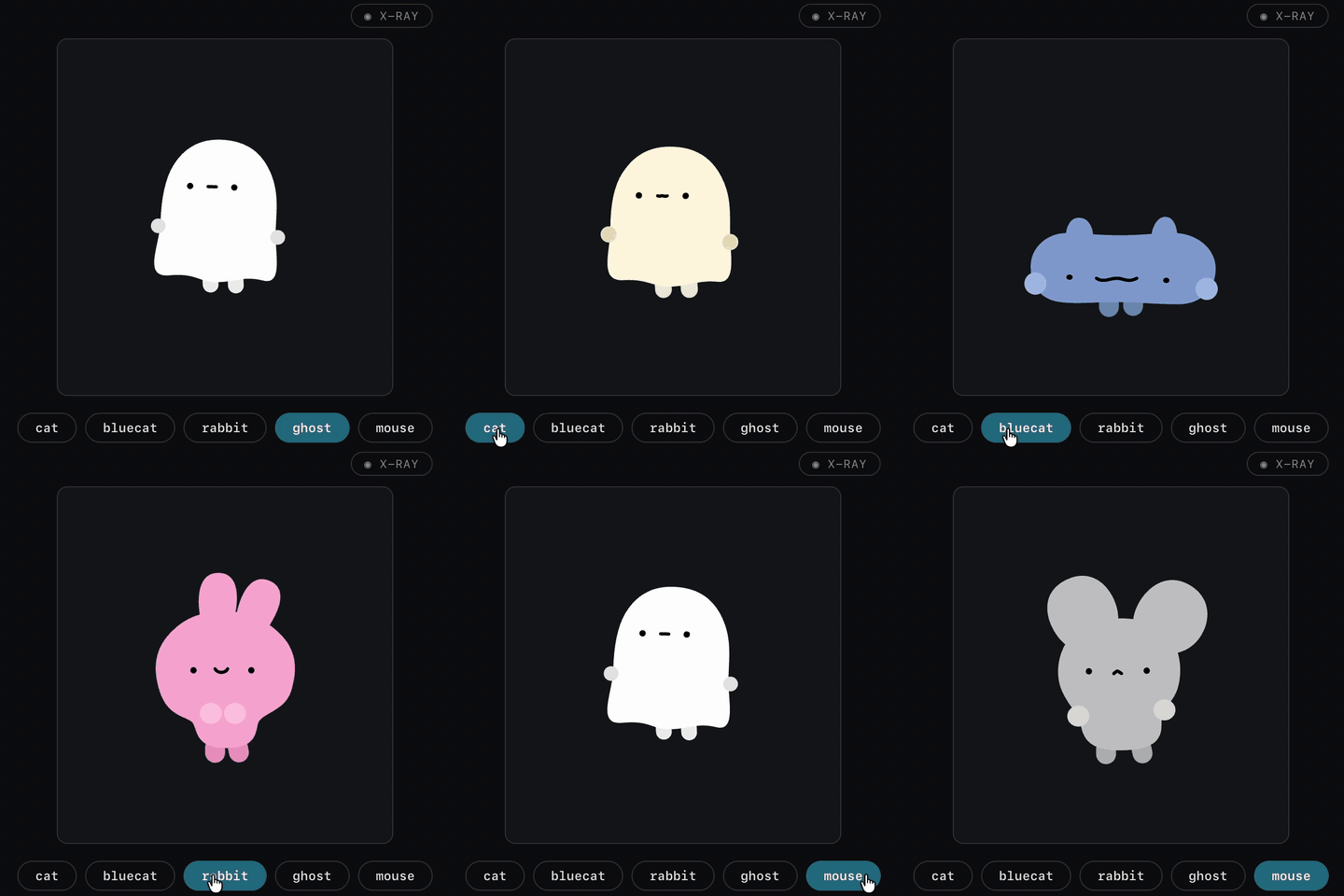

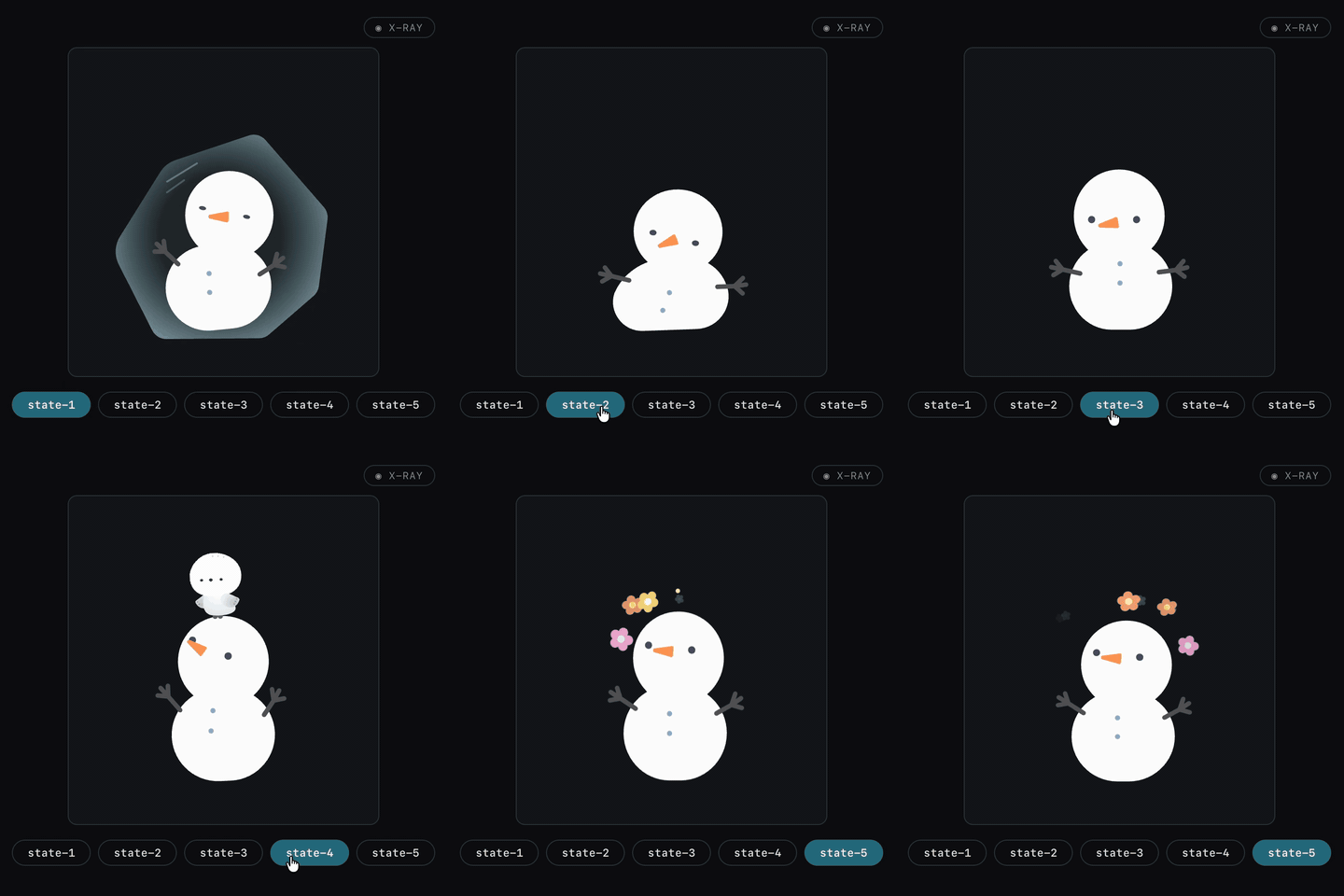
What you get
| Part | What it does |
|---|---|
| Agent Skill | Teaches Claude Code, Codex, Cursor, and other compatible agents to turn 2–10 SVG states into a runnable React animation. |
| Animator Studio | A standalone browser editor for live preview, easing curves, idle presets, per-path debugging, and export. No app install required. |
| Exporters | Export a self-contained Web player, transparent PNG sequence, or native SwiftUI view. |
This is useful for mascots, onboarding characters, empty states, interactive menus, icon transitions, game UI, and any illustration that needs to feel alive.
Install
Codex
Install for your user account:
git clone https://github.com/molauu/svg-character-animator.git ~/.agents/skills/svg-character-animator
Codex detects skills in ~/.agents/skills. If it does not appear immediately, restart Codex, then invoke it with $svg-character-animator or describe an SVG character animation task normally.
For a repository-scoped install, clone or add this repository at:
<your-project>/.agents/skills/svg-character-animator/
Claude Code
git clone https://github.com/molauu/svg-character-animator.git ~/.claude/skills/svg-character-animator
Then mention the skill in your request or ask Claude Code to read its SKILL.md first.
Cursor and other coding agents
Clone the repository anywhere your agent can read it, then attach or reference SKILL.md in the task. The skill follows the open Agent Skills format.
Make your first animation
1. Prepare 2–10 SVG states
Use one SVG per pose, expression, or character state. Matching parts should use the same element id in every file — for example, left-eye, mouth, and body.
For the cleanest result:
- Keep every state on the same canvas and
viewBox. - Reuse IDs for parts that correspond across states.
- Give unique IDs to decorations that only appear in one state.
- Preserve editable paths instead of flattening the whole character into one compound path.
2. Prompt your agent
Here are four SVG states of my mascot: happy, sleepy, excited, and sad.
Use the svg-character-animator skill to build a clickable React state machine.
Add subtle breathing while idle, blink every few seconds, and keep the feet
anchored during transitions. Also create a states file I can tune in Animator Studio.
3. Tune and export
Open Animator Studio, drop in the generated *.states.js file, adjust the easing and per-path behavior, then export for Web, PNG, or SwiftUI.
Animator Studio
Animator Studio is a self-contained HTML editor. Open it in your browser with two ready-to-use examples already loaded:
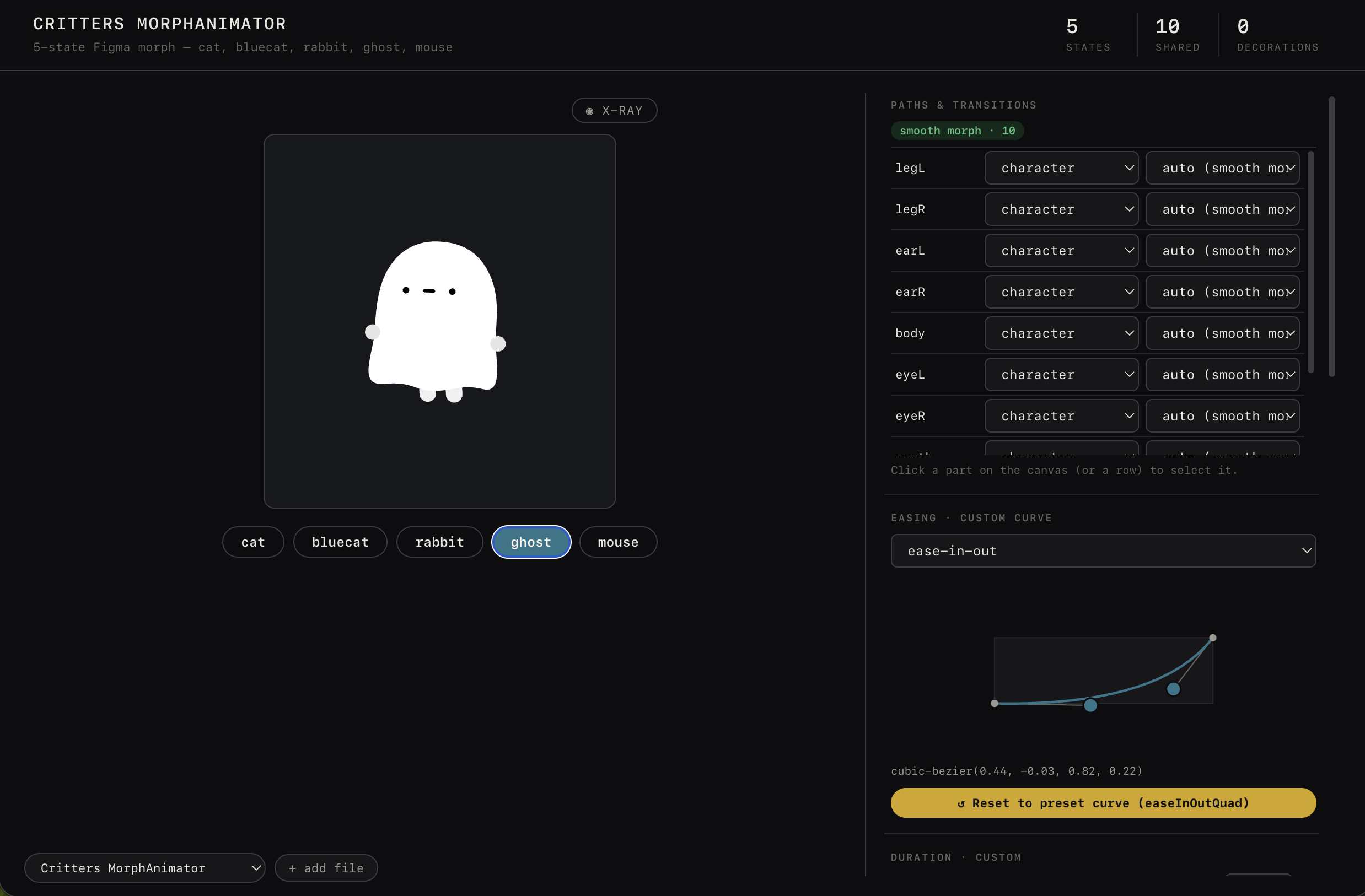
Prefer to work offline? Download one file and open it locally:
The bundled library starts with these examples, and you can add your own *.states.js files at any time:
The Studio includes:
- Live state switching and rapid-interruption testing
- Easing curve editor with presets
- Breathing, blinking, swaying, gaze, and other idle presets
- Per-path strategy, anchor, role, and timing controls
- Path/debug mode for inspecting mismatched artwork
- Web player, PNG sequence, and SwiftUI export
The first launch needs an internet connection because React and Babel are loaded from a CDN.
Why the morphs stay clean
Naive SVG morphing sends every shape through a polygon-based morph library. That often makes circles collapse, curves wobble, stroke caps flatten, and face parts drift apart.
SVG Character Animator chooses a strategy for each path:
| Strategy | Used when | Result |
|---|---|---|
| Exact interpolation | Matching paths have the same normalized command structure | Original Bézier curves and stroke geometry stay intact. |
| Morph fallback | A shape genuinely changes topology | A morph library handles only the paths that actually need it. |
| Fade in/out | A decoration exists in only some states | The decoration appears cleanly instead of morphing from nothing. |
It also normalizes equivalent path commands, interpolates transforms and flat colors, splits multi-subpaths safely, and blends transition motion with idle motion instead of letting the two fight.
Read the deeper implementation notes in references/.
Exports
| Export | Output |
|---|---|
| Web player | One self-contained .html file for direct use or embedding with an <iframe>. |
| PNG sequence | A .zip of frames at 12–60 fps, 1–3× scale, with optional transparency. |
| SwiftUI | One self-contained .swift file carrying the states, easing, and idle motion. |
You can also export SwiftUI from the command line:
node scripts/export-swift.js character.states.js CharacterView.swift
Examples
Critters
A multi-character morph demo with source artwork available on Figma Community.
- States:
examples/critters.states.js
Snowman
A five-state character used to test path normalization, expression changes, idle motion, and fast state switching.
- States:
examples/snowman.states.js
Repository map
SKILL.md                    Instructions the coding agent reads
references/                 Strategy, normalization, idle, and iOS guides
templates/                  Production React component and preview source
scripts/                    Studio build, Figma conversion, SwiftUI export
assets/preset-library.json  Easing and idle presets
examples/                   Ready-to-open example state files
evals/                      Skill evaluation prompts
animator-studio-en.html     Standalone English editor
animator-studio-cn.html     Standalone Chinese editor
The Studio HTML files are generated artifacts. Edit templates/preview/*, then rebuild:
node scripts/build-standalone.js
node scripts/build-standalone.js --lang cn
Feedback and contributions
If an SVG produces a broken transition, open an issue with:
- The smallest SVG pair that reproduces the problem
- The expected behavior and a screen recording of the result
- The browser and coding agent you used
Bug reports, example characters, exporter improvements, and documentation fixes are welcome.
License
Code is MIT. Example artwork is CC BY-NC 4.0.
- Everything except the example artwork is covered by
LICENSEand may be used commercially. - Artwork under
examples/is © molauu and covered byexamples/LICENSE.md. It may be shared and adapted with attribution for non-commercial use. - Use your own artwork for commercial characters and products.
中文说明
English | 中文
把 2–10 个静态 SVG 状态变成会呼吸、眨眼、摇摆并能丝滑切换状态的角色,还可以导出为网页、PNG 序列帧或原生 SwiftUI。
这个仓库包含两部分:
- Agent Skill:教 Claude Code、Codex、Cursor 等编程智能体生成可运行的 React 角色状态机。
- Animator Studio:无需安装的浏览器编辑器,可以实时预览、修改缓动曲线、设置待机动画、逐路径调试并导出。
安装 Skill
Codex
安装到用户级 Skill 目录:
git clone https://github.com/molauu/svg-character-animator.git ~/.agents/skills/svg-character-animator
如果没有立即显示,重启 Codex。之后可以输入 $svg-character-animator 显式调用,也可以直接描述 SVG 角色动画任务。
Claude Code
git clone https://github.com/molauu/svg-character-animator.git ~/.claude/skills/svg-character-animator
其他编程智能体
把仓库克隆到智能体能够读取的位置,在任务中附加或引用 SKILL.md。本项目遵循开放的 Agent Skills 格式。
快速开始
- 为同一个角色准备 2–10 个 SVG 状态。
- 对应的部件在每个 SVG 中使用相同的
id,例如left-eye、mouth、body。 - 让智能体读取本 Skill,生成 React 状态机和
*.states.js文件。 - 打开在线中文版 Animator Studio,或下载离线版,切换内置示例或载入自己的 states 文件进行调试和导出。
示例 Prompt:
这是我的角色的四个 SVG 状态:开心、困倦、兴奋和难过。
使用 svg-character-animator skill 制作一个点击切换的 React 状态机。
待机时添加轻微呼吸和间歇眨眼,切换时让脚底保持固定,
并生成一个可以在 Animator Studio 里继续调整的 states 文件。
核心能力
- 逐路径判断应该精确插值、真实变形,还是淡入淡出
- 自动规范化等价但写法不同的 SVG 路径
- 变形动画与呼吸、眨眼、摇摆等待机动画融合
- 快速连续切换时仍保持动画稳定
- 可视化修改 easing、anchor、路径策略和动画属性
- 导出独立网页、透明 PNG 序列帧和原生 SwiftUI
导出
| 格式 | 输出内容 |
|---|---|
| Web player | 一个自包含 .html,可以直接打开或用 <iframe> 嵌入。 |
| PNG sequence | 12–60 fps、1–3 倍分辨率、可选透明背景的序列帧 .zip。 |
| SwiftUI | 包含状态、缓动和待机动画的单个 .swift 文件。 |
许可
代码采用 MIT 协议;examples/ 中的示例美术由 molauu 创作,采用 CC BY-NC 4.0。商业项目请使用自己的角色美术素材。
Reviews (0)
Sign in to leave a review.
Leave a reviewNo results found