claude-orchestra
Health Warn
- License — License: MIT
- Description — Repository has a description
- Active repo — Last push 0 days ago
- Low visibility — Only 7 GitHub stars
Code Fail
- rm -rf — Recursive force deletion command in install.sh
Permissions Pass
- Permissions — No dangerous permissions requested
No AI report is available for this listing yet.
An operating system for your Claude Code skills, agents & MCPs — organize everything into auto-routing orchestras.
🎼 Claude Orchestra
An operating system for your Claude Code skills, agents & MCPs.




You installed 50, 200, maybe 500+ skills, agents, and MCP servers. Now you have no idea what's
active, what fires when, or whether half of them are wasted. Claude Orchestra fixes that — it
organizes your entire toolkit into themed orchestras, each with a conductor, clear triggers, and
automatic routing, so the right tools fire for the right task. Every time.
Built to be forked. This isn't a one-click install you forget about — it's a template you
fork, customize with your rosters, and run on your own machine. The constitution stays yours.
The problem
Your ~/.claude right now:
  hundreds of skills · dozens of agents · plugins · MCPs · connectors
  → "Which one handles this task?"            🤷
  → "Did I install something for this already?" 🤷
  → "Why did THAT skill just fire?"            🤷
More tools should mean more power. Instead it means more chaos. There's no system.
The fix: orchestras
Claude Orchestra files every tool into themed orchestras. Each has one conductor that
sequences its players, clear triggers, and quality gates. A routing hook reads every
request and activates the right orchestra automatically — and announces it, so you always know
what's playing.
What you'll see when it works
After install, the next time you prompt Claude Code, you'll see a one-line announcement at the
top of the response telling you exactly which orchestra fired and why:
🎼 BUILD active · Conductor: architect · Using: gh, code-reviewer, pr-review-toolkit

[…the actual response continues below…]
Compound requests stack orchestras:
🎼 DESIGN + BUILD active · Conductors: design-ux-architect → architect
   Using: figma, frontend-design, code-reviewer
Idea / business-planning prompts fire NEXUS, the meta-conductor that sequences whole
orchestras across the lifecycle:
🎼 NEXUS active (Phase 0 → 1) · Stacking RESEARCH + PRODUCT + KNOWLEDGE
No more "why did THAT skill fire?" The system tells you.
Requirements
| Need | Why | Install |
|---|---|---|
| Claude Code | The host this routes inside | https://claude.com/claude-code |
| Bash 4+ | Install script is Bash | macOS / Linux preinstalled |
jq |
Safely merges settings.json (no clobbering) |
brew install jq · apt-get install jq |
That's it. No Python, no npm, no Docker.
Install — the audit-first path (recommended)
This is the order we recommend for anyone running unfamiliar code against their ~/.claude:
# 1. Clone
git clone https://github.com/Momo2323-ui/claude-orchestra
cd claude-orchestra

# 2. Audit — read every line you're about to run (it's ~80 lines)
cat install.sh

# 3. Install — idempotent, backs up settings.json before any change
./install.sh

# 4. Verify what changed
diff "$(ls -t ~/.claude/settings.json.bak.* | head -1)" ~/.claude/settings.json
ls -la ~/.claude/skills/orchestra-router ~/.claude/skills/orchestra-intake

# 5. Customize — edit your roster
$EDITOR ~/.claude/rules/orchestra-system.md
Open a new Claude Code session — the router fires on your next prompt.
Want to reverse the install? See SECURITY.md → Uninstall.
Install — the fast path
If you already trust the repo, you can have Claude Code drive the install for you:
Install this for me: https://github.com/Momo2323-ui/claude-orchestra
Claude reads the repo, runs the installer, and sets everything up. (You can still cat install.sh
afterward to see what landed.)
What the installer actually does
| Target | Action |
|---|---|
~/.claude/skills/orchestra-router/ |
Created (or refreshed if it exists) |
~/.claude/skills/orchestra-intake/ |
Created (or refreshed if it exists) |
~/.claude/hooks/orchestra-route.sh |
Copied + chmod +x |
~/.claude/rules/orchestra-system.md |
Copied only if not already present — yours wins |
~/.claude/settings.json |
One entry appended to hooks.UserPromptSubmit (auto-backup first) |
~/.claude/CLAUDE.md |
Orchestra rule appended only if marker text not present |
Nothing else. No network calls, no sudo, no telemetry. Full breakdown + audit walkthrough in
SECURITY.md.
How it works
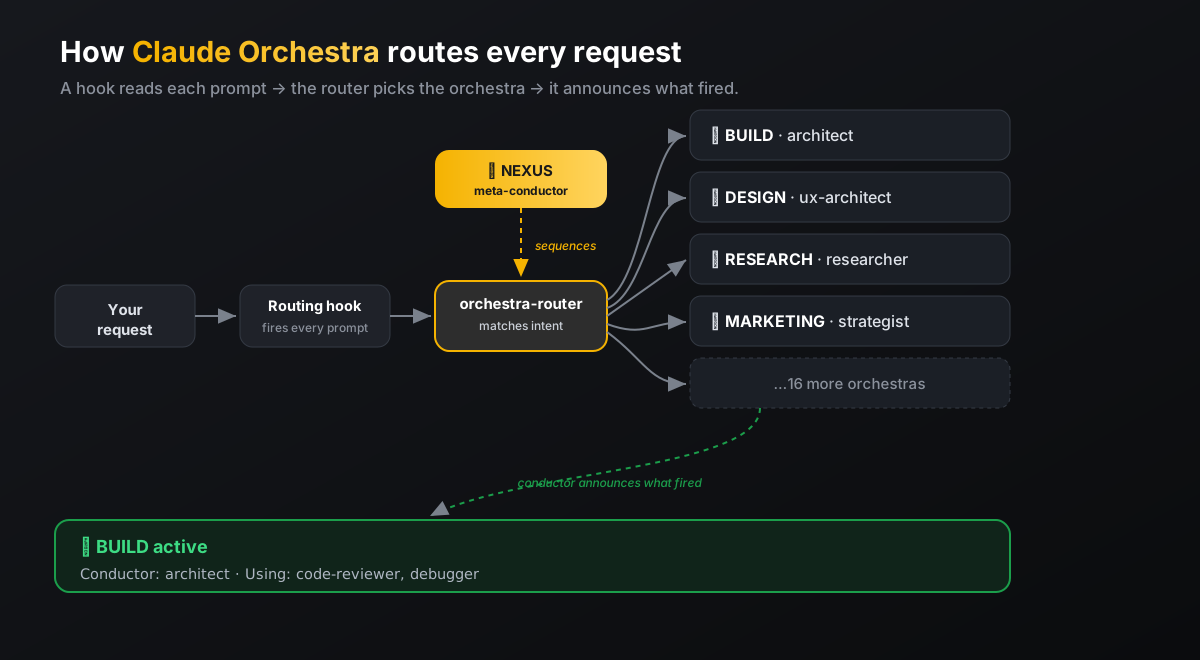
- The constitution (
orchestra-system.md) defines your orchestras — rosters, conductors, triggers, gates. - The routing hook injects a routing directive on every prompt.
- The router skill matches your request to the right orchestra(s) and announces them.
- The intake skill files anything new you install into the right orchestra — never archived.
→ Full walkthrough in docs/HOW-IT-WORKS.md.
Build your own orchestras
The framework ships as a template. docs/CREATE-YOUR-ORCHESTRA.md
walks you through mapping your tools into orchestras in about ten minutes.
See a real setup
Want a worked example? examples/my-20-orchestras.md is a real
20-orchestra config — rosters, the reasoning behind each placement, and links to every skill so
you can install the ones you like.
FAQ
Does this install any skills/agents for me? No. Claude Orchestra is the organization layer —
it doesn't bundle anyone else's tools. The example config links to skills at their original repos
so you install them yourself (and the authors get the credit).
Will it overwrite my settings? No. The installer backs up settings.json, merges with jq
without clobbering existing hooks, and only appends to CLAUDE.md if the rule isn't already there.
Is this on PyPI / npm / homebrew? No. It's a Bash + Markdown repo. Clone it, audit it, run
the installer. That's the whole shape of the project — keeping it small is the point.
Do I have to use all 20 orchestras? No. Delete, merge, or rename freely. The themes are a
starting taxonomy, not a rulebook.
Do I need NEXUS? No — it's optional. Delete the section if you don't want a meta-conductor.
Can I uninstall? Yes — see SECURITY.md → Uninstall.
Security
Every install modifies your ~/.claude/. We take that seriously — see SECURITY.md
for the full breakdown of what gets touched, how to audit before running, how to verify after, and
how to report a vulnerability privately.
Contributing
PRs and new-orchestra ideas welcome — see CONTRIBUTING.md.
A note for AI-assisted contributors: please verify every command, package name, and feature in
your PR actually exists in this repo before submitting. We've had AI-drafted PRs invent commands
and features that don't exist — those will be closed.
Credits
Built by Moksh Mittra. MIT licensed — use it freely. Every skill
referenced in the example links to its original author.
Reviews (0)
Sign in to leave a review.
Leave a reviewNo results found