clicodelog
Health Gecti
- License — License: MIT
- Description — Repository has a description
- Active repo — Last push 0 days ago
- Community trust — 42 GitHub stars
Code Gecti
- Code scan — Scanned 12 files during light audit, no dangerous patterns found
Permissions Gecti
- Permissions — No dangerous permissions requested
This tool provides a local web interface to browse and inspect session history, including thinking processes, file changes, and token costs, from AI coding agents like Claude Code, OpenAI Codex, and Gemini CLI.
Security Assessment
The application reads local conversation logs and file directories, meaning it inherently accesses sensitive data (your AI conversation history and potentially proprietary codebase snippets). It automatically executes shell commands to kill processes occupying its default port (6126). While the light code scan found no dangerous patterns, hardcoded secrets, or requested dangerous permissions, the tool is designed to bind to a local web server. Risk: Medium. The risk stems strictly from its core functionality: aggregating highly sensitive local data into an accessible web server, though it claims nothing leaves the machine.
Quality Assessment
The project is in active development (last push was today) and is transparent about its functionality. It is legally clear for integration, using a standard MIT license. Community trust is currently low but growing, currently sitting at 42 GitHub stars. The codebase is small (12 files scanned), which makes it easy to manually review.
Verdict
Safe to use, but developers should ensure they do not expose the local web server (port 6126) to public networks, as it displays sensitive proprietary code and chat history.
Browse & Inspect CLI agents : Claude Code, Codex, Gemini CLI code & conversation history

Your AI coding agent just edited 30 files across 6 directories.
What actually happened?
Browse every session from Claude Code, OpenAI Codex, and Gemini CLI the thinking, the tool calls, the file changes, the token costs. All in one local interface. Nothing leaves your machine.
Features • Supported Tools • Installation • Usage • Screenshots




| Light Mode | Dark Mode |
|---|---|
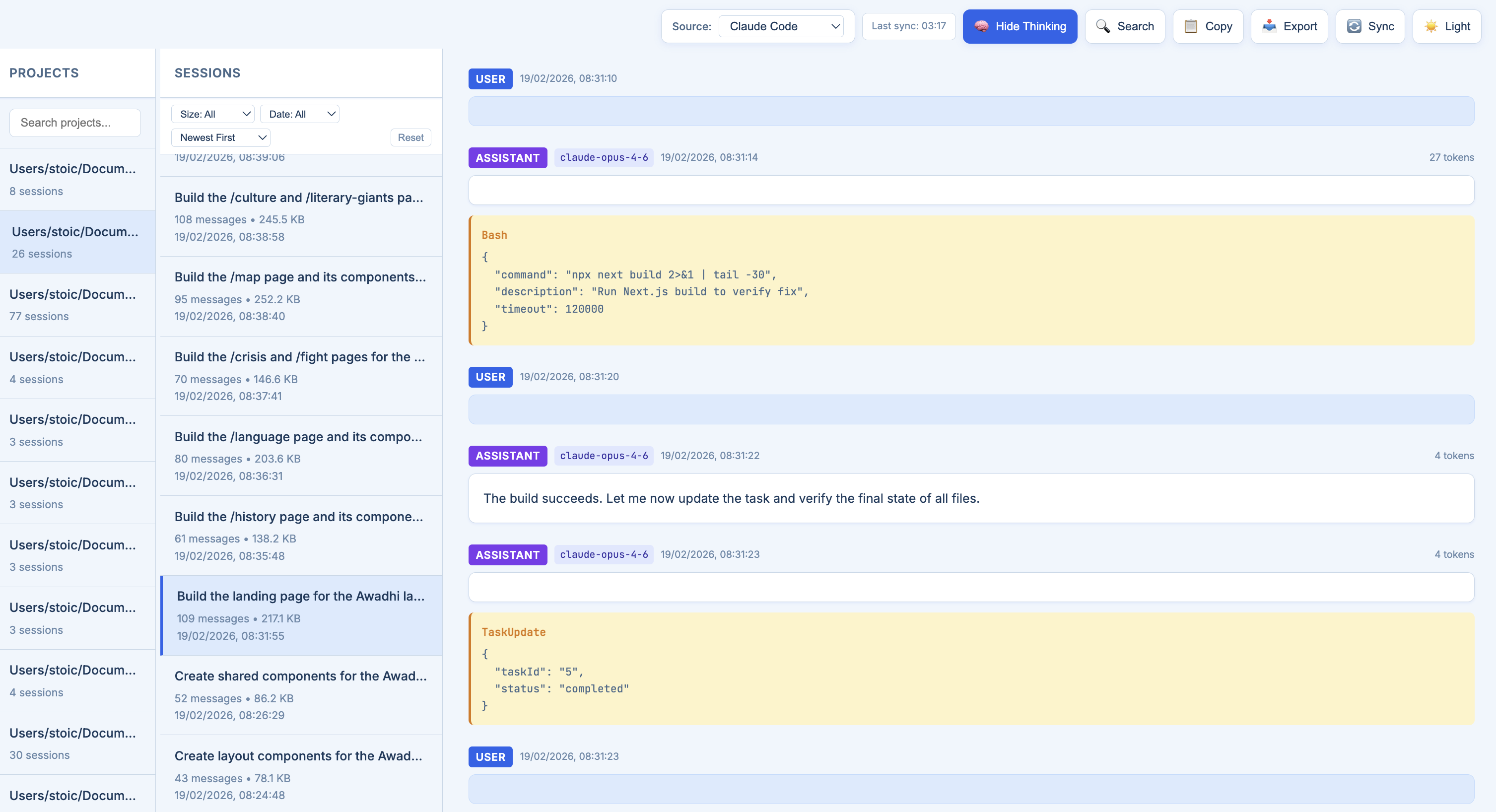 |
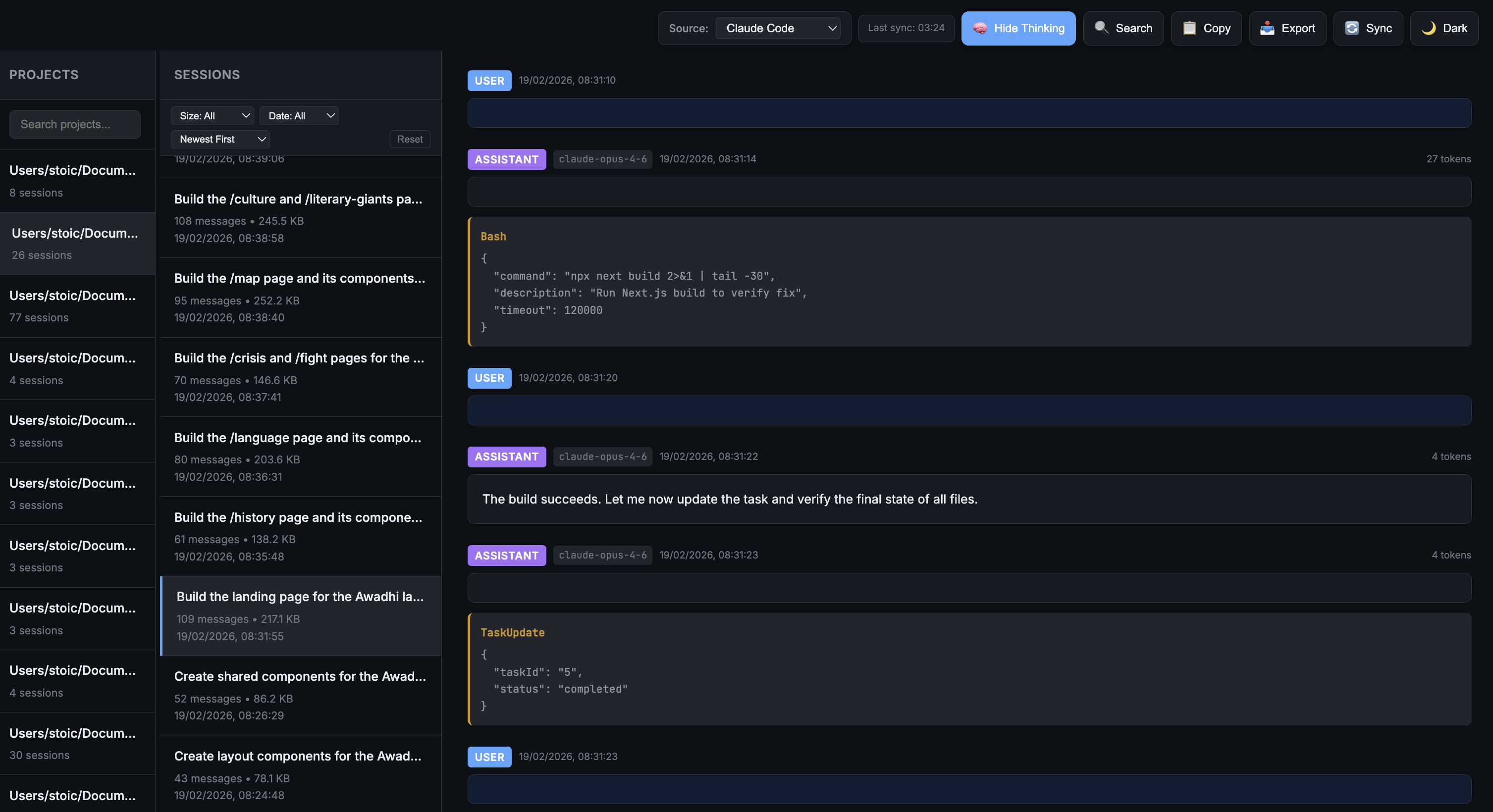 |
Installation
Via uv tool (Recommended)
uv is a fast Python package installer. Install it first if you haven't:
curl -LsSf https://astral.sh/uv/install.sh | sh
Then install clicodelog as an isolated tool:
uv tool install clicodelog
To upgrade:
uv tool upgrade clicodelog
Via pip
pip install clicodelog
From source
git clone https://github.com/monk1337/clicodelog.git
cd clicodelog
uv tool install -e .
# or with pip:
pip install -e .
Usage
After installation, simply run:
clicodelog
The app will:
- Auto-kill any process on port 6126 (if occupied)
- Sync data from all AI coding agent sources
- Start a web server at http://localhost:6126
Command Options
clicodelog --help               # Show all options
clicodelog --port 8080          # Use custom port
clicodelog --host 0.0.0.0       # Bind to all interfaces
clicodelog --no-sync            # Skip initial data sync
clicodelog --debug              # Run in debug mode
Alternative: Run from source
git clone https://github.com/monk1337/clicodelog.git
cd clicodelog
python -m clicodelog.cli
Why Developers Use It
| 🧠 | See the full chain of reasoning Read the agent's thinking blocks, tool calls, and decisions in a clean conversation view. No more squinting at raw JSONL. |
| 🔍 | Track what actually ran Every file read, shell command, and edit — laid out clearly so you can audit what the agent did before you commit. |
| 📊 | Spot wasted tokens Session-level token stats (input, output, cached) so you can see which runs were efficient and which went in circles. |
| 🔀 | All your agents, one place Claude Code, Codex, and Gemini CLI side by side. Same interface, same workflow, no context switching. |
| 🔒 | Nothing leaves your machine Fully local. Reads from your existing log directories, syncs to a local backup. No cloud, no accounts, no telemetry. |
Supported Tools
| Tool | Source Directory | Status |
|---|---|---|
| Claude Code | ~/.claude/projects/ |
✅ Supported |
| OpenAI Codex | ~/.codex/sessions/ |
✅ Supported |
| Gemini CLI | ~/.gemini/tmp/ |
✅ Supported |
Claude Code
- Sessions organized by project directory
- Displays summaries, messages, thinking blocks, and tool usage
- Shows model metadata and token usage
OpenAI Codex
- Sessions organized by date (
YYYY/MM/DD/) - Groups sessions by working directory (cwd) as projects
- Displays messages, function calls, and reasoning blocks
- Filters out system prompts for cleaner inspection
Gemini CLI
- Sessions stored as JSON files in
{hash}/chats/session-*.json - Groups sessions by project hash
- Displays messages, thoughts (thinking), and tool calls
- Shows token usage (input, output, cached)
CLI Options
clicodelog --help               # Show help message
clicodelog --version            # Show version
clicodelog --port 8080          # Run on custom port (default: 6126)
clicodelog --host 0.0.0.0       # Bind to all interfaces (default: 127.0.0.1)
clicodelog --no-sync            # Skip initial data sync
clicodelog --debug              # Run in debug mode
Note: The app automatically kills any process running on the specified port before starting.
How It Works
- Startup sync — Copies logs from source directories into local
./data/ - Background sync — Automatically refreshes every hour
- Manual sync — Trigger a sync for the active source via UI
- Source switching — Switch between Claude Code, Codex, and Gemini CLI
Data Storage
data/
├── claude-code/          # Claude Code backup
│   ├── -Users-project1/
│   │   ├── session1.jsonl
│   │   └── session2.jsonl
│   └── -Users-project2/
├── codex/                # OpenAI Codex backup
│   └── 2026/
│       └── 01/
│           ├── 16/
│           │   └── rollout-xxx.jsonl
│           └── 17/
└── gemini/               # Gemini CLI backup
    ├── {project-hash-1}/
    │   └── chats/
    │       ├── session-2026-01-17T12-57-xxx.json
    │       └── session-2026-01-17T13-04-xxx.json
    └── {project-hash-2}/
Controls
| Control | Action |
|---|---|
| Source dropdown | Switch between supported tools |
| 📥 Export | Download current session as .txt |
| 🔄 Sync | Manually refresh logs from source |
| ☀️ / 🌙 Theme | Toggle light/dark mode |
Screenshots
| Light Mode | Dark Mode |
|---|---|
|
|
Project Structure
clicodelog/
├── app.py              # Flask backend (multi-source support)
├── run.sh              # Run script
├── requirements.txt    # Dependencies
├── data/               # Synced logs (auto-created)
│   ├── claude-code/
│   ├── codex/
│   └── gemini/
└── templates/
    └── index.html      # Frontend
API Endpoints
| Endpoint | Method | Description |
|---|---|---|
/api/sources |
GET | List available sources |
/api/sources/<id> |
POST | Set active source |
/api/projects?source= |
GET | List projects |
/api/projects/<id>/sessions?source= |
GET | List sessions |
/api/projects/<id>/sessions/<id>?source= |
GET | Fetch session |
/api/sync?source= |
POST | Trigger sync |
/api/status?source= |
GET | Sync status |
Requirements
- Python 3.7+
- Flask 2.0+
- flask-cors
Adding New Sources
To add support for another CLI-based AI tool, update app.py:
SOURCES = {
    "claude-code": {
        "name": "Claude Code",
        "source_dir": Path.home() / ".claude" / "projects",
        "data_subdir": "claude-code"
    },
    "codex": {
        "name": "OpenAI Codex",
        "source_dir": Path.home() / ".codex" / "sessions",
        "data_subdir": "codex"
    },
    "gemini": {
        "name": "Gemini CLI",
        "source_dir": Path.home() / ".gemini" / "tmp",
        "data_subdir": "gemini"
    },
    # Add new tool here
}
Then implement the corresponding parser for its log format.
 @misc{clicodelog2026,
    title        = {clicodelog: Unified Session Inspector for CLI AI Coding Agents},
    author       = {Pal, Ankit},
    year         = {2026},
    howpublished = {\url{https://github.com/monk1337/clicodelog}},
    note         = {Local web UI for browsing Claude Code, OpenAI Codex, and Gemini CLI session logs - thinking blocks, tool calls, file edits, and token costs}
  }
License
MIT
Yorumlar (0)
Yorum birakmak icin giris yap.
Yorum birakSonuc bulunamadi