moontors
Health Warn
- No license — Repository has no license file
- Description — Repository has a description
- Active repo — Last push 0 days ago
- Low visibility — Only 6 GitHub stars
Code Pass
- Code scan — Scanned 3 files during light audit, no dangerous patterns found
Permissions Pass
- Permissions — No dangerous permissions requested
No AI report is available for this listing yet.
Moontors, the agentic development environment (ADE) for Claude Code, Codex, Gemini CLI and Grok Build on macOS, Windows and Linux. Downloads, release notes and issues.
Moontors
Many agents. Every project. One board.
Run Claude Code, Codex, Gemini CLI and Grok Build side by side, across all your projects, on macOS, Windows and Linux. A free agentic development environment (ADE), built around your agents rather than your files, that keeps all of them in view and working in the background.



Download · Report a bug · Request a feature
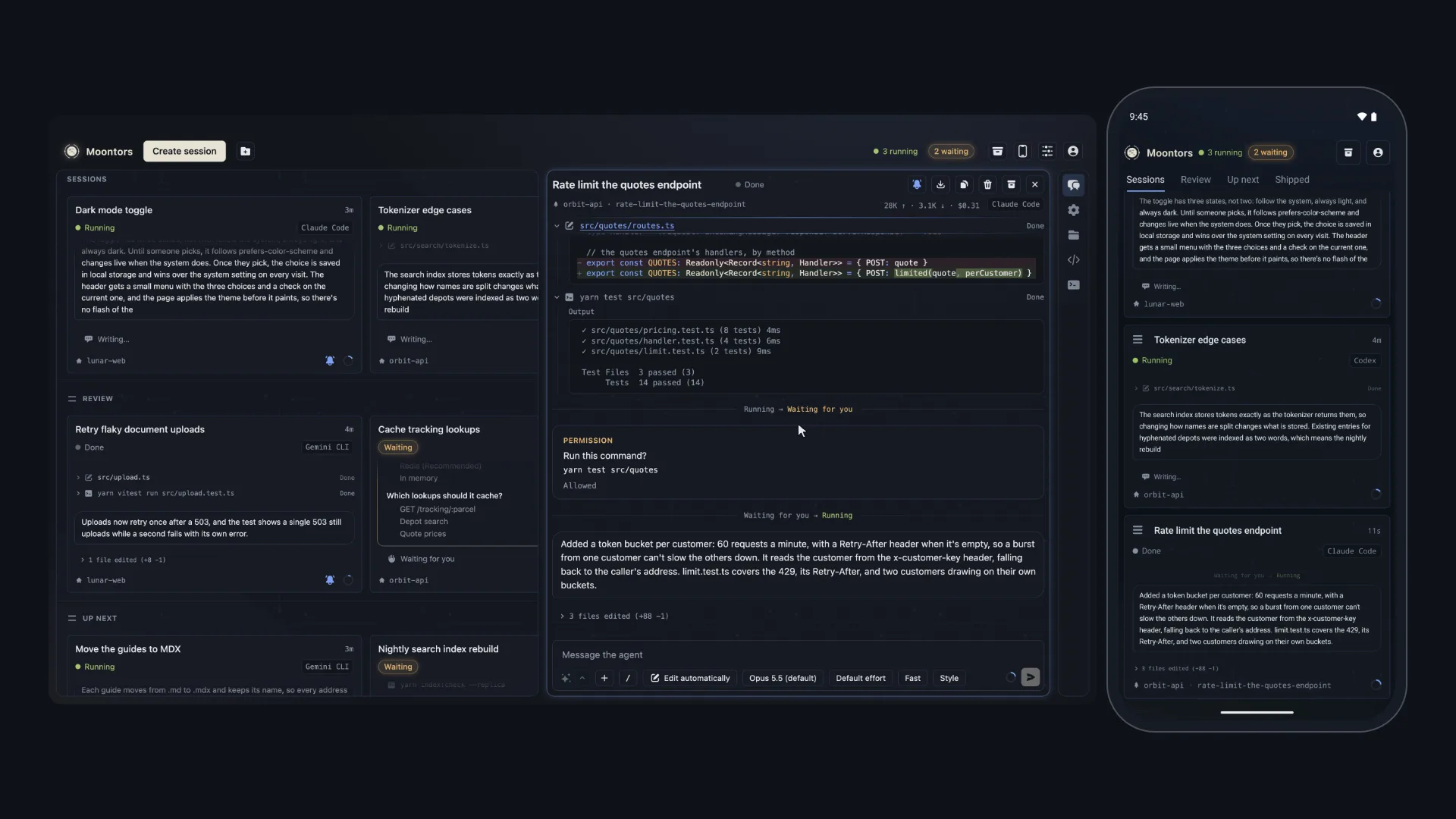
Moontors is an ADE, an agentic development environment: a desktop app for macOS, Windows and
Linux where you direct AI coding agents instead of typing every line yourself. It runs
Claude Code, Codex, Gemini CLI and Grok Build side by side. Every session sits on
one board, streaming its work live, so you can follow them all, answer the one that needs you, and
review what each one changed without leaving the app. A background service runs the agents, so they
keep working when the window is closed.
Early preview. Moontors is at 0.x. It's ready for daily use, but expect rough edges, and
please tell us when you find one.
Features
- Every session on one board. Claude Code, Codex, Gemini CLI and Grok Build sessions side by
side, each card showing its transcript live. Sort them into your own sections; the header counts
the sessions running, waiting for you, with an action denied or an error, and a click on one goes
to the next. - Talk to agents as you would to people. Reply to any row of a transcript, send while the agent
works, what it can't take yet waiting in the session's queue, have the agent rephrase your draft
first, and let your sessions message each other: a Claude Code session can hand work to a Codex
session and hear back. - Keeps working without you. Sessions run in a background service, not in the window, so they
carry on when you close it. While Moontors is open, a desktop notification tells you when a
session needs you or runs into trouble. - Your sessions on your phone. The Android app or the iPhone app pairs with Moontors on your computer
once, by scanning the code it shows or typing it, then shows the board and every session: follow
them, answer their questions and permission requests, and reply, away from your desk. It reaches
your computer directly, on the same network or through Tailscale, or, with Moontors Pro, from
anywhere through Moontors' relay, which passes its encrypted link on without reading it. - You decide what agents may do. Permission modes from Manual to Bypass, changed as you go,
with Allow and Deny right in the transcript. - A worktree per task. A session can work in its own git worktree, on a new branch if you name
one, with the files it needs copied in, and archiving it asks before anything is removed. - The Git view. Each session's repository as a graph, every branch in a lane of its own and each
agent's commit the moment it lands. Find a commit as you type, and see which commits git verified
as signed. Check out, branch, merge, rebase, cherry-pick, tag, stash, fetch, pull and push from
right-click menus. - Every file at hand. Files opens the session's folder as a tree beside an editor. Go to File
(Cmd+P, or Ctrl+P) finds a file by a few letters of its name, Find in Files searches and replaces
across the folder, right-click menus make, move, copy, rename and delete files, and images, PDFs
and more preview in their tab. - Review as you go. The session's changes hunk by hunk in the Git view, to stage, discard and
commit, edits in the transcript coloured as the editor colours code, and a file editor that never
overwrites the agent's work, or yours, while the agent keeps working. - The agents' own commands. Each agent's slash commands work in Moontors, apart from those
that only make sense in a terminal, along with/rewind,/compact, side questions, subtasks,
forks,/exportand@file mentions. - Your setup, untouched. Your agents' settings, MCP servers, skills and commands reach
Moontors' sessions, and Moontors never writes your own configuration files. - Usage at a glance. A context meter on every card, token usage, and your account's limits,
with a ring by Profile for each one near its end. - Private by design. No Moontors account needed. Moontors keeps your sessions on your computer,
counts how it's used and its errors without them, which you can turn off, and each agent talks to
its own vendor, to the services and MCP servers you set it up with, and to any site its own tools
reach, just as it would in your terminal.
Download
Get the newest version from the latest release.
| Platform | Download | Requires |
|---|---|---|
| macOS | the .dmg ending in -arm64 for Apple silicon, the other one for Intel |
macOS 13 Ventura or later |
| Windows | Moontors-Setup-<version>.exe |
Windows 10 or later, x64 |
| Linux | Moontors-x86_64.AppImage, or the .deb for Ubuntu and Debian |
x86-64 Linux with a desktop |
Moontors downloads and verifies each agent's own program the first time you use it. You'll also
want git 2.23 or later: Moontors uses it for the Git view and worktree
sessions, and on Windows Claude Code needs Git for Windows.
On your phone, get Moontors for Android from Google Play or Moontors for iPhone from the App Store, and pair it from Phones
in Moontors on your computer.
First launch
- macOS: open the
.dmgand drag Moontors to Applications. - Windows: run the installer. Until Moontors' Windows builds are signed, SmartScreen may warn
about an unrecognized app: choose More info, then Run anyway. Windows 11's Smart App
Control, when it's on, blocks unsigned apps outright. - Linux: make the AppImage executable (
chmod +x Moontors-x86_64.AppImage) and run it, or
install the.debwithsudo apt install ./<file>.deb.- The AppImage needs FUSE. Without it, start it with
--appimage-extract-and-run. - On systems that block the user namespaces Chromium's sandbox needs, such as Ubuntu 24.04, the
AppImage runs with Chromium's sandbox off, and says so once. The.debkeeps the sandbox on.
- The AppImage needs FUSE. Without it, start it with
Getting started
- Sign in to a provider: with your Claude, ChatGPT or grok.com account in the browser, with an
API key, which Moontors keeps in your system's keychain, or through Amazon Bedrock, Google
Cloud's Vertex AI or Microsoft Foundry where the agent offers it. Gemini CLI takes a Gemini API
key or Vertex AI, as Google doesn't let personal accounts sign in to it through the browser. - Create a session: pick a project folder, choose an agent and a model, and give it a task.
- Follow along on the board. Open any session to read its full transcript, answer its
questions, or review its changes. - Take it with you, if you like: choose Phones, then Pair a phone, and pair the
Android app or the iPhone app by the code your computer shows.
Updates
Moontors checks for a new version when it starts and every 4 hours, and downloads it in the
background. When it's ready, Moontors offers Restart to update. Choose it when it suits you:
Moontors waits for running work to finish, installs the update and reopens. It says first if that
ends a running terminal, and asks before it discards unsaved edits. To look at once, choose
Check for Updates…: in the Moontors menu on macOS, and in Help on Windows and Linux.
- The AppImage updates itself: it deletes the old file, then moves the new one into its place, so if
that move fails (a full disk, or the machine stopping in between), download it again. - The
.debasks for your password to update. It isn't signed, so only the download's checksum is
checked, and if a package it needs is missing, apt may add or remove packages to fix that.
Questions
What is an agentic development environment (ADE)?
It's where you work with AI coding agents rather than only an editor. You start agents on tasks,
follow their progress, answer their questions and permission requests, and review their changes.
Moontors does that for several agents at once, from different vendors, in one window.
Does Moontors replace Claude Code, Codex, Gemini CLI or Grok Build?
No. Moontors runs each vendor's own official agent, so you get the same agent, signed in with your
own account and using your own settings, MCP servers and skills, with a desktop app around it.
Is Moontors free?
Yes. Moontors is free to use, with no account. You use your own plan or API key with each agent's
vendor, or a cloud that runs the agent. Pro adds your phone's notifications and your phone
reaching your computer from anywhere, for a Moontors account (see
Pricing).
What do I need to use it?
An account with the agent's vendor, or a cloud that runs it: a Claude subscription or an Anthropic
API key for Claude Code, a ChatGPT plan or an OpenAI API key for Codex, a Gemini API key for
Gemini CLI, and a grok.com account or an xAI API key for Grok Build; or Amazon Bedrock for
Claude Code and Codex, Google Cloud's Vertex AI for Claude Code and Gemini CLI, and Microsoft
Foundry for Claude Code. Moontors itself is free.
Can several agents work on the same repository?
Yes. Each session can work in its own git worktree, on a branch of its own if you name one, so
agents don't step on each other's changes, and you review and merge each branch as you would
anyone's.
Is there a phone app?
Yes, for Android, on Google Play, and for the iPhone, on the App Store. It pairs with Moontors on your computer and works on
the same sessions: the board, the transcripts, answering questions and permission requests, and
replying.
Does Moontors see my code?
No. Each agent talks to its own vendor, to the services and MCP servers you set it up with, and to
any site its own tools reach, as it would in your terminal, and Moontors keeps your sessions on your
computer. Moontors' server holds only what an optional Moontors account needs, never your code or
your sessions: your phone's link through its relay, and its notifications, with Moontors Pro, are
encrypted so the server can't read them.
Feedback and support
- Found a bug? Open an issue and
include the build line from Moontors' About window or/status. It names your exact version. - Have an idea? Request a feature.
- Anything else: [email protected].
Privacy and terms
Moontors needs no account, and counts how it's used and its errors, never your code, prompts or
sessions, which you can turn off. The Privacy Policy says exactly what it keeps,
where, what it sends, and what reaches the internet. Use of Moontors is governed by the
Terms of Use. The open-source software Moontors includes, and its licenses, are listed
in the third-party notices.
© 2026 Moontors. All rights reserved. Moontors is an independent agentic development
environment, not affiliated with or endorsed by Anthropic, OpenAI, Google or xAI. Claude Code,
Codex, Gemini CLI and Grok Build are trademarks of their respective owners.
Reviews (0)
Sign in to leave a review.
Leave a reviewNo results found