ContextKeep
Health Uyari
- No license — Repository has no license file
- Description — Repository has a description
- Active repo — Last push 0 days ago
- Community trust — 139 GitHub stars
Code Uyari
- network request — Outbound network request in static/js/app.js
Permissions Gecti
- Permissions — No dangerous permissions requested
This tool acts as a standalone MCP server that provides a persistent, searchable long-term memory database for AI agents. It allows AI clients to store, search, and retrieve unlimited conversational context and project details.
Security Assessment
The application promises a "privacy first" approach by using 100% local storage and does not request dangerous system permissions. However, the automated scan flagged an outbound network request hidden inside a static JavaScript file (`static/js/app.js`). While this is likely part of the bundled Web Dashboard's functionality, undisclosed outbound calls warrant a manual code review to ensure no user data is silently exfiltrated. No hardcoded secrets were detected. Overall risk is rated as Medium due to the unexplained network activity.
Quality Assessment
The project is actively maintained, with its most recent code push occurring today. It enjoys strong community trust with 139 GitHub stars. The documentation claims an MIT license via a badge, though the automated scan noted the actual license file is currently missing from the repository root. It remains highly usable across all major operating systems and offers convenient deployment options like Docker.
Verdict
Use with caution—rely on it for local storage, but inspect the JavaScript payload to ensure the outbound network request does not compromise your privacy.
Infinite Long-Term Memory for AI Agents (MCP Server)

ContextKeep 🧠
Infinite Long-Term Memory for AI Agents








ContextKeep is a powerful, standalone memory server that gives your AI agents (Claude, Cursor, Gemini, OpenCode, and more) a persistent, searchable brain. Stop repeating yourself — let your AI remember everything, permanently.
Features • What's New in V1.3 • Installation • MCP Tools • Web Dashboard • Configuration
🌟 Features
- ♾️ Infinite Context: Store unlimited project details, preferences, decisions, and snippets — no expiry, no size cap.
- 💰 Save Money & Tokens: Pull only the memories that matter, slashing context window usage and API costs.
- 🔌 Universal Compatibility: Works with any MCP-compliant client via Stdio (local) or SSE (remote/homelab).
- 🧭 Memory Index Protocol: A reliable two-step retrieval system —
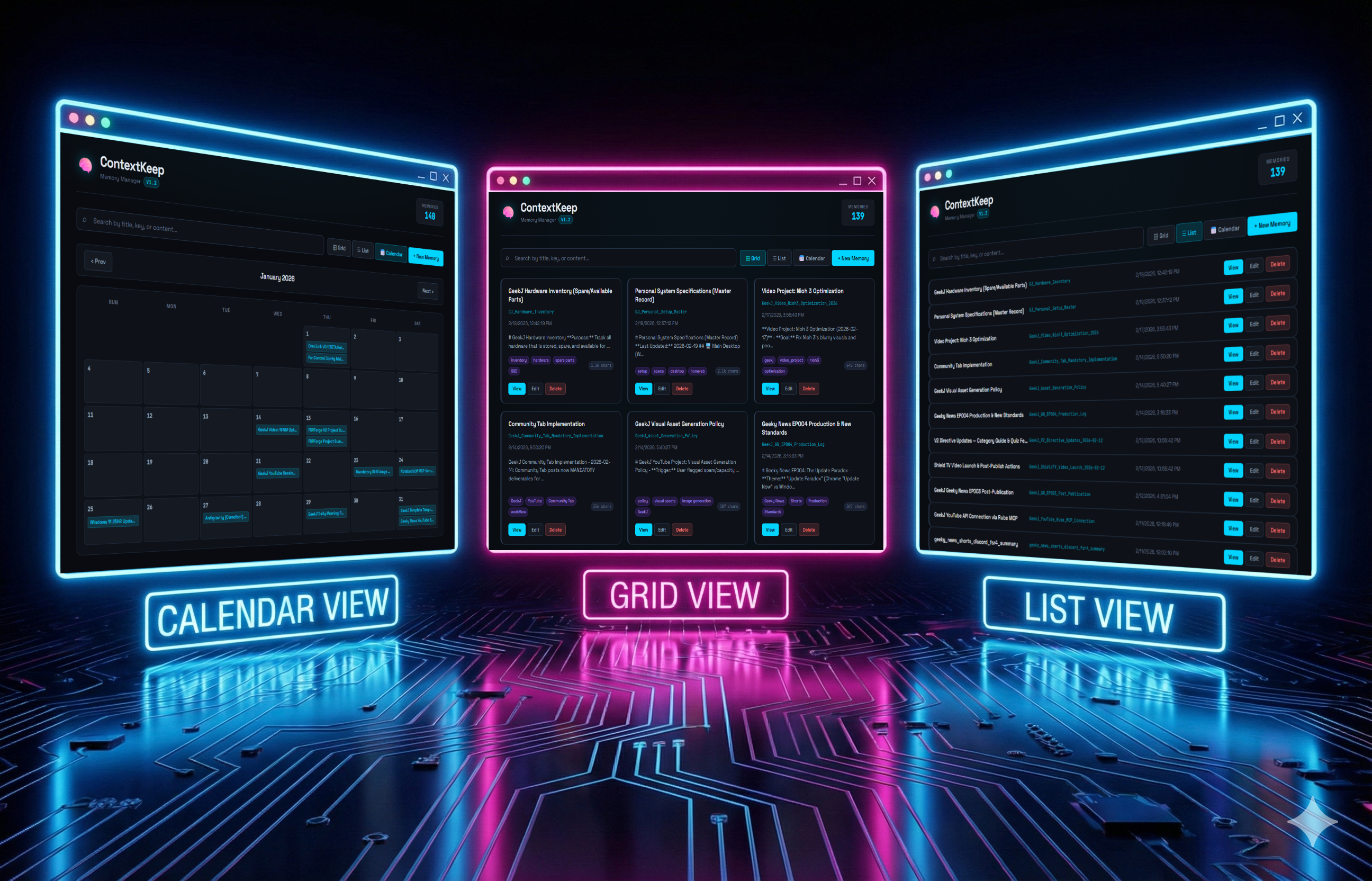
list_all_memories()→retrieve_memory()— so agents always find the right key, every time. - 🖥️ Modern Web Dashboard: Manage your memories visually with Grid, List, and Calendar views in a sleek dark interface.
- 🔒 Privacy First: 100% local storage. Your data never touches an external server.
- 🔎 Smart Search: Keyword and semantic search across all memory content.
- 🐧 Linux Service: Runs silently in the background as a systemd service.
- 🐳 Docker Ready: One-command deployment with Docker Compose.
- ⬇️ Export & Backup: Export all memories as JSON via MCP tool or WebUI.
🆕 What's New in V1.3 — Harbor
🐳 Docker Support
The #1 community request. ContextKeep now ships with a Dockerfile and docker-compose.yml for one-command deployment:
docker compose up --build
That's it. MCP server on :5100, WebUI on :5000, with persistent storage via Docker volumes.
📦 Modern Python Packaging
pyproject.toml— canonical dependency spec foruv,poetry, orpipuvsupport — the installer auto-detectsuvand usesuv syncfor blazing-fast setup- Backwards compatible —
pip install -r requirements.txtstill works
🛠️ 3 New MCP Tools (5 → 8 total)
| New Tool | Purpose |
|---|---|
delete_memory(key) |
Agents can now delete memories directly |
get_memory_stats() |
Memory count, total chars, storage path at a glance |
export_memories() |
Full backup as JSON — for migration or archival |
⬇️ WebUI Export
- Export All button in the toolbar (or press
Ctrl+E) - Downloads a timestamped
contextkeep_backup_YYYY-MM-DD.json
🧹 Code Quality
- Fixed dead code in
memory_manager.py(unreachable duplicatetry/except) - Added missing
core/__init__.pyfor proper Python packaging - Replaced bare
except:withexcept Exception:throughout
🚀 Installation
Option 1: Quick Start (pip)
Clone the repository:
git clone https://github.com/mordang7/ContextKeep.git
cd ContextKeep
Run the Installer:
- Linux/macOS:
python3 install.py - Windows:
python install.py
- Linux/macOS:
Follow the Wizard: The installer creates a virtual environment, installs dependencies, and generates a ready-to-use
mcp_config.json.
Option 2: uv (Fast)
git clone https://github.com/mordang7/ContextKeep.git
cd ContextKeep
uv sync
uv run python server.py
Option 3: Docker (Recommended for Homelabs)
git clone https://github.com/mordang7/ContextKeep.git
cd ContextKeep
docker compose up --build -d
This starts:
| Service | Port | Purpose |
|---|---|---|
mcp-server |
5100 |
MCP server (SSE transport) |
webui |
5000 |
Web dashboard |
Memories persist in a Docker volume (contextkeep-data).
🛠️ MCP Tools
ContextKeep exposes 8 MCP tools to any connected agent:
| Tool | Signature | Purpose |
|---|---|---|
list_all_memories |
(no args) | [USE FIRST] Returns a full directory of all memory keys, titles, tags, and timestamps |
retrieve_memory |
(key: str) |
Fetch the full content of a specific memory by exact key |
store_memory |
(key: str, content: str, tags: str) |
Create or update a memory |
search_memories |
(query: str) |
Content-based keyword/semantic search across all memories |
list_recent_memories |
(no args) | Return the 10 most recently updated memories |
delete_memory |
(key: str) |
Delete a memory permanently by key |
get_memory_stats |
(no args) | Get total memory count, character count, and storage path |
export_memories |
(no args) | Export all memories as a JSON array |
Recommended Agent Directive
Add this to your GEMINI.md, AGENTS.md, or CLAUDE.md:
## Memory Index Protocol (MANDATORY)
1. FIRST — call `list_all_memories()` to get the complete key directory
2. THEN — call `retrieve_memory(exact_key)` using the exact key from step 1
Only use `search_memories()` for content-based searches, NOT for key lookup.
🔌 Configuration
Copy the contents of mcp_config.example.json into your AI client's config file and update the paths.
Option 1: Local (Claude Desktop / Gemini CLI / Cursor)
{
  "mcpServers": {
    "context-keep": {
      "command": "/absolute/path/to/ContextKeep/venv/bin/python",
      "args": ["/absolute/path/to/ContextKeep/server.py"]
    }
  }
}
Option 2: Remote via SSH (Homelab / Raspberry Pi)
Run ContextKeep on a home server and access it from any machine on your network:
{
  "mcpServers": {
    "context-keep": {
      "command": "ssh",
      "args": [
        "-i", "/path/to/private_key",
        "[email protected]",
        "'/path/to/ContextKeep/venv/bin/python'",
        "'/path/to/ContextKeep/server.py'"
      ]
    }
  }
}
Option 3: SSE Mode (HTTP)
Ideal for OpenCode, web apps, or any client that prefers HTTP transport:
{
  "mcpServers": {
    "context-keep": {
      "transport": "sse",
      "url": "http://localhost:5100/sse"
    }
  }
}
Option 4: Docker
Use mcp_config.docker.example.json or point your client to the container:
{
  "mcpServers": {
    "context-keep": {
      "transport": "sse",
      "url": "http://localhost:5100/sse"
    }
  }
}
🌐 Web Dashboard
ContextKeep ships with a full-featured web UI to manage your memories without touching the CLI.
- URL:
http://localhost:5000 - Grid View: Memory cards with tag chips, char counts, and inline actions
- List View: Dense, scannable table with all memories sorted by last updated
- Calendar View: Browse your memory history by month
- Search: Real-time filtering across titles, keys, and content
- Full CRUD: Create, view, edit, and delete memories from the browser
- Export: Download all memories as JSON with one click (
Ctrl+E)
To start manually:
./venv/bin/python webui.py
🐧 Linux Service Setup (Recommended for Homelabs)
Run both the MCP server and Web UI as persistent background services:
chmod +x install_services.sh
./install_services.sh
This installs:
| Service | Port | Purpose |
|---|---|---|
contextkeep-server |
5100 |
MCP server (SSE transport) |
contextkeep-webui |
5000 |
Web dashboard |
Manage services:
sudo systemctl status contextkeep-server
sudo systemctl restart contextkeep-webui
📋 Changelog
V1.3 — Harbor
- ✅ Docker Support — Dockerfile + docker-compose.yml for one-command deployment
- ✅ Modern Packaging —
pyproject.toml+uvsupport alongside pip - ✅ New MCP tool:
delete_memory()— agents can now delete memories - ✅ New MCP tool:
get_memory_stats()— memory count & size at a glance - ✅ New MCP tool:
export_memories()— full backup as JSON - ✅ WebUI: Export All button with
Ctrl+Eshortcut - ✅ WebUI: Stats API endpoint
- ✅ Fix: Removed dead code in
memory_manager.py - ✅ Fix: Added missing
core/__init__.pyfor Docker/package imports - ✅ Fix: Bare
exceptreplaced withexcept Exception - ✅ Updated installer to V1.3 with
uvdetection - ✅ Community contributors credited 🙏
V1.2 — Obsidian Lab
- ✅ New
list_all_memories()MCP tool — complete memory directory in one call - ✅ Obsidian Lab UI redesign — dark premium aesthetic with cyan/neon accents
- ✅ Memory count live badge in the header
- ✅ Calendar month navigation (forward/back)
- ✅ Grid cards now show tag chips and character count badges
- ✅ Removed "Recent Memories" sidebar for a cleaner calendar layout
- ✅ Memory Index Protocol V1.2 — standardised two-step agent retrieval pattern
V1.1
- Web dashboard with Grid, List, and Calendar views
- SSE transport support alongside Stdio
- Linux systemd service installer
- Memory titles and timestamps
V1.0
- Core MCP server with
store_memory,retrieve_memory,search_memories - JSON-backed persistent storage
- SSH remote transport support
🤝 Contributing
Contributions are welcome. Open a PR, file an issue, or suggest a feature — all input is appreciated.
V1.3 Community Contributors
A huge thank you to everyone who contributed to the Harbor release:
- @shuft — Opened Issue #1 requesting Docker support
- @Cyberdogs7 — PR #2: Initial Docker & Docker Compose implementation
- @frehov — PR #3: Dockerfile,
pyproject.toml,uvsupport,__init__.pyfix - @thinkstylestudio — Community advocacy
☕ Support the Project
If ContextKeep saves you time, tokens, or sanity — consider buying me a coffee.
Yorumlar (0)
Yorum birakmak icin giris yap.
Yorum birakSonuc bulunamadi