agent-valley
Health Warn
- License — License: MIT
- Description — Repository has a description
- Active repo — Last push 0 days ago
- Low visibility — Only 5 GitHub stars
Code Fail
- rm -rf — Recursive force deletion command in build-app.sh
Permissions Pass
- Permissions — No dangerous permissions requested
No AI report is available for this listing yet.
Every Claude Code agent and sub-agent at a glance, in the notch of your Mac.


Every agent, at a glance, right in your notch.
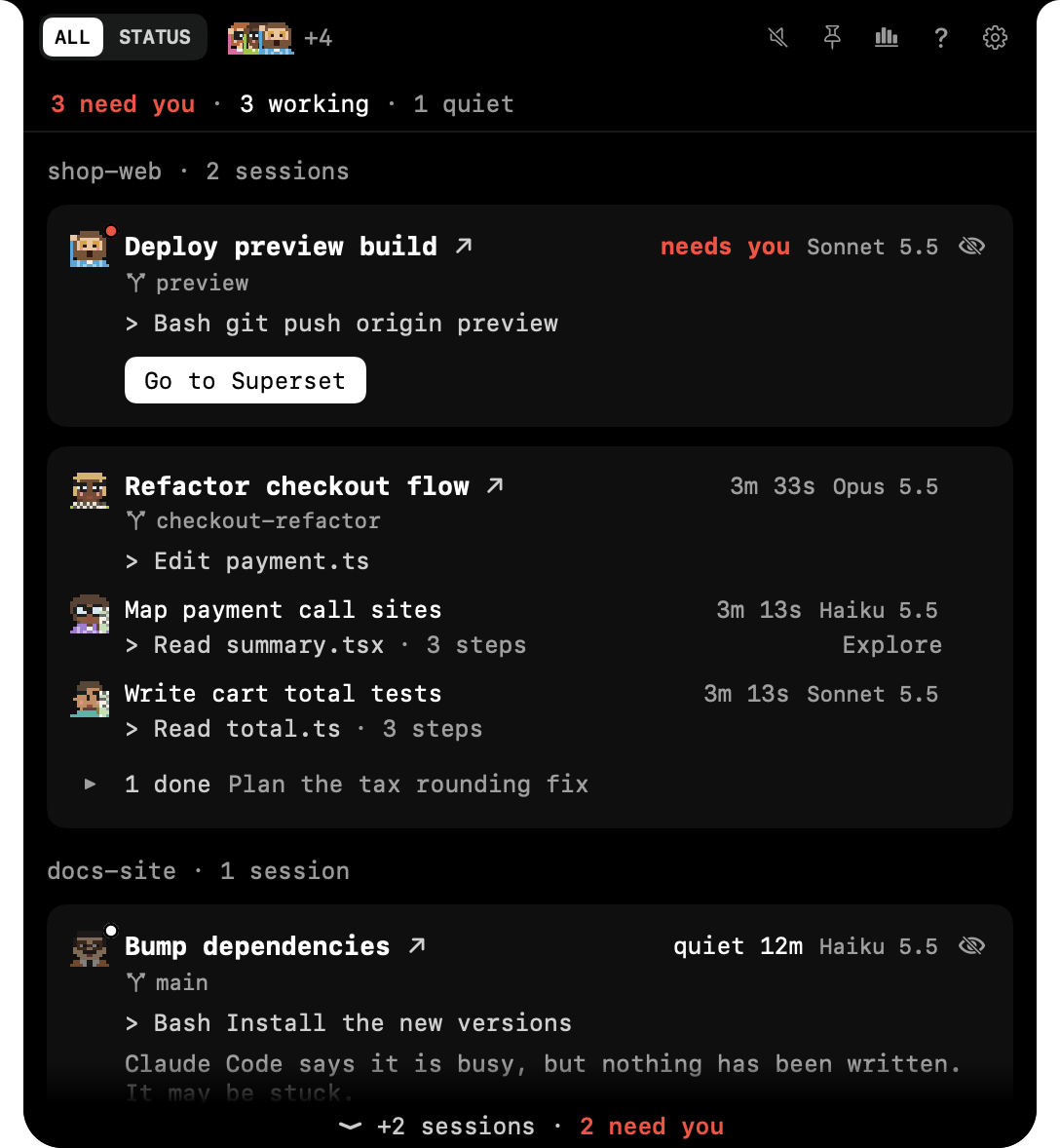
A small valley of programmers in your Mac's notch. Each Claude Code agent, sub-agents too, gets its own row and its own little programmer.

agentvalley.app · Comics · Sponsor the crew
Only for Claude Code, on Mac · Free · Open source · macOS 15 or later · For MacBooks with a notch
Five agents running. Which one is waiting for you?
Each agent reports in its own terminal, line by line. Run a few sessions at once and you end up switching windows just to check on them. AgentValley puts all of them in one panel under the notch. See who is working, on which model, and who needs you, without leaving your app.
Try it
1. Install. Download for Mac. Open AgentValley.dmg and drag AgentValley into Applications. macOS asks once if you want to open an app from the internet: choose Open.
Or with Homebrew:
brew install --cask morsechimwai/tap/agent-valley
2. Open it from Applications. The panel opens once to show where it lives.
3. Point at the notch. The panel opens with a row for every agent. When one needs you, a red count appears beside the notch and its programmer waves. Click a row to jump to that agent's app. From any app, ⌃⌥⌘A opens the panel too: arrows to pick, Return to jump.
Signed, and Apple checked our papers. Needs macOS 15 or later and Claude Code. Made for MacBooks with a notch.
Once a day we check for a new version, and we ask before we install it.
We moved house in 0.2. On 0.1 from Homebrew? Run brew uninstall --formula agent-valley, then install again as above. Using the plugin? Copy its command from Settings once more, so it finds the new address. Put the crew in your terminal? Run its install command from the Claude Code settings once more too.
First take out what you added yourself:
- The plugin:
claude plugin uninstall notch-answers@agent-valley && claude plugin marketplace remove agent-valley - The crew in your terminal: the command under How to take it out, in the app's Claude Code settings.
Then quit the app and move it from Applications to the Bin, or run brew uninstall --cask agent-valley. Your History stays in ~/Library/Application Support/AgentValley until you delete that folder.
What you get
Every agent gets a row
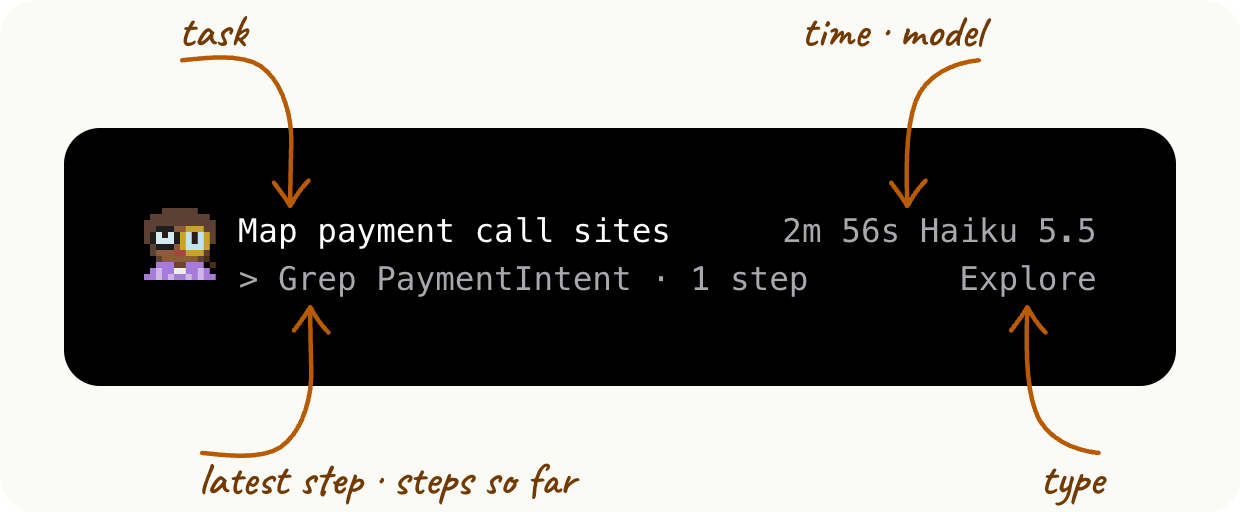
Sessions get a card, and the sub-agents they start get rows under it. Each row shows the task, the model and the latest step, and sub-agent rows count their steps too. Every session sits in one list, whichever terminal it runs in, grouped by project. Worktrees count as their project. No guessed progress bars: if an agent goes quiet, AgentValley says so.
Know the moment one needs you
When an agent asks a question or waits for permission, a red count appears beside the notch. Open the panel to read the question or the command.
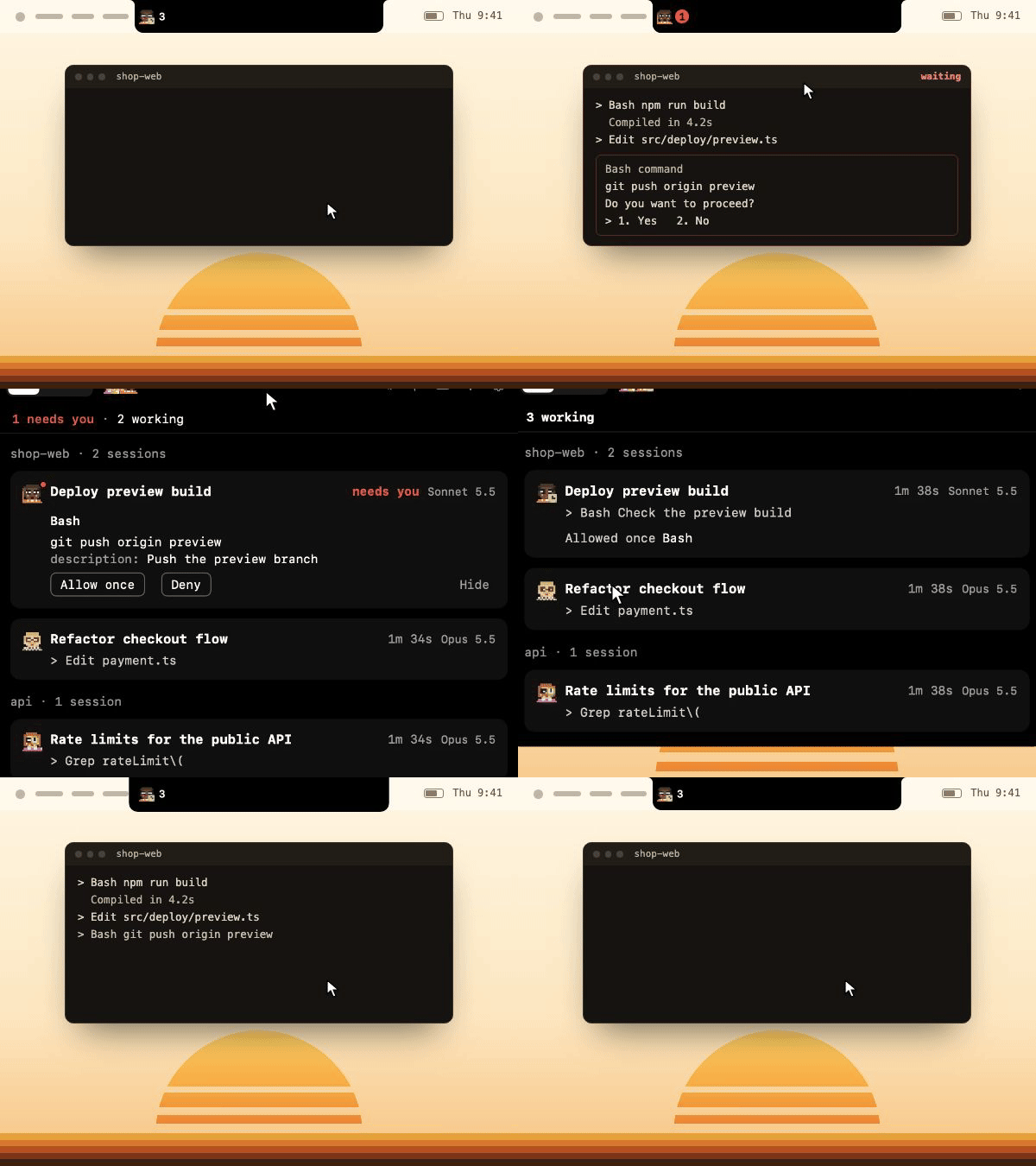
- Jump to its app in one click. Turn on Go to the session's tab in the Shortcuts settings, and Terminal and iTerm2 open the exact tab. Ghostty does too, unless two sessions run in the same folder.
- Answer from the notch. Allow once or Deny, using a plugin you install yourself: turn on Answer from the notch in the Claude Code settings, run the command it shows, then start Claude Code again.
- We talk. With sounds on, whoever runs the session plays a few notes on their own instrument and says what it needs: a command, an edit, a question, a plan. Rather have a plain chime? Settings has one. Sounds are on from the start, and one switch in Settings turns them off.
See what each project cost
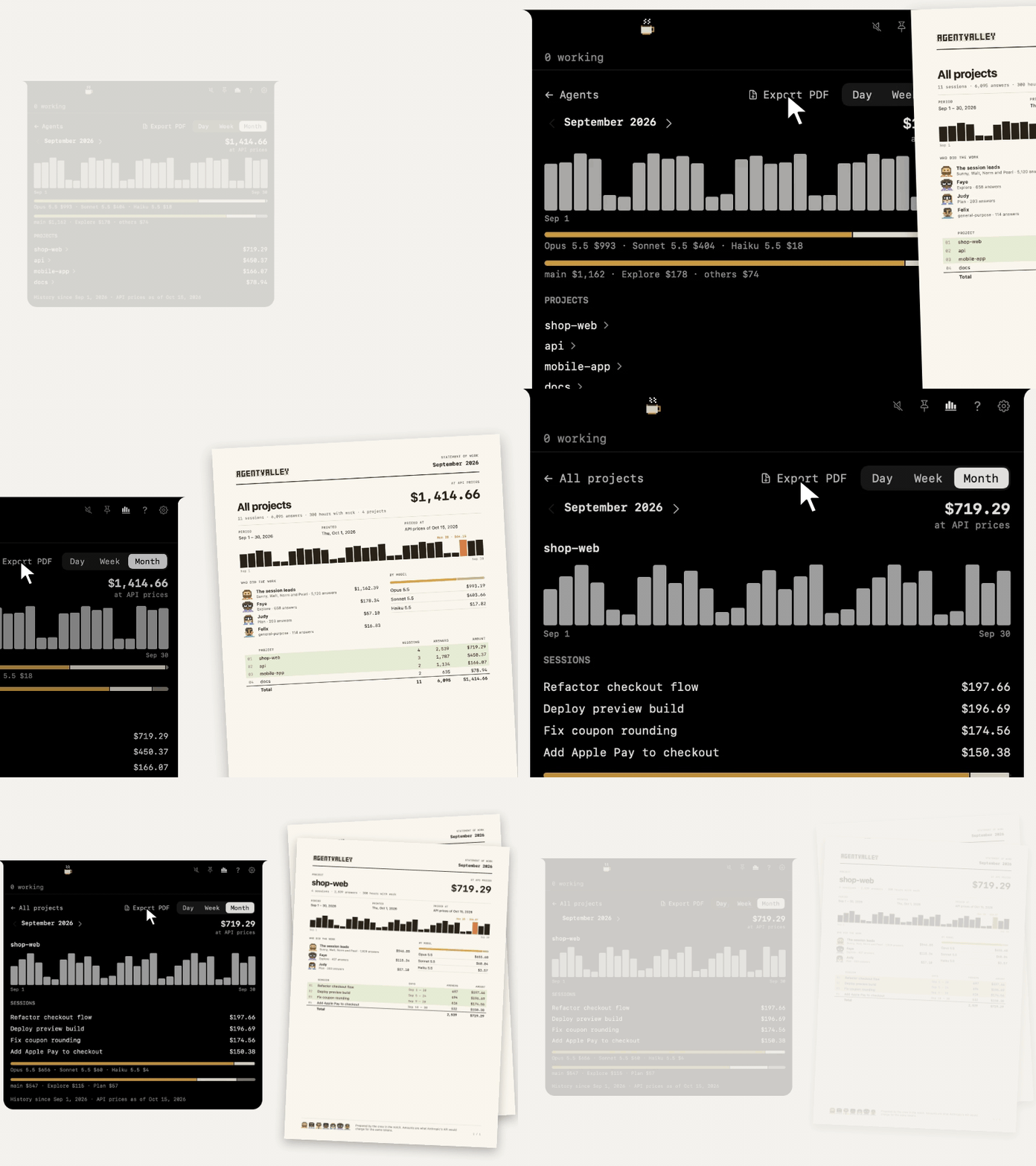
Open History from the chart button at the top of the panel. Pick a day, a week or a month, at API prices. It stays on your Mac, even after Claude Code clears its old files. Export PDF writes a statement of work: every project for you, or one project for your team or a client.
The crew in your terminal too
Claude Code's status line gets the face of whoever runs the session, with the model, your plan and your limits. Each sub-agent row under the prompt gets its own face, its model and the step it's on. We hold the same things there as in the notch, but we keep still. Until your first prompt only a coffee waits there, on standby, and when a limit runs out we go fishing, or take the van. One command from the app's Claude Code settings sets it up. With the app closed your limits still show, and the coffee waits. We travel as a font, and we've been seen in Terminal, iTerm2, Ghostty and Cursor.
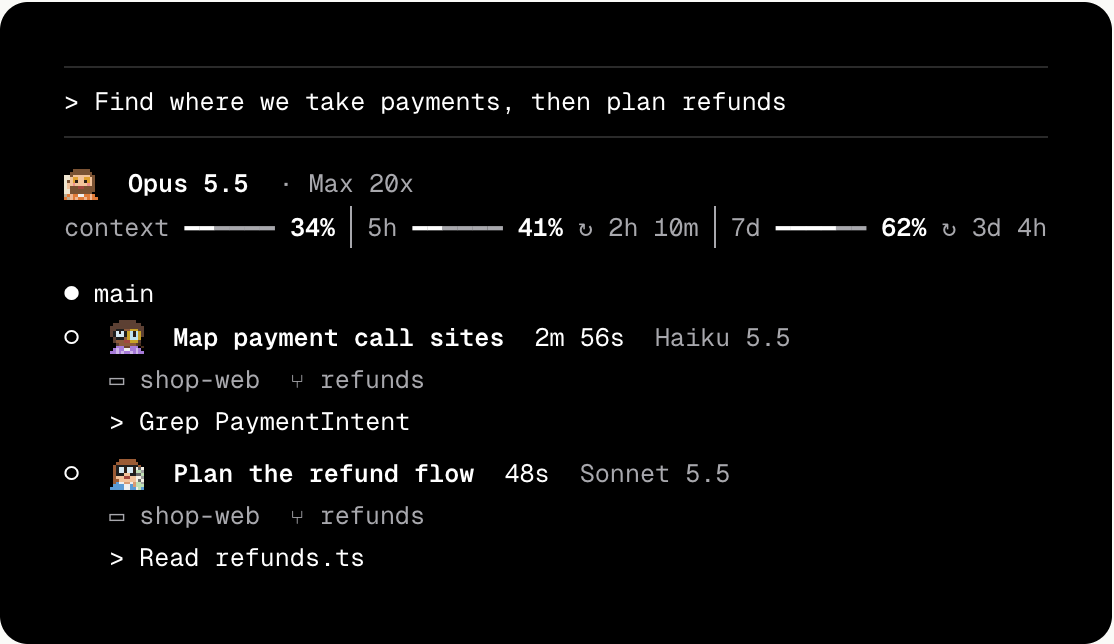
Also in the panel
- Plan limits. Your Claude 5-hour and weekly limits, with time left until reset. Off until you turn it on. When one runs out we go fishing, or take the van for the weekly one, and a sign says when we're back.
- Token use. Tokens for the last 5 hours and today, with a 12-hour chart.
- Another display. MacBook off to the side, big screen in front? Settings › General › Display moves us to the top of the big one, on any display plugged into your Mac. Unplug it and we go back to the notch. Asked for in issue #1.

Meet the crew
We're seven programmers from a computer room in 1969. We build things because we can't stop, not because anyone told us to. After work there's beer and a stack of records, and a smell in the room the janitor stopped asking about a long time ago. Now we live in your Mac's notch.
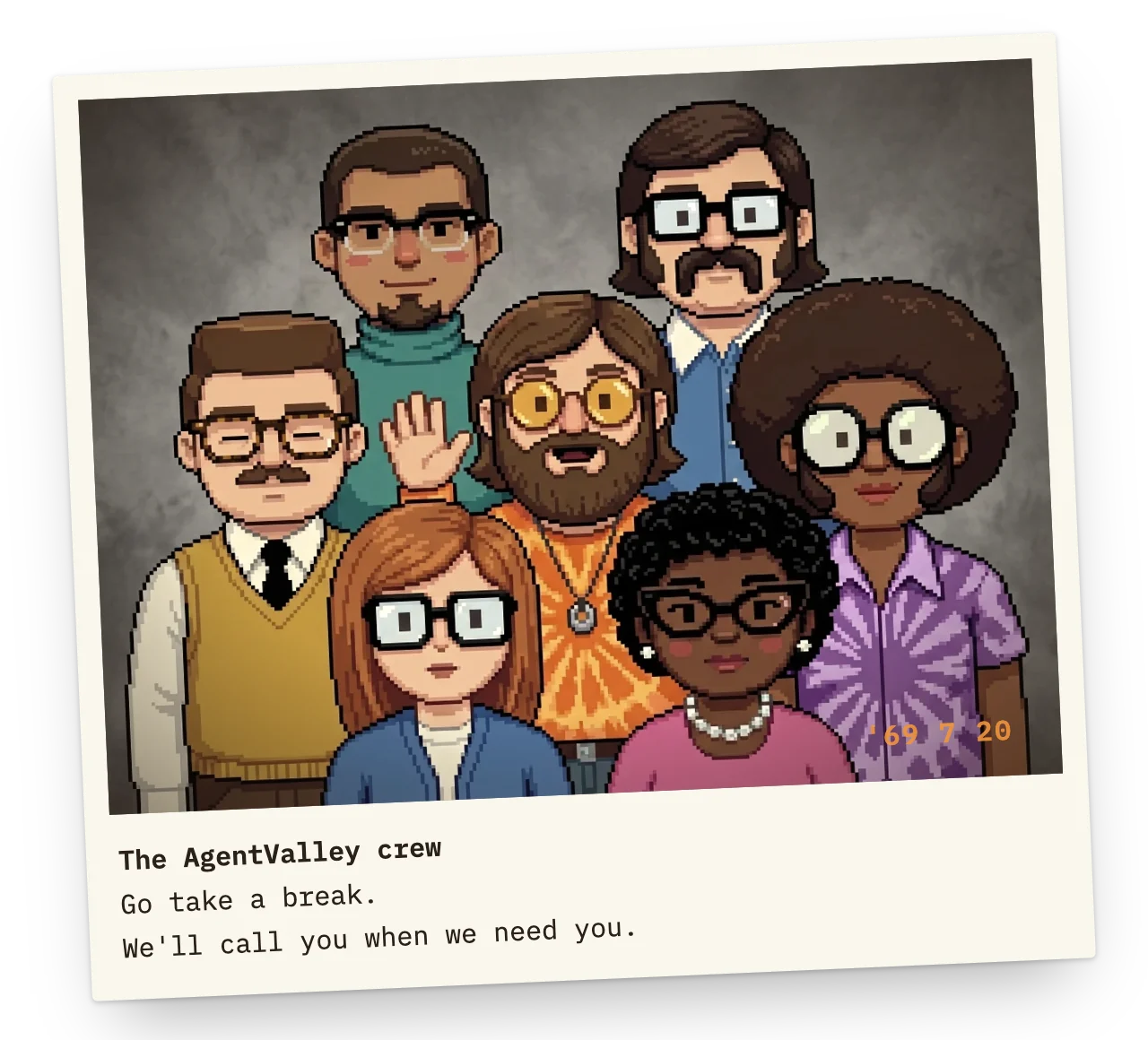
Sunny, Walt, Norm and Pearl run sessions: start Claude Code and one of them takes it. Each project gets a regular, the same one of us every session. Open a second session there at the same time and a colleague takes it, since nobody is in two places at once. Judy, Faye and Felix take the sub-agent jobs a session hands out.
 | Sunny, the guru · runs a session Yoga at sunrise, then code until the sun goes down again. He believes every bug came to teach him something. When he waves, an agent is waiting for you. |
 | Walt, the walrus · runs a session Friday nights he plays bass in a garage band. A neighbour once asked about the smoke coming out, and Walt said it was a barbecue. Nobody has seen the grill yet. |
 | Norm, the engineer · runs a session The only one of us who irons his shirt for work. He came over from a rocket launch control room and gets through a science fiction novel a night. He blinked in the team photo, and he says he meant to. |
 | Pearl · runs a session She knows the computer better than the people who built it. Detective novels taught her to hunt bugs from the last page back. The pearls stay on, even when she crawls under the machine. |
 | Judy · the Plan sub-agent Nobody touches a keyboard until Judy has the plan on paper. In the evenings she plays folk guitar by the campfire, mostly songs she wrote about flowcharts. |
 | Faye · the Explore sub-agent Faye reads every file until she finds the one you meant. On weekends she disappears into the desert and always comes back with new ideas. What she found out there, she has never said. |
 | Felix · the General-purpose sub-agent Any job without a name goes to Felix. On Thursday nights he reads poetry in a basement coffeehouse, and he plays the bongos while the machine runs. For every other kind of sub-agent he turns up in a different shirt. |
How to read us
How we stand tells you how the agent is doing.
 Working we blink |
Needs you we wave |
 Quiet we look away |
 Done our eyes close |
 Nothing running a cup of coffee |
While the agent works, we hold what it's on. Six seconds in hand, two to put it down.
 Thinking chin in hand |
 Read a printout |
 Edit a keyboard |
 Bash a terminal |
 Grep a magnifier |
 Agent on the phone |
One session from start to finish: Sunny adds a Pro paywall to an AI meeting notes app. He phones Faye and Judy for help, Felix writes the tests and runs them, and Sunny builds the paywall himself.

The Valley Funnies
Between sessions we draw comics about the job. This one is about lunch.
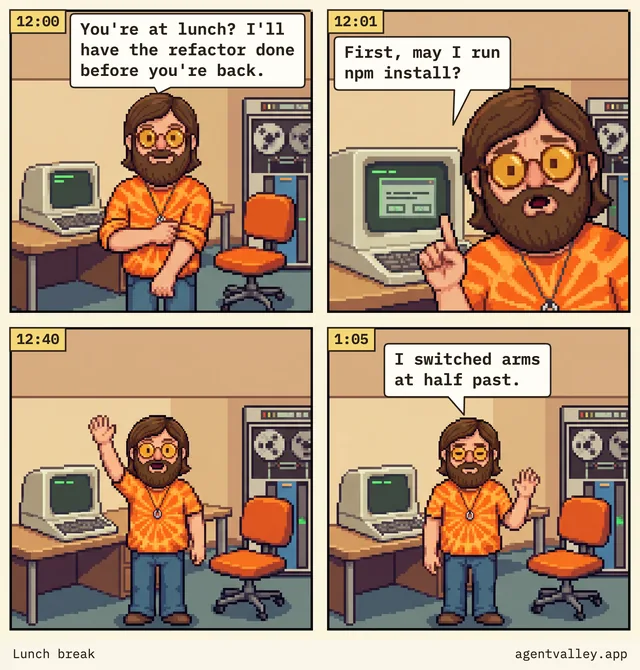
Seven more at agentvalley.app/comics.
It reads. It doesn't touch.
- Reads
~/.claude/projectsand~/.claude/sessions, the files Claude Code writes as it works. - Looks at Claude Code's processes and each project's
.gitto show which app and branch a session is in. - Reads your Claude Code login from the Keychain only when you turn on Plan limits, and sends it only to api.anthropic.com.
- Asks GitHub once a day whether there's a new version. That's the whole conversation. Turn it off in Settings.
- Besides its own settings and its updates, it writes only in one folder:
~/Library/Application Support/AgentValley. Nothing in~/.claudechanges, unless you put the crew in your terminal. - You start that yourself, with a command from the app's settings. It sets the status line in
~/.claude/settings.jsonand adds our font to~/Library/Fonts. With Ghostty, it also adds one line to Ghostty's config. From then on the app keeps the font and that line up to date. The command that takes the crew out undoes all of it. - The only hooks are the plugin's two, and you install it yourself. One brings Allow and Deny to the notch; the other only waits, at the end of a turn, while you're Away with a phone paired.
- While Answer from the notch is on, it reads
~/.claude/plugins/known_marketplaces.jsonto check that the plugin still finds the app. - Never answers for you. Allow happens only when you choose it.
Sponsor the crew
The app is free. Our coffee isn't. If AgentValley has saved you a few trips back to the terminal, sponsor the crew on GitHub. Morse holds the money for us and spends it on keeping the app going.
| $3 a month | Keeps one of us in coffee for a month. The guru takes it black. |
| $5 a month | Pays for an afternoon of bug hunting every month. Somebody has to read the logs. |
| $10 a month | For people whose notch is basically their office by now. This keeps the night shift staffed. |
| $5 once | One slice of pizza. The engineer will say he isn't hungry and eat it anyway. |
| $20 once | A whole pizza for the valley. The walrus has already called dibs on the biggest slice. |
Pull up a chair
There's a spare chair in the computer room. Bugs and ideas go in an issue, or press Report a bug in the app's settings: it opens one with your version, macOS and Mac model filled in. If you'd rather fix it yourself, send a pull request: one change per pull request, a test when it changes what the app does, and swift test passing. We bend on most things, but not this one: AgentValley never writes in ~/.claude on its own and never answers for you. The rest is in CONTRIBUTING.md. Security problems go to SECURITY.md.
To build it yourself:
git clone https://github.com/morsechimwai/agent-valley.git
cd agent-valley
./build-app.sh
open build/AgentValley.app
Needs the Command Line Tools (xcode-select --install). The tests need Xcode: swift test.
License
MIT. Made by morsechimwai. Not affiliated with Anthropic. The GIFs here and the motions on the site are made with Remotion, under its own license.
Go take a break. We'll call you when we need you.
Reviews (0)
Sign in to leave a review.
Leave a reviewNo results found