lawless-waf
Health Uyari
- License — License: Apache-2.0
- Description — Repository has a description
- Active repo — Last push 0 days ago
- Low visibility — Only 5 GitHub stars
Code Gecti
- Code scan — Scanned 12 files during light audit, no dangerous patterns found
Permissions Gecti
- Permissions — No dangerous permissions requested
Bu listing icin henuz AI raporu yok.
A small web app + local API for tuning Azure WAF false positives without paying Log Analytics prices.
lawless-waf
Tune Azure WAF false positives on your laptop, without paying Log Analytics prices.



The write-up, with the problem it solves and a worked tuning session: Tuning Azure WAF Without Paying Log Analytics Prices.
A small web app + local API for tuning Azure WAF false positives without paying Log
Analytics prices. It pulls the raw WAF log blobs your Front Door or Application Gateway already
archives to a storage account, queries them on your laptop with DuckDB,
separates vulnerability-scanner noise from genuine false positives, and hands you (or an AI
coding agent) the exact facts needed to write an exclusion in waf-exclusions.tf.
It does not generate Terraform. It returns structured context — rule id/group, thematchVariable → Terraform match_variable + selector mapping, sample values, affected
URIs, hit counts, and a scanner/FP/attack classification — and I write the HCL myself (or
let the agent do it from those facts).
Scope: Azure Front Door and Application Gateway WAF logs. The two products write
different log schemas (Front Door's AnomalyScoring/Block records vs Application Gateway'sMatched/Blocked; different field names and exclusion match variables); the app detects the
type from the data, normalizes both into one internal shape, and namespaces the cache by type so
you can analyze both side by side. Point the container atinsights-logs-frontdoorwebapplicationfirewalllog orinsights-logs-applicationgatewayfirewalllog (or pick it in Settings).
Why I built it
WAF logs are noisy and high-volume, and the usual way to look at them is Log Analytics /
Sentinel with KQL. That works, but ingestion is billed per GB and it adds up fast for
something I only touch when I'm chasing a false positive. The logs are already being
archived to a storage account for retention, so I'm paying twice if I also ingest them just
to run a handful of queries.
This tool reads those archived blobs directly. DuckDB runs the queries locally, so the
analysis itself is free. Rough, list-price ballpark for ~5 GB/day of WAF logs (check the
Azure pricing calculator for your region and commitment tier — these are illustrative):
| What it costs | Notes | |
|---|---|---|
| Log Analytics ingestion | $2.5–2.8 / GB ingested → **$400+/month** for 150 GB | plus retention beyond the free period |
| Blob storage (the archive) | ~$0.02 / GB-month → a few $/month | you're usually already paying this |
| DuckDB queries (this tool) | $0 | runs on your laptop against the blobs you downloaded |
So instead of ingesting everything into Log Analytics on the off chance I'll query it, I
download the day (or hour) I care about and query it locally. The trade-off is that this is
on-demand and single-operator, not an always-on SIEM — which is exactly what I want for
tuning work.
The other reason: the boring part of WAF tuning is judgement (is this a real attack or my
own app's traffic?), and the dangerous part is punching holes in the WAF for an attacker.
This tool front-loads scanner segmentation so a single noisy scanner IP can't trick you (or
an agent) into writing 30 exclusions for one attacker, and it keeps the whole loop —
find → classify → write → verify — in one place.
Screenshots
(All screenshots use synthetic sample data — no real traffic.)
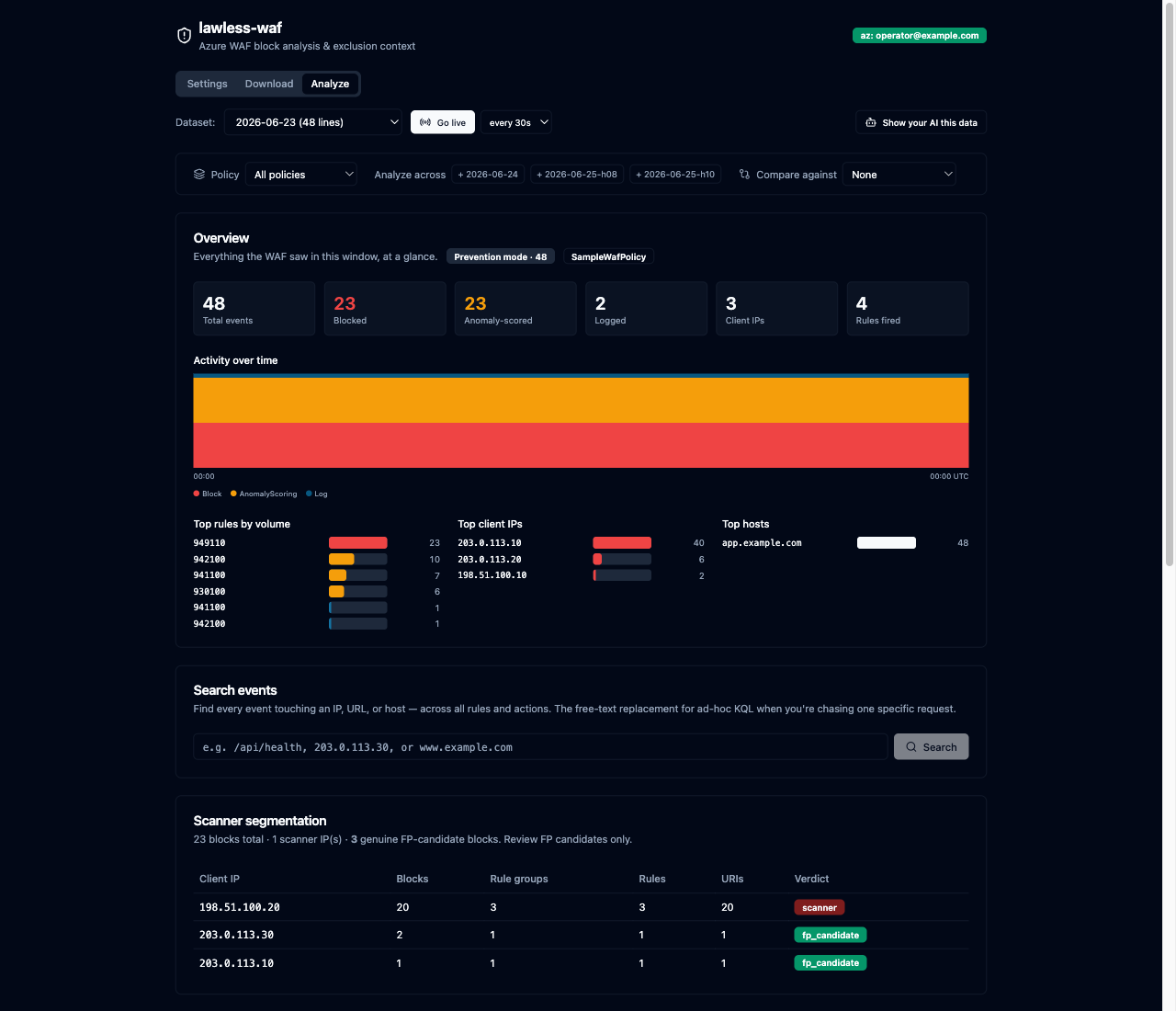
Overview + scope. Action mix, an activity timeline, top rules / IPs / hosts, and a scope
bar to filter by WAF policy or analyze several days at once.
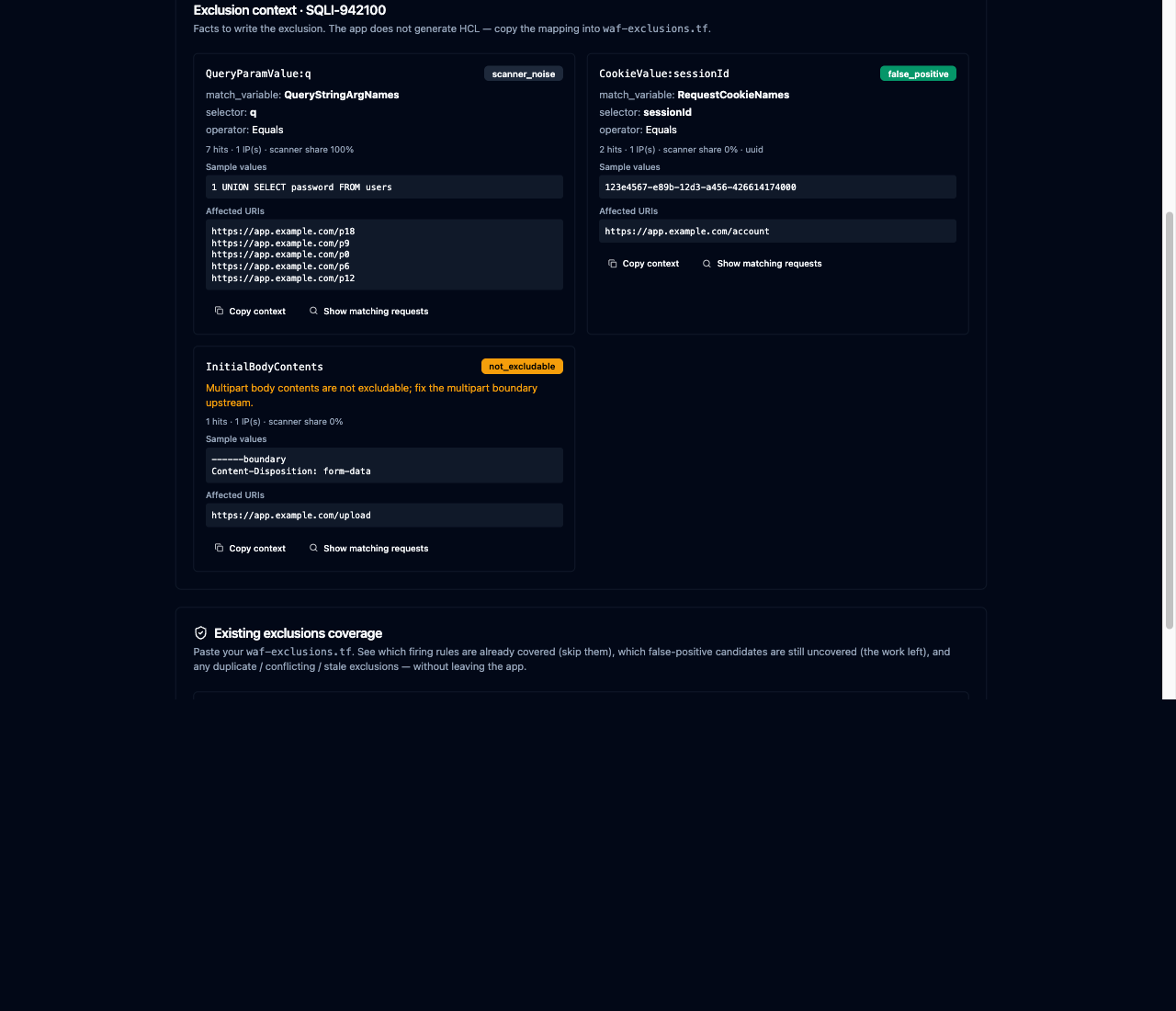
Exclusion context — the deliverable. Per match variable: the Terraform match_variable
selector, a classification (false positive / scanner noise / not excludable), sample
values, and affected URIs.
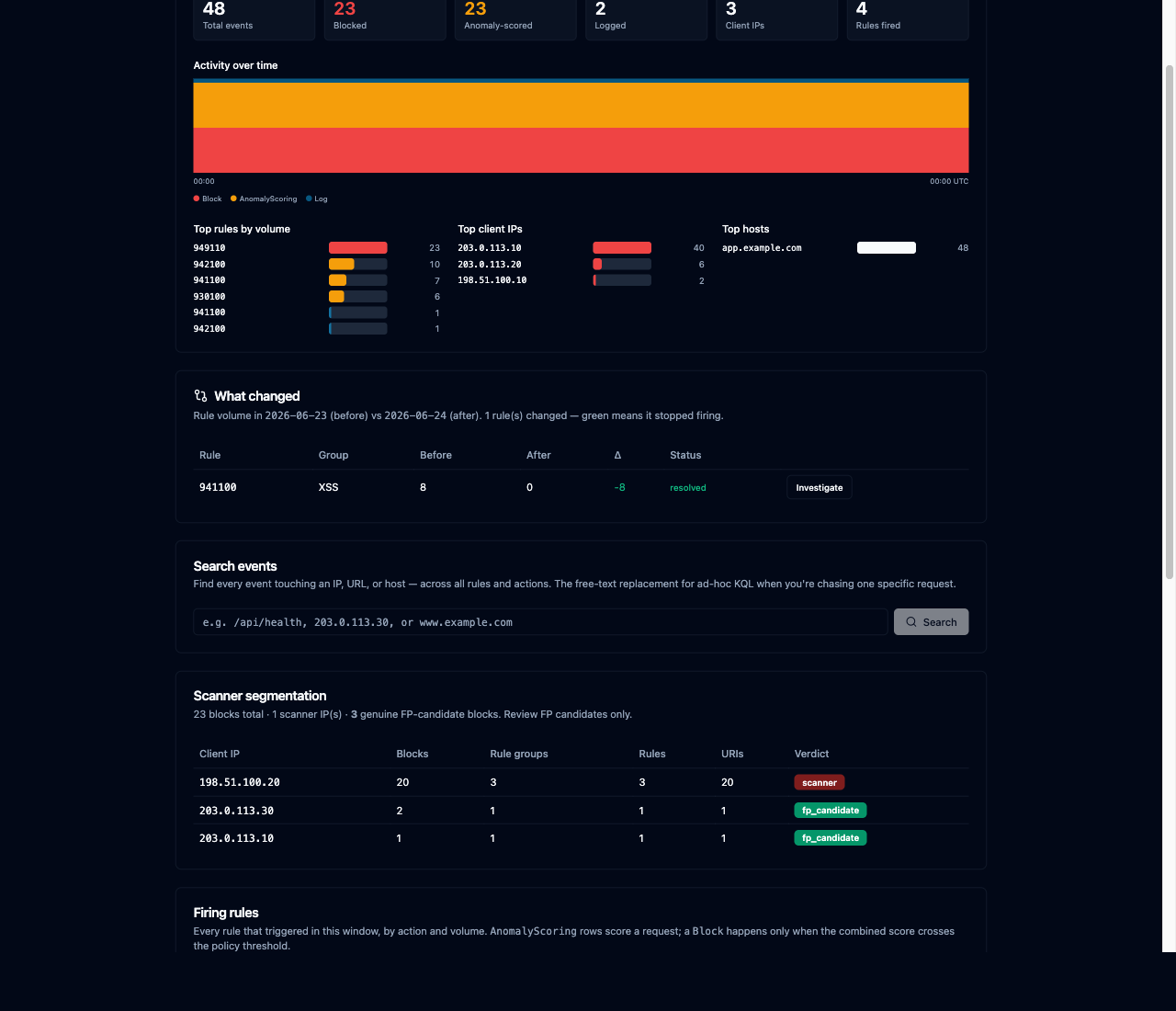
Before / after diff. Compare two windows to confirm an exclusion actually stopped a rule
firing (resolved), or to spot a rule that just started.
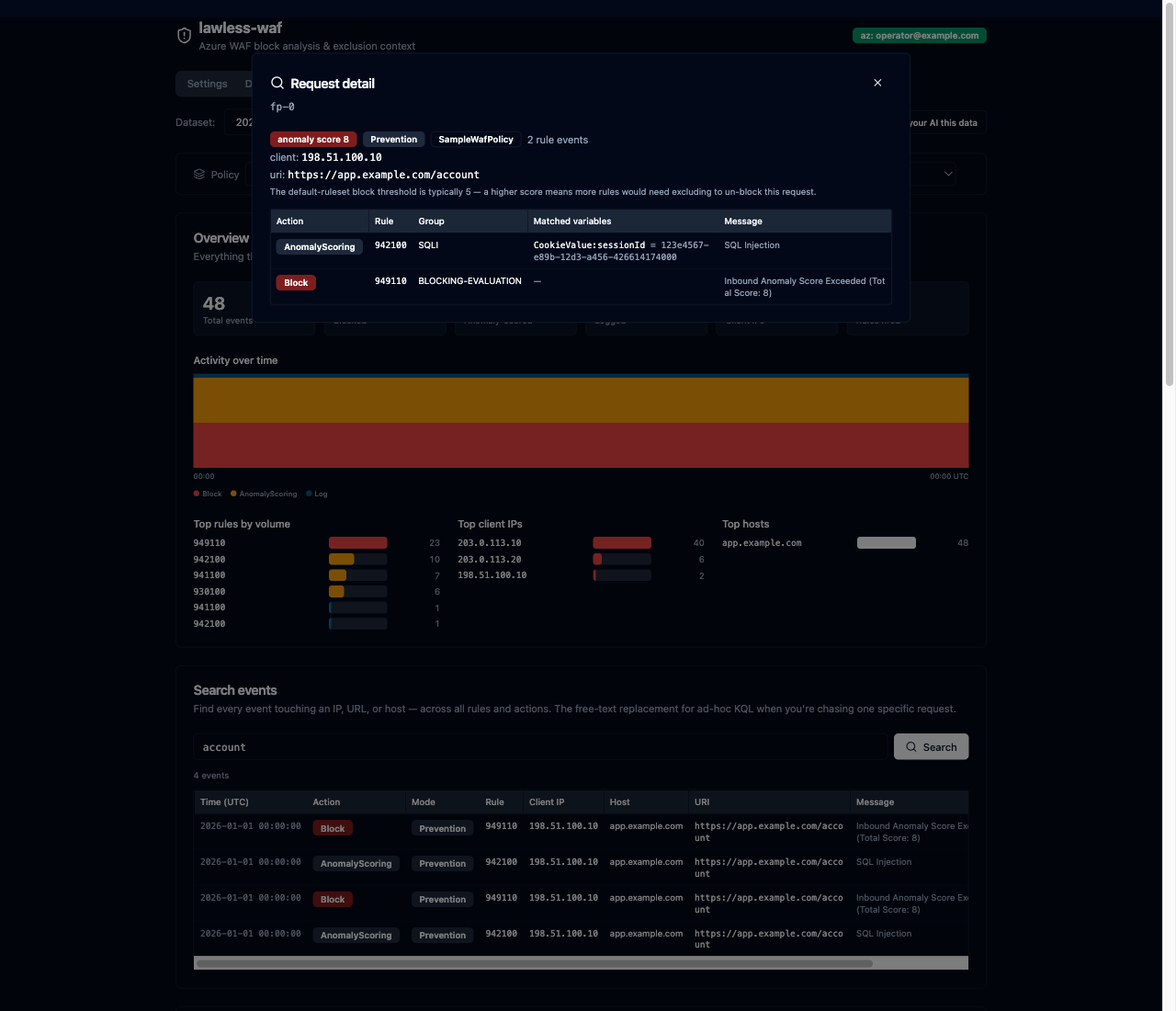
Full request inspector. Every rule one request tripped, the matched variables, and the
anomaly score parsed from the blocking-evaluation message.
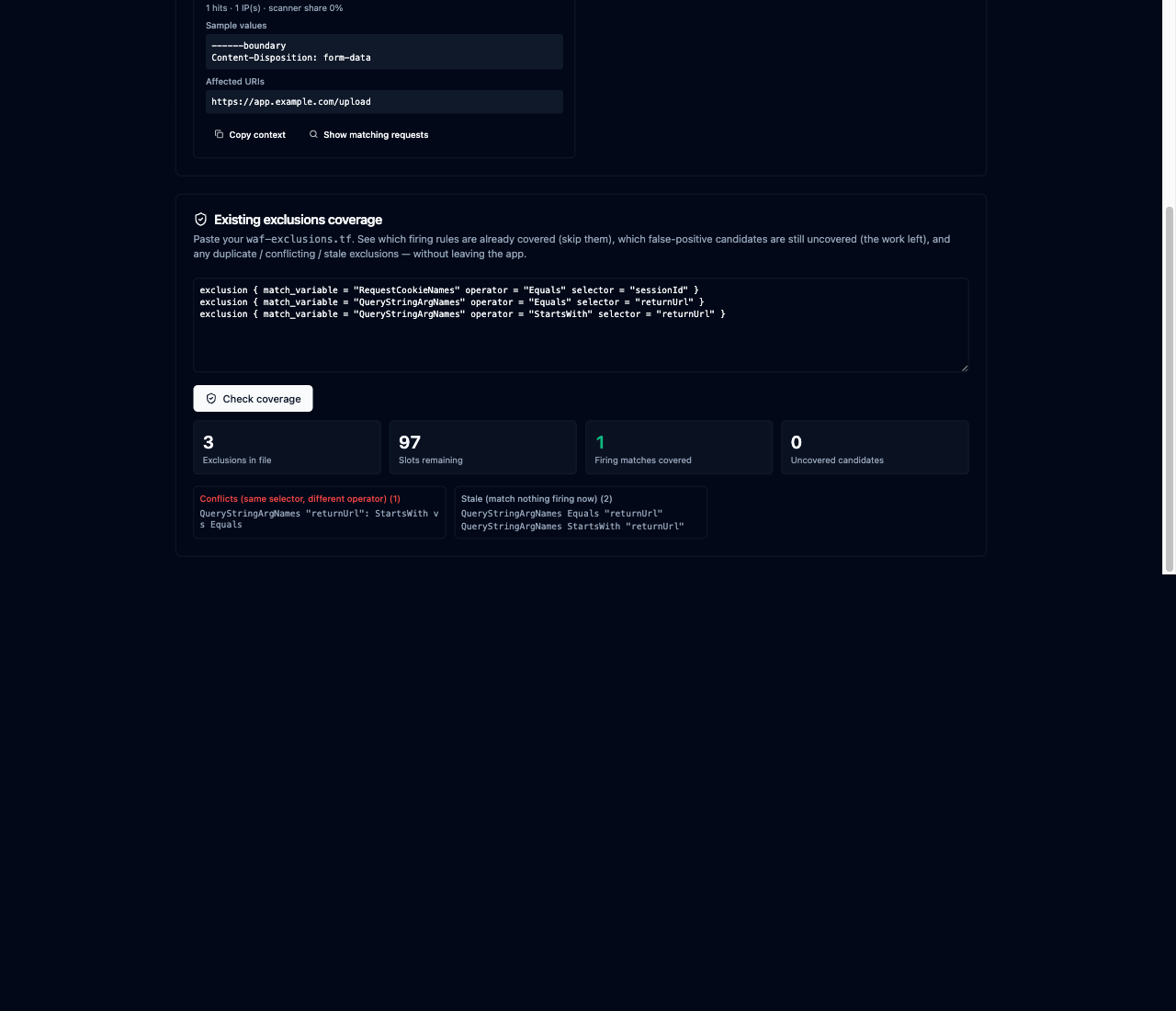
Existing-exclusions coverage. Paste your waf-exclusions.tf — or load it from a local
file (e.g. your infra repo mounted into the app, optionally at a git branch/ref) — to see which
firing rules are already covered, what's still uncovered, and any duplicate / conflicting / stale
entries. See Local exclusions file to set the mount.
Prerequisites
- To try the demo: just Docker. One
docker run, no clone. - To develop on it: Docker with Compose, plus make. Dependencies, tests, lint, the
API, and the UI all run in containers — no host Python or Node toolchain.
To point it at real Azure logs you also need, on the host:
- the
azCLI, signed in withaz login(the container reuses that session; it never
holds Azure secrets of its own), - Storage Blob Data Reader on the storage account holding the archive — Reader on the
subscription is not enough, - WAF diagnostic logs already streaming to a storage container. This tool reads that
archive, it does not configure the export for you.
Reusing your az session means mounting ~/.azure into the container, so it assumes a
Unix-like $HOME: macOS, Linux, or Windows via WSL.
Quick start
The published image is the whole app — API + web UI on one port. Pick a mode:
| Demo data | Your real logs | |
|---|---|---|
| Needs Azure? | No | Yes (az login on the host) |
| Data | Two synthetic days, fabricated | Downloaded from your storage account |
OFFLINE |
true (the default — it cannot call Azure) |
false |
| Safe to just try? | Yes, nothing leaves your laptop | It reads your real WAF logs |
Demo data (no Azure, no clone)
docker run --rm -p 127.0.0.1:8000:8000 \
  -e SEED_SAMPLE=true \
  ghcr.io/mortennordbye/lawless-waf:latest
Open http://localhost:8000 → Analyze tab → pick frontdoor:2026-06-24 (orappgw:2026-06-24 for the Application Gateway sample). You should see 48 events, 23 of them
blocked.
SEED_SAMPLE=true writes the synthetic days — two Front Door (the 24th with the false positive
firing, the 25th with it fixed, so the before/after diff shows something) and one Application
Gateway. OFFLINE defaults to true, so this mode physically can't reach Azure — the data is
fabricated and nothing leaves your laptop. Drop SEED_SAMPLE once you have real data; it only
ever writes days that are missing, so it can't overwrite anything you downloaded.
→ Walk through a real false positive, start to finish — five minutes,
and it ends with the Terraform you'd actually write.
Your real logs
Same image, plus your az session, OFFLINE=false, and a volume so downloads survive:
az login                                    # on the host, first

docker run --rm -p 127.0.0.1:8000:8000 \
  -v ~/.azure:/root/.azure \
  -v lawless-waf-data:/data \
  -e OFFLINE=false \
  ghcr.io/mortennordbye/lawless-waf:latest
-v ~/.azure:/root/.azurereuses your ambientaz login. The app holds no Azure secrets of
its own. Must be read-write: the CLI refreshes its token there.-v lawless-waf-data:/datakeeps downloaded datasets in a named volume. Without it, every
day you download is thrown away when the container exits (--rmplus an anonymous volume).-e OFFLINE=falseis what allows Azure calls at all.
The header should show az: <your account>. Then continue with
Running against real Azure below for the Settings → Download →
Analyze loop.
Keep the 127.0.0.1: prefix in both modes — there is no login, and it is the only thing keeping
the app off your LAN.
Updating
docker run uses the latest image you already have on disk; it does not check for a newer
one. If you ran it a while ago, you are still on that build. To upgrade:
docker pull ghcr.io/mortennordbye/lawless-waf:latest # then run as before
Or make every run self-updating:
docker run --rm --pull=always -p 127.0.0.1:8000:8000 ... ghcr.io/mortennordbye/lawless-waf:latest
Your downloaded datasets live in the lawless-waf-data volume, not the image, so they survive
an upgrade untouched. Nothing to migrate — pull and re-run.
To pin a specific build instead of tracking latest, every commit on main is also published asghcr.io/mortennordbye/lawless-waf:sha-<short-sha>.
Develop on it (clone + hot reload)
git clone https://github.com/mortennordbye/lawless-waf.git
cd lawless-waf

make seed   # generate two synthetic sample days, so there's something to analyze
make up     # API + web UI on http://localhost:5173, both hot-reloading
First run builds the images and creates .env from .env.example (which defaults toOFFLINE=true). make up stays in the foreground tailing the container logs, so give it its own
terminal (Ctrl+C, or make down from another one, stops it).
This is the only mode where the UI runs under Vite with hot reload; the single-container image
above serves a pre-built UI from the API instead.
make        # list all commands
make test   # run the test suite
make e2e    # full offline pipeline test against the sample dataset
make down   # stop everything
Running against real Azure
The app never holds Azure secrets. It reuses your ambient az session, so on the host:
- Sign in:
az loginon the host, not in the container. Activate PIM and connect the VPN
first if your storage account requires them. - Set
OFFLINE=falsein.env, then restart so it takes effect:make down && make up - Settings tab: pick the subscription → storage account → container. Once you're signed in
those are dropdowns populated from your session. The default container is the Front Door WAF
log name; pickinsights-logs-applicationgatewayfirewalllogfor Application Gateway. The
WAF type is auto-detected from the container name (override it for a custom name). The
header showsaz: <your account>when the session is visible to the app. - Download tab: pick a date range (or "This hour"), check the size/time estimate, and pull
the blobs. Cached days are reused, so you only pay the download once. - Analyze tab: pick the dataset you just pulled. From here it's
the same loop as the walkthrough, on your own traffic.
You need Storage Blob Data Reader on the storage account — Reader on the subscription is
not enough, and that trips up nearly everyone the first time. See
Troubleshooting if a download 403s or comes back empty.
docker compose mounts ~/.azure into the container read-write so the CLI can refresh its
own token. No Azure credentials live in this repo.
Local exclusions file
Instead of pasting your waf-exclusions.tf into the coverage panel, you can point the app at
the file on disk — typically your infra repo — and have the Analyze tab (and the MCPread_local_exclusions tool) load it, optionally at a specific git branch/ref. It stays fully
local: no network, no git remote, no credentials. Reading at a ref uses git show <ref>:<path>
without touching your working tree; with no ref it reads the working-tree file as it is now.
Because the app runs in a container, mount the directory in. With make up / compose, one line in.env does it — it mounts the host dir read-only at the same path inside the container (so the
full path you paste just works) and points the app there:
EXCLUSIONS_HOST_DIR=/Users/you/code/infra # a folder that contains your waf-exclusions.tf
Then restart (make down && make up). In Settings → Exclusions file (local), paste the file's
full path (e.g. /Users/you/code/infra/waf/waf-exclusions.tf) and an optional branch (e.g.main). In the coverage panel, click Load from file. Reads are confined to the mounted
directory — no path outside it is accessible.
(Running the published single-container image directly instead of compose? Set EXCLUSIONS_ROOT
and mount the dir at the same path yourself, e.g.-e EXCLUSIONS_ROOT=/Users/you/code/infra -v /Users/you/code/infra:/Users/you/code/infra:ro.)
The workflow
- Download the window you care about (a day, or a single hour for something recent).
- Analyze:
- Read scanner segmentation first — never write an exclusion for a scanner IP.
- Look at blocks by cause (or firing rules, if the policy is in Detection mode and
nothing actually blocks). - Investigate a rule to get its exclusion context, and drill into the real requests
(URI / IP / host / matched value) to confirm it's a false positive. - Use search to chase one specific IP or URL across every rule, and the request
inspector to see everything a single request tripped.
- Check coverage against your existing
waf-exclusions.tfso you don't redo work. - Write the exclusion from the returned
match_variable+selector+ operator. - After you apply the Terraform, diff a fresh window against the old one to confirm the
rule stopped firing.
Every table of WAF entries has a filter box that narrows the rows on screen, click-to-filter
on any rule / IP / host, Fullscreen (Esc to leave), and copy buttons on hover.
For near-real-time work, the Analyze tab has a Go live toggle that re-downloads the
current hour on a timer and refreshes the analysis in place. WAF diagnostic logs lag a few
minutes, so "live" tails with that inherent delay.
To hand the whole loop to an AI agent, use the MCP server below.
Documentation
| Walkthrough | The whole loop on the sample data: one rule, three match variables, three different correct actions — ending in the exclusion you'd write and the diff that proves it worked. Start here. |
| WAF concepts | Why a rule fires without blocking, anomaly scoring, Detection vs Prevention, the log→Terraform mapping that catches everyone, and the 100-slot limit. |
| Troubleshooting | az not signed in, 403s, empty datasets, OFFLINE=true, "I excluded it and it still fires". |
| BACKLOG.md | Known gaps, deliberately left. |
Use it from an AI agent (MCP)
The agent drives the whole loop through native MCP tools — refresh_live,scanner_report, blocks_by_cause, exclusion_context, search, coverage,read_local_exclusions (pull your waf-exclusions.tf from a mounted repo), firing_diff,
and friends (src/lawless_waf/mcp_server.py). The server reuses the same service layer as the
REST API and runs inside the app container (it has the dataset cache and your mounted az
session), speaking MCP over stdio. The app must be running (make up).
Claude Code:
make mcp # claude mcp add --scope user lawless-waf -- docker compose -f <repo>/compose.yaml exec -T api python -m lawless_waf.mcp_server
Any other client (Cursor, Claude Desktop, Windsurf, …) — print the config and paste it into
that client's mcpServers config:
make mcp-config
It emits:
{
  "mcpServers": {
    "lawless-waf": {
      "command": "docker",
      "args": ["compose", "-f", "/abs/path/to/compose.yaml", "exec", "-T", "api", "python", "-m", "lawless_waf.mcp_server"]
    }
  }
}
Then ask the agent to tune a window — it calls the tools directly. The server validates every
input at this boundary (it's no longer behind FastAPI's query validation) and the same scope
options apply: most tools take dataset_id plus optional datasets=[…] and policy=….
API (also what the UI calls)
Everything is under /api (no auth — localhost-only tool; Azure is the real gate). Every
analysis endpoint takes an optional scope: ?policy=<name> restricts to one WAF policy, and
repeating &dataset=<id> analyzes several days together.
GET/PUT /api/config— the Azure target;GET /api/azure/status+ the
subscriptions / storage-accounts / containers lookups behind the Settings dropdowns.POST /api/datasets {date, hour?, force?}— download a day/hour (cached; only calls Azure
when missing).POST /api/datasets/estimatefor size + ETA,POST /api/datasets/speedtest
to measure real throughput,DELETE /api/datasets[/{id}]to clear cache.GET /api/datasets/{id}/summary— overview (action mix, cardinalities, policy modes, top
hosts/IPs, timeline).GET …/policies,GET …/search?q=(free-text drill),GET …/requests/{trackingRef}(one whole request + anomaly score).GET /api/datasets/{id}/scanner-report— read first: scanners vs FP candidates.GET /api/datasets/{id}/blocks-by-cause?exclude_scanners=true— what blocks real traffic.GET /api/datasets/{id}/rules/{ruleId}/exclusion-context— the structured facts to write
an exclusion;…/eventsfor the row-level requests behind a rule.GET /api/datasets/{id}/diff?against=<id>and…/rules/{ruleId}/diff?against=<id>—
before/after, to verify a fix.POST /api/exclusions/count {tf_content}— the 100-slot guard + consolidation hints;POST /api/datasets/{id}/exclusions/coverage {tf_content}— cross-reference an existingwaf-exclusions.tfagainst what's firing now.GET/PUT /api/exclusions/source— configure the localwaf-exclusions.tfpointer (path +
optional git ref);GET /api/exclusions/localreads it (confined toEXCLUSIONS_ROOT).
Notes
- The app is meant to run on one operator's laptop. There's no app-level auth by design; the
gate is your Azure access. Don't expose it on a network. - Match values are truncated everywhere they're returned — WAF logs can carry tokens and PII.
- Nothing leaves your laptop except the
azcalls to your own storage account. The one
exception is optional and off by default:GEOIP_ENABLED=trueturns on country flags for
client IPs, which sends the IPs from your logs to the third party ip-api.com over plain
HTTP. Leave it off unless you're fine with that. - Coverage cross-references the top firing rules per run (it flags when it truncates) to stay
fast on large datasets. - The UI is dark-only. There's no light theme and no toggle.
Continuous integration
| Workflow | Trigger | Purpose |
|---|---|---|
| CI | push, PR | Python lint + test, frontend lint + build, Docker image build and push to GHCR |
| Dependency Review | PR | block PRs that add known-vulnerable dependencies |
| Scorecard | push, weekly | OpenSSF supply-chain grade → Security tab |
| Container Scan | push, weekly | Trivy image scan → Security tab |
The GHCR image is the whole app — API plus the pre-built web UI, served on one port. That's
the docker run in the quick start. make up builds a separate dev image instead, where the UI
runs under Vite with hot reload.
Architecture
src/lawless_waf/service.py— framework-agnostic core, shared by the FastAPI routers and
the MCP server (mcp_server.py) so both transports run identical logic.duck/— DuckDB engine (multi-file + policy-scoped views) and the runbook's queries.schema.pynormalizes both WAF log schemas (Front Door + Application Gateway) into one
canonical view, so every query is schema-agnostic.analysis/—scanner.py(IP segmentation),classify.py(attack vs app data),mapping.py(log → Terraform match variable, per WAF type),exclusions.py(slot guard +
tf parsing).localrepo.py(repo root) reads awaf-exclusions.tffrom a mounted dir/git ref.azure/—downloader.py/estimate.py(argv wrappers around the documentedaz
commands),discovery.py(session + resource lookups).api/— thin FastAPI routers (rate limiting, boundary validation); all under/api.frontend/— React + Vite + Tailwind SPA; serves the UI and proxies/apito the API.
Yorumlar (0)
Yorum birakmak icin giris yap.
Yorum birakSonuc bulunamadi