mosaic-bridge
Health Warn
- License — License: NOASSERTION
- Description — Repository has a description
- Active repo — Last push 0 days ago
- Low visibility — Only 5 GitHub stars
Code Pass
- Code scan — Scanned 12 files during light audit, no dangerous patterns found
Permissions Pass
- Permissions — No dangerous permissions requested
This is a Unity Editor plugin that connects AI agents via the Model Context Protocol, allowing tools like Claude or Gemini to directly drive Unity with hundreds of specialized commands for scene creation, physics, and procedural generation.
Security Assessment
The overall risk is Low. The automated code scan reviewed 12 files and found no dangerous patterns, no hardcoded secrets, and no risky permission requests. The developers explicitly claim there is no telemetry and that your project data never leaves your local machine. While it exposes a large surface area of tools (~250) to manipulate the Unity Editor, these actions are contained entirely within your local game development environment. It does not appear to execute hidden shell commands or make unauthorized external network requests.
Quality Assessment
The project is very new and currently has low community visibility with only 5 GitHub stars, meaning it has not been broadly tested or vetted by a large user base. However, it is actively maintained, with repository pushes happening as recently as today. The repository includes a clear description and documentation, and it claims to be licensed under the open-source Apache 2.0 framework, though the automated scanner flagged the exact license file as unasserted. The codebase is highly ambitious, featuring original implementations of well-known computer science research papers.
Verdict
Use with caution. While the tool passes basic security checks, its extremely low community adoption means it should be evaluated carefully in a sandboxed Unity environment before connecting it to sensitive AI workflows.
Unity Editor MCP plugin — AI agents drive Unity via Model Context Protocol. Apache 2.0, ~200 domain-specialized tools including procedural generation, simulation, physics, rendering, and AI behavior from published research papers.
Mosaic Bridge







AI agents that drive the Unity Editor.
Mosaic Bridge connects MCP-compliant AI clients — Claude Code, Claude Desktop,
Cursor, Gemini CLI, and any other Model Context Protocol client — to a running
Unity Editor. It exposes ~250 tools covering GameObject and scene operations,
procedural generation, physics simulation, pathfinding, rendering, animation,
and more.
Free and open source under Apache 2.0. No telemetry. Your project never leaves
your machine.
See it work
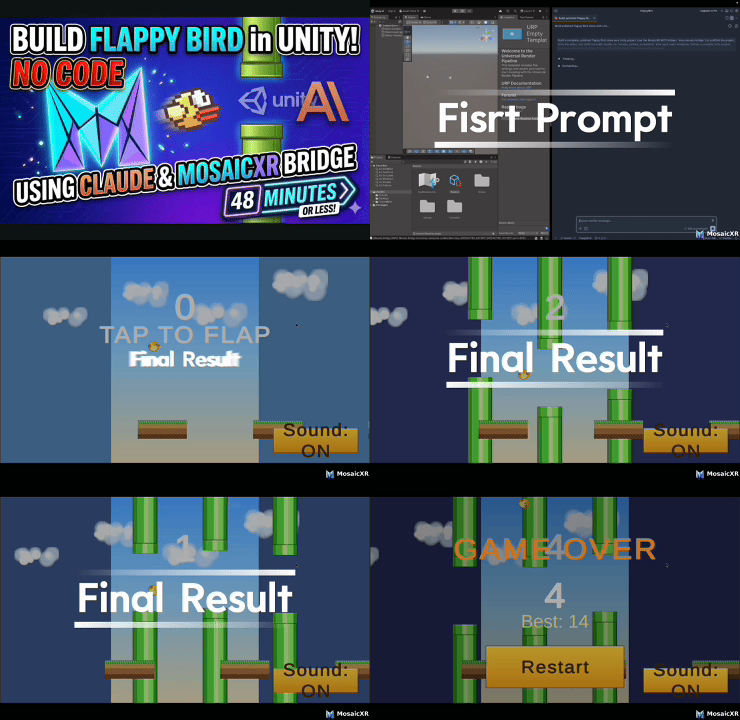
"Build me a Flappy Bird clone in Unity"
48 minutes later: a working game. No code written by hand, no manual editor clicks —
Claude drove every Unity action through Mosaic Bridge tools.
  You:     "Create a 3D tic-tac-toe board with warm wood styling and
            glowing cyan X pieces"
  Claude:  calls mosaic_gameobject_create, mosaic_material_create (uses
            KB for oak albedo), mosaic_physics_add-rigidbody, …
  Unity:   board appears in your scene, ready to play
What makes it different
Research-paper implementations. ~90 of the tools are original
implementations of published CS, graphics, and AI papers — Bridson's Poisson
Disk (2007), Müller's SPH fluid (2003), Stam's Stable Fluids (1999), Orkin's
GOAP (F.E.A.R. 2003), Lorensen-Cline Marching Cubes (1987), Reynolds' Boids
(1987), Harabor-Grastien Jump Point Search (2011), Garland-Heckbert quadric
decimation (1997). Not wrappers over Unity APIs — actual algorithms, callable
by AI.Curated knowledge base. Tools that return physical quantities (density,
friction, IOR, color temperature) draw from a bundled reference library — NIST
physics constants, Unity's PhysicallyBased material data. Responses include
citations. No hallucinated numbers.Multi-Unity-version. Works on Unity 2022 LTS and Unity 6. Each Editor
runs in its own per-project runtime directory, so multiple Editors on
different projects can run concurrently without fighting for ports or files.Privacy-first. Loopback-only HTTP listener bound to 127.0.0.1,
HMAC-SHA256 authenticated, telemetry off by default. Ephemeral ports,
per-project discovery files (mode 0600 on Unix).Vendor-neutral. Apache 2.0 with explicit patent grant. Not a funnel for a
paid product. Your tools, your keys, your data.
Requirements
- Unity 2022 LTS or newer (Unity 6 fully supported)
- Node.js 18+ (for the MCP server)
- macOS, Windows, or Linux
Quick install
One command. It walks you through the rest:
npx @mosaicxr-ai/create-bridge
The installer:
- Asks for your Unity project path (create one in Unity Hub first if you
haven't — any empty Unity 2022 LTS+ or Unity 6 project works) - Asks which MCP client(s) to configure — Claude Code, Claude Desktop,
Cursor, Gemini CLI, or OpenAI Codex (any combination) - Adds
com.mosaic.bridgeto the project'sPackages/manifest.json - Writes the MCP server entry into each selected client's config
Then open the Unity project, wait for compile, restart your MCP client, and
start prompting.
Non-interactive (CI / scripted)
npx @mosaicxr-ai/create-bridge \
  --project-path /path/to/UnityProject \
  --clients claude-code,cursor \
  --yes
See npx @mosaicxr-ai/create-bridge --help for all flags.
Scene-building intelligence + cross-LLM agents
The installer writes instruction files and specialist agents into your Unity project for every
supported AI client:
| File | Client |
|---|---|
CLAUDE.md |
Claude Code + Claude Desktop |
GEMINI.md |
Gemini CLI |
AGENTS.md |
OpenAI Codex |
.cursor/rules/mosaic-bridge.mdc |
Cursor |
All instruction files enforce:
- Interview before building — when you give a vague prompt like "make me a desert scene",
the AI asks 4 targeted questions (scene type, geographic reference, scale, player perspective)
before touching any tools. - Spatial coherence — every placed object Y is resolved from
terrain/sample-height
before placement. No more objects buried underground or floating in air. - Correct build order — terrain → textures → lighting → structures → vegetation →
post-processing → camera.
Three specialist skill agents are installed following the bmad-method
convention — written to both .claude/skills/ (Claude Code slash commands) and.agents/skills/ (universal, works with Cursor, Gemini, Codex, Windsurf, OpenCode):
| Agent | Claude Code | Cursor | Codex | Best for |
|---|---|---|---|---|
| Zara — Project Guide | /mosaic-guide |
@mosaic-guide |
$mosaic-guide |
Session start, preflight, pipeline issues |
| Ray — Shader Expert | /mosaic-shader |
@mosaic-shader |
$mosaic-shader |
ShaderGraph creation, node wiring, debugging |
| Max — Scene Builder | /mosaic-scene |
@mosaic-scene |
$mosaic-scene |
Full scene construction, particles, physics |
To skip writing instruction files:
npx @mosaicxr-ai/create-bridge --skip-claude
To refresh after an update:
npx @mosaicxr-ai/create-bridge --force
Manual install (if you prefer)
Add to <UnityProject>/Packages/manifest.json:
{
  "dependencies": {
    "com.mosaic.bridge": "https://github.com/MosaicXR-AI/mosaic-bridge.git?path=/packages/com.mosaic.bridge"
  }
}
Then point your MCP client at:
{
  "mcpServers": {
    "mosaic-bridge": {
      "command": "npx",
      "args": ["-y", "@mosaicxr-ai/mcp-server", "--project-path", "/path/to/UnityProject"]
    }
  }
}
What's inside
~250 tools across 60+ categories. A sample:
| Category | Tools | Notable |
|---|---|---|
| Procedural Generation | 17 | Poisson Disk, Marching Cubes, Hydraulic Erosion, Wave Function Collapse, L-Systems, Voronoi, Blue Noise, Perlin / Simplex noise, 3D noise textures |
| Simulation | 8 | SPH fluid, Boids, Stable Fluids / smoke, agent-based (ant colony, slime mold), cloth, orbital mechanics |
| AI Behaviors | 11 | GOAP, Utility AI, Context Steering, Flow Fields, Jump Point Search, Behavior Trees, Steering |
| Advanced Mesh | 10 | Quadric decimation, QuickHull, BSP/CSG boolean, Dual Contouring, icosphere subdivision |
| Advanced Rendering | 12 | Volumetric clouds, atmospheric scattering, ray marching, SDF text, portals |
| Physics | 10 | Rigidbody, collider, raycast, overlap, gravity, physics material, joints |
| Spatial Data Structures | 6 | Spatial hash, k-d tree, octree |
| Scene Intelligence | 4 | scene/create-object (asset search → store → procedural build), asset/find-3d, scene/plan-composition, terrain/get-regions |
| GameObjects & Scenes | 15 | Create, delete, duplicate, reparent, hierarchy, stats, snap-to-ground |
| Prefabs & Assets | 13 | Create, instantiate, overrides, variants, import, list, find-3d |
| Components & Scripts | 9 | Add, remove, set property / reference, create/read/update scripts |
| Animation | 7 | Controllers, states, blend trees, clips, IK setup, transitions |
| Lighting & Graphics | 13 | Lights, baking, shaders, post-processing, shadergraph |
| Cameras & ScreenShots | 6 | Camera info, scene/game/camera screenshots |
| UI | 5 | Canvas, elements, layouts, rect transforms |
| Navigation | 10 | NavMesh, agents, obstacles, pathfinding, FOV visualization, FABRIK IK |
| Terrain | 10 | Height, paint, trees, detail, settings, grid, erosion, sample-height, get-regions |
| Particles | 7 | Create, set-shape, set-emission, set-renderer, set-main, playback, info |
| Package Integrations | ~28 | Cinemachine, ProBuilder, Addressables, TextMeshPro, URP, HDRP, Splines, VisualScripting |
Plus: editor control (play mode, run-block, execute code, menu items), profiler,
timeline, input system, constraints, LOD, assembly definitions, reflection,
undo/redo, selection, tags & layers, settings, build, console, measurement, data
visualization.
Full tool list: Packages/com.mosaic.bridge/Editor/Tools/ after install, or
browse here.
Knowledge base
Tools that return physical values consult a bundled, versioned reference library:
physics/constants.json— NIST CODATA fundamental constantsrendering/pbr-materials.json— PhysicallyBased API material values (CC0)rendering/render-pipeline-compat.json— shader ↔ pipeline compatibility matrix (URP / HDRP / BuiltIn)rendering/shadergraph-nodes.json— 38 node aliases with input/output slot descriptionsrendering/unity-api-quirks.json— documented API pitfalls with tested workarounds- Planned: animation timing, audio attenuation, spatial metrics, color temperature, lighting presets
When a tool consults the KB, it attaches a citation to its response envelope so
the AI knows which source a value came from. If a requested value isn't in the
KB, the tool surfaces an explicit "no data available" warning rather than
fabricating a number.
Supported MCP clients
Mosaic Bridge is protocol-native — it speaks Model Context Protocol
2024-11-05. The installer configures all
of these in one pass:
| Client | Config file | Format | Auto-configured? |
|---|---|---|---|
| Claude Code | <project>/.mcp.json |
JSON | ✅ via installer (+ auto-written by bridge on first start) |
| Claude Desktop | ~/Library/Application Support/Claude/claude_desktop_config.json |
JSON | ✅ via installer |
| Cursor | ~/.cursor/mcp.json |
JSON | ✅ via installer |
| Gemini CLI | ~/.gemini/settings.json |
JSON | ✅ via installer |
| OpenAI Codex CLI | ~/.codex/config.toml |
TOML | ✅ via installer |
| Windsurf, OpenCode, GitHub Copilot, others | see each client's docs | varies | Manual MCP config; AGENTS.md + .agents/skills/ written by installer for agent support |
Any MCP 2024-11-05 compliant client works with manual config. The auto-config
list above is just the clients the installer knows paths/formats for today.
Multi-project: run several Unity Editors at once
Each Editor gets its own runtime directory under~/Library/Application Support/Mosaic/Bridge/{projectHash}/ (macOS;
analogous paths on Windows and Linux). State files never collide.
To have one MCP client talking to multiple Unity projects, register one MCP
server per project:
{
  "mcpServers": {
    "mosaic-bridge-game": {
      "command": "node",
      "args": ["/path/to/mcp-server/dist/index.js", "--project-path", "/path/to/MyGame"]
    },
    "mosaic-bridge-factory": {
      "command": "node",
      "args": ["/path/to/mcp-server/dist/index.js", "--project-path", "/path/to/Factory"]
    }
  }
}
Each server connects to exactly the specified Editor. When you say "in my game
project, create a cube", the client routes to the correct server by namespace.
Launched without --project-path, the server inspects the shared instance
registry:
- Zero live Editors: clear error with setup guidance
- One live Editor: auto-selects it
- Two+ live Editors: structured error listing projects and the flags to
disambiguate
MCP server flags
mosaic-mcp [options]

  --project-path <path>     Unity project root (recommended)
  --project-hash <hash>     16-hex-char project hash
  --runtime-dir <dir>       Explicit per-project runtime directory
  --discovery-file <file>   Direct path to bridge-discovery.json
  -h, --help                Show help
  -v, --version             Show version
Architecture
                 Unity Editor (main thread)
                         │
                         │  [MosaicTool] attribute discovery via TypeCache
                         │
                ┌────────▼────────┐
                │  Mosaic Bridge  │   Unity C# package
                │   Core + Tools  │   In-process, main-thread dispatched
                └────────┬────────┘
                         │
                         │  HTTP on loopback (127.0.0.1, ephemeral port)
                         │  HMAC-SHA256 challenge-response authentication
                         │  Discovery file at {project-hash} runtime dir
                         │
                ┌────────▼────────┐
                │  MCP Server     │   Node.js / TypeScript
                │  stdio ↔ MCP    │
                └────────┬────────┘
                         │
                         │  Model Context Protocol over stdio
                         │
      ┌──────────────────┼──────────────────┬──────────────┐
      │                  │                  │              │
  Claude Code      Claude Desktop        Cursor        Gemini CLI
Key properties:
- In-process bridge — Unity APIs are main-thread-only, cross-process calls
throwUnityException - Main-thread dispatch via
EditorApplication.update— guaranteed safe - Survives Unity domain reloads via
SessionStatepersistence TypeCachediscovery — add a static method with[MosaicTool(...)],
it's automatically callable- Per-project isolation — multiple Editors never share mutable state files
- Telemetry off by default
Development
git clone https://github.com/MosaicXR-AI/mosaic-bridge.git
cd mosaic-bridge

# MCP server
cd packages/mcp-server
npm install
npm run build
npm test

# Unity package — install via file: reference in a test project's manifest.json
# See TESTING.md (coming soon) for setup details.
Monorepo layout:
packages/
├── com.mosaic.bridge/       Unity UPM package (Editor + Runtime + Tests)
│   ├── Editor/              ~250 tools + core infrastructure
│   ├── Runtime/             Runtime-compatible tool subset
│   ├── Tests/               NUnit + Unity Test Runner
│   └── Samples~/            Custom-tool authoring sample
└── mcp-server/              Node.js MCP server (TypeScript + Vitest)
Running Unity tests requires opting in via testables in the consuming
project's manifest.json:
{
  "testables": ["com.mosaic.bridge"]
}
Roadmap
v1.0 beta (current)
- Core bridge, MCP server, ~250 tools across 60+ categories
- Per-project runtime isolation
- Auto
.mcp.jsonfor Claude Code + auto-config for Claude Desktop, Cursor,
Gemini CLI, and OpenAI Codex CLI vianpx @mosaicxr-ai/create-bridge - Windows
cmd /cwrapper for stdio MCP launch (beta.2) - Scene intelligence:
scene/create-objectdecision tree (project search →
Asset Store → procedural build), spatial coherence tools, build plans editor/run-blockmulti-statement C# execution with polling- Knowledge base with Unity-version-aware guidance + rendering compat KB (beta.3)
project/preflight— render pipeline + color property detection (beta.3)material/create-batch— bulk material creation (beta.3)- Cross-LLM specialist agents via bmad-method SKILL.md format (beta.3):
Zara, Ray, Max installed to.claude/skills/+.agents/skills/ - Unity project asset resources in MCP (
@Unity Prefabs,@Unity Materials, etc.) (beta.3) - Apache 2.0 license with patent grant
v1.0 stable
- Unity Asset Store listing
- OpenUPM registry publication
- First docs site
- Runtime
kb/query+kb/fetchserver contract live kb/watchbackground drift detector for Unity-docs updates
v1.1+
- Migrate deprecated Unity API usage to modern equivalents
- Expand knowledge base (animation, audio, level design, lighting presets)
- Runtime (compiled build) tool support for more categories
- Performance profiler integration
See open issues for the
live backlog, and Discussions
for design conversations.
Contributing
Contributions welcome — pull requests, issues, test coverage, docs. Every
commit must be signed off per the Developer Certificate of Origin:
git commit -s -m "your message"
See CONTRIBUTING.md for the full workflow, and
CODE_OF_CONDUCT.md for community standards.
Security vulnerabilities: please disclose privately — see
SECURITY.md.
License
Apache License 2.0. Includes an explicit patent grant.
Individual research-backed tools cite the papers they implement. Algorithm
citations are embedded in the source code and returned in tool response
envelopes where relevant.
Credits
Built and maintained by Mousa Soutari /
MosaicXR.
Research-paper implementations respectfully credit their authors. Knowledge
base values are sourced from public authoritative data (NIST, Unity
PhysicallyBased, etc.) under their respective licenses.
If you build something interesting with Mosaic Bridge, open a
Discussion — we'd
love to see it.
Reviews (0)
Sign in to leave a review.
Leave a reviewNo results found