perch
Health Gecti
- License — License: MIT
- Description — Repository has a description
- Active repo — Last push 0 days ago
- Community trust — 22 GitHub stars
Code Gecti
- Code scan — Scanned 12 files during light audit, no dangerous patterns found
Permissions Gecti
- Permissions — No dangerous permissions requested
Bu listing icin henuz AI raporu yok.
A Mac notch companion that watches your coding agents, keeps the week you spent with them, and fills the wait.
Perch
Work with coding agents. Keep your focus, and take care of your body too.



Contents
- Why Perch exists
- Watching your agents for you
- The week under the bird
- The 30-second moves
- Local data and privacy
- Supported agents
- Install
- Uninstall and delete your data
- Upgrading from 2.3 or earlier
- Development
- Contributing
- License
Perch is a little companion in your Mac's notch. It uses the rhythm of your work
with Claude Code, Codex and Google Antigravity to keep track of focused time and remind you to move
after a long stretch of work.
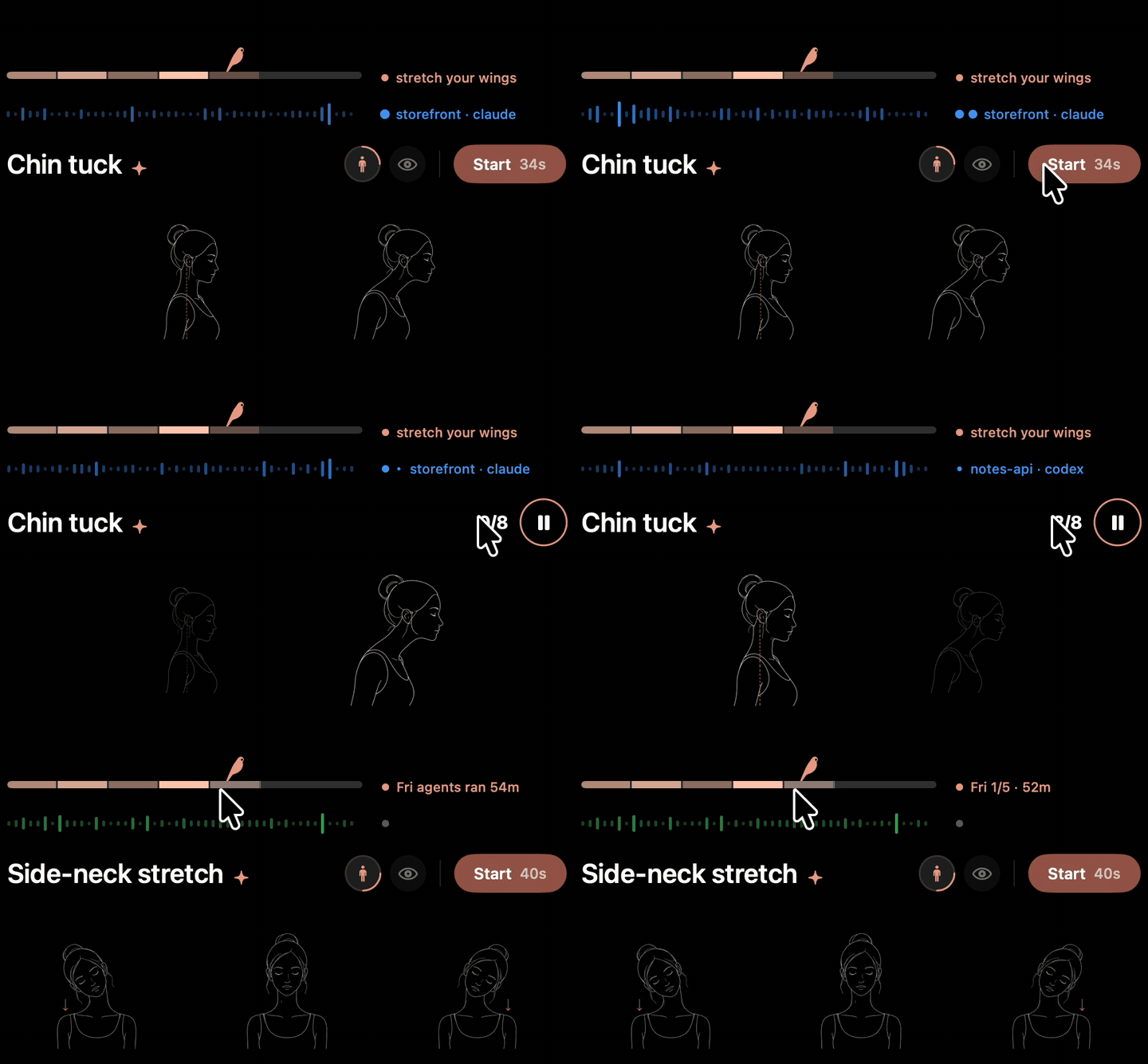
The branch beneath the bird holds this week's focus record. The card has short
moves with illustrations and a beat to follow. While you wait for an agent,
give your body 30 seconds.
Why Perch exists
Coding agents take a lot of the hands-on work off your plate, but they bring a
new rhythm of attention: hand off a task, wait, come back and check, approve,
start the next round. Each wait may be only a few tens of seconds or a few
minutes, but because you never know when the agent will come back, it is easy
to end up half-watching the terminal while your phone or another tab takes the
rest of you.
Perch is trying to protect two things: your focus and your health.
For focus, Perch looks at how fast you pick the agent's work back up and start
the next round, judges from that whether this stretch of collaboration is
still running continuously, and shows you the shape of your focus across the
day and the week.
For health, Perch turns a wait that was already happening into a short
recovery. The illustration means you don't have to work out how the move
goes, and the beat means you don't have to watch a separate timer. Follow it
through and you are back for the next round.
Perch gives no one a performance score. It shows two things you normally
can't see: the rhythm of your focus, and the chances to recover that are easy
to waste. You can see when the collaboration was running smoothly, when the
rhythm slackened, and whether those scattered waits were actually spent on
yourself.
Watching your agents for you
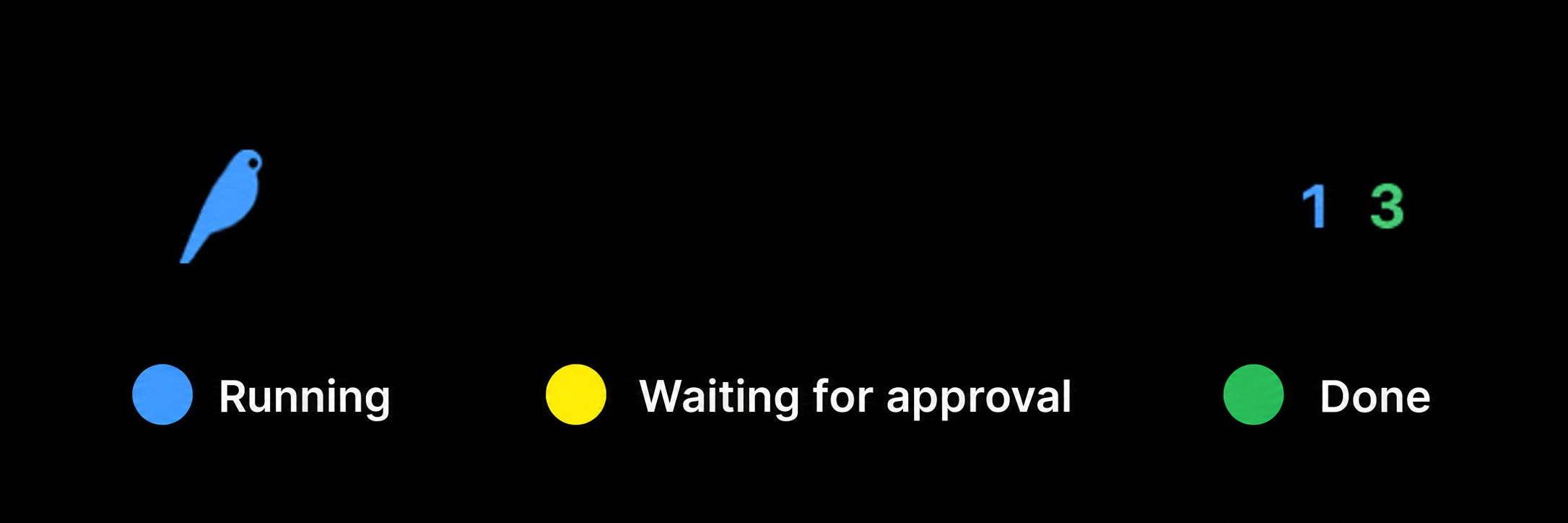
Hooks in Claude Code and codex hand Perch the lifecycle states: running,
waiting for approval, and finished.
Collapsed, the bird on the left takes the colour of whatever needs your attention
most, and the counts for each state sit on the right. Hover the notch
and the card unfolds: one status dot per project, with the project names
cycling through one at a time. As long as one of those projects is waiting on
your approval, the name stops there until you deal with it. Waiting on you
also makes a sound of its own, different from the chime for a finished one.
Press a project's name to go to its agent: in the Claude app or the Codex app,
straight to that session; in Terminal, to the tab the agent runs in; in iTerm or
your editor, that app comes forward.
The week under the bird
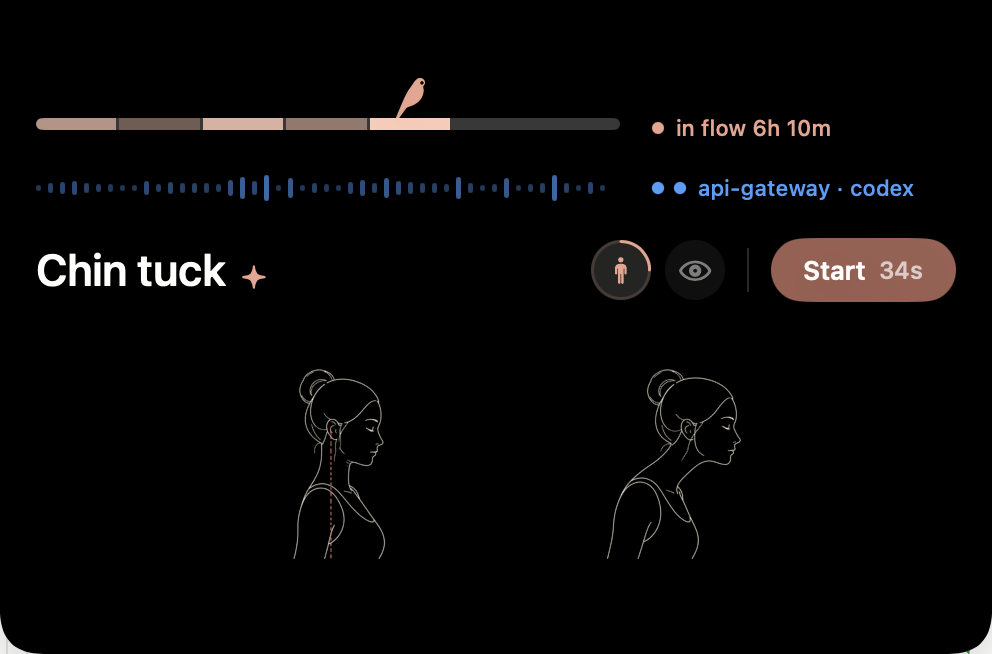
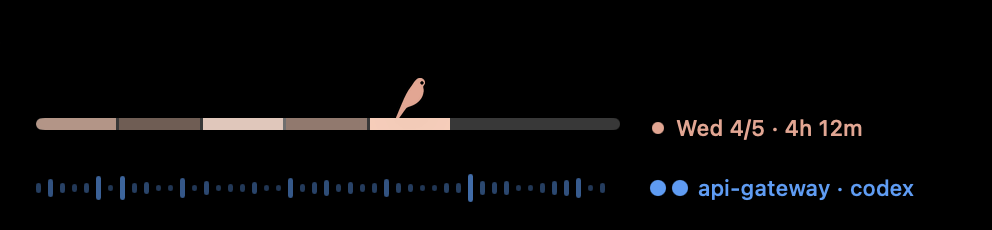
The top row of the card is a branch running Monday to Sunday, with the bird
standing on today. Days that haven't happened yet stay grey. Days that are over
and the day under way are lit in a single coral colour at five levels of
brightness, showing the handoff rhythm Perch measured.
To the right of the branch, three things take their turn:
- in flow 2h 37m: the total time Perch judged your recent handoffs to be
staying tight; - agents ran 5h 10m: wall-clock time with at least one agent running.
Several agents in parallel still count once; - the name of the project that finished most recently.
The two durations are kept apart on purpose: an agent running is not the same
as you going quickly back and forth with it, and neither one is a total of
hours worked.
Hover a day on the branch and that area switches to showing that day's level,
its in flow duration and its agents ran duration.
Earlier weeks are in Record: press today's in flow reading, or choose
Record from the card's right-click menu, and the card's lower half turns
into it. It draws one week large, on the same branch, with a small dot under
each day for every move you finished, and every week since Perch started
listening as a row of strokes underneath; press one to see that week. Hover a
day for its flow and the moves you did. Press the reading again, or let the
card close, and the move comes back.
What Perch means by "in flow"
Perch uses "in flow" to estimate how long you stayed focused while working with
an agent. Recent handoff speed is its ruler: after an agent finishes a round,
do you start the next one soon, and are those quick handoffs still going?
Perch does not read screen contents, prompts, response text, or which app is in
front. It only sees agent lifecycle events, which keeps the reading local and
its boundary clear; the price is that reading, thinking and deciding produce no
handoffs, so they never get counted.
So it infers focus rather than reading attention directly. Reading,
thinking and deciding can be just as focused, and they get undercounted because
they leave no handoff behind, so the number can sometimes read lower than the
time you actually spent focused. This reading is good for watching how
continuous the collaboration was; it cannot judge the quality of the work, your
ability, or your output. When there is no in flow duration to show for a day,
the reading is —.
A day's level depends only on the in flow duration measured that day:
| Level | Measured that day |
|---|---|
| 1/5 | less than 1 hour |
| 2/5 | 1–2 hours |
| 3/5 | 2–4 hours |
| 4/5 | 4–6 hours |
| 5/5 | 6 hours or more |
The wave in the second row is the same verdict, live: brighter and quicker
while you are judged to be in flow. If the current verdict is wrong, press
the wave. If a day's level is wrong, press that day on the branch to step it
1 → 5 → 1. A correction only changes the verdict or level being displayed; it
never rewrites the raw events, and it never changes the durations already
measured.
The 30-second moves
Work with a coding agent for hours and your attention keeps moving between
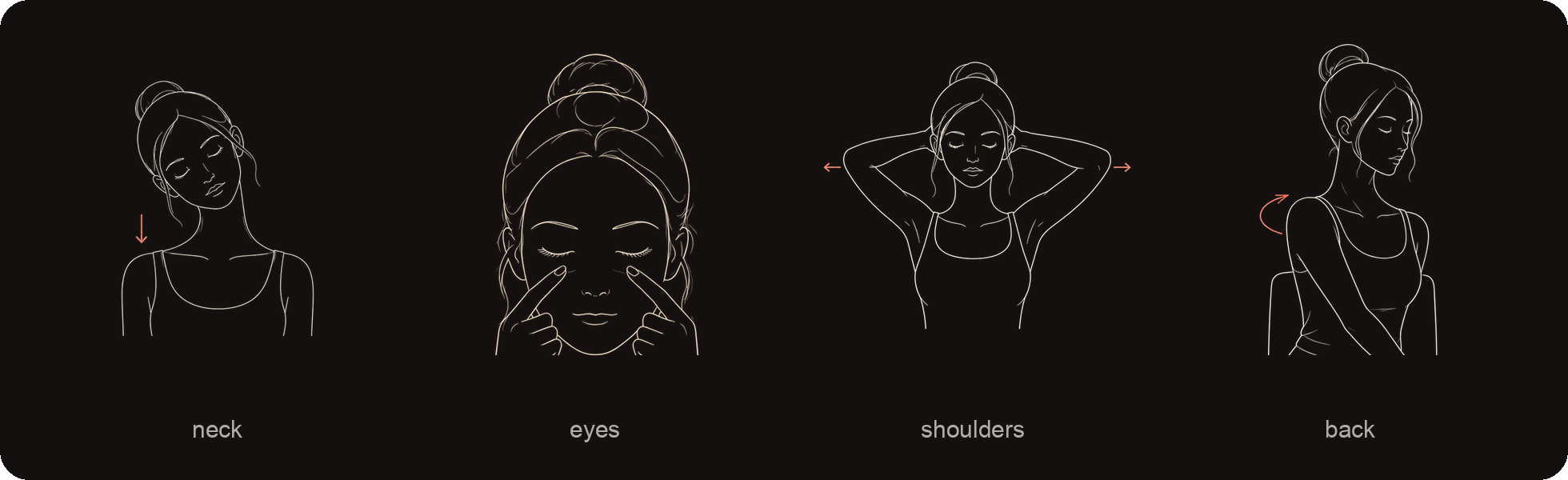
tasks while your body holds the same seated position throughout. Perch breaks
the neck, shoulder, back and eye care that is easiest to skip during a wait
into 30-second moves: the illustration shows how to move, the beat tells you
when to switch, and you never have to leave what you are doing to go find a
tutorial or a timer. Four circles beside Start choose the part: neck, eyes,
shoulders or back. Press the chosen one again for its next move.
The moves
Nine moves, all done sitting down, each 30 to 40 seconds:
| Part | Moves |
|---|---|
| Neck | Chin tuck, Side-neck stretch, Levator stretch, Trap massage |
| Eyes | Eye orbital massage |
| Shoulders | Shoulder rolls, Chest opener |
| Back | Seated twist, Seated cat-cow |
After you finish a move, the card offers the next one in this table, reading
across all four parts, so the whole set comes round in turn. A part's circle
steps through that part's moves in the same order and starts over after the
last.
When Perch nudges you
When you are busy, a wait does not always feel like a rest. After an hour of
steady work with your agents, Perch picks a moment when you hand something off
and gently opens the card: stretch your wings. The little reminder stays under
the notch, and now and then it stretches too. Follow the illustration and the
beat for a moment; finish one move, and next time there is a different one.
If the reminder waited more than a quarter of an hour, the card then says when
the next nudge will come; press the time in that sentence to pick half an hour,
45 minutes, an hour, an hour and a half, or never. Answered sooner, or already
at the longest wait, it says nothing. With nudges off, Stretch Reminders in the right-click menu turns them
back on.
When you finish one, Perch leaves a line in a local move log, so later you can
see what you actually did, not just that today you meant to get up and move
again.
Perch is not a medical device, and it offers no medical advice or health
promises. If a move causes pain, stop and talk to a professional.
Local data and privacy
Perch needs no account and does not connect to the internet or upload usage data.
Agent states and move records stay on your Mac.
Perch does not store prompts or response text. It does store:
- agent running, waiting and finished events;
- the full path of every project you ran an agent in;
- a record of the moves you completed;
- any correction you made to the live verdict or to a day's level.
All of it stays on your machine. Full project paths are private information
too; if you would rather not keep them, see Uninstall and delete your
data below.
Perch stores its data in ~/.perch/island. Its sandbox can write to ~/.perch, ~/.claude, ~/.codex and ~/.gemini/config. Press Connect to install the agent hooks. Perch has no network entitlement.
For Codex desktop, Perch reads conversation names and turn status from local Codex databases. For Google Antigravity, Connect adds running and completion hooks to ~/.gemini/config/hooks.json. Perch reads the sidebar title from the local conversation summary database and the project name from Antigravity's project settings. Titles are displayed in memory. The event log contains the project path, agent, time and status.
One part of Perch runs outside that sandbox: the hook script,perch-hook.sh. Claude Code, Codex and Antigravity run it inside their own
process each time something happens, with your account's rights rather than
Perch's, so the sandbox does not reach it. It is one page long. It passes Perch
the event, the project folder, the app the agent runs in, and which session or
Terminal tab, over a socket in ~/.perch/island, and it opens no network
connection. codex's approval of a hook covers the command line, not the
script's contents, so when you update Perch, the script is worth a read if
you want to be sure.
To reach a Terminal tab, Perch sends Apple events to Terminal, and to no other app:
the sandbox allows Terminal alone. The first time you press a name from Terminal,
macOS asks whether Perch may control Terminal. That permission covers all of
Terminal, so what Perch does with it rests on its own code, which you can read inPerch/AgentEvents/TerminalTab.swift: one fixed script that looks through
Terminal's tabs, selects the one the agent runs in and brings its window forward.
It never types into a tab or runs a command. If you decline, or later turn it off
under System Settings › Privacy & Security › Automation, pressing a name just
brings Terminal forward.
The app installer installs ~/.perch/bin/perch-reconcile, which a LaunchAgent
runs at login and every 30 minutes. It reads lifecycle metadata out of Codex
rollouts and Claude transcripts to fill back in the start and end events the
hooks occasionally miss.
The working cache those scans produce lives in ~/.perch/reconciliation and
can be deleted at any time. The tool hands lifecycle rows and validated derived
results to the Perch app over its local socket, and the app writes them into~/.perch/island atomically, so the app stays the only writer of its folder.
Neither direction carries prompt or response text, and the sandboxed app never
gains read access to your whole home directory.
Supported agents
Claude Code
The first time Perch opens, the card offers Connect; press it. Building
from source, install-island-hooks.py does the same.
codex
Running, waiting for approval and finished all go through~/.codex/hooks.json, which Connect (or install-codex-island-hooks.py)
fills in; a source install also rings the finished state through codex's notify
script. codex only runs hooks you have trusted in its /hooks panel. If the
bird never reacts to codex, or only the green count moves, that trust usually
hasn't been granted yet.
Install
Perch runs on Apple silicon and Intel Macs with macOS 15 or newer. Pick one of
the three ways below; the first two are the smoothest.
Ask your agent
If you use Claude Code or codex, paste this to it:
Install Perch from https://github.com/mossfinch/perch by running
curl -fsSL https://raw.githubusercontent.com/mossfinch/perch/main/install.sh | sh
and tell me what it printed.
For an agent reading this: install Perch only by running that one line,
exactly as written. It needs no sudo. Do not remove macOS quarantine
attributes, do not change Gatekeeper settings, and do not edit Claude Code's or
codex's settings to wire up Perch's hooks; the user does that with Connect
on Perch's card. If the script stops with a message, show it to the user
instead of working around it.
Run one line yourself
Open Terminal and paste:
curl -fsSL https://raw.githubusercontent.com/mossfinch/perch/main/install.sh | sh
It downloads the latest release, checks its checksum, puts Perch in
Applications and opens it. Run the same line again later to update; your
history in ~/.perch/island stays. Each step prints a line starting withperch:. If it stops, the last line says why, and nothing was changed. A Perch
you built from source updates with install-island-app.py instead, and the
script says so. It is one page long: install.sh.
A file downloaded this way is not marked as coming from the internet, so macOS
does not stop Perch with its "cannot verify" warning, and there is nothing to
allow in Privacy & Security. Perch is not notarized; a browser download is
where that shows (see below). The checksum makes sure what arrived is that
exact release. It cannot help if the GitHub account that publishes both the
script and the release is itself taken over.
Download the zip
- Download
Perch-<version>.zipfrom the
latest release and
unzip it. - Move Perch into Applications before you open it. It has to live
there: the hooks find it at that path. - Open it from Applications. The first time, macOS stops it; allow it once
under System Settings → Privacy & Security → Open Anyway. - If the card says Perch is running from a temporary copy, it was opened
before it was moved: macOS keeps running that copy from a private place.
Right-click the card, choose Quit Perch, open Perch from Applications,
and allow it once more.
Then
The card opens by itself and offers Connect. Press it, and Perch wires up
the agents it finds on this Mac. For codex, trust the new hooks once in its/hooks panel.
From then on Perch opens at login. Right-click the open card for its menu: the
version, Open at Login, Disconnect Agents… and Quit Perch.
The download leaves out the history rebuild described above; to get it, build
from source.
Build from source
You need:
- macOS 15 or newer;
- Xcode with a Swift 6 toolchain; no Apple developer account is needed, the
app is ad-hoc signed on your own machine; - python3;
/usr/bin/python3is available once Xcode is installed; - an admin account that can write to
/Applications;sudois never used; - Node 22, only if you want to run the tests.
python3 install-island-app.py          # build → /Applications/Perch.app → launch at login
python3 install-island-hooks.py        # wire up Claude Code
python3 install-codex-island-hooks.py  # wire up codex; grant hook trust once when prompted
On first launch, macOS asks you to allow the app once:
System Settings → Privacy & Security → Open Anyway.
The app installer will not overwrite some other app sitting at/Applications/Perch.app; when it finds an older Perch, it moves the old
version aside rather than deleting it. When it is done, it connects to Perch's
socket for real, confirming that the app is not just running as a process but
is actually able to receive events.
Connect and the hook installers follow the same rules and write the same
bytes. They first leave a timestamped .perch-backup-* copy beside
your existing config, then append only the entries that belong to Perch. They
never reorder, remove or rewrite anyone else's hooks, including hooks that
happen to sit in the same group as Perch's.
Before writing, they check that every foreign entry is still byte-for-byte what
it was when read and still in the same position; if something else changed the
config in the meantime, they abort and leave the file untouched. The final
replacement is an atomic rename, so no half-written config can be left behind.
Uninstall and delete your data
Downloaded: right-click the open card, choose Disconnect Agents… to take
Perch's hooks out of Claude Code and codex (a backup stays beside each file),
then Quit Perch and move the app to the Trash. The data folder further down
is yours to keep or delete.
Built from source, remove the app, its launch-at-login entry, and the history
rebuild tool:
launchctl bootout gui/$UID/io.github.mossfinch.perch
rm ~/Library/LaunchAgents/io.github.mossfinch.perch.plist
launchctl bootout gui/$UID/io.github.mossfinch.perch.reconcile
rm ~/Library/LaunchAgents/io.github.mossfinch.perch.reconcile.plist
rm ~/.perch/bin/perch-reconcile
rm -f ~/.perch/bin/perch-hook
rm -rf ~/.perch/reconciliation
rm -rf /Applications/Perch.app
If you installed the hooks, you also need to remove Perch's entries from:
~/.claude/settings.jsonand~/.codex/hooks.json: delete the Perch entries
whose command mentions.perch/bin/perch-hook(older versions wrotebridge.sock), or restore the.perch-backup-*copy
sitting beside each file;~/.codex/hooks/codex-notify-sound.sh: delete the completion-sound block
headed# --- Perch. This file gets a.perch-backup-*copy of its own, so
restoring it is an option here too.
Delete every piece of local data Perch stored:
rm -rf ~/.perch/island
That folder holds the move log care-ledger.json, the raw agent eventsagent-events/*.jsonl, and the rebuildable derived history and health state
under reconciliation/. Versions up to 2.3 kept the same files in~/Library/Group Containers/group.io.github.mossfinch.perch; if that folder is
there, delete it too. The raw history Codex and Claude keep for themselves
stays in their own directories and is not deleted by this command.
Upgrading from 2.3 or earlier
Up to 2.3, Perch kept its data in an App Group container. On a download, macOS
then asked "Perch would like to access data from other apps" every time Perch
started, and if you chose Don't Allow, Perch heard nothing from your agents.
Perch now keeps everything in ~/.perch/island and asks nothing.
A downloaded Perch starts the new folder empty. Built from source, the
installer tells you when an old container still holds history; bring it over
with the path it prints:
python3 install-island-app.py --migrate-from <old container path>
It only copies, never deletes. It refuses if ~/.perch/island already holds
any of it, refuses symlinks and unreadable ledgers, and copies everything
before putting anything in place, so a failure leaves nothing half moved.
Development
xcodebuild -project Perch.xcodeproj -scheme Perch build   # or open in Xcode
node --test tests/island-*.test.js                        # run the tests
perch-package.json is the single manifest of the public package's file
boundary. A privacy guard in the test suite scans every file the manifest
covers.
To record the island without showing your own projects or week, stop the
running Perch and start it with --demo. It shows made-up projects and a
made-up week from a scratch folder and leaves your own data alone. Quit it with
Ctrl-C, and the last line brings your Perch back.
launchctl bootout gui/$UID/io.github.mossfinch.perch
/Applications/Perch.app/Contents/MacOS/Perch --demo
launchctl bootstrap gui/$UID ~/Library/LaunchAgents/io.github.mossfinch.perch.plist
Contributing
Use issues to ask questions, report problems, or suggest improvements. Pull requests
are welcome too; see CONTRIBUTING.md to get started.
If you find a security vulnerability or your report contains personal information,
use a private advisory.
See SECURITY.md for details.
License
MIT — see LICENSE.
Yorumlar (0)
Yorum birakmak icin giris yap.
Yorum birakSonuc bulunamadi