chatwalaau
Health Warn
- License — License: Apache-2.0
- Description — Repository has a description
- Active repo — Last push 0 days ago
- Low visibility — Only 6 GitHub stars
Code Pass
- Code scan — Scanned 12 files during light audit, no dangerous patterns found
Permissions Pass
- Permissions — No dangerous permissions requested
No AI report is available for this listing yet.
The localhost AI Agent Runtime - Chat UI, Tools, RAG, and MCP in one pip install
ChatWalaʻau
The localhost AI Agent Runtime -- Chat UI, Tools, RAG, and MCP in one pip install



ChatWalaʻau is a full-stack AI agent runtime that runs entirely on localhost. It connects a modern chat UI to AI agents via the AG-UI protocol, with built-in tools, a RAG pipeline, MCP integration, and an OpenAI-compatible API -- all from a single pip install.
Hawaii-built, powered by Microsoft Agent Framework
📖 Full documentation & guides: chatwalaau.com
Quick Start
pip install chatwalaau
chatwalaau init        # writes a .env for you to edit (and can set up your first model)
Upgrading to v0.129.0: 52 runtime settings moved out of
.envinto the in-app
App Settings screen (stored inapp_settings.jsonc). Your server still starts, but a
leftover value in.envis ignored -- the startup log names every key it finds. Runchatwalaau settings migrate --writeto carry an existing configuration across. Secrets,
ports/paths, and feature enable-gates stay in.env. See the
configuration docs.
Setting up models (v0.107.0+): chat models are configured exclusively through the
Model Offering Catalog (model_offerings.jsonc). Runchatwalaau initfor a guided
first-model step,chatwalaau models addany time to author the file, or use the in-app
App Settings screen (changes apply without a restart). The legacy per-provider model
environment variables (AZURE_OPENAI_MODELS,ANTHROPIC_MODELS,OPENAI_MODELS,FOUNDRY_MODELS,MODEL_MAX_CONTEXT_TOKENS,ANTHROPIC_HOSTING, ...) have been
removed. As of v0.108.0, image generation and RAG embeddings are configured the same
way -- add an offering withoperations: ["image"]or["embeddings"](the formerIMAGE_DEPLOYMENT_NAME/EMBEDDING_DEPLOYMENT_NAME/IMAGE_*variables are removed). See the
model configuration docs.
Set your Azure endpoint / credentials in .env (shared with image, RAG, and speech):
AZURE_OPENAI_ENDPOINT=https://<your-resource>.openai.azure.com/
AZURE_OPENAI_API_KEY=<your-key>      # or authenticate with Entra ID instead (see below)
# ANTHROPIC_API_KEY / OPENAI_API_KEY as needed -- referenced by NAME from the catalog
Then author at least one chat model in model_offerings.jsonc (or runchatwalaau models add). Example spanning several providers:
{
  "offerings": [
    { "id": "gpt-5.5", "provider": "azure-openai", "model_ref": "gpt-5.5",
      "endpoint": "${AZURE_OPENAI_ENDPOINT}", "default": true, "context_window": 1050000 },
    { "id": "claude-fable-5", "provider": "anthropic", "hosting": "direct",
      "model_ref": "claude-fable-5", "api_key_env": "ANTHROPIC_API_KEY" },
    { "id": "gpt-5.1", "provider": "openai", "model_ref": "gpt-5.1", "api_key_env": "OPENAI_API_KEY" },
    { "id": "deepseek-v4-pro", "provider": "foundry", "model_ref": "deepseek-v4-pro",
      "endpoint": "https://<resource>.services.ai.azure.com/api/projects/<project>" }
  ]
}
Each offering self-describes its provider, model_ref (the connector's real
model/deployment name), optional endpoint / base_url / hosting / context_window,
and references any API key by env-var NAME via api_key_env (secrets stay in .env). An
azure-openai offering may omit endpoint/api_key_env to reuse the shared Azure lanes above.
An offering may also declare what its deployment can serve via an optionalcapabilities block (web_search, native_structured_output) -- use it when an endpoint
rejects a feature, e.g. a Claude deployment created in Microsoft Foundry with the
Hosted on Azure hosting option, which supports neither server-side tools nor structured
outputs ("web search not supported in your workspace"; recreating it as Hosted on
Anthropic is the real fix). Omit the block and nothing changes; the same settings are
editable in the App Settings screen.
Then start the server:
chatwalaau
Open: http://localhost:8000/chat
Azure authentication options. An API key (
AZURE_OPENAI_API_KEY) is the
quickest and always takes precedence -- set it and you do not needaz login.
To use Microsoft Entra ID instead, leave the key unset and pick a credential lane
withAZURE_CREDENTIAL_MODE:cli(default --az loginfor local dev),managed-identity(Azure App Service / Container Apps / AKS / Functions / VM), ordefault(auto-discovery). Anthropic usesANTHROPIC_API_KEYfordirect
hosting, or Entra ID forfoundryhosting. Microsoft Foundry is Entra ID only
(it reuses the same credential lanes; no API key exists). See the
Authentication guide.
Behind a corporate TLS-intercepting proxy? Install with
pip install "chatwalaau[corp]"
so Python trusts your OS certificate store. See the
Installation guide.
Highlights
- Modern chat UI -- Markdown, code, math (KaTeX), Mermaid, reasoning blocks, web search with citations, voice in/out, image analysis, attach a PDF and the assistant reads it directly (given to the model as context, like an image -- natively on Azure OpenAI / OpenAI / Foundry, or as extracted text on other providers), a built-in paint canvas -- draw, paste, or load an image from your device or the coding workspace, then attach and re-edit it; a sized artboard with 16:9 / 4:3 / 1:1 presets, Hand-tool panning and 5%-800% zoom, duplicate / copy-paste with a right-click menu, and arrows and lines that glue to your shapes and follow them when you move them, Temporary Chat, Privacy Screen (one click scrambles your chat history, your own messages, and your attachments -- replacing the text, not blurring it -- so you can demonstrate a real instance on a shared screen; the agent's replies stay readable), message-by-message navigation (previous/next step buttons that walk the conversation one message at a time), slash commands (
/help,/prompt,/skill,/model) with completion and dynamic arguments, and a compact chat sidebar that collapses by section and loads hundreds of conversations as you scroll - Agent tools -- image generation + mask editor, weather, coding tools with an approval workflow (a per-turn round counter, a configurable round budget, and "approve for this session" that stops counting against the budget and clears the other pending cards of that tool), prompt templates, and Agent Skills (enable/disable or hot-reload from disk at runtime; a skill folder is a boundary -- a
SKILL.mdnested inside another skill belongs to that parent skill, so use sibling folders or one grouping level for separate skills, and the Skills manager lists exactly what the agent loads). Skills and Background (BG) are mutually exclusive: a background answer is resumed by id and cannot complete a skill's tool call, so while BG is on the skill tools are not offered — the toggle says so before you send, and function tools, MCP tools and web search are unaffected. On Anthropic models the skill tools ask for approval the first time they run in a session (rather than being auto-approved as on other providers) — the agent framework's auto-approval path produces a request Anthropic rejects, so skills take ChatWalaʻau's own approval route there instead; "approve for this session" makes it a one-time prompt - Models -- switch between Azure OpenAI, Anthropic (Claude), OpenAI, and Microsoft Foundry mid-conversation, with per-message generation options (reasoning effort and, on gpt-5.x, verbosity), structured output (constrain the answer to JSON / a JSON Schema), and provider-agnostic prompt caching that cuts input-token cost on long/coding turns (on by default, output-transparent); as of v0.107.0 models are configured exclusively through the Model Offering Catalog (
model_offerings.jsonc) -- compose the served models (multi-provider and gateway offerings) from the CLI (chatwalaau models add) or the in-app App Settings screen, drag to set the order they appear in the selector, and changes apply live without a restart (the legacy per-provider*_MODELSenv vars have been removed); as of v0.108.0 the image generation and RAG embedding models are configured the same way -- add an offering withoperations: ["image"](with optionalimage_defaults) or["embeddings"], and the formerIMAGE_DEPLOYMENT_NAME/EMBEDDING_DEPLOYMENT_NAME/IMAGE_*env vars are removed; as of v0.109.0 the per-task helper models (chat title, user-/agent-memory, Teams meeting summary, ontology NL-to-SPARQL) are assigned in the catalog too under Task model assignments (arolesblock, the App Settings screen, orchatwalaau models role set) -- each points at one of your chat offerings so it routes to the right provider, and the formerSESSION_TITLE_MODEL/USER_MEMORY_EXTRACTION_MODEL/AGENT_MEMORY_CURATION_MODEL/TEAMS_MEETING_SUMMARY_MODEL/ONTOLOGY_NL_MODELenv vars are removed; as of v0.123.0–v0.124.0 an offering can also declare what its deployment supports -- hosted web search and native structured output are per-offering capabilities in the App Settings screen, because availability follows the deployment and not the provider (the same Claude model reached through two different routes does not offer the same tools). Declaring nothing keeps today's behavior exactly; declaring a capability unavailable withholds the tool cleanly instead of letting the turn fail, and the composer hides a control the model cannot serve rather than offering one that errors. A no-schema structured-output request now resolves to a default schema the provider can actually accept -- the "any JSON object" shape is valid on OpenAI and rejected outright by Anthropic -- and when a deployment refuses a feature, the chat says which restriction it hit and what to change, instead of "an internal error occurred" - Knowledge -- RAG over your PDFs (ChromaDB), ingested by the built-in Pipeline Jobs engine: submit/monitor/cancel jobs from a portal, the API, or the agent (reference an uploaded PDF by its filename), with live progress and run history (on by default)
- Ontology -- design concept models as RDF knowledge graphs on a visual node canvas: circular entities (emoji, colors, typed properties with key attributes) connect from anywhere on the node's ring (360°) with directional, cardinality-labeled relationships that fan out when parallel so each is individually selectable, and clicking a node or edge lights up its whole in/out neighborhood; rename ontologies in place, search with SPARQL or natural language with on-canvas highlighting, import/export standard RDF with automatic backups, and let the agent answer from your ontologies in any chat (opt-in via
ONTOLOGY_ENABLED) - MCP native -- connect any MCP server (Claude Desktop-compatible config); enable/disable servers and individual tools at runtime to control token usage, or hot-reload the config (reconnect) without a restart; MCP Apps render interactive UI in chat
- Memory -- a configurable Agent Identity, a self-maintaining User Preference Memory (about you), and an Agent Memory (about the work -- project conventions, tool quirks, operating rules) that the agent curates inline and you can grow by giving any chat turn a thumbs-up to "remember this turn"; a built-in Memory editor lets you view and edit all three files (
IDENTITY.md/USER.md/MEMORY.md) in a Markdown editor with automatic timestamped backups - Scheduled execution -- a built-in Cron Scheduler runs workspace scripts on a cron expression, an interval, or once after a delay; manage jobs from a portal, the API, or the agent (opt-in via
CRON_ENABLED) - File Explorer -- a built-in VSCode-style file tree + monaco editor to browse and hand-edit files in your coding workspace, with tabs, create/rename/delete, drag-to-move, upload files & folders (multiple, with an overall-progress bar), file/folder download (ZIP), PDF & image preview with zoom (with Attach to chat to hand an open image/PDF to the composer), and a split editor (drag tabs between panes) (opt-in via
FILE_EXPLORER_ENABLED) - Microsoft Teams -- talk to the agent from a Teams personal chat, group chat, or channel (Bot Framework JWT auth, typing indicator, Adaptive Card tool approval, Entra Object-ID allow-list; opt-in via
TEAMS_ENABLED) - Declarative agents & workflows -- define an agent (persona, model, per-agent tools, output policy) in a YAML file or a built-in GUI editor and switch the active agent at runtime; or compose a declarative Workflow (
kind: Workflow) that orchestrates your Prompt agents as a graph, authored in a visual DAG editor with the full Microsoft Agent Framework action set -- variables, control flow (If/ConditionGroup/ForeachwithBreakLoop/ContinueLoop/GotoAction, shown as nested container nodes), agent invocation, human-in-the-loop (Question/RequestExternalInput), and opt-in, jailed tool / MCP / HTTP calls (off by default; enabled per class viaWORKFLOW_FUNCTION_ACTIONS_ENABLED/WORKFLOW_MCP_ACTIONS_ENABLED/WORKFLOW_HTTP_ACTIONS_ENABLED, with an MCP allow-list to your configured servers and an HTTP host allow-list + SSRF guard). Both kinds are managed in one modal (told apart by aPrompt/Workflowtag), and a workflow runs either in chat as a selectable run-target (live progress graph, the answering agent/workflow named on each message) or as a background pipeline job; the built-in CORE agent reproduces the default behavior (opt-in custom agents & workflows viaDECLARATIVE_AGENTS_DIR, bounded by the Workflow superstep cap in App Settings -> Limits). Every action form writes the field names the Microsoft Agent Framework runtime actually reads, each action takes an optional display name that labels its step in the live progress view, and variable fields suggest the variables the workflow already has (itsLocal.*names plus whateverinputs:/outputs:declare) -- a name typed without a namespace is stored asLocal., and a write the runtime cannot accept is reported before the workflow runs instead of failing mid-run. A run that fails says why in one sentence and marks the step that failed in the progress view. In both editors saving is a checkpoint, not an exit: the screen stays open with your canvas, selection and scroll position intact, the button reads Create until the first save and Save after it, repeated saves update the same agent or workflow, and Close (which still guards unsaved changes) is the only way out. When the running agent is not the built-in one, its name appears above the message box -- click it to reopen the management modal. As of v0.125.0,BreakLoopactually breaks the loop -- before this it was indistinguishable fromContinueLoopand the loop ran to completion either way, so a workflow written against the old behavior will now exit its loop early. - Watch a workflow run -- a run streams standard AG-UI events (
STEP_STARTED/STEP_FINISHED/ACTIVITY_SNAPSHOT), the same vocabulary the Microsoft Agent Framework's own adapter emits, so it is readable by any AG-UI client and not just this UI. Press Diagram on the run indicator to open a detached run canvas: a movable, resizable window showing the whole graph -- including the branch that was not taken, which the run stream itself never reports -- with per-step logs, four step states (running / completed / skipped / failed), and one canvas per run so a failing run can be compared against the one that worked. Closing it hides it; pressing Diagram brings it back with its state intact. AQuestionstep pauses the turn as an AG-UI interrupt and resumes the same run with its variables intact, so a pending question survives a page reload. A Variables pane shows theLocal./Workflow.*/System.namespaces at each superstep (secret-looking keys redacted -- a name-based heuristic, so keep real secrets out of workflow variables). Reloading a chat restores each workflow turn's steps and can re-open its diagram. - Harness Agents (v0.128.0) -- a third declarative kind,
kind: Harness, built on the Microsoft Agent Framework harness (create_harness_agent()): an autonomous software-engineering agent with a persistent todo list, plan/execute modes, file-based session memory, jailed file access + shell scoped toCODING_WORKSPACE_DIR, Agent Skills, hosted web search (per-model capability gate respected), context compaction, and a keep-going-until-done loop capped at 10 iterations. Composed in the same management modal (aHARNESStag) with a form + canvas + live-YAML editor, and run as a per-conversation run-target like a workflow -- file writes and shell commands raise the existing approval card, and the YAML never carries credentials, a provider, or sampling parameters - Inbound webhooks -- drive the agent from external events via a Webhook Gateway with a management portal; the first source is Microsoft Graph, which auto-summarizes Teams meeting transcripts into the workspace (opt-in via
WEBHOOK_ENABLED), or summarize a meeting you organized on demand by signing in yourself (device-code, no service principal or admin policy); the portal shows live Graph subscriptions, offers delete-and-re-subscribe when a subscription already exists, and surfaces the auto-renewal schedule. Transcript access needs a Teams tenant setting as well as Entra permissions -- Teams admin center → Meetings → Meeting settings → Transcript API access → Microsoft Graph access (default off, enforced since 2026-07-29), plus Include speaker attribution (also default off, and without it the summary cannot determine action-item owners or participants). Both lanes need it; app permissions do not override it. If a 403 hits that gate, ChatWalaʻau now says which setting to change instead of showing the raw Graph error - OpenAI-compatible API -- expose the agent as
/v1/responsesfor any OpenAI-SDK app - App Settings, in the app -- as of v0.129.0 the runtime tuning knobs no longer live in
.env. 52 settings -- generation, chat & session, memory, speech, RAG, limits and the cron schedule -- moved into an App Settings screen (the renamed Model Settings modal, now hosting the Model Offering Catalog and seven settings groups), backed by an operator-ownedapp_settings.jsonc. The first-run.envshrinks from ~150 keys to ~97, leaving only endpoints, credentials, ports, storage locations and feature gates. Every control says when it takes effect -- applies immediately (37 settings), rebuilds agents in place (3), or restart required (12) -- so a value that is saved but not yet live never looks like it took effect; ChatWalaʻau never restarts itself, it tells you which keys are waiting on you. Upgrading is one command (chatwalaau settings migrate --write) and the startup log names every relocated key still sitting in your.env. Secrets, bootstrap paths and every feature enable-gate deliberately stay in.env-- a screen that could widen the sandbox would hand that power to whoever reaches the screen, soCODING_ENABLEDstays put whileCODING_BASH_TIMEOUTmoves. A settings file written by a newer release will not stop an older one from starting: keys it does not recognise are kept, not rejected - Survives a restart -- deploying or restarting the backend no longer signs anyone out, and a message you were typing is never thrown away: if the server is unreachable your text comes back to the input box with a Retry button, and an expired sign-in opens a dialog over your intact chat instead of reloading the page. If the API server is not up yet, the app says so and waits for it, instead of rendering a chat page where nothing works. Sessions persist as SHA-256 digests only -- never the token itself (
AUTH_SESSION_PERSIST, on by default) - Yours, local-first -- file-based sessions, vectors, and uploads stay on your machine; unified API-key auth and an optional web sign-in for LAN/cloud; uploaded and generated images are served behind your session (a raw image URL no longer opens for anyone who is not signed in -- when web login is on, even on
localhostand behind a dev/reverse proxy); an opt-in Prompt Dump (PROMPT_DUMP_ENABLED) writes the exact flowing prompt per run to a folder for debugging -- including the agent's tool surface, which lists every built-in function, MCP server/tool, and Skill and the ones that are missing, with the reason (an env setting, the agent's tool allow-list, the MCP or Skills manager, or a server that is not connected), so you can see at a glance why a tool was not offered and which screen owns the gate
See the Features documentation for the full list and configuration.
UI Preview
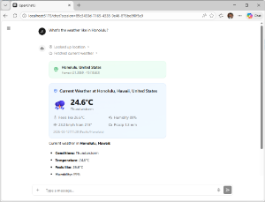
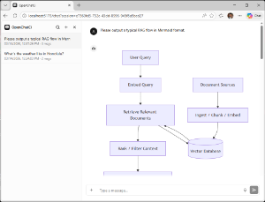
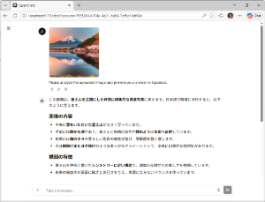
Weather Tools | Mermaid Diagrams | Image Analysis
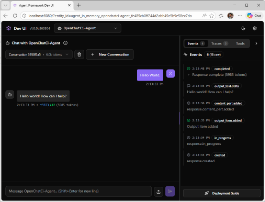
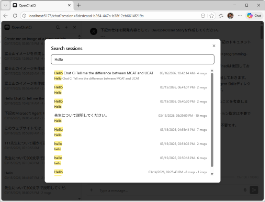
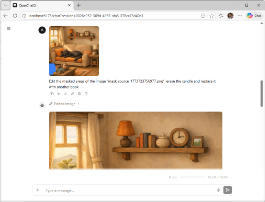
DevUI | Search Session | Image Generation
About the Name
"Walaʻau" (wah-la-OW) is a Hawaiian word meaning "to chat, talk, or converse." We chose it because it captures what the agent does, in the language of the place where the project is built. Hawaiian (ʻōlelo Hawaiʻi) is an indigenous language now in active revitalization; we use this word with respect and gratitude.
Documentation
Everything -- installation, configuration, every feature, the API, the CLI, and deployment -- lives on the documentation site:
- Getting started: Installation · Configuration
- Features: Chat & UI · Slash Commands · Agent Tools · Models & Reasoning · Voice · Knowledge & MCP · Memory & Sessions · Declarative Agents
- API & CLI: OpenAI-compatible API · Authentication · CLI
- Deployment & Ops: Development setup · Networking & Ops
Documentation is available in English and 日本語, with full-text search (including
Japanese) built into the site.
Development
# Backend
cd backend && uv sync --prerelease=allow
uv run chatwalaau init --no-model    # writes .env from the bundled template
# edit .env and set AZURE_OPENAI_ENDPOINT
uv run uvicorn app.main:app --reload --app-dir src    # http://localhost:8000

# Frontend (separate terminal)
cd frontend && pnpm install && pnpm dev    # http://localhost:5173
Full prerequisites, Azure credential lanes, and the production build are in the
Development setup guide.
Supported Platforms
Windows 10/11 · macOS (Intel / Apple Silicon) · Linux (Ubuntu, Debian, etc.)
License
Reviews (0)
Sign in to leave a review.
Leave a reviewNo results found